Microsoft Agent Framework + Neo4j Integration
Microsoft Agent Framework is Microsoft’s open-source SDK for building AI agents in .NET and Python. Agents can invoke external tools through a standardized interface, whether those tools are local functions, REST APIs, or MCP servers. They can form workflows where multiple specialized agents collaborate on complex tasks. The framework runs locally for development and integrates with Microsoft Foundry for production deployment with tracing and metrics.
The architecture stays flexible around data access. Custom tools can query databases directly. MCP servers expose data capabilities through a standard protocol. Context providers inject information automatically before each LLM call. Pick the pattern that fits your constraints.
Neo4j Integration Patterns
There are four patterns for connecting Microsoft Agent Framework agents to Neo4j. Each reflects a different philosophy about where database logic lives and how much the agent controls directly.
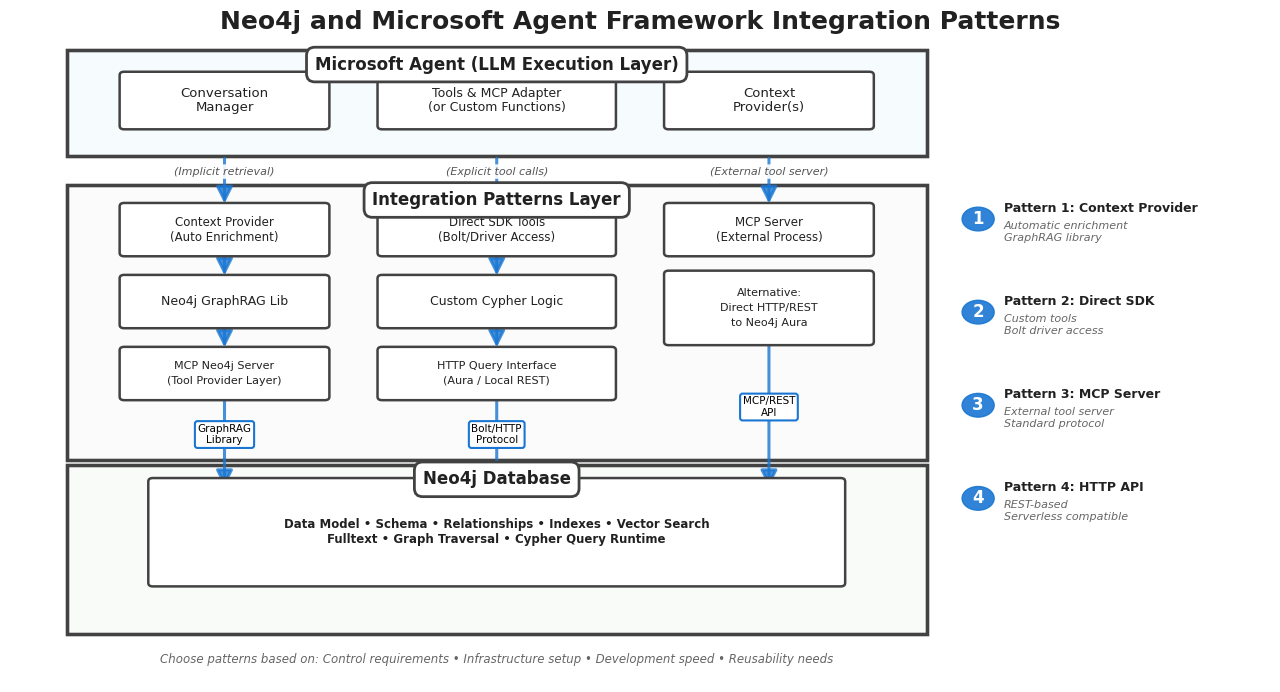
Direct SDK Integration
Write custom tools using the official Neo4j drivers. The agent calls your function, your code executes Cypher, and you control exactly what comes back.
This pattern gives you the most control over what the LLM sees. You can filter results, reshape data, handle errors with custom logic, and summarize large result sets before they consume tokens. The tradeoff is maintenance: your integration code is tightly coupled to both the Neo4j driver version and your agent’s tool interface.
Demo: GraphRAG Contract Review Agents
Christian Glessner (Microsoft MVP) built a contract analysis system on this pattern. Contracts, organizations, clauses, and jurisdictions exist as nodes in a knowledge graph. The agent combines structured Cypher queries with vector search to answer compliance questions across document sets.
A user asks: "Which contracts reference GDPR and involve suppliers in Germany?" The agent’s custom tool executes a Cypher query that matches Contract nodes linked to Clause nodes containing GDPR references, then traverses to Organization nodes filtered by jurisdiction. The tool formats the results as a structured response before the LLM generates its answer. No raw JSON parsing in the prompt.
Source: GraphRAG Contract Agents
MCP Server Integration
Run a Neo4j MCP server as a separate process. The agent connects to it like any other MCP tool provider. The server exposes capabilities like read_cypher and get_schema through the standard protocol.
This pattern separates data access from agent logic. The same MCP server configuration works whether your agent runs locally during development or in Azure for production. Swap the LLM, change the agent framework, the data layer stays constant. The cost is operational: you need to run and maintain the MCP server alongside your agent.
Demo: Graph Database Detective
Jose Luis Latorre (Microsoft AI MVP) built an investigative agent that connects to Neo4j Aura via MCP. The graph contains the POLE dataset: persons, objects, locations, and events from crime investigations.
The agent adopts the persona of a Golden Age detective. When a user asks about connections between suspects and crime scenes, the agent calls the MCP server’s Cypher tool to traverse the graph. The MCP server executes the query and returns results. The agent then narrates findings in character, turning graph traversals into detective monologues. The persona choice is deliberate — it demonstrates how agent personality and data access remain cleanly separated when using MCP.
Source: Graph Database Detective
HTTP Query API
Treat Neo4j as a REST endpoint. Send Cypher in POST request bodies, receive JSON responses. No driver installation required.
This pattern works in constrained environments where you cannot install binary dependencies — serverless functions, restricted containers, browser-based agents. Latency is higher than the Bolt protocol and the JSON responses can be verbose, but the simplicity is hard to beat for lightweight use cases.
Demo: Sovereign AI Knowledge Base
Matthias Buchhorn Roth (Sopra Steria) built a RAG solution for regulated environments. The graph holds regulations, legal documents, and operational procedures. The system runs in both cloud and air-gapped deployments.
In air-gapped scenarios, installing and maintaining driver dependencies becomes a logistics problem. HTTP calls to a local Neo4j instance sidestep that entirely. The agent queries the regulation graph through REST, combines results with BitNet-based local inference, and produces citation-rich answers. Auditors can trace every response back to specific regulatory nodes in the graph.
Context Provider Integration
Context providers inject information into the conversation before each LLM call. The agent does not explicitly request data — the provider searches Neo4j automatically, enriches results through graph traversal, and merges context into the prompt.
The Neo4j Context Provider builds on the neo4j-graphrag-python library, which provides VectorRetriever for semantic similarity, HybridRetriever for combined vector and fulltext search, and VectorCypherRetriever for vector search followed by graph traversal. The context provider wraps these retrievers and hooks them into the Microsoft Agent Framework lifecycle.
Configuration is minimal. You specify an index name, choose a search type, and optionally provide a Cypher retrieval query for graph enrichment:
from neo4j_context_provider import Neo4jContextProvider

provider = Neo4jContextProvider(
    uri="neo4j+s://your-instance.databases.neo4j.io",
    username="neo4j",
    password="your-password",
    index_name="maintenance_events",
    index_type="fulltext",  # or "vector"
    top_k=5,
    retrieval_query="""
        MATCH (node)<-[:HAS_EVENT]-(comp:Component)
              <-[:HAS_COMPONENT]-(sys:System)
              <-[:HAS_SYSTEM]-(aircraft:Aircraft)
        RETURN node.fault AS fault,
               node.corrective_action AS corrective_action,
               aircraft.model AS aircraft_model,
               sys.name AS system_name
    """
)
The index_type parameter determines which retriever the provider uses internally. Set it to "fulltext" for keyword-based BM25 matching or "vector" for semantic similarity search. The retrieval_query runs after the initial search, traversing from matched nodes through the graph to pull in related context.
Demo: Aircraft Maintenance and Flight Operations
The Neo4j Context Provider demo models maintenance events and flight delays as a knowledge graph. When a user asks about recurring faults on a specific aircraft type, the provider’s invoking() method fires before the LLM processes the message.
The provider runs a fulltext search against the maintenance index using the user’s question. Results come back as maintenance event nodes. The configured retrieval query then traverses from those events through component and system relationships to aircraft nodes, pulling in fault codes, corrective actions, and affected systems. This enriched context merges into the prompt automatically.
The flight delays agent works similarly. Questions about delay patterns trigger searches against flight data, with graph traversal expanding from delay nodes through flights to airports and routes. The LLM receives a connected view of the data without the agent ever making an explicit tool call.
Choosing Your Integration Pattern
Start with the context provider if you want graph-aware agents running quickly. Configure an index, point at your Neo4j instance, and the framework handles the rest. Add a retrieval query later when you need graph traversal beyond the initial search results.
Move to direct SDK integration when you need precise control over what the LLM sees. Complex business logic, token budget constraints, or custom result formatting all push toward this pattern. The tool can filter, summarize, and structure graph results before they ever reach the prompt.
MCP makes sense when you want to reuse the same data layer across multiple agents or frameworks. If you expect to swap LLMs or run agents in different environments, the separation MCP provides pays off. Keep the tool count reasonable to avoid bloating the system prompt.
The HTTP API fits constrained environments where installing drivers is not an option — serverless functions, sandboxed containers, browser-based agents.
Each pattern assumes you already have a graph worth querying. The agent integration is the last mile. Before that comes data modeling, relationship design, and index configuration.
Resources
Community Demos
-
Graph Database Detective — crime investigation with POLE dataset
-
GraphRAG Contract Agents — contract compliance analysis
-
Aircraft Maintenance & Flight Delays — context provider demo
Videos & Tutorials
NODES 2025 — Christian Glessner: Live-Coding Graph-Native Agents: Neo4j AuraDB + Microsoft Agent Framework in Action
<iframe width="560" height="315" src="https://www.youtube.com/embed/aJY7Sm5vtko" title="YouTube video player" frameborder="0" allow="accelerometer; autoplay; clipboard-write; encrypted-media; gyroscope; picture-in-picture; web-share" referrerpolicy="strict-origin-when-cross-origin" allowfullscreen></iframe>