Getting started with MCP servers: A technical deep dive

Head of Product Innovation & Developer Strategy, Neo4j
15 min read
Modern GenAI systems can’t live on model outputs alone. They need to read from business systems, integrated development environments (IDEs), cloud APIs, and databases, then take actions back on those same systems. Without a shared protocol, every integration turns into custom SDK glue that’s brittle and hard to maintain.
The Model Context Protocol (MCP) addresses this by providing a standard protocol for integrating tools, data, and infrastructure into your AI agents as context. The Neo4j MCP Server, for example, allows agents to query and traverse a knowledge graph, reason over the results, and trigger follow-up actions across other services.
In the first post of this series, we zoomed in on what MCP is and why it matters. Now, we’re focusing on when you’re ready to build. We’ll unpack MCP architecture, show you how to build MCP servers, and walk through how to use MCP with Neo4j and IDEs like Cursor in real‑world integrations.
More in this guide:
MCP architecture
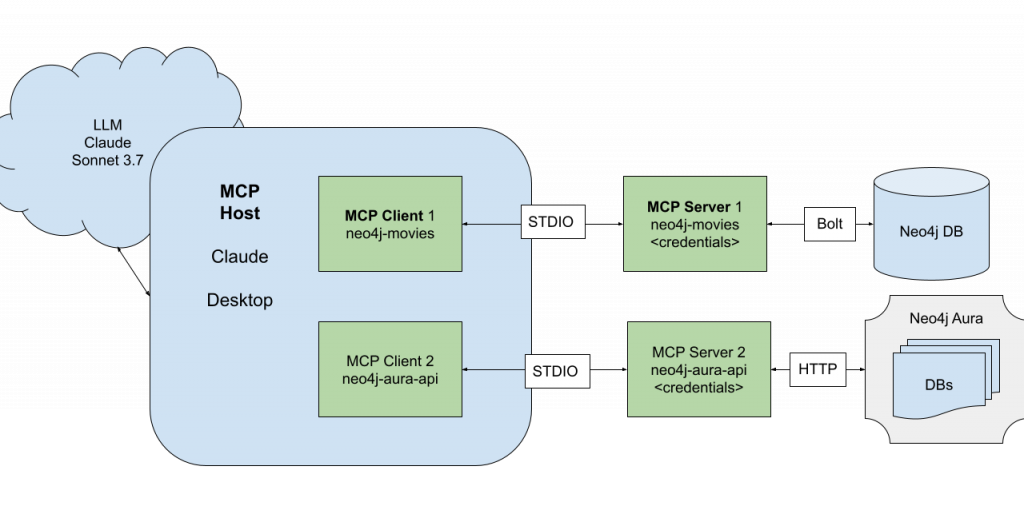
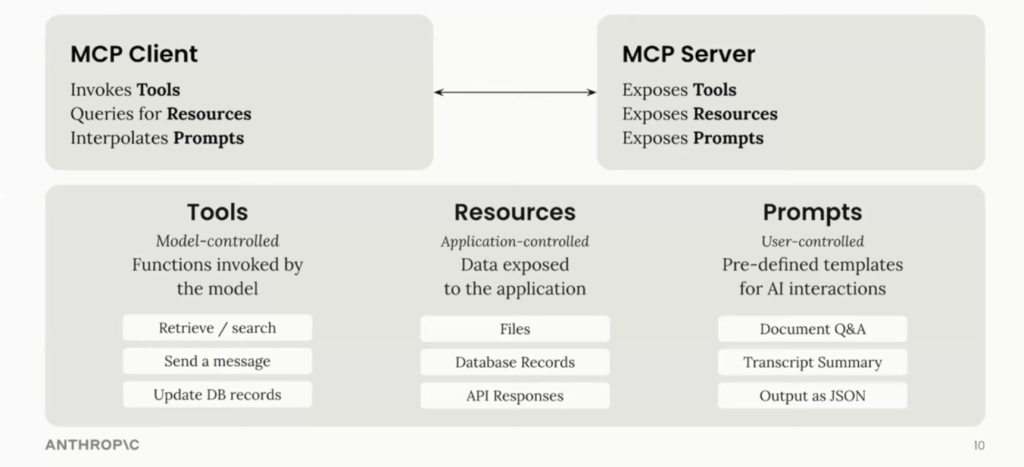
Three components sit at the heart of MCP architecture and work together in a tight loop: host, client, and server.
The host uses its configuration to start a client for each server. The client connects and retrieves tools, resources, and prompts. The model chooses which tools and resources to use and makes the host invoke them through the client. You can read more about how MCP works here.
For example, when a developer asks Cursor, “Show me the bottleneck between these five microservices in my staging environment,” the flow might look like:
- The host (Cursor) sends the conversation to the model.
- The model decides it needs topology data and calls a Neo4j MCP server tool.
- The client forwards a
read-cypherrequest to the Neo4j server with a graph query. - The server runs the query, returns a structured result, and the host turns that into an explanation or even a diagram.
- The response is evaluated by the LLM — if sufficient, it generates an answer.
- If not, it continues to retrieve more information using tools in the agentic loop.
You didn’t wire any of that manually — the protocol gives the model a systematic way to orchestrate the usage of the different MCP server capabilities (tools, resources, prompts).
MCP server and client features
Once the host and client connect, MCP exposes a set of standardized primitives. These are the core capabilities you model and implement when you build a server.
Tools: model-controlled actions
Tools are the main way agents act. Each tool is a named function with a clear description, a JSON schema for its arguments, and a predictable output format.
On the Official Neo4j MCP Server, for example, you might expose tools like:
get-schema: Returns the graph’s schemaread-cypher: Executes read-only Cypher querieswrite-cypher: Runs write operations to create or update datalist-gds-procedures: Retrieves the available graph algorithms to run on this server
The client lists these tools for the host, and the model picks which to call based on the user’s request.
Resources: Application-controlled context
Resources give the model read-only access to context such as file contents, database views, dashboards, or API responses. The application defines and controls these resources, not the model.
You might expose:
- A latest-logs resource for observability
- A read-only view of user segments in a graph
- A static architecture overview document
Resources make it easy for models to pull context safely, without giving them broad read/write access to your systems.
Prompts: User-controlled templates
Prompts are predefined templates that guide a workflow. They can accept dynamic arguments, pull in resources for context, and orchestrate multi-step interactions.
Example prompt: create_new_data_model
Take a look at the workflow prompt below that takes the data source (URL) and use cases, then fetches and enriches context before proposing a Neo4j data model.
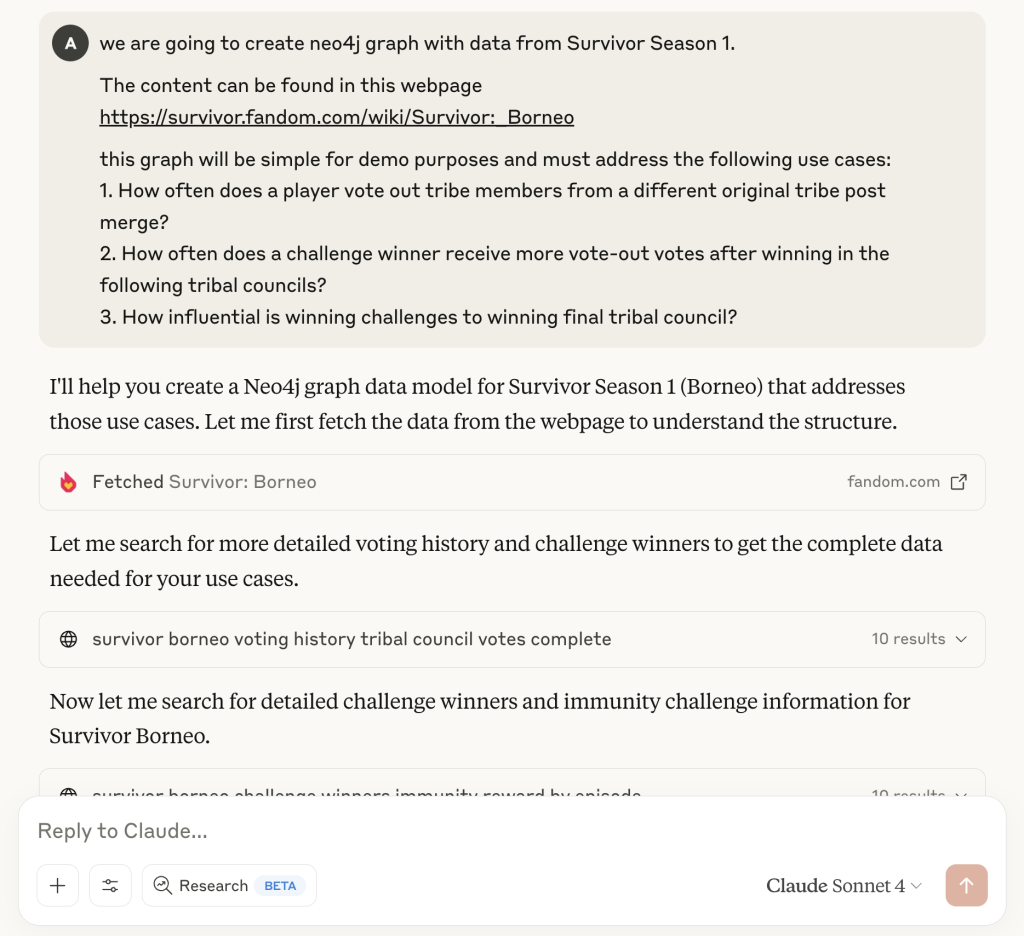
By baking patterns into prompts, you guide agent behavior and reduce prompt engineering overhead for each user.
Sampling, pings, roots, notifications
MCP also includes runtime and operational concepts that become important once you move beyond simple integrations:
- Sampling lets a server request an LLM call from the client on its behalf with a specific model, system prompt, and sampling parameters.
- Pings allow clients to check server health and capabilities and reconnect automatically if needed.
- Roots and discovery help servers list their entry points so support directories and marketplaces can find them.
- Notifications let servers push updates to clients when resources change (e.g., when a graph index finishes rebuilding).
Once you start running MCP servers in production, these operational features matter as much as the tools themselves.
MCP security: What you should care about
Since launch, developers have already built tens of thousands of MCP servers. OAuth-based authorization is now part of the baseline specification, and recent revisions have focused on richer tool annotations, Streamable HTTP transport, structured tool outputs, and clearer security best practices. Security and operational concerns are now steadily moving into the core protocol.
As the MCP ecosystem standardizes manifest formats, registries, and deployment best practices, you can expect more security controls to move from custom patterns into reusable building blocks.
Local vs. remote servers
- Local servers (running on a developer’s machine) are usually reachable only from the host via STDIO or a local HTTP interface. This limits exposure, but doesn’t eliminate risk because tools can still write to disk, hit internal APIs, or mutate local databases.
- Remote servers are exposed over HTTPS and must assume hostile networks and untrusted clients. The 2025 MCP specification update standardized OAuth 2.0 integration for JSON Web Token (JWT) tokens, so remote HTTPS servers can authenticate with scoped credentials instead of passing raw secrets around.
Authorization, access control, and LLM safety
Most MCP deployments still rely on custom access control, rate limiting, and secret management. However, there’s active work on richer, standardized controls, like RBAC and manifest-driven permissions, plus certification and verification via registries.
Until those patterns mature, you should:
- Limit tool surface area and expose only the operations you’re comfortable automating.
- Scope credentials with least-privilege service accounts for each environment.
- Validate inputs, especially where LLMs generate queries (e.g., guard
read-cyphertools from write queries and quarantine unsafe strings). - Log every call so you can capture who called what tool, with which arguments, and what the outcome was.
Observability is also an open issue. Current servers typically rely on custom metrics and logs, and standardized monitoring for MCP servers is still evolving.
How to build your first MCP server
Let’s walk through what it takes to build a practical MCP server. You’ll choose an SDK, design your public contract to implement tools, enforce guardrails, and test everything locally with MCP Inspector.
Pick your SDK and runtime
Most developers use Anthropic’s official MCP SDKs for Python or JavaScript, but the protocol is simple enough that you can build servers in other languages as needed.
There’s also a growing ecosystem of scaffolding tools that generate MCP skeletons from prompts or API descriptions, including projects from Cloudflare, Cline, Mintlify, and others. Some can even turn a REST API spec into an MCP server automatically.
2. Design your capabilities
Before you touch code, design your public contract:
- Which tools will you expose?
- What arguments do they require?
- Are any of them write or admin operations that need extra safeguards?
- Do you also want resources or prompts to encode common workflows?
For a Neo4j-backed server, a minimal design might include:
get-schemafor graph schema explorationread-cypherfor read-only analytical querieswrite-cypherfor database manipulation
3. Implement the server
In a Python server (simplified), you’ll typically:
- Create a
Serverinstance with a unique name. - Register a
list_toolshandler that returns metadata for all tools. - Register a
call_toolhandler that dispatches based on the tool name, validates parameters, executes the logic, and returns results.
Conceptually, it looks like this:
server = Server("neo4j-manager")
@server.list_tools()
async def list_tools():
    return [
        Tool(
            name="read-cypher",
            description="Run a read-only Cypher query",
            input_schema={...}
        ),
        # other tools...
    ]
@server.call_tool()
async def call_tool(name, args):
    if name == "read-cypher":
        query = args["query"]
        ensure_read_only(query)  # guard rails
        results = neo4j_db.run(query)
        return as_text_content(results)
    # handle other tools
Under the hood, the SDK handles the MCP wire protocol, while your code focuses on validation and business logic.
4. Test with MCP Inspector and local hosts
Once your server starts, you want to test it before exposing it to real users or agents.
Anthropic’s MCP Inspector spins up a web app that connects to your local server, lists all tools and resources, and lets you execute them interactively. It also validates your server against the MCP schema and reports violations.
The screenshot below shows MCP Inspector connected to the Neo4j MCP Server and validating its tools and resources.
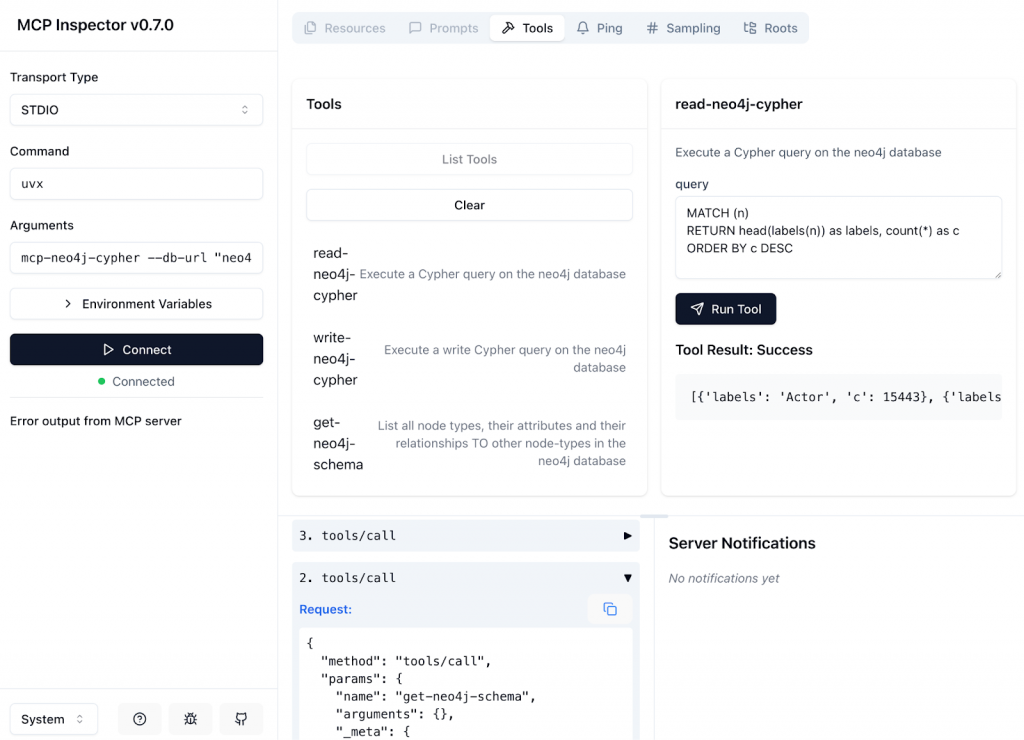
You can then:
- Connect the same server to a local Claude Desktop or Cursor instance.
- Run natural-language prompts (“find duplicate users in this graph”) and confirm that the right tools fire with the correct parameters.
- Iterate on tool descriptions and schemas until the model reliably selects the right tool.
Integrating and provisioning Neo4j MCP servers in Cursor
Now, let’s look at a concrete example of how to use Neo4j MCP servers inside Cursor.
Querying graph data from your IDE
Neo4j provides an MCP server that connects to a graph database. Once you add the server to your AI IDE configuration, Cursor can show it under “Installed MCP Servers,” along with the available tools.
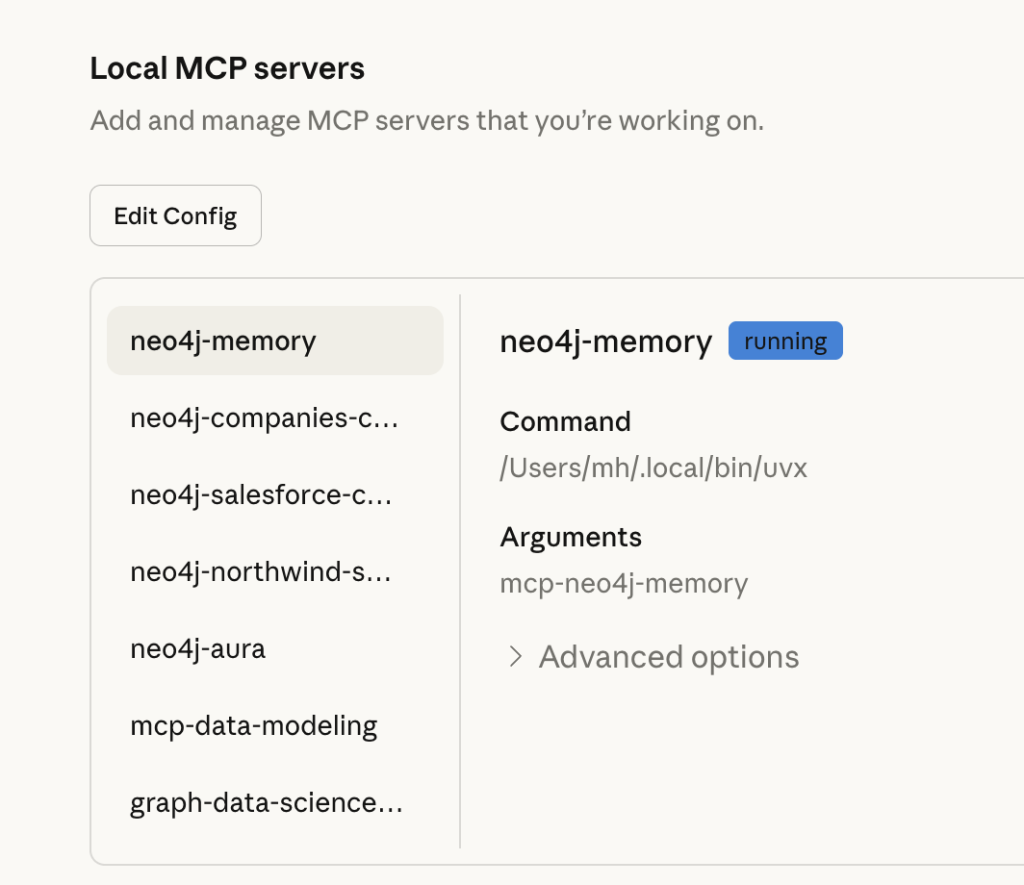
After successful connection, Cursor lists all connected MCP servers under the plug icon.
When you select a Neo4j MCP server, Cursor shows the tools the assistant can call, such as get-schema, read-cypher, and write-cypher under the hammer icon.
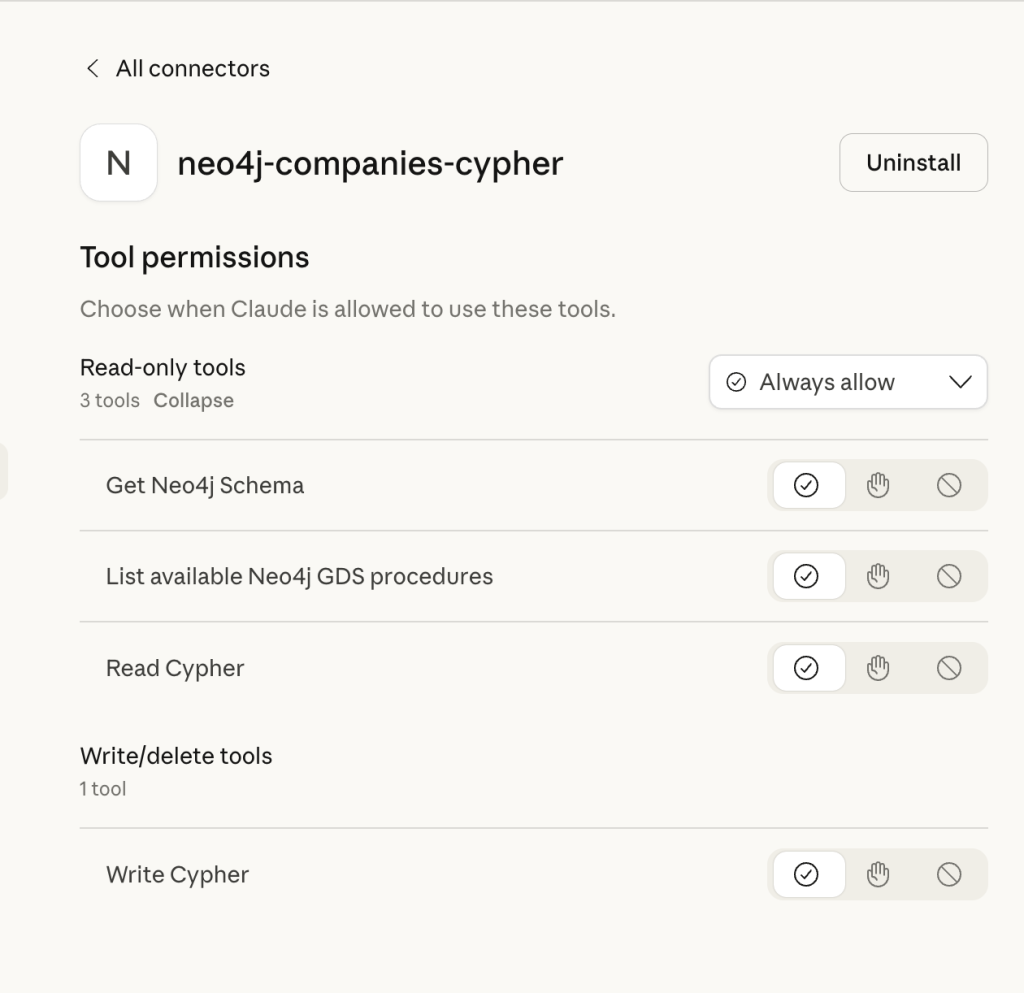
Here’s a typical workflow:
- Configure a Neo4j MCP server to point to a movies demo database.
- In Cursor, ask: “What are the best-rated adventure movies in my database?”
- The agent calls
read-cypher, generating a MATCH/RETURN query automatically. - The tool returns a structured list of movies and ratings, which Cursor renders as a table or chart.
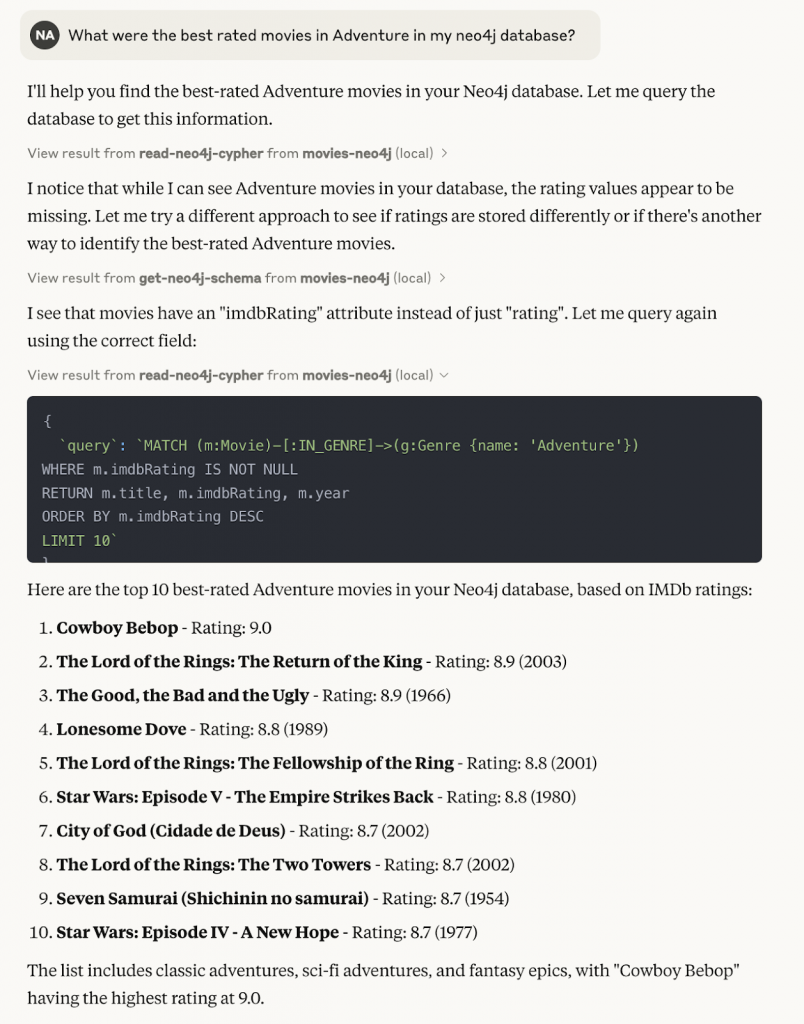
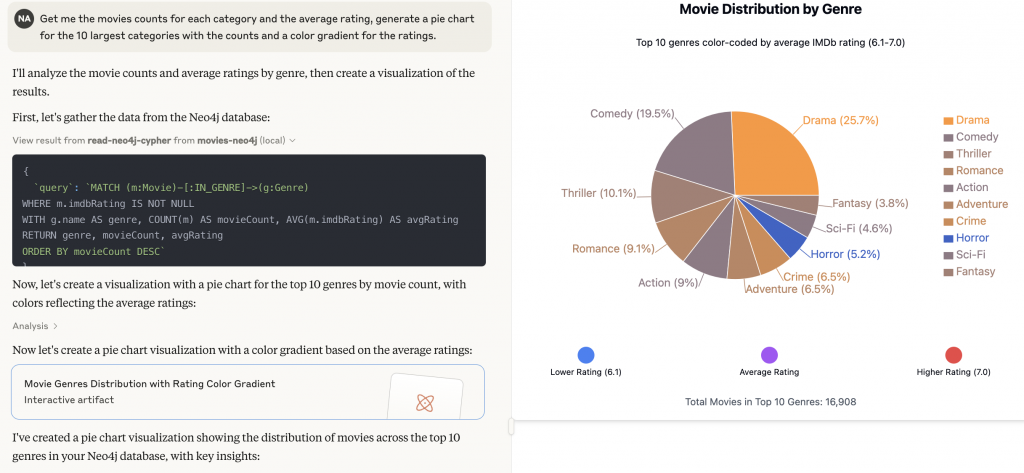
The screenshots above show Cursor using the Neo4j MCP tools to answer that question and visualize the results as both a ranked list and a chart.
From your point of view, you stay inside the editor and talk to your graph in natural language. MCP and Neo4j handle the translation into Cypher and back.
Because the Neo4j graph database captures rich relationships like genres, actors, user ratings, time windows, the agent can traverse paths, not just rows. When you pair that with MCP, those graph queries become reusable tools that any MCP-enabled agent can call.
Provisioning Neo4j Aura instances with MCP
Neo4j also exposes an Aura provisioning MCP server that talks to the Aura Provisioning API. From Cursor, you can list, create, pause, or resume Aura databases through tools like list_instances, create_instance, and update_instance_memory.
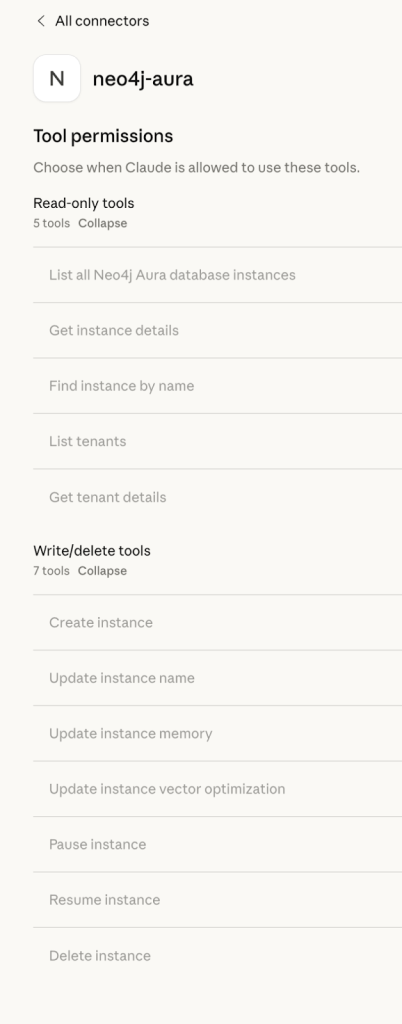
In practice, this lets you:
- Ask: “Create a small Aura Free instance for a staging graph, name it cx-staging, and show me the connection string.”
- Resize or pause instances during off-hours.
- Query live instance metadata and embed it into your infra-as-code workflows.
The images below show Cursor listing Neo4j Aura instances through the MCP server and returning instance details directly into the chat.
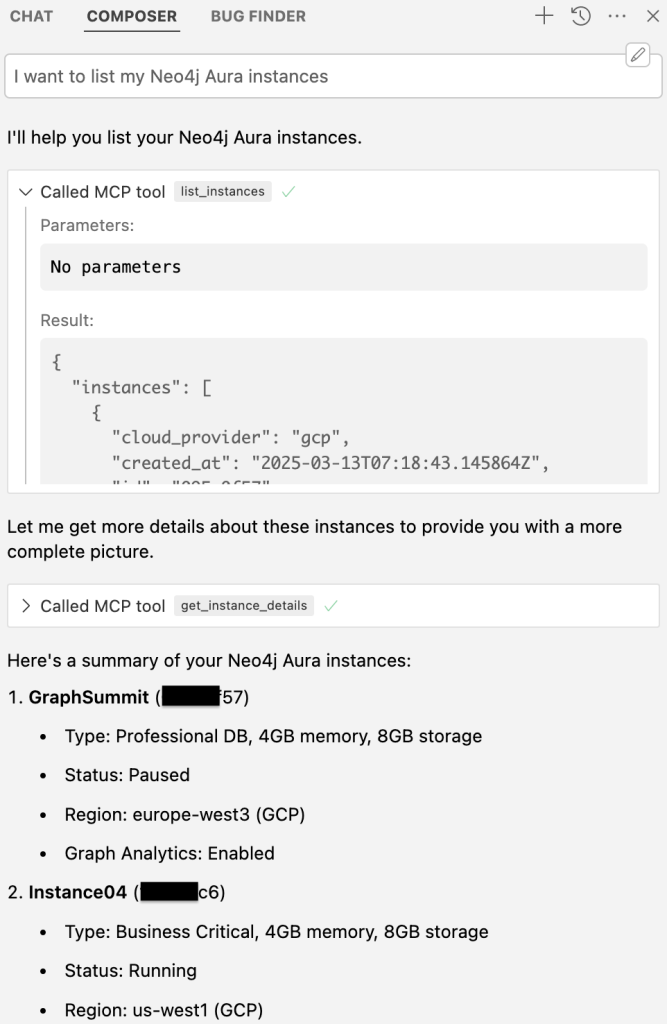
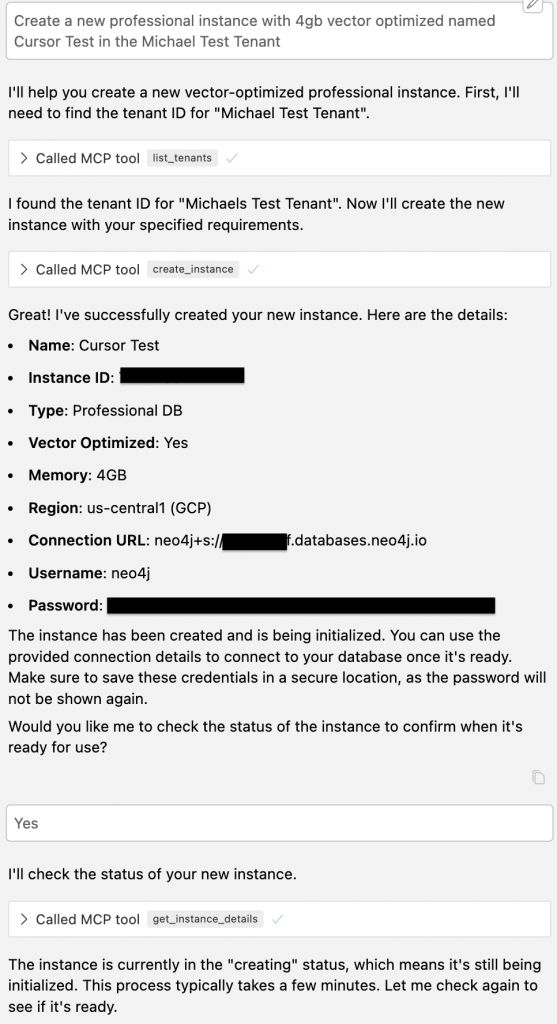
All of this happens from the same host where you chat with the model, explore graphs, and run tests.
Combining database, memory, and infrastructure
Neo4j’s MCP servers go beyond single tools, as the conversation above shows an agent creating a new Aura instance, checking its status, and reporting the results without leaving the IDE. In addition to data-level access, Neo4j has added infrastructure and knowledge-graph memory capabilities that give agents both a durable memory layer and the GraphRAG capabilities to spin up the graph infrastructure they need.
In a full agentic system, you might wire things like:
- A memory MCP server that stores long-lived entities and interactions as a graph
- A database MCP server for analytical Cypher queries
- An Aura provisioning MCP server for environment management
From the agent’s perspective, these appear as different servers and tools. From your perspective, they’re a cohesive context platform that connects data, memory, and infrastructure.
Comprehensive guide to production-ready RAG
A new Manning guide explains how to combine structured and unstructured data, connect entities, and deploy multiple retrievers.
MCP discovery and registries
As MCP adoption grows, so has the challenge of discovering trustworthy servers. Right now, there’s no single official registry, but there is active work on an MCP registry model with versioning, checksums, and certification so you can verify what you’re installing.
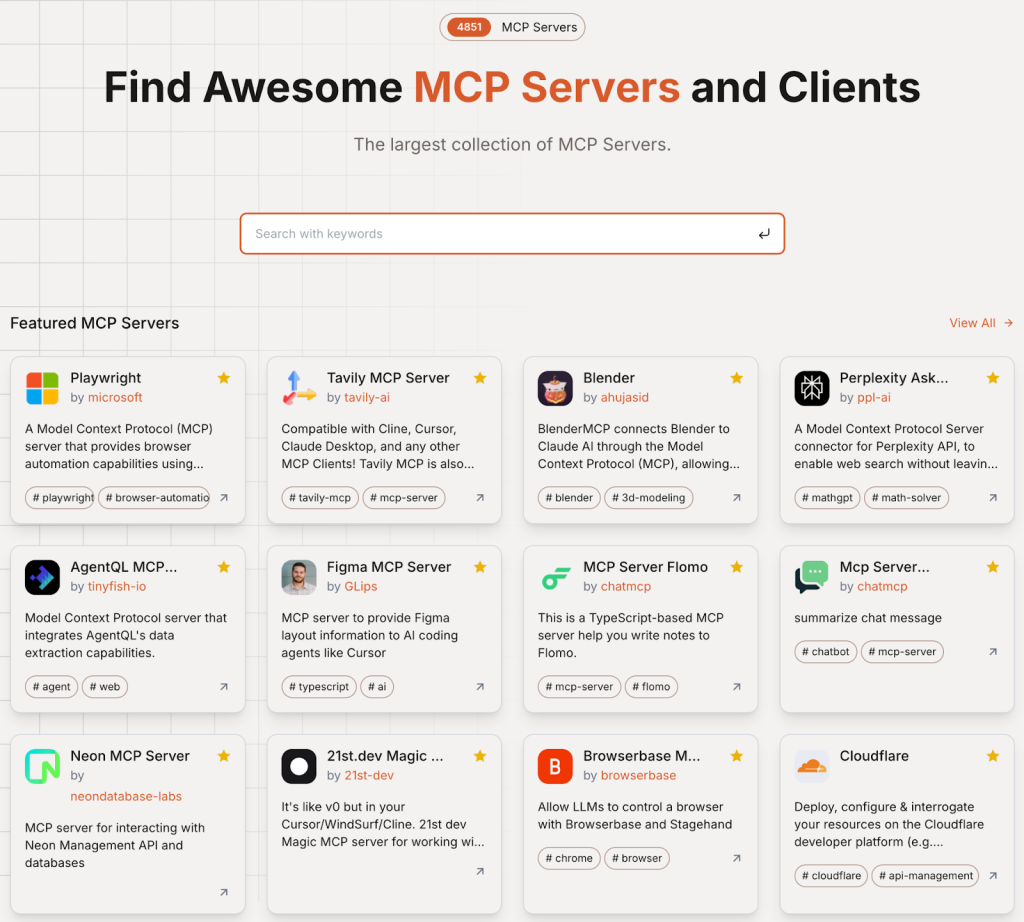
In the meantime, several community directories already list many MCP servers, including GitHub collections and dedicated services like Smithery, Glama.ai, mcp.so, and Cursor Directory.
Best practices for discovery today:
- Treat public directories as catalogs, not as sources of trust
- Maintain an internal allowlist of vetted servers for your teams
- Pin versions and verify checksums where possible
- Prefer self-hosted or vendor-backed servers for critical workloads
As registries mature, you can tighten this with signed manifests, RBAC, and automated checks in your CI/CD pipeline.
MCP’s role in agentic systems
MCP changes how you design agentic systems. Instead of baking business logic into model prompts or bespoke adapters, you treat servers as capability providers that agents can compose at runtime.
That unlocks patterns like:
- Static retrieval to active reasoning: An agent reads from one system, reasons about results, and takes action in another within a single loop.
- GraphRAG as a first-class server: Your Neo4j GraphRAG pipeline becomes an MCP server that exposes graph search, path exploration, similarity queries, and explanation prompts as tools.
- Connected IDE workflows: Developer companions that query Neo4j, check GitHub PRs, call Stripe, and update observability dashboards, all orchestrated by MCP servers behind the scenes.
For Neo4j specifically, MCP is a natural fit with the way you already think about connected data:
- The graph becomes your long-lived agent memory and retrieval layer.
- MCP servers sit on top to expose graph capabilities as tools, resources, and prompts.
- Your agent framework or IDE host orchestrates everything using a shared protocol.
In practice, this lets you use your Neo4j graph as the backbone of context for retrieval, reasoning, and action, instead of treating it as just another data source.
Where to Go next
This post was about understanding MCP architecture and seeing what’s possible with Neo4j. The next step is to get hands-on.
- Take our GraphAcademy course to learn how to combine MCP and Neo4j to build intelligent applications that perform complex tasks.
- Experiment with Neo4j’s open-source MCP servers for databases, memory, and Aura provisioning, and add them as MCP integrations in your IDE.
- Start small: expose one useful graph query as a tool, wire it into Cursor, and watch how quickly it becomes part of your daily workflow.
Once you’ve shipped your first MCP server, you’ll see why MCP is quickly becoming the default way to connect agents, tools, and graph-native context.
Take the free developing with Neo4j MCP tools course
MCP architecture FAQs
The host is the user-facing app (for example, Cursor) that owns the conversation with the model and decides when to call tools. The client runs inside the host, manages connections to MCP servers, and exposes their capabilities. The server is where your logic lives: it implements tools, resources, and prompts, talks to systems like Neo4j or cloud APIs, and returns structured results.
MCP servers expose three main types of capabilities:
• Tools (model-invoked actions with structured inputs/outputs)
• Resources (read-only context such as files, dashboards, or graph views)
• Prompts (reusable templates that combine instructions, resources, and dynamic arguments)
Together, they let agents read from Neo4j, call Cypher queries, trigger infrastructure changes, and follow consistent workflows.
Start by designing your public contract (tools, resources, and prompts), then implement it with an MCP SDK (typically Python or JavaScript). Add guardrails such as read-only modes, input validation, and least-privilege credentials. Use tools like MCP Inspector and local IDE integration to test tools interactively. For security, log all calls, limit sensitive operations, and add rate limiting and access control before you deploy.
In an IDE such as Cursor, you register your MCP servers in the configuration. The host discovers tools like get_schema or read-neo4j-cypher, and the model can call them directly during a chat. From the developer’s point of view, MCP integration means you can ask natural-language questions (“find cycles in this fraud graph”) and have Cursor route the right MCP tool calls to Neo4j and other systems.
Treat public MCP directories as starting points, not as sources of trust. Keep an internal catalog of approved servers, pin specific versions, and verify checksums or signatures where they’re available. For sensitive workloads, prefer self-hosted or vendor-supported MCP servers and wire them into your CI/CD so new versions are tested and registered consistently.
Share Article



Explore
Related Articles
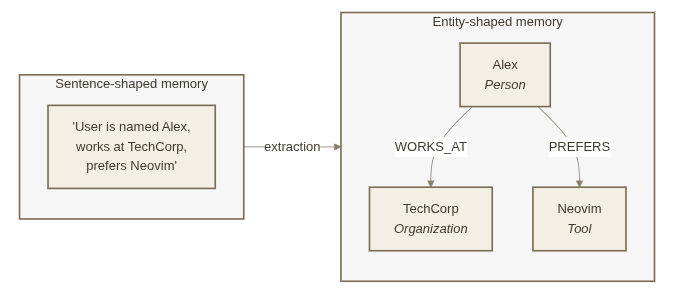
Your AI Agent Forgets Everything. So We Taught It to Remember — With a Graph.
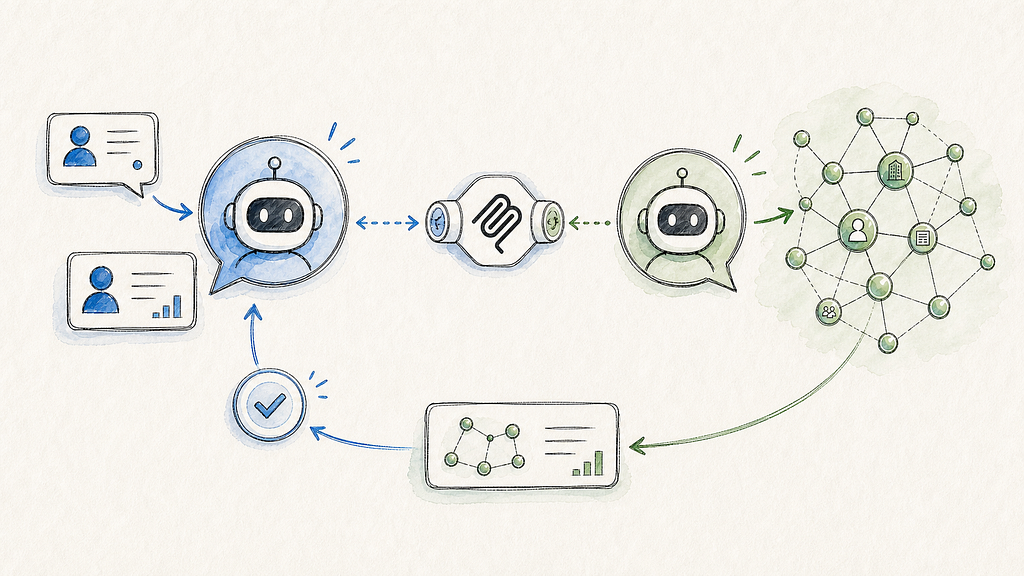
Grounding Salesforce Agentforce with Neo4j — multi-agent setup over MCP

Cut Text2SQL token costs up to 81%, and stop paying for wrong answers: a Neo4j semantic layer across BigQuery and Databricks