“Boost” the power of your AI agents: Integrating Neo4j MCP with Laravel

Developer at https://nagels.tech/
7 min read


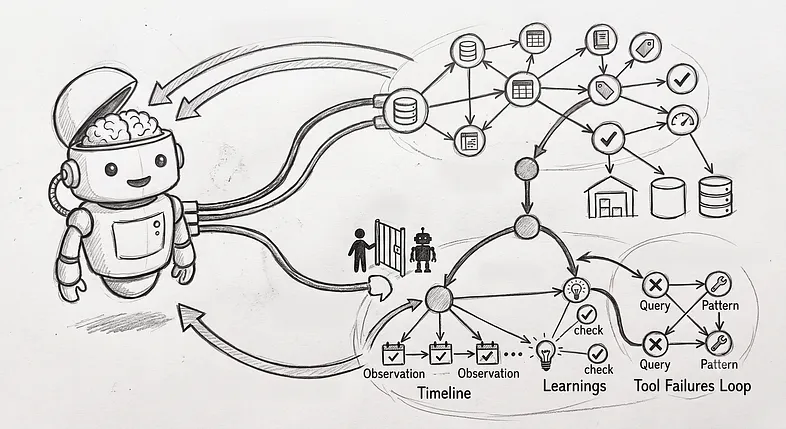
Imagine trying to guide a blindfolded person through a complex maze using only verbal cues. You know exactly where the obstacles are, but they can only “see” what you describe to them. This is exactly what it feels like to use a Large Language Model (LLM) without the Model Context Protocol (MCP).
Today, simply adding a chat interface to your application isn’t enough. Providing deep integration between your application and an LLM is essential for it to work effectively. Giving AI agents direct access to specific APIs and databases is critical to grounding agent actions and reducing hallucinations.
If you are using Laravel, the laravel/boost package provides this deep integration, giving your AI agents access to your codebase’s context. However, there has been a missing link: Neo4j was not supported in that package.
Our new package, neo4j/laravel-boost, resolves this by bridging your graph database with MCP-enabled clients like Cursor. This article will show you how to run the Neo4j MCP server in docker and expose it cleanly through Laravel Boost, giving your agents direct, observable, and secure graph access.
The Architecture: Why Proxy Through Laravel?
You might be wondering: if Neo4j provides an official MCP server, why build a Laravel package to proxy it? While connecting directly is an option, routing it through our package offers a significantly better Developer Experience (DX) and deeper LLM integration.

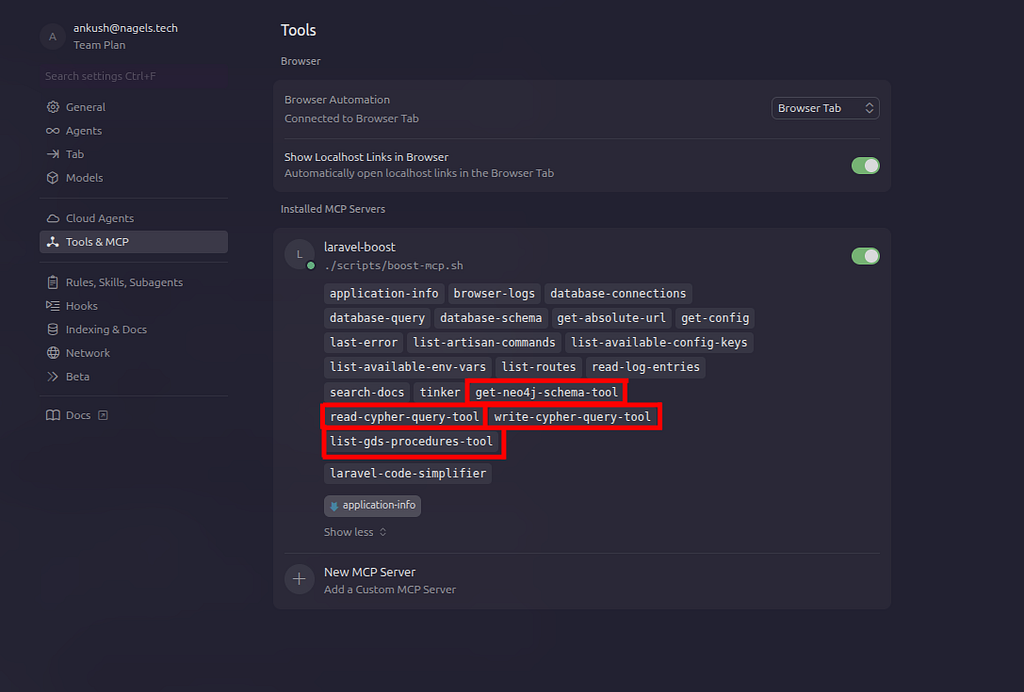
Instead of forcing you to configure multiple connections in your IDE, this package dynamically registers the Neo4j tool manifests (such as read-cypher, write-cypher, list-gds-procedures, and get-schema) directly within Laravel Boost’s tool registry at runtime. By merging these manifests on the fly alongside your standard application tools, Cursor perceives a single, unified MCP endpoint.
When the LLM triggers a graph interaction, the package acts as a stateless proxy. It forwards the JSON-RPC requests from Laravel Boost to the official Neo4j MCP server. You have two ways to handle this routing:
- HTTP POST: Securely delegates graph execution to a separate, Dockerized MCP service.
- STDIO: Utilizes our dedicated STDIO client to run the MCP server as a direct subprocess, completely bypassing network overhead.
To switch between the two, in your .env file, NEO4J_MCP_TRANSPORT= should be either set to stdio or http. After editing the .env remember to run “php artisan config:clear” so Laravel picks up the changes.
Key Advantages:
- Single Server Configuration: You won’t have to manage two separate MCP servers in your workspace; our package injects Neo4j tools directly into Boost’s registry.
- Best of Both Worlds: We leverage the official, well-designed Neo4j MCP server for graph interactions while hooking into the rich observability and debugging tools of Laravel Boost.
- Lightweight Security: By letting a Dockerized MCP server handle credentials and schema management, your PHP app remains purely focused on routing requests.
Prerequisites & Limitations
Before you begin, ensure you have the following:
- Laravel installed: This guide assumes a modern setup (PHP 8.1+, Laravel 11+)
- Docker installed: Needed to host the MCP server + Neo4j
- Basic Neo4j Knowledge: Familiarity with Cypher queries.
- Protocol Note: We now support STDIO and HTTPS
Step 1: Set Up the Neo4j MCP Server
The blog post shows the setup with the Neo4j MCP server over HTTP. You must have the official Neo4j MCP server running alongside your application.
Initial Docker Setup
In your docker-compose.yml, enable the GDS and APOC plugins:
# Neo4j database + Neo4j MCP server for Laravel Boost integration
# See: https://neo4j.com/docs/mcp/current/installation/

services:
  neo4j:
    image: neo4j:5-community
    environment:
      NEO4J_AUTH: neo4j/your-password
      NEO4J_PLUGINS: '["apoc", "graph-data-science"]'
      NEO4J_dbms_security_procedures_unrestricted: 'apoc.*,gds.*'
      NEO4J_dbms_security_procedures_allowlist: 'apoc.*,gds.*'
    ports:
      - "7474:7474"
      - "7687:7687"
    healthcheck:
      test: ["CMD-SHELL", "wget -q -O /dev/null http://localhost:7474 || exit 1"]
      interval: 10s
      timeout: 5s
      retries: 5
      start_period: 15s

  # Official Neo4j MCP server (HTTP mode). Laravel Boost proxies to this;
  # in HTTP mode, Neo4j credentials are sent per-request by the client (do not set NEO4J_USERNAME/PASSWORD here).
  neo4j-mcp:
    image: mcp/neo4j
    environment:
      NEO4J_URI: bolt://neo4j:7687
      NEO4J_DATABASE: neo4j
      NEO4J_READ_ONLY: "false"
      NEO4J_TELEMETRY: "false"
      NEO4J_TRANSPORT_MODE: http
      NEO4J_MCP_HTTP_HOST: 0.0.0.0
      NEO4J_MCP_HTTP_PORT: "8080"
    ports:
      - "8080:8080"
    depends_on:
      neo4j:
        condition: service_healthy
Note: The list-gds-procedures tool requires the Graph Data Science (GDS) plugin.
Step 2: Connecting Your Laravel Application
1. Install Required Packages
Run the following command to manage the connection:
composer require laravel/boost neo4j/laravel-boost
2. Update the .env File
Configure Laravel to connect to your Dockerized MCP instance by updating the .env file (project-name/.env)
# The HTTP endpoint for the running Neo4j MCP Server
NEO4J_MCP_URL=http://localhost:8080/mcp

# Optional Basic Auth
NEO4J_MCP_USERNAME=neo4j
NEO4J_MCP_PASSWORD=your-password

# Neo4j URI (if using Laravel’s driver elsewhere)
NEO4J_URI=bolt://localhost:7687
3. Register Tools with Your IDE
Use the built-in Artisan command to update Cursor’s configuration so you have exactly one MCP server with all tools:
php artisan neo4j-boost:cursor-config
Step 3: Using Neo4j in Cursor
Open your Laravel application folder (the project where you ran composer require) as the Cursor workspace. Reload Cursor or open MCP settings so it picks up .cursor/mcp.json. Enable the MCP server. Tools like get-schema, read-cypher, and write-cypher should immediately appear when the server is connected.
Example: Natural Language Data Retrieval
We’ll demonstrate this deep integration in action using the standard Neo4j Movies database. You can access the Movies Database by running —
CALL apoc.example.movies();

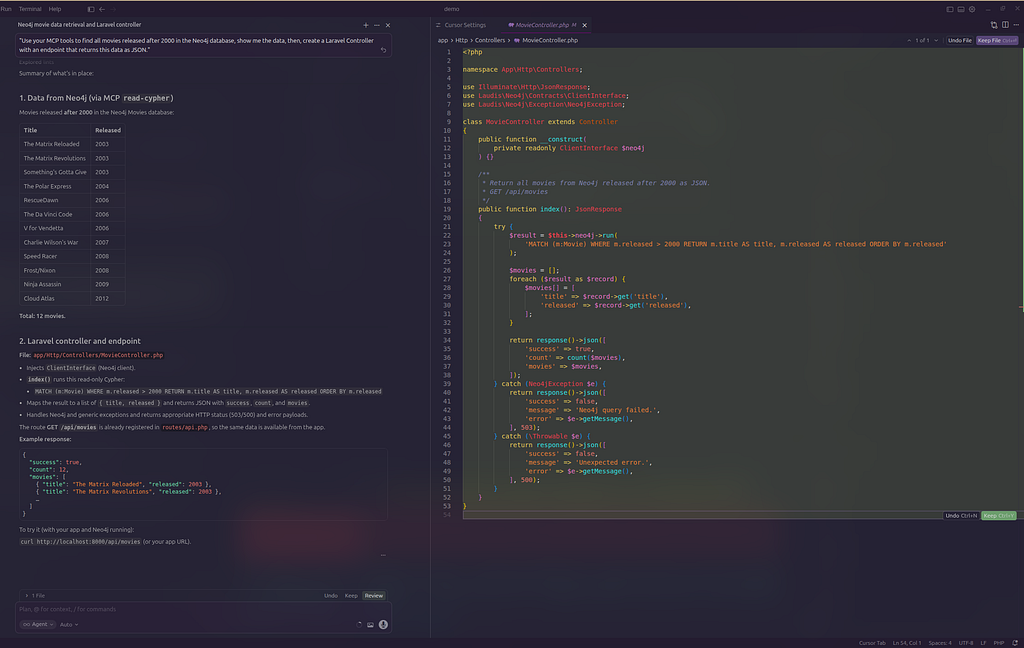
Since the LLM now has direct access to your schema and data, you can build a CRUD application through natural language. In your Cursor chat, simply ask the agent:
“Use your MCP tools to find all movies released after 2000 in the Neo4j database, show me the data, then, create a Laravel Controller with an endpoint that returns this data as JSON.”
The LLM will autonomously trigger the read-cypher tool, pull the data, and write the perfectly mapped PHP code for you.
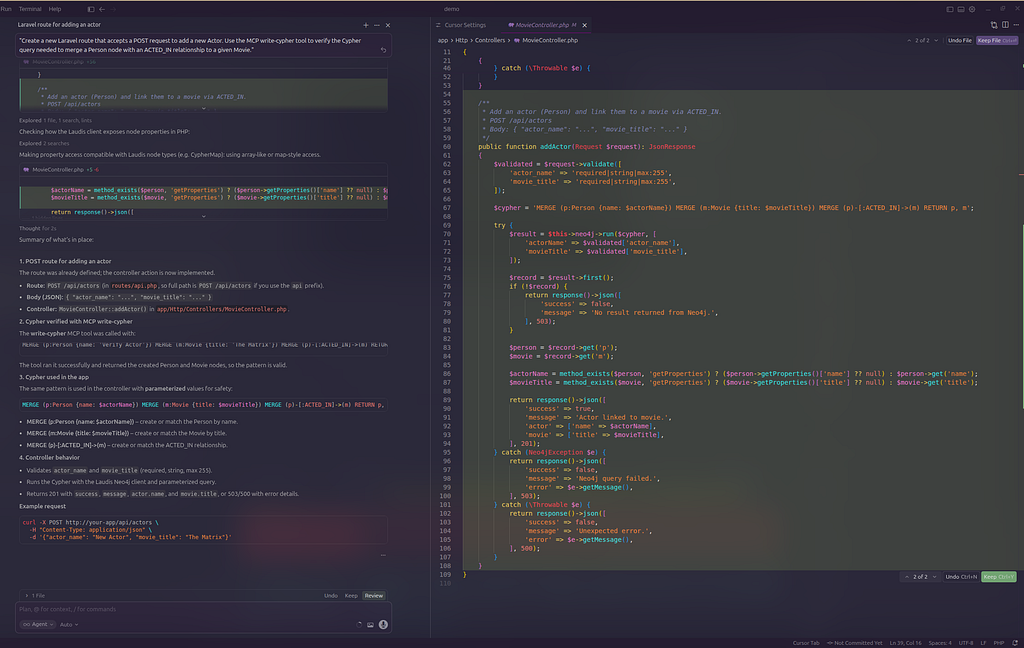
You can also ask the agent to handle database mutations:
“Create a new Laravel route that accepts a POST request to add a new Actor. Use the MCP write-cypher tool to verify the Cypher query needed to merge a Person node with an ACTED_IN relationship to a given Movie.”
The agent acts as an active participant in your development environment, testing queries against the graph before writing the final application logic.
Summary
By combining Laravel with neo4j/laravel-boost, you create a robust, single-server architecture that gives your AI agents direct access to your graph database. This setup lets you effortlessly execute Cypher queries and retrieve schemas directly from prompts, accelerating your development workflow.
This package is proudly maintained by the team at https://nagels.tech/
Important Links
“Boost” the power of your AI agents: Integrating Neo4j MCP with Laravel was originally published in Neo4j Developer Blog on Medium, where people are continuing the conversation by highlighting and responding to this story.
Share Article



Explore
Related Articles

From first graph algorithm experiment to production with Aura Graph Analytics
SumoDB in Neo4j: Microsoft Fabric bridging Decades of Rikishi — Part 4