Enterprise AI is moving at lightning speed. Teams are connecting LLMs to internal databases, knowledge graphs, document stores, and business tools to build AI assistants that can actually answer questions about their data. The protocol making this possible is the Model Context Protocol (MCP), an open standard that people have started calling the “USB-C for AI”. One interface, and anything plugs right in.
But just like a physical USB-C port, you can plug anything into it, and that creates a glaring security problem.
MCP makes it easy to give an AI model access to tools, data, and services. What most demos quietly skip over is what happens when that data isn’t meant for everyone. Different people have different clearance levels. If two of them ask the same question through the same AI assistant, they should not see the same answer.
But with most MCP setups today, they do.
What’s at Stake
Without identity-aware access control, the consequences are real:
- Data leakage: sensitive information surfaces in AI-generated responses to users who were never meant to see it
- Compliance violations: regulations like GDPR, SOX, and MiFID II require controlled, auditable access to sensitive data. A system that can’t distinguish who made a request can’t produce a credible audit trail
- Erosion of trust: once a stakeholder discovers the AI assistant surfaced data they shouldn’t have seen, trust in the entire system collapses, and adoption tanks
The irony is that most organizations already have robust access control for their human users. The problem is that MCP sits between the user and the database, and in most implementations, it strips the user’s identity out of the request entirely.
The Problem: MCP operates in an Identity Vacuum
Picture this. A financial services company has built an Agentic RAG system where MCP is the gateway between the AI and their internal knowledge graph. Three different personas use it daily:
- A Confidential user (e.g. a senior manager) reviews board memos, AML reports, and risk assessments
- An Internal user (e.g. an analyst) works with segment performance data, market research, and revenue breakdowns
- An External user (e.g. a client or auditor) has access only to press releases and regulatory filings
They each have different clearance levels. They should see different data. But that’s not what happens.
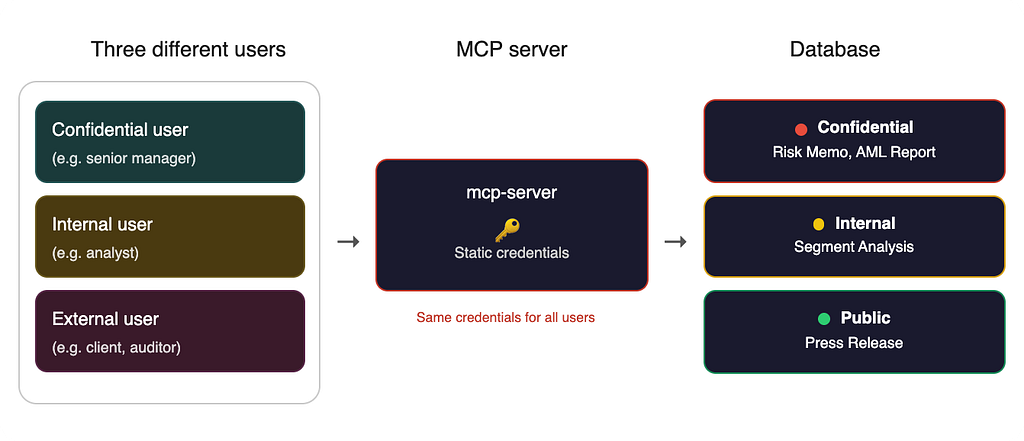
With a non-secure MCP setup, the MCP server authenticates to the database with a single set of static credentials, often baked into environment variables. Every request, regardless of who triggered it, runs with the same identity. The database can’t tell whether the query came from a senior manager, an analyst, or an external client. It returns everything.
Before you know it, an external client accidentally pulls up an AML report, or an analyst gets a summary of a board memo. Nobody maliciously bypassed security; the system just didn’t know how to differentiate between the users. When an LLM makes a database call on a user’s behalf, it creates a massive blind spot in the security audit trail. This is the default state for most MCP servers today.
The Fix: Introducing Identity Driven Access Control
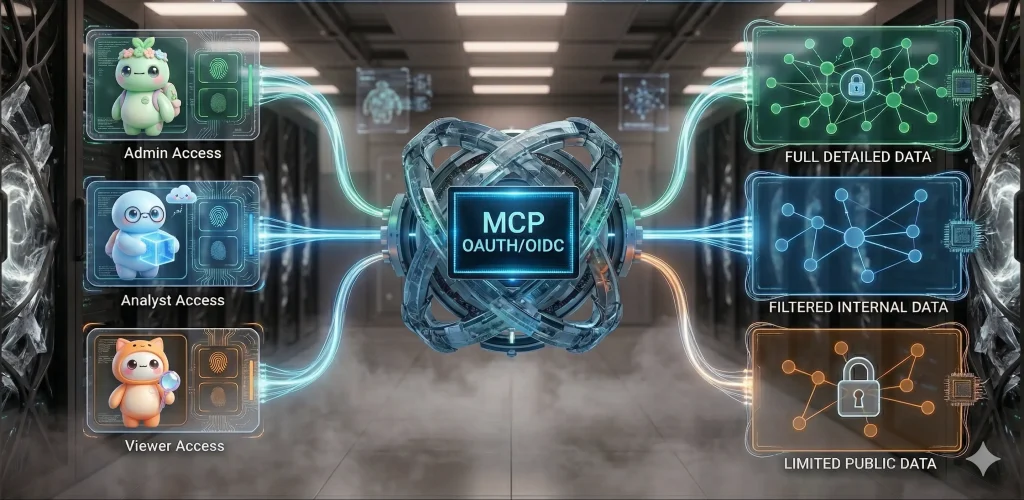
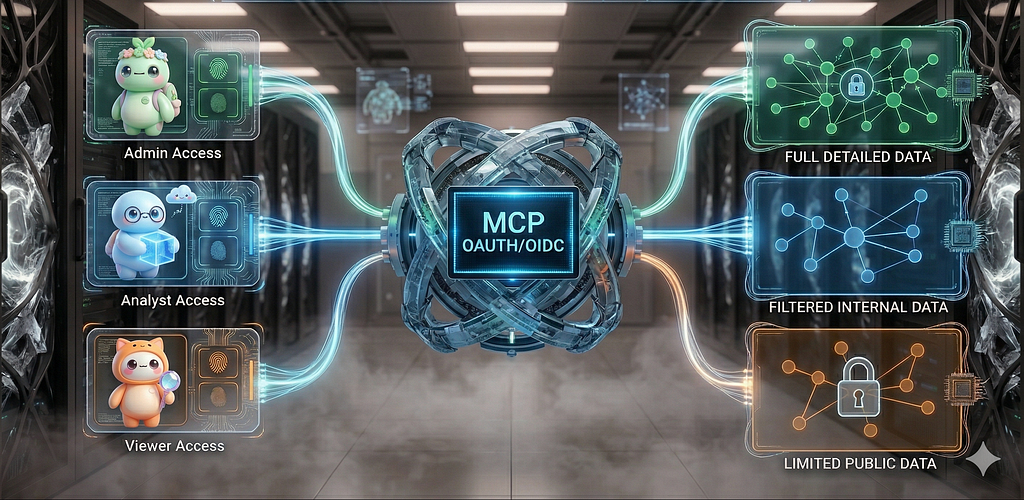
To fix this, you need an architecture where the MCP server stops acting like a service account and starts acting like a transparent pipe, passing the user’s actual identity down to the data layer to be evaluated.
To illustrate what this looks like in practice, we’ll build out this pattern using Neo4j MCP Server. By running the Neo4j MCP Server in HTTP transport mode, we can pass a user’s OIDC Bearer token directly through with every request. Instead of relying on static credentials, the graph database evaluates the JWT and enforces its native, fine-grained role-based access control. The agent just asks the question; the graph enforces the policy. Let’s see how this works.
Architecture: One Token, Zero Trust
The core principle here is simple: a user’s identity shouldn’t be stripped, translated, or re-synthesized halfway through the stack. The exact JWT issued by your identity provider should be the exact token that hits the database.
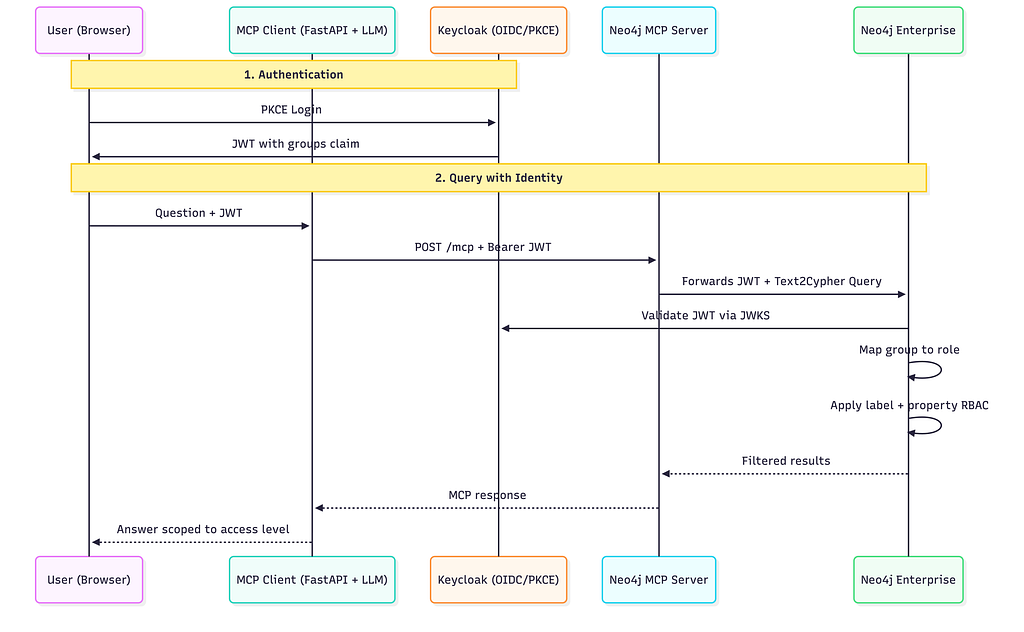
Here’s how the pieces fit together:
- The Login: A user authenticates against your Identity Provider using OIDC with PKCE. For this architecture, Keycloak is used as a local IdP. Upon login, Keycloak hands back a JWT containing a groups claim that defines the user’s access tier: /Confidential, /Internal, or /External
- The Request: When the user asks the agent a question (“What’s the latest on Globex Inc?”), the MCP Client (a FastAPI backend powered by an LLM) receives the prompt alongside the user’s JWT as a Bearer token.
- The Pass-Through: The MCP Client connects to the Neo4j MCP Server over Streamable HTTP, passing that Bearer token in the request header. Because MCP supports per-request authentication, every tool call carries the human caller’s identity.
- The Enforcement: When the MCP server issues a Cypher query, it simply forwards the token. Neo4j validates the JWT against Keycloak’s JWKS endpoint, extracts the groups claim, maps it to a native database role, and executes the query strictly under those permissions.
Setup & Configuration
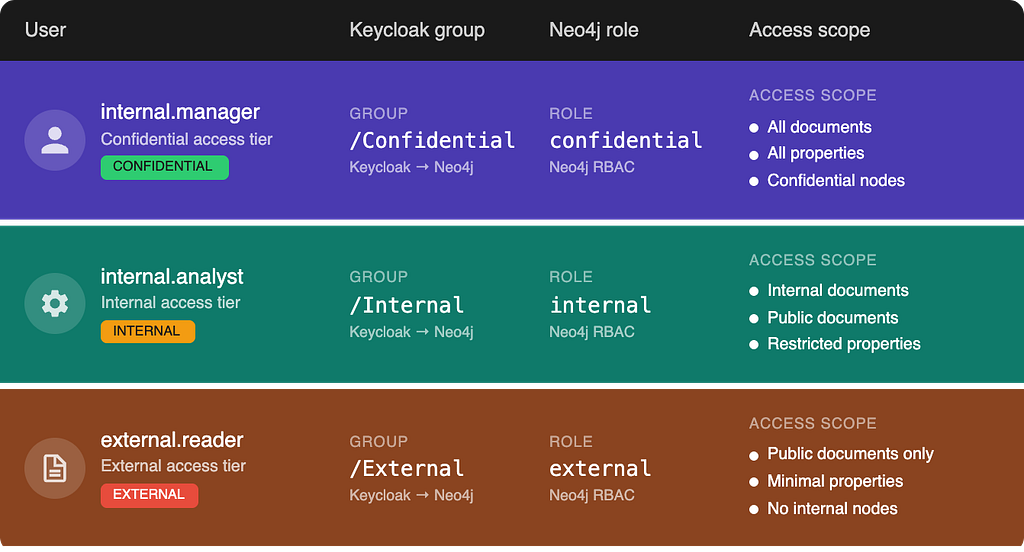
Here’s how each role maps from a Keycloak group to a scoped Neo4j access tier/role:
1) Keycloak Configuration
For this demo, I set up a Keycloak realm called myCorp with a client configured for Neo4j’s OIDC integration. I won’t walk through every step of realm and client creation here; for a more holistic guide, refer to Keycloak’s getting started guide.
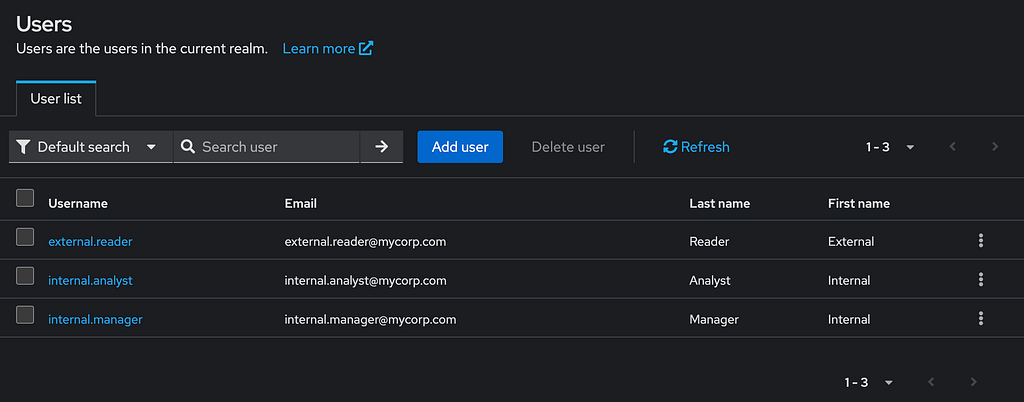
Within the realm, I created three users and assigned each to a group that maps to a different access tier. You can see the user and group setup in the screenshots below.
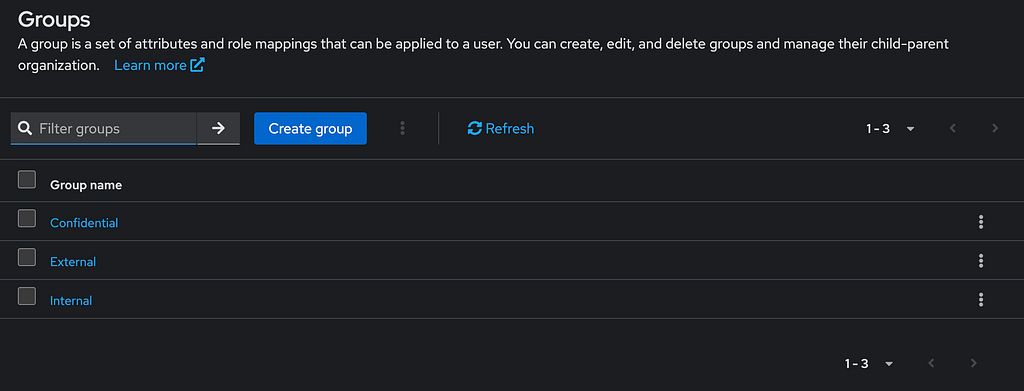
Gotcha: When setting up Keycloak, ensure that the audience claim is explicitly configured with a protocol mapper. Without it, Neo4j’s OIDC provider silently rejects every token because the aud claim doesn’t match.
2) Neo4j Configuration
Neo4j Enterprise has native OIDC/SSO support. For my setup, I ran both Neo4j and Keycloak locally in Docker. Here’s the full SSO configuration:
# OIDC / Keycloak SSO
NEO4J_dbms_security_authentication__providers: "oidc-keycloak,native"
NEO4J_dbms_security_authorization__providers: "oidc-keycloak,native"
NEO4J_dbms_security_oidc_keycloak_display__name: "Keycloak"
NEO4J_dbms_security_oidc_keycloak_auth__flow: "pkce"
NEO4J_dbms_security_oidc_keycloak_params: "client_id=neo4j-client;response_type=code;scope=openid email roles"
NEO4J_dbms_security_oidc_keycloak_audience: "account"
NEO4J_dbms_security_oidc_keycloak_claims_username: "preferred_username"
NEO4J_dbms_security_oidc_keycloak_claims_groups: "groups"

# Map Keycloak groups to Neo4j database roles
NEO4J_dbms_security_oidc_keycloak_authorization_group__to__role__mapping: '"/Confidential"=confidential;"/Internal"=internal;"/External"=external'

NEO4J_dbms_security_oidc_keycloak_config: "principal=preferred_username;token_type_principal=access_token;token_type_authentication=access_token"
NEO4J_dbms_security_oidc_keycloak_well__known__discovery__uri: "https://keycloak:8443/realms/myCorp/.well-known/openid-configuration"
NEO4J_dbms_security_oidc_keycloak_token__endpoint: "https://127.0.0.1:8443/realms/myCorp/protocol/openid-connect/token"

# Must match JWT iss claim (browser-facing)
NEO4J_dbms_security_oidc_keycloak_issuer: "https://127.0.0.1:8443/realms/myCorp"

# Browser-facing (PKCE redirect)
NEO4J_dbms_security_oidc_keycloak_auth__endpoint: "https://127.0.0.1:8443/realms/myCorp/protocol/openid-connect/auth"
The group-to-role mapping is where identity becomes authorization. When a JWT arrives with groups: [“/Confidential”], Neo4j assigns the confidential database role to that session. The privileges attached to each role determine exactly which node labels are visible and which properties show up in query results.
Role-Based Access Control (RBAC)
To demonstrate access control in action, I set up a small sample graph with Document and Company nodes connected by HAS_DOCUMENT relationships. The key mechanism here is Neo4j Node Labels as Access Tiers.
In this scenario, each document gets tagged with a label like Internal, Public, or Confidential to indicate its visibility level. In the screenshot below, notice how the selected Document node carries both the Document and Internal labels which signals that it’s meant for internal consumption only.
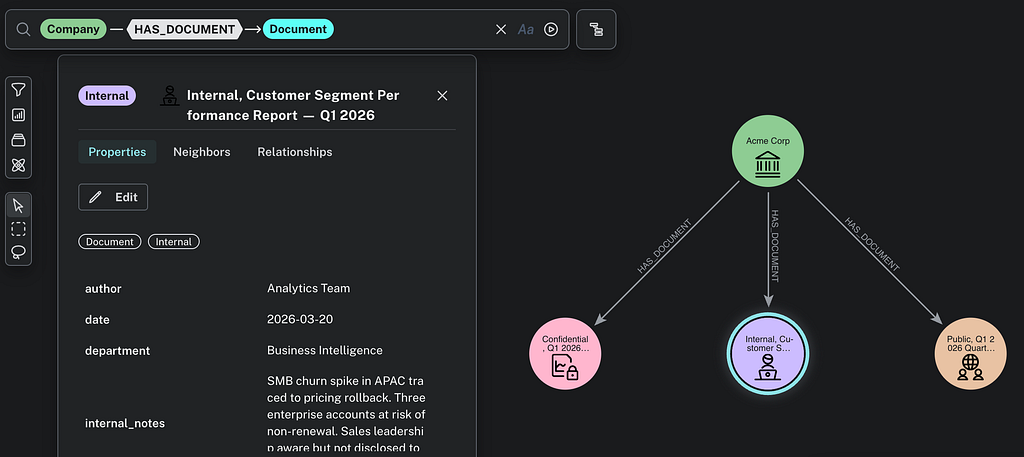
This is where Neo4j’s fine-grained RBAC really shines. For example, a user with the internal role can query Document nodes labelled Internal or Public; but any Document node tagged with the Confidential label is completely invisible to them. It’s not filtered out after the query runs; as far as that role is concerned, those nodes simply are transparent to them. This is database-level enforcement, not application-level filtering.
Multi Layers of Security: Database + Labels + Property-level RBAC
Neo4j’s access control doesn’t stop at label visibility, it extends down to individual properties on a per-role basis. This means you can control not just which nodes a role can see, but what fields are returned when they query those nodes.
This creates 3 distinct layers of security:
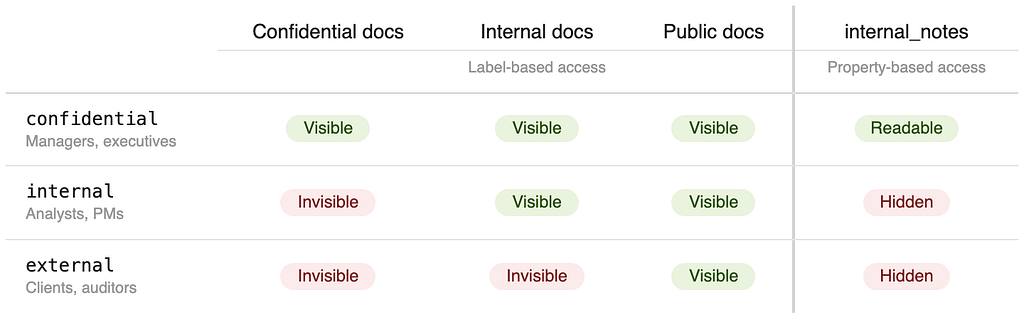
- Database-level access controls which database a role can connect to, typically used to separate project groups or environments. It’s critical for managing context graphs and storing agent memory by ensuring each database belongs to one user, establishing complete data isolation. We won’t go deep on this in the post.
- Label-based access controls which documents a role can see at all. An external user will never know a Confidential document exists
- Property-based access controls which fields come back within visible documents. An internal user can read a document’s summary and metadata, but sensitive fields like internal_notes (where analysts write what they actually think) are quietly left out of the results
Only the confidential role gets the full, unredacted picture.
If you’re coming from the relational world, think of it as column-level security applied natively to the graph. The difference is that it layers on top of label-based row filtering, giving you a multi-dimensional access matrix that usually requires views or middleware to pull off.
Why this matters for GenAI
Remember the three users from above? Now imagine they all ask the same question to an AI assistant backed by the MCP layer: “What’s the latest on Globex Inc?
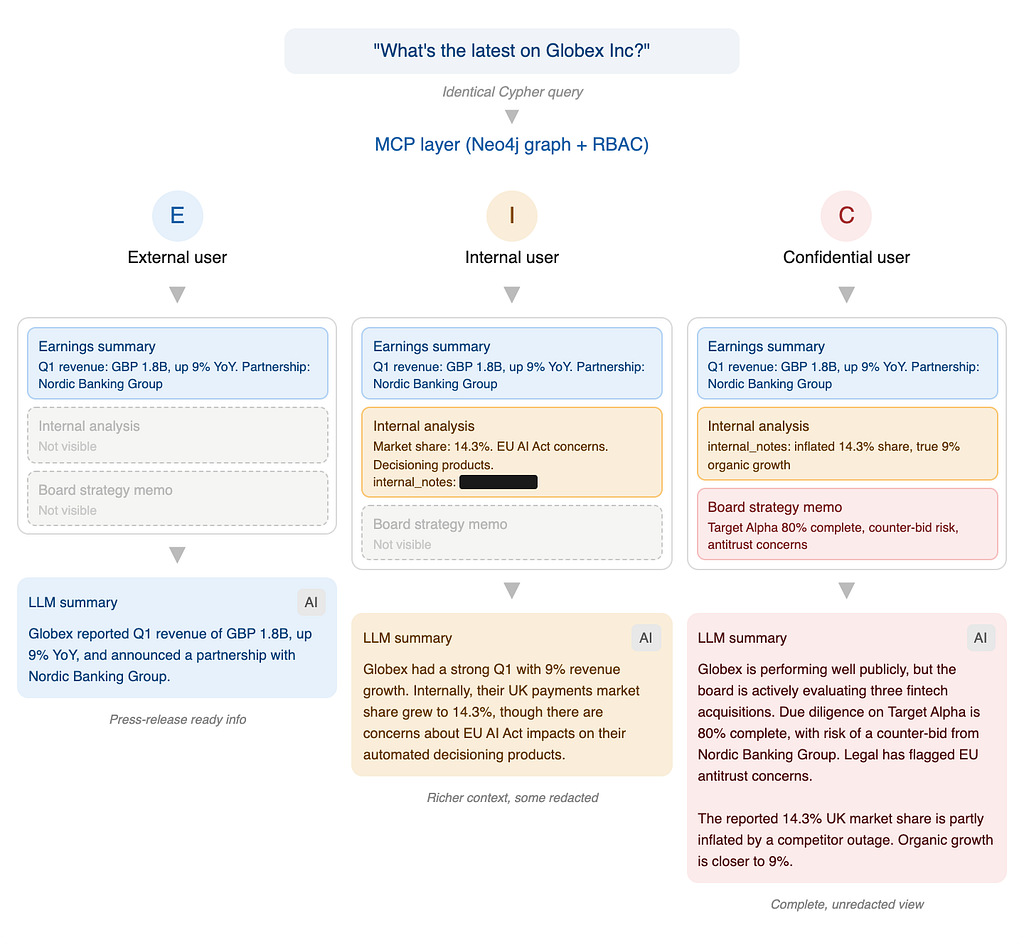
The MCP layer runs the same Cypher pattern every time: traverse from the Company node, pull all connected Document nodes, and feed them as context to the LLM. With identity-driven authentication in place, the MCP layer can call any tool freely. It doesn’t need to understand who should see what. That responsibility is delegated entirely to the database, each role gets a fundamentally different picture of reality.
- The External user gets a clean, press-release-level summary.
- The Internal user sees richer context from the market analysis, but the internal_notes field, is silently excluded.
- Only Confidential user sees everything, including the board strategy memo and the candid analyst commentary.
Without strict access control, all three users would see the same thing: M&A pipelines, sanctions flags, counter-bid intelligence, and internal commentary that was never meant to leave the team.
Putting it all together: Tech Stack
To make testing easy, I packaged everything into a single Docker Compose stack. This spins up Keycloak, Neo4j Enterprise, the Neo4j MCP Server, and a FastAPI frontend all at once. The FastAPI backend serves as your MCP client. I went with the LiteLLM setup which is entirely model agnostic, meaning you can plug in Cohere, OpenAI, Claude, or any other LLM you prefer.
from mcp.client.streamable_http import streamablehttp_client
from mcp import ClientSession

async def call_mcp_tool(tool_name: str, arguments: dict, bearer_token: str):
    """Connect to neo4j-mcp-server with the user's JWT."""
    headers = {"Authorization": f"Bearer {bearer_token}"}

    async with streamablehttp_client(MCP_SERVER_URL, headers=headers) as (
        read_stream, write_stream, _,
    ):
        async with ClientSession(read_stream, write_stream) as session:
            await session.initialize()
            result = await session.call_tool(tool_name, arguments)
            return result
The key detail: every MCP call carries the user’s JWT, not a service account token. Neo4j validates the token independently on every request. The access control doesn’t live solely in the application layer; it is propagated and controlled in the database layer.
See Neo4j MCP in action with OIDC/PKCE
Using the same scenario from above:
The 3 different users log in and ask: “What’s the latest on Globex Inc?”
Behind the scenes, the MCP layer generates the same Cypher query every time. The only thing that changes is the JWT attached to the request, and that single difference transforms what the LLM can see.
Scenario 1: Confidential user (manager)
Logging in as internal.manager, the user has full visibility. They can query all three documents including any sensitive document information.
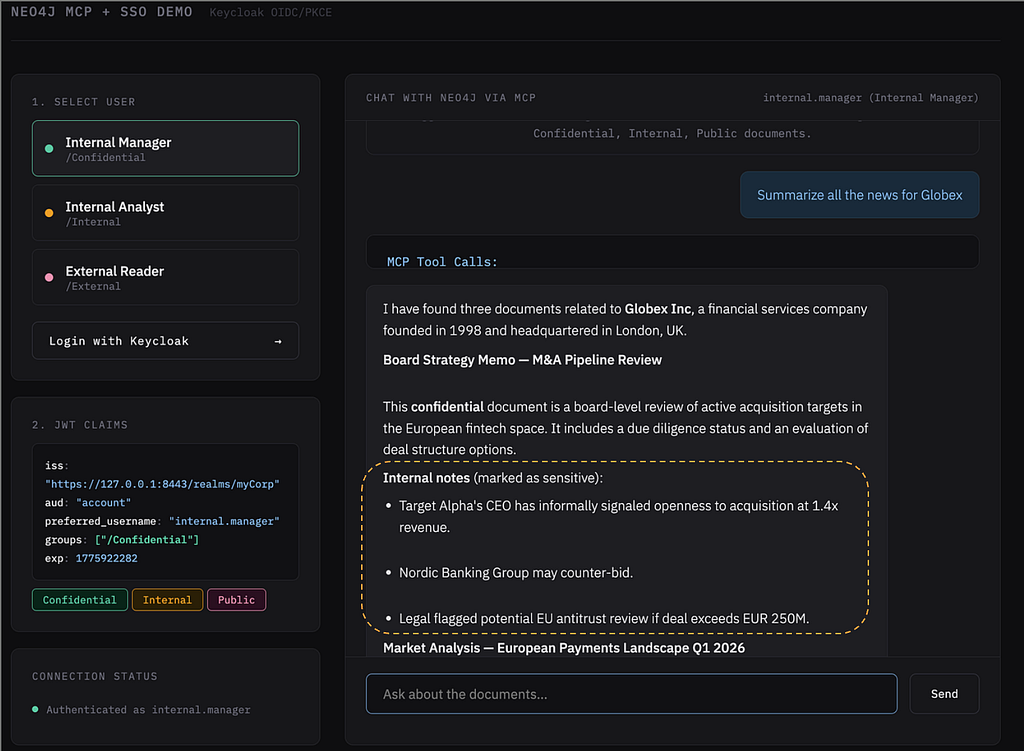
The Neo4j MCP read-cypher tool generated the following cypher query:
read-cypher
{ "query": "MATCH p=(c:Company)-[:HAS_DOCUMENT]->(d:Document) WHERE c.name CONTAINS 'Globex' RETURN p" }
Notice that all sensitive information is available in the response, including the candid analyst commentary from internal_notes and the full board strategy memo.
Scenario 2: Internal Analyst (Internal access)
Logging in as internal.analyst, the scope narrows. Confidential documents and internal_notes property is redacted and the query returns only the Internal and Public documents:
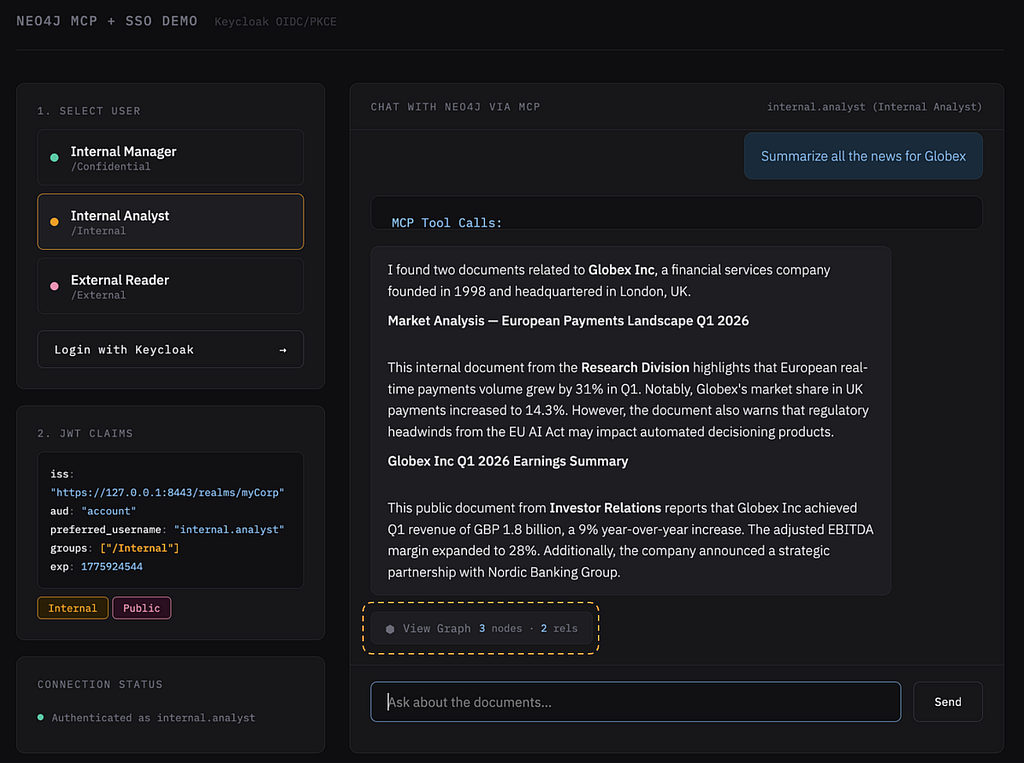
Neo4j’s property-level RBAC silently excludes internal_notes from the results. Zooming into the graph view below (developed using Neo4j Visualization Library), notice that the Confidential documents are completely absent from the graph, and the internal_notes property is missing from the returned nodes.
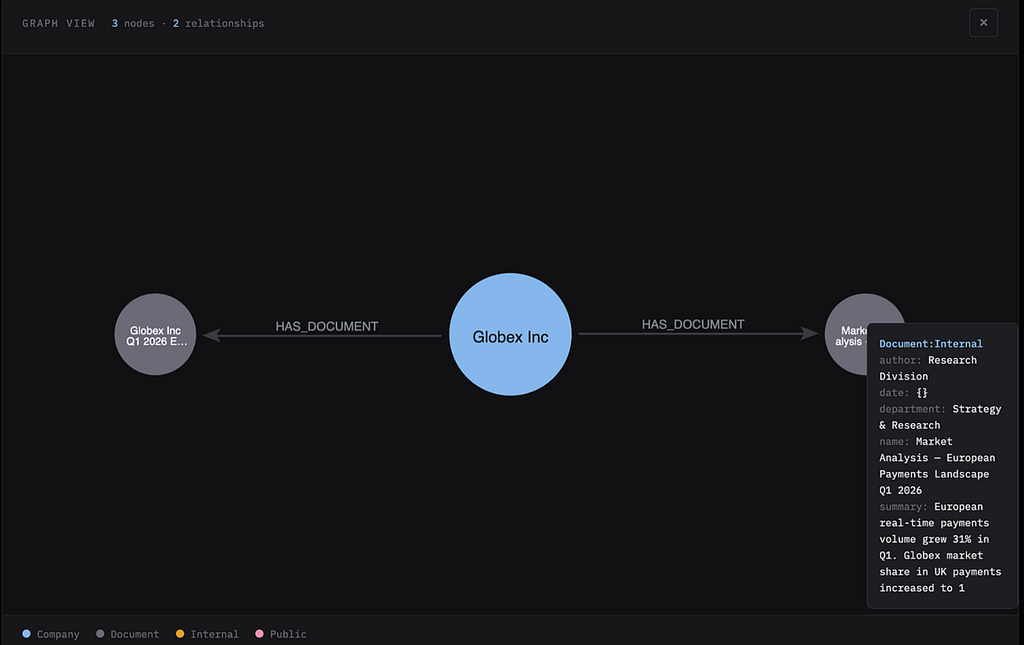
The user can trace and explain which documents from the knowledge graph informed the LLM’s answer, and more importantly, they can verify that nothing outside their access tier leaked into the response.
Scenario 3: External Reader (Public access only)
Logging in as external.reader, only the documents labelled with Public are retrieved.
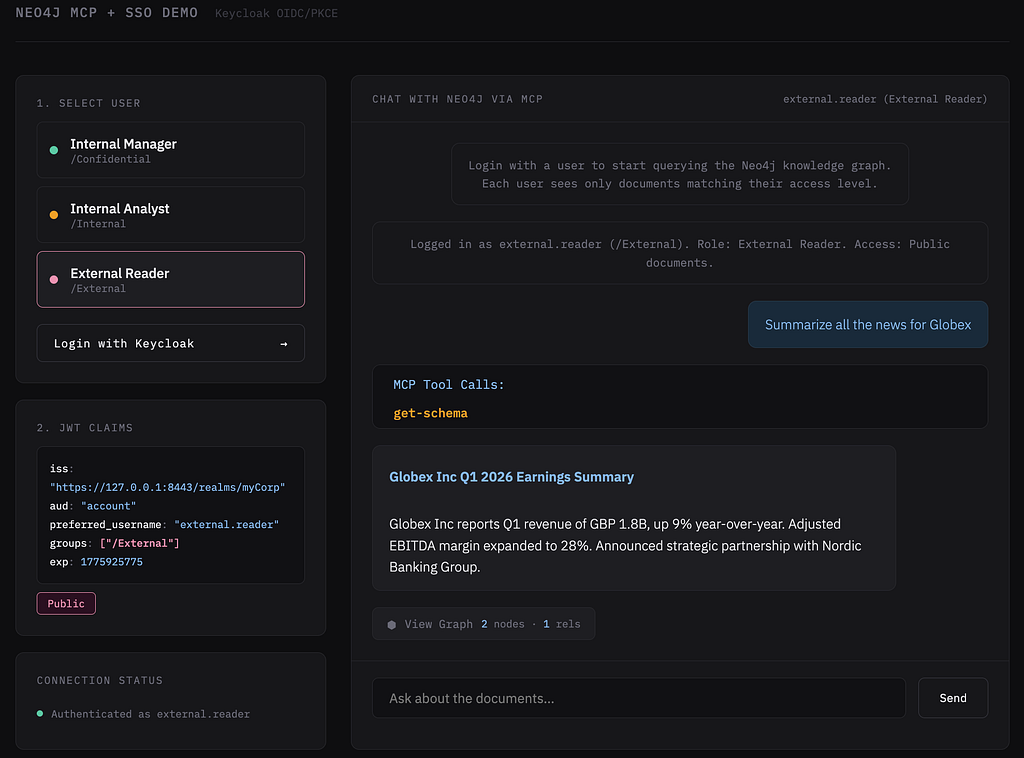
The external user can only see public documents with minimal properties. The property-level restrictions are layered on top of the label restrictions for defence in depth
Takeaway & Conclusion
Every enterprise adopting MCP will eventually face the same question: who is this request actually from, and what are they allowed to see?
You can’t build zero trust on top of static service accounts. The real power of connecting LLMs to enterprise data only works if you maintain data governance and sovereignty while doing it.
Note: this approach requires your frontend client to delegate tokens to the MCP server. At the time of writing, most off-the-shelf AI interfaces don’t support this natively, so you’ll likely need to build your custom frontend.
The full Docker Compose setup, Keycloak realm export, FastAPI backend, demo UI, and TLS configuration are available on GitHub.
How are you currently governing access in your AI workflows? Let me know in the comments or connect with me via email or on LinkedIn.
From Identity Vacuum to Identity Driven Access Control: Securing LLM Agents in the Enterprise was originally published in Neo4j Developer Blog on Medium, where people are continuing the conversation by highlighting and responding to this story.
Share Article



Explore
Related Articles

Connected Intelligence: Accelerating Enterprise AI throughout the cloud ecosystem