Agentic AI vs. Generative AI: Why Agents Need Memory, Context, and Guardrails

Senior Tech Content & Research Writer, Redpoint
22 min read

Generative AI is strong at producing content like text and code, but in real workflows, a human still has to plan the next steps, call tools, update systems, and verify outcomes.
Agentic AI brings that execution into the system. An agentic system can plan steps, use tools, observe results, and keep going until the system reaches a goal or a safe stopping point.
The definitions sound straightforward, but the gap between generative output and goal completion becomes obvious in real systems. In practice, the biggest bottleneck in building reliable multi-step agents is context. They need the right data, tool options, constraints, and memory at each step, and weak context leads to drift and repeated work. Agentic AI is gaining momentum because models are improving at structured outputs and tool use, the tooling ecosystem makes integration easier, and teams want automation that can complete workflows end to end.
This guide explains the differences between generative AI and agentic AI, when to use which, and how you can transition from using generative AI to developing agentic systems.
More in this guide:
What Is Generative AI?
Generative AI (GenAI) refers to models that can generate new content based on patterns learned from training data. In practice, the term often refers to large language models (LLMs) that produce text, code, and structured outputs, as well as related models that generate images, audio, or video.
How GenAI Works
GenAI applications combine a trained model with runtime inputs such as a user prompt and any additional context your app provides. Below, we cover what developers need to understand first: what the underlying model is, how it’s trained, and what happens when you call it in production.
Transformers and Foundation Models
Most modern LLMs are built on transformer architectures. Transformers use attention mechanisms to weigh relationships between tokens so the model can produce coherent output across long sequences. Rather than understanding meaning, the model predicts the next token using statistical patterns learned from training data and the context provided at runtime.
Training vs. Inference
Most production controls happen when the model runs, such as prompt design, retrieval, tool use, and output settings. Training defines the model’s baseline capabilities and limits. Understanding the difference comes down to when model behavior is established versus when it’s applied in a real application.
- Training: The model learns patterns from large datasets. The training process shapes the model’s parameters so the model can generalize across many prompts.
- Inference: The model uses a prompt, plus any additional context you supply, to generate an output token by token.
Developers usually have control at inference time through prompts, retrieved context (RAG), tool calls, and output constraints.
Prompt-to-Response Interaction Model
A typical GenAI interaction is reactive:
- A user provides a prompt.
- The model produces a response.
- The user asks a follow-up, optionally adding more context.
Even when teams add retrieval, the interaction pattern often stays prompt-driven: ask, retrieve, answer.
The GenAI Sweet Spot
GenAI can be very effective when the task is primarily about producing or transforming information:
- Understanding natural language: Summarization, translation, classification, and extraction are strong fits because the output is text that a human or system can review before using.
- Text and media generation: Drafting documents, generating images, and creating first-pass templates can speed up delivery, especially when you pair generation with tests and reviews.
- Embeddings and semantic search: Embeddings turn text into vectors so you can retrieve semantically similar content, which is often the first step in a retrieval-augmented generation (RAG) pipeline.
Where GenAI Loses Its Edge
Limitations become more visible when a workflow needs repeatable, dependable execution:
- Stateless interactions: A language model doesn’t retain memory across sessions unless the application stores and reinjects state.
- No intrinsic goals or autonomy: A prompt-response model doesn’t own a goal. A prompt-response model waits for the next prompt.
- Limited multi-step reasoning: Multi-step plans can drift because the model can lose context, mishandle intermediate results, or compound earlier errors.
- Hallucinations caused by lack of grounding: When the model lacks access to authoritative, up-to-date information, it can generate plausible but incorrect details.
- Fragility in complex workflows: As steps increase, prompt-only workflows often require brittle prompt tuning and manual exception handling.
What Is Agentic AI?
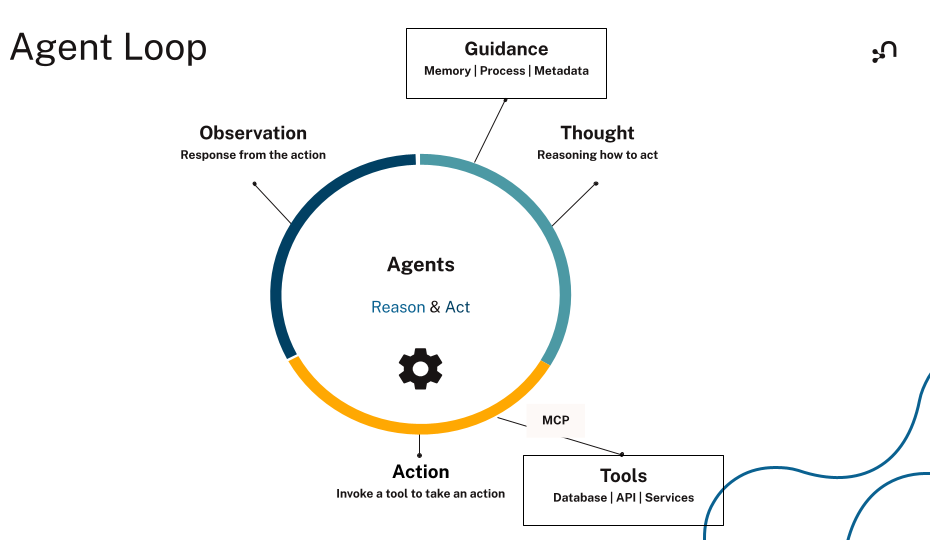
Think of agentic AI as software that can pursue a goal through a loop: plan steps, use tools, observe results, and iterate until the system reaches the goal or the system reaches a safe stopping point. It’s an architecture that uses models inside a broader execution system with memory, tools, and guardrails.
What Makes a System Agentic?
Most implementation systems share similar traits:
- Goal-driven behavior: The system optimizes for completing an outcome instead of only generating a response.
- Autonomy and persistence: The system can keep working across steps and across time, within defined boundaries.
- Planning and execution: The system can break work into steps, choose tools, run actions, and track progress.
- Feedback loops and adaptation: The system updates a plan based on tool outputs and changing conditions.
- Awareness of environment and state: The system can incorporate external state such as policies, entitlements, inventory, incident status, or conversation history.
AI Agents vs. Agentic AI
While an AI agent is the building block, agentic AI is the system that coordinates one or more agents, tools, and shared state to complete work reliably. In practice, the system is where most of the engineering happens — think tool permissions, state management, retrieval quality, and stop conditions.
Core Components of an AI Agent
If you want a system to run diagnostics, update a ticket, and confirm recovery, you need more than a good prompt. You need a few concrete pieces that work together so the model can act and stay consistent at every step.
Core components usually include the areas below, each of which you’ll implement and wire together in your application.
LLM as the Reasoning Engine
The language model, which is the GenAI component inside an agentic system, interprets the goal, proposes a plan, decides which tool to use next, and synthesizes results into the next action or final output.
Tools for Execution
Tools can include retrieval functions, database queries, ticketing actions, deployment commands, or business APIs. Tooling turns language into actions.
Memory Layers
Agent systems commonly separate memory into at least two layers:
- Short-term memory (working memory): Session context, intermediate steps, tool outputs, and current constraints
- Long-term memory (durable state): Facts about users, systems, tasks, policies, and outcomes that need to persist across sessions
Observing and Improving
A production agent usually needs mechanisms for observation and feedback: logging tool calls, recording what happened, and capturing outcomes that can improve future behavior.
Agentic AI vs. GenAI: Differences That Matter in Practice
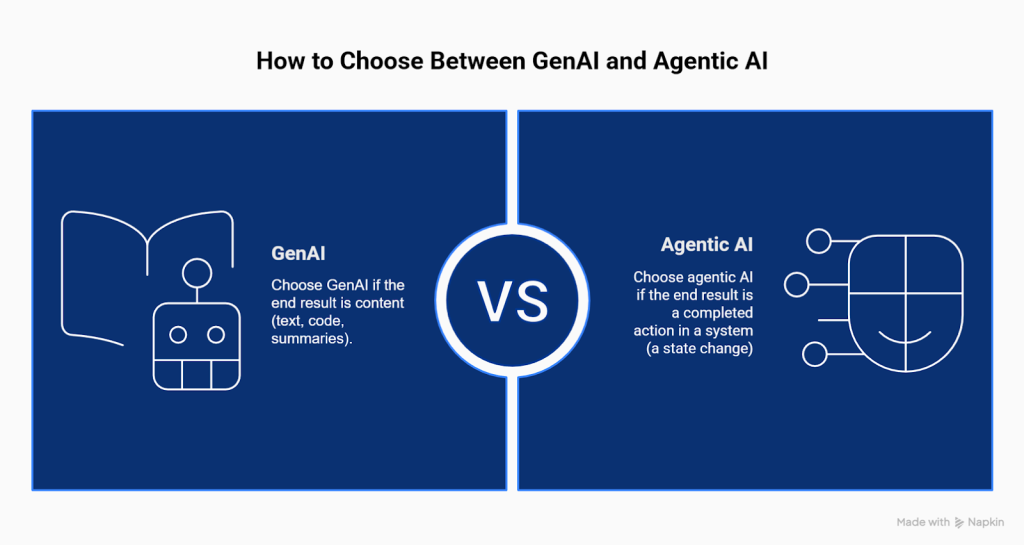
The fastest way to separate GenAI from agentic AI is to focus on what success means for the workflow you want your system to complete. For GenAI, success often means producing a good response. In agentic AI, it’s about completing the goal safely, using tools and state.
| Dimension | GenAI | Agentic AI |
| Primary Output | Content (text, code, summaries) | Goal completion (actions plus outcomes) |
| Interaction Pattern | Reactive prompt-response | Goal-driven loop with planning and follow-through |
| State | Usually stateless unless the app adds memory | Stateful by design (shared state and memory are central) |
| Reasoning | Often single-step or loosely multi-step | Explicit multi-step planning with checks and iteration |
| Tool Use | Optional and often limited | Essential; tools are part of normal operation |
| Context | Prompt plus context window, sometimes with retrieved text | Environment-aware context (memory, policies, entities, relationships, tool results) |
How to decide which approach to use: Use GenAI when the last step is a piece of content. Use agentic AI when the last step is a state change in a system.
Here are some examples:
- GenAI: Draft a support reply, summarize an incident postmortem, and generate a SQL query template
- Agentic AI: Open and update a ticket, run diagnostics, apply a safe remediation step, and confirm that the system recovered
Agentic AI Still Relies on GenAI — Here’s Why
Most agentic systems still use GenAI inside the system:
- The LLM interprets user intent and intermediate results.
- The LLM generates plans, tool calls, and structured outputs.
- The LLM summarizes outcomes for humans.
Agentic AI builds on GenAI, then adds the system elements that enable goal execution.
Agentic AI Requires Orchestration, Not Just Prompting
A prompt can describe a workflow, but can’t reliably enforce state transitions, tool sequencing, guardrails, retries, or stop conditions across many steps. Orchestration solves those problems by separating responsibilities:
- The orchestration layer routes steps, tracks progress, and enforces constraints.
- The memory layer stores durable state and intermediate results.
- The tool layer executes actions and returns grounded outputs.
Where GenAI Hits a Wall in Real Workflows
Many teams start with prompt-based copilots because a simple prompt-and-response demo produces convincing results, and it’s a fast way to prove value. But production workflows introduce conditions that prompt-only systems handle poorly.
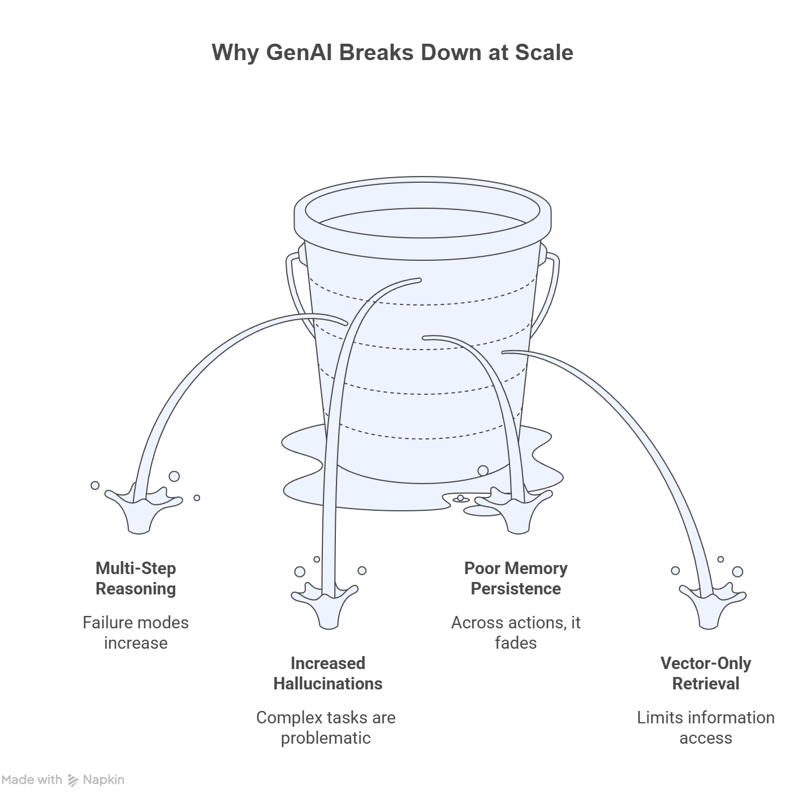
Failure Modes in Multi-Step Reasoning
Multi-step tasks introduce compounding risk:
- Each step depends on the accuracy of prior steps.
- Each step introduces new context that can crowd out earlier constraints.
- Each tool output can be misunderstood or misapplied.
Agent loops help because the system can verify intermediate outputs, detect inconsistencies, and correct course.
Increased Hallucinations in Complex Tasks
Hallucinations are harder to catch when a workflow spans many actions. A wrong assumption early in a workflow can influence downstream tool calls and final output. Grounded retrieval and durable state reduce that risk.
Poor Memory Persistence Across Interactions
Most meaningful tasks require continuity:
- A customer issue stays open across sessions.
- An incident investigation evolves as new evidence arrives.
- A procurement workflow spans approvals, policies, and vendor constraints.
A stateless chat history isn’t a durable memory system. Durable memory requires storage and structured retrieval the agent can query.
The Limits of Vector-Only Retrieval
Vector search is useful for finding semantically similar text. Vector-only RAG often retrieves isolated text fragments and can miss the context that connects those fragments. This makes multi-hop questions harder and can reduce explainability because vector retrieval doesn’t naturally show why a specific chunk was selected.
Why Real Workflows Push Teams Beyond GenAI Answers
In real systems, a correct explanation is not the end goal. The system often needs to choose a next step, apply it through a tool, and confirm the result under policy and permission constraints. That’s why teams move from generative assistants to agentic workflows with orchestration, tool use, and durable state.
Workflows also depend on facts that have to stay consistent across steps, such as service ownership, dependencies, entitlements, and change history. When that state is missing or hard to retrieve, the system drifts, repeats work, or takes the wrong action.
Move beyond prompt-only behavior by adding:
- A planning step that breaks work into actions the system can verify
- Tool calls that are permissioned, logged, and bounded by safety rules
- A durable state layer for tasks, decisions, and results across steps
4 Real-World Use Cases of Agentic AI Systems
The easiest way to make agentic AI concrete is to look at workflows where a system has to actually do the work and not just explain it. In each example below, the system pulls inputs from systems of record, uses tools that can change state, and checks whether the workflow is complete or needs escalation.
1. Support Triage That Resolves Common Issues End to End
A support workflow becomes agentic when the system can progress the case instead of only drafting a reply. A practical example is pulling customer context, confirming entitlements, applying a known fix or policy, and updating the ticket so the next human doesn’t repeat the same checks.
Typical tools and data sources:
- CRM for customer profile and plan details
- Knowledge base for policies and known issues
- Ticketing system for status, owner, and history
- Billing or order management for refunds and replacements
Completion checks:
- Ticket status reflects the true state of the work.
- Resolution summary is saved to the case.
- Required downstream action is initiated, when applicable.
2. Incident Response That Follows a Runbook and Proves Recovery
Incident response becomes agentic when the system can correlate signals, decide the next safe step, take an action, and keep verifying until the service is stable. A typical pattern is gathering telemetry, mapping the alert to the owning service and dependencies, running a scoped remediation step, and rechecking signals to confirm recovery.
Typical tools and data sources:
- Observability systems for logs, traces, and metrics
- Service catalog or configuration management database (CMDB) for ownership and dependencies
- Runbook automation for safe operational actions
- Ticket routing for assignment and escalation
Completion checks:
- Severity and ownership are set correctly.
- Evidence and actions are recorded for audit and postmortem.
- Recovery signal is verified, or the case is escalated.
3. Supply Chain Exception Handling That Traces Impact and Triggers Mitigation
Supply chain workflows become agentic when the system can detect a disruption signal and trace the impact across products, regions, and commitments. The goal is a mitigation path the system can initiate, such as rerouting an order, sourcing an alternative supplier, or creating an approval request.
Typical tools and data sources:
- ERP and inventory for stock, orders, and commitments
- Supplier feeds for risk signals and status changes
- Procurement workflows for sourcing and approvals
- Logistics systems for routing and fulfillment options
Completion checks:
- Impact map is created and stored.
- Mitigation option includes tradeoffs and constraints.
- Action is initiated, or an approval request is created.
4. Fraud Investigation That Connects Evidence and Moves a Case Forward
Fraud workflows become agentic when the system can assemble evidence across entities, connect suspicious relationships, and drive the case to a clear next step. That next step might be escalating to an investigator, requesting step-up verification, or freezing a transaction when policy thresholds are met.
Typical tools and data sources:
- Transaction and event data for behavioral signals
- Identity verification for user and device checks
- Case management for evidence capture and workflow state
- Notification systems for customer outreach and alerts
Completion checks:
- Evidence trail is stored with supporting context.
- Risk assessment aligns with policy thresholds.
- Next action is recorded with an audit-friendly rationale.
Why These Use Cases Matter for Developers
These workflows force the design questions agent demos avoid: which tools the system can call, what state has to persist between steps, what counts as “done,” and when the system has to stop and hand off to a human.
Getting clear answers matters because the answers determine reliability and safety in production. They define what the system is allowed to do, how the system prevents repeat work or contradictions, and how the system avoids turning a small mistake into a cascading failure.
How Knowledge Graphs Power Agentic AI
Agentic workflows don’t fail because the model can’t write a good response — they fail because the system can’t keep the right context, constraints, and history available as the work unfolds across tools and time. Context is the critical factor in making agents reliable.
In practice, agents need context that supports decisions across time:
- Entities that stay stable (users, services, products, policies)
- Relationships that drive constraints (ownership, dependency, access, approvals)
- History that explains decisions (actions taken, outcomes)
- State that persists across sessions (open tasks, escalations, preferences)
A prompt window isn’t designed to store and query a connected state. When the system relies on unstructured text alone, the model has to infer relationships and fill in missing details.

Why Knowledge Graphs Map Well to Agentic Work
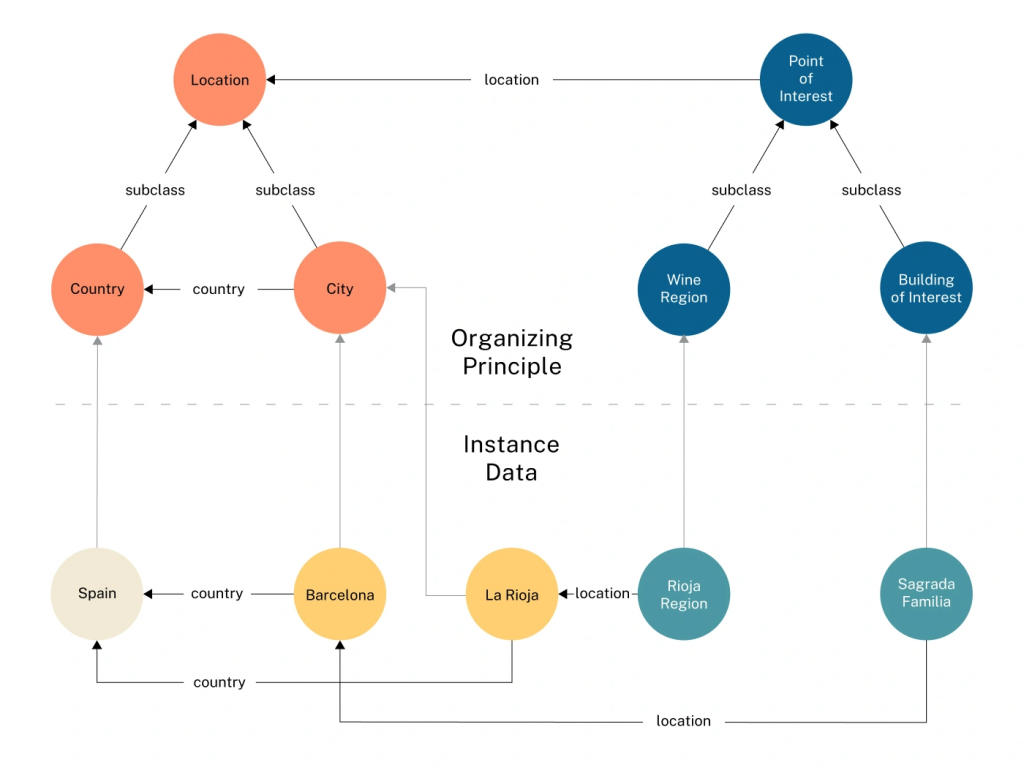
Knowledge graphs are structured representations of entities and their relationships. They act as a shared map of entities, relationships, and lineage that makes agent loops more reliable and easier to audit because the system can retrieve connected facts and show how those facts relate.
Knowledge graphs help in concrete ways:
- Relationships are explicit: A graph can represent “service A depends on service B” directly, instead of hoping similarity search retrieves both items and the model infers the dependency.
- Multi-hop retrieval becomes natural: Agents often need “follow the links” context, such as “customer to entitlement to service to deployment to incident.” Graph traversal supports that pattern.
- The system can show its work: Graph retrieval can return related entities and the paths that connect them, which supports debugging and auditing.
- Guardrails can live in the data layer: If your graph store supports role-based access control, the agent can be limited to the data and operations that match its permissions.
A Concrete Example Where Relationships Change the Answer
Consider a question that sounds simple but needs connected context: “Could this service outage be related to a recent login system change for a specific group of users?”
To answer reliably, the system has to connect customers, entitlements, services, deployments, and incidents. That’s a relationship problem. A knowledge graph can store those connections, along with lineage and policy, so retrieval returns the facts along with the context that makes the facts usable.
Graphs as Long-Term Memory for Agents
A knowledge graph can act as a context layer that evolves as tasks change and data updates in real time. Long-term memory stays queryable even as the world changes.
Examples of durable, queryable agent memory:
- Persistent user preferences and permissions
- Task state and outcomes
- Policies and constraints that must be enforced
- Entity histories that explain why a decision was made
Practical Retrieval Pattern: GraphRAG for Connected Context
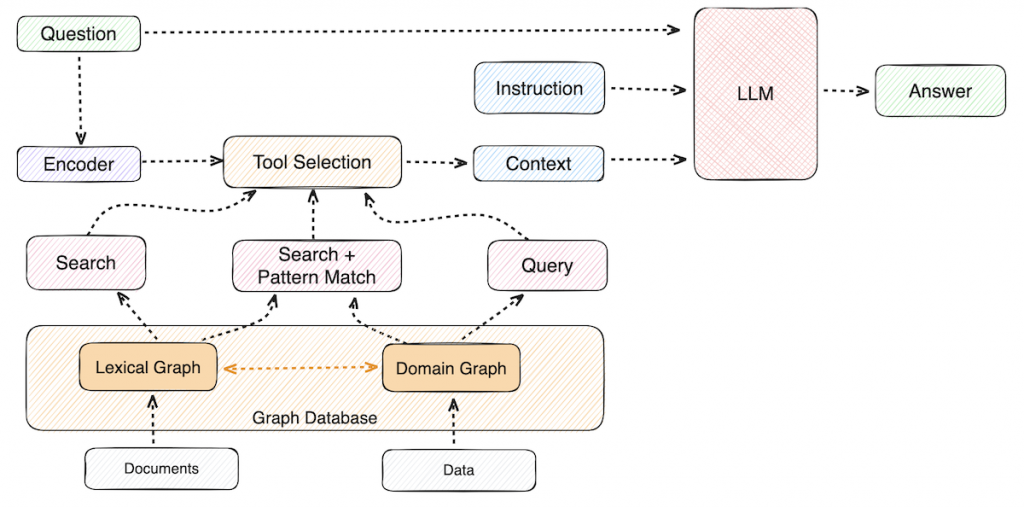
Retrieval improves when it returns connected context and not just similar text. GraphRAG does that by using a knowledge graph to expand from an initial match into the relevant neighbors and relationships.
Agents often need the context that connects who owns a service, which deployment introduced a change, which customers are affected, and which policy limits the next action. GraphRAG helps by retrieving not only relevant passages but also the relationships that make those passages usable in a workflow.
A practical GraphRAG loop often looks like this:
- Use embeddings to find a starting point (a document chunk or an entity)
- Traverse relationships to gather connected facts, constraints, and neighbors
- Return grounded context that includes passages and relationship context
- Generate an answer that references the retrieved evidence
A GraphRAG pipeline can reduce multi-step drift and make debugging easier because the system can surface the retrieval path that supports each output.
Why Neo4j for Agentic AI
From a developer perspective, the goal isn’t to create a database for agents but rather a structured context and memory backbone agents can query, evolve, and reuse. Neo4j’s AuraDB Enterprise Edition adds fine-grained access control and operational logging that can support governance and auditability, which is important when agents can take actions.
Practically, this means:
- Graph-native modeling of entities and relationships that matter for decisions
- Fast multi-hop traversal for connected context retrieval
- GraphRAG patterns that combine vector search with relationship-based expansion
- A data layer that supports explainability, auditing, and access control
How to Transition From GenAI to Agentic AI
Moving from a prompt-driven app to an agentic workflow usually happens in stages. The section below lays out a practical path, so you can add retrieval, tools, and memory without turning the system into a fragile tangle of prompts.
The Typical Evolution Path for AI Applications
Many teams evolve through a pattern that looks like this:
- Prompt-based LLM applications
You start with a prompt, a response, and some prompt tuning.
Good for drafting, summarization, internal copilots, and low-risk text workflows. - Retrieval-augmented generation (RAG)
You add retrieval so the model can answer based on your data.
Good for documentation, Q&A, policy assistants, and support chat that needs grounding. - GraphRAG (knowledge graph-based RAG)
You add structured retrieval and connected context so the system can answer multi-hop questions and trace evidence.
Good for workflows that depend on relationships, such as dependencies, entitlements, ownership, lineage, root cause, and governance. - Tool-using agents
You add tool use, tool selection, and a loop that can take actions.
Good for automations that call APIs, run checks, update tickets, and perform tasks. - Goal-driven agentic systems
You coordinate multiple tools and sometimes multiple agents around a shared goal and shared state.
Good for end-to-end workflows that need planning, follow-through, and repeatability.
The Architectural Mindset Shift That’s Needed
The jump to agentic workflows is less about writing a better prompt and more about system design. The subsections below highlight what has to change when the system must take actions and stay consistent over time:
- From prompts to systems: A production agentic system needs explicit components, including orchestration, tools, memory, guardrails, and evaluation.
- From outputs to outcomes: A helpful response isn’t the same as a completed workflow. Outcome-driven design requires success criteria such as done-when checks, retries, and safe stops.
- From stateless to stateful architectures: A stateful design needs durable memory and structured retrieval. That state can live in a knowledge graph the agent reads and writes.
A Practical Transition Checklist for Developers
Use this checklist to move from agent demo to agent system:
- Pick one workflow with clear boundaries: Define start signals, stop conditions, and a safe escalation path.
- Define tools and permissions before writing prompts: Decide which APIs the agent can call, and which actions require a human approval step.
- Design memory explicitly: Separate working memory (session) from long-term memory (durable state). Store durable state in a form you can query, audit, and update.
- Add structured retrieval where relationships matter: If the workflow depends on dependencies, lineage, ownership, or policy constraints, add a knowledge graph and GraphRAG patterns.
- Instrument everything: Log prompts, tool calls, tool outputs, and state changes so your team can debug and evaluate behavior.
- Evaluate behavior at the task level: Measure task completion, error recovery, grounding quality, and safety compliance.
Mistakes Teams Make When Building Agents
Agent projects usually run into the same pitfalls, especially when a team tries to solve system problems with prompt tuning alone.
Over-Reliance on Prompt Tuning
What happens: The prompt grows until the prompt becomes brittle and hard to maintain.
What to do instead: Move constraints, state, and policies into structured data and retrieval. Keep prompts focused on the current step.
Treating Agents Like Chatbots
What happens: The system can talk about steps, but doesn’t execute steps.
What to do instead: Define tool contracts, success criteria, and a loop that uses tools, checks results, and stops safely.
Ignoring Memory and Context Design
What happens: The system forgets earlier decisions and repeats work or contradicts itself.
What to do instead: Treat memory as a first-class part of the architecture, with a durable store for entities, relationships, and outcomes.
Neo4j’s context engineering guide covers practical techniques for designing, storing, and retrieving the context agents need at each step.
Make AI Useful Beyond the Answer
GenAI is a powerful foundation layer. It can write, summarize, translate, and help developers move faster. Agentic AI is the execution layer that makes AI systems complete work, plan steps, use tools, track state, and iterate until the system reaches a goal.
The key differentiator for dependable agentic behavior is structured context that helps an agent retrieve the right facts, reason over relationships, and explain why the system took an action. Knowledge graphs and GraphRAG patterns are a practical way to provide that structured context and durable memory.
For developers, the next step isn’t a bigger prompt but an architecture that treats orchestration, tools, and memory as first-class parts of the system, with a knowledge graph that turns data into connected, usable context.
Essential GraphRAG
Unlock the full potential of RAG with knowledge graphs. Get the definitive guide from Manning, free for a limited time.

Agentic AI vs. Generative AI FAQs
Generative AI focuses on generating content in response to a prompt. Agentic AI focuses on achieving a goal through a loop that plans steps, uses tools, checks results, and continues until completion or a safe stop.
A practical rule: Use GenAI when the main job is creating or transforming information; use agentic AI when the job requires follow-through across tools, state, and multi-step execution.
ChatGPT is primarily a GenAI interface because the core behavior is prompt-to-response generation.
A team can incorporate a ChatGPT-class model into an agentic system by adding tool access, orchestration, and durable memory. The difference comes from the surrounding system design, not only the model.
A common educational framework describes four types of AI by sophistication:
• Reactive machines: Systems that respond to inputs without memory
• Limited memory: Systems that use past data or recent history to improve decisions
• Theory of mind: A proposed future class of systems that can model beliefs and intentions
• Self-aware AI: A hypothetical future class with self-awareness
Most production AI systems today fall into the first two categories.
Examples of agentic AI include:
• A customer support system that can diagnose an issue, execute account actions, and close a ticket
• An incident response agent that correlates logs, creates a ticket, and runs safe remediation steps
• A coding agent that can propose a fix, run tests, and open a pull request for review
Agentic AI examples share the same pattern: tools plus memory plus an execution loop that drives toward a defined outcome.
Share Article



Explore
Related Articles

Why Healthcare CIOs Can’t Afford to Scale AI Without a Knowledge Graph Foundation