GRAPH TYPE – Schema enforcement made easy (Preview)

Senior Product Manager, Core Database, Neo4j
9 min read
Neo4j databases are famous for being schema-optional and developers love the flexibility this gives them to get up and running fast. But eventually, it’s time to go to production… and you need rules. You need structure. You need to enforce data quality, like ensuring entities never exist without their mandatory properties, and that attributes are always validated as per the enforced data model.
For years, enforcing this structure meant constraints and lots of them. You had to piecemeal your schema together, one specific rule at a time.
Neo4j 2026.02 introduces GRAPH TYPE as a preview feature: a way to define your schema holistically. Instead of managing dozens of isolated rules, you can now declare your database’s data model like defining nodes, multi-label implications, and relationship connections, all in a single, readable structure.
Preview: Available in Neo4j v2026.02 as a preview feature of Cypher 25 across Enterprise Edition, Infinigraph Edition and all tiers of Neo4j Aura. Preview features are intended for evaluation and feedback and are not supported for production use. Syntax and capabilities may change between preview and GA. Full documentation will be published soon.
The Problem: Managing the constraint piecemeal challenge
Before GRAPH TYPE, enforcing a strict data model required piecing together individual constraints. This approach is powerful but can become cumbersome and verbose as your model grows.
The Old Way (Individual Constraints) To enforce this previously, you had to run separate commands for every single rule. It separates the definition of the entity from its validation.
This works, but it scatters your schema logic across the database metadata.
The New Way: GRAPH TYPE
Instead of managing dozens of isolated rules, GRAPH TYPE allows you to simply declare the “enforced data model” of your universe. You describe what the data should look like the nodes, their properties, and how they connect and the database automatically creates the necessary constraints to enforce it.
The current preview supports Open GRAPH TYPE, meaning the schema validates what you define but allows you to add extra properties or labels as required by your application needs.
We will use four key commands to manage the lifecycle of this enforced data model: SET to create it, ADD to expand it, ALTER to modify it, and DROP to remove parts of it.
Here is how to manage the lifecycle of your enforced data model using SET, ADD, ALTER, and DROP.
Chapter 1: James T. Kirk and the Enterprise (SET)
The SET command defines the baseline. It is useful when initializing a database or performing a full schema reset. When there is a database created in 2025.02, it is considered to have an empty data model (GRAPH TYPE) and the GRAPH TYPE can be altered as required.
We begin with a clean slate. We need to define the core of our fleet.
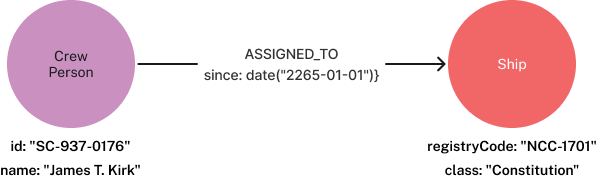
- Crew: Every Crew member implies they are a Person. They must have an id (Key) and a name.
- Ship: Every Ship must have a registryCode (Key) and a class.
- Assignments: Crew members are assigned to Ships.
We use ALTER CURRENT GRAPH TYPE SET to declare this baseline structure.
ALTER CURRENT GRAPH TYPE SET {
  // Define Crew.
  // The '=> :Person' syntax enforces that every Crew node MUST also be a Person.
  (c:Crew => :Person {
    id   :: STRING,
    name :: STRING NOT NULL
  }) REQUIRE c.id IS KEY,

  // Define Starships.
  (s:Ship => {
    registryCode :: STRING,
    class        :: STRING NOT NULL
  }) REQUIRE s.registryCode IS KEY,

  // Define the Assignment relationship.
  // This explicitly restricts 'ASSIGNED_TO' to only connect Crew to Ships.
  (:Crew)-[:ASSIGNED_TO => { since :: DATE }]->(:Ship)
}
New capabilities: GRAPH TYPE debuts new schema capabilities in Neo4j.
- Relationships can have the labels set on their start and end nodes enforced
- A node with one label set can be required to have another label set
The impact: by running this command, the database automatically generated 12 Constraints to protect your data, including property types, node keys, and source/target validation for the relationship.
Let’s test the enforced schema:
// ✅ SUCCESS: Kirk takes command
CREATE (enterprise:Ship {registryCode: "NCC-1701", class: "Constitution"});
CREATE (kirk:Crew:Person {id: "SC-937–0176", name: "James T. Kirk"});
MATCH (c:Crew {id: "SC-937–0176"}), (s:Ship {registryCode: "NCC-1701"})
CREATE (c)-[:ASSIGNED_TO {since: date("2265–01–01")}]->(s);

// ❌ FAILURE: The Anomaly
// Fails Label Implication: Created as :Crew but missing :Person
CREATE (:Crew {id: "SC-000", name: "Unknown"});

// ❌ FAILURE: Relationship Violation
// Fails Source/Target: A Ship cannot be ASSIGNED_TO another Ship
MATCH (s:Ship {registryCode: "NCC-1701"})
CREATE (s)-[:ASSIGNED_TO {since: date()}]->(s);
Chapter 2: First Contact (ADD)
The universe is expanding. We have discovered Planets. We need to add them to our registry without disturbing the existing fleet records.
Planets are complex entities; they are both a CelestialBody and a Location (a multi-label implication).
ALTER CURRENT GRAPH TYPE ADD {
// Define Planet.
// Enforces that every Planet implies BOTH CelestialBody AND Location.
(p:Planet => :CelestialBody&Location {
name :: STRING,
coordinates :: POINT NOT NULL
}) REQUIRE p.name IS UNIQUE,
// Ships traverse to Planets.
(:Ship)-[:BOLDLY_GOES_TO =>]->(:Planet)
}
The impact: By running this single command, the database automatically generated additional 8 Constraints to protect your data.
The Data:
// ✅ SUCCESS: Charting Vulcan
// We must add all implied labels (:CelestialBody:Location) or the schema rejects it.
CREATE (vulcan:Planet:CelestialBody:Location {
name: "Vulcan",
coordinates: point({x: 2.3, y: 4.5, z: 1.1})
});
// Ship travels to Planet
MATCH (s:Ship {registryCode: "NCC-1701"}), (p:Planet {name: "Vulcan"})
CREATE (s)-[:BOLDLY_GOES_TO]->(p);

// ❌ FAILURE: Bad Coordinates
// Fails Property Type: 'coordinates' must be a POINT, not a String.
CREATE (:Planet:CelestialBody:Location {
name: "Earth",
coordinates: "Sector 001"
});

Chapter 3: The Bureaucracy (ALTER)
Fleet command has sent a memo. Apparently, tracking a Crew member’s name isn’t enough. We must now track their rank as an Integer (grade).
We need to update the definition of Crew.
⚠️ The catch: When using ALTER, you provide the new full definition for that element. If you leave out a property or implied label that used to be there, the schema stops enforcing it.
ALTER CURRENT GRAPH TYPE ALTER {
// We redefine Crew to add 'rank'.
// We MUST repeat 'id' and 'name' to keep them enforced.
(c:Crew => :Person {
id :: STRING,
name :: STRING NOT NULL,
rank :: INTEGER // The new property and property type enforcement
})
}
The impact: By running this command, the database automatically generates one additional Constraint to protect your data.
The migration:
// ✅ SUCCESS:
// 1. Fix existing data (Kirk needs a rank!)
MATCH (c:Crew {id: "SC-937–0176"})
SET c.rank = 6; // Captain's Grade

// 2. Create Spock
CREATE (:Crew:Person {
id: "SC-937–0177",
name: "Spock",
rank: 5 // Commander's Grade
});

// ❌ FAILURE: Invalid Data Type
// HR requires an Integer rank, not a String code.
CREATE (:Crew:Person {
id: "SC-000–000",
name: "Red Shirt",
rank: "Ensign"
});

Chapter 4: The Audit (SHOW)
A Federation auditor arrives. They want to see the schema. You don’t need to hunt down 15 different constraints. You just show them the current enforced data model.
SHOW CURRENT GRAPH TYPE
"{
(:`Crew` => :`Person` {`id` :: STRING, `name` :: STRING NOT NULL, `rank` :: INTEGER}),
(:`Planet` => :`CelestialBody`&`Location` {`coordinates` :: POINT NOT NULL, `name` :: STRING}),
(:`Ship` => {`class` :: STRING NOT NULL, `registryCode` :: STRING}),
(:`Crew` =>)-[:`ASSIGNED_TO` => {`since` :: DATE}]->(:`Ship` =>),
(:`Ship` =>)-[:`BOLDLY_GOES_TO` =>]->(:`Planet` =>),
CONSTRAINT `constraint_9b6f6d22` FOR (`n`:`Crew` =>) REQUIRE (`n`.`id`) IS KEY,
CONSTRAINT `constraint_fb3b8b63` FOR (`n`:`Planet` =>) REQUIRE (`n`.`name`) IS UNIQUE,
CONSTRAINT `constraint_23f2a288` FOR (`n`:`Ship` =>) REQUIRE (`n`.`registryCode`) IS KEY
}"
This returns a single, readable specification string of your entire data model.
Chapter 5: The Deregulation (DROP)
The BOLDLY_GOES_TO relationship proved too restrictive. The Federation wants to allow ships to traverse to any node (Space Stations, Asteroids, Anomalies), not just Planets.
We decide to drop the schema enforcement for this relationship.
ALTER CURRENT GRAPH TYPE DROP {
// Drop the strict relationship definition.
// The data remains, but the rules are gone.
()-[:BOLDLY_GOES_TO =>]->()
}
The impact: By running this command, the database automatically removes 2 Constraints.
Now, BOLDLY_GOES_TO is unregulated. You can connect a Ship to a Ship, or a Crew to a Planet using this relationship type, and the database won’t stop you.
Summary : The Strategic Advantage of Graph Types
Adopting Graph Types represents a shift from managing isolated rules to implementing a unified schema strategy.
- Consolidated schema definition: Rather than maintaining numerous disconnected constraints, GRAPH TYPE allows you to declare the entire data model in a single, coherent specification. This centralizes schema management, improving readability and maintainability.
- Advanced data integrity: This feature introduces validation capabilities that extend beyond traditional property constraints. Specifically, it enforces relationship element types are strictly defining valid source and target nodes for connections and node label implications, ensuring that specific labels (e.g., :Crew) automatically necessitate the presence of parent labels (e.g., :Person).
- Flexible governance: By utilizing open GRAPH TYPE, the system establishes a rigorous validation layer for defined entities without sacrificing the schema-flexible nature of the graph. This ensures core data quality while permitting the ad-hoc evolution of the data model.
Feedback
Ready to build your world? GRAPH TYPE is available in the Public Preview of Neo4j 2026.02 and in Neo4j Aura. Your experience in the field is vital to us. Whether it is a success story or a specific blocker, please share your findings at graphtype@neo4j.com. Feedback on your use case helps us to ensure the next release meets your needs.
Graph Type Documentation can be found here
GRAPH TYPE -Schema enforcement made easy (Preview) was originally published in Neo4j Developer Blog on Medium, where people are continuing the conversation by highlighting and responding to this story.
Share Article



Explore
Related Articles
Hey LLM, you’re using OPTIONAL MATCH wrong. Here’s the Cypher that actually works.