Vector search with filters in Neo4j v2026.01 (Preview)

Principal Database Product Manager at Neo4j
8 min read

Vector search is great at answering “what’s most similar?” — but real applications almost never want “the nearest neighbors across everything.”
They want the nearest neighbors the user is allowed to see, in the right language, from the right tenant, within a time window, in stock, not archived, or matching a category.
Neo4j v2026.01 introduces Vector search with filters as a preview feature: you can apply predicates inside the vector index at query time so the index behaves like it only contains vectors that match your criteria. This helps you keep latency low and results relevant without relying on over-fetching or large candidate scans and post-filtering.
Preview: Available in Neo4j v2026.01 as a preview feature of Cypher 25 across Enterprise Edition, Community Edition and all tiers of Neo4j Aura. Preview features are intended for evaluation and feedback and are not supported for production use. GA is targeted for Neo4j v2026.02. Full documentation will be published soon.
And to complement vector search with filters, we’re also releasing native Cypher syntax for vector search that streamlines query authoring, makes advanced search native inside Cypher, removes the need for procedure calls, and prepares the database for more advanced AI and GraphRAG features.
Three ways to filter vector search results
There are now three distinct patterns you can use, depending on what you’re filtering on and what you need to guarantee:
- NEW: Vector search with filters (In-index filtering)
Apply a predicate inside the vector index during search execution. - Cypher after vector search (Post-filtering)
Run vector search first (with or without filters), then refine/expand results in Cypher. - Cypher before vector search (Pre-filtering)
Use Cypher to define a candidate subgraph, then score only those candidates by vector similarity.
As a rule of thumb:
- Use in-index filtering when the filter is for simple properties and you need consistent low-latency retrieval.
- Use post-filtering when inclusion depends on richer graph logic or you want to expand results via traversal.
- Use pre-filtering when you can restrictively define a candidate set and want exact scoring within that set.
In-index filtering can be paired with post-filtering, to get the benefits of both approaches.
1) Vector search with filters (In-index filtering)
This is ideal when the index should behave as if it only contains vectors that satisfy the filter criteria. In our testing, latency stayed low and recall accuracy stayed high across both broad (includes most of data) and narrow (excludes most of the data) filters.
The main drawback is that the filtered properties must be identified at index creation. Whereas Cypher after/before filters have the full flexibility of Cypher graph queries to compose filters based on any graph element, pattern, or property.
Creating the index
When you create a vector index, you can choose properties from the indexed node/relationship to be stored alongside each embedding as metadata. In the example below, the document’s author and published_year are included in the vector index.
CYPHER 25

CREATE VECTOR INDEX documentIndex
  IF NOT EXISTS
  FOR (document:Document)
  ON document.embedding
  WITH [document.author, document.published_year]
Querying the index
At query time, a WHERE predicate in the new SEARCH statement restricts which indexed vectors are eligible to match.
CYPHER 25

MATCH (document)
  SEARCH document IN (
    VECTOR INDEX documentIndex
    FOR $query_vec
    WHERE document.author = 'David'
    AND document.published_year >= 2020
    LIMIT $top_k
  ) SCORE AS score

RETURN document, score
The WHERE clause inside the SEARCH statement currently supports a subset of the WHERE clause under a MATCH.
2) Cypher after vector search (Post-filtering)
You can run vector search using the SEARCH command and then use Cypher to refine, validate, or expand the results before returning them. Post-filtering is especially useful when the decision to include a result depends on richer graph logic than can be expressed as metadata, or when you want to traverse the graph to bring back related entities.
Because filtering happens after vector search, properties do not need to be copied into the index, however the final result set may contain fewer than the requested k results. To compensate, the query may need to over-fetch (or re-query) to reach the desired result size.
CYPHER 25

MATCH (document)
  SEARCH document IN (
    VECTOR INDEX documentIndex
    FOR $query_vec
    LIMIT $ef_search
  ) SCORE AS score

MATCH (project:Project)<-[:WRITTEN_FOR]-(document)
      -[:WRITTEN_BY]->(author:Author)
  WHERE author.name = 'David'
    AND document.published_year >= 2020
    AND project.completed = true

RETURN document, project, author, score
  ORDER BY score DESC
  LIMIT $top_k
Note that in the query above I used $ef_search to specify the over-fetch from the vector index, and $top_k to limit the number of results returned by the query. The first SEARCH block could make use of the WHERE filter, allowing Cyper to expand and refine the results of vector search with filters.
3) Cypher before vector search (Pre-filtering)
In pre-filtering, Cypher first identifies a candidate subgraph (for example, all items the user is allowed to see). The query then ranks only those candidates by similarity to the query vector. This produces exact nearest neighbor (ENN) results over the candidate set, rather than the approximate results (ANN) typically returned from a vector index.
Pre-filtering gives you the full expressive power of graph pattern matching and can guarantee perfect recall for the candidate set. However, performance may not scale if the candidate set is very large (for example, millions of vectors), because the query may need to score many embeddings directly.
CYPHER 25

MATCH (project:Project)<-[:WRITTEN_FOR]-(document:Document)
      -[:WRITTEN_BY]->(author:Author)
  WHERE author.name = 'David'
    AND document.published_year >= 2020
    AND project.completed = true
  WITH document, project, author,
  vector.similarity.cosine(document.embedding, $query_vec) AS score

RETURN document, project, author, score
  ORDER BY score DESC
  LIMIT $top_k
Performance
To demonstrate these different performance characteristics I created a simple GraphRAG inspired data model and loaded it with 10M vectors. The next step was to devise filters that would restrict the set of vectors to various percentages of the whole data set (0.001% up to 100%), then write a query for each of the techniques above. I tested the query for Cypher after vector search twice, once without over fetching, and again with sufficient over-fetching to give a constant recall accuracy.
For example, the query examples above, when run on my data, are restricted to the same set of vectors, or about 0.1% of the total vectors.
The chart below plots query latency in ms (Y-axis) against filter selectivity (X-axis: % of vectors eligible). Each point is annotated with % recall accuracy. The main takeaways:
- Cypher before search (green) performs the best when the graph can be used to quickly narrow the vectors to a small set. The results always have a 100% recall accuracy, but as the filter broadens an exhaustive search becomes computationally too costly and latency increases.
- Cypher after search (blue) performs consistently but as the filter narrows the recall accuracy drops off as more and more results are filtered out.
- Cypher after search with over fetch (yellow) by scaling the over fetch to counteract the filter we have a consistent high-90s recall accuracy. But as the filter narrows, our over fetch grows and eventually becomes computationally too costly and latency increases.
- Vector search with filters (red) by filtering on the properties inside the index, the HNSW algorithm can quickly filter out vectors saving costly comparisons, and expand the search intelligently only in the most promising areas. The latency was consistently low and the recall accuracy high.
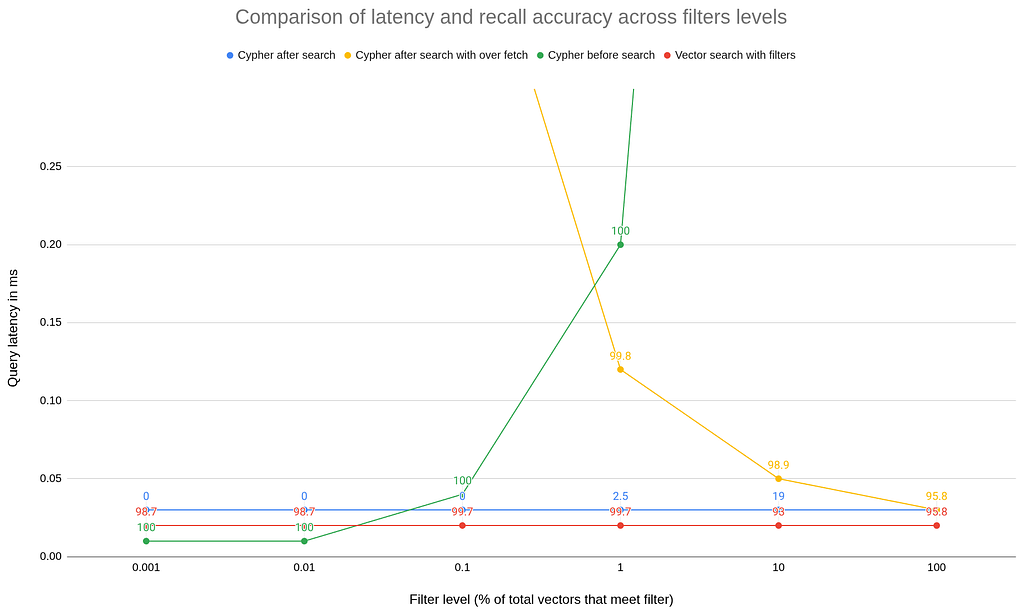
All techniques were tested on the same machine and dataset (10M vectors), using the same index configuration and query parameters. Results shown are mean latency; recall accuracy is measured against an exact baseline for the filtered candidate set. The cache was warmed and tests were repeated 10 times.
Feedback
We’ve been shipping fast lately, and this feature is part of a bigger push to make graph + search a great foundation for modern AI and RAG-style workloads.
If you try (or have tried) our vector search feature, I’d genuinely love to hear what you found — david.pond@neo4j.com. The most useful emails are the honest ones: what worked, what didn’t, and what you’d change. Even a short note with your use case and the biggest blocker (if you hit one) helps us prioritize the right next steps.
Vector search with filters in Neo4j v2026.01 (Preview) was originally published in Neo4j Developer Blog on Medium, where people are continuing the conversation by highlighting and responding to this story.
Share Article



Explore
Related Articles

Why Healthcare CIOs Can’t Afford to Scale AI Without a Knowledge Graph Foundation
Hey LLM, you’re using OPTIONAL MATCH wrong. Here’s the Cypher that actually works.