What Is Model Context Protocol (MCP)?

Head of Product Innovation & Developer Strategy, Neo4j
15 min read
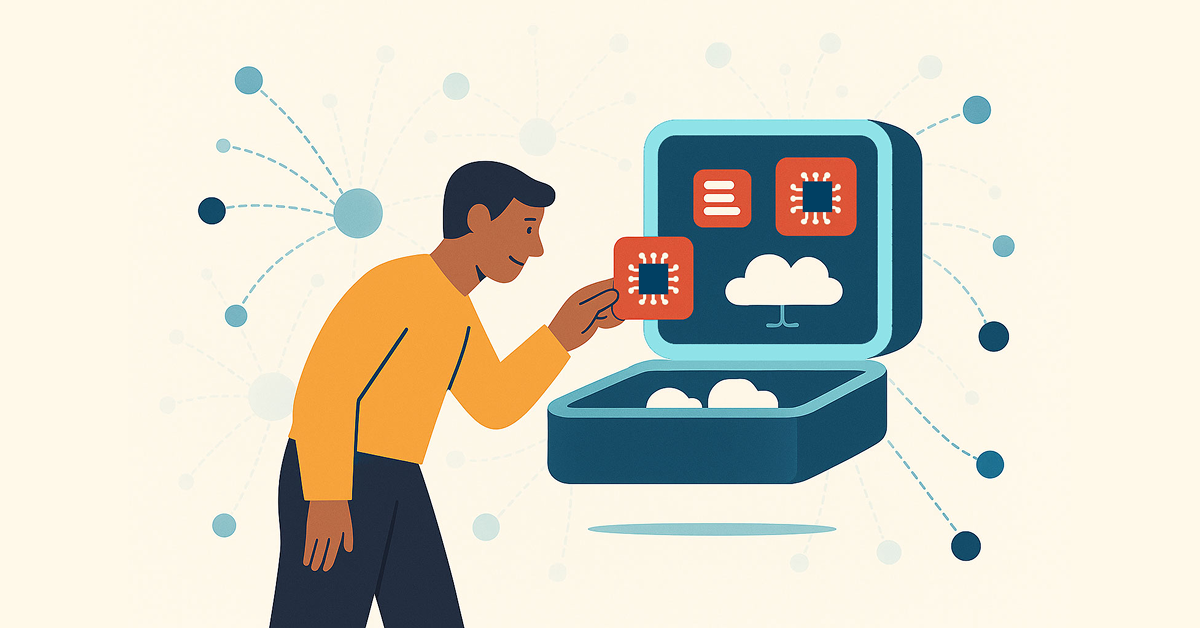
Model Context Protocol (MCP) is a universal way to plug external data sources, tools, infrastructure, and APIs into an AI model as context. MCP gives you a consistent protocol that connects AI agents with the systems they need to read information, take action, and support your workflows.
Modern GenAI applications rely on far more than model outputs. They need access to business systems, developer tools, cloud platforms, and operational data. Without a shared standard, you end up stitching together ad-hoc APIs, mixing SDKs that don’t align, and maintaining fragile interfaces that models can’t reliably use. Anthropic developed MCP to solve that problem, so you don’t have to rebuild one-off integrations every time you connect an LLM to a new service.
Instead of turning every integration into a custom job, MCP creates clarity and consistency in how agents retrieve context and take action. This shift moves GenAI from isolated model responses to richer, system-aware behavior—the kind that can support your workflows and adapt to the complexity of modern software environments.
More in this guide:
MCP’s Ecosystem Potential
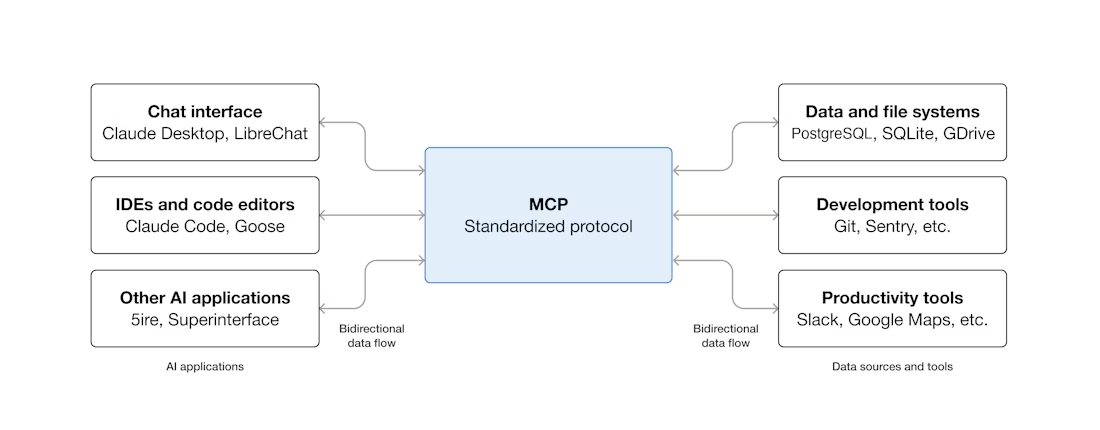
MCP unlocks a powerful ecosystem by giving AI clients and external services a universal protocol. Suppliers and consumers can build an MCP integration once and use it across any client that adheres to the standard. Instead of creating custom connectors for every model, IDE, or agent framework, you expose your capabilities through an MCP server and make them instantly available to compatible clients. This one-to-many pattern mirrors how earlier standards, like HTTP and REST, opened up the vast space of internet interactions and integrations we have today.
This ecosystem is already taking shape. Developers connect MCP servers to chat interfaces such as Claude or to AI-enabled IDEs like Cursor, VS Code, and Windsurf. With a single configuration, these clients gain access to databases, cloud services, analytics systems, and application APIs—all through the same protocol. MCP handles tool discovery, structured communication, and reliable interaction patterns between agents and services.
As agentic systems grow, this becomes crucial. Agents need to federate across multiple tools and data sources, reason using one system’s output, and act through another. With MCP, developers no longer stitch together dozens of brittle, one-off connections. Instead, you get a single protocol that lets an agent:
- Pull structured data from a database
- Query an API
- Trigger an action in a cloud service
- Execute workflows inside a development tool
- Combine all of that inside the same agent loop
Consider a developer using an AI-powered IDE like Cursor. Without MCP, checking a GitHub pull request and querying a Neo4j graph database requires context switching between the IDE, the browser, and the database console. With MCP, the agent can simply ‘ask’ the GitHub server for the PR status and the Neo4j server for the relevant graph data in a single natural language workflow.
In this way, Model Context Protocol mirrors what the Language Server Protocol (LSP) did for programming languages: it unified how IDEs interact with languages and accelerated the entire developer tooling ecosystem. MCP offers a similar lift for AI-powered applications and agents.
This ecosystem benefits everyone:
- Users get richer capabilities inside AI clients.
- Developers avoid repetitive integration work.
- Vendors deliver a standard interface that works across models and agent frameworks.
How Does MCP Work?
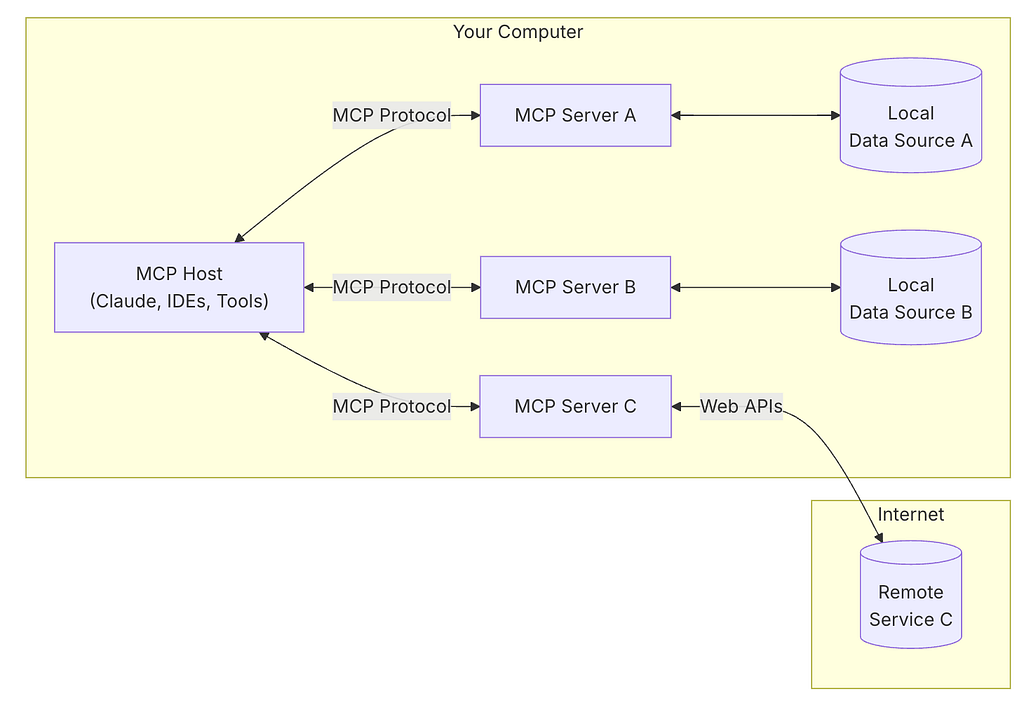
MCP works by defining a simple, predictable way for AI clients and external services to communicate. At its core, the protocol revolves around three components: the MCP host, the MCP client, and the MCP server. These components create a structured pipeline that lets an AI agent discover tools, request actions, access context, and return results to the user.
This architecture keeps the protocol flexible but easy to reason about, which is why developers can build reliable AI integrations without juggling dozens of custom APIs.
MCP Host
The MCP host is the application you interact with, such as an AI client like Claude Desktop, Cursor, Windsurf, or any GenAI-enabled interface. It manages your conversation with the underlying model and decides when to call a tool and which MCP server to use.
When you add an MCP server to your host, it creates the environment that the AI model uses to retrieve context or take action. The host manages:
- Starting and stopping MCP clients
- Passing your conversation state to the model
- Routing tool calls and parameters to the correct server
- Handling the results and presenting them back to you
Because AI hosts control the entire interaction loop, they determine how effectively an agent uses the tools you expose.
MCP Client
The MCP client sits inside the host and maintains the actual connection to each MCP server. It’s the worker that handles discovery, authentication, and message passing.
As soon as the client connects, it retrieves the server’s capabilities, including its tools, prompts, and resources—and makes them available to the host. It can connect to servers running locally (via STDIO or HTTP) or remotely (via HTTP/SSE over the network).
The client’s responsibilities include:
- Establishing and managing one-to-one server connections
- Handling authentication and credential flow
- Requesting tool metadata, resource lists, and prompt templates
- Executing tool invocations and returning structured results
This component keeps the protocol consistent. No matter where the server runs, the client presents a unified interface to the host.
MCP Server
The MCP server exposes the actual functionality. It lists the tools an AI agent can use, the resources it can read, and optional prompts or workflows tailored for the service. MCP servers can wrap almost anything:
- A graph database like Neo4j
- A cloud service API (e.g., Cloudflare, Stripe, Supabase)
- Developer tools (e.g., GitHub, Playwright, Grafana)
- Retrieval or research workflows
- Internal enterprise systems
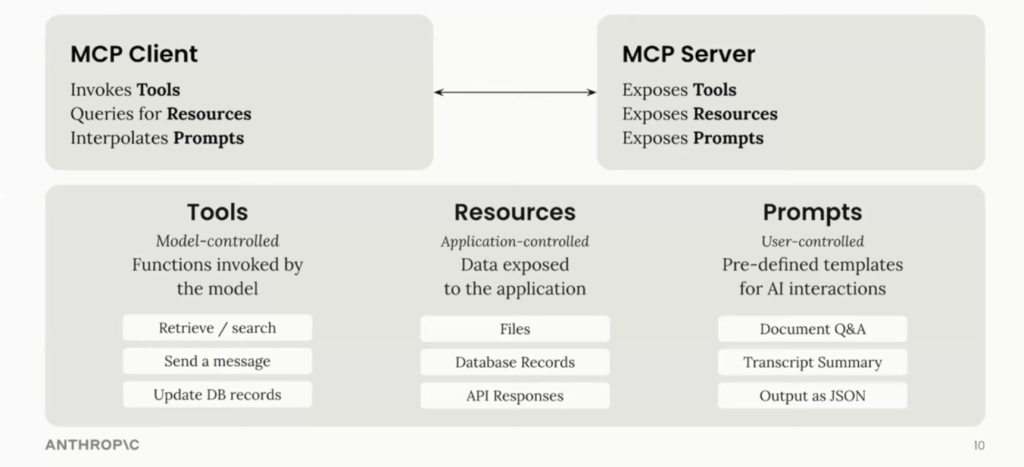
Beyond just tools (executable actions), MCP servers handle two other distinct primitives:
- Resources are application-controlled data, such as file contents, database records, or server logs, that the model can read as context.
- Prompts are user-controlled templates that help standardize how agents interact with the server.
For instance, a Google Drive MCP Server enables an agent to ‘read’ a PDF (Resource), while a Slack MCP Server enables the agent to ‘post’ a summary to a channel (Tool). The agent doesn’t need to know the underlying API calls; it just interacts with the standardized MCP interface.
To deliver these interactions reliably to the host, the server maintains a bidirectional persistent protocol (locally via STDIO or remotely via HTTP/SSE) that lets both sides send structured messages in real time.
Servers can compose with each other, with one MCP server acting as a client of another. This creates powerful federated agent pipelines. When the model decides it needs information or action, the host routes the tool request to the server through the client. The server validates parameters, executes the tool logic, and sends results back as structured JSON. Because tools follow a consistent schema, AI models can reliably parse, reason about, and chain tool outputs.
How These Components Work Together
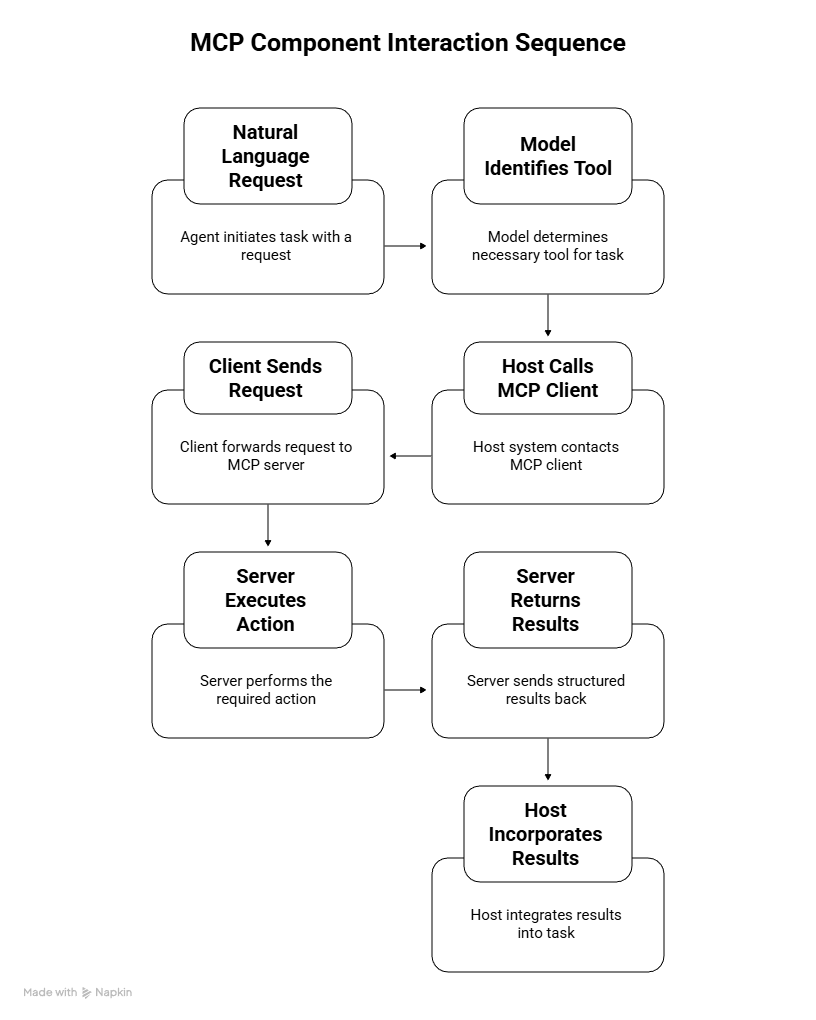
When an agent needs to perform a task, the flow looks like this:
- You issue a natural-language request inside the host (e.g., Cursor or Claude Desktop).
- The model identifies that it needs to run a tool exposed by one of your MCP servers.
- The host calls the MCP client, passing the tool name and structured parameters.
- The client sends the request to the correct MCP server.
- The server executes the action—query a database, call an API, fetch a resource, trigger a workflow—then returns structured results.
- The host incorporates the results into the model’s response or uses them to drive additional tool calls.
This architecture gives you a clean separation of concerns:
- The host manages the user and model interaction.
- The client handles connection and capability discovery.
- The server exposes real-world actions and data.
That alignment makes MCP both powerful and accessible. You build a server once. Any AI client that supports the protocol can engage with it instantly.
Impact on GenAI and Agent Systems
MCP benefits both end-user AI assistants and larger GenAI systems because every business system needs to integrate with internal and external tools. Without a shared protocol, every integration becomes custom, brittle, and slow to build. MCP changes that by giving agents a universal way to discover capabilities, call tools, and compose multi-step operations across systems.
From Static Retrieval to Active Reasoning
This universal connectivity fundamentally changes how GenAI applications operate. Instead of limiting an agent to retrieval-only workflows, MCP lets the agent read from a system, analyze the output, and act on another system—all inside a single reasoning loop. We’re already seeing this from OpenAI, Google, AWS, crewAI, LangGraph, and others. MCP reduces effort for cross-system integration, from federating across data sources to taking information from one system, reasoning about it with another, and taking action in a third.
Strengthening RAG Architectures
RAG and GraphRAG architectures also fit naturally into this model, since they can run as full MCP servers and provide agents with structured context and follow-up actions. This makes it easier for models to use retrieved knowledge and then execute the next step.
Empowering Developers and IDEs
MCP goes beyond retrieval. It enables agents to take action across business, personal, and infrastructure tasks. Integrated into AI-powered IDEs and developer tools, MCP lets developer companions investigate and act on services like Cloudflare, GitHub, Supabase, Stripe, Neo4j, and others without leaving the editor.
The protocol also includes richer concepts such as prompts, sampling, and resources, which give agents more structured and reliable ways to interact with systems. Together, these capabilities move agents from simple information-returners to true participants in your workflows.
Challenges and Limitations of MCP
Since its launch in November 2024, MCP has become a core part of the developer stack. Developers and companies have built tens of thousands of MCP servers, integrated it into more clients, and launched marketplaces and tools around the protocol. But there are still challenges that need to be addressed, especially around:
- Security: Local MCP servers are relatively safe, but remote or publicly exposed servers require stronger controls than the protocol defines today. OAuth 2.0 support in the 2025 spec update improved authentication, but developers still manage most aspects of credential handling, access control, and safe execution.
- Observability: Teams have no standard way to monitor usage, trace failures, or generate audit logs, which complicates deployment in high-stakes or regulated environments. Improvements are on the roadmap, but current implementations rely on custom monitoring.
- Discovery: While several community directories exist, there is no official, vetted MCP registry. Until a standardized registry with versioning, checksums, and verification arrives, it remains difficult for organizations to identify trustworthy servers.
Finally, MCP is not yet a full replacement for traditional APIs. It excels at rapid prototyping and workflow orchestration, but conventional integrations still lead where you need high throughput, strict security, or production-grade operational guarantees.
That said, many of the solutions to these challenges are already in motion. The spring 2025 specification update introduced OAuth support, additional tool annotations, batching, and a streaming HTTP server transport. MCP continues to address many-to-many integration challenges, improve interoperability, and let users choose the best combination of client, LLM, and MCP server for their needs.
MCP delivers a strong developer experience for quick prototyping, fast workflow orchestration, and context-aware applications while traditional API integrations remain dominant for secure and performance-critical use cases.
The Future of MCP
When MCP launched in late 2024, the community split between those who saw its potential and skeptics who felt the protocol was too complex or premature. A year later, with tens of thousands of MCP servers in circulation and major model vendors beginning to support it, MCP has clearly gained momentum.
Its open specification process is a key advantage. Because MCP invites contributions from tool providers, cloud vendors, and agent-framework developers, the protocol continues to evolve toward a stable, widely usable standard. It also brings efficiency to both users and vendors, who no longer need to maintain a growing collection of one-off integrations.
Several important areas of development are already underway. Much of the roadmap focuses on security, operations, tooling, and enterprise readiness along with improvements to model interactions such as streaming and multi-modal support. Data and systems vendors are adding MCP into their offerings, and even model providers that compete with Anthropic, including OpenAI, Google Cloud Platform, AWS, and Microsoft, have begun introducing support paths for the protocol.
MCP won’t replace every proprietary integration pattern, but a shared standard benefits everyone. Vendors gain a simpler surface for exposing their capabilities, and developers get a consistent way to connect agents with the systems they rely on.
The 2025 H1 roadmap for MCP reflects this direction:
- Remote connectivity: Secure connections through OAuth 2.0, improved service discovery, and support for stateless operations.
- Developer resources: Reference client implementations and a more streamlined proposal process.
- Deployment infrastructure: Standardized packaging, easier installation tools, server sandboxing, and a centralized registry.
- Agent capabilities: Better support for hierarchical agents, interactive workflows, and real-time streaming for long-running operations.
- Ecosystem expansion: Additional modalities beyond text and progress toward formal standardization.
Neo4j implemented the first data-level MCP integration in December 2024 and continues to expand its MCP servers with infrastructure and knowledge-graph memory capabilities. We’re excited to see how developers build on these features and what feedback emerges from real-world use.
Other standards are also beginning to form. IBM introduced the Agent Context Protocol (ACP), which focuses on agent-to-agent communication, and IBM intends to standardize it. However, MCP is recognized as an interim solution. Its original design focuses on context sharing, making it an imperfect fit for ACP’s emerging requirements around agent communication. ACP plans to diverge from MCP during its alpha phase, addressing this misalignment by establishing a standalone standard specifically optimized for robust agent interactions.
The broader community continues to shape MCP’s direction. Reviews from groups like Latent Space, Andreesen Horowitz (a16z), and ThursdAI highlight the protocol’s promise, while maintainers of frameworks such as LangGraph point to areas where MCP still needs to simplify implementation, improve scalability, and strengthen server quality controls. These perspectives reflect a healthy, evolving ecosystem that is maturing rapidly as MCP becomes a foundational layer for agentic applications.
Getting Started with MCP
To try MCP yourself, start by connecting an existing MCP server to your AI client of choice. Tools like Claude Desktop, Cursor, Windsurf, and VS Code already support MCP, so you can add servers with just a few lines of configuration. Once connected, the AI agent gains access to the tools, resources, and prompts that the server exposes, and then you can use them directly from within your conversation or IDE.
Most developers start by adding a server through their client’s configuration file. From there, the host automatically launches an MCP client, retrieves the server’s capabilities, and makes them available for tool calls. The workflow feels natural: you ask a question, the model identifies the right tool, passes structured parameters, and incorporates the tool results into the response.
For example, you might add a Neo4j MCP Server that connects to a public graph database. After the host initializes the client and loads the server’s capabilities, you’ll see the available tools, such as Cypher read/write operations, appear in your tool panel.
Imagine asking your IDE, ‘How are these five microservices related?’ Instead of you manually writing a query, the agent uses the Neo4j MCP server to traverse the dependency graph, identifies the bottleneck, and returns a visual description of the architecture, all without you writing a single line of Cypher.
If you use Cursor or another AI-powered IDE, the workflow becomes even more powerful. You can provision databases, inspect instances, run graph queries, and manage your infrastructure without leaving the editor. MCP handles the wiring so you can focus on building and iterating.
Resources
This article focused on explaining what MCP is, why it matters, and how it fits into the broader agent ecosystem. To understand MCP, this explanation from Norah Sakal is a good place to start. For full reference material, architecture details, and implementation examples, you can also explore Neo4j’s MCP documentation.
If you want to go deeper into the architecture and start building your own servers, the next part of this series walks you through the details:
Read: Getting Started with MCP Servers: A Technical Deep Dive
You’ll learn:
- The responsibilities of the MCP host, client, and server
- How tools, prompts, resources, and sampling work under the hood
- How to build and test your own MCP server
- How to integrate the Neo4j MCP Server with Cursor
- Best practices for security, discovery, and versioning
Think of that guide as your blueprint for implementing MCP in real applications. By the end, you’ll be able to build servers, publish them, and integrate them into your agent workflows with confidence.
Essential GraphRAG
Unlock the full potential of RAG with knowledge graphs. Get the definitive guide from Manning, free for a limited time.

Share Article



Explore
Related Articles

Why Healthcare CIOs Can’t Afford to Scale AI Without a Knowledge Graph Foundation