Neo4j Community Edition Advances for Graph-Powered AI and Intelligent Applications

VP, Product Management, Cloud, Neo4j
4 min read
You started with Neo4j Community Edition because you experienced a challenge that relationships could solve: a fraud pattern to detect, a supply chain to map, a knowledge graph to build. Community Edition made it easy to get started and prove out your solution.
Now you can take that even further. Community Edition includes vector search for AI workflows, graph visualization and exploration via the Aura console, centralized management across all your deployments with Fleet Manager, and one-click cloud provisioning via the AWS, Azure, and Google Cloud marketplaces
Let’s dig into everything that’s now available and what that means for you.
Build AI Applications with Vector Search
If you are building an application that combines relationship data with semantic similarity, you can now do it in a single database. Neo4j CE supports vectors, so you can store embeddings directly on your nodes and query them alongside your graph relationships in one operation.
In a GraphRAG workflow, that means retrieving semantically relevant nodes and traversing their relationships to gather context for your LLMs, all in a single query. For a recommendation engine, you can blend content similarity with relationship signals in a single pass. For fraud detection, you can combine behavioral embeddings with transaction graph traversals.
Neo4j drivers handle vector lists consistently across languages, validation happens at the database level, and your embedding pipeline integrates cleanly.
Stronger GQL Alignment for Scalable Graph Querying
As your graph work grows from simple traversals to complex business logic, you want a query language that keeps up. Cypher 25 delivers that.
Enhancements in the Cypher query language — including alignment with emerging GQL (Graph Query Language) standards, support for conditional logic, and improved query composition — help you to build scalable graph workflows, so the patterns you write today carry forward as the industry converges.
The practical payoff: more expressive queries that are easier for your team to read, debug, and maintain.
Explore Your Graph, Not Just Query It
You can now easily connect your Community Edition databases deployed anywhere to Neo4j Aura Console and use the latest and greatest graph tools for free. Sometimes you need to see the patterns in your data, not just query for them. Which nodes are most connected? Where do critical dependencies emerge in the network? How do relationships branch across your dataset?
When you connect your Community Edition instance to the Aura console, you get access to Neo4j Bloom (Explore) to visually answer those questions.
Build and refine queries interactively using natural language. Explore patterns across your graph. Run graph algorithms, such as degree centrality, and see the results immediately. This is especially valuable when you are validating a data model, explaining a finding to a stakeholder, or getting oriented in a new dataset. Visual exploration surfaces insights that are easy to miss in tabular query results.
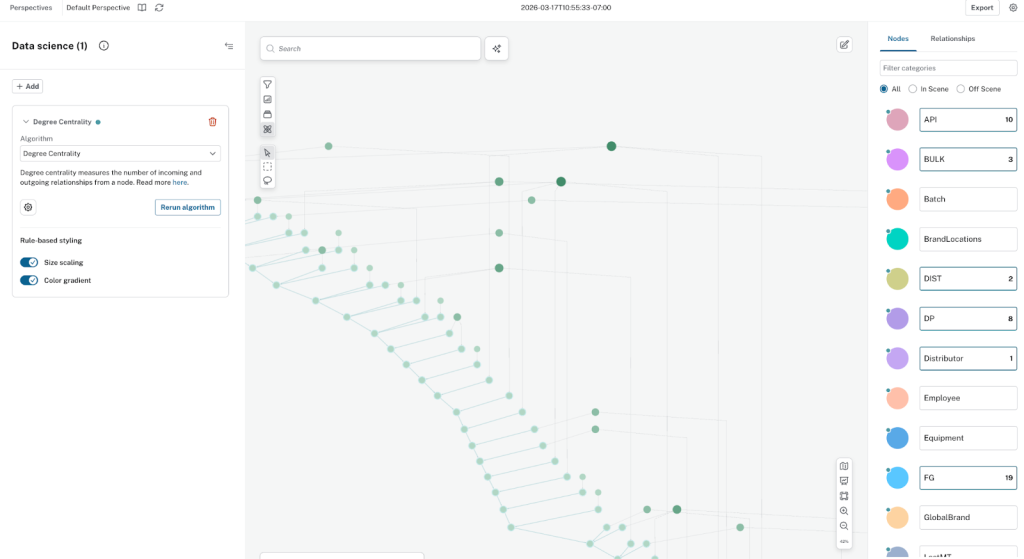
Running degree centrality to highlight highly connected supplier nodes that drive the majority of supply interactions.
Deploy to the Cloud in One Click
Ready to deploy your graph workload in a cloud environment? You can now deploy Community Edition directly from the AWS, Azure, or Google Cloud marketplace. It takes one click and bills through your existing cloud provider account. You get a production-grade environment that mirrors where your application will eventually run.
An important distinction: Community Edition deployed through the marketplace runs inside your own cloud infrastructure. It lives in your account, your VPC, under your control. If you or your teams are in an organization where SaaS tools are restricted but self-managed, cloud-deployed software is approved, this is a direct path to running Neo4j in production.
Manage All Your Deployments from One Place
As your graph footprint grows across projects and environments, Fleet Manager gives you a single interface to monitor and manage everything. Community Edition instances appear alongside your managed cloud and self-managed production deployments, so all of your graph databases are visible in a single view. You see what is running, where it is running, and what state it is in, with consistent governance and lifecycle management across the entire system.
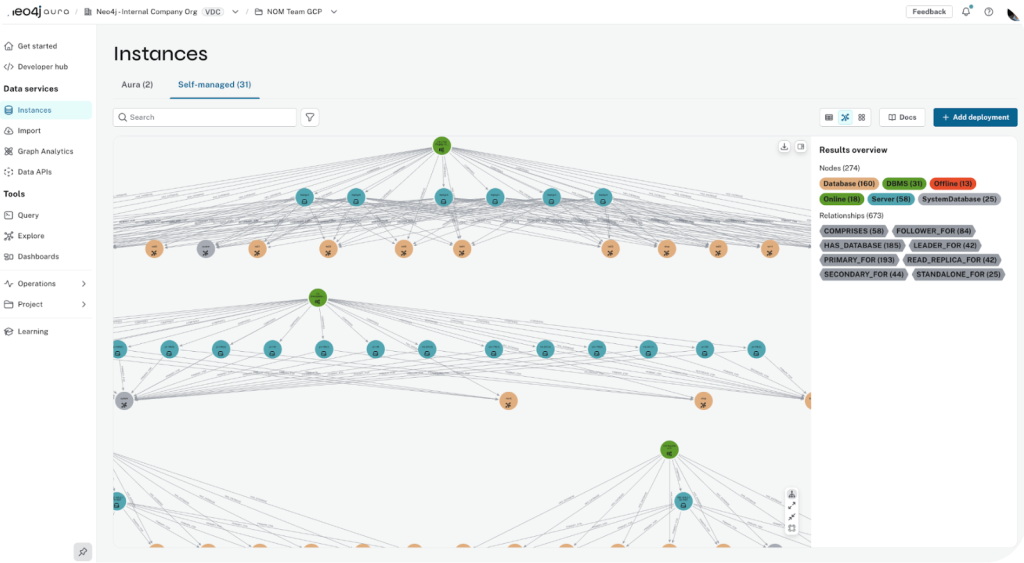
Fleet Manager topology view of self-managed Neo4j instances, including Community Edition
A Frictionless Journey from Exploration to Production
When your project is ready to scale, you have options. You can easily migrate to AuraDB. Your data model, your queries, and your operational knowledge carry forward. And because AuraDB is fully managed, you can leave much of the operational overhead of running Neo4j to us, so you can focus on your application.
“While Neo4j’s Community Edition initially served the company well, its growth and increasing data complexity soon demanded a more robust, cloud-based solution. The decision to migrate to Neo4j AuraDB on AWS marked a turning point in their digital transformation journey.” – European Automaker
Get Started
To get started, download Community Edition, or deploy directly on your preferred cloud:
Share Article



Explore
Related Articles
Designing Agentic AI for Pharma & Life Sciences with Graph Technology: From Complex Evidence to Explainable Insights