Building a Seamless Data Pipeline with Neo4j CDC and GCP Pub/Sub

Senior Cloud Partner Architect, Neo4j
7 min read

Introduction
Neo4j and Google Cloud Platform (GCP) together make it simple to build intelligent, real-time, and connected data applications. This is a better together story where Neo4j’s powerful graph capabilities meet GCP’s scalable data and messaging infrastructure.
Neo4j has a built-in Change Data Capture (CDC) capability that tracks and streams changes happening in the database – nodes created, relationships updated, or properties modified. On the other hand, Google Cloud Pub/Sub provides reliable, asynchronous messaging that allows data producers and consumers to communicate in real time without being tightly coupled. It enables event-driven systems to scale globally, making it ideal for connecting diverse systems across cloud environments.
In this post, we’ll show how to set up a simple, bidirectional data pipeline that connects Neo4j and GCP Pub/Sub using Kafka as the message broker, relying only on configuration files and officially supported libraries from Neo4j and Google Cloud.
Architecture Overview
At a high level, there are two pipelines that connect in a linear flow:
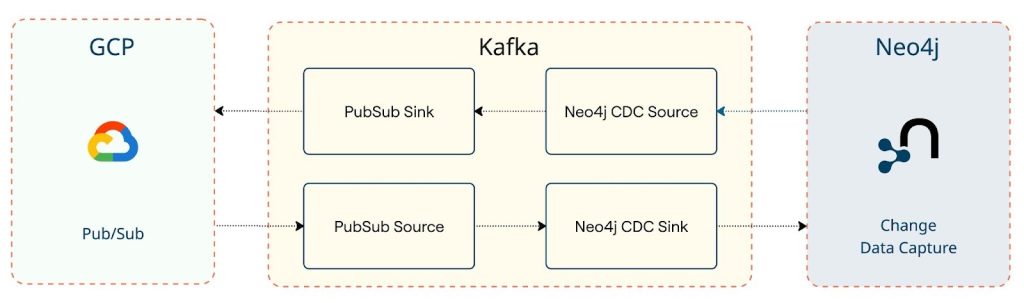
With this setup, you can easily:
- Publish graph data changes from Neo4j into Pub/Sub for downstream systems.
- Ingest updates from other systems into Neo4j, keeping your graph in sync.
Why Graph + PubSub = Better Together
Neo4j is purpose-built for handling connected data problems – enabling contextual and connected responses from intelligent agents and chatbots powered by graph-based retrieval and reasoning.
Kafka Connect acts as the backbone of this flow by offering a configuration-based, no-code integration layer. It connects Neo4j CDC streams to event backbones like Kafka and onward to Pub/Sub. This means you don’t have to write custom ETL code – just configure your connectors, and you’re streaming.
Pub/Sub on GCP then makes this data globally available – letting analytics systems, microservices, or AI pipelines consume graph updates in real time.
Setting Up Kafka Connect
Before configuring connectors, the first step is to deploy a Kafka environment. From the Google Cloud Marketplace, you can either deploy Apache Kafka using the Click to Deploy option, use Apache Kafka as a managed service, or install Confluent Kafka from the marketplace. All these deployment options are supported by Neo4j and integrate seamlessly with the connectors.
Once Kafka is running, ensure that the required connector JARs are added to your Kafka Connect plugin path:
You can place these JAR files inside your Kafka Connect plugins directory and restart the Connect service. To make sure Kafka Connect recognizes your plugin path, update the plugin.path entry in the server.properties file, for example:
plugin.path=/usr/local/share/kafka/pluginsCode language: JavaScript (javascript)Section 1: Neo4j → Pub/Sub
Let’s start with a common scenario: a customer node update in Neo4j – say, a change in the customer’s subscription status.
Before diving into configuration, it’s worth noting how Neo4j Change Data Capture (CDC) works. According to the Neo4j documentation and recent Neo4j blog posts, CDC can be activated with just a few clicks from the Neo4j Aura Console. Once enabled, CDC continuously emits events for node and relationship changes in your database, allowing external systems to stay synchronized in near real time.
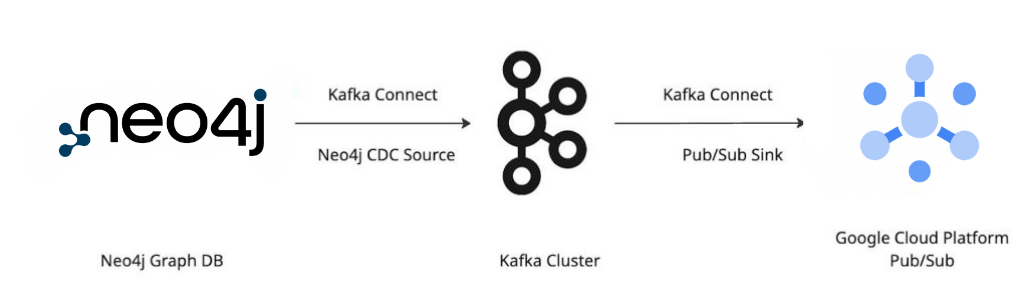
With Neo4j CDC, any change is automatically emitted as an event, captured by the Neo4j-CDC-Source Connector, and pushed into Kafka. From there, a Pub/Sub Sink Connector publishes it into your GCP topic for other systems to react.
Flow Diagram
Configuration Files
1. Neo4j CDC Source Connector
{

  "name": "neo4j-cdc-source",

  "connector.class": "streams.kafka.connect.Neo4jCdcSourceConnector",

  "neo4j.server.uri": "neo4j+s://abc.databases.neo4j.io",

  "neo4j.authentication.basic.username": "neo4j",

  "neo4j.authentication.basic.password": "password",

  "neo4j.cdc.enabled": "true",

  "topics": "neo4j.cdc.events"

}Code language: JSON / JSON with Comments (json)
2. Pub/Sub Sink Connector
{
  "name": "pubsub-sink",
  "connector.class": "com.google.pubsub.kafka.sink.PubSubSinkConnector",
  "topics": "neo4j.cdc.events",
  "gcp.project.id": "your-gcp-project",
  "pubsub.topic": "neo4j-updates"
}Code language: JSON / JSON with Comments (json)
Once both connectors are deployed, any graph change in Neo4j – like adding or updating a customer node – is published to Pub/Sub almost instantly.
Section 2: Pub/Sub → Neo4j
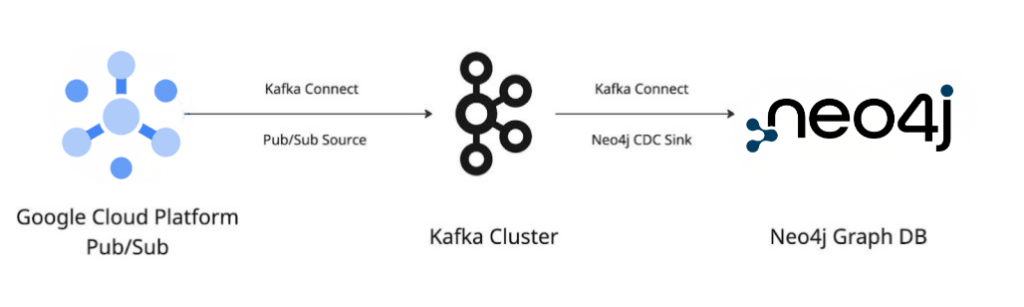
Now, let’s reverse the flow. Imagine your external CRM system updates customer data and publishes it to a Pub/Sub topic. You can stream that change all the way back into Neo4j to keep your graph current.
Configuration Files
3. Pub/Sub Source Connector
{
  "name": "pubsub-source",
  "connector.class": "com.google.pubsub.kafka.source.PubSubSourceConnector",
  "gcp.project.id": "your-gcp-project",
  "pubsub.subscription": "crm-updates-subscription",
  "kafka.topic": "crm-updates"
}Code language: JSON / JSON with Comments (json)
4. Neo4j CDC Sink Connector
{
  "name": "neo4j-cdc-sink",
  "connector.class": "streams.kafka.connect.Neo4jSinkConnector",
  "topics": "crm-updates",
  "neo4j.server.uri": "neo4j+s://abc.databases.neo4j.io",
  "neo4j.authentication.basic.username": "neo4j",
  "neo4j.authentication.basic.password": "password",
  "neo4j.topic.cypher.crm-updates": "MERGE (c:Customer {id: event.id}) SET c += event.properties"
}Code language: JSON / JSON with Comments (json)
With these four configurations, you achieve a bi-directional dataflow powered entirely by configuration – no glue code required.
Enabling SSL for Secure Communication
Security is a key consideration when building data pipelines that move sensitive information across systems. To ensure encrypted communication between Kafka brokers, Neo4j, and Pub/Sub, enabling SSL is highly recommended.
Below is an example snippet from the Kafka server.properties file showing SSL configuration settings:
# Enable SSL Encryption
listeners=SSL://:9093
advertised.listeners=SSL://your-server-hostname:9093
security.inter.broker.protocol=SSL
ssl.keystore.location=/etc/kafka/secrets/kafka.server.keystore.jks
ssl.keystore.password=your_keystore_password
ssl.key.password=your_key_password
ssl.truststore.location=/etc/kafka/secrets/kafka.server.truststore.jks
ssl.truststore.password=your_truststore_password
ssl.client.auth=requiredCode language: PHP (php)
Once configured, restart the Kafka brokers and ensure that clients such as Neo4j connectors and Pub/Sub connectors are updated to use SSL connections by specifying the correct security protocol and truststore locations.
Enabling SSL not only encrypts data in transit but also helps authenticate connections between systems, ensuring end-to-end security for your Neo4j and Pub/Sub integration.
Putting It All Together
All these components work together seamlessly to create a unified, real-time data pipeline. The combination of Neo4j CDC, Kafka Connect, and GCP Pub/Sub ensures that data remains synchronized across systems, providing a reliable foundation for connected applications and analytics.
In addition to Neo4j and Pub/Sub, this same flow pattern can easily connect with other Google Cloud services like BigQuery, Dataflow, or Cloud Functions, enabling integration with AI/ML systems and external APIs for broader data movement and processing.
This pattern allows high throughput, real-time synchronization, and decoupled data systems – all while keeping your graph database at the heart of your data ecosystem.
References
Closing Thoughts
Setting up Neo4j CDC with GCP Pub/Sub is remarkably straightforward, thanks to the official connectors provided by both Neo4j and Google Cloud. Whether your goal is to stream graph updates outward or ingest changes inward, this architecture provides a scalable, configuration-based pipeline that integrates deeply with modern cloud data systems.
You can try Neo4j on Google Cloud Platform Marketplace here. Neo4j offers a fully managed SaaS option through Neo4j Aura, or you can deploy and manage it yourself on GCP using Google Kubernetes Engine (GKE) or Compute Engine instances from the Marketplace.
It’s a perfect example of how Neo4j’s graph-first view of data complements GCP’s event-driven architecture – together, delivering real-time insights across your enterprise.
Share Article



Explore
Related Articles
Capgemini Turns Data and AI Into Connected Intelligence With Neo4j and Databricks
Neo4j Community Edition Advances for Graph-Powered AI and Intelligent Applications
Power Connected Intelligence for AI and Analytics with Neo4j and Databricks

Neo4j Brings High Speed Identity Resolution to the Snowflake AI Data Cloud
The Data Strategy That Makes Truly Personalized Customer Experiences Possible