Exploring More Advanced Features of the Neo4j .NET Driver
Introduction
In the first tutorial, you took your first steps with Neo4j and .NET. You set up a project, installed the Neo4j driver package, and ran a query against an example database. You also learned how the driver can map the results back into your own application objects, as well as some driver best practices for developing more robust enterprise applications.
All of that code used the ExecutableQuery API interface, the most straightforward way to interact with the driver. In this tutorial, we will explore more advanced functionality and APIs of the driver, where simplicity and automatic functionality can be exchanged for increased control of the transaction lifecycle, execution, and results handling.
More Advanced Driver Usage
When using the ExecutableQuery interface, the driver wraps the query you wish to run in a transaction. This allows the query to be committed or rolled back on an error. However, this interface does limit you to running a single query.
To support more complex use cases, where you may want to run multiple queries in a single transaction and possibly interleave some client logic with them, the driver provides APIs to control the transaction lifecycle.
The Session Object
The driver has a concept called sessions. A session gives you the interfaces to run multiple query transactions, either with managed transactions or manually managing the transactions yourself. A session also enforces causal consistency between queries you run within it, which means you can read your own writes. Session objects are lightweight and designed to be short-lived; however, they are not thread-safe. Don’t cache or hold onto them, as you will tie up the resources they utilize, such as connections to the database.
Let’s create a driver instance and connect to the ‘Goodreads’ example database. This will likely look familiar if you have already completed other .NET material.
using Neo4j.Driver;

var driverInstance = GraphDatabase.Driver(new Uri("neo4j+s://demo.neo4jlabs.com"),
        AuthTokens.Basic("goodreads", "goodreads"));
Now, rather than using the ExecutableQuery interface to connect to Neo4j, we will create a Session instead.
await using var session = driverInstance
        .AsyncSession(conf => conf.WithDatabase("goodreads"));
We are following another best practice by specifying the database name in the configuration. This helps with performance and round-trips to the server.
Unlike the driver object, session objects are designed to be lightweight and cheap to instantiate. They should not be held long-term. If a session object is not allowed to close, then the resources it is using, such as a database connection, will not be returned to a state where they can be used by other sessions. This will tie up resources and impact driver efficiency over time.
Within the session, we can run any number of queries needed in a single transaction. There are two ways of doing this: with managed transactions or with manual transactions.
Managed Transactions with Transaction Functions
This part of the API consists of two methods – ExecuteRead and ExecuteWrite. Both methods take a callback function (usually supplied as a lambda) that receives a transaction as a parameter. You can then make use of that within the callback to run any queries you need to, as well as any other application code. The API handles the transaction creation, as well as the commit and rollback logic for you. It also implements retries, which we will discuss further down.
Let’s see an example of using a managed transaction with a transaction function.
string cypher = @"MATCH (r:Review)-[:WRITTEN_FOR]->(b:Book)<-[:AUTHORED]-(a:Author)
   WHERE a.name = $name
   RETURN b.title AS Title, r.text AS ReviewText, r.rating As Rating
   ORDER BY r.rating DESC
   LIMIT 20";

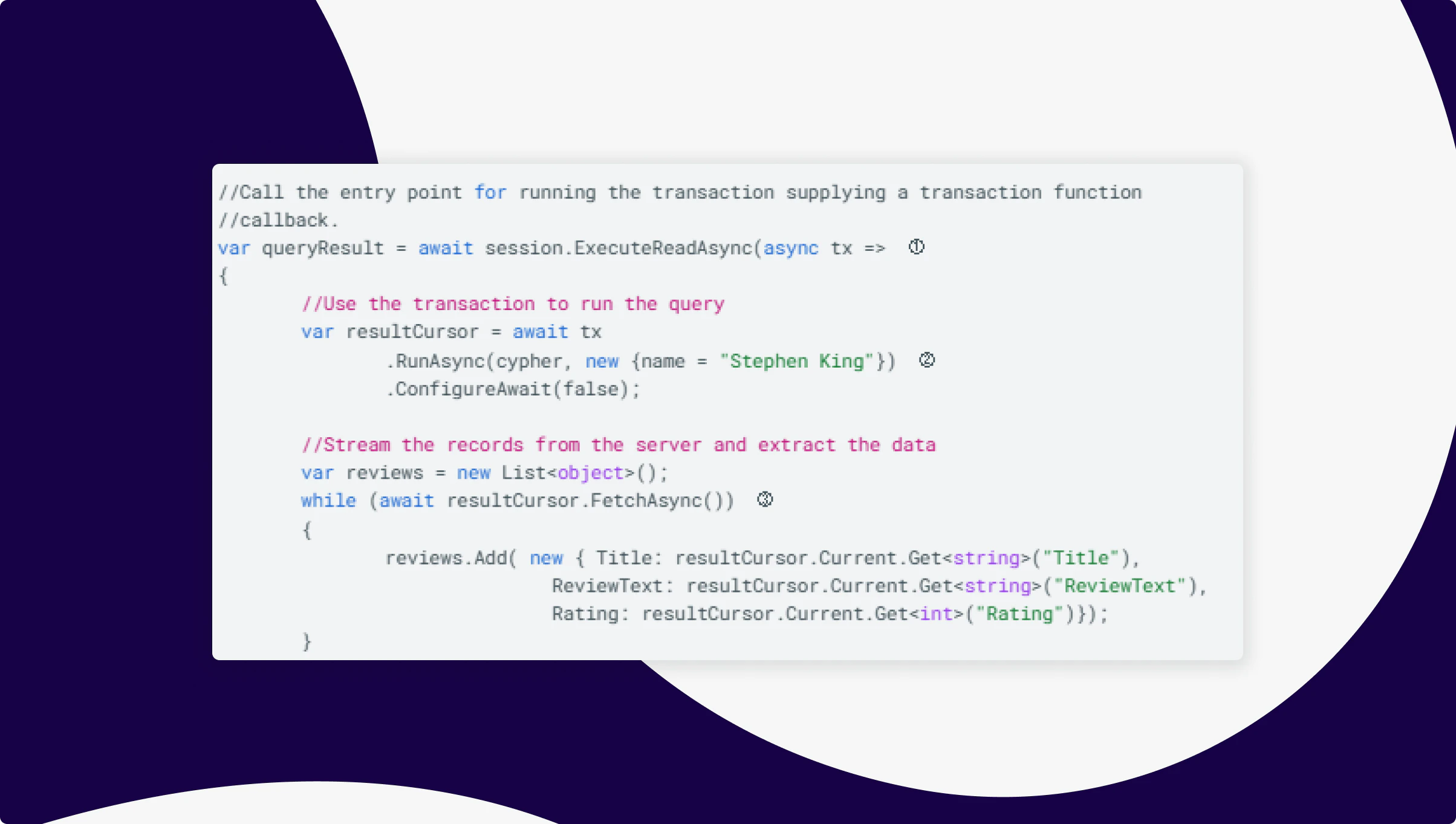
//Call the entry point for running the transaction supplying a transaction function
//callback.
var queryResult = await session.ExecuteReadAsync(async tx =>	  ①
{
	//Use the transaction to run the query
        var resultCursor = await tx
        	.RunAsync(cypher, new {name = "Stephen King"})  ②
               .ConfigureAwait(false);

	//Stream the records from the server and extract the data
        var reviews = new List<object>();
        while (await resultCursor.FetchAsync())  ③
        {
        reviews.Add( new { Title: resultCursor.Current.Get<string>("Title"),
       	      	ReviewText: resultCursor.Current.Get<string>("ReviewText"),
           	Rating: resultCursor.Current.Get<int>("Rating")});
        }
        return reviews;
})
.ConfigureAwait(false);
- This is the entry point for running the queries. There are two available:
ExecuteReadandExecuteWrite. The choice you make depends on whether you wish to retrieve data from the database or modify it. The methods accept a callback to a transaction function, which receives a transaction as a parameter. - Here, the
RunAsyncmethod on the transaction is called with the query string and any parameters (optional). AnIResultCursoris returned, representing the stream from which the records will be retrieved. At this point, though, nothing has been received from the server. - Now we fetch records, which starts the driver’s process of streaming the results from the server. Because you can operate on a record as it is received, you can be more memory efficient.
Retries and an Important Note
We should mention here an important feature of the transaction functions and why the ExecutableQuery API interface is built on top of it: retriability and transient error resilience.
The callback supplied to the transaction function is wrapped in a transaction. This means that if there is a transient error at any point (which can be anything from a connection failure to a server-side issue), then the driver will rollback and retry the transaction, e.g. re-run the transaction function and anything within it.
The important thing to note is that, because the transaction function can potentially be run multiple times, it must be idempotent. This means that the result of the transaction function should remain unchanged, regardless of how often it is executed. For instance, if you were to generate a value for a node’s property, perhaps incrementing a counter, then if the transaction were to commit successfully, but a connection error occurs, and the driver does not receive the success message for the commit, then a retry would occur, and the counter would be 1 larger than expected. This is not idempotent because the result can end up out of sync.
This idempotency should also apply to the application state and the queries themselves. Within the transaction function, you should not call code that is stateful and cannot handle multiple calls without changing behaviour.
Multiple Queries in a Single Transaction Function
Please note that this example will write to the database. The goodreads database we have been connecting to is read-only. Should you wish to run this example code and queries, you can create a local instance of the database using Neo4j Desktop and the Cypher query found here: https://github.com/JMHReif/graph-demo-datasets/blob/main/goodreadsUCSD/50k-books-ai/goodreadsai-50k-data-import.cypher.
Let’s imagine you have a unit of work that requires several interdependent queries to achieve. You can do this with transaction functions. To demonstrate this, we will create a retry-safe pattern for updating a book’s aggregate rating using two queries.
The queries:
string readCypher = @"MATCH (b:Book {title:$title)<-[:WRITTEN_FOR]-(r:Review)
        RETURN b.book_id AS bookId, avg(r.rating)
        AS avgRating, count(r) AS ratingsCount";
string writeCypher = @"MATCH (b:Book {book_id: $bookId})
        SET b.average_rating = $avgRating,
            b.ratings_count = $ratingsCount
        RETURN b"
The code:
await using var session = driver
        .AsyncSession(conf => conf.WithDatabase("goodreads"));

await session.ExecuteWriteAsync(async tx => ①
{
    // Query 1: Compute fresh aggregates from reviews
    var result1 = await tx
        .RunAsync(readCypher,
            new { title = "The Tommyknockers" })
        .ConfigureAwait(false);

    var record = await result1.SingleAsync();  ②
    var avgRating = record["avgRating"].As<double>();
    var ratingsCount = record["ratingsCount"].As<long>();
    var bookId = record["bookId"].As<string>();

    // Query 2: Update the book with recomputed values
    var result2 = await tx
        .RunAsync(writeCypher, ③
            new { bookId, avgRating, ratingsCount })
        .ConfiguerAwait(false);

    var resultSummary = await result2.ConsumeAsync().ConfigureAwait(false); ④
})
.ConfigureAwait(false);
- We are using the
ExecuteWritetransaction function because we will be updating the database during the transaction. SingleAsyncis a useful extension method on the result cursor. If you know that only a single record will be returned, this is a convenient way of getting it.- Here, we are running the second piece of Cypher that updates the database. It depends on the first query because it uses parameters retrieved from the database by that first piece of Cypher. This demonstrates a simple unit of work involving more than one Cypher query that will be committed, rolled back, and potentially retried as a single transaction.
- Here, we have taken the opportunity to show how to get an
IResultSummary. This contains useful information about the query that has been run. Please note that once this is called, any unconsumed records in the stream that the result cursor is fetching will be discarded.
This transaction function serves as a simple demonstration of the crucial need for idempotency. It is retry-safe because
- We don’t increment counters, which are not idempotent.
- We recompute from source data every time.
- If the transaction function retries due to a transient error, the query rewrites the same stable aggregate values.
We have avoided the key synchronization risk of the driver retry and a counter approach, such as:
SET b.average_rating = ...

//or

b.ratings_count = b.ratings_count + 1
So instead of incrementing, we recompute the aggregate from all Review nodes each time. That way, retries are safe — the same deterministic result is written no matter how many times the transaction executes.
Manual Transactions
Sometimes you really want manual control over a transaction’s lifecycle. In these cases, you might:
- Want to conditionally commit or roll back.
- Decide when queries are sent to the server.
- Need control over whether it retries.
To allow this level of control, we supply the transaction interface on the session object.
Instead of passing a delegate to ExecuteReadAsync or ExecuteWriteAsync, you can explicitly open a transaction:
await using var session = driver.AsyncSession();

// Start a write transaction manually
var tx = await session.BeginTransactionAsync();
At this point, you have an IAsyncTransaction object. This object gives you full control: you can run queries, commit, or roll back. You can pass various parameters and configurations to the BeginTransaction method, including the access mode (read or write), depending on whether you will update the database or not. If you do not pass this parameter, the default access mode configured for the session at creation will be used.
Next, we want to run our queries and commit or roll them back. Using the same two queries from the previous example, we get:
await using var session = driver.AsyncSession();
var tx = await session.BeginTransactionAsync(); ①

try
{
        // Query 1: Compute fresh aggregates from reviews
    	var result1 = await tx.RunAsync(readCypher, ②
  	   	      new { title = "The Tommyknockers" })
                .ConfigureAwait(false);

    	var record = await result1.SingleAsync();
    	var avgRating = record["avgRating"].As<double>();
    	var ratingsCount = record["ratingsCount"].As<long>();
    	var bookId = record["bookId"].As<string>();

    	// Query 2: Update the book with recomputed values
    	var result2 = await tx.RunAsync(writeCypher, ③
   	              new { bookId, avgRating, ratingsCount })
                .ConfiguerAwait(false);

    	var resultSummary = await result2.ConsumeAsync().ConfigureAwait(false);

    	await tx.CommitAsync();  // Commit all changes ④
}
catch (Exception e)
{
    	await tx.RollbackAsync(); // Undo everything ⑤
}
- Create the transaction. Here, we can override the session’s default access mode (if desired) or specify some transaction-specific configuration.
- Run the query in the same way that we do with transaction functions.
- Run the second query.
- Once the work we want to do in the transaction is done, we can commit it.
- Should there be an error, the try-catch statement will trigger, and we can roll back the transaction so that no modifications are made to the database.
Why Choose between Read and Write?
You might wonder why you need to choose between the ExecuteRead and ExecuteWrite transaction functions or the read/write access mode in manual transactions, particularly when one of the examples shows a read query happily running in the ExecuteWrite function.
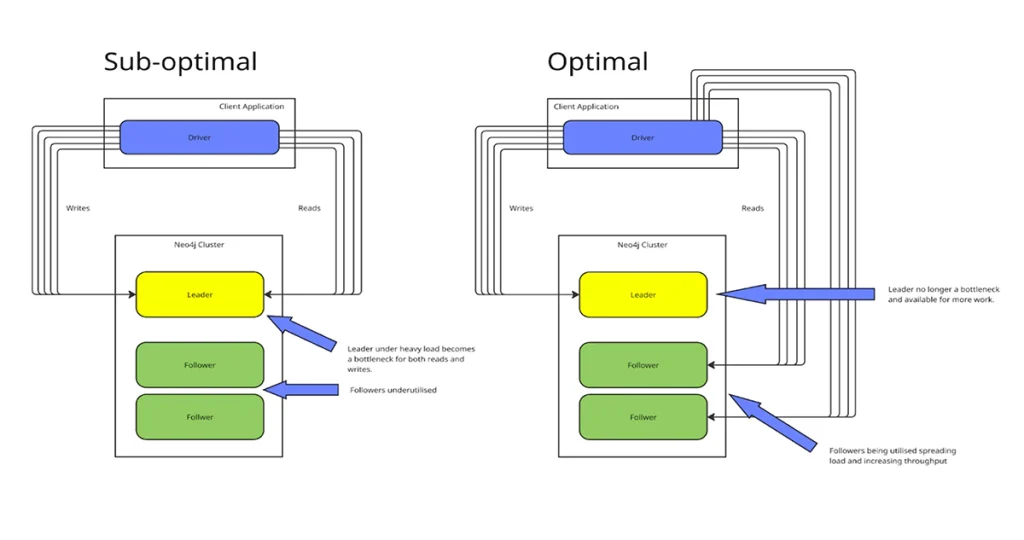
We don’t want to go too deep into the rabbit hole here, but a high-level explanation is useful. In a Neo4j clustered server environment, there are readers and the writer (often referred to as followers and the leader). The leader can both read and write, while the followers can only read. When you have a read-heavy workload, it is a good idea to have that performed on the followers so that the leader doesn’t get too busy and end up delaying writes to the database, becoming a bottleneck for the whole system. These two transaction functions enable the client code to route requests to the members of the cluster in a suitable manner.
Result Streams vs EagerResult
In this tutorial and the first one, we have seen two main ways to retrieve data from the database.
- Eager results (via
ExecutableQuery) - Streaming results (via
IResultCursorin transaction functions)
They both get you query results, but they are different in practice. Let’s review why.
1. Eager Results — everything at once
With ExecutableQuery, the driver doesn’t mess around — it runs your Cypher, pulls all the results back, and hands them to you in one nice package. For example:
var result = await session
        .ExecutableQuery("MATCH (b:Book) RETURN b.title AS Title")
        .ExecuteAsync();

//Do something with the results
foreach (var record in result.Records)
{
        Console.WriteLine(record["Title"].As<string>());
}
Here, Neo4j has already sent the whole result set back to the client. You can loop through it as many times as you like, pass it around, whatever — it’s just sitting in memory waiting for you.
That makes ExecutableQuery extremely convenient for small to medium-sized result sets. However, it does mean that if your query matches millions of nodes, you’ll notice it in memory usage.
2. Streaming with a Result Cursor — one record at a time
On the other hand, IResultCursor provides a streaming API. Instead of buffering everything up front, it lets you pull results record by record, straight from the server:
await session.ExecuteReadAsync(async tx =>
{
        var cursor = await tx.RunAsync("MATCH (b:Book) RETURN b.title AS Title");

	//Fetch the results and do something with them
    	while (await cursor.FetchAsync())
    	{
         	var name = cursor.Current["name"].As<string>();
        	Console.WriteLine(name);
    	}
});
Here, results come in lazily — the driver only requests more data from the server as you call FetchAsync(). This is perfect if:
- You’re dealing with huge result sets.
- You don’t want everything in memory at once.
- Or you’re already inside a transaction and want to run more queries based on current results.
The trade-off is that you write a little more boilerplate code yourself, and the cursor is only valid while the transaction is open (don’t pass the IResultCursor outside of the transaction function).
So which one should you use?
- If you just want a quick list of nodes or values, use
ExecutableQuery. It’s clean, easy, and great for small to medium-sized queries. - If you’re streaming through thousands or millions of results, or need to react as results come in, stick with
IResultCursorinside a transaction.
Think of it like this:
- Eager results → “Give me the whole table now.”
- Streaming cursor → “Let me read row by row while you keep the connection open.”
Causal Consistency and Bookmarks
When working with Neo4j in a clustered or cloud setup, a question that arises quickly is: “If I write some data in one transaction, how do I make sure I can read it right away in the next one?”
This is where causal consistency and bookmarks come into play. Causal consistency means your reads are guaranteed to “see” the effects of the writes that came before them. Neo4j makes this possible using bookmarks.
In the .NET driver, you don’t normally manage bookmarks manually — but you can.
Here’s a simple example:
await using var session = driver.AsyncSession(o => o
        .WithDefaultAccessMode(AccessMode.Write));

var writeTx = await session.WriteTransactionAsync(async tx =>
{
    	await tx.RunAsync("CREATE (:Book {name: 'The Stand'})"); ①
    	return true;
});

// Grab the bookmark from the session
var bookmarks = session.LastBookmarks; ②

// Use the bookmark in a new session
await using var readSession = driver.AsyncSession(o => o
    	.WithDefaultAccessMode(AccessMode.Read)
    	.WithBookmarks(bookmarks)); ③

var readTx = await readSession.ReadTransactionAsync(async tx =>
{
    	var cursor = await tx.RunAsync("MATCH (b:Book) RETURN b.name"); ④
    	var record = await cursor.SingleAsync();
    	return record["name"].As<string>();
});

Console.WriteLine(readTx); // "The Stand"
Here:
- Write to the database to create a Book called ‘The Stand’
- Get a bookmark from the write session
- Pass that bookmark into a new read session
- Neo4j ensures the read is causally consistent with the write
Managing bookmarks manually can get tedious if you’re juggling multiple sessions. That’s where the BookmarkManager comes in. It’s basically a bookmark store that the driver can update and reuse for you. Truncating the previous manual example to show the relevant changes will result in something like this:
var bookmarkManager =
        GraphDatabase.BookmarkManagerFactory.NewBookmarkManager(); ①

// Session 1 writes Alice
await using var readSession = driver.AsyncSession(o =>
    o.WithDefaultAccessMode(AccessMode.Write)
     .WithBookmarkManager(bookmarkManager)); ②

// Run your write query using the ExecuteWrite transaction function

// Session 2 reads Alice, using the same bookmark manager
await using var readSession = driver.AsyncSession(o =>
    o.WithDefaultAccessMode(AccessMode.Read)
     .WithBookmarkManager(bookmarkManager)); ②

// Run your read query using the ExecuteRead transaction function
- Create the bookmark manager we want to use for causal consistency. You can also get an IBookmarkManager from the driver for the instance it uses internally for ExecutableQuery. In this way, you can mix sessions and transaction functions with executable queries and still ensure causal consistency.
- Configure the sessions to use the bookmark manager.
Notice how we didn’t manually pass around any bookmarks? The BookmarkManager ensured that both sessions remained causally consistent.
Finally
We hope that this rather lengthy tutorial has provided you with a solid foundation for understanding the functionality of the Neo4j .NET Driver and the interfaces it offers. For further reading and information, you may find the following links of use:
Share Article