Building an Application with Spring AI in Java
This tutorial walks through how to write GenAI applications with Java using the Spring AI framework and utilizing RAG for improving answers. Generative AI (GenAI) is when a Large Language Model (LLM) generates new content, such as text, images, or music based on patterns it has seen before, either in its training or provided in the prompt. Retrieval-Augmented Generation (RAG) is a technique that enhances the accuracy and reliability of generative AI models by grounding them in external knowledge sources and guiding their output with more context in the input. While most GenAI applications and related content are centered around Python and its ecosystem, what if you want to write a GenAI application in Java?
Photo by Igor Omilaev on Unsplash

What is Spring AI?
Spring AI is a framework for building generative AI applications in Java. It provides a set of tools and utilities for working with generative AI models and architectures, such as large language models (LLMs) and retrieval augmented generation (RAG). Spring AI is built on top of the Spring Framework, which is a popular Java framework for building enterprise applications, allowing those already familiar with or involved in the Spring ecosystem the ability to incorporate GenAI strategies into their already existing applications and workflow.
There are also other options for GenAI in Java, such as Langchain4j, but this tutorial focuses on Spring AI.
Creating a project
To get started with Spring AI, you will need to either create a new project or add the appropriate dependencies to an existing project. You can create a new project using the Spring Initializr at https://start.spring.io/, which is a web-based tool for generating Spring Boot projects.
When creating a new project, you will need the following dependencies:
- Spring Web
- OpenAI (or other LLM model, such as Mistral, Ollama, etc.)
- Neo4j Vector Database (other vector database options also available)
- Spring Data Neo4j
If you are adding these dependencies manually to an existing project, you can see the dependency details in today’s related Github repository.
The Spring Web dependency is to create a REST API for the GenAI application. The OpenAI dependency will access the OpenAI model for embeddings and messages, which is a popular LLM. The Neo4j Vector Database dependency accesses Neo4j to store and query vectors, which are used for similarity searches. Finally, adding the Spring Data Neo4j dependency provides support for working with Neo4j databases in Spring applications to run Cypher queries in Neo4j and map entities to Java objects.
Go ahead and generate the project, and then open it in your favorite IDE.
A bit of boilerplate
The first thing needed is a Neo4j database. The Neo4j Aura free tier is an excellent choice for this tutorial, but Docker images and other methods are also available.
Depending on the LLM model you choose, you will probably also need an API key. For many public models, you can get one by signing up on the vendor’s website (e.g. https://platform.openai.com/signup for OpenAI).
Once you have an API key, you can set up the config in the application.properties file. Here is an example of what that might look like:
# LLM model (OpenAI) config
spring.ai.openai.api-key=<YOUR API KEY HERE>Code language: HTML, XML (xml)
Note: It’s a good idea to keep sensitive information like API keys and passwords in environment variables or another location external to the application. To create environment variables, you can use the export command in the terminal or set them in your IDE.
The file also contains configuration properties for the Neo4j vector store to access and search the vector index for similarity search as well as run the retrieval query.
The configuration specifies Review as the label for nodes that will store the embeddings, as Spring’s default looks for Document entities. This also specifies the index name for the embeddings (default is spring-ai-document-index). Since this demo server contains multiple databases (each with a separate data set), there is a property pointing to the goodreads database. The final property prevents the application from creating the index in the database if it does not already exist (not best practice for a production environment).
Data set
For this example, we’ll use a dataset of books and reviews from Goodreads. The data was originally sourced from the UCSD Book Graph project and contains information about books, authors, as well as related reviews and the users who wrote them.
The database is publicly available with a read-only user. You can explore the data by opening a new tab at https://demo.neo4jlabs.com:7473/browser/.
URI: neo4j+s://demo.neo4jlabs.com
User: goodreads
Password: goodreads
Database: goodreadsCode language: HTTP (http)
Application model
Next, we need to create a domain model in our application to map to our database model shown below.
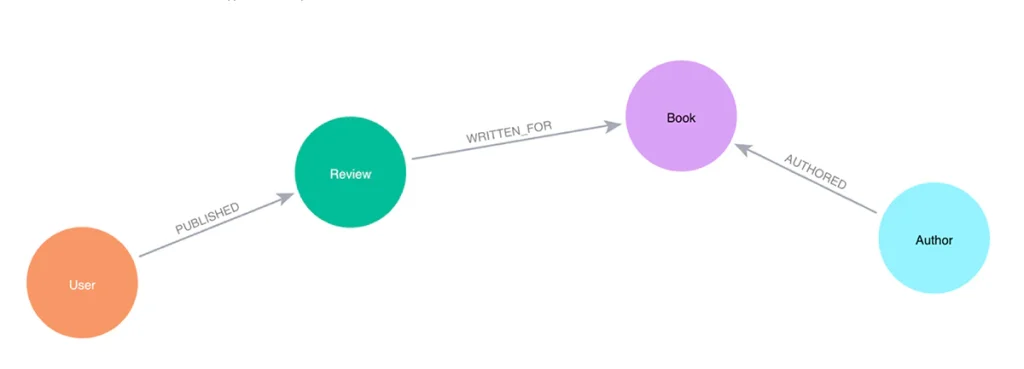
In this example, we’ll create a Book entity that represents a book node. We’ll also create a Review entity that represents a review of a book. The Review entity will have an embedding (vector) associated with it, which we’ll use for similarity searches.
These entities are standard Spring Data Neo4j code, so I won’t show the code here. However, full code for each class is available in the Github repository – Book class, Review class.
We also need a repository interface defined so that we can interact with the database. While we will need to define a custom query, we’ll come back and add that in a bit later.
public interface BookRepository extends Neo4jRepository<Book, String> {
}Code language: Java (java)
Next, the core of this application where all the magic happens is the controller class. This class will contain the logic for taking a search phrase provided by the user and calling the Neo4jVectorStore to calculate and return the most similar ones. We can then pass those similar reviews into a Neo4j query to retrieve connected entities, providing additional context in the prompt for the LLM. It will use all the information provided to respond with some similar book recommendations for the original searched phrase.
Controller
Our controller class contains a common annotation for setting it as a rest controller. We’ll also inject the Neo4jVectorStore and BookRepository to later call vector search and retrieval query methods, as well as the model-agnostic ChatClient for our embedding client.
The next thing is to define a string for our prompt. This is the text that we will pass to the LLM to generate the response. We’ll use the search phrase provided by the user and the similar reviews we find in the database to populate our prompt parameters in a few minutes. Next, we define the constructor for the controller class, which will inject the necessary beans.
@RestController
public class BookController {
    private final ChatClient client;
    private final Neo4jVectorStore vectorStore;
    private final BookRepository repo;

    String prompt = """
            You are a book expert providing recommendations from high-quality book information in the CONTEXT section.
            Please summarize the books provided in the context section.

            CONTEXT:
            {context}

            PHRASE:
            {searchPhrase}
            """;

    public BookController(ChatClient.Builder builder, Neo4jVectorStore vectorStore, BookRepository repo) {
        this.client = builder.build();
        this.vectorStore = vectorStore;
        this.repo = repo;
    }

    //Retrieval Augmented Generation with Neo4j - vector search + retrieval query for related context
    @GetMapping("/graphrag")
    public String generateResponseWithContext(@RequestParam String searchPhrase) {
        List<Document> results = vectorStore.similaritySearch(searchPhrase);

        //more code shortly!
    }
}Code language: Java (java)
Finally, we define a method that will be called when a user makes a GET request to the /graphrag endpoint. This method will first take a search phrase as a query parameter and pass that to the vector store’s similaritySearch() method to find similar reviews. You can also add customization filters to the query, such as by limiting to the top five results (.withTopK(5)) and only pull the most similar results (withSimilarityThreshold(0.8)).
Then, we map the similar Review nodes back to Document entities because Spring AI expects a general document type. The Neo4jVectorStore class contains methods to convert Document to a custom record, as well as the reverse for record to Document conversion.
We now have similar reviews for the user’s searched phrase. But reviews (and their accompanying text) aren’t really helpful in giving us book recommendations. So now we need to run a query in Neo4j to retrieve the related books for those reviews. This is the retrieval augmented generation (RAG) piece of the application.
Let’s write the query in the BookRepository interface to find the books associated with those reviews.
public interface BookRepository extends Neo4jRepository<Book, String> {
    @Query("MATCH (b:Book)<-[rel:WRITTEN_FOR]-(r:Review) " +
            "WHERE r.id IN $reviewIds " +
            "OPTIONAL MATCH (b)<-[rel2:AUTHORED]-(a:Author) " +
            "RETURN b, collect(rel), collect(r), collect(rel2), collect(a);")
    List<Book> findBooks(List<String> reviewIds);
}Code language: Java (java)
In the query, we pass in the ids of the reviews from the similarity search ($reviewIds) and pull the Review -> Book pattern for those reviews. We also optionally retrieve any authors connected to the book. We then return the Book nodes, the Review nodes, the Author nodes, and all the relationships.
Now we need to call that method in our controller and pass the results to a prompt template. We will pass that to the LLM to generate a response with a book recommendation list based on the user’s search phrase.
//Retrieval Augmented Generation with Neo4j - vector search + retrieval query for related context
@GetMapping("/graphrag")
public String generateResponseWithContext(@RequestParam String searchPhrase) {
       //run vector similarity search in Neo4j
        List<Document> results = vectorStore.similaritySearch(searchPhrase);

        //execute retrieval query in Neo4j to pull related entities to the similar results
        List<Book> bookList = bookRepository.findBooks(results.stream().map(Document::getId).toList());

        //create a message to send to the LLM containing original prompt + RAG results
        var template = new PromptTemplate(prompt).create(
                Map.of("context", bookList.stream().map(Book::toString).collect(Collectors.joining("\n")),
                        "searchPhrase", searchPhrase)
        );
        System.out.println("----- PROMPT -----");
        System.out.println(template);

        //call the LLM with the message and return the answer string (content)
        return chatClient.prompt(template).call().content();
}Code language: Java (java)
Starting right after the similarity search, we call the findBooks() method and pass in the list of review ids from the similarity search. The retrieval query returns to a list of books called bookList. Next, we create a prompt template with the prompt string, the context data from the graph, and the user’s search phrase, mapping the context and searchPhrase prompt parameters to the graph data (list with each item on a new line) and the user’s search phrase, respectively. I have also added a System.out.println() to print the prompt to the console so that we can see what is getting passed to the LLM.
Finally, we execute the call() method to generate the response from the LLM. The returning JSON object has a contents key that contains the response string with the list of book recommendations based on the user’s search phrase.
Let’s test it out!
Running the application
To run the Goodreads AI application, you can use the ./mvnw spring-boot:run command in the terminal. Once the application is running, you can make a GET request to the /graphrag endpoint with a search phrase as a query parameter. Some examples are included next.
http ":8080/graphrag?searchPhrase=happy ending"
http ":8080/graphrag?searchPhrase=encouragement"
http ":8080/graphrag?searchPhrase=could you recommend books that are high tech"
http ":8080/graphrag?searchPhrase=please tell me about books that have dragons and magic"Code language: Bash (bash)
Sample call and output + full prompt
Call and returned book recommendations:
jenniferreif@elf-lord springai-java-tutorial % http ":8080/graphrag?searchPhrase=please tell me about books that have dragons and magic"

Here are summaries of the books featuring dragons and magic from the provided context:

1. **Throne of Jade (Temeraire, #2) by Naomi Novik**: This book is part of the Temeraire series, which blends historical fiction with fantasy, focusing on the relationship between a dragon named Temeraire and his captain, Laurence. The story explores themes of loyalty, friendship, and the complexities of war, all while highlighting the bond between humans and dragons. It has received praise for its engaging narrative, especially from those who enjoy dragon-centric tales.

2. **Dragonmaster (DragonMaster, #1) by Chris Bunch**: This novel centers around a war between two countries where dragons play a pivotal role in aerial combat. The protagonist, Hal, begins as an inexperienced country boy who becomes an apprentice dragon rider and eventually takes on a military command. The book mixes military strategy with fantasy elements, featuring relatable characters and a humorous take on the challenges of war. Some readers appreciated the military aspects, although others wished for more magical elements.

3. **Mechanical Dragons: Fire & Water by Bobbi Schemerhorn**: This story involves a quest to save magic in a world filled with mechanical dragons. The protagonist, Khaly, is portrayed as intelligent and engaging, and the narrative draws inspiration from popular anime and fantasy games. With a plot that combines adventure and darker themes, the book has been well-received for its imaginative world-building and character development, making it a recommended read for fans of magical adventures.

These books should appeal to readers interested in dragons and magical elements within their narratives.Code language: Bash (bash)
Application log output:
----- PROMPT -----
You are a book expert providing recommendations from high-quality book information in the CONTEXT section.
Please summarize the books provided in the context section.

CONTEXT:
Book[book_id=14069, title=Throne of Jade (Temeraire, #2), isbn=0345481291, isbn13=9780345481290, authorList=[Author[author_id=8730, name=Naomi Novik]], reviewList=[Review[id=08a97af8dadb42f047c4124dfcbeddf3, text=If you like dragons, READ THIS BOOK!, rating=5]]]
Book[book_id=1390326, title=Dragonmaster (DragonMaster, #1), isbn=0451460308, isbn13=9780451460301, authorList=[Author[author_id=48308, name=Chris Bunch]], reviewList=[Review[id=d56f87a8cced880de5b56685877cfa9d, text=Long story short: This is a tale about war. And in this war, some people are riding dragons. The end.
 It was an okay read, but I wished for more magic and more from the dragons., rating=2], Review[id=7f0df50131b598c55f81771501c50672, text=A really good military book with Dragons! What more can a girl ask for. The premise is simple. Two countries at war, a good old archers and swordsman fighting style until someone decides to use dragons and take the battle airborne.
 The main character, Hal starts of as a country bumpkin that cannot stand any harm to come to animals. It follows his journey to apprentice dragon rider to a command in the army fighting on dragon back.
 The characters are enjoyable and realistic with a great sense of military humour that had me laughing out loud in a few places. Mariah could be Corporal Nobbs ( from the Discworld) brother, that's all i'm saying.
 I would recommend this to anyone that is a fan of battles and the military in their fantasy., rating=3]]]
Book[book_id=23933461, title=Mechanical Dragons: Fire & Water, isbn=null, isbn13=null, authorList=[Author[author_id=7349514, name=Bobbi Schemerhorn]], reviewList=[Review[id=90c877bd35ed31093048f34e87a592a9, text=A tale of a quest to save magic! That's a great premise if I've ever heard one. Paired with reminiscent tones of beloved anime such as Fullmetal Alchemist, a touch of DragonAge, and mechanical dragons, this was a quick and enjoyable read. Khaly is a likable and intelligent protagonist and Bobbi did a great job bringing her (and the dragons!) to life. The story started off in way that had me immediately understanding the world and engaging with the characters before winding into a plot with a dark edge that took me all the way to the end, leaving me ready for book two!
 I highly recommend "Mechanical Dragons: Fire & Water" for anyone looking for a magical adventure!, rating=4]]]

PHRASE:
please tell me about books that have dragons and magicCode language: Bash (bash)
We can see that the LLM generated a response with a list of book recommendations based on the books found in the database (CONTEXT section of prompt). The results of the similarity search + graph retrieval query for the user’s search phrase are in the prompt, and the LLM’s answer uses that data for a response.
Wrapping Up!
In today’s tutorial, you learned how to build a GenAI application with Spring AI in Java. We used the OpenAI model to generate book recommendations based on a user’s search phrase. We used the Neo4j Vector Database to store and query vectors for similarity searches. We also mapped the domain model to our database model, wrote a repository interface to interact with the database, and created a controller class to handle user requests and generate responses.
I hope this post helps to get you started with Spring AI and beyond. Happy coding!
Resources
- Code (Github repository): Spring AI Goodreads
- Documentation: Spring AI
- Webpage: Spring AI project
Share Article