Getting Started with Neo4j and Javascript (Node.js)
In this blog post, we’ll walk through building a JavaScript (Node.js) application that highlights the strengths of Neo4j and demonstrates how developers in the JavaScript ecosystem can leverage graph databases to tackle complex data challenges.
But before we start coding, let’s pause and explore why a JavaScript developer might want to use a graph database in the first place.
Why Would a JavaScript Developer Choose a Graph Database?
Graph databases arose out of a need to model and query highly connected, dynamic data—something that often feels awkward or inefficient with traditional relational tables or even many NoSQL stores. Neo4j’s property graph model—where nodes and relationships have their own rich sets of properties—mirrors how we sketch real-world data on a whiteboard, making it easy to conceptualize and implement even the most tangled domains.
In JavaScript and Node.js applications, working with relational or document stores can require endlessly transforming JSON, mapping joins, or deeply nesting data to approximate relationships. Graph databases, by contrast, let JavaScript developers natively express real-world networks, hierarchies, and dependencies, then traverse them efficiently using Cypher—the query language designed for graphs.
Want to map how users are connected in a social app? Need to trace dependencies between NPM packages or visualize API calls? Want to build recommendations, explore business hierarchies, or uncover fraud rings in real time? This is precisely where graphs shine, and why graph databases are gaining traction with JavaScript engineers building real-time analytics, recommendation systems, knowledge graphs, and more.
And the flexible, dynamic nature of JavaScript data modeling—using plain objects, classes, arrays, and references—aligns closely with how graph data is structured. You can model nodes and relationships as objects, arrays, and references, and move between in-memory structures and graph queries with minimal impedance.
Creating a Project
Let’s walk through setting up a simple Node.js project that connects to Neo4j and queries some data about books and authors.
Prerequisites: You should have Node.js (v16+ recommended) and npm installed on your system. We’ll also need the official Neo4j JavaScript driver and a Neo4j database to connect to. For this tutorial, we’ll use Neo4j’s free Goodreads demo database, which contains data about books, authors, and reviews (sourced from the UCSD Book Graph project). You can access it via the Neo4j Browser interface or spin up your own instance.
Use the Demo Database: Open the Neo4j Browser here: https://demo.neo4jlabs.com:7473/browser/. Use the following credentials to connect:
- URI: neo4j+s://demo.neo4jlabs.com
- Username: goodreads
- Password: goodreads
- Database: goodreads
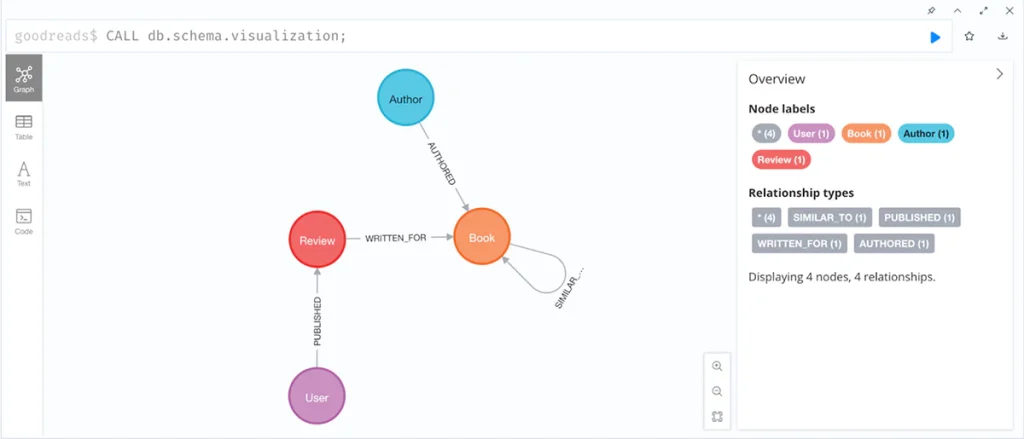
You can verify the dataset is available by running a schema visualization query in the browser, for example:
CALL db.schema.visualization;Code language: CSS (css)This should show nodes like “Author”, “Book”, “Review” and relationships like “AUTHORED” between Authors and Books as shown below.
Or use Neo4j Aura: As an alternative, you can create your own free Neo4j Aura instance in the cloud. Visit https://console.neo4j.io/ and create a new database (AuraDB Free). You’ll get a unique Bolt URI and credentials. Remember where this file is saved on your computer because you will need to access those credentials later. If you take this route, just substitute your Aura connection URI, username, and password in the steps below.
Project Structure:
Create a new directory for the project (let’s call it neo4j-js-tutorial). Inside, we’ll have a very simple structure (do not create these manually right now, we will create them as we go):
neo4j-js-tutorial/
├── index.js       # Our Node.js script
├── .env           # Environment variables for Neo4j connection
└── package.json   # Project configuration and dependenciesCode language: PHP (php)
Initializing Our Project:
Navigate into your project directory and initialize a Node.js project with default settings:
npm init -yCode language: Shell Session (shell)This will create a basic package.json. Next, install the Neo4j driver and a small utility for environment variables:
npm install neo4j-driver dotenvCode language: Shell Session (shell)This adds two dependencies to your package.json file: neo4j-driver (the official Neo4j JS driver, latest 5.x version) and dotenv (to load the environment variables from our .env file). After installing, your package.json should list these dependencies, for example:
{
  "dependencies": {
    "neo4j-driver": "^5.28.1",
    "dotenv": "^17.2.0"
  }
}Code language: JSON / JSON with Comments (json)
Configure the Neo4j Credentials
In the project root, create a file named .env and add the below Neo4j connection details to that file. It’s best practice to never hard-code (or write) credentials in the project code (aka outside of a .env file) that could be visible and used by other users if you ever made this code public on the internet. Therefore, the dotenv library will read and load them from this protected .env file:
NEO4J_URI = "neo4j+s://demo.neo4jlabs.com"
NEO4J_USERNAME = "goodreads"
NEO4J_PASSWORD = "goodreads"
NEO4J_DATABASE = "goodreads"Code language: JavaScript (javascript)
If you’re using your own Neo4j Aura Database, set NEO4J_URI to the Bolt URL (starting with neo4j+s://...), and the username/password to the values Neo4j provided. The neo4j+s scheme in the URI means a Neo4j Bolt connection with encryption (SSL) – which is what we want for Aura or the demo database.
Connecting and Querying with Neo4j
Time to write some code! Create an index.js in an editor and add the following:
We import the neo4j-driver package and the dotenv package to read the environment variables from our .env file.
// Import dependencies
const neo4j = require('neo4j-driver');
require('dotenv').config();Code language: JavaScript (javascript)
We then call neo4j.driver(...) with the NEO4J_URI and an authentication token (in this case – using basic auth with NEO4J_USERNAME and NEO4J_PASSWORD). This creates a Driver instance which manages the connection pool to the database. We load our environment variables from the .env file using dotenv.config(), so process.env.NEO4J_URI etc. are available to this file.
// Initialize the Neo4j driver
const driver = neo4j.driver(
  process.env.NEO4J_URI,
  neo4j.auth.basic(process.env.NEO4J_USERNAME, process.env.NEO4J_PASSWORD)
);Code language: JavaScript (javascript)
We then use an immediately-invoked async function to contain our asynchronous code (so we can use await at the top level). Inside, driver.getServerInfo() is called to ensure our connection details are correct. This method returns a promise that resolves if the driver can connect (or throws an error if it cannot). We log a confirmation message if successful.
(async () => {
  try {
    // Verify the connection details
    const serverInfo = await driver.getServerInfo();
    console.log(`Connected to Neo4j server version: ${serverInfo.version}`);Code language: JavaScript (javascript)
Next, we define a Cypher query string. This query looks for an Author node with a given name, finds the Book nodes that the author AUTHORED, and returns each book’s title and average rating. We include a $name parameter in the query (parameter placeholders in Cypher use the $ syntax), and we sort the results by rating in descending order, limiting to 5 books. (You’ll find a more detailed explanation of this query further down. For now, feel free to copy and paste ).
 // Define a Cypher query to find books by a given author
    const cypherQuery = `
      MATCH (a:Author)-[:AUTHORED]->(b:Book)
      WHERE a.name = $name
      RETURN b.title AS title, b.average_rating AS rating
      ORDER BY b.average_rating DESC
      LIMIT 5;
    `;Code language: JavaScript (javascript)
We execute the query using driver.executeQuery(cypherQuery, { name: "Chimamanda Ngozi Adichie" }). The second argument is the parameters object – here we pass in the actual author name for $name. The Neo4j driver will handle sending the query and parameters securely to the database. This new executeQuery API (introduced in Neo4j driver 5.8) conveniently runs a read transaction under the hood and returns a result containing the records directly.
// Execute the query with a parameter
    const result = await driver.executeQuery(cypherQuery, { name: "Chimamanda Ngozi Adichie" });Code language: JavaScript (javascript)
The result we get back has a records array (each record corresponds to one row in the Cypher result). We loop through result.records and for each, use record.get(<field>) to access the returned fields. We named the fields title and rating in our Cypher RETURN clause, so we use record.get('title') and record.get('rating'). We print each book’s title and rating.
And finally, whether the query succeeded or threw an error, we close the driver in a finally block with await driver.close(). This is important to free up resources (sockets, memory). In a long-running application, you would keep the driver open and reuse it, but in a short script like this, we close it at the end of execution.
// Loop through the returned records and output the data
    for (const record of result.records) {
      console.log(`Title: ${record.get('title')}, Rating: ${record.get('rating')}`);
    }
  } catch (err) {
    console.error('Error querying Neo4j:', err);
  } finally {
    // Close the driver connection
    await driver.close();
  }
})();Code language: JavaScript (javascript)
The finished code block for the index.js file will look like this:
// Import dependencies
const neo4j = require('neo4j-driver');
require('dotenv').config();


// Initialize the Neo4j driver
const driver = neo4j.driver(
  process.env.NEO4J_URI,
  neo4j.auth.basic(process.env.NEO4J_USERNAME, process.env.NEO4J_PASSWORD)
);

(async () => {
  try {
    // Verify the connection details
    const serverInfo = await driver.getServerInfo();
    console.log(`Connected to Neo4j server version: ${serverInfo.version}`);


    // Define a Cypher query to find books by a given author
    const cypherQuery = `
      MATCH (a:Author)-[:AUTHORED]->(b:Book)
      WHERE a.name = $name
      RETURN b.title AS title, b.average_rating AS rating
      ORDER BY b.average_rating DESC
      LIMIT 5;
    `;

    // Execute the query with a parameter
    const result = await driver.executeQuery(cypherQuery, { name: "Chimamanda Ngozi Adichie" });

    // Loop through the returned records and output the data
    for (const record of result.records) {
      console.log(`Title: ${record.get('title')}, Rating: ${record.get('rating')}`);
    }
  } catch (err) {
    console.error('Error querying Neo4j:', err);
  } finally {
    // Close the driver connection
    await driver.close();
  }
})();Code language: JavaScript (javascript)
Running the Application
Make sure your Neo4j instance (demo or Aura) is up and accessible, and that your .env has the correct credentials. Then run the script:
node index.jsCode language: Shell Session (shell)If everything is set up correctly, you should see output similar to:
Connected to Neo4j
Title: We Should All Be Feminists, Rating: 4.47
Title: Dovremmo essere tutti femministi, Rating: 4.47
Title: Paarse hibiscus, Rating: 4.12Code language: CSS (css)
(Note: Your exact results may vary, but here we see the top highest-rated books authored by Chimamanda Ngozi Adichie that exist in the database, along with their average Goodreads ratings.)
Detailed Query Explanation
Let’s unpack the Cypher query we used in our code, as understanding cypher queries will help you understand the real power of graph:
- MATCH (a:Author)-[:AUTHORED]->(b:Book) – This pattern matches an author node connected by the AUTHORED relationship to a book node b. In other words, it finds all (Author)–(Book) pairs where the relationship type is AUTHORED (meaning the author wrote the book). In Cypher, round parentheses denote nodes, and -[:LABEL]-> denotes a directed relationship. So we’re specifically looking for an Author who authored a Book. If an Author has not written any books, they won’t appear in this match.
- WHERE a.name = $name – This filters the results of the MATCH. We only keep those author nodes whose name property equals the parameter $name. In our code, we supplied $name = “Chimamanda Ngozi Adichie”. Using a parameter here (instead of embedding the string directly) is a best practice for both security and performance – it prevents Cypher injection and allows Neo4j to cache the query plan. We could have hard-coded a name in the query (e.g., WHERE a.name = “Chimamanda Ngozi Adichie”), but using a parameter makes it easy to reuse this query for any author name.
- RETURN b.title AS title, b.average_rating AS rating – This tells Neo4j what data to return for each match. We’re returning two fields: the book’s title and the book’s average_rating, and we alias them as title and rating respectively. If we simply returned b (the whole book node), Neo4j would return the entire node with all properties (and a reference id). By specifying only the properties we care about, we make the output easier to handle (and avoid huge dumps like long description text or vector embeddings that might be stored on the node).
- ORDER BY b.average_rating DESC – This sorts the returned records by the book’s average_rating in descending order (highest first). Cypher ORDER BY works similarly to SQL. Here we want the top-rated books by the author. If we omitted this, the books would be returned in an arbitrary order (depending on internal storage or query execution order).
- LIMIT 5 – As the name suggests, this limits the result to 5 records. The demo dataset might have more or less than five books for some authors, but we only want to show the top 5 in this example. Limiting the result also helps reduce data transfer if you only need a subset of results.
In summary, the Cypher query is: “Find the books authored by Chimamanda Ngozi Adichie, then return their titles and ratings, sorted by rating, and give me the top five.” Cypher efficiently executes this by an index lookup on the author’s name (if an index exists on Author(name)) followed by a traversal to that author’s books. Because Neo4j stores relationships natively, it can fetch connected nodes (the books) in constant time for each author, which is a big reason why graph databases excel at traversal queries.
On the JavaScript side, the driver’s executeQuery method handled all the boilerplate of starting a session, beginning a transaction, running the query, and committing it. We got back a list of records that we iterated over. Each record in our case has two fields (title and rating), accessible by the get method or by index. We printed them out in a simple template string. The driver also provides metadata like result.summary which we could use to inspect how many records were returned, how long the query took, and so on, but we kept it simple for now.
Congratulations – you’ve just made your first Neo4j query from Node.js!
Verify In Your Database:
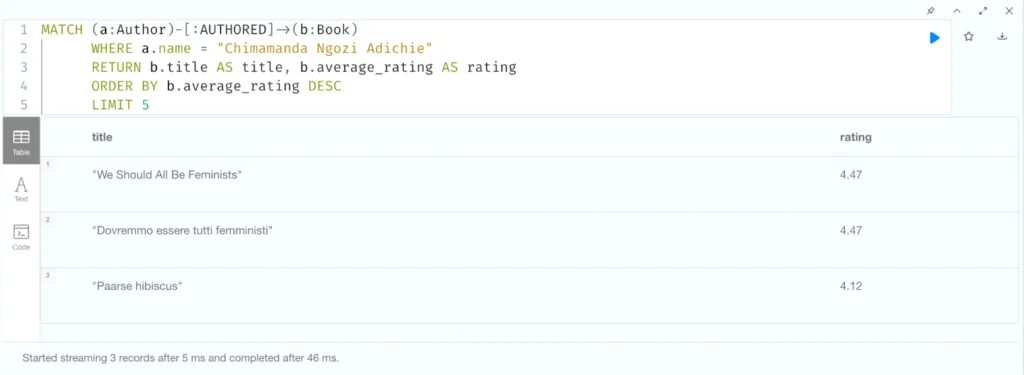
If you would like to verify that the output from your application matches what is seen in the database, you can take the same cypher query and simply replace the $name property with the actual name parameter in quotation marks and run it in the demo.neo4jlabs.com/7343 browser – “Chimamanda Ngozi Adichie”:
MATCH (a:Author)-[:AUTHORED]->(b:Book)
      WHERE a.name = "Chimamanda Ngozi Adichie"
      RETURN b.title AS title, b.average_rating AS rating
      ORDER BY b.average_rating DESC
      LIMIT 5;
    `;
The result:
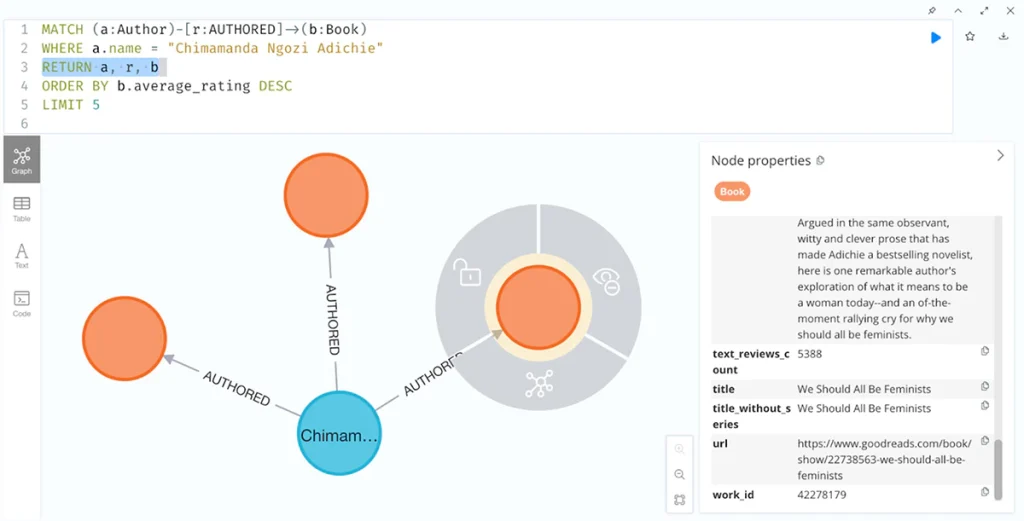
With a few small edits to the Cypher RETURN statement on line 3, we can also visualize the available data as a graph and click into one of the “book” nodes to read some additional information.
Next Steps
From here, you have a basic foundation to build on. Some ideas for next steps:
- Build a Web API: You can integrate this Neo4j query logic into a web server using a framework like Express. For example, create an endpoint (e.g.,
/top-books?author=Chimamanda%20Ngozie%20Adichie) that uses a query parameter and returns the query results as JSON. This way, you could build a frontend (maybe a React or Vue app) that displays the data from Neo4j in a user-friendly way. - Use a Higher-Level ORM/OGM: While using the driver directly is straightforward, for larger applications, you might consider an Object Graph Mapper like Neode or even the Neo4j GraphQL library for Node.js if you’re into GraphQL. These can abstract some of the Cypher queries and map results to JavaScript classes or GraphQL types, respectively.
- Expand the Data Model: We focused on authors and books. The dataset also has Review nodes and likely User nodes (who wrote reviews). You could write queries to find, say, the top reviewers, or recommendations (e.g., if user X liked the same book as user Y, what else did user Y review highly?). Try writing new Cypher queries to explore the graph.
- Error Handling and Configuration: In a production app, you’d add more robust error handling. For instance, if getServerInfo() fails, you might want to retry or exit gracefully. You’d also manage configuration (like URI and credentials) via environment variables (which we did using dotenv). If using multiple Neo4j environments (dev/production), you’d adjust those accordingly. The Neo4j driver also allows tuning of connection pool size and routing (for clusters), which the docs cover.
Now that you know how to connect and run basic queries from Node.js, you can start solving problems where understanding the contextual information from the relationships in data is vital– all while using JavaScript syntax and data structures.
Resources
- Continue Building – Neo4j Movies App (JS): Check out the Neo4j example project movies-javascript-bolt (https://github.com/neo4j-examples/movies-javascript-bolt) which shows a simple web app using the Neo4j JavaScript driver with a movies dataset. It’s a great way to see a slightly larger application structure using Neo4j from Node.js.
- Free Online Course: Building Neo4j Applications with Node.js on Neo4j GraphAcademy walks you through using the driver in a step-by-step tutorial (similar to what we did, but in the context of a web app). You can find it here: https://graphacademy.neo4j.com/courses/app-nodejs/.
- Neo4j JavaScript Driver Documentation: The official driver manual is an excellent reference for more advanced features. See https://neo4j.com/docs/javascript-manual/current/ for details on topics like explicit transactions, async result streams, driver configuration, and more.
- Neo4j AuraDB (Free Tier): Don’t have a Neo4j instance running? Get a free AuraDB instance in the cloud at https://console.neo4j.io. It is a managed Neo4j instance, so you don’t have to install anything locally – which is helpful for development and prototyping.
Welcome to the Graph!
Share Article