Get Started with Neo4j and Python
In this blog post, we’ll walk through building a Python application that highlights the strengths of Neo4j and how Python developers can use graph databases to solve complex data problems.
But before we start writing code, let’s look at why a Python developer might reach for a graph database in the first place.

Why Would a Python Developer Choose a Graph?
Graph databases were born out of the need to model and query complex, highly connected domains that were cumbersome to represent in traditional tabular or document structures. Neo4j uses the property graph model—nodes and relationships, each with their own properties—to express data in a natural, whiteboard-friendly form.
In Python, working with relational or NoSQL databases often requires transforming data structures to fit a backend system that isn’t always designed for relationships. With a graph database, Python developers can model real-world networks, hierarchies, and dependencies natively and query them efficiently using Cypher.
Want to compare how language features evolved from Python 2 to Python 3? Want to trace dependencies between your packages across versions? Want to find paths through a network of fraud transactions or recommend friends-of-friends? Graphs shine in these domains.
And Python’s flexible data modeling—using dictionaries, objects, or dataclasses—fits naturally with how graph data is structured.
Creating a Project
Let’s build a simple app that connects to a Neo4j instance and queries data about books and authors from a sample dataset.
Prerequisites
You need:
- Python 3.8+
- The neo4j Python package (install it with pip install neo4j)
- Access to a Neo4j instance
For this tutorial, we’ll use Neo4j’s hosted demo database:
Browser: https://demo.neo4jlabs.com:7473/browser/
Credentials:
- URI: neo4j+s://demo.neo4jlabs.com
- Username: goodreads
- Password: goodreads
- Database: goodreads
You can verify the dataset by running this Cypher query in the browser:
CALL db.schema.visualization;Code language: Shell Session (shell)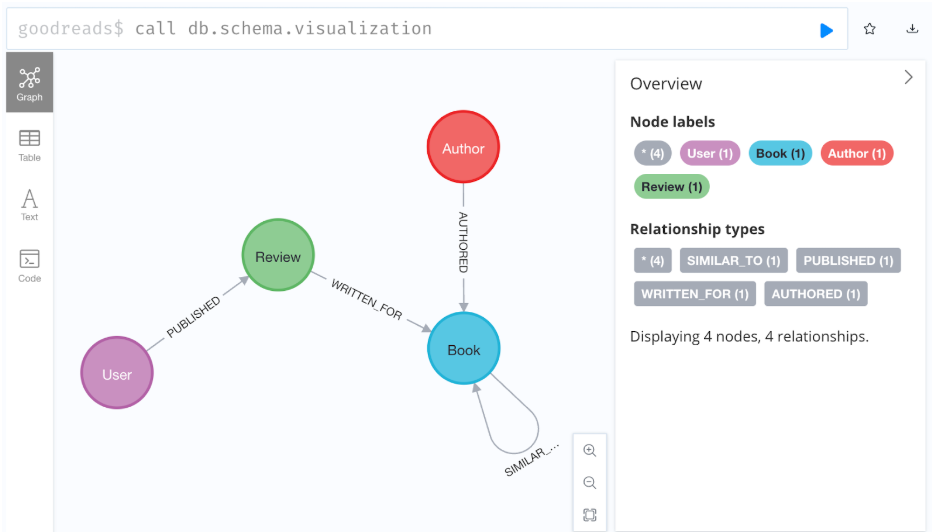
Or spin up your own free Neo4j Aura instance at: https://console.neo4j.io/
Project Structure
Let’s use a simple Python layout:
neo4j-python-tutorial/
├── app.py
├── .env
└── requirements.txt
Installing the Neo4j Python Driver
In your requirements.txt:
neo4j==5.28.1
python-dotenv==1.1.0Code language: Shell Session (shell)
Create and run a virtual environment:
python -m venv venv
source venv/bin/activateCode language: Shell Session (shell)
Then install the dependencies:
pip install -r requirements.txtCode language: Shell Session (shell)Configure the Neo4j Credentials
In .env:
NEO4J_URI = "neo4j+s://demo.neo4jlabs.com"
NEO4J_USERNAME = "goodreads"
NEO4J_PASSWORD = "goodreads"
NEO4J_DATABASE = "goodreads"Code language: Shell Session (shell)
Connecting and Querying with Neo4j
Create app.py:
import os
from dotenv import load_dotenv
load_dotenv()


from neo4j import GraphDatabase


# Initialize the Neo4j driver
driver = GraphDatabase.driver(
   os.getenv('NEO4J_URI'),
   auth=(
       os.getenv('NEO4J_USERNAME'),
       os.getenv('NEO4J_PASSWORD')
   )
)


# Verify the connection
driver.verify_connectivity()


# Define the query
cypher_query = """
MATCH (r:Review)-[:WRITTEN_FOR]->(:Book)<-[:AUTHORED]-(a:Author)
WHERE a.name = $name
RETURN r {.text, .rating}
ORDER BY r.rating DESC
LIMIT 10
"""


# Execute the query with a parameter
records, summary, keys = driver.execute_query(
   cypher_query,
   name="Jennifer Weiner"
)


# Parse the result
for record in records:
   # Print the return values
   print(f"record: {record}")


# Close the driver
driver.close()Code language: Python (python)
Running
python run app.pyCode language: Shell Session (shell)Sample Output (Trimmed)
<Record r={'text': 'Addie Downs thought her and Valerie Adler would be best friends forever.But when Valerie becomes part of the popular crowd and Addie becomes the scapegoat of her classmates. The friendship kind of grows apart.Flash forward fifteen years. Valerie has found a measure of fame as the local weather girl.Addie lives alone in her parents old house in Pleasant Ridge IL. and cares for her troubled brother . She is still hoping and trying to meet her own prince charming so she has turned to internet dating.She has just returned home from bad date number 6 when there is a knock on her door .There stands Valerie with blood on her coat sleeve and a terrified look on her face. She tells Addie something horrible has happened and your the only one who can help. Its a hilarious adventure , a story about loyalty and betrayal, family history and small town secrets. Its about finding love where you least expect it and living through tragedy. And the ties that keep best friends together.', 'rating': 5}>
…Code language: Shell Session (shell)
Query Explanation
The key parts of the code are the cypher_query and the driver.execute_query() function.
Cypher is the primary query language used with Neo4j databases to read and write data.
The MATCH (r:Review)-[:WRITTEN_FOR]->(:Book)<-[:AUTHORED]-(a:Author) portion specifies a pattern or a sub-graph of the data stored. Only Reviews connected to an Author through the above chain of intermediary relationships and nodes would be returned. An Author who has not yet authored a book, for example, would not be part of the returned data.
WHERE a.name = $name is a filter clause, where only Authors with a name property matching the value of the named parameter $name would be included in the results. Alternatively a value could have been hardcoded, like WHERE a.name = “Rachel Roberts”.
The return statement RETURN r {.text, .rating} specifies to return only the text and rating properties of any matching Reviews. Just using RETURN r would return all data associated with found Reviews. This particular data set includes vector embeddings in an .embeddings property, which would result in a very long output.
Finally ORDER BY r.rating DESC LIMIT 10 will sort the results by the .rating property of the Reviews, descending from highest to lowest value. The limit statement forces the return of just the first 10 Reviews.
The execute_query() function takes a minimum of 1 argument, that being the cypher query to run. However, if named parameters are used, they will need to be passed in with the source of the values.
records, summary, keys = driver.execute_query(
    cypher_query,
    name="Jennifer Weiner"
)Code language: Python (python)
The function returns a tuple of records (as a list), a summary object, and list of keys found in each record. For more details on this query function see the docs here.
Next Steps
From here, you can:
- Add Flask or FastAPI to turn this into a web API
- Use neomodel for higher-level modeling
Resources
- Python driver docs: https://neo4j.com/docs/python-manual/current/
- Code Examples: https://github.com/neo4j-examples/python-driver-examples/tree/main
- Free course: https://graphacademy.neo4j.com/courses/drivers-python/
- Free cloud DB: https://console.neo4j.io/
Share Article