Architecture
This page explains how the components of Neo4j Enterprise Studio relate to each other and how network traffic flows between them.
Components
Neo4j Enterprise Studio consists of three components:
-
Frontend: the browser-based user interface.
-
Server (backend): handles tool asset operations, access control, and optionally proxies database queries.
-
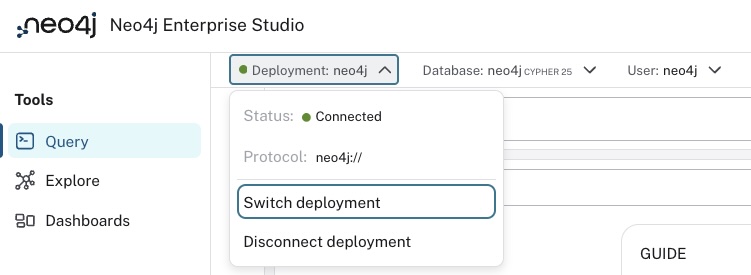
Asset storage: a Neo4j database that stores tool assets (queries, dashboards, Perspectives) and sharing metadata.
Asset storage
The asset storage database holds all tool assets across all connected deployments. Use a separate Neo4j database for the asset storage. Do not co-locate it with your business data. This avoids accidental interference, simplifies backups, and keeps concerns cleanly separated.
How the components interact
The frontend loads in the user’s browser and communicates with the Enterprise Studio server for all tool-related operations (saving queries, sharing dashboards, etc.). Each request includes the user’s Neo4j credentials, which the server validates before granting access.
For running Cypher® queries against Neo4j deployments, the frontend can either:
-
Route queries through the Enterprise Studio server (which acts as a reverse proxy), or
-
Connect directly to the Neo4j deployment from the browser.
This is controlled by the connection mode configured per deployment.
The server connects to the asset storage database using a dedicated service account.
Connection modes
Each Neo4j deployment in Enterprise Studio is configured with a connection mode that determines how queries reach the database.
Reverse proxy (default)
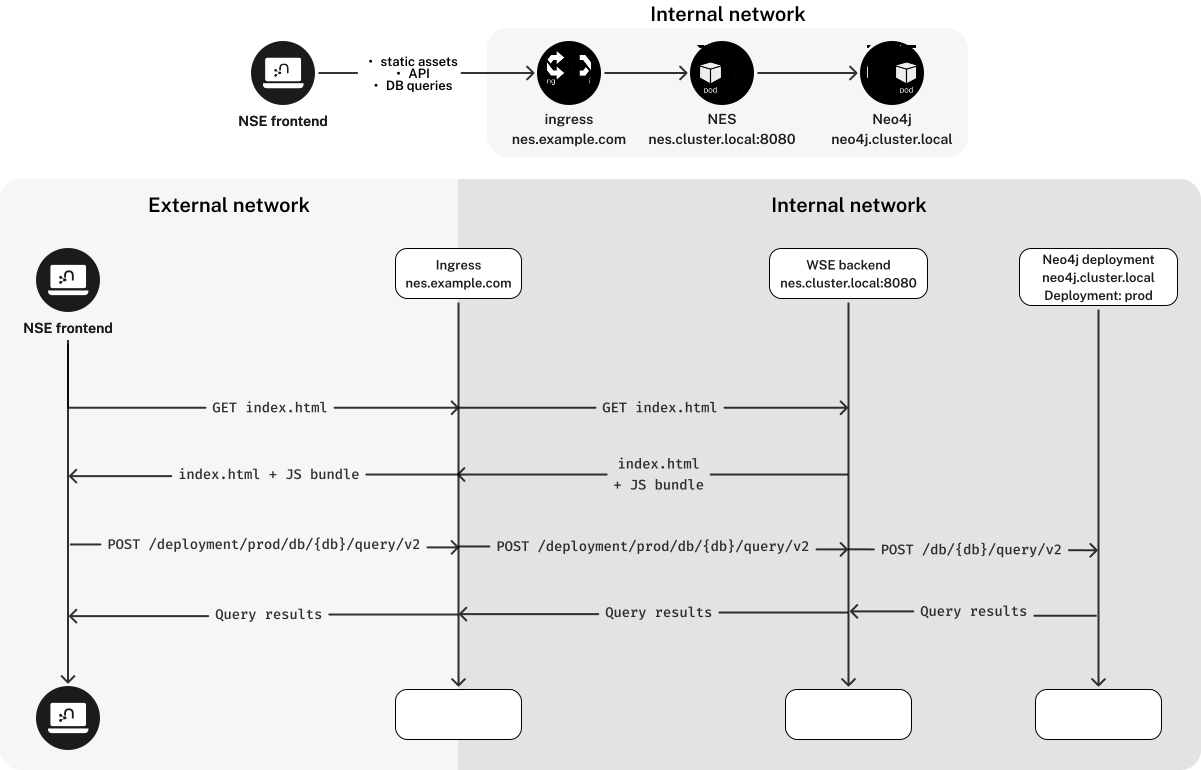
The browser sends queries to the Enterprise Studio server, which forwards them to the Neo4j deployment. This is the simplest option. The deployment only needs to be reachable from the server, not from every user’s browser. Requires the deployment to be accessible over HTTP or HTTPS. For Neo4j clusters, this mode requires session affinity in front of the cluster; see Prerequisites → Set up communication to a Neo4j cluster.
Split connection
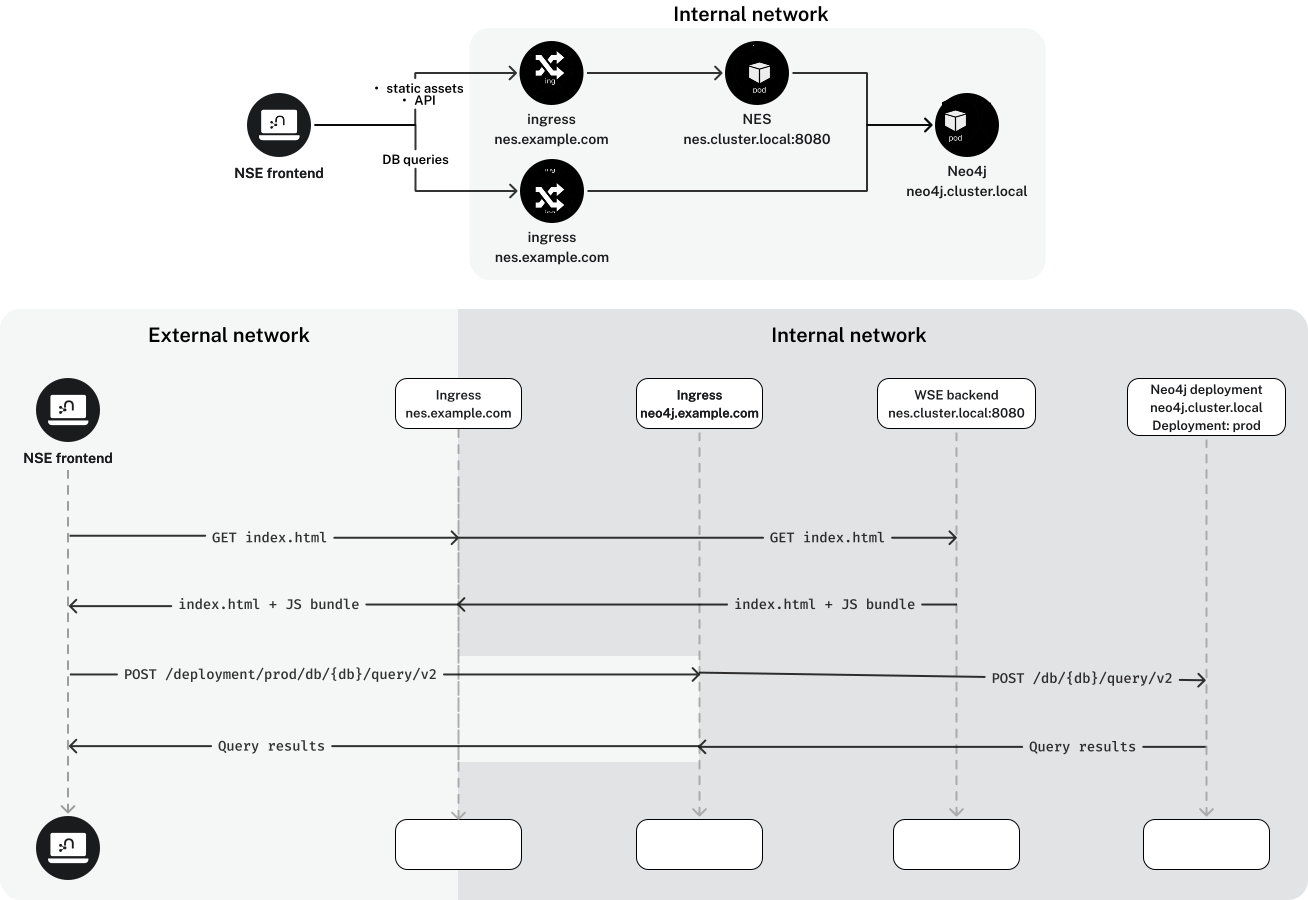
The browser connects directly to the deployment using a browser-accessible address, while the server uses a separate (potentially internal) address to reach the same deployment. Use this when the browser and server need different network paths to the deployment.
Direct connection only
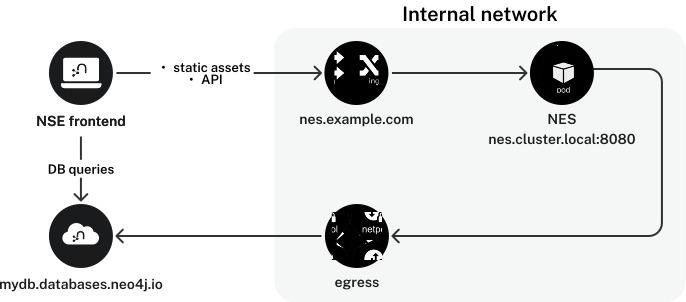
Both the browser and the server connect to the deployment using the same address. Use this when the deployment is accessible from both at the same URL, for example when using the Bolt protocol directly.
For details on how to configure these modes, see Configuration → Neo4j Deployments.
Scalability and high availability
Enterprise Studio is a stateless application. The server does not store session data, caches, or in-memory state between requests. Every request is independently authenticated against Neo4j.
This design has two important consequences:
-
Horizontal scaling: you can run multiple Enterprise Studio instances behind a load balancer (or as Kubernetes replicas) with no coordination between them. All instances connect to the same asset storage database.
-
High availability: if one instance fails, the load balancer routes traffic to the remaining instances. There is no leader election, no cluster membership, and no state to replicate.
One limit is not shared across instances: generativeAi.chatCompletionProvider.default.settings.maxConcurrentRequests is enforced per instance, so the concurrency your LLM provider sees is that value multiplied by the replica count.
Size it against your provider’s rate limit and your replica count together.
|
Explicit transactions proxied to a Neo4j cluster are stateful on the Neo4j side and require session affinity in front of the cluster. See Prerequisites → Set up communication to a Neo4j cluster. |
Network paths
The following connections must be reachable from the machine running Enterprise Studio:
| Destination | Port | Used for |
|---|---|---|
Asset storage Neo4j |
7687 |
Bolt ( |
User-facing Neo4j deployments |
7473 or 7687 |
HTTPS (proxy mode) or Bolt (direct mode) |
LLM provider endpoint |
443, or as configured in |
OpenAI-compatible chat completions, when generative AI is enabled |
When directClientQuery.enabled is true, end-user browsers also need direct access to Neo4j on port 7687.
The LLM provider connection is outbound from the server only; browsers never contact the provider.
Air-gapped deployments either leave generative AI disabled (the default) or point upstream.url at a gateway or self-hosted model inside the network.
For TLS configuration between Enterprise Studio and Neo4j, see Security → Neo4j backend connections.
Multi-tenancy
A single Enterprise Studio instance can serve multiple teams.
Each deployment has its own authorization.roleMapping, so users can only access deployments they can authenticate to.
For full data isolation between teams, deploy separate Enterprise Studio instances with distinct asset storage databases.