Introduction
Neo4j’s GenAI plugin provides functions and procedures to interact with external AI providers through Cypher, such as for creating vector embeddings and generating text.
| To use the plugin’s features, you need an account and API credentials from one of the supported external AI providers: (OpenAI, Azure OpenAI, VertexAI, Amazon Bedrock). |
Installation
In Neo4j Aura, the GenAI plugin is enabled by default.
On self-managed instances, you install the plugin by moving the neo4j-genai-plugin-<version>.jar file from <NEO4J_HOME>/products to <NEO4J_HOME>/plugins, or, if you are using Docker, by starting the Docker container with the extra parameter --env NEO4J_PLUGINS='["genai"]'.
For more information, see Operations Manual → Configure plugins.
Most GenAI features are available only in Cypher 25.
If your database’s default language is Cypher 5, prepend the query with CYPHER 25 to override the default for that query (see Cypher → Select Cypher version).
|
Environment setup
The examples in this manual use the Neo4j movie recommendations dataset, mostly focusing on the plot and title properties of Movie nodes.
There are 9083 Movie nodes with a plot and title property.
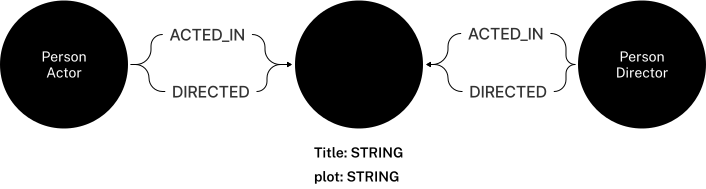
To follow the examples in this manual, you need to import a dump file. The file to import depends on the edition/deployment of Neo4j you are using and which storage format is available:
For instructions on importing dump files, see Aura → Backup, export, restore, and upload or Operations manual → Restore a database dump.