Building an AI Agent with Memory: Microsoft Agent Framework + Neo4j

Senior Product Manager
17 min read
How to build a conversational AI agent with persistent memory using the Microsoft Agent Framework, Neo4j, and the neo4j-agent-memory library.
AI agents are more useful when they remember. A transport assistant that recalls your home station, knows you need step-free access, and can reference a route it suggested three conversations ago is fundamentally different from one that starts fresh every time. But building that kind of memory into an agent is hard — you need short-term conversational context, long-term entity and preference storage, and reasoning trace retrieval, all without blocking your response stream.
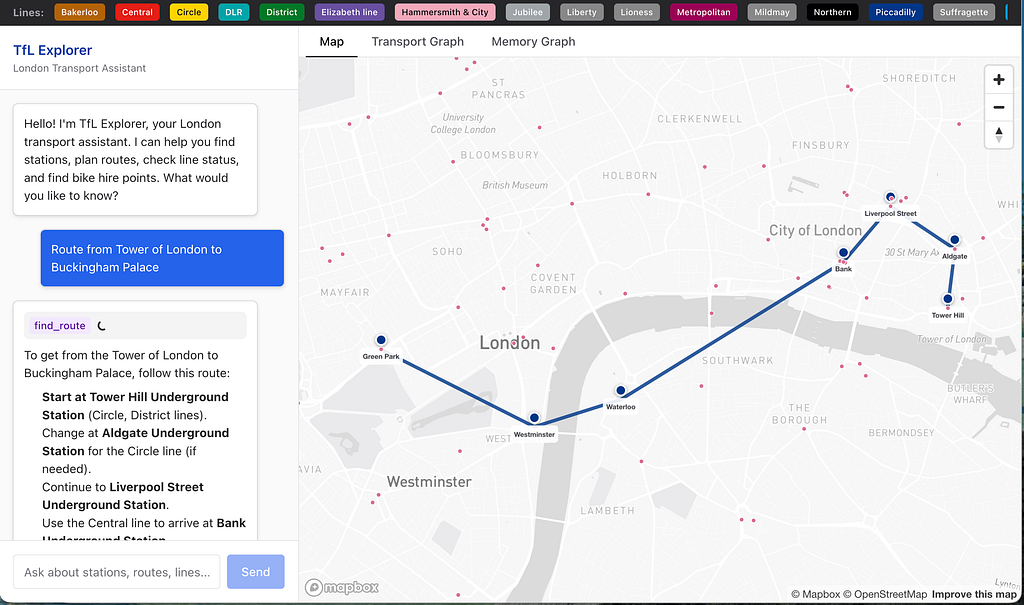
In this post, I’ll walk through how we built TfL Explorer, a London transport assistant that combines the Microsoft Agent Framework (MAF) with Neo4j Agent Memory to create an agent that navigates a transport graph, calls live APIs, and maintains a persistent context graph across sessions — all stored in Neo4j.
Architecture Overview
The application has three layers as shown in this diagram.
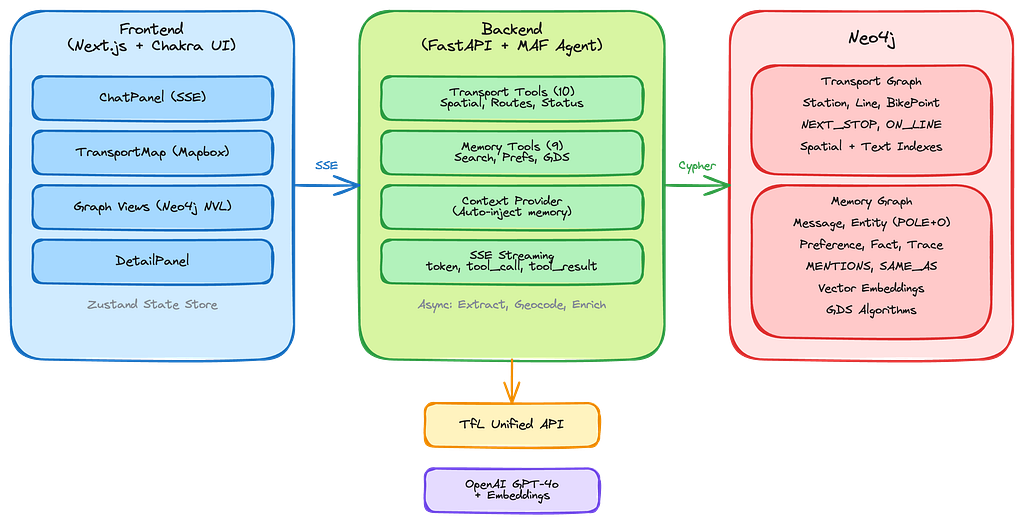
Both the transport data (stations, lines, routes) and the agent’s memory (conversations, entities, preferences, reasoning traces) live here in the same Neo4j instance.
The transport graph uses spatial indexes for geospatial queries while the context graph uses vector embeddings for semantic search as an entry point to traversing the graph.
The Microsoft Agent Framework
Microsoft Agent Framework (MAF) reached v1.0 in April 2026 — a production-ready, open-source SDK that unifies the enterprise-ready foundations of Semantic Kernel with the multi-agent orchestration patterns of AutoGen. It provides stable APIs with long-term support for building, orchestrating, and deploying AI agents in Python and .NET.
The framework has a pluggable architecture for both model providers (Microsoft Foundry, Azure OpenAI, OpenAI, Anthropic Claude, Amazon Bedrock, Google Gemini, Ollama) and memory backends.
Neo4j is one of the supported agent memory and context providers at launch, alongside Mem0, Redis, and Foundry Agent Service.
MAF’s key abstractions:
- Agent — An LLM-backed agent with a system prompt, tools, and context providers
- Message — A conversation message with role and content
- FunctionTool / @tool — Typed tool definitions the agent can invoke
- OpenAIChatClient — LLM adapter (OpenAI, Azure OpenAI, or compatible APIs)
- Context providers — Pluggable hooks that inject dynamic context before each turn and persist state after
Here’s how TfL Explorer creates its agent:
from agent_framework import Agent, Message, tool
from agent_framework.openai import OpenAIChatClient
from neo4j_agent_memory.integrations.microsoft_agent import (
    Neo4jMicrosoftMemory,
    create_memory_tools,
    record_agent_trace,
)

async def create_agent(
    memory: Neo4jMicrosoftMemory,
    tfl_client: TfLClient | None = None,
) -> Agent:
chat_client = OpenAIChatClient(
    api_key=settings.openai_api_key,
    model_id="gpt-4o",
 )

# Memory tools: search, preferences, knowledge, traces, GDS graph algorithms
memory_tools = create_memory_tools(memory, include_gds_tools=True)
# Transport tools: spatial queries, routing, live status
transport_tools = get_transport_tools(memory, tfl_client=tfl_client)
agent = chat_client.as_agent(
    name="TfLExplorer",
    instructions=SYSTEM_PROMPT,
    tools=memory_tools + transport_tools,
    context_providers=[memory.context_provider],
)
return agent
The agent gets 19 tools total — 9 from Neo4j Agent Memory (including 3 GDS graph algorithm tools) and 10 custom transport tools. The context_provider is the key piece of the pluggable memory architecture — it automatically injects relevant memory context (recent messages, known entities, user preferences) into the agent’s prompt on each turn, without consuming a tool call.
Neo4j Agent Memory: The Microsoft Agent Framework Integration
The neo4j-agent-memory library gives Agent Framework agents persistent memory backed by a knowledge graph. It was featured as one of the initial agent memory and context providers in the Agent Framework v1.0 launch — part of the framework’s pluggable memory architecture that lets you “choose your backend” for persistent agent state.
Neo4j actually has two integrations for MAF — each is a context provider, but they serve different purposes:
- Neo4j Memory Provider (neo4j-agent-memory) — Persistent memory that learns from conversations. Stores interactions, extracts entities via a multi-stage pipeline, infers preferences, and records reasoning traces. Bidirectional: automatically retrieves relevant context before each invocation and saves new memories after responses.
- Neo4j GraphRAG Context Provider (agent-framework-neo4j) — RAG from an existing knowledge graph. Supports vector, fulltext, and hybrid search modes with optional graph traversal via custom Cypher queries to enrich results with related entities. Available in both Python and .NET.
Together they cover both the “learning from conversations” and “grounding in domain knowledge” sides of agent intelligence. TfL Explorer uses the memory provider, since the transport graph is accessed directly via Cypher tools rather than through RAG retrieval.
Setting Up the Memory Client
The memory system is configured with several pluggable options, including sensible defaults for: Neo4j connection, embedding model, entity extraction, entity resolution, geocoding, and enrichment services options.
from neo4j_agent_memory import MemoryClient, MemorySettings
from neo4j_agent_memory.config.settings import (
    ExtractionConfig,
    ExtractorType,
    SchemaConfig,
)
def get_memory_settings() -> MemorySettings:
    return MemorySettings(
        neo4j={
            "uri": "bolt://localhost:7687",
            "user": "neo4j",
            "password": SecretStr("password"),
        },
        embedding={
            "provider": "openai",
            "model": "text-embedding-3-small",
            "api_key": SecretStr(os.environ["OPENAI_API_KEY"]),
        },
        extraction=ExtractionConfig(
            extractor_type=ExtractorType.LLM,
        ),
        # POLE+O entity schema: Location for stations, Organization for TfL
        schema_config=SchemaConfig(
            enable_subtypes=True,
        ),
        # + entity resolution, geocoding, enrichment configs (see "Additional Capabilities" below)
    )
# Initialize once at application startup
memory_client = MemoryClient(get_memory_settings())
await memory_client.connect()
The ExtractorType.LLM configuration uses OpenAI to extract entities from conversations — stations mentioned, lines discussed, places referenced. These become nodes in the memory graph, linked to the messages that mentioned them. Note that LLM-based extraction adds an OpenAI API call per conversation turn. For cost-sensitive applications, neo4j-agent-memory also supports spaCy and GLiNER extractors that run locally without API calls, at the trade-off of lower extraction quality for domain-specific entities.
The SchemaConfig uses the POLE+O model (Person, Object, Location, Event, Organization) — a natural fit for a transport application where stations are Locations, TfL is an Organization, and service disruptions are Events.
Three Types of Memory
Neo4j Agent Memory has abstractions for three distinct types of agent memory: short-term, long-term, and reasoning memory.
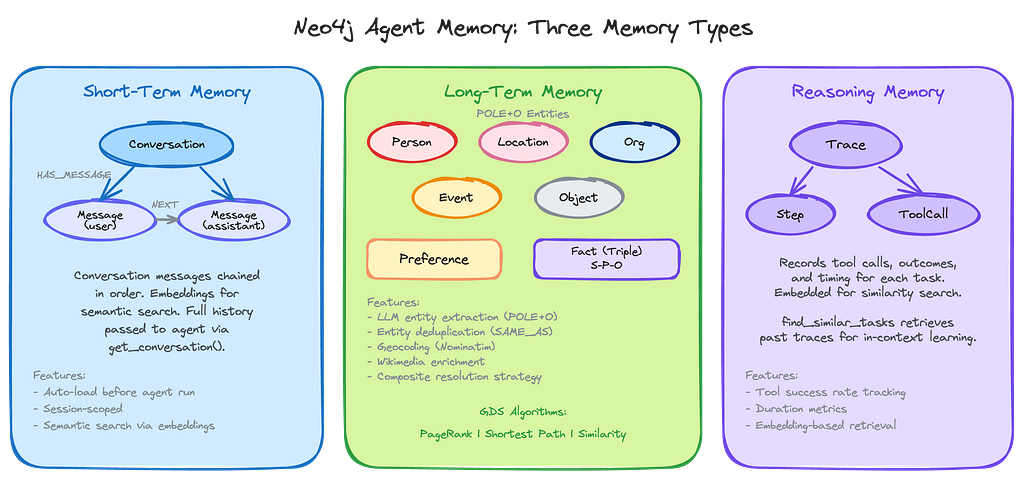
Short-term memory stores the conversation messages for the current session. Each message becomes a :Message node in Neo4j, chained in order. The MAF context provider handles message persistence automatically through its lifecycle hooks — before_run() loads conversation history and injects it as context, and after_run() saves both the user input and assistant response. This means you only need to pass the current message to the agent:
# Pass only the current message — context provider handles history injection
async for update in agent.run([Message("user", [message])], stream=True):
    yield update
The context provider retrieves recent messages from Neo4j, converts them to MAF Message objects, and injects them into the agent’s context automatically. No manual save_message()calls, no explicit history retrieval — the lifecycle hooks handle the full round-trip.
Long-term memory consists of entities which can be automatically extracted from conversations using the LLM and classified with the POLE+O schema. When a user says “I’m going to King’s Cross”, the extraction pipeline identifies “King’s Cross” as a Location entity, the resolution pipeline checks for duplicates, and the entity is stored as a node with :MENTIONSrelationships back to the messages that referenced it. Location entities are automatically geocoded with coordinates via Nominatim, and enriched with Wikipedia descriptions via the Wikimedia provider. Over multiple sessions, this builds up a knowledge graph of everything the user has discussed.
Reasoning traces record the sequence of tool calls and their outcomes for each task. When the agent encounters a similar question in the future, find_similar_tasks retrieves relevant traces via vector similarity, giving the agent in-context examples of how it previously solved similar problems giving the agent graph-based reasoning to make the agent more efficient during the reasoning phase going forward.
The Context Provider
The context provider is where the integration gets interesting. In the Agent Framework’s pluggable architecture, context providers run around each invocation — before_run adds context before execution, after_run processes and persists state after. The Neo4j memory provider is bidirectional: it automatically retrieves relevant context before invocation and saves new memories after responses. Instead of requiring the agent to explicitly call a tool to retrieve memory, it injects context automatically:
agent = chat_client.as_agent(
    name="TfLExplorer",
    instructions=SYSTEM_PROMPT,
    tools=all_tools,
    context_providers=[memory.context_provider],
)
On each agent invocation, the context provider queries Neo4j for:
- Recent messages from the current session (up to max_recent_messages)
- Relevant entities from long-term memory (up to max_context_items), optionally ranked by PageRank when GDS is enabled
- User preferences that might be relevant
- Similar reasoning traces
This context is injected into the agent’s prompt automatically — no tool call overhead, no extra latency from a round-trip decision.
The max_recent_messages and max_context_itemsparameters control how much context is injected — and therefore how many tokens are consumed. With 10 recent messages and 15 context items, the memory context typically adds 2,000–4,000 tokens to each invocation. For applications with long conversations or large entity graphs, tuning these values is important to stay within model context limits while still providing useful recall.
Building Custom Tools with the Transport Graph
The transport tools demonstrate a pattern that works well with neo4j-agent-memory: using the memory client’s Neo4j connection to run Cypher queries against your own domain graph.
Each tool is defined with MAF’s @tool decorator and uses typed parameters via Annotated:
from agent_framework import FunctionTool, tool
from typing import Annotated
def get_transport_tools(memory: Neo4jMicrosoftMemory) -> list[FunctionTool]:
    client = memory.memory_client  # Access the underlying MemoryClient
    @tool(
        name="find_nearest_stations",
        description="Find stations near a geographic coordinate.",
    )
    async def find_nearest_stations(
        lat: Annotated[float, "Latitude"],
        lon: Annotated[float, "Longitude"],
        radius_meters: Annotated[int, "Search radius in meters"] = 1000,
    ) -> str:
        cypher = """
        WITH point({latitude: $lat, longitude: $lon}) AS location
        MATCH (s:Station)
        WHERE point.distance(s.location, location) < $radius
        WITH s, round(point.distance(s.location, location)) AS distance
        ORDER BY distance LIMIT 10
        OPTIONAL MATCH (s)-[:ON_LINE]->(l:Line)
        RETURN s.naptanId AS id, s.name AS name,
               s.lat AS lat, s.lon AS lon,
               collect({name: l.name, color: l.color}) AS lines
        """
        result = await client.graph.execute_read(
            cypher, {"lat": lat, "lon": lon, "radius": radius_meters}
        )
        stations = [dict(r) for r in result]
        return json.dumps({
            "stations": stations,
            "graph_data": {"nodes": [...], "relationships": [...]},
            "map_markers": [{"lat": s["lat"], "lon": s["lon"], ...} for s in stations],
        })
    return [find_nearest_stations, ...]
The key pattern here: memory.memory_client.graph.execute_read() provides direct Cypher execution against the Neo4j instance. Your domain data and your context graph coexist in the same database, accessed through the same client. No separate connection pool, no second driver instance.
Each tool returns a JSON structure with three sections:
- Domain data — The actual query results (stations, routes, etc.)
- graph_data — Nodes and relationships for the frontend graph visualization
- map_markers — Coordinates for the frontend map
This structure lets the chat panel drive updates to the map and graph panels through a shared Zustand store.
The Full Tool Set
TfL Explorer has 10 transport tools, each leveraging Neo4j’s graph capabilities:
- find_nearest_stations – Spatial point.distance() with spatial index
- search_station – Text matching (case-insensitive CONTAINS)
- get_station_details – Multi-hop traversal: Station → Line, BikePoint, Zone
- find_routes – shortestPath() over :NEXT_STOP relationships
- get_line_stations – Pattern match with ORDER BY sequence
- find_bike_points – Spatial query on BikePoint nodes
- get_line_status – Graph lookup + live TfL API call
- get_disruptions – Live TfL API call
- execute_cypher – Read-only Cypher execution (with validation)
- get_graph_schema – Schema introspection
The find_route tool is a good example of graph-native computation using the expressiveness of the Cypher graph query language:
MATCH (start:Station)
WHERE toLower(start.name) CONTAINS toLower($from)
WITH start LIMIT 1
MATCH (end:Station)
WHERE toLower(end.name) CONTAINS toLower($to)
WITH start, end LIMIT 1
MATCH path = shortestPath((start)-[:NEXT_STOP*..50]-(end))
UNWIND range(0, size(nodes(path))-1) AS i
WITH nodes(path)[i] AS stop, i
OPTIONAL MATCH (stop)-[:ON_LINE]->(l:Line)
RETURN collect({
    name: stop.name, lat: stop.lat, lon: stop.lon,
    lines: collect(DISTINCT l.name), sequence: i
}) AS route
This computes the shortest path through the transport network using Neo4j’s built-in shortestPath algorithm over :NEXT_STOP relationships, then enriches each stop with its line information. The *..50 upper bound prevents runaway traversals (the longest London tube line has 27 stops).
The Context Graph in Neo4j
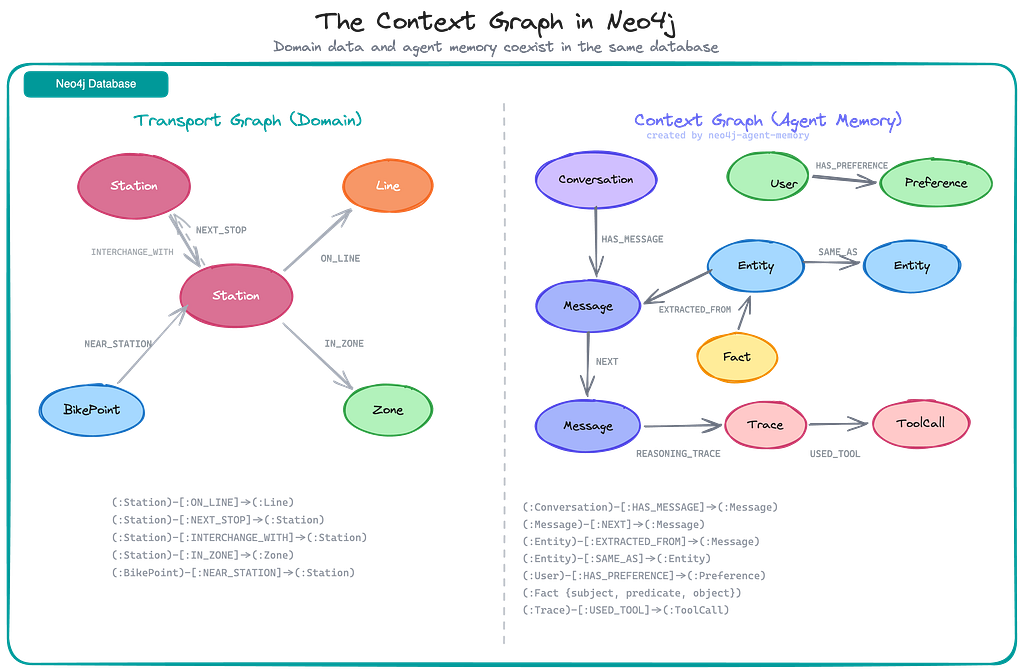
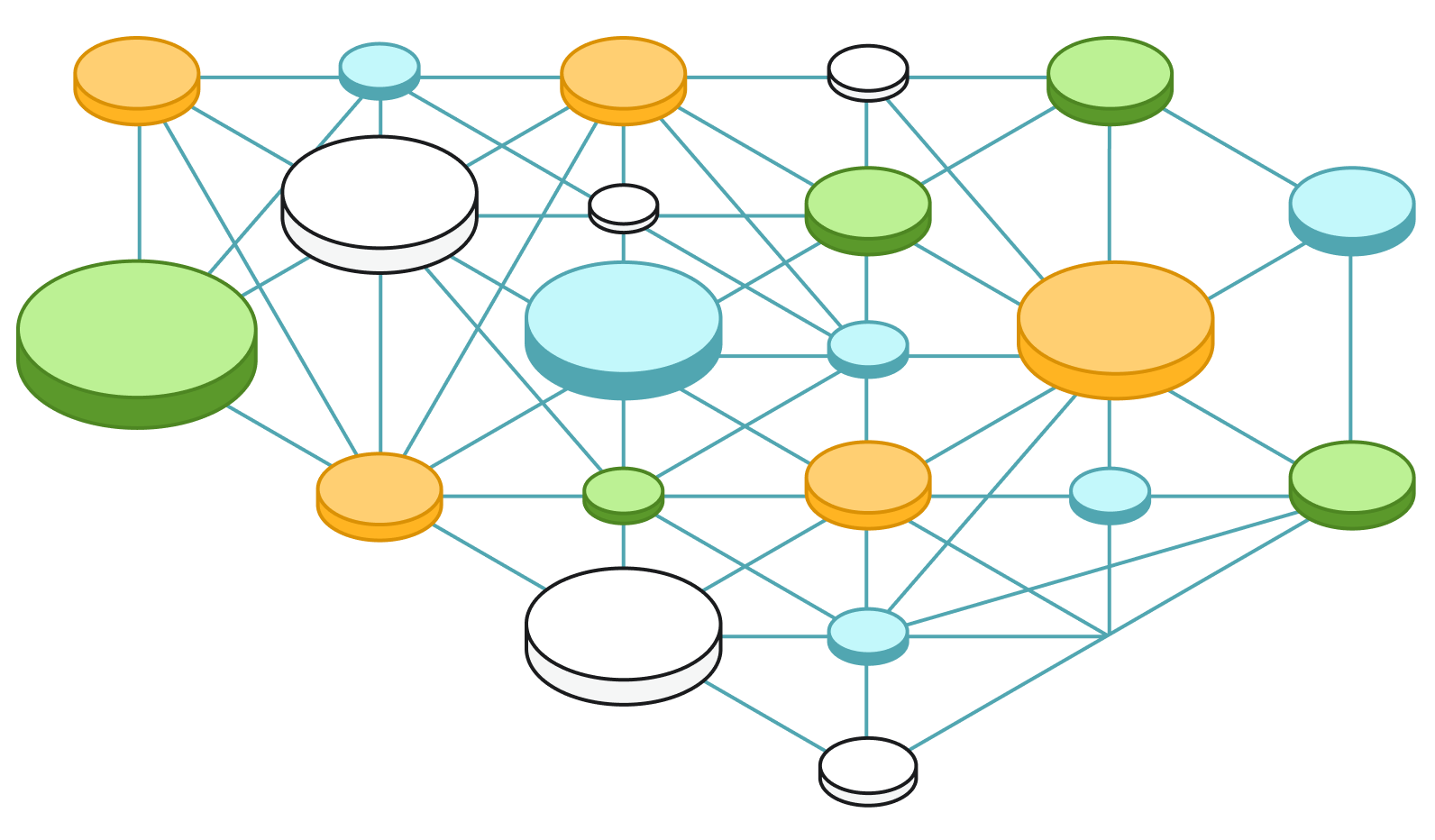
After several conversations, the Neo4j instance contains two interleaved graph models — the domain data (transport network) and the agent’s context graph (memory).
This is the key architectural insight: the context graph isn’t a separate system bolted on after the fact. It lives in the same database as the domain graph, accessed through the same driver, indexed with the same engine. The agent’s memory of what the user discussed coexists with the transport data it reasons about.
The transport data comes from the TfL Unified API and is loaded into Neo4j as a graph with spatial indexes.
The data pipeline (scripts/download_tfl_data.py + scripts/load_graph.py) downloads station, line, route, and bike point data, then creates the graph with point()coordinates, NEXT_STOP chains from route sequences, and NEAR_STATION relationships for bike points within 500m of stations.
Frontend: Driving Visualizations from Agent Tool Calls
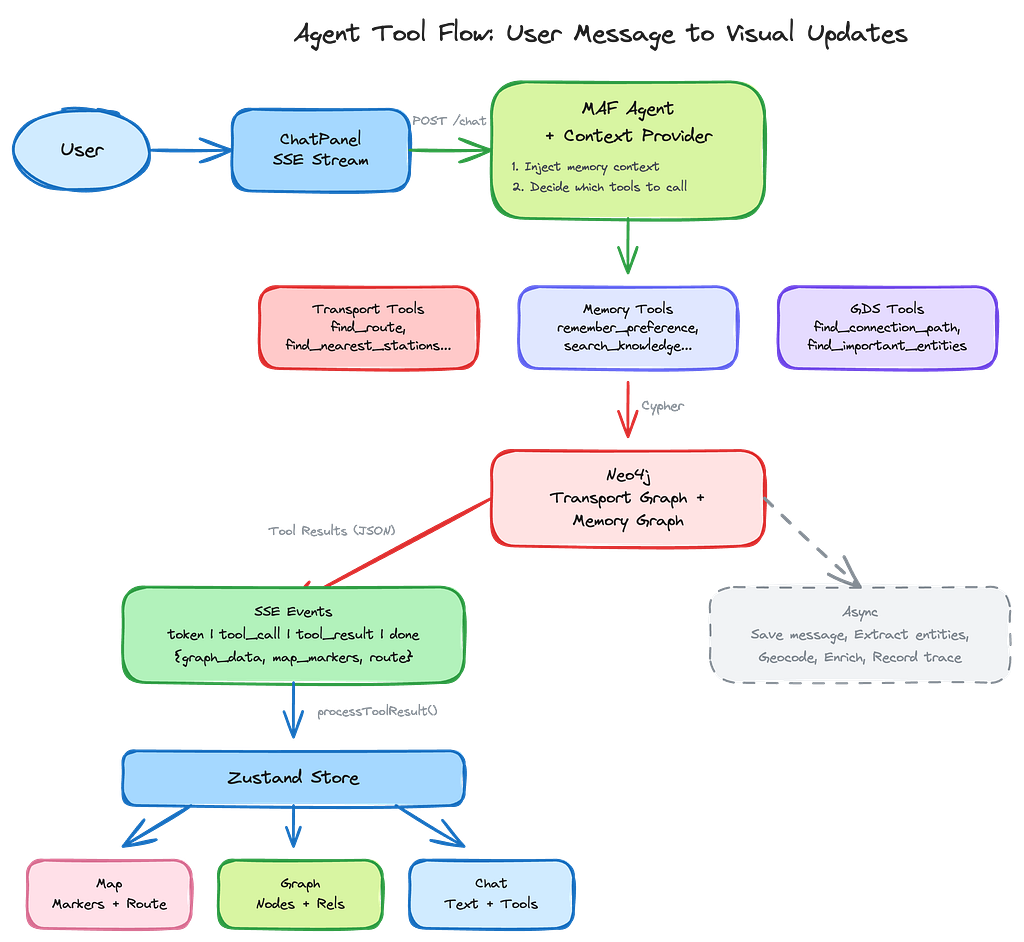
The frontend is a three-panel layout built with Next.js, Chakra UI, and two visualization libraries:
- Mapbox GL JS for the interactive map
- Neo4j NVL for graph visualization
Chat messages and the session ID are persisted to sessionStorage, so conversations survive page refreshes within the same tab. If sessionStorage is cleared (e.g., browser crash), the frontend backfills messages from the backend’s /chat/history endpoint on mount. A “New chat” button in the header clears the backend session, generates a fresh session ID, and resets the UI.
The map also displays memory location markers (shown in purple) when the user loads memory locations from the Memory Graph tab. These represent geocoded entities that the agent has extracted from conversations, providing a visual layer of “what the agent remembers” on top of the transport map.
Key Takeaways
Use the same database for domain data and memory has benefits. Having the transport graph and the agent’s context graph in the same Neo4j instance simplifies the architecture, reduces connection overhead, and opens up possibilities like linking memory entities to domain nodes (“Show me all stations the user has asked about”).
Because memories are stored as connected entities — not flat records — the agent can reason about relationships between things it remembers. Preferences, facts, and reasoning traces persist across sessions and surface automatically via context providers, giving the agent cross-session recall without explicit retrieval logic.
In cases where this is not feasible, you can also separate the memory and the domain (graph-)databases, which allows them to scale and operate independently.
The MAF integration eliminates boilerplate.create_memory_tools() generates typed, documented tools that the agent can call. The context provider handles the full message lifecycle — loading history via before_run(), saving messages and triggering entity extraction via after_run(). You pass only the current message to the agent; everything else is automatic.
Make memory operations non-blocking. Entity extraction, geocoding, enrichment, and reasoning trace recording are computationally expensive. The context provider’s after_run() hook handles message persistence and entity extraction automatically, while reasoning traces are recorded as asyncio.create_task() fire-and-forget tasks. The user sees no latency from memory operations.
Return structured data from tools. The graph_data + map_markers pattern lets every tool call drive visual updates in the frontend without the agent needing to know about the UI. The agent just returns data; the frontend decides how to render it.
Entity resolution prevents knowledge graph bloat. Without deduplication, the same station would appear multiple times in the memory graph as users refer to it differently. Composite resolution (exact + fuzzy + semantic) catches these duplicates automatically.
GDS fallback makes graph algorithms portable. By setting fallback_to_basic=True, the GDS tools work on any Neo4j deployment — from Aura Free to self-managed Neo4j Enterprise with GDS installed. The fallback uses basic Cypher queries that approximate PageRank (degree centrality), shortest path (Cypher shortestPath), and node similarity (shared neighbor counting).
Resources
Source Code & Libraries
- TfL Explorer source code: github.com/johnymontana/transport-for-maf
- Neo4j Agent Memory: github.com/neo4j-labs/agent-memory — the graph-native memory library used in this project (PyPI)
- Neo4j GraphRAG Context Provider: github.com/neo4j-labs/neo4j-maf-provider — GraphRAG from existing knowledge graphs (PyPI · NuGet)
- Microsoft Agent Framework: github.com/microsoft/agent-framework — the agent SDK (Python + .NET)
- Agent Framework Samples: github.com/microsoft/Agent-Framework-Samples — official example projects
- Create Context Graph: github.com/neo4j-labs/create-context-graph — CLI scaffolding tool that generates full-stack context graph apps for 22 industry domains
- Sample: Retail Assistant: neo4j-labs/agent-memory/examples/microsoft_agent_retail_assistant — example MAF agent with Neo4j memory
Microsoft Learn Documentation
- Agent Framework Overview — architecture and core concepts
- Context Providers — how before_run/after_runlifecycle hooks work
- Memory & Persistence (Step 4) — getting started with agent memory
- Agent Framework Integrations — all supported context providers and memory backends
- Neo4j Memory Provider — persistent knowledge graph memory for MAF agents (Python)
- Neo4j GraphRAG Context Provider — graph-enhanced RAG with vector, fulltext, and hybrid search (Python + .NET)
- Agent Framework v1.0 Announcement — the production release blog post
Context Graphs & Agent Memory
- Context Graphs & Agentic Decisions — Andreas Kollegger on why graphs capture “what you know, how you reason, and what you value”
- Hands On with Context Graphs and Neo4j — building AI systems that remember the “why” behind decisions
- Meet Lenny’s Memory: Building Context Graphs for AI Agents — demo app with 300+ podcast episodes and three-memory-type architecture
- Neo4j Agent Memory documentation — Neo4j Labs project page with tutorials and API reference
- Workshop: Neo4j Context Providers for Agent Framework — hands-on lab for both memory and GraphRAG providers
Infrastructure
- Neo4j Aura (free tier): console.neo4j.io
- TfL Unified API: api.tfl.gov.uk
Community Power in Action
A heartfelt thank you to the Microsoft MVPs and Ninjas for their advocacy and for driving meaningful collaboration across ecosystems on Agent Memory. Your contributions, insights, and technical leadership play a key role in bridging platforms like Neo4j and the Microsoft Agent Framework.
Building an AI Agent with Memory: Microsoft Agent Framework + Neo4j was originally published in Neo4j Developer Blog on Medium, where people are continuing the conversation by highlighting and responding to this story.
Share Article



Explore
Related Articles
Hey LLM, you’re using OPTIONAL MATCH wrong. Here’s the Cypher that actually works.