Neo4j Agent Memory
Neo4j Labs · Graph memory for AI agents
Store conversations, entities, and application-recorded reasoning in Neo4j. Python and TypeScript clients can share a NAMS workspace; the Python SDK also connects directly to a Neo4j database through Bolt.
|
Neo4j Labs project This project is part of Neo4j Labs and is actively maintained, but not officially supported. There are no SLAs or guarantees around backwards compatibility and deprecation. For questions and support, please use the Neo4j Community Forum. |
Choose your starting path
| Language | Backend | Start here |
|---|---|---|
Python |
NAMS hosted workspace |
|
TypeScript |
NAMS hosted workspace |
|
Python |
Your Neo4j database through Bolt |
NAMS is the recommended starting point when you want a managed workspace. Choose Bolt when you need client-side extraction configuration, preferences, facts, custom write Cypher or other database-specific operations. Review backend capabilities and data scope before moving an example between them.
async with MemoryClient(settings) as client:
    await client.short_term.add_message("session-1", "user", "Hi!")
    entity, _ = await client.long_term.add_entity("Acme Corp", "ORGANIZATION")
    context = await client.get_context("what does the user need?")
Abridged; see Build your first memory context for the full program.
Three memory types, one graph
An agent that uses this library works with three kinds of memory on every turn of a conversation. All three live in one Neo4j graph: in your own database when you connect through Bolt, or in a NAMS workspace, which stores them in Neo4j for you.
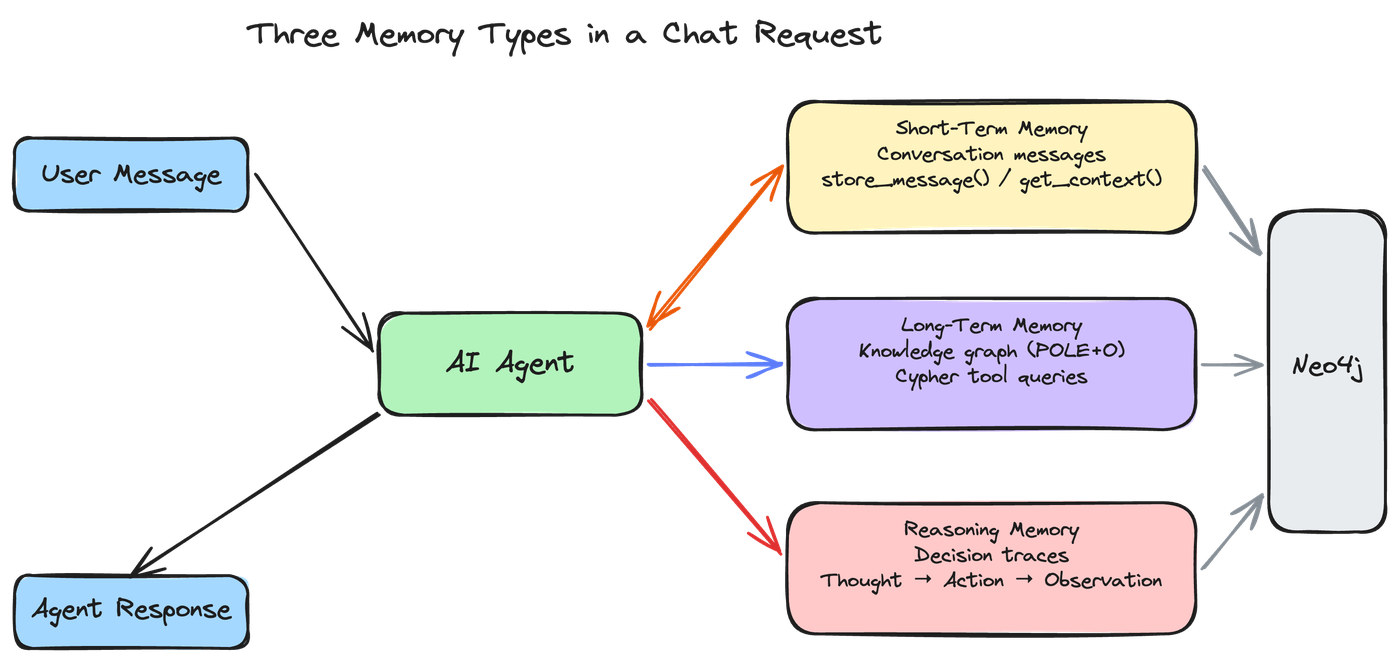
On each turn the agent stores the incoming message and loads recent context, looks up the entities and relationships it needs, and records what it did and which tools it called. store_message() and get_context() are MemoryIntegration helpers, which the MCP server also uses. With the client directly, the same steps are client.short_term.add_message() and client.get_context().
| Memory layer | Stored information | How applications use it |
|---|---|---|
Short-term |
Conversation messages and metadata |
Read a selected conversation or search messages; review the operation’s scope before combining results into a prompt |
Long-term |
Entities and graph relationships; preferences and facts on Bolt |
Retrieve relevant entities and, where supported, explicitly manage structured preferences and facts |
Reasoning |
Application-supplied traces, steps and tool calls |
Inspect recorded actions and results; this does not expose a model’s hidden reasoning |
Because the three types share one graph, you can follow an answer back to its sources. A message links to the entities it mentions, a reasoning trace links to the message that started it, and each step links to its tool calls and to the entities it used.
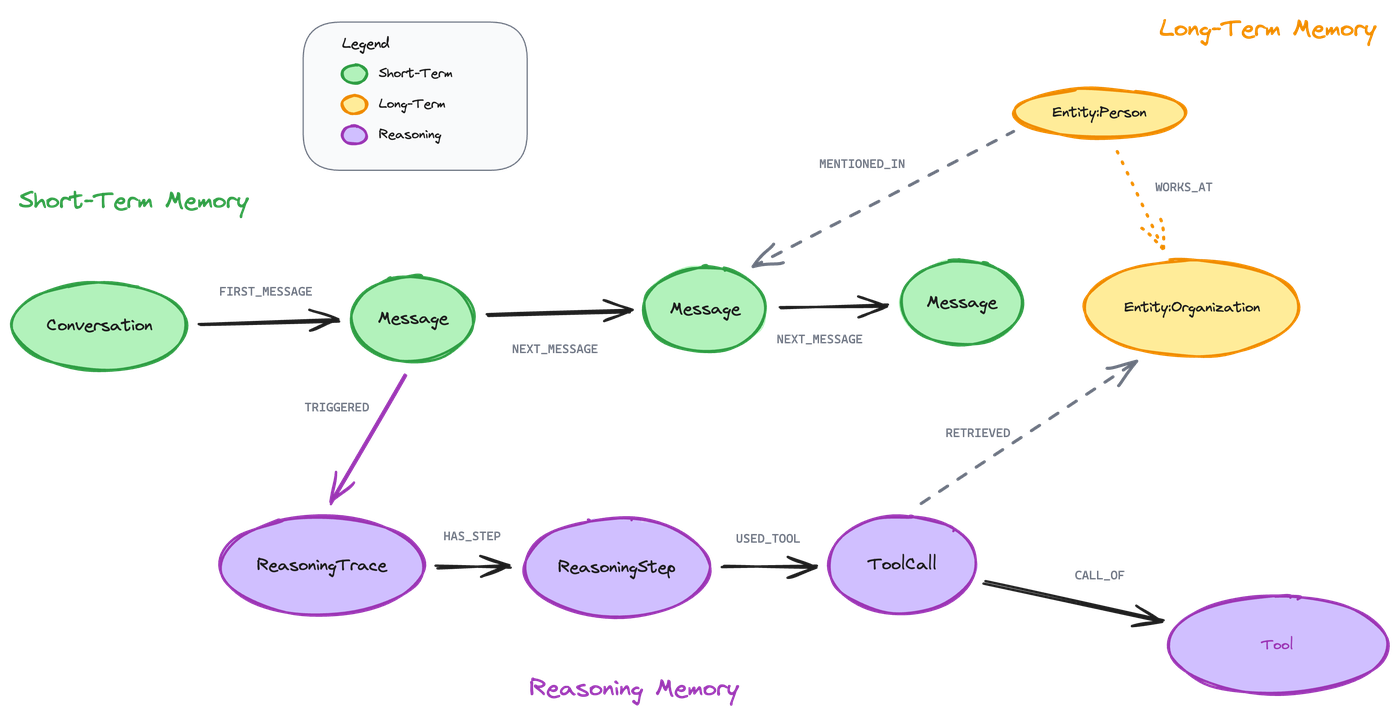
|
The diagram simplifies some relationship names. In the stored graph:
Conversations also link every message with |
See memory types for the conceptual model and reference for exact APIs. Persistence stores data; retrieval and a model call must be wired into the application for that data to influence a later answer.
Sharing memory between agents
Several agents can use the same workspace or database. Shared entities can connect their work, while conversation IDs identify individual conversations rather than enforce access control — see identity and retrieval scope for exactly what each identifier does and does not guarantee. See associate users and select scoped reads and sharing tradeoffs.
Graph and extraction capabilities
-
Connect conversation messages to entities and recorded actions in a graph.
-
Combine semantic retrieval with graph queries supported by the chosen backend.
-
Configure local or remote extraction/embedding providers on Bolt; NAMS manages its processing pipeline.
-
On Bolt, describe your domain once in an ontology document: it drives GLiNER2.5 entity and relation extraction, drops relations the ontology does not permit, and resolves new mentions against existing entities on ingest. See ontology-driven extraction and entity resolution.
-
Add geocoding or enrichment on Bolt when explicitly enabled and configured. See entity tasks.
-
Integrate with supported agent frameworks through Python integrations or TypeScript integrations.
Choose batch sizes and extraction limits for your model and workload; no universal large-document cutoff or throughput guarantee applies.
Community and examples
Run the Python lessons with the published neo4j-agent-memory==0.7.0 package and the complete programs shown on each tutorial page. The Python SDK guide links the setup paths. Explore larger Python applications and TypeScript source examples using their own dependency and build instructions.
Ask questions in the community forum, report reproducible problems through GitHub issues, and see contributing for development and documentation workflows.