Self-hosted Python MCP reference
Tool parameters, resource registrations and prompts for the self-hosted Python server in neo4j-agent-memory==0.7.0.
Overview
This page documents the self-hosted Python MCP server you run yourself with
neo4j-agent-memory mcp serve (against a bolt or NAMS backend). It exposes
memory capabilities via the Model Context Protocol for Claude Desktop, Claude
Code, Cursor, and other MCP-compatible hosts.
|
The hosted NAMS backend also operates its own MCP server (OAuth-authenticated, a scope-dependent tool surface including ontology and skills) — see Hosted NAMS MCP Server. That one you connect to; this one you run. |
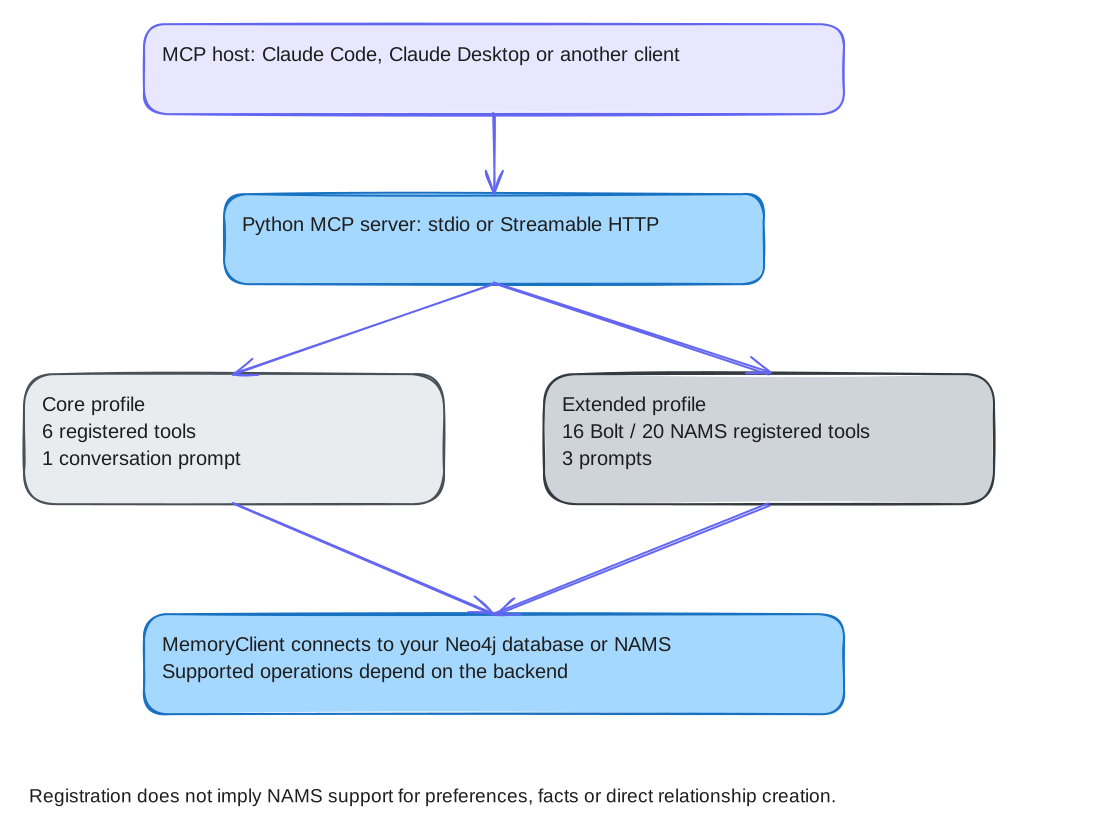
|
Registration and operation support are different. With NAMS, |
Tools are organized into two profiles:
-
Core (6 tools): Essential read/write cycle for memory operations
-
Extended (16 registered tools on Bolt; 20 on NAMS): Adds reasoning, entity, graph and query tools; four extra registrations are NAMS-specific
Start the server with a specific profile:
neo4j-agent-memory mcp serve --profile core      # 6 tools
neo4j-agent-memory mcp serve --profile extended   # 16 on Bolt / 20 on NAMS (default profile)
Core profile tools
memory_search
Search the selected memory types through the integration layer. With NAMS, pass memory_types=["messages", "entities"] to avoid the unsupported default preference search — see the fuller NAMS-limitations note under memory_add_preference below.
| Parameter | Description |
|---|---|
|
Natural language search query. |
|
Maximum results per memory type (default: 10). |
|
Types to search: |
|
Requested message-search session. The checked Bolt implementation does not apply this filter; it is not an isolation guarantee. |
|
Similarity threshold 0.0-1.0 (default: 0.7). |
memory_get_context
Assembled context from enabled memory types. Retrieval can include results outside the current conversation; this is not an authorization boundary.
| Parameter | Description |
|---|---|
|
Session to get context for (uses current session if not set). |
|
Optional search query to focus context retrieval. |
|
Maximum items per memory type (default: 10). |
|
Include conversation history (default: true). |
|
Include entities and preferences (default: true). |
|
Include similar reasoning traces (default: true). |
memory_store_message
Store a message and invoke the configured extraction behavior. NAMS does not expose the Bolt preference-write API.
| Parameter | Description |
|---|---|
|
The message text content. |
|
Message role: |
|
Session ID (uses current session if not set). |
|
Optional metadata dict to attach. |
memory_add_entity
Create or update an entity in the knowledge graph with POLE+O typing.
| Parameter | Description |
|---|---|
|
Entity name (e.g., "John Smith", "Acme Corp"). |
|
POLE+O type: |
|
Optional subtype (e.g., |
|
Entity description. |
|
Alternative names for the entity. |
|
Additional metadata. |
memory_add_preference
Record a preference for personalization. Bolt only; registration on NAMS does not make this write supported.
| Parameter | Description |
|---|---|
|
Preference category (e.g., |
|
The preference text (e.g., "Prefers dark mode"). |
|
Optional context about when/why the preference was expressed. |
|
Confidence score 0.0-1.0 (default: 1.0). |
memory_add_fact
Store a subject-predicate-object fact triple. Bolt only.
| Parameter | Description |
|---|---|
|
The subject of the fact. |
|
The relationship. |
|
The object/value. |
|
Confidence score 0.0-1.0 (default: 1.0). |
|
ISO date for when this fact becomes valid. |
|
ISO date for when this fact expires. |
|
Additional metadata (e.g., scope, stack_tags, temporality). |
Extended profile additional tools
memory_get_conversation
Retrieve full conversation history for a session.
| Parameter | Description |
|---|---|
|
The session ID to retrieve. |
|
Maximum messages to return (default: 50). |
|
Include message metadata (default: true). |
memory_list_sessions
List available conversation sessions with previews.
| Parameter | Description |
|---|---|
|
Maximum sessions to return (default: 20). |
|
Offset for pagination (default: 0). |
memory_get_entity
Get detailed entity information with graph relationships.
| Parameter | Description |
|---|---|
|
Entity name to look up. |
|
Filter by POLE+O type (optional). |
|
Traverse graph for related entities (default: true). |
|
Relationship traversal depth, 1-3 (default: 1). |
memory_export_graph
Export a subgraph as JSON for visualization or debugging.
| Parameter | Description |
|---|---|
|
Filter to a specific session (optional). |
|
Types to include: |
|
Maximum nodes per memory type (default: 500). |
memory_create_relationship
Create a typed relationship between two entities. Bolt only; the NAMS backend rejects this client-created relationship operation.
| Parameter | Description |
|---|---|
|
Name of the source entity. |
|
Name of the target entity. |
|
Relationship type in |
|
Optional description of the relationship. |
|
Confidence score 0.0-1.0 (default: 1.0). |
memory_start_trace
Begin recording a reasoning trace for a complex task.
| Parameter | Description |
|---|---|
|
Session ID for the trace. |
|
Description of the task being solved. |
|
Optional metadata (e.g., model name). |
memory_record_step
Record a reasoning step within a trace.
| Parameter | Description |
|---|---|
|
ID of the trace to add the step to. |
|
The reasoning for this step. |
|
The action taken. |
|
The result or observation. |
|
Name of tool called in this step (optional). |
|
Arguments passed to the tool (optional). |
|
Result from the tool call (optional). |
memory_complete_trace
Complete a reasoning trace with the final outcome.
| Parameter | Description |
|---|---|
|
ID of the trace to complete. |
|
Final outcome or result description. |
|
Whether the task completed successfully (default: true). |
NAMS-specific extended registrations
The extended profile adds these four registrations when the client uses NAMS. “Platinum” in source comments names a client conformance tier, not a pricing or support commitment — see NAMS limits and behavior for what the conformance tiers mean.
| Tool | Parameters | Return and current limitation |
|---|---|---|
|
Required |
JSON text with |
|
Required |
JSON text with |
|
Required |
JSON text containing the client’s provenance response, including available sources and extractors. |
|
Required |
JSON text with |
These wrappers catch operation errors and return JSON text with an error field.
A successful MCP protocol response therefore still needs its tool result inspected.
Live service behavior and visibility require an authenticated check against the intended workspace.
Resources
The context URI is a resource template. Other rows are concrete resources. Registration does not bypass backend limitations; in particular, the preference resource cannot supply Bolt preference storage through NAMS.
| URI | Profile | Description |
|---|---|---|
|
Core |
Assembled context for a session (conversation + entities + preferences). |
|
Extended |
Catalog of all entities with names, types, and descriptions. |
|
Extended |
All stored user preferences. |
|
Extended |
Knowledge graph node/relationship counts. |
Prompts
| Name | Profile | Description |
|---|---|---|
|
Core |
Initialize a memory-aware conversation. Loads context and guides memory tool usage. |
|
Extended |
Record a reasoning trace for a complex task with step-by-step guidance. |
|
Extended |
Review stored knowledge and flag contradictions or outdated information. |
Server instructions
The server sends behavioral instructions during MCP initialization that teach Claude:
-
To call
memory_get_contextat conversation start -
To call
memory_store_messagefor important user messages -
To call
memory_searchwhen asked about past interactions -
To use POLE+O entity types and
UPPER_SNAKE_CASErelationship types -
(Extended) To record reasoning traces for complex tasks
Transports
The server is built on FastMCP 4 (MCP Python SDK 2) and serves two transports:
| Transport | When to use |
|---|---|
|
Local hosts that launch the server as a child process: Claude Desktop, Claude Code, Cursor. The host owns stdin/stdout, so nothing else may write to them — the FastMCP startup banner is suppressed on this transport for that reason. |
|
Streamable HTTP, the network transport in the current MCP spec. Use it for Cloud Run, Kubernetes, or any deployment where several clients share one server. |
Export the Aura credentials from the Aura connection setup before starting either transport. The server process connects to Aura through the bolt backend; its transport determines how the MCP host reaches that process.
# Local process, for a desktop host; memory is stored in Aura.
neo4j-agent-memory mcp serve --backend bolt \
  --uri "$NEO4J_URI" --user "$NEO4J_USERNAME"

# networked, Streamable HTTP on all interfaces
neo4j-agent-memory mcp serve --transport http --host 0.0.0.0 --port 8080 \
--backend bolt --uri "$NEO4J_URI" --user "$NEO4J_USERNAME"|
The endpoint path also changed with it: Streamable HTTP serves a single
|
CLI reference
The maintained options, defaults and environment precedence are in CLI reference. The core profile registers six tools; the extended profile registers sixteen with Bolt or twenty with NAMS.
Runnable example
examples/claude-code-team-memory/
wires this server (both profiles) and the hosted NAMS MCP server side by side in
Claude Code, Claude Desktop and Cursor, with no agent code.
See also
-
NAMS REST API - HTTP surface used by the NAMS backend
-
MCP tools spec in the TCK - Cross-language behavioral contract