Connect Claude Desktop to memory with a TypeScript MCP server
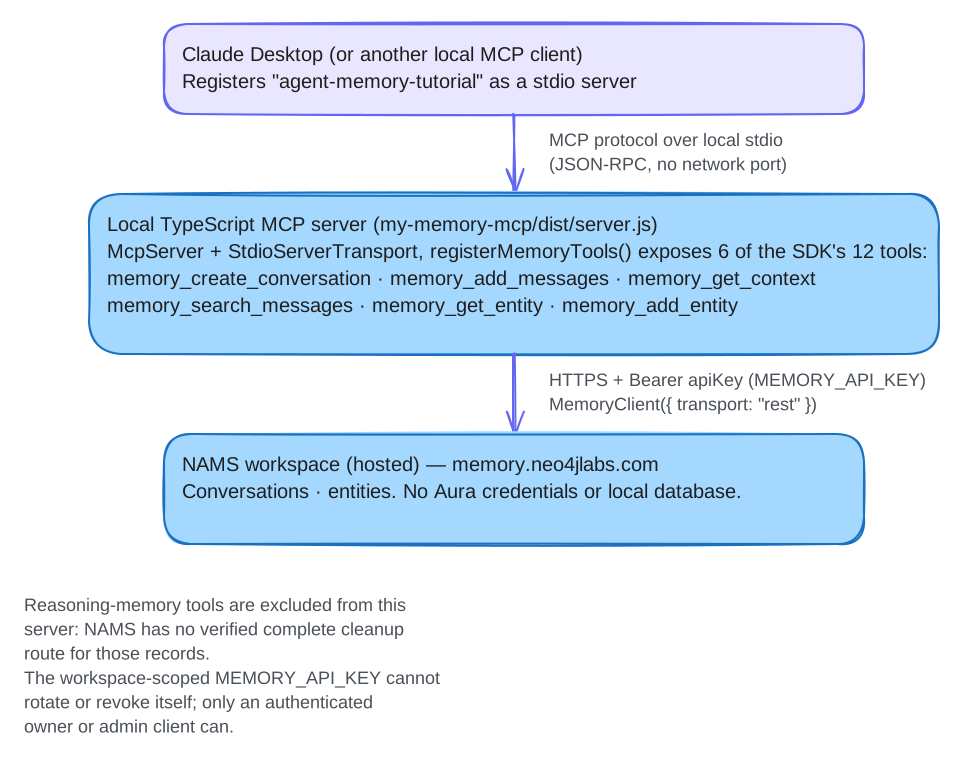
We will run a local TypeScript MCP server, connect Claude Desktop to it, and explicitly store and recall a message and entity in a dedicated NAMS workspace. We will retain the returned IDs so we can verify the same records in a new chat and account for the resources we create.
This lesson teaches a local stdio server with a selected set of tools. For the separate hosted MCP service, see Hosted NAMS MCP.
Before you begin
-
macOS, Git, Node.js 22.9 or later with npm, and a POSIX shell. This lesson is macOS-only because Step 4 edits the Claude Desktop config file at its macOS path (
~/Library/Application Support/Claude/claude_desktop_config.json). On Windows or Linux, follow Hosted NAMS MCP instead. -
Claude Desktop with local stdio-server support.
-
A workspace-scoped
MEMORY_API_KEYfor a dedicated NAMS test workspace.
The local server uses that NAMS data key, not Aura credentials. No OpenAI key is required by this server. See Authentication for the distinction between workspace data access and owner key management.
Step 1: Project setup
Use Git, Node.js 22.9 or later with npm, and a POSIX shell. The lesson
commands load .env with Node’s --env-file-if-exists flag, added in
Node.js 22.9; the SDK itself supports Node.js 22. These lessons
share one repository checkout. The example-based lessons build the SDK from
source so they run against current source; application code, including the
MCP lesson’s standalone my-memory-mcp project, installs the published
@neo4j-labs/[email protected] package from npm. Keep this checkout for the
remaining TypeScript lessons.
For your first lesson, clone and build the SDK:
git clone https://github.com/neo4j-labs/agent-memory.git
cd agent-memory
export AGENT_MEMORY_TUTORIAL_ROOT="$PWD"
cd typescript
npm ci
npm run build
cd "$AGENT_MEMORY_TUTORIAL_ROOT"
Expected: the build finishes without errors and typescript/dist/index.js
exists. The example-based lessons use this built SDK; installing an example
does not build it. The MCP lesson’s project uses the npm package instead, so
it does not depend on this build.
Continuing from another lesson, keep your existing checkout and skip the clone/build block above. From any directory inside that checkout, run:
cd "$(git rev-parse --show-toplevel)"
export AGENT_MEMORY_TUTORIAL_ROOT="$PWD"
Both entry paths finish at the repository root. If you changed the SDK source since the preceding lesson, rebuild it before continuing with an example-based lesson.
Create a separate project at the repository root:
mkdir my-memory-mcp
cd my-memory-mcp
npm init -y
npm install @neo4j-labs/[email protected] @modelcontextprotocol/sdk@^1.30 zod@^4
npm install --save-dev typescript@^5.9 tsx@^4 @types/node@^22
mkdir src
cp ../typescript/examples/shared/tutorial-state.ts src/
cp ../typescript/examples/shared/tutorial-cleanup.ts src/
cp ../typescript/examples/shared/tutorial-mcp.ts src/
This project is a standalone application, so it installs the published
@neo4j-labs/[email protected] package from npm; the checkout supplies only
the helper files and the .env template. The three maintained helpers are
copied into src/, inside this project’s TypeScript rootDir. They retain
lesson IDs, verify saved records and clean up only resources whose ownership is
established. Keep this project for the restart and cleanup steps; do not
recreate it midway through the lesson.
zod is what McpServer validates tool arguments with; it is an optional peer of the memory SDK and a direct dependency of the MCP SDK. Installing all three from npm lets them share one copy of zod, which npm run build needs: the memory tool schemas and McpServer must use the same zod types.
Add "type": "module", an engine floor and the scripts to package.json:
{
  "type": "module",
  "engines": { "node": ">=22.9.0" },
  "scripts": {
    "start": "tsx --env-file-if-exists=.env src/server.ts",
    "build": "tsc -p tsconfig.json"
  }
}
Create tsconfig.json in my-memory-mcp/:
{
  "compilerOptions": {
    "target": "ES2022",
    "module": "NodeNext",
    "moduleResolution": "NodeNext",
    "rootDir": "src",
    "outDir": "dist",
    "strict": true,
    "skipLibCheck": true
  },
  "include": ["src/**/*.ts"]
}
Merge the package fields above into the generated file; keep the dependency entries. Create the private environment file only if it does not already exist:
if [ ! -e .env ]; then
  (umask 077; set -C; cat ../typescript/examples/mcp/.env.tutorial.example > .env)
fi
chmod 600 .env
if [ ! -e .gitignore ]; then
  (set -C; printf '.env\n.tutorial-state/\n' > .gitignore)
fi
Edit .env with the workspace data key. Keep .env and .tutorial-state/
ignored by Git; if this project already had a .gitignore, add any missing
entries. An existing .env is preserved. --env-file-if-exists=.env loads it
for terminal commands; exported variables take precedence. Desktop receives
its own explicit environment in Step 4.
All following terminal commands run in my-memory-mcp/. When returning from
another lesson in this checkout, use
cd "$AGENT_MEMORY_TUTORIAL_ROOT/my-memory-mcp" instead of recreating the project.
If a dependency install was interrupted, run npm ci using this project’s
generated lockfile, then npm run build. This reinstalls dependencies while
preserving .env and .tutorial-state/.
Keep a private note of the selected workspace name/ID and key owner for any
later resource review. If you use MEMORY_WORKSPACE_ID, set the same selector
in the terminal .env and Desktop’s env below.
Step 2: Write the MCP server
Create src/server.ts:
import { McpServer } from "@modelcontextprotocol/sdk/server/mcp.js";
import { StdioServerTransport } from "@modelcontextprotocol/sdk/server/stdio.js";
import { MemoryClient, VERSION } from "@neo4j-labs/agent-memory";
import { registerMemoryTools } from "@neo4j-labs/agent-memory/mcp/register";
import { resolveTutorialConfig } from "./tutorial-state.js";

async function main() {
  // Fail fast on stderr: thrown later, a missing key looks to the client like
  // a server that simply never answers.
  if (!process.env.MEMORY_API_KEY) {
    console.error("MEMORY_API_KEY is not set (see .env)");
    process.exit(1);
  }

  // The server and record/verify/cleanup CLI resolve the same environment.
  const memory = new MemoryClient({ ...resolveTutorialConfig(), transport: "rest", timeout: 30_000 });

  const server = new McpServer({ name: "my-memory-mcp", version: VERSION });

  // Expose only the six storage/retrieval tools used by this lesson.
  const toolNames = registerMemoryTools(server, memory, {
    only: [
      "memory_create_conversation", "memory_add_messages", "memory_get_context",
      "memory_search_messages", "memory_get_entity",
      "memory_add_entity",
    ],
    // One audit line per call — tool name and argument *keys*, never values.
    onCall: ({ tool, argKeys, durationMs, ok }) =>
      console.error(`[mcp] ${tool} keys=[${argKeys.join(",")}] ${durationMs}ms ok=${ok}`),
  });

  const transport = new StdioServerTransport();
  await server.connect(transport);
  console.error(`my-memory-mcp listening on stdio; registered ${toolNames.length} SDK memory tools`);

  // Ctrl+C should close the MCP session and the memory client, not just die.
  for (const signal of ["SIGINT", "SIGTERM"] as const) {
    process.on(signal, () => {
      void (async () => {
        await server.close();
        await memory.close();
        process.exit(0);
      })();
    });
  }
}

main().catch((err) => {
  console.error(err);
  process.exit(1);
});
The SDK defines 12 standard memory tools. This lesson registers six of them,
with validation and dispatch supplied by registerMemoryTools. Reasoning writes
are excluded because the service has no verified delete route for steps or
tool calls, so lesson cleanup could not remove them (see
Hosted cleanup and retained resources).
Applications that decide how long such records are kept can use the reasoning
methods listed in the API reference.
Diagnostics go to stderr because stdout carries the stdio protocol. A
dispatch failure returns a tool result with isError: true. Inspect that
result before continuing; do not repeat an uncertain write until its resource
ID and disposition are established.
Step 3: Test the server locally
npm startThe process should print my-memory-mcp listening on stdio; registered 6 SDK memory tools to stderr and then sit waiting for JSON-RPC over stdin/stdout. This proves local startup and tool registration; it does not authenticate with NAMS. Press Ctrl+C to stop it.
If it exits 1 with MEMORY_API_KEY is not set, check that .env exists and that the start script carries --env-file-if-exists=.env.
Check hosted access separately, using the same environment as the server:
npx tsx --env-file-if-exists=.env src/tutorial-mcp.ts check-accessExpected: NAMS authenticated read succeeded; no records were created or printed.
This makes one bounded conversation-list request and prints no conversation
contents. It creates no ledger or records. A nonempty invalid key can start the
stdio server successfully but fails this request, or the first hosted tool
call, with an authentication error. A successful read does not prove every
tool has permission to write.
Step 4: Register the server with Claude Desktop
This selected path uses Claude Desktop on macOS. Merge the server entry below
into ~/Library/Application Support/Claude/claude_desktop_config.json,
preserving any existing server entries. Client UI labels can change
independently of this SDK.
{
  "mcpServers": {
    "agent-memory-tutorial": {
      "command": "node",
      "args": ["/absolute/path/to/my-memory-mcp/dist/server.js"],
      "env": {
        "MEMORY_API_KEY": "nams_your_workspace_key_here",
        "MEMORY_ENDPOINT": "https://memory.neo4jlabs.com/v1"
      }
    }
  }
}
Run npm run build first so dist/server.js exists. Pointing Desktop at compiled
output keeps a TypeScript loader out of the launch path. Use the lesson-specific
agent-memory-tutorial entry; preserve other servers already configured.
Use an absolute entry-point path and, if needed, an absolute Node executable
path. This server does not depend on a client-specific cwd setting.
claude_desktop_config.json stores its env values as plaintext. Use the
workspace-scoped data key and keep the file private. If it leaks, ask the key
owner to rotate or revoke that exact key through their authenticated management
interface, then replace the value in Desktop and verify that the old key is
rejected. The API alternative requires the key’s keyId and a separately
authenticated owner-user or administrator client; this workspace-key client
cannot manage its own key. See
Key rotation and revocation.
Never put an owner or administrator credential in Desktop.
Restart Claude Desktop.
The official Claude Desktop guide (checked September 17, 2026) places connected servers and tools under the chat’s + button, then Connectors, and connection diagnostics under Settings → Developer. The protocol examples here are tested independently of Desktop; they do not establish a GUI test on your installed Desktop version.
Step 5: Verify the connection
Inspect the connected server’s tools/list response in your MCP client. The
lesson registers these six tools:
memory_create_conversation
memory_add_messages
memory_get_context
memory_search_messages
memory_get_entity
memory_add_entity
If connection fails, inspect the client’s MCP logs and the server’s stderr. The usual setup issues are:
-
Wrong absolute path in
args, ordist/not built yet. -
Missing
MEMORY_API_KEYinenv— the server exits 1 and says so in the log. -
A nonempty invalid key — local connection can succeed;
check-accessor a hosted tool call fails. Compare terminal and Desktop settings privately. -
Node not on the PATH that Claude Desktop sees — use the absolute path to the binary, e.g.
"command": "/usr/local/bin/node".
Step 6: Store and read back a concrete memory
Before any write, confirm that your installed Desktop version lets you inspect and copy the exact JSON text of a tool result. The official connection guide does not specify a raw-result copy control, and its label can vary by version. If your client only exposes an assistant summary, stop before this step: the manual receipt workflow cannot be completed reliably there. A summary or a later GET response cannot replace the original create result.
First initialize the private ledger in the terminal:
npx tsx --env-file-if-exists=.env src/tutorial-mcp.ts init .tutorial-state/mcp.jsonExpected: JSON with a unique runId, userId and entityName. Keep those
actual values. Ask Desktop to perform one write at a time, then record the
returned ID in the terminal before requesting another write.
-
Ask Desktop to call
memory_create_conversationwith these arguments, replacing the placeholders with the ledger’s printed values. MCP arguments useuser_id, while the TypeScript SDK method usesuserId:{ "user_id": "<printed userId>", "metadata": { "run": "<printed runId>" } }Copy its returned conversation ID into the command below; do not invent an ID.
export CONVERSATION_ID='<the returned conversation ID>'
npx tsx --env-file-if-exists=.env src/tutorial-mcp.ts record .tutorial-state/mcp.json conversation "$CONVERSATION_ID"
Expected:
Recorded conversation IDfollowed by that ID. The helper checks its user, run marker and creation time against the ledger. -
Ask Desktop to call
memory_add_entitywith the printedentityNameand typeorganization, before adding the message that will mention it:{ "name": "<printed entityName>", "type": "organization" }Copy the exact returned entity JSON object from the tool result’s text content to the macOS clipboard, then save it privately and record its ID:
(umask 077; set -C; pbpaste > .tutorial-state/mcp-entity-result.json)
npx tsx --env-file-if-exists=.env src/tutorial-mcp.ts record .tutorial-state/mcp.json entity '<the returned entity ID>' .tutorial-state/mcp-entity-result.json
Copy the JSON entity object, not the enclosing MCP result or Desktop’s prose. Keep the create result unchanged: a later
memory_get_entityresponse can omit merge evidence needed for cleanup. The command stops if the receipt file already exists, so an earlier receipt is not overwritten.For example, this synthetic MCP envelope has an encoded JSON string in
content[0].text:{"content":[{"type":"text","text":"{\"id\":\"entity-demo\",\"name\":\"Lantern Orchard <runId>\",\"type\":\"organization\",\"metadata\":{}}"}]}The decoded receipt for that example is the inner object:
{"id":"entity-demo","name":"Lantern Orchard <runId>","type":"organization","metadata":{}}These illustrative IDs cannot be recorded. Copy every field from your actual create response, including timestamps and any
metadata.nams_resolution; do not strip merge evidence or add fields to make a receipt pass.Expected:
Recorded entity ID. Ask Desktop to callmemory_get_entitywith that ID and inspect its returned name and type. Recording an ID does not by itself authorize deletion. A merged entity, or one without a matching create receipt, is retained; cleanup checks creation and provenance separately. -
Ask Desktop to call
memory_add_messagesfor that conversation with one user message, using these exact argument names:{ "conversation_id": "<returned conversation ID>", "messages": [ { "role": "user", "content": "My fictional project is <printed entityName>." } ] }Record the actual message ID returned by the tool, supplying the same conversation ID:
npx tsx --env-file-if-exists=.env src/tutorial-mcp.ts record .tutorial-state/mcp.json message '<the returned message ID>' "$CONVERSATION_ID"Expected:
Recorded message ID. The helper reads back its content and stores its digest. Ask Desktop to callmemory_get_contextfor the same conversation and inspect the stored message in the successful tool result.
Inspect the ledger and verify all recorded messages from a separate process:
npx tsx src/tutorial-mcp.ts inspect .tutorial-state/mcp.json
npx tsx --env-file-if-exists=.env src/tutorial-mcp.ts verify .tutorial-state/mcp.json
inspect is entirely local and needs no key or .env. Expected from verify:
Verified stored messages: reports this conversation and its one message.
These commands make no model calls or new memory writes. Desktop’s
prose is not the storage assertion: inspect the actual tool results and CLI
readback. This selected surface creates neither preference records nor
reasoning steps.
The ledger does not intercept Desktop calls. If a chat or terminal is
interrupted between a write and its record command, retain the tool result
and record its exact ID before continuing. If the ID or ownership is uncertain,
stop and resolve that resource with the workspace owner. Do not claim complete
cleanup of writes that were never recorded or ask Desktop to repeat them as a
recovery shortcut.
Step 7: Recall in a new client chat
Keep the NAMS conversation ID from Step 6. In a new chat, supply that ID and ask:
Use memory_get_context for NAMS conversation <the returned ID>.
Search messages for "project" within that same conversation.
What project name was stored?
A new client chat does not automatically select the earlier NAMS conversation.
Message search requires its ID; this lesson retrieves entities by their returned
IDs instead of searching the workspace.
Successful protocol dispatch, actual Desktop behavior and hosted extraction are
separate checks. Verify the original message again with the CLI after the new
chat; its verify command neither repeats teaching nor creates another record.
Keep the ledger for the cleanup step below. Cleanup follows the last verification step.
Adding a custom tool alongside the memory ones, and restricting which tools a client can reach, are configuration choices rather than additional tutorial steps. See the MCP how-to for both recipes.
Step 8: Clean up and inspect retained resources
Stop Desktop’s lesson server so it cannot add more records, then run:
npx tsx --env-file-if-exists=.env src/tutorial-mcp.ts cleanup .tutorial-state/mcp.json
npx tsx src/tutorial-mcp.ts inspect .tutorial-state/mcp.json
The helper waits for terminal extraction of the recorded messages, checks
entity creation and provenance, deletes only proven-owned entities and the
conversation, then verifies their absence. Its Cleanup: result reports
complete, retainedIds and residualIds. A retained shared or uncertain
entity means the run is not fully removed; exit status 2 reports that incomplete
disposition. A failed request or residual check is an error, not a cleanup pass.
Keep the private ledger until every resource has a verified disposition. No step or skill delete route, broad workspace reset, or entity-name deletion is assumed. If manual ID recording was interrupted, resolve that gap before making a full-cleanup claim.
Read the cleanup result before starting another run. These are illustrative shapes; your IDs and counts differ:
Cleanup: {"complete":true,"retainedIds":[],"residualIds":[]}
Cleanup: {"complete":false,"retainedIds":["<entity-id>"],"residualIds":[]}| Result | Next action |
|---|---|
|
Keep the original ledger as the completed record. A new run uses a new state path. |
|
Inspect each retained resource’s reason. Ask the workspace owner to review its ownership; do not delete it by name or force a workspace reset. |
Error, exit status |
Preserve the ledger and error. A timeout can be retried against the same state; an uncertain write or residual ID needs review before further writes or deletion. |
inspect reads only the local ledger and works without .env, a current key,
or a service connection. It reports IDs, operation status and cleanup
dispositions, omitting credentials, credential fingerprints, workspace
selectors and message digests. It does not establish the current remote state.
After key rotation, verify, record and cleanup still refuse a changed
identity. Do not edit the ledger’s identity to bypass that guard.
For an uncertain or retained result, privately give the workspace owner the run ID, recorded resource IDs, operation statuses, selected workspace note and the failing command. Retain any original MCP create receipt. Do not send keys or the raw ledger. The owner must resolve the exact records before a cleanup claim; a new key or a repeated write is not evidence that the earlier attempt failed.
Only after a completed run, start the next exercise with a distinct filename:
npx tsx --env-file-if-exists=.env \
  src/tutorial-mcp.ts init .tutorial-state/mcp-2.json
Use that new filename for all subsequent commands for the new run. Preserve
the original ledger and any receipts; do not remove them to make seed,
teach or init accept a used path.
What we built
-
A local stdio server exposing the selected NAMS tools, with validated inputs and logs that record argument keys rather than secret values.
-
A Claude Desktop workflow using explicit tool calls and the same conversation ID in a fresh chat, checked independently by a separate CLI process.
-
An explicit record/verify/cleanup procedure for the resources created during the exercise.
Extending the server
See the MCP how-to for custom policies and a complete Streamable HTTP listener. The HTTP transport needs caller authentication before exposure beyond the local machine. For multiple workspaces, keep each server’s credential and ledger separate; a different Desktop chat alone does not create a workspace boundary.
Next steps
-
Recall conversation memory after a restart — verify an application uses its saved conversation.
-
Ingest documents and inspect extracted entities — inspect extraction through the lesson’s scoped message IDs.
-
MCP tools how-to — every option for
registerMemoryTools,createMemoryTools()andhandleMemoryToolCall(). -
Hosted NAMS MCP server — the larger, OAuth-capable surface you do not have to run.
-
MCP tools reference — the standard tool definitions.