Use with Microsoft Agent Framework
Give a Microsoft Agent Framework agent retrieved Neo4j context, persist its turns through the context-provider hook, and verify an explicitly recorded task trace. The selected example uses the current Agent API and OpenAIChatClient.
|
Preview. This adapter is a preview integration. It targets the Microsoft Agent Framework 1.x GA line ( Upgrading from the framework’s |
1. Prepare the selected environment
Use Python 3.10+ and a POSIX shell. The recipe uses BoltSettings to select Neo4j explicitly and disables entity extraction so that message persistence can be checked independently. Use a dedicated AuraDB instance with vector-index support and no incompatible existing vectors. Follow the Aura connection setup and copy its connection values into the exports below. These recipes use the published Python 0.7.0 package; provider access and database execution must be verified in your environment.
Create a local folder and virtual environment for the examples on this page. The commands reuse an existing environment without changing its files:
mkdir -p ~/agent-memory-tutorials
cd ~/agent-memory-tutorials
if [ -e .venv ]; then
  printf '%s\n' 'Using the existing virtual environment.'
else
  python3 -m venv .venv
fi
source .venv/bin/activate
Expected: ~/agent-memory-tutorials is your working directory and its virtual environment is active. Install the published SDK with the command below.
Each complete code block labelled Save as names a file to create in this folder using your editor. Copy the entire block, including imports and the entry point. Expand each helper disclosure and use Copy code to copy its full source. Keep all files together so their imports resolve.
When continuing from another tutorial or guide, retain the existing environment, configuration, session files, and .tutorial-state/. Reuse unchanged helper files; compare an existing file before replacing it, and finish any pending cleanup or recovery before changing the code that owns its state.
python -m pip install 'neo4j-agent-memory[microsoft-agent,openai]==0.7.0' "agent-framework-openai>=1.13,<2"
export NEO4J_URI='neo4j+s://<instance-id>.databases.neo4j.io'
export NEO4J_USERNAME='neo4j'
export NEO4J_PASSWORD='replace-with-your-Aura-password'
export NEO4J_DATABASE='neo4j'
export OPENAI_API_KEY='replace-with-your-provider-key'
export OPENAI_MODEL='replace-with-an-available-model-id'
The OpenAI-backed recipes require access to text-embedding-3-small; it produces 1536-dimensional vectors in this configuration. Configure the selected chat model separately where required. Credentials are read from the environment, never printed by the programs.
The repository’s microsoft-agent extra pins agent-framework-core>=1.13,<2. The program imports OpenAIChatClient from agent_framework.openai; an OpenAI key is appropriate for that client. In agent-framework-openai 1.x, OpenAIChatClient calls the OpenAI Responses API (the Chat Completions client is the separate OpenAIChatCompletionClient), so choose a model that supports Responses. An Azure client would require its own deployment, endpoint and credentials.
2. Read the complete integration
Save both complete files below in agent-memory-tutorials/. The program imports aura_config from the helper in the same directory.
Open the helper below and save its complete source as aura_connection.py in ~/agent-memory-tutorials.
Show aura_connection.py
aura_connection.py"""Read the Aura connection exported by the documentation setup commands."""
import os
class AuraConfigurationError(ValueError):
"""Missing or invalid tutorial settings, with no credential values in errors."""
def aura_config():
required = ("NEO4J_URI", "NEO4J_USERNAME", "NEO4J_PASSWORD")
missing = [name for name in required if not os.environ.get(name, "").strip()]
if missing:
raise AuraConfigurationError("Export the Aura connection settings: " + ", ".join(missing))
uri = os.environ["NEO4J_URI"]
if not uri.startswith("neo4j+s://"):
raise AuraConfigurationError("NEO4J_URI must use the Aura neo4j+s:// connection scheme")
database = os.environ.get("NEO4J_DATABASE", "neo4j")
if not database.strip():
raise AuraConfigurationError("NEO4J_DATABASE must not be empty")
return {
"uri": uri,
"username": os.environ["NEO4J_USERNAME"],
"password": os.environ["NEO4J_PASSWORD"],
"database": database,
}Complete microsoft_shopping_tutorial.py
microsoft_shopping_tutorial.py"""Small Microsoft Agent Framework shopping exercise; no GDS or hidden catalog."""
import asyncio
import os
from uuid import uuid4
from aura_connection import aura_config
async def main():
model = os.environ.get("OPENAI_MODEL", "").strip()
if not model or model.startswith("replace-with-"):
raise ValueError("Export an accessible OPENAI_MODEL before storing the preference")
from agent_framework.openai import OpenAIChatClient
from neo4j_agent_memory import BoltSettings, MemoryClient
from neo4j_agent_memory.integrations.microsoft_agent import (
Neo4jMicrosoftMemory,
record_agent_trace,
)
settings = BoltSettings(
neo4j=aura_config(),
embedding="openai/text-embedding-3-small",
extraction={"extractor_type": "none"},
)
session_id = f"shopping-docs-{uuid4().hex[:8]}"
async with MemoryClient(settings) as client:
preference = await client.long_term.add_preference(
preference="Maya prefers Northstar running shoes under 150 dollars.",
category="shopping",
)
print(f"Stored explicit preference: {preference.id}")
memory = Neo4jMicrosoftMemory(
client,
session_id,
extract_entities=False,
include_reasoning=False,
similarity_threshold=0.0,
)
chat = OpenAIChatClient(model=model, api_key=os.environ["OPENAI_API_KEY"])
agent = chat.as_agent(
name="TutorialShoppingAssistant",
instructions=(
"Use the provided memory to recommend one item from this fictional catalog: "
"Northstar Trail Runner costs 120 dollars; Harbor Road Runner costs 180 dollars. "
"Explain the match. These are tutorial products, not real inventory."
),
context_providers=[memory.context_provider],
)
prompt = "Which running shoe fits Maya's preferences and budget?"
try:
response = await agent.run(prompt)
except Exception as exc:
await record_agent_trace(
memory,
messages=[{"role": "user", "content": prompt}],
task=prompt,
outcome=f"Agent call failed: {type(exc).__name__}",
success=False,
)
raise
text = response.text or ""
if not text.strip():
raise RuntimeError("The agent returned no text")
print(f"Assistant: {text}")
history = (await client.short_term.get_conversation(session_id)).messages
if not any(message.content == prompt for message in history):
raise RuntimeError("Context-provider hook did not persist the user turn")
print("Verified: context-provider hook persisted the user turn")
trace = await record_agent_trace(
memory,
messages=[{"role": "user", "content": prompt}, {"role": "assistant", "content": text}],
task=prompt,
outcome="Shopping response recorded",
success=True,
)
recorded = await client.reasoning.get_session_traces(session_id)
if not any(item.id == trace.id for item in recorded):
raise RuntimeError("The recorded trace was missing from readback")
print(f"Verified: trace read back; session={session_id}")
if __name__ == "__main__":
asyncio.run(main())The program seeds an explicit preference and places two fictional products in agent instructions. Neo4jMicrosoftMemory.context_provider is the sole message writer. A separate record_agent_trace call records the observed task outcome and its returned ID is read back.
3. Run and verify stored records
python microsoft_shopping_tutorial.pyExpected: a nonempty response, confirmation that the context-provider hook persisted the exact user turn, and a verified trace. If the model raises an exception, the program records a failed task outcome and propagates it. The program does not query live inventory or promise an automatically inferred preference. For a complete database-startup walkthrough, see the Microsoft tutorial.
Troubleshooting and cleanup
Check that the installed framework exposes the current Agent and ContextProvider interfaces before adapting legacy code. An OpenAI/Azure credential mismatch is a provider configuration error, not a Neo4j failure. Empty retrieved context does not prove data is absent; inspect direct conversation readback and the configured retrieval thresholds. Client shutdown does not delete stored preferences, conversations or traces; retain the printed IDs in the dedicated example database until inspection is complete.
Adapt the integration and inspect example applications
Neo4jContextProvider uses before_run() to supply context and after_run() to persist messages. Neo4jChatMessageStore supports explicit history storage; using it in addition to the writing context provider requires you to avoid duplicate writes. Neo4jMicrosoftMemory composes the two surfaces and exposes its context_provider for Agent(context_providers=[…]).
The context provider can include short-term history, long-term knowledge and similar recorded traces with configured limits. The session identifier groups stored messages; neither it nor user_id is an access boundary. Serialized provider state records configuration; it is not a database backup or a credential export.
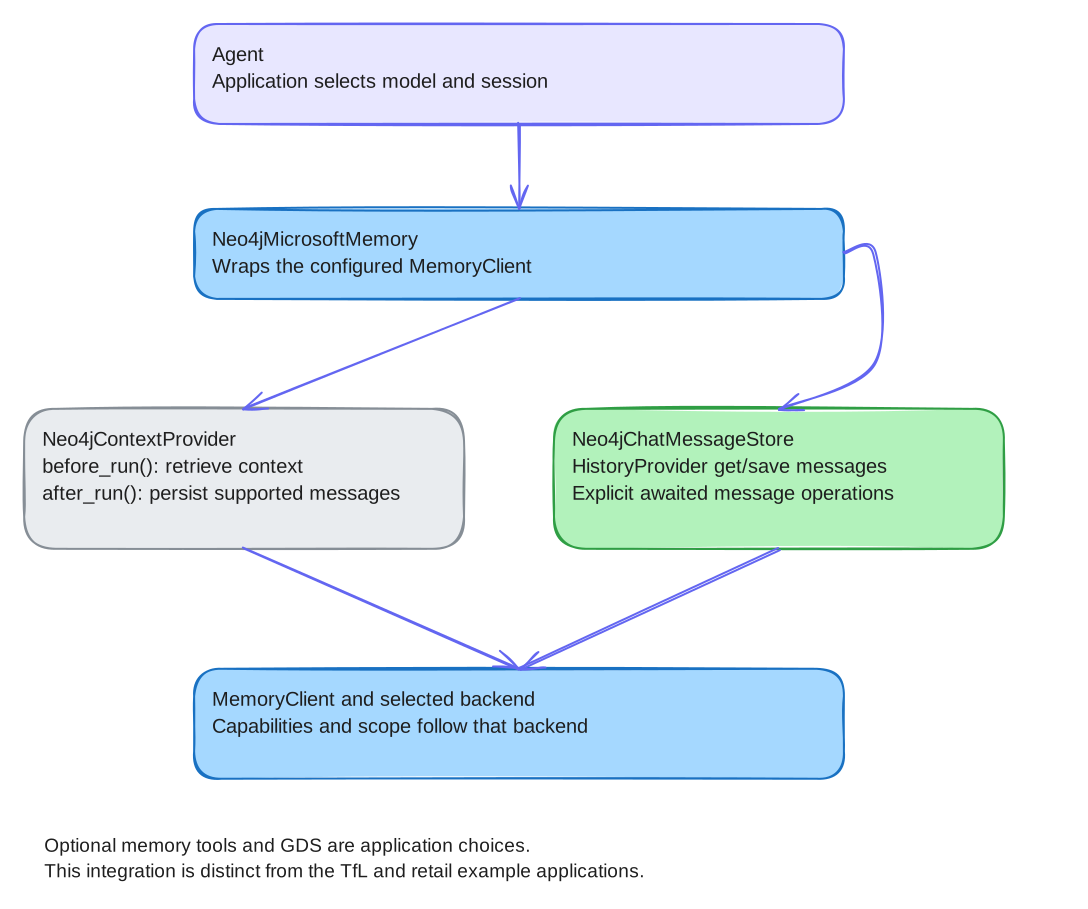
The optional GDS helper requires suitable domain data and a supported graph surface. A Cypher fallback is a different retrieval/ranking method, not an equivalent execution of PageRank or Node Similarity. The minimal script above does not enable GDS; see get_gds_config() in the retail application’s memory_config.py for a working GDSConfig that enables GDSAlgorithm.SHORTEST_PATH, NODE_SIMILARITY and PAGERANK. To give the agent memory tools, pass create_memory_tools(memory) to as_agent(tools=…); see Memory tools.
The maintained retail application adds inventory, cart and product-search tools plus a UI and domain graph, and is also the GDS-enabled example referenced above. Those features belong to the example application, not to MemoryClient automatically.
Adapter reference
This section lists the adapter surface of the published 0.7.0 package. Import every name below from neo4j_agent_memory.integrations.microsoft_agent.
Constructor options
Neo4jMicrosoftMemory(memory_client, session_id, …) and Neo4jContextProvider(memory_client, session_id, …) accept the same keyword-only options. Neo4jContextProvider also accepts source_id (default "neo4j-context") and context_template, a string with a {context} placeholder that wraps the retrieved block.
| Option | Default | Effect |
|---|---|---|
|
|
Optional user identifier stored on the provider, exposed as |
|
|
Add recent and similar conversation messages to the context. |
|
|
Add matching preferences and entities. |
|
|
Add similar past task traces. |
|
|
Limit for retrieved preferences and entities; similar messages use half of it and traces a third (at most 100). |
|
|
Number of recent session messages included (at most 50). |
|
|
Minimum similarity for message search. The recipe lowers it to |
|
|
Run entity extraction on persisted messages. |
|
|
Queue extraction in the background instead of running it while the turn is saved. |
|
|
A |
Neo4jChatMessageStore(memory_client, session_id, …) is a framework HistoryProvider. Its options are source_id ("neo4j-history"), max_messages (None, which loads up to 1,000 messages), extract_entities (False), generate_embeddings (True), load_messages, store_inputs and store_outputs (all True).
Neo4jMicrosoftMemory also exposes context_provider, chat_store and gds, and async helpers for direct use: get_context(), save_message(), get_conversation(), search_memory(), add_preference(), add_fact(), get_similar_traces(), clear_session(), find_entity_path(), find_similar_entities() and get_important_entities().
Memory tools
create_memory_tools(memory, include_gds_tools=True) returns agent_framework.FunctionTool instances bound to memory. Pass them straight to the agent; the framework calls them itself during agent.run(), so no dispatch code is needed:
tools = create_memory_tools(memory)
agent = chat.as_agent(
    name="ShoppingAssistant",
    instructions="Use the memory tools to recall and store the user's preferences.",
    tools=tools,
    context_providers=[memory.context_provider],
)| Tool | Purpose |
|---|---|
|
Search messages, entities and preferences. |
|
Store a user preference with a category. |
|
Retrieve stored preferences. |
|
Search the entity graph. |
|
Store a subject-predicate-object fact. |
|
Find similar recorded task traces. |
|
Shortest path between two entities. GDS tool. |
|
Entities that share relationships with a given entity. GDS tool. |
|
Most central entities. GDS tool. |
The three GDS tools are added only when include_gds_tools=True and the memory was created with GDSConfig(enabled=True). find_connection_path and find_similar_items are added when expose_as_tools lists them or is empty; find_important_entities needs GDSAlgorithm.PAGERANK in expose_as_tools. Register write tools only when the application intends the agent to store data. execute_memory_tool() is deprecated; it is kept for code that dispatches tool calls by hand.
GDS configuration
GDSConfig is a dataclass:
| Field | Default | Effect |
|---|---|---|
|
|
Create the |
|
|
|
|
|
Use the Cypher fallbacks below when the GDS library is not installed. When |
|
|
Log one warning when GDS is not available. |
|
|
Damping factor for GDS PageRank. |
|
|
Accepted but not applied by the 0.7.0 context provider; context retrieval does not rerank by PageRank or community. |
GDSAlgorithm has the members PAGERANK, COMMUNITY_DETECTION, SHORTEST_PATH, NODE_SIMILARITY, BETWEENNESS and CLOSENESS. Only the first four are wired to helpers or tools.
| Algorithm | What runs without the GDS library |
|---|---|
PageRank |
Degree centrality, normalized to the highest-degree entity. |
Community detection |
In 0.7.0 the Cypher fallback query fails with an implicit-grouping error. The helper catches the error and puts every entity in community |
Node similarity |
Overlap of shared relationships. In 0.7.0 this Cypher method is used even when GDS is installed. |
Shortest path |
Cypher |
Serialization
Neo4jContextProvider.serialize() returns a JSON string, and Neo4jChatMessageStore.serialize() returns a dictionary. Both record configuration such as the session ID and limits, not stored memory, and never the database connection. Restore them with a connected client:
provider = Neo4jContextProvider.deserialize(saved_provider, memory_client=client)
store = Neo4jChatMessageStore.deserialize(saved_store, memory_client=client)
Neo4jContextProvider.deserialize() does not restore context_template or gds_config; pass them again as keyword arguments. Background extraction work still queued when you serialize is not saved.
Traces
record_agent_trace(memory, messages, task, tool_calls=None, outcome=None, success=True) stores a task trace, as in the recipe. await get_similar_traces(memory, task, limit=5) finds past traces for a similar task, and format_traces_for_prompt(traces) turns them into text for agent instructions. llm_provider_from_microsoft_agent(chat) passes a configured framework chat client to memory extraction; see Provider configuration.
See also
See Provider adapter reference, Provider configuration, Backend capabilities and Memory concepts. Neo4j Agent Memory is a community-supported Neo4j Labs project.