Associate memory with users and select scoped reads
|
Available on NAMS: Yes, with differences. NAMS supports this kind of memory, but not every call on this page: some steps run server-side, some calls take different arguments or return different shapes, and some are Bolt-only. Check the backend capabilities reference before you adapt a Bolt procedure. |
To associate Bolt conversation writes and preferences with a user, pass the identifier only to supported operations and use an explicitly scoped read. This guide does not establish user authentication or database access control.
Prerequisites
-
A connected Python
MemoryClientusing Bolt and a database intended for this application. -
An application-authenticated user identifier. Do not accept another user’s identifier directly from an untrusted request.
-
The current scope limitations, especially the ignored
session_idfilter in Bolt semantic message search. Use separate authorized databases where independent tenant isolation is required.
1. Associate supported writes with a user
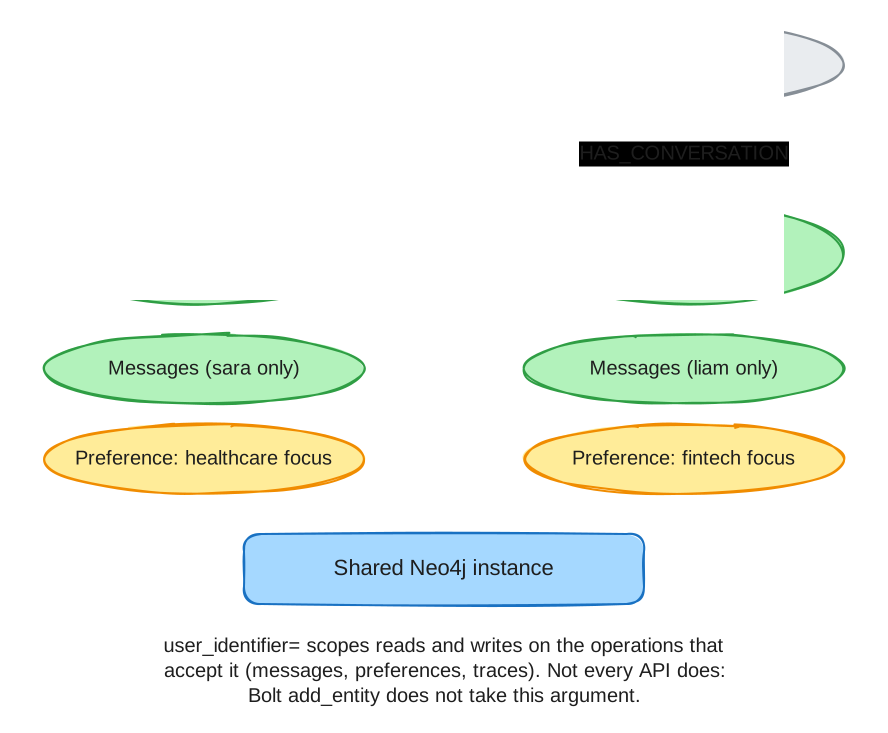
:User nodes, each with its own conversation, messages, and preferences in one shared Neo4j instanceThe following fragments run inside async with MemoryClient(settings) as client:. They use synthetic identities and do not require a model call for the demonstrated writes.
await client.users.upsert_user(identifier="sara-demo")
await client.users.upsert_user(identifier="liam-demo")

await client.short_term.add_message(
    "sara-demo-session", "user", "Please use concise answers.",
    user_identifier="sara-demo",
    extract_entities=False,
    generate_embedding=False,
)
pref = await client.long_term.add_preference(
    "communication", "Use concise answers",
    user_identifier="sara-demo",
    generate_embedding=False,
)
user_identifier is accepted by particular message, preference and trace write methods. It is not accepted by every API; for example, Bolt add_entity does not take this argument. memory.multi_tenant=True requires it on specific write paths but does not make all reads user-scoped.
2. Read preferences through the user relationship
sara_preferences = await client.long_term.get_preferences_for("sara-demo")
liam_preferences = await client.long_term.get_preferences_for("liam-demo")
assert any(item.id == pref.id for item in sara_preferences)
assert all(item.id != pref.id for item in liam_preferences)
print("The new preference belongs to sara-demo.")
These writes disable embedding-based preference deduplication so the fixture creates a distinct preference. Default duplicate lookup can reuse a global preference node and link multiple users to it; superseding that shared node affects all linked users. Review ownership before revising existing data.
get_preferences_for selects preferences connected to the requested user. search_preferences instead performs semantic search and does not automatically use that user. Entity search and trace similarity search also have their own scopes.
3. Read the intended conversation
conversation = await client.short_term.get_conversation("sara-demo-session")
assert conversation is not None
assert any(message.content == "Please use concise answers." for message in conversation.messages)
print("Read the intended conversation.")
Authorize the session before this call. Do not replace it with search_messages(session_id=…) and infer equivalent isolation: the current Bolt search does not apply that filter. Combined get_context is also not a tenancy boundary.
4. Supersede a preference explicitly
replacement = await client.long_term.add_preference(
    "communication", "Use detailed answers",
    user_identifier="sara-demo",
    generate_embedding=False,
)
await client.long_term.supersede_preference(pref.id, replacement.id)
active = await client.long_term.get_preferences_for("sara-demo")
assert any(item.id == replacement.id for item in active)
assert all(item.id != pref.id for item in active)
print("Only the replacement is active.")
For applies_to, historical as_of reads, validity fields and constraints, see the long-term reference.
Manage user records
client.users (UserMemory) manages the :User nodes that user_identifier= links to. Supported write methods MERGE the :User node by identifier, so an explicit upsert is needed only to store attributes or to create the user before its first write. A user created implicitly by a write takes its identifier as its id; upsert_user assigns a UUID when it creates the node.
user = await client.users.upsert_user(
    identifier="sara-demo",
    attributes={"role": "manager", "team": "consulting"},
)
same_user = await client.users.get_user("sara-demo")  # None when absent
assert same_user is not None and same_user.id == user.id
recent_users = await client.users.list_users(limit=100)  # newest first
upsert_user(*, identifier, attributes=None) is idempotent. Calling it again with attributes replaces the stored attributes; calling it without them keeps the existing attributes. The schema setup creates a unique constraint on User.identifier, so each identifier maps to one :User node.
User-scoped writes produce this graph shape:
-
(:User {id, identifier, attributes_json, created_at}): one node per identifier. -
(:User)-[:HAS_CONVERSATION]→(:Conversation): written by message and conversation writes that passuser_identifier=. -
(:User)-[:HAS_TRACE]→(:ReasoningTrace): written bystart_trace(user_identifier=…). -
(:User)-[:HAS_PREFERENCE]→(:Preference): written byadd_preference(user_identifier=…). -
(:Preference)-[:APPLIES_TO]→(:Entity): written byadd_preference(applies_to=[…]). -
(:Preference)-[:SUPERSEDED_BY]→(:Preference): written bysupersede_preference, which also setsvalid_untilon the old preference. -
Preference.valid_fromandPreference.valid_until: the validity interval thatget_preferences_for(as_of=…)reads.
TypeScript counterpart (NAMS)
NAMS separates workspaces through authentication. Within one workspace, explicitly create and retain a conversation ID; userId alone does not resume it or authorize the caller.
import { MemoryClient } from "@neo4j-labs/agent-memory";

const memory = new MemoryClient(); // MEMORY_API_KEY selects the workspace
const conversation = await memory.shortTerm.createConversation({ userId: "sara-demo" });
await memory.shortTerm.addMessage(conversation.id, "user", "Please use concise answers.");
const saved = await memory.shortTerm.getConversation(conversation.id);
console.log(saved);
NAMS does not expose the Bolt preference API. Use the conversation recall lesson for persisting and reusing an ID across processes, and authentication for workspace selection.
Verification
In a test database/workspace, use two identities and confirm each explicitly scoped read returns only its intended fixture. Test authorization separately. For any claimed semantic-search filtering, use overlapping vectors and highly ranked foreign-session rows, with and without metadata filters; unrelated text alone can hide a missing filter. See capabilities and limitations before extending this pattern to other operations.