Build your first memory context
We will store a short conversation, a relationship between two entities, and an explicit preference. We will close the process, retrieve those records in a second process, and assemble context that an application can pass to a model. This lesson builds the memory input; the next lesson uses that input in a chatbot.
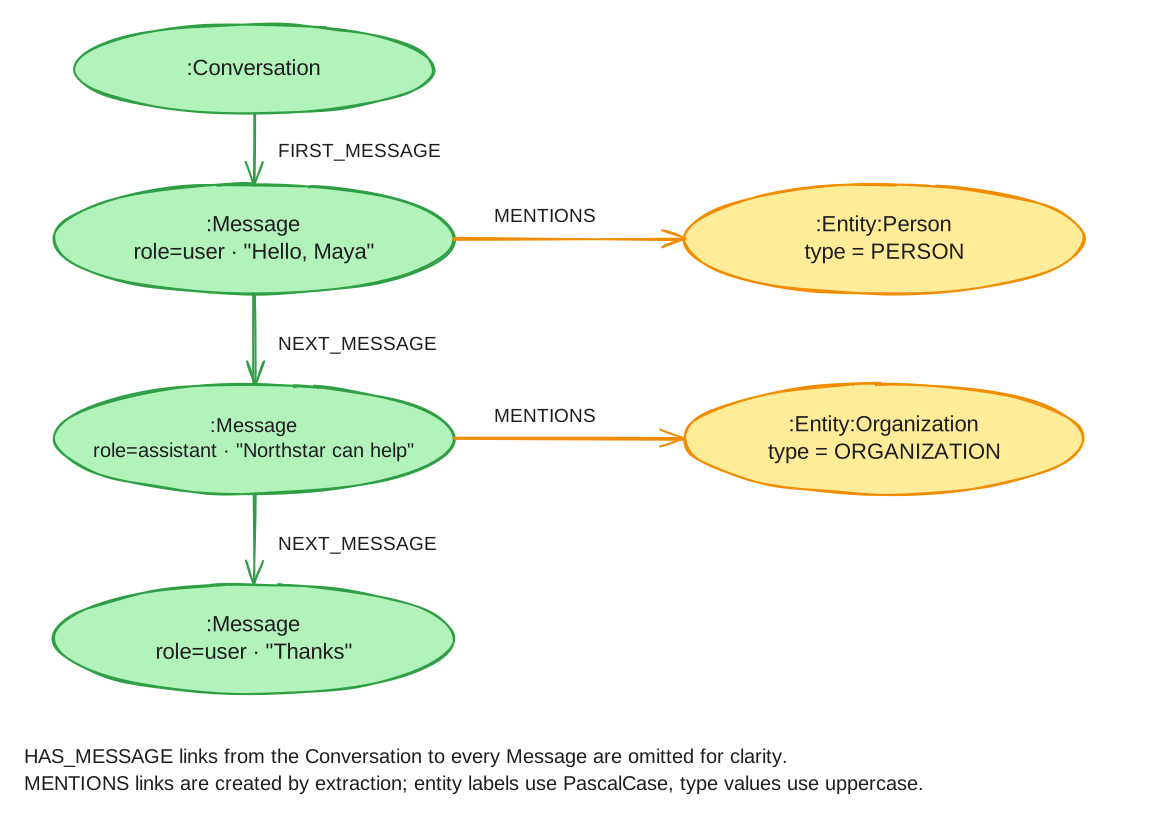
This lesson uses neo4j-agent-memory 0.7.0 from PyPI, the complete programs on this page, and a dedicated Neo4j AuraDB instance over Bolt. We will use the seed, verification, and search commands to check provider access and persisted data in this environment.
Before you begin
-
Python 3.10 or newer and a POSIX shell such as Bash or Zsh.
-
An OpenAI API key with access to
text-embedding-3-small. -
A Neo4j Aura account with capacity for a dedicated AuraDB Free instance.
The embedding calls send the supplied text to OpenAI. This exercise uses fictional data. Neo4j Agent Memory is an experimental Neo4j Labs project; see backend capabilities before adapting the example to NAMS.
1. Install the lesson dependencies
Create a local folder and virtual environment for the examples on this page. The commands reuse an existing environment without changing its files:
mkdir -p ~/agent-memory-tutorials
cd ~/agent-memory-tutorials
if [ -e .venv ]; then
  printf '%s\n' 'Using the existing virtual environment.'
else
  python3 -m venv .venv
fi
source .venv/bin/activate
Expected: ~/agent-memory-tutorials is your working directory and its virtual environment is active. Install the published SDK with the command below.
Each complete code block labelled Save as names a file to create in this folder using your editor. Copy the entire block, including imports and the entry point. Expand each helper disclosure and use Copy code to copy its full source. Keep all files together so their imports resolve.
When continuing from another tutorial or guide, retain the existing environment, configuration, session files, and .tutorial-state/. Reuse unchanged helper files; compare an existing file before replacing it, and finish any pending cleanup or recovery before changing the code that owns its state.
python -m pip install 'neo4j-agent-memory[openai]==0.7.0'
python -c "from importlib.metadata import version; import neo4j_agent_memory; assert version('neo4j-agent-memory') == '0.7.0'; print('SDK 0.7.0 import verified')"
Expected: SDK 0.7.0 import verified. Keep agent-memory-tutorials as your working directory for every command below.
Create and check the local files
Create each file below in ~/agent-memory-tutorials. All complete sources follow this manifest. On a first visit every file is new; when returning, reuse unchanged helpers and compare their contents before replacing them.
| File | Purpose | Returning reader |
|---|---|---|
|
Read explicit Aura credentials; the database defaults to |
Reuse unchanged |
|
Probe the selected database and close the driver. |
Reuse unchanged |
|
Construct the explicit Bolt and OpenAI embedding settings. |
Reuse unchanged |
|
Store, verify, and search the small memory context. This is the lesson entry point. |
New for this lesson; retain it with unfinished state |
The manifest above names this lesson’s entry point and its helpers. Save every file it lists, then run the offline assembly checks that follow the sources before the lesson commands.
Open the helper below and save its complete source as aura_connection.py in ~/agent-memory-tutorials.
Show aura_connection.py
aura_connection.py"""Read the Aura connection exported by the documentation setup commands."""
import os
class AuraConfigurationError(ValueError):
"""Missing or invalid tutorial settings, with no credential values in errors."""
def aura_config():
required = ("NEO4J_URI", "NEO4J_USERNAME", "NEO4J_PASSWORD")
missing = [name for name in required if not os.environ.get(name, "").strip()]
if missing:
raise AuraConfigurationError("Export the Aura connection settings: " + ", ".join(missing))
uri = os.environ["NEO4J_URI"]
if not uri.startswith("neo4j+s://"):
raise AuraConfigurationError("NEO4J_URI must use the Aura neo4j+s:// connection scheme")
database = os.environ.get("NEO4J_DATABASE", "neo4j")
if not database.strip():
raise AuraConfigurationError("NEO4J_DATABASE must not be empty")
return {
"uri": uri,
"username": os.environ["NEO4J_USERNAME"],
"password": os.environ["NEO4J_PASSWORD"],
"database": database,
}Open the helper below and save its complete source as wait_for_tutorial_neo4j.py in ~/agent-memory-tutorials.
Show wait_for_tutorial_neo4j.py
wait_for_tutorial_neo4j.py"""Check the exported Aura connection, waiting at most three minutes."""
import asyncio
import sys
from aura_connection import AuraConfigurationError, aura_config
from neo4j import AsyncGraphDatabase
from neo4j.exceptions import DriverError, Neo4jError, ServiceUnavailable, SessionExpired
async def wait_until_ready(timeout=180):
if timeout <= 0:
raise ValueError("Readiness timeout must be positive")
config = aura_config()
async def probe(driver):
while True:
try:
await driver.verify_connectivity()
records, _, _ = await driver.execute_query(
"RETURN 1 AS ready", database_=config["database"], routing_="r"
)
if len(records) != 1 or records[0]["ready"] != 1:
raise RuntimeError("Unexpected readiness query result")
return
except (ServiceUnavailable, SessionExpired):
await asyncio.sleep(2)
async with AsyncGraphDatabase.driver(
config["uri"],
auth=(config["username"], config["password"]),
connection_timeout=min(10, timeout),
connection_acquisition_timeout=min(10, timeout),
) as driver:
await asyncio.wait_for(probe(driver), timeout=timeout)
def main():
try:
asyncio.run(wait_until_ready())
except AuraConfigurationError as error:
print(str(error), file=sys.stderr)
raise SystemExit(1) from None
except (asyncio.TimeoutError, DriverError, Neo4jError) as error:
# Driver exceptions can include connection details. Report the category
# and next action without echoing credentials or a raw server message.
print(
f"Neo4j Aura readiness failed ({type(error).__name__}). "
"Check that the instance is Running, the exported NEO4J_* values "
"match its credentials, and your network allows the connection.",
file=sys.stderr,
)
raise SystemExit(1) from None
print("Verified: Neo4j Aura answered the readiness query")
if __name__ == "__main__":
main()core_memory_settings.py"""Shared settings for the three Aura-backed memory tutorials."""
from aura_connection import aura_config
from neo4j_agent_memory import MemorySettings
def settings():
return MemorySettings(
backend="bolt",
neo4j=aura_config(),
embedding="openai/text-embedding-3-small",
llm=None,
extraction={"extractor_type": "none"},
resolution={"strategy": "none"},
geocoding={"enabled": False},
enrichment={"enabled": False},
)first_agent_memory.py"""Store and reconstruct a small memory context across two process runs."""
import argparse
import asyncio
from core_memory_settings import settings
from neo4j_agent_memory import MemoryClient
SESSION = "docs-first-memory"
USER = "docs-first-user"
TEXT = "Maya Chen works at Northstar Robotics. She prefers concise answers."
async def seed(client):
existing = await client.short_term.get_conversation(SESSION)
if existing.messages:
raise RuntimeError("This lesson is already seeded; run verify or use a fresh database")
message = await client.short_term.add_message(
SESSION, "user", TEXT, user_identifier=USER, extract_entities=False
)
await client.short_term.add_message(
SESSION,
"assistant",
"I will keep responses concise.",
user_identifier=USER,
extract_entities=False,
)
person, _ = await client.long_term.add_entity(
"Maya Chen",
"PERSON",
resolve=False,
deduplicate=False,
description="Maya Chen works at Northstar Robotics.",
)
company, _ = await client.long_term.add_entity(
"Northstar Robotics",
"ORGANIZATION",
resolve=False,
deduplicate=False,
description="The fictional employer of Maya Chen.",
)
await client.long_term.add_relationship(person, company, "WORKS_AT")
await client.long_term.link_entity_to_message(person, message.id, context=TEXT)
await client.long_term.add_preference(
"communication",
"Use concise answers",
user_identifier=USER,
context="Explicitly supplied by the lesson; not inferred from behavior",
)
print("Stored: 2 messages, 2 entities, 1 relationship, 1 explicit preference")
async def verify(client):
conversation = await client.short_term.get_conversation(SESSION)
preferences = await client.long_term.get_preferences_for(USER)
rows = await client.query.cypher(
"MATCH (person:Entity {name: $person})-[r:RELATED_TO]->"
"(company:Entity {name: $company}) "
"WHERE r.type = 'WORKS_AT' "
"RETURN person.name AS person, company.name AS company",
{"person": "Maya Chen", "company": "Northstar Robotics"},
)
assert len(conversation.messages) == 2, "Expected both stored messages"
assert any(p.preference == "Use concise answers" for p in preferences)
assert rows, "Expected the stored WORKS_AT relationship"
context = "\n".join(
[f"{m.role.value}: {m.content}" for m in conversation.messages]
+ [f"Preference: {p.preference}" for p in preferences]
+ [f"{row['person']} works at {row['company']}" for row in rows]
)
print("Verified: stored history, preference, and relationship survived restart")
print(context)
return context
async def main():
parser = argparse.ArgumentParser()
parser.add_argument("command", choices=["seed", "verify", "search"])
args = parser.parse_args()
async with MemoryClient(settings()) as client:
if args.command == "seed":
await seed(client)
elif args.command == "verify":
await verify(client)
else:
candidates = await client.long_term.search_entities(
"Maya Chen's employer", threshold=0.0, limit=5
)
for entity in candidates:
print(entity.name, entity.metadata.get("similarity"))
print(f"Search returned {len(candidates)} candidates; ranking is model-dependent")
if __name__ == "__main__":
asyncio.run(main())Check the copied files before exporting credentials or making a service request:
python -m py_compile aura_connection.py wait_for_tutorial_neo4j.py core_memory_settings.py first_agent_memory.py
python -c "import aura_connection, wait_for_tutorial_neo4j, core_memory_settings, first_agent_memory; assert all(callable(f) for f in [aura_connection.aura_config, wait_for_tutorial_neo4j.wait_until_ready, core_memory_settings.settings, first_agent_memory.main]); print('Lesson imports verified')"
python first_agent_memory.py --help
Expected: compilation exits without errors, then Lesson imports verified and the command help. These checks import the local files without calling their entry points, downloading models, or contacting Aura/providers. Compilation alone does not check imports. If a file or function is missing, recopy its entire source and repeat the checks; leave existing session/state files intact. Provider/framework calls are checked when the lesson runs.
2. Create and connect to the Aura database
This starts a new lesson with a new empty database. To return to an unfinished lesson, use Resume this lesson later instead.
-
Sign in to the Neo4j Aura console and create an AuraDB Free instance named
agent-memory-tutorial. Use an empty instance dedicated to this lesson; do not load a sample dataset. -
Download the generated credentials and keep them outside the tutorial folder. Wait until the instance shows Running.
-
Copy its connection URI, username, password and database name into the exports below. Keep the
neo4j+s://scheme supplied by Aura.
Aura permits one Free instance per account. This lesson needs that slot for a dedicated tutorial instance; do not delete an existing database containing other work to make room. See Aura instance creation for account and tier requirements.
The files from the preceding assembly checkpoint read these exports and verify the selected database.
export NEO4J_URI='neo4j+s://<instance-id>.databases.neo4j.io'
export NEO4J_USERNAME='neo4j'
export NEO4J_PASSWORD='replace-with-the-generated-password'
export NEO4J_DATABASE='neo4j'
python wait_for_tutorial_neo4j.py
Expected: Verified: Neo4j Aura answered the readiness query. The helper checks connectivity and executes RETURN 1 in the selected database, retrying temporary connection failures for up to three minutes. Authentication failures stop immediately. If the check fails, confirm the instance is Running and recopy its connection settings.
The examples read these exported variables through aura_connection.py. They require the Aura URI, username and password and never fall back to a local instance. When NEO4J_DATABASE is unset, they use the neo4j database, which is the Aura default. Keep this shell and virtual environment active for the remaining commands. See Aura connection instructions for help locating the settings.
In the Aura console, open Query, select this instance and database in the connection bar, and connect using the same credentials. Run:
MATCH (n) RETURN count(n) AS node_countExpected: 0. This confirms that the lesson starts with an empty database. The Python SDK still uses backend="bolt": Aura hosts Neo4j and accepts encrypted Bolt connections.
3. Configure the provider and inspect the shared settings
export OPENAI_API_KEY="replace-with-your-key"
python -c "import os; assert os.environ['OPENAI_API_KEY']; print('Provider key present')"
python -c "from core_memory_settings import settings; s = settings(); print(f'backend={s.backend}, embedding={type(s.embedding).__name__}')"
Expected: Provider key present, then backend=bolt, embedding=OpenAIEmbeddingProvider. The first check confirms the key is present; the requests in the program verify access. The second constructs and inspects the shared settings object without contacting Aura or OpenAI. Do not put the API key in the program.
The core_memory_settings.py file copied above is imported by the lesson program.
The helper uses the exported Aura connection, explicitly selects the Bolt backend, disables automatic extraction and enrichment, and selects the embedding adapter. This lesson stores the supplied entities directly. The next step runs the complete program from the tutorial folder.
4. Read and run the complete storage program
Read the first_agent_memory.py file copied in step 1. Start at main(), which selects seed, verify, or search. In seed(), the public SDK calls short_term.add_message(), long_term.add_entity(), add_relationship(), and add_preference() create the records we will read back. settings() and the verification assertions are tutorial scaffolding; the memory accessors belong to the SDK.
await waits for each asynchronous operation before using its result. async with MemoryClient(settings()) opens the client and closes it when the block ends, including on errors. asyncio.run(main()) starts the event loop for this command. See the public client reference when adapting the example.
python first_agent_memory.py seedExpected: Stored: 2 messages, 2 entities, 1 relationship, 1 explicit preference. The process then closes its database client. The entities and preference are supplied by the program; they are not automatically learned from the conversation.
5. Read the persisted records in a second process
python first_agent_memory.py verifyExpected: Verified: stored history, preference, and relationship survived restart, followed by the two stored messages, Preference: Use concise answers, and Maya Chen works at Northstar Robotics.
This command starts a new Python process. The Aura instance continues running between the two commands.
The history lookup uses the known session ID, and preference retrieval uses the known user identifier. These identifiers organize data; your application must authorize the caller before choosing them. The dedicated demonstration database has a single application user.
6. Compare semantic retrieval with exact readback
python first_agent_memory.py searchExpected: up to five entity names and their metadata["similarity"] values, followed by the candidate count. Scores and order vary between runs; the exact readback in step 5 remains the persistence check. An empty search string does not list all entities. See Understanding the three memory types for how ranked semantic search differs from exact lookup.
7. Inspect the stored relationship
In the Aura console, open Query, select the lesson instance and database, and connect with the credentials exported in step 2. Run:
MATCH (person:Entity {name: 'Maya Chen'})-[r:RELATED_TO]->(company:Entity)
RETURN person.name, r.type, company.name
Expected: Maya Chen, WORKS_AT, and Northstar Robotics. The explicit add_relationship() call stores the logical relationship name as type on a RELATED_TO relationship.
What we built
A program now reconstructs memory context from persistent records. We verified storage independently of semantic ranking. Continue with conversation memory to consume retrieved context in an actual model call, or document extraction to generate candidate entities from text.
Resume this lesson later
A new Python process keeps the same shell exports; a new terminal does not. If this lesson’s Aura instance still exists, resume it without creating another instance or asserting that its database is empty:
-
Return to the existing folder and activate its environment:
cd ~/agent-memory-tutorials source .venv/bin/activate -
Re-export the original instance’s
NEO4J_URI,NEO4J_USERNAME,NEO4J_PASSWORD, andNEO4J_DATABASEfrom its saved credentials. Restore this page’s provider key/model/region settings too. Keep secrets out of the Python files. -
Check the same database:
python wait_for_tutorial_neo4j.py -
Use the readback or inspection step described below. Do not repeat the seed/record/write command just to recover context. Preserve existing IDs and state until you know which operations completed.
If the instance was already destroyed, its stored results cannot be resumed; complete local cleanup and start a new empty lesson instance. A different lesson also starts with a fresh instance, while keeping the folder and environment.
Run python first_agent_memory.py verify. If records are incomplete, use the failure guidance below; do not run seed over partial results.
Clean up
Cleanup ends this lesson and removes its stored results. To keep working with those results later, follow Resume this lesson later before cleanup.
In the Aura console, select only the agent-memory-tutorial instance created for this lesson. Use its trashcan action, enter its exact name and confirm Destroy.
Expected: the tutorial instance disappears from the instance list. This removes its data and snapshots, so verify the instance name before confirming. See Aura instance deletion for the console procedure.
Remove the downloaded credentials for that deleted instance and clear its connection variables:
unset NEO4J_URI NEO4J_USERNAME NEO4J_PASSWORD NEO4J_DATABASEKeep the tutorial folder and virtual environment. Start each Aura tutorial with a new empty lesson instance and its new credentials; this also avoids carrying over vector indexes from a lesson using a different embedding dimension.
With this environment still active and agent-memory-tutorials as your working directory, continue at step 1 of the next lesson to copy its new entry point and reuse unchanged helpers after checking its additional chat-model prerequisite.
If a check fails
-
A connection or authentication failure: confirm the Aura instance is Running, check the exported connection settings, and rerun the readiness command from step 2.
-
An OpenAI access or quota error: correct the account/model configuration and rerun on a fresh tutorial database if the prior write stopped midway.
-
Missing readback data: verify that the write command completed against this Aura instance. The program stops on missing data rather than treating an empty result as success.