Build your first TypeScript agent with memory
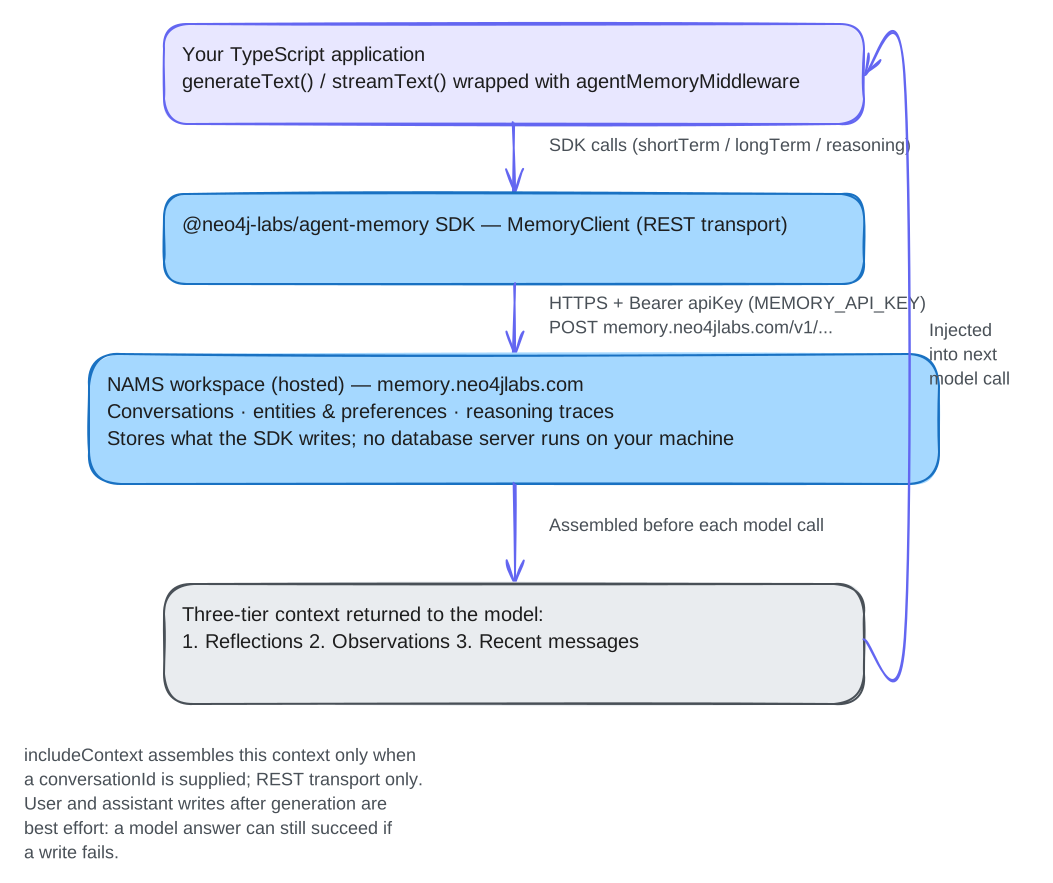
We will store a fictional project name and entity, retrieve the same conversation during a model call, then independently verify that the new question and answer were stored. NAMS hosts the data; no database server runs on your machine.
Step 1: Build the SDK and install the lesson project
You need a workspace-scoped MEMORY_API_KEY for a dedicated test workspace on
NAMS. Model calls also need OPENAI_API_KEY.
Use Git, Node.js 22.9 or later with npm, and a POSIX shell. The lesson
commands load .env with Node’s --env-file-if-exists flag, added in
Node.js 22.9; the SDK itself supports Node.js 22. These lessons
share one repository checkout. The example-based lessons build the SDK from
source so they run against current source; application code, including the
MCP lesson’s standalone my-memory-mcp project, installs the published
@neo4j-labs/[email protected] package from npm. Keep this checkout for the
remaining TypeScript lessons.
For your first lesson, clone and build the SDK:
git clone https://github.com/neo4j-labs/agent-memory.git
cd agent-memory
export AGENT_MEMORY_TUTORIAL_ROOT="$PWD"
cd typescript
npm ci
npm run build
cd "$AGENT_MEMORY_TUTORIAL_ROOT"
Expected: the build finishes without errors and typescript/dist/index.js
exists. The example-based lessons use this built SDK; installing an example
does not build it. The MCP lesson’s project uses the npm package instead, so
it does not depend on this build.
Continuing from another lesson, keep your existing checkout and skip the clone/build block above. From any directory inside that checkout, run:
cd "$(git rev-parse --show-toplevel)"
export AGENT_MEMORY_TUTORIAL_ROOT="$PWD"
Both entry paths finish at the repository root. If you changed the SDK source since the preceding lesson, rebuild it before continuing with an example-based lesson.
Enter the shared lesson project — its package.json pins the SDK with
file:../.. so it always runs against the checkout you just built. On its
first use, install its locked dependencies; subsequent lessons reuse them.
Create the tutorial environment file only if it does not already exist:
cd "$AGENT_MEMORY_TUTORIAL_ROOT/typescript/examples/vercel-ai"
if [ ! -d node_modules ]; then npm ci; fi
if [ ! -e .env ]; then
  (umask 077; set -C; cat .env.tutorial.example > .env)
fi
chmod 600 .env
npm run lint
Expected: typechecking finishes without errors. It does not authenticate or
write to NAMS. Edit the private .env with the keys required by this lesson;
keep it out of version control. An existing .env is preserved: add missing
tutorial settings without replacing its other values.
For the two model lessons, set OPENAI_MODEL=gpt-4o-mini and supply
OPENAI_API_KEY; an existing demo configuration may select a different model.
If an earlier install was interrupted, or the lockfile changed, run npm ci
again from this project directory, then npm run lint. The directory check
above only avoids an unnecessary reinstall; it does not prove the dependencies
are complete. npm ci replaces node_modules from the lockfile and preserves
your .env and .tutorial-state/ files.
Keep a private note of the selected NAMS workspace name/ID and its key owner.
The optional MEMORY_WORKSPACE_ID is a selector, not proof of ownership. A
workspace-scoped key may not need it. Keep the same endpoint, key and selector
for the run’s authenticated verification and cleanup; do not print the key or
use a different workspace to work around a failed check.
The tutorial template uses gpt-4o-mini for model lessons. DEMO_USER_ID,
newest-conversation reuse and the gpt-5-mini default in .env.example belong
to the separate npm start demo. These lessons create or explicitly resume
their own conversations instead.
All remaining commands run in typescript/examples/vercel-ai/.
--env-file-if-exists=.env loads that file; exported shell variables take
precedence, so keep them consistent with the selected workspace. The project
sets ESM and supplies the compiler configuration; no global TypeScript install
is needed.
Step 2: Read the complete agent
Open src/tutorials/first-agent.ts. The file below is the complete program; keep
its imports at module scope. It creates a conversation and an explicit entity
before storing the message that mentions that entity. The subsequent message
search explicitly scopes itself to this conversation.
import type { LanguageModelV4 } from "@ai-sdk/provider";
import { openai } from "@ai-sdk/openai";
import { generateText, wrapLanguageModel } from "ai";
import { agentMemoryMiddleware } from "@neo4j-labs/agent-memory/middleware/vercel-ai";
import { TutorialRun, isTutorialEntryPoint } from "../../../shared/tutorial-state.js";
import { runTutorialCommand } from "../../../shared/tutorial-cleanup.js";

export async function firstAgent(run: TutorialRun, baseModel: LanguageModelV4) {
  const conversation = await run.createConversation();
  console.log(`CONVERSATION_ID=${conversation.id}`);
  const entity = await run.addEntity();
  const storedEntity = await run.client.longTerm.getEntity(entity.id);
  console.log(`ENTITY_ID=${storedEntity.id} name=${storedEntity.name}`);
  const message = await run.addMessage("user", `My fictional project is called ${run.name}.`);
  console.log(`Stored message: ${message.id}`);
  const matches = await run.client.shortTerm.searchMessages(run.name, { conversationId: conversation.id, limit: 5 });
  console.log(`Conversation search matches: ${matches.length}`);

  await run.verify();
  const before = await run.client.shortTerm.getConversation(conversation.id);
  const prompt = "What is the exact full project name I told you, including its identifier?";
  const model = wrapLanguageModel({ model: baseModel,
    middleware: agentMemoryMiddleware(run.client, { conversationId: conversation.id }) });
  const restore = run.trackMiddlewareWrites();
  try {
    const answer = await generateText({ model,
      system: "Use the supplied conversation history. If a fact is missing, say so.", prompt });
    console.log(`Model returned: ${answer.text}`);
    await run.verifyTurn(before.messages.map(m => m.id), prompt, answer.text);
    console.log("New user and assistant messages verified in storage.");
    if (!answer.text.includes(run.name)) throw new Error("Storage passed, but the model did not recall the run-specific project name.");
    console.log("Recall verified against the run-specific project name.");
    return { conversationId: conversation.id, entityId: entity.id, answer: answer.text };
  } finally { restore(); }
}

export async function firstAgentCli(args: string[]) {
  await runTutorialCommand("first-agent", args, "seed", ["seed"],
    (_mode, run) => firstAgent(run, openai(process.env.OPENAI_MODEL ?? "gpt-4o-mini")), {
      preflight: () => {
        if (!process.env.OPENAI_API_KEY?.trim()) throw new Error("Set OPENAI_API_KEY before seed or retry-empty. No state or records were created; rerun after setting it.");
      },
    });
}

if (isTutorialEntryPoint(import.meta.url)) {
  firstAgentCli(process.argv.slice(2)).catch(error => { console.error(error); process.exitCode = 1; });
}
The maintained state and cleanup helpers are in typescript/examples/shared/.
Keep the private .tutorial-state/ directory with this checkout. Each run binds
its saved IDs to the endpoint, workspace selector and credential; a changed
identity stops authenticated use of those IDs; local inspect remains available. Reseeding an existing state is refused.
This lesson pins the cheaper gpt-4o-mini as its OPENAI_MODEL fallback on
purpose, to keep the exercise low-cost; the SDK’s own agentMemoryMiddleware
JSDoc example uses gpt-5-mini for the same env var.
TutorialRun and runTutorialCommand are local teaching helpers, not exports
from the published SDK. They keep a private ledger around these public APIs:
| In this lesson | Public SDK operation underneath |
|---|---|
|
Constructs |
|
|
|
|
|
Reads |
|
|
|
Tutorial-only tracking around middleware |
The helper also retains uncertain operations and scopes cleanup to this run.
When adapting the lesson, use run.client to see the actual SDK calls, and keep
an equivalent ownership and failure policy before removing the teaching
helpers. See the TypeScript API reference
for public methods and the middleware guide
for agentMemoryMiddleware and its best-effort storage behavior.
wrapLanguageModel accepts the SDK’s V4 middleware. Before generation, the
middleware reads this conversation’s context. Its user and assistant writes are
best effort: a model answer can succeed even if storing a message fails. This
lesson checks newly returned message IDs, roles and exact content before
reporting a persistence milestone.
Step 3: Run and inspect the result
npx tsx --env-file-if-exists=.env src/tutorials/first-agent.ts seed .tutorial-state/first-agent.jsonThe program checks that OPENAI_API_KEY is present before reserving the state
file or writing to NAMS. If that check fails, set the key and rerun the same
command. Presence does not establish that the provider will accept the key:
a later provider failure preserves the created resources for cleanup.
If an earlier version left a proven-unstarted ledger, inspect it locally first. Only a ledger with no resources, no operations and no cleanup attempt qualifies for this recovery command:
npx tsx src/tutorials/first-agent.ts inspect .tutorial-state/first-agent.json
npx tsx --env-file-if-exists=.env src/tutorials/first-agent.ts retry-empty .tutorial-state/first-agent.json .tutorial-state/first-agent-retry.json
retry-empty preserves the original ledger and exclusively creates the new
file. Use first-agent-retry.json for the rest of that run. Any recorded or
uncertain operation blocks this path, even if no resource ID was returned.
Keep the same NAMS identity; do not delete a used state file to restart. A
manually recorded MCP ledger cannot prove that no write occurred and does not
support this recovery.
Expect the returned conversation and entity IDs, a scoped message-search result, and a model answer recalling the run’s full fictional project name, including its unique identifier. The question requests that precision without supplying the name or identifier. Surrounding model wording and search counts vary.
Expect New user and assistant messages verified in storage. before
Recall verified against the run-specific project name.
Read these checks separately: the new user and assistant messages must
match this call’s question and answer, with IDs absent before generation.
A previously stored identical string cannot satisfy this check. If the model
answers but message storage cannot be verified, the command fails that milestone
and preserves state for inspection and cleanup.
The introductory path creates no reasoning steps: the service has no verified delete route for steps or tool calls, so lesson cleanup could not remove them (see Hosted cleanup and retained resources). Decide how long such records are kept before adding them with the reasoning methods in the API reference.
Verify in a fresh process
Run these commands from the same directory, using the state created above:
npx tsx src/tutorials/first-agent.ts inspect .tutorial-state/first-agent.json
npx tsx --env-file-if-exists=.env src/tutorials/first-agent.ts verify .tutorial-state/first-agent.json
inspect shows local saved IDs and operation status without loading .env
or contacting NAMS. verify opens another authenticated client and reads the
recorded conversation and exact message IDs, roles and content digests. Expect
Verified stored messages: with the conversation ID and message count.
Verification makes no model calls and creates no records. It establishes
persistence across client processes; it does not imply that the hosted service
restarted.
Clean up and inspect the disposition
From the same lesson directory, clean up this run using its saved state:
npx tsx --env-file-if-exists=.env src/tutorials/first-agent.ts cleanup .tutorial-state/first-agent.json
npx tsx src/tutorials/first-agent.ts inspect .tutorial-state/first-agent.json
The cleanup command waits for the recorded messages' extraction to finish, checks the entities derived from those messages and any explicitly created entities, and deletes only records with proven exclusive ownership. It verifies deleted records are absent. Shared, merged or uncertain records remain listed; inspect their disposition instead of treating partial cleanup as a complete reset. A timeout or failed readback stops cleanup and preserves the state.
Keep the state until every resource has a verified disposition. Closing the client alone does not delete data. Do not remove the state file to bypass an unfinished run or bulk-delete workspace entities.
Read the cleanup result before starting another run. These are illustrative shapes; your IDs and counts differ:
Cleanup: {"complete":true,"retainedIds":[],"residualIds":[]}
Cleanup: {"complete":false,"retainedIds":["<entity-id>"],"residualIds":[]}| Result | Next action |
|---|---|
|
Keep the original ledger as the completed record. A new run uses a new state path. |
|
Inspect each retained resource’s reason. Ask the workspace owner to review its ownership; do not delete it by name or force a workspace reset. |
Error, exit status |
Preserve the ledger and error. A timeout can be retried against the same state; an uncertain write or residual ID needs review before further writes or deletion. |
inspect reads only the local ledger and works without .env, a current key,
or a service connection. It reports IDs, operation status and cleanup
dispositions, omitting credentials, credential fingerprints, workspace
selectors and message digests. It does not establish the current remote state.
After key rotation, verify, record and cleanup still refuse a changed
identity. Do not edit the ledger’s identity to bypass that guard.
For an uncertain or retained result, privately give the workspace owner the run ID, recorded resource IDs, operation statuses, selected workspace note and the failing command. Retain any original MCP create receipt. Do not send keys or the raw ledger. The owner must resolve the exact records before a cleanup claim; a new key or a repeated write is not evidence that the earlier attempt failed.
Only after a completed run, start the next exercise with a distinct filename:
npx tsx --env-file-if-exists=.env \
  src/tutorials/first-agent.ts seed .tutorial-state/first-agent-2.json
Use that new filename for all subsequent commands for the new run. Preserve
the original ledger and any receipts; do not remove them to make seed,
teach or init accept a used path.