Tutorials
Learn by building one working example. Choose a language and backend here; each lesson then follows one path. The Aura lessons connect to a dedicated Neo4j database through Bolt. The hosted lessons use a NAMS workspace and its data key; the two configurations are separate.
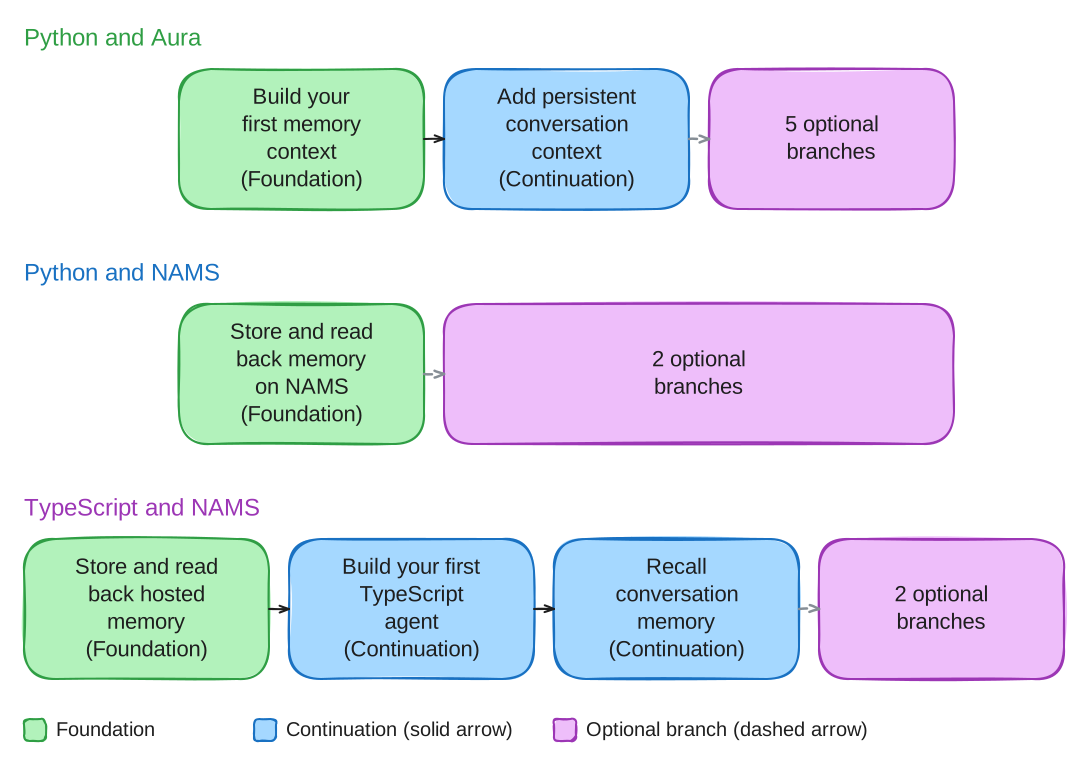
Start with the foundation lesson in your route. The tables identify its continuation and optional branches, including the accounts and tools each adds. Each lesson provides one complete path; you do not need to complete every provider or framework branch.
Python and Aura
These lessons install neo4j-agent-memory 0.7.0 from PyPI and show every local file on the page. All require Python 3.10 or newer, a POSIX shell and capacity for a dedicated Aura instance. Complete cleanup before starting the next lesson with a new empty instance; reuse the local environment and unchanged helpers. Resuming an unfinished lesson uses its original instance and saved IDs.
| Lesson and outcome | Place in the route | Additional requirements |
|---|---|---|
Build your first memory context: store and read back supplied records |
Foundation |
OpenAI access for embeddings |
Add persistent conversation context to a chatbot: use stored context in a new model turn |
Continue the foundation |
OpenAI chat-model access as well as embeddings |
Build a knowledge graph from documents: inspect extraction and source provenance |
Optional extraction branch |
OpenAI embeddings/chat; local GLiNER2.5 model download |
Optional provider branch |
Anthropic model access; disk space and network access for a local embedding model |
|
Build a shopping response with Microsoft Agent Framework memory |
Optional framework branch |
OpenAI embeddings/chat; Microsoft Agent Framework packages |
Optional framework branch |
AWS credentials; Bedrock chat/inference-profile and embedding-model access in the selected region |
|
Optional desktop branch |
macOS, Claude Desktop with local MCP support, and a local embedding-model download |
Python and NAMS
These lessons also install neo4j-agent-memory 0.7.0 and include every local file. They need a NAMS workspace data key; no separate model-provider key is required. Service-managed extraction and distillation can still consume workspace resources. Check the selected workspace’s usage limits with its owner before starting.
| Lesson and outcome | Place in the route | Workspace responsibility |
|---|---|---|
Foundation |
Dedicated test workspace; permission to create records and perform scoped cleanup |
|
Optional configuration branch |
Exclusive ontology editing for the exercise; an identified recovery owner; preserve the exact prior binding |
|
Optional preview evaluation |
A newly provisioned workspace whose owner has verified it is empty; Skills permissions and capability; an agreed disposal or retention arrangement for steps, tool calls, runs and skills |
The Skills lesson is not an automatic continuation in the workspace used for the preceding lessons. It can finish with a withheld result or retained resources. Read its prerequisites and outcome paths before seeding.
TypeScript and NAMS
This route uses Node.js 22.9 or newer, the maintained source project and its locked dependencies, and a NAMS test workspace/data key. It retains the source build setup described on each page, so every lesson runs against current source. Preserve the checkout’s private state between phases and use each lesson’s disposition checks.
| Lesson and outcome | Place in the route | Additional requirements |
|---|---|---|
Foundation |
No model-provider key; permission for scoped writes and cleanup |
|
Continue the foundation |
OpenAI model access; independent checks of middleware message persistence |
|
Continue with saved conversation identity |
OpenAI model access; preserve the original run state between teach and recall |
|
Ingest documents and inspect extracted entities (TypeScript) |
Optional extraction branch |
Service-managed extraction; no model-provider key |
Connect Claude Desktop to memory with a TypeScript MCP server |
Optional desktop branch |
macOS, Claude Desktop with local MCP support, and the ability to retain exact tool results for cleanup |
Plan the run
Allow for copying the named files, installing packages and any local models, and configuring the selected service before the first write. A lesson’s polling deadline measures how long its client waits; it is not a setup-time estimate or a cancellation of server work.
The NAMS foundation stores one conversation and two messages; extraction may add entities. Its extraction wait is bounded at 60 seconds. The Skills fixture adds nine steps and nine simulated tool calls, then may create a run and a skill; each inspection polls for at most two minutes. The TypeScript graph lesson stores two document messages and waits up to 60 seconds before a separate observation can continue the same run. Supported cleanup and retained-resource reporting are part of each hosted lesson, not a promise that every resource can be deleted.
For provider charges, model permissions and workspace quotas, consult the provider account or workspace owner for the selected configuration. These tutorials do not promise a free run. Keep each phase’s result separate: storage readback, extraction, model response and final resource disposition can have different outcomes.