Grounding Salesforce Agentforce with Neo4j knowledge graphs

AI Cloud Expert
9 min read
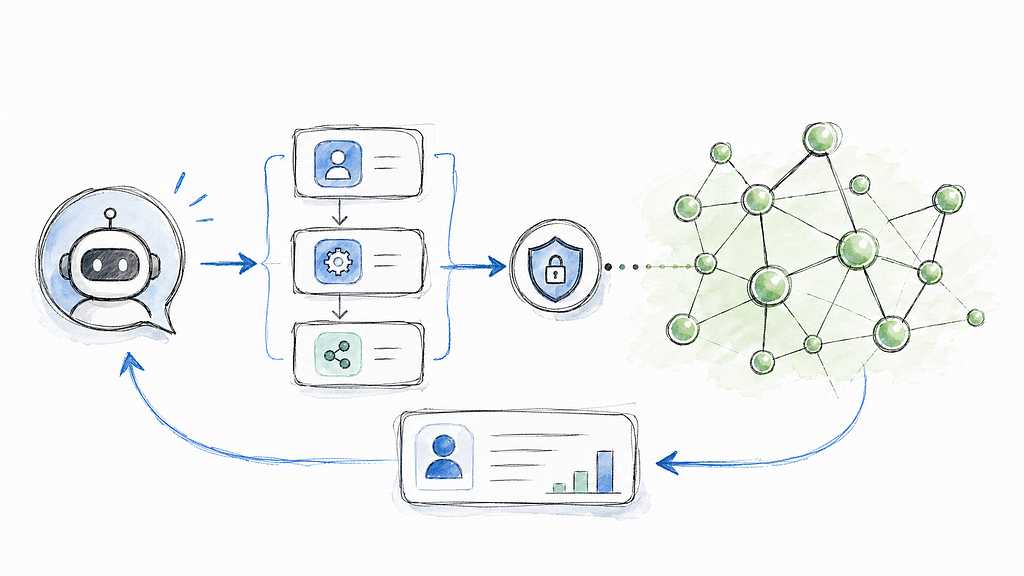
How connected enterprise context can make Salesforce agents more useful, explainable, and action-oriented
Salesforce is where customer work happens. Sellers prepare for account meetings, service teams investigate cases, and revenue teams decide where to focus next. Agentforce brings AI agents into those workflows, but the quality of an agent’s answer still depends on the context it can reach.
An Account record can tell you what your company knows about a customer. It may not show the broader network around that customer: subsidiaries, suppliers, competitors, executives, industries, recent news, and second-order relationships that explain why an account is changing. That connected context is exactly where a Neo4j knowledge graph is useful.
In this post, we’ll show how to make Neo4j available to Salesforce Agentforce as a grounded action. The example is an industry research agent that combines Salesforce’s workflow layer with a Neo4j company knowledge graph, so a user can ask for a strategic account briefing and receive a response grounded in explicit relationships rather than a generic web-style summary.
Why CRM agents need connected context
Consider a common Salesforce workflow:
“I have a meeting with Neo4j tomorrow. Give me a briefing on the company, its competitors, suppliers, subsidiaries, and recent news.”
A useful answer should not stop at a CRM summary. The agent may need to combine:
- Salesforce context: Account ownership, open opportunities, recent activities, renewal dates, support cases, and internal notes.
- Market context: competitors, suppliers, subsidiaries, executives, industries, and related companies.
- Recent developments: news mentioning the company or entities in its business network.
- Reasoning context: why a relationship matters and which underlying data supports the recommendation.
Traditional retrieval can help with documents and snippets, but many business questions are relationship questions. “Which suppliers are connected to this account?” “Which subsidiaries have recent news?” “Which competitor is also active in the same industry?” These are graph-shaped questions, and they benefit from graph traversal rather than text search alone.
Neo4j gives Agentforce a connected data layer for this kind of work. Instead of asking the language model to infer relationships from loose text, we can expose curated graph queries as Salesforce actions. The agent stays focused on the user intent and workflow, while Neo4j returns structured facts about the business network.
Where Agentforce fits
Agentforce is designed around agents that can reason, select actions, and interact with the CRM systems. In current Salesforce terminology, subagents handle focused areas of work, and actions let those agents retrieve information, execute logic, or call external systems.
That model is a good fit for Neo4j:
- A subagent can own a focused workflow, such as company intelligence or account research.
- An action can expose a safe, curated Neo4j capability, such as “Get insights about a company: Neo4j.”
- Flow can orchestrate Salesforce-native enrichment before or after the graph lookup.
- Prompt templates can shape the final response without putting all instructions into the agent itself.
That fit will be even better with a native MCP integration, which is coming to Salesforce soon; and which we will explore further the moment it become available.
The result is an agent architecture that is instruction-light, auditable, and familiar to Salesforce teams. Admins can manage Flow and prompt behavior. Developers can manage the graph query and integration code. Business users can stay in the Salesforce experience.
The reference use sase: Company intelligence
The Neo4j Labs Salesforce Agentforce integration guide implements a company insights workflow. The agent captures an organization name from the user’s request, calls a Salesforce action, and returns a structured briefing.
The Neo4j demo database contains company and news data with entities such as organizations, people, locations, industries, and articles. For a named company, the graph query can retrieve a number of attributes, from the organization profile, through key leadership and commercial and competitive landscape, to a set of recent articles mentioning the company or entities in its network.
That response becomes the factual substrate for the Agentforce answer. The language model does not need to invent a company network. It receives structured graph data and uses the prompt template to summarize it in a professional format.
For a seller, the final response might become a meeting briefing. For a customer success manager, it could become a renewal risk summary. For a service team, it could provide context around a strategic account before escalation. The underlying pattern is the same: Salesforce owns the workflow, Neo4j owns the connected context.
A Salesforce-native integration pattern
The implementation can be described as a simple request path
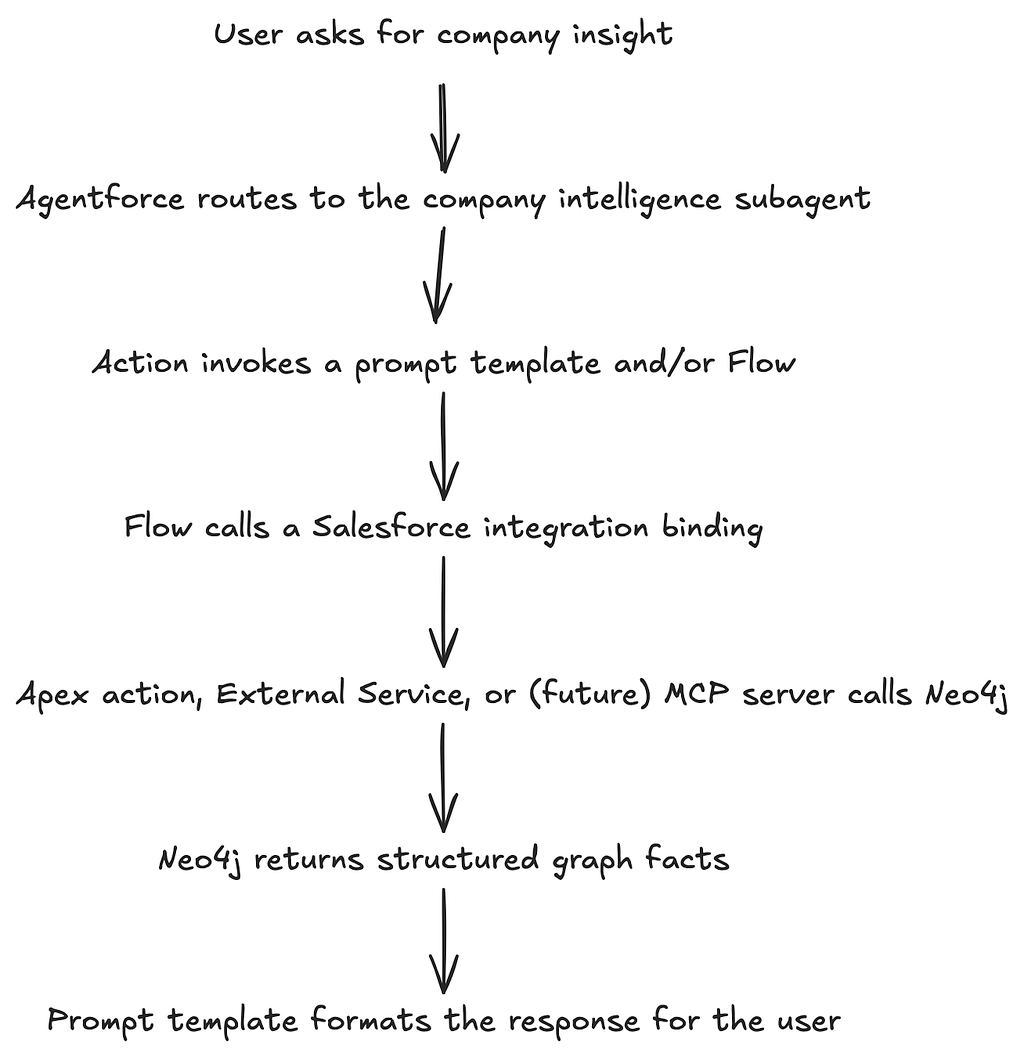
The important design choice is that the LLM is not responsible for every part of the system. The agent identifies the user’s intent. The action boundary defines what can be called. Flow can enrich the answer with CRM records. Neo4j performs the graph lookup. The prompt template controls the final tone and structure.
This makes the integration easier to govern. You can review which actions are available, inspect the Cypher query behind the action, manage credentials through Salesforce setup, and decide exactly which graph facts should be returned to the model.
Three ways to connect Neo4j to Agentforce
The technical guide describes three integration tracks. They are not competing approaches as much as deployment choices for different Salesforce teams.
Apex Actions for Control
Apex is the most direct option when you want full control inside Salesforce. In the sample, an @InvocableMethod exposes a “Get Neo4j Organization Insights” action. The Apex service calls Neo4j’s HTTP Query API through a Named Credential, receives JSON, simplifies the graph response, and returns it to Agentforce.
This is a good fit when you want to:
- Combine Neo4j results with Salesforce records in the same transaction flow.
- Add custom validation, error handling, or response shaping.
- Keep the integration close to existing Salesforce development practices.
- Reuse the same logic from Flow, prompt templates, or Lightning components.
For production code, keep the Cypher parameterized and expose narrow actions that match business tasks. “Get account network briefing” is safer and easier for an agent to use than a generic “run arbitrary Cypher” action.
External Service Actions for Low-Code Integration
External Services are useful when you want a declarative Salesforce setup. You expose a REST API with an OpenAPI schema, import that schema into Salesforce, and then use the generated operation as an action in Flow or Agentforce.
The sample bridge uses a lightweight Node.js service suitable for platforms such as Cloudflare Workers. The bridge receives a company name, calls Neo4j, and returns a structured response that Salesforce can understand.
This is a good fit when you want to:
- Avoid Apex for the first version.
- Put the Neo4j adapter outside Salesforce.
- Centralize API transformation logic in a small service.
MCP for a Standards-Based Tool Layer
Model Context Protocol (MCP) is becoming a common way to expose tools and context to AI agents. As Salesforce MCP support matures and becomes available in more Agentforce environments, Neo4j’s MCP server can provide a standards-based way to expose graph capabilities.
The MCP path is attractive because it can let an agent discover curated graph tools through a common protocol. The same caution still applies: enterprise agents should receive specific, governed tools, not unrestricted database access. The right pattern is to expose business-safe graph operations with clear descriptions, inputs, and permissions.
This integration method is on Salesforce roadmap and is planned for general availability in mid-2026.
Why this is more than “RAG in Salesforce”
Retrieval-augmented generation is often described as finding the right text and giving it to a model. That is useful, but Salesforce workflows often need more than text snippets. They need connected operational context.
A graph can answer questions such as:
- Which companies are related to this account through suppliers or subsidiaries?
- Which news items mention not only the target account, but also companies in its surrounding network?
- Which relationships explain a recommendation?
- Which CRM records should be combined with external market intelligence before the agent responds?
Neo4j makes those relationships explicit. Agentforce makes them operational by bringing the answer into the CRM workflow where the user is already working.
This also improves explainability. A graph-backed response can point to the entities and relationships used to produce the answer. That is much more useful in an enterprise setting than an opaque summary with no visible grounding.
What to try first
If you want to experiment with the integration, start with the Apex or External Service track:
- Use the sample company insights action from the Neo4j Labs Salesforce Agentforce integration guide.
- Add the action to a focused Agentforce subagent for company or account intelligence.
- Test with a concrete prompt, such as: “Give me a briefing on Neo4j, including competitors, suppliers, subsidiaries, and recent news.”
- Add Salesforce enrichment through Flow, such as Account owner, open Opportunities, recent Cases, or upcoming renewal date.
That last step is where the demo becomes a Salesforce workflow instead of a standalone graph lookup. Neo4j supplies the connected business context; Salesforce supplies the customer context and process.
Beyond text: Graph context in the Salesforce UI
The first version can return a text briefing in the Agentforce conversation, but the same graph data can support richer Salesforce experiences.
For example, a Lightning Web Component can render a localized account network on an Account page: the account at the center, connected suppliers and subsidiaries around it, and recent articles attached to the relevant organizations. A seller could review that graph before a meeting. A service manager could open the same view during an escalation. A revenue leader could use it to understand account concentration or ecosystem risk.
This is where the combination becomes especially practical. Agentforce can answer the question conversationally, while Salesforce UI components can preserve the graph as an inspectable business object.
Resources
- Neo4j Labs Salesforce Agentforce integration guide
- Neo4j Agent Integrations repository
- Neo4j MCP Server
- Salesforce Agentforce APIs and SDKs
Grounding Salesforce Agentforce With Neo4j Knowledge Graphs was originally published in Neo4j Developer Blog on Medium, where people are continuing the conversation by highlighting and responding to this story.
Share Article



Explore
Related Articles
New research finds enterprises earn 230% ROI with Neo4j Graph Intelligence Platform
SumoDB in Neo4j: Chaining Multiple Graph Algorithms in Snowflake — Part 3