When and How to Implement Text2Cypher in Agentic Applications
Introduction
In this article, we’ll discuss the process of generating database queries from natural language with LLMs, as well as some of the challenges that come along with it. We will then go into the details of specifically generating Cypher queries, Text2Cypher, for Neo4j, and some libraries that facilitate the process.
What is Text2Query Generation?
A common subtask for agents is to generate a database query that addresses user input. This allows the agent to gather information from the database and summarize the results or use it as input for another tool call.
This is a powerful ability, but it also has faults due to its broad scope. Here we will discuss the process of generating queries from natural language, specifically for the Cypher query language, which is commonly used for graph databases. We will also address challenges this process faces, as well as methods to overcome these challenges.
Text2Query includes any query generation by an LLM from natural language, such as Text2SQL and Text2Cypher.
When Should Text2Query Be Used?
Allowing an AI agent to generate and execute database queries enables it to ground its insights in actual domain knowledge. This reduces the risk of hallucination and provides access to information that may otherwise be unavailable in the public domain.
While this is a powerful tool, as the complexity of the question or task increases, so does the chance that the generated query will fail or not return the desired information. Performance varies across LLMs, and different prompting methods also have a significant influence.
Text2Query works best as either an exploratory or a general fallback tool. As an exploratory tool, this process may be used to quickly gain an understanding of new datasets. This is especially helpful in instances such as knowledge graph generation, where the resulting knowledge graph is not deterministic. Here, it may be helpful to use an agent with Text2Cypher ability for initial analysis of the graph to identify any gaps that may exist in the current ingestion pipeline.
This process may also be effectively used as a generic fallback tool. In this case, it will be used if the agent does not have any other available tools that address the current task. These other tools are typically prewritten, parameterized queries that address specific use cases we know the agent is responsible for. The queries contained in these tools are either very common or too complex to rely on the agent to generate accurately each time.
The fallback queries are often simple retrievals with filters, aggregations, or short graph traversals. It saves the effort of explicitely expressing all these potential queries as tools.
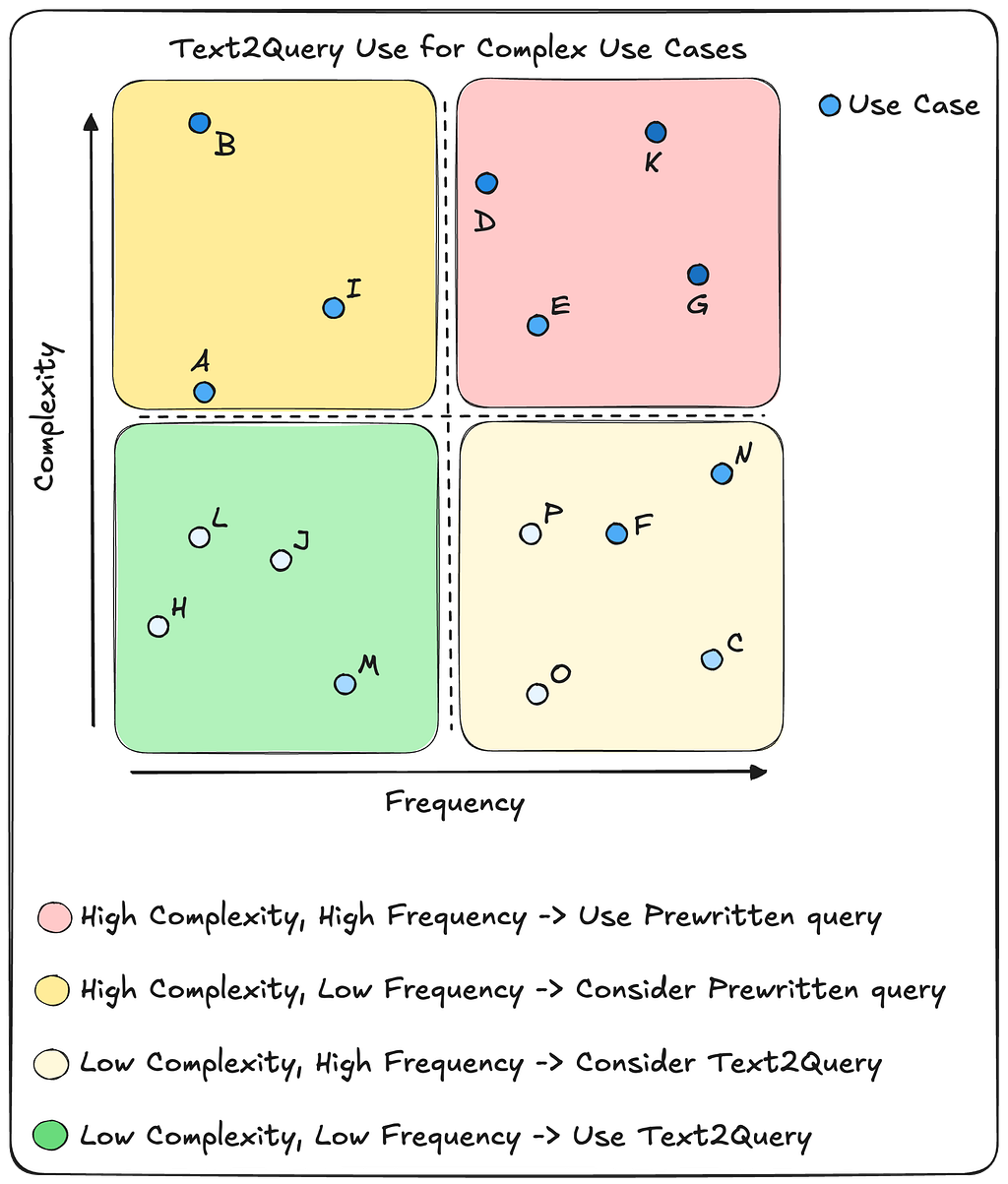
In the above chart, we see four quadrants, each specifying a general approach to the type of query tool that should be used. Coloring is aligned with how challenging the query is for the overall Text2Query process.
- Queries that are low in complexity and frequency may safely be delegated to Text2Query, since it is assumed they will be easy to reliably generate, and they are not requested often.
- Queries that are low in complexity, but occur frequently, can also be safely delegated to Text2Query, but since the agent will often get these requests, it may be beneficial to create a prewritten query tool to handle them. This will eliminate the need to call the LLM for query generation each time and makes the response more deterministic.
- Highly complex queries that rarely occur should probably be handled by a specific query tool since it is assumed that Text2Query will not be able to reliably generate the correct query. However, requests that fall into this category also might simply be out of scope for our application, and adding a new tool for these rare occurrences takes up unnecessary space in our context window.
- Finally, complex queries that are frequently seen should have their own dedicated tool. It is assumed that Text2Query will not be capable of reliably generating the same required query for each request, and it will be safer and more deterministic to write the query ourselves and reuse it each time.
What Are The Challenges of Text2Query?
There are inherent challenges that an agent faces when generating database queries.
Three primary challenges are
- identifying user intent and context,
- handling domain jargon and
- understanding the database schema.
The user’s intentions and context may significantly influence the required query. The agent must understand who the user is and why they are asking a given question. A simple example is an employee who asks for a reporting chain that starts with their position. The agent must understand who this employee is by either asking clarifying questions or using additional tools to gather the appropriate context in order to properly anchor the query.
Internally facing agents will receive requests that contain domain-specific jargon. These may be abbreviations, names, or phrases that have a particular meaning within that environment. If the agent doesn’t have a method of clarifying these terms, then it will likely assume definitions and bake these assumptions into its generated query. While it is easy to allow the agent to ask the user to clarify any uncertain terms, we may also choose to give the agent a “term lookup” tool to use selectively. This option reduces the responsibility of the user while providing a standardized set of definitions for any internal domain jargon.
The previous two challenges exist not only for query generation, but also for general tool use and agent performance. Query generation, however, specifically requires agents to also have a clear understanding of the database schema.
A graph database schema should include nodes, relationships, properties, and property types. It is also useful to include indices so the agent may intelligently anchor on nodes. Finally, we may also include additional information (enhanced schema) such as element descriptions, example values, numeric distributions, enumeration values, string formats, and min/max values for number and date property values. These provides deep details of the schema so the agent receives the most informative context.
Large schema sizes may also impact the agent’s ability to accurately generate database queries as it can overload the context and confuse the LLM. In this case, we may need to bring in only select components of the schema for context. This can be done in many ways, including vector-based similarity search on component descriptions or traversing n-hops from identified schema nodes via relationships in graph databases.
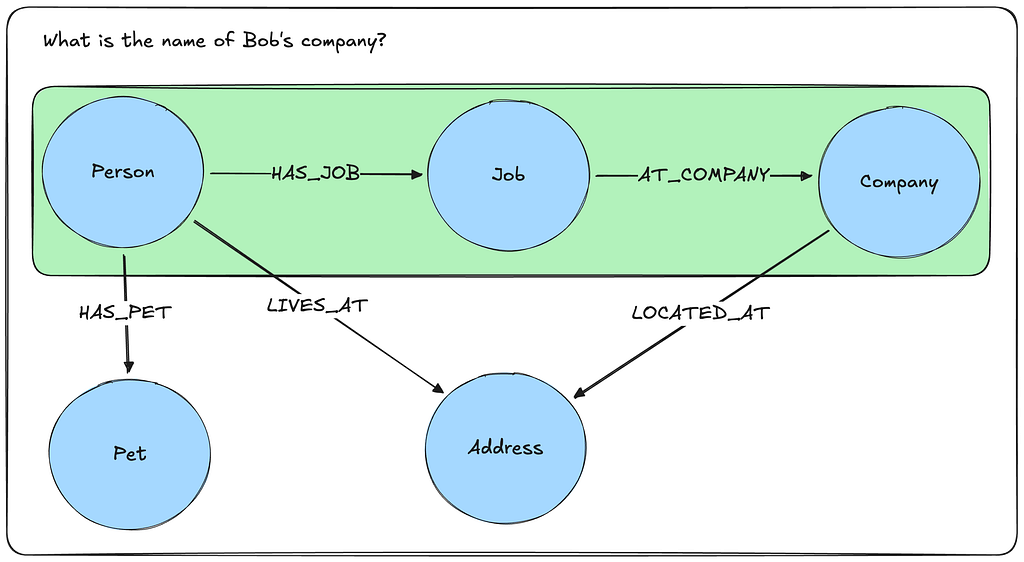
Methods for parsing schema components for Text2Cypher are detailed in this article by Neo4j engineering. These methods are conceptual and represent future work by our engineering team.
This GitHub repo by my colleague Eric Monk contains an implementation of parsing graph schema components for Cypher generation context.
What Is Cypher?
We will use Text2Cypher as our reference Text2Query process. Cypher is the primary query language used with graph databases, and an example can be seen below.
MATCH (p:Person)-[l:LIVES_AT]->(a:Address)
WHERE p.name = "Bob" and l.since >= date('2025-01-01')
RETURN a.address as address
Text2Cypher Workflow
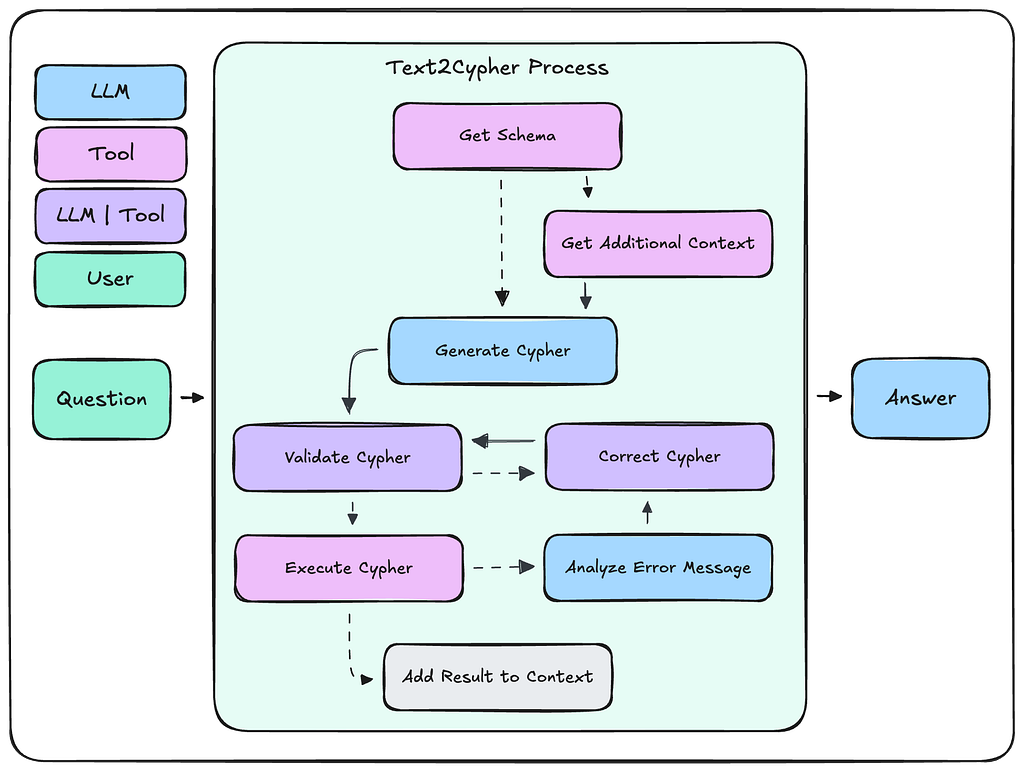
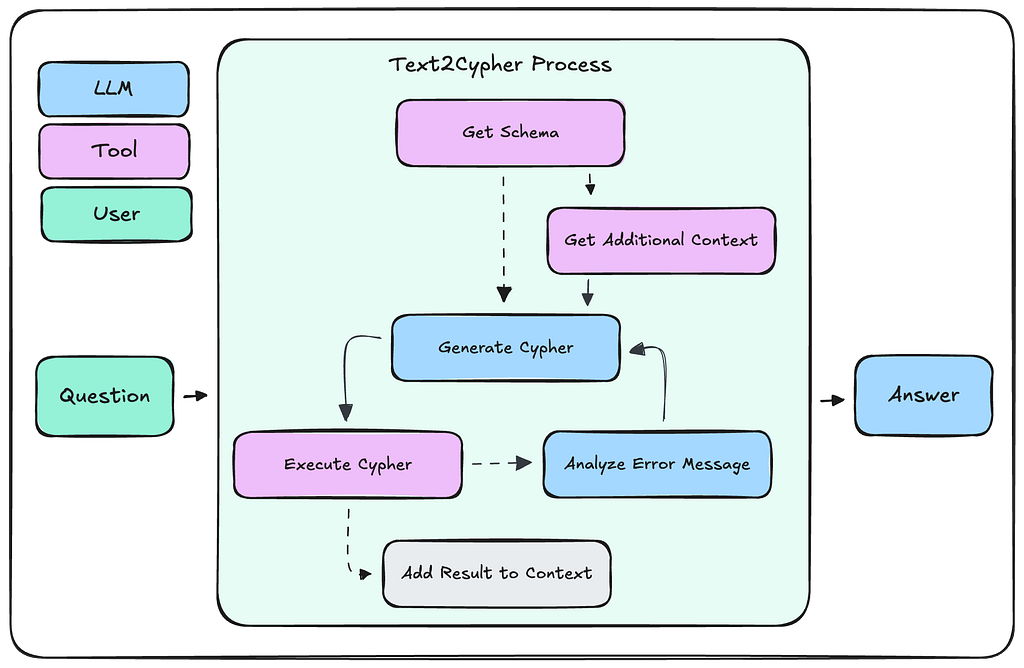
A Text2Cypher implementation will resemble the following workflow.
- The agent will first gather the graph schema via a tool call.
- If additional information is needed, then it will iteratively call other tools until it has determined that a query can successfully be written.
- The agent will then generate a Cypher query via an LLM request where the user input, graph schema, and additional information are sent as context.
- This query should then be validated, and any required corrections should be made. Both of these steps may be handled by LLM calls or by code functions.
- The validated Cypher query will then be executed against the database.
- Any error messages will be analyzed by the agent, and the query will be corrected, validated, and executed again. This loop may occur multiple times.
- Upon successful query execution, the results are appended to the context window, and the agent continues with the given task.
Methods
We will now discuss various methods to improve a Text2Cypher workflow. The following three approaches will cover context engineering, using fine-tuned LLMs, and validation-correction loops.
Few-Shot Examples
When retrieval augmented generation (RAG) initially arrived, the focus was solely on vector-based similarity search. When LLMs became more capable of generating code, this definition expanded to include querying non-vector databases as well. Unfortunately, LLMs at that time were not the best at generating queries, and so developers had to add few-shot examples to the prompt to assist the LLM.
The purpose of few-shot examples is to provide relevant question to query examples to the LLM that influence query generation. Ideally these examples contain the types of graph traversals, property access and filtering we would like the LLM to include in its query.
This method may be naively implemented by including a static set of question and query pairs in the prompt. This requires a subject matter expert to write an initial set of Cypher queries that address anticipated user questions. While this may be easier to set up than the following methods, it doesn’t allow for flexibility and may either include irrelevant information or miss crucial information.
We may also dynamically inject few-shot examples into the prompt. This typically involves storing question and query pairs in an external database (example store) and querying the database for relevant examples at runtime.
A simple method of implementing this is to store question embedding and Cypher query pairs in a vector store. Then, an incoming user question will be embedded and used to find the most relevant Cypher queries via vector similarity search. These retrieved queries will be injected into the generation prompt and passed to the LLM. We may also implement a similarity threshold to prevent low similarity queries from being included in the prompt. This way, we are selecting only the most relevant queries to include in each query generation request.
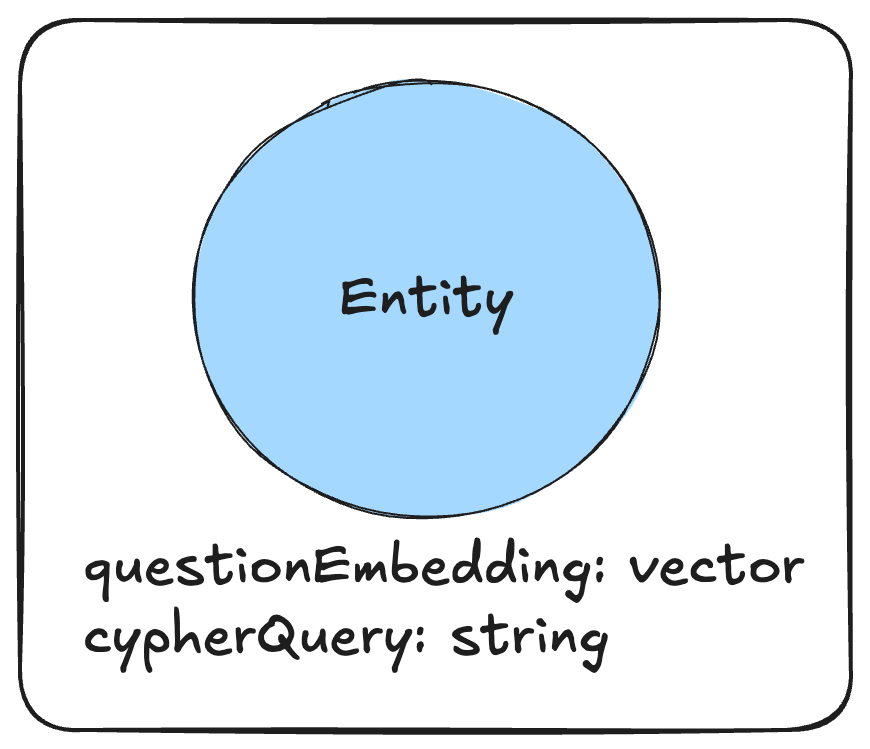
The Few-Shot Prompting section of this notebook walks through how to use the SemanticSimilarityExampleSelector class from LangChain to achieve this. Please note that this example is from LangChain v0.3 and some import statements must be changed to use langchain_classic instead of langchain_core to be compatible with LangChain v1.x.
from langchain_core.example_selectors import SemanticSimilarityExampleSelector

# changed to
from langchain_classic.example_selectors import SemanticSimilarityExampleSelector
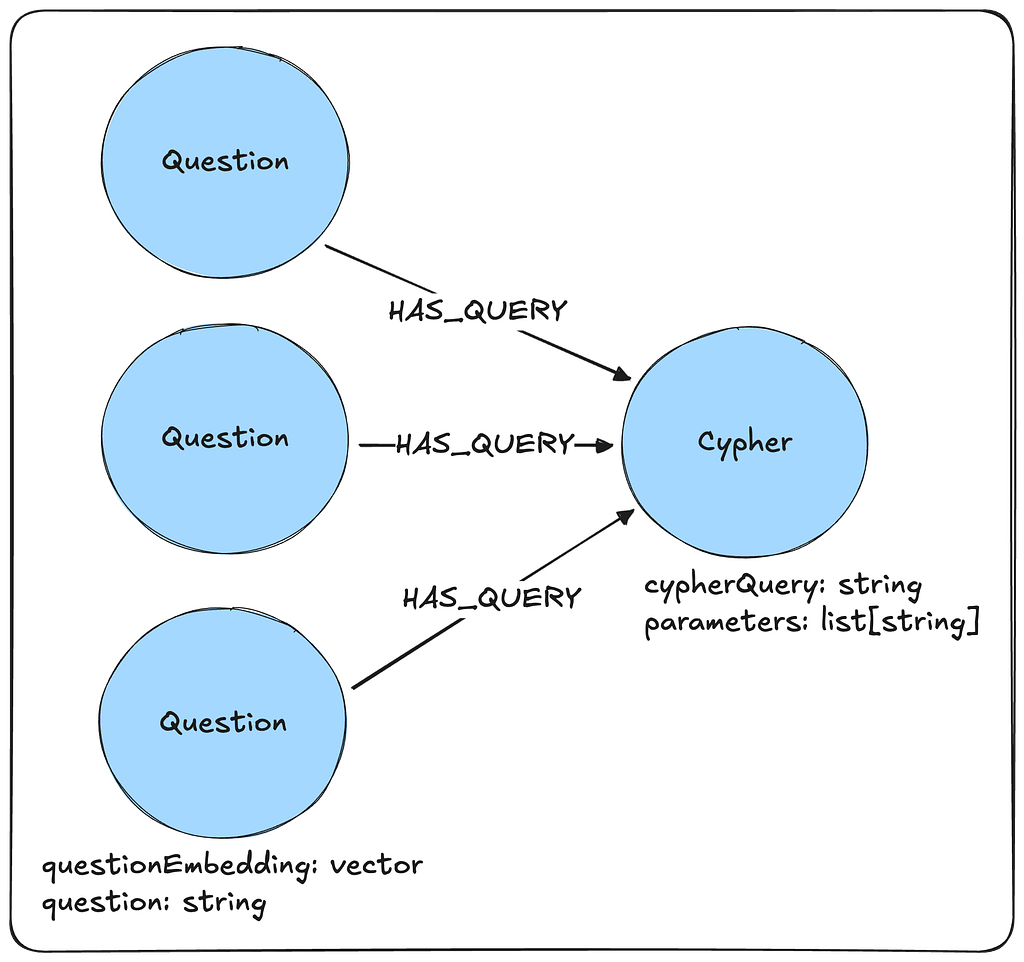
The above retrieval may be further enhanced if we store the data in a graph. In this implementation, we may have many questions that relate to a single Cypher query. Now that there is potentially more coverage for a given query, it is more likely to be chosen for the appropriate user questions.
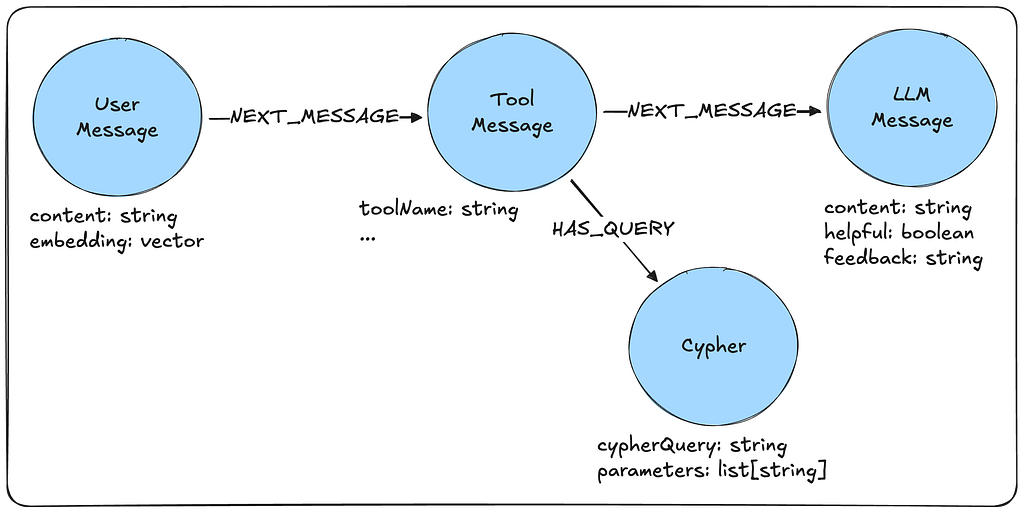
Alternatively, if we are logging our application, then we will have access to user questions, any generated Cypher, and whether the LLM generated a successful response from the query results. In this case, we may query our LLM traces to find similar questions our application has been previously asked. We may then find their associated Cypher queries and only include them if the final LLM response did not receive negative feedback from the user. This allows the few-shot example pool to continue to grow and mature throughout the lifetime of the application.
Fine-Tuned LLMs
Modern LLMs have become very capable in generating Cypher queries with just the graph schema as context. However, these frontier models are not always available, are slower and more expensive and may still struggle with some cases. In these instances, it may be better to deploy a fine-tuned LLM that has been trained to generate Cypher queries.
Fine tuning takes the few-shot examples to the next level and actually updates the weights of an existing model to integrate a lot of those question-query pair predictions.
The Neo4j engineering team has released fine tuned models on HuggingFace that are able to be deployed locally. In addition, they provide the training datasets so that you may fine-tune your own LLMs with validated Cypher datasets.

Validation — Correction Loop
Modern agent architectures typically allow for validation and correction loops. These may be explicitly defined as a workflow that the agent executes or freely allowed, like in a ReAct architecture. The goal of this loop is to give an agent the tools necessary to correct its unsuccessfully generated query.
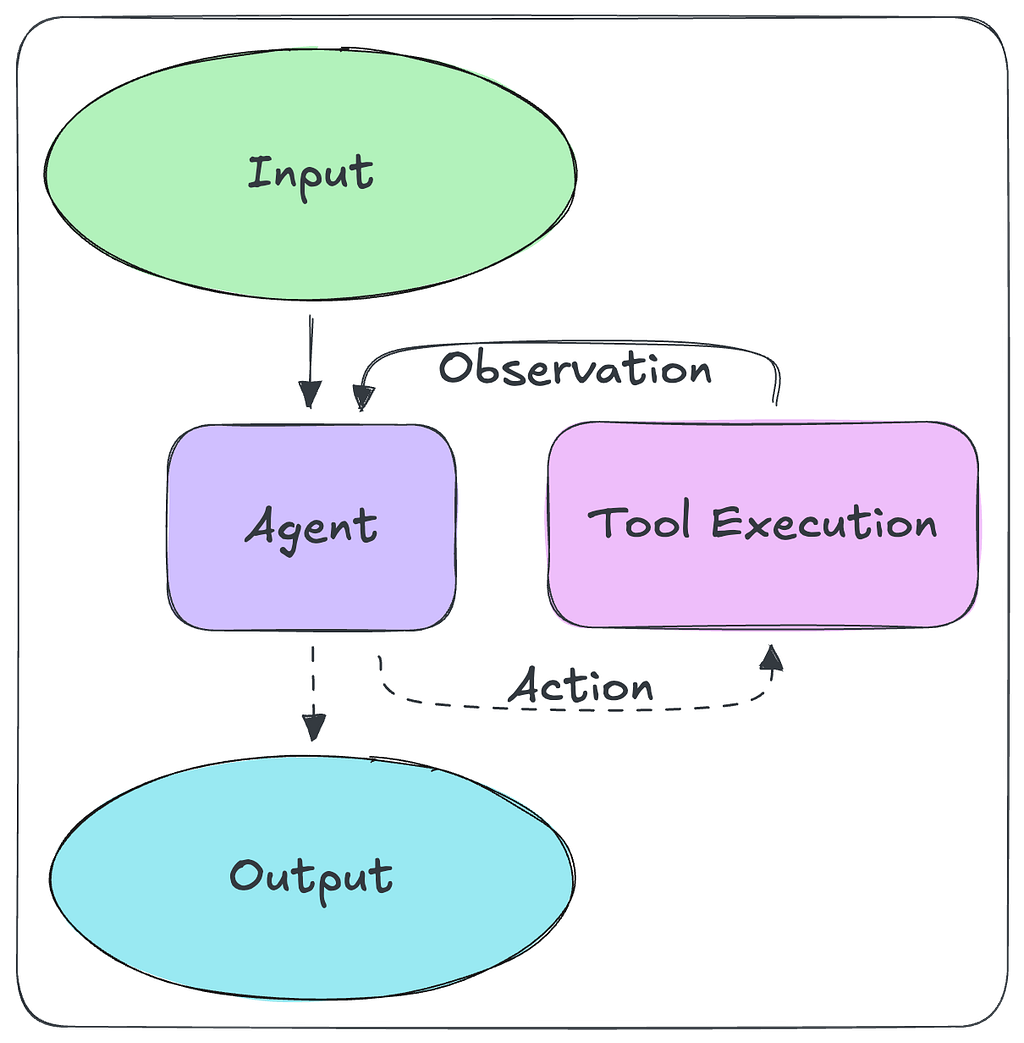
While it’s possible to have an LLM perform query validation and correction through inference (esp. with error messages of failed queries), as seen in this LangGraph example, we may also choose to automate these tasks with deterministic code instead.
Validation may be achieved by writing some simple regex checks or using a library such as CyVer under the hood. This allows for fast validation, such as checking for write queries and catching invalid property access. Using a query parser and the graph schema it can also correct for misspellings, wrong relationship directions and general syntax errors.
Once validation errors are collected, they may be passed back to the LLM to regenerate the Cypher query. This is not always necessary, though. For example, relationship direction may be corrected automatically by comparing the query relationship direction with patterns in the schema.
The LangChain Neo4j library contains the CypherQueryCorrector class, which can perform this task, given the allowed schema patterns and the query to correct.
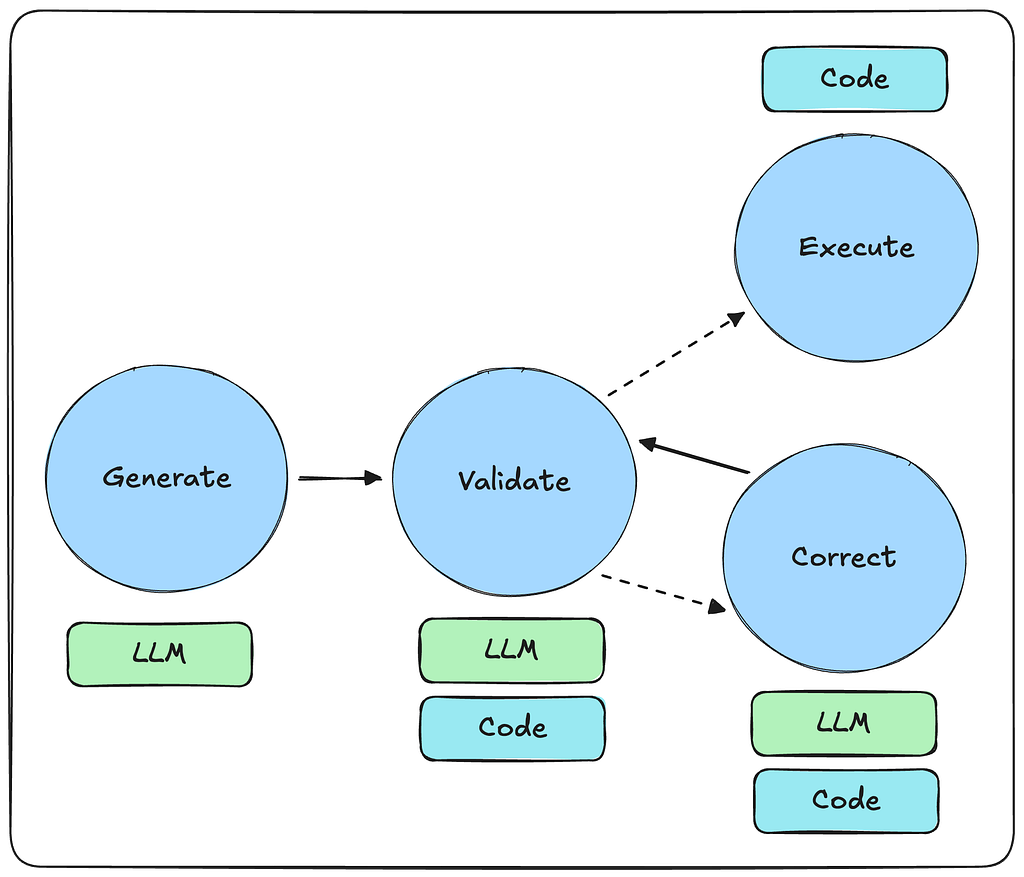
Baking the validation and correction logic into deterministic functions reduces the reliance on an LLM in the query generation process and makes it much faster.
However, this does make our Text2Cypher workflow more rigid. Finding the right balance between using an LLM and automated functions for validation and correction can reduce costs and improve workflow robustness.
Evaluation
When evaluating Text2Cypher, there are two primary procedures to assess the results. One is translation, which compares the reference query with the generated query. The other is execution, which compares the reference query results against the generated query results.
These procedures are covered by the Neo4j engineering team in their article on benchmarking using the Text2Cypher dataset. You can also find a detailed review of the dataset in this article. The team also conducted a retrospective on their previous fine-tuning methods to identify areas of improvement. You can find their review in this article, which covers model struggles and how the dataset can be improved.
Libraries
There are many libraries that support Text2Cypher workflows. Here we will cover three:
- the Neo4j GraphRAG Python Package,
- the LangChain Neo4j library,
- and the Neo4j MCP servers.
Afterwards, we will discuss when to select each available option.
Neo4j GraphRAG Python Package
The Neo4j GraphRAG Python Package provides an abstraction to execute Text2Cypher workflows. It provides a simple function to retrieve the graph schema and a Text2CypherRetriever class that handles fetching the schema, constructing the prompt, generating Cypher, executing the query, and formatting the results.
# imports + set up
# Initialize the retriever
retriever = Text2CypherRetriever(
    driver=driver,
    llm=llm,
    neo4j_schema=schema,
    examples=examples,
# optionally, you can also provide your own prompt
# for the text2Cypher generation step
# custom_prompt="",
    neo4j_database=os.getenv("NEO4J_DATABASE", "recommendations"),
    result_formatter=lambda x: RetrieverResultItem(content=x.data())
)
# Generate a Cypher query using the LLM, send it to the Neo4j database, and return the results
query_text = "Which movies did Hugo Weaving star in?"
result = retriever.search(query_text=query_text)
A full example of implementing Text2Cypher with the Neo4j GraphRAG Python Package may be found here.
LangChain
The LangChain Neo4j library contains the GraphCypherQAChain class, which is another abstraction for the Text2Cypher workflow. This class also provides a validation—correction layer that detects reversed relationship directions in the Cypher query and automatically corrects them according to the schema (basic and enhanced). This class also easily integrates with the rest of the LangChain / LangGraph ecosystem.
# imports + set up

chain = GraphCypherQAChain.from_llm(
    ChatOpenAI(temperature=0),
    graph=graph,
    verbose=True,
    cypher_prompt=CYPHER_GENERATION_PROMPT,
    allow_dangerous_requests=True,
)

chain.invoke({"query": "Who played in Top Gun?"})
A full example of implementing Text2Cypher with the LangChain Neo4j library may be found here.
MCP
The easiest way to implement a Text2Cypher workflow is with the Neo4j MCP servers. You may use either the official Neo4j MCP server or the Neo4j Labs Cypher MCP server. Both these servers provide tools for schema retrieval and Cypher execution. They may be easily connected to agentic applications, such as Claude Desktop, or used in your custom agents. There the agent-LLM will be responsible for generating and executing the Cypher queries with the MCP tools.
Note that, while both MCP servers are viable, it is recommended to use the official Neo4j MCP server, as it is supported by the engineering team. The Labs MCP servers are supported by the AI Field Team and contain experimental features.
{
    "mcpServers": {
        "neo4j-labs-cypher": {
            "command": "uvx",
            "args": [ "mcp-neo4j-cypher@0.5.2", "--transport", "stdio"  ],
            "env": {
            "NEO4J_URI": "bolt://localhost:7687",
            "NEO4J_USERNAME": "neo4j",
            "NEO4J_PASSWORD": "<your-password>",
            "NEO4J_DATABASE": "neo4j"
            }
        },
        "neo4j-official-mcp": {
            "type": "stdio",
            "command": "neo4j-mcp",
            "env": {
                "NEO4J_URI": "bolt://localhost:7687",
                "NEO4J_USERNAME": "neo4j",
                "NEO4J_PASSWORD": "<your-password>",
                "NEO4J_DATABASE": "neo4j"
            }
        }
    }
}
These servers are typically used in a ReAct agent architecture where the agent will adhere to a simplified version of the workflow discussed in the Text2Cypher Workflow section.
Library Selection
Both the Neo4j GraphRAG Python Package and LangChain Neo4j library are good options to develop quick proof of concepts. They provide comprehensive abstractions that handle formatting prompts, collecting and formatting schema, calling the LLM, and formatting responses. Both libraries are supported by Neo4j engineering, with the LangChain library being more compatible with the rest of the LangChain ecosystem.
The MCP route decouples the Text2Cypher tooling from the other components. This enables more complex and robust agent development, tailored to specific use cases. While MCP is a good option for quick proof of concepts with client applications such as Claude Desktop or Cursor IDE, it is also a good choice for production systems. MCP provides a standardized tooling interface for agents and allows for more robust agent customization than the other two methods.
Conclusion
Generating queries from natural language is a powerful tool for AI agents. It allows those who are nontechnical or unfamiliar with the underlying data to still gain insights on demand. This is an invaluable asset at a time when technology is moving so rapidly.
Despite this, Text2Cypher, and more broadly Text2Query, have complex underlying processes and challenges. We can improve performance by refining the provided context, fine-tuning a custom query generation LLM, and implementing validation — correction processes. However, it is also important to identify when Text2Query should be used and when other, more specialized tools are more appropriate. This allows you to fully leverage agentic AI systems over your data.
References
Benchmarking Using the Neo4j Text2Cypher (2024) Dataset
Build a Question Answering Application Over a Database
The Impact of Schema Representation in The Text2Cypher Task
Introducing the Neo4j Text2Cypher (2024) Dataset
Neo4j HuggingFace Training Data
Neo4j Text2Cypher: Analyzing Model Struggles and Dataset Improvements
ReAct: Synergizing Reasoning and Acting in Language Models
Text2Cypher: Bridging Natural Language and Graph Databases
Text2Cypher Guide Github Repository
Verify Neo4j Cypher Queries with CyVer
Text2Cypher Guide was originally published in Neo4j Developer Blog on Medium, where people are continuing the conversation by highlighting and responding to this story.
Share Article



Explore
Related Articles


Why Healthcare CIOs Can’t Afford to Scale AI Without a Knowledge Graph Foundation
Hey LLM, you’re using OPTIONAL MATCH wrong. Here’s the Cypher that actually works.