Turning ServiceNow data into connected enterprise intelligence

Principal Partner Architect, Neo4j
11 min read
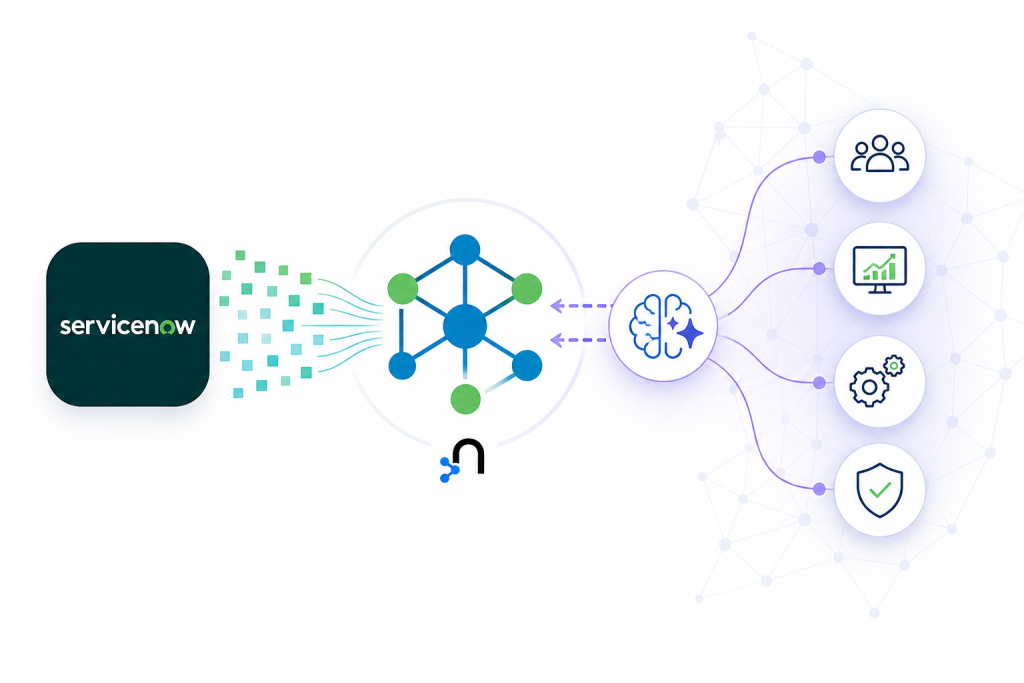
Are you thinking about how ServiceNow data could become more valuable when connected to the rest of your enterprise?
This post explores a practical approach: using Neo4j to connect ServiceNow workflows with enterprise context so GenAI can reason across incidents, services, applications, owners, changes, risks, and recommended actions.
That is the promise of combining ServiceNow with a graph database.
ServiceNow is becoming one of the most important enterprise platforms in the generative AI era. With capabilities like Now Assist, AI Agents, and Workflow Data Fabric, ServiceNow is helping organizations move beyond workflow automation toward intelligent, AI-assisted operations.
But for many large enterprises, the biggest challenge is not whether GenAI can summarize a ticket. It is whether GenAI can understand the business and technical context behind that ticket.
For this demo, I used the ServiceNow Australia release with a ServiceNow developer instance and connected it to Neo4j Aura. The goal was simple but powerful: show how ServiceNow incidents can become part of a connected enterprise knowledge graph that GenAI can use for context, reasoning, and action.
- ServiceNow captures the work
- Neo4j connects the context
- GenAI turns that context into explainable, actionable intelligence
ServiceNow has the workflow. The context lives everywhere.
ServiceNow is often the front door for enterprise operations. It captures incidents, change requests, service requests, CMDB data, approvals, work notes, and operational history.
However, the information needed to resolve an incident rarely lives in one place.
An incident may mention an application, but the dependencies may live in a CMDB. Ownership may live in an internal service catalog. Recent deployments may live in a change system. Alerts may come from observability platforms. Vulnerabilities may come from security tools. Runbooks may live in knowledge articles, wikis, or document repositories.
That fragmentation creates a problem for both humans and AI.
When a production incident occurs, stakeholders want answers quickly:
- Which business service is affected?
- What applications, APIs, databases, queues, and cloud resources are connected to it?
- Who owns the impacted service?
- Was there a recent change that could explain the issue?
- Are there related vulnerabilities or alerts?
- Have we seen a similar issue before?
- What remediation worked last time?
- What is the business impact?
A generative AI assistant can produce a polished response, but without connected enterprise context, that response may be incomplete, shallow, or difficult to trust.
That is where a graph database becomes essential.
The approach: Turn operational workflow data into a knowledge graph
The core idea is to keep ServiceNow as the operational system of record while using Neo4j as the connected context layer.
Instead of treating an incident as an isolated row in a table, we model it as part of a network:
Incident -> impacts -> Service
Service -> depends on -> Database
Service -> owned by -> Team
Service -> changed by -> Change Request
Service -> has alert -> Monitoring Event
Service -> exposed to -> Vulnerability
Incident -> similar to -> Past Incident
Past Incident -> resolved by -> Runbook
This graph gives both users and AI systems a richer way to reason about operations.
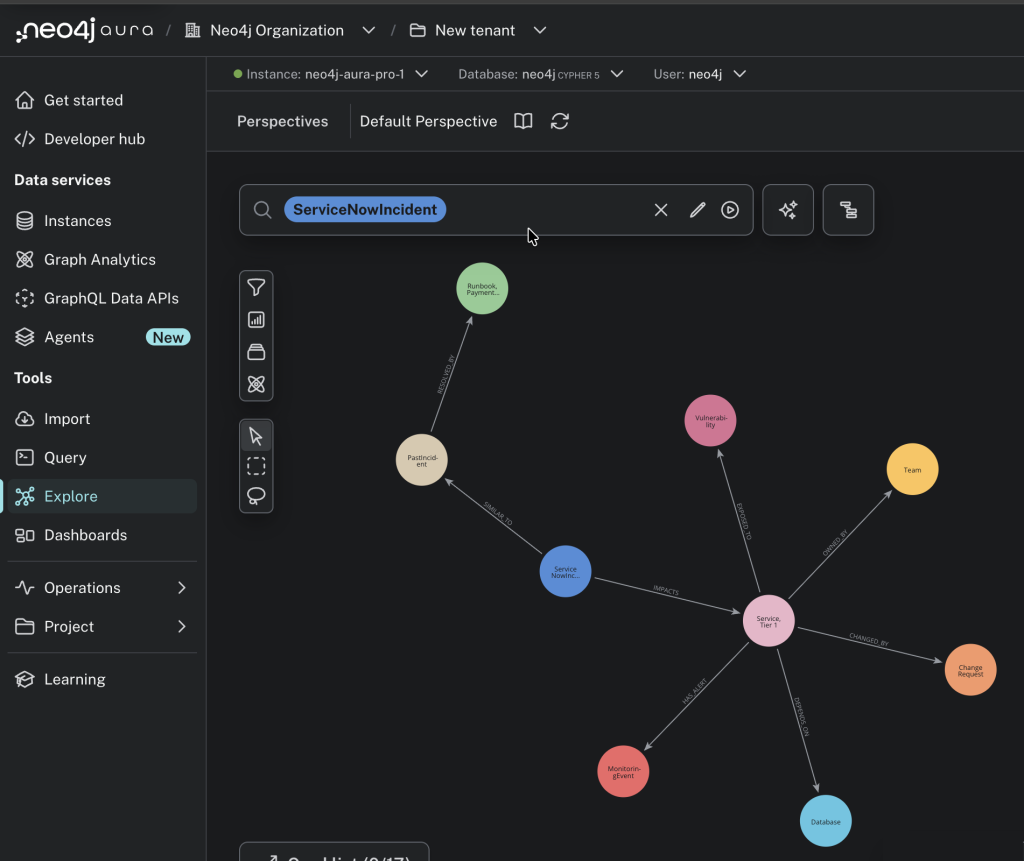
The Neo4j Aura graph view makes the point immediately: the ServiceNow incident is no longer just an operational ticket. It is connected to topology, ownership, change activity, observability signals, security risk, historical incidents, and remediation knowledge.
ServiceNow provides the operational workflow data. The knowledge graph becomes even more powerful when it is enriched with data from other enterprise systems such as CRM, SCM, ERP, observability, security, and cloud platforms. Each additional system adds more context, which improves the precision of graph queries, semantic search, and GenAI responses.
Why Kafka?
Kafka is important because enterprise integration is rarely a single point-to-point connection.
In a large organization, ServiceNow events may need to reach multiple downstream consumers: graph databases, data platforms, observability systems, automation workflows, reporting tools, and AI services. Kafka provides a durable event backbone for that pattern.
In this architecture, Kafka helps with four things:
- Decoupling: ServiceNow does not need to know every downstream system.
- Replayability: Events can be replayed when a new consumer or data product is introduced.
- Scalability: Multiple consumers can process the same operational events independently.
- Operational resilience: Temporary downstream failures do not require losing the original event.
Kafka Connect makes the pattern easier to operationalize. The ServiceNow side can publish incident events into a Kafka topic, and the Neo4j Kafka Connector can write those events into Neo4j Aura using Cypher.
Reference architecture
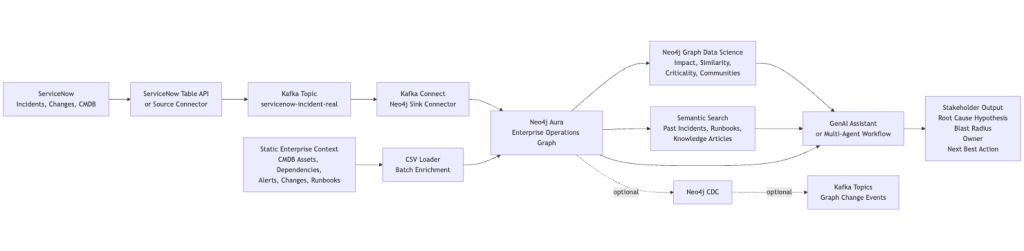
Where Neo4j CDC Fits:
Neo4j Change Data Capture, or CDC, lets downstream systems subscribe to changes happening inside the graph. This is different from the ServiceNow-to-Neo4j ingestion path.
For the basic flow, CDC is not required:
ServiceNow -> Kafka -> Neo4jThat flow uses the Neo4j Kafka sink connector to write ServiceNow events into Neo4j.
CDC becomes valuable when the graph itself becomes an event source:
Neo4j graph changes -> Neo4j CDC -> Kafka -> downstream consumersThis is useful when enriched graph changes need to drive dashboards, automation, audit streams, data products, or AI agents. For example, once an incident is connected to an impacted service, owner, vulnerability, and runbook, CDC can publish that graph change as an event for other systems to consume.
In Neo4j Aura, CDC can be left off for simple ingestion. If you want graph changes emitted to Kafka, enable CDC using DIFF or FULL depending on how much change detail downstream consumers need.
Here is a simplified Neo4j Kafka sink connector configuration that writes ServiceNow incident events into Neo4j:
{
  "name": "servicenow-incident-to-neo4j",
  "config": {
    "connector.class": "org.neo4j.connectors.kafka.sink.Neo4jConnector",
    "topics": "servicenow-incident-real",
    "neo4j.uri": "${file:/opt/servicenow-neo4j/secrets/aura.properties:NEO4J_URI}",
    "neo4j.authentication.type": "BASIC",
    "neo4j.authentication.basic.username": "${file:/opt/servicenow-neo4j/secrets/aura.properties:NEO4J_USERNAME}",
    "neo4j.authentication.basic.password": "${file:/opt/servicenow-neo4j/secrets/aura.properties:NEO4J_PASSWORD}",
    "neo4j.database": "${file:/opt/servicenow-neo4j/secrets/aura.properties:NEO4J_DATABASE}",
    "neo4j.cypher.topic.servicenow-incident-real": "WITH __value AS row MERGE (i:ServiceNowIncident {sys_id: row.sys_id}) SET i.number = row.number, i.short_description = row.short_description, i.state = row.state, i.priority = row.priority, i.source = 'servicenow'"
  }
}Code language: JSON / JSON with Comments (json)
And here is a simplified Neo4j Kafka source connector configuration that publishes graph changes from Neo4j CDC back into Kafka:
{
  "name": "neo4j-servicenow-cdc-source",
  "config": {
    "connector.class": "org.neo4j.connectors.kafka.source.Neo4jConnector",
    "neo4j.uri": "${file:/opt/servicenow-neo4j/secrets/aura.properties:NEO4J_URI}",
    "neo4j.authentication.type": "BASIC",
    "neo4j.authentication.basic.username": "${file:/opt/servicenow-neo4j/secrets/aura.properties:NEO4J_USERNAME}",
    "neo4j.authentication.basic.password": "${file:/opt/servicenow-neo4j/secrets/aura.properties:NEO4J_PASSWORD}",
    "neo4j.database": "${file:/opt/servicenow-neo4j/secrets/aura.properties:NEO4J_DATABASE}",
    "neo4j.source-strategy": "CDC",
    "neo4j.start-from": "NOW",
    "neo4j.payload-mode": "EXTENDED",
    "neo4j.cdc.topic.neo4j-servicenow-incident-cdc.patterns.0.pattern": "(:ServiceNowIncident)"
  }
}Code language: JSON / JSON with Comments (json)
The important design point is that Neo4j is not just a passive destination. Once ServiceNow data becomes connected enterprise context, Neo4j can also publish meaningful graph changes back into the event ecosystem.
Solution walkthrough
The demo flow is intentionally simple:
- A user creates an incident in the ServiceNow Australia developer instance.
- A lightweight ServiceNow Table API script retrieves the incident.
- The incident is written to a Kafka topic.
- Kafka Connect writes the incident into Neo4j Aura.
- Neo4j links the incident to services, owners, dependencies, changes, alerts, vulnerabilities, and historical runbooks.
- Graph queries, Graph Data Science, and semantic search produce richer operational insight.
- A GenAI layer can summarize the findings for different stakeholders.
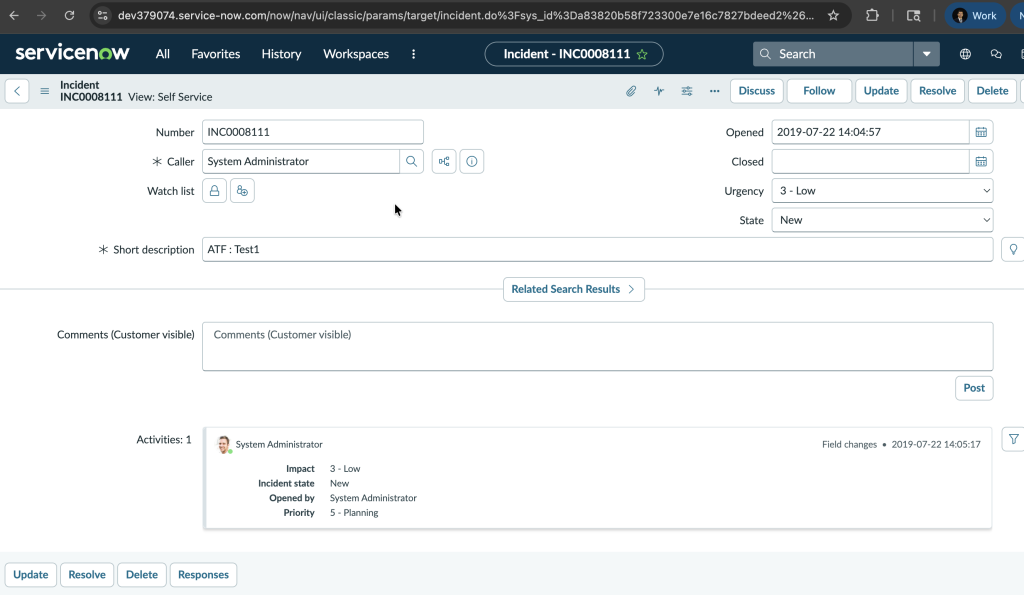
In the screenshot above, a ServiceNow incident is created directly in the web UI. That same operational event can be retrieved through the ServiceNow Table API, published to Kafka, and written into Neo4j Aura as a connected graph entity.
The first version of the graph may create a node like this:
(:ServiceNowIncident {
  number: "INC0008111",
  short_description: "ATF : Test1",
  priority: "Low",
  source: "servicenow"
})Code language: CSS (css)
The value increases when that incident becomes connected:
MATCH p =
  (:ServiceNowIncident {number: "INC0008111"})
  -[:IMPACTS]->(:Service)
  -[:DEPENDS_ON*1..3]->(:Asset)
RETURN p;Code language: PHP (php)
Now the incident is no longer just a ticket. It is a doorway into enterprise context.
Where Graph Data Science Adds Value
Graph Data Science helps move the demo from visualization to decision support.
Some high-impact examples:
- Blast radius analysis: Use graph traversal and path analysis to identify downstream applications, teams, and customers affected by a service issue.
- Criticality scoring: Use centrality algorithms to identify services that are disproportionately important because many other systems depend on them.
- Incident similarity: Use graph structure and embeddings to find past incidents that look similar to the current issue.
- Community detection: Group related services, teams, and applications into operational domains or business capabilities.
- Root cause prioritization: Combine recent changes, alerts, dependency distance, and historical similarity to rank likely causes.
This matters because executives and operations leaders do not just need a list of tickets. They need prioritization, impact, and recommended action.
Where semantic search fits
Not every useful signal is structured.
Runbooks, knowledge articles, postmortems, work notes, and resolution summaries often contain the institutional memory of the enterprise. Semantic search can retrieve that knowledge based on meaning, not just keywords.
For example:
Find past incidents similar to this checkout latency issue and summarize the resolution steps that worked.
he system can retrieve relevant historical incidents and runbooks, then combine them with graph context:
- current ServiceNow incident
- impacted service and dependencies
- recent changes
- related alerts
- owning team
- similar historical incidents
- known remediation steps
That gives GenAI a much stronger foundation for an answer.
A multi-agent enterprise operations pattern
This architecture also lends itself naturally to a multi-agent demo.
The agents can be role-based agents that query the same graph and enriched enterprise context:
- Incident Triage Agent: classifies severity and extracts key entities from the ServiceNow incident.
- Topology Agent: identifies affected services, dependencies, and blast radius in Neo4j.
- Change Risk Agent: checks recent changes connected to impacted services.
- Security Agent: checks vulnerabilities and exposed assets.
- Runbook Agent: uses semantic search to find similar past incidents and remediation steps.
- Commander Agent: synthesizes the findings into a stakeholder-ready recommendation.
Example output:
The checkout latency incident appears related to a recent deployment on the payment-service. The service depends on the orders-db cluster, which also shows elevated error rates. Blast radius includes checkout-api, mobile-checkout, and partner-order-ingest. Recommended action: page the Payments Platform team, review change CHG003421, and follow the payment-service rollback runbook.
That is much more compelling than a simple ticket summary.
Why this matters to enterprise stakeholders
The strategic value is not just technical integration. It is better decision-making.
For CIOs and CTOs, this pattern shows how GenAI can be grounded in real operational context.
For IT operations leaders, it shortens triage and reduces the manual effort required to understand impact.
For enterprise architects, it exposes dependency risk and service criticality.
For security leaders, it connects incidents to vulnerabilities and exposed systems.
For business stakeholders, it translates technical incidents into business impact and recommended action.
The result is a more explainable GenAI architecture. Instead of asking a model to guess, the system retrieves connected context from Neo4j and uses that context to produce a grounded answer.
The bigger idea
ServiceNow already contains some of the most valuable operational signals in the enterprise. Neo4j makes those signals connected. Graph Data Science helps analyze the relationships. Semantic search brings in historical knowledge. GenAI turns the result into a natural, actionable experience.
This is how enterprises can move from workflow automation to connected intelligence.
The future of enterprise GenAI will not be defined by prompts alone. It will be defined by context.
For ServiceNow-driven organizations, that context is already being created every day through incidents, changes, services, owners, assets, approvals, and operational history.
The interesting question is not whether enterprises have enough data for GenAI.
They do.
The better question is:
What could your AI agents know, recommend, and automate if your ServiceNow workflows were connected to the full context of your enterprise?
Share Article



Explore
Related Articles
Finding the Ultimate Beneficial Owner in a Pile of KYC Documents with Document Intelligence
Connected Intelligence: Accelerating Enterprise AI throughout the cloud ecosystem