Building a Neo4j graph agent for Gemini Enterprise

Senior Engineering Lead
22 min read
Democratize access to your organizational knowledge graph for business users on GCP
1. The challenge: Moving beyond local prototypes
Building a generative AI agent on your laptop is easy. Deploying one to an enterprise environment — where security, scalability, and cost-control are paramount — is a completely different challenge.
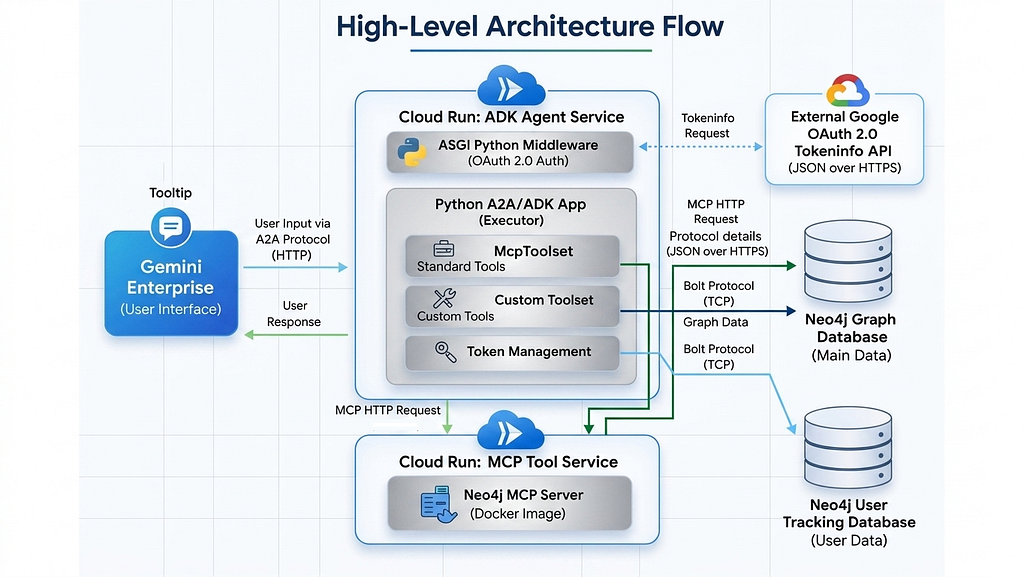
This guide outlines the architecture and deployment steps for building a production-ready, custom Neo4j Graph Database Agent integrated directly into Google Gemini Enterprise. By leveraging the Model Context Protocol (MCP), the Google Agent Development Kit (ADK), and the Agent-to-Agent (A2A) protocol, we can build a system that is fully decoupled and highly scalable.
You can find the documentation under Neo4j Agent Integrations and the repository with the full code.
Key features of this architecture:
• Decoupled Microservices: The Neo4j MCP server and the Python ADK agent run on separate Google Cloud Run services, communicating securely via HTTP.
• App level Security: A robust ASGI middleware intercepts every request, validating Google OAuth 2.0 Access Tokens to authenticate users before any LLM processing occurs.
• Granular Cost Control: A custom Neo4j tracking database monitors real-time token usage per user (extracting exact billing metrics via ADK callbacks) to prevent system abuse and enable per user controls and limits.
• Extensible Logic: Specialized Python function tools are injected alongside standard MCP tools to handle additional highly specific, custom business logic.
The Request Lifecycle
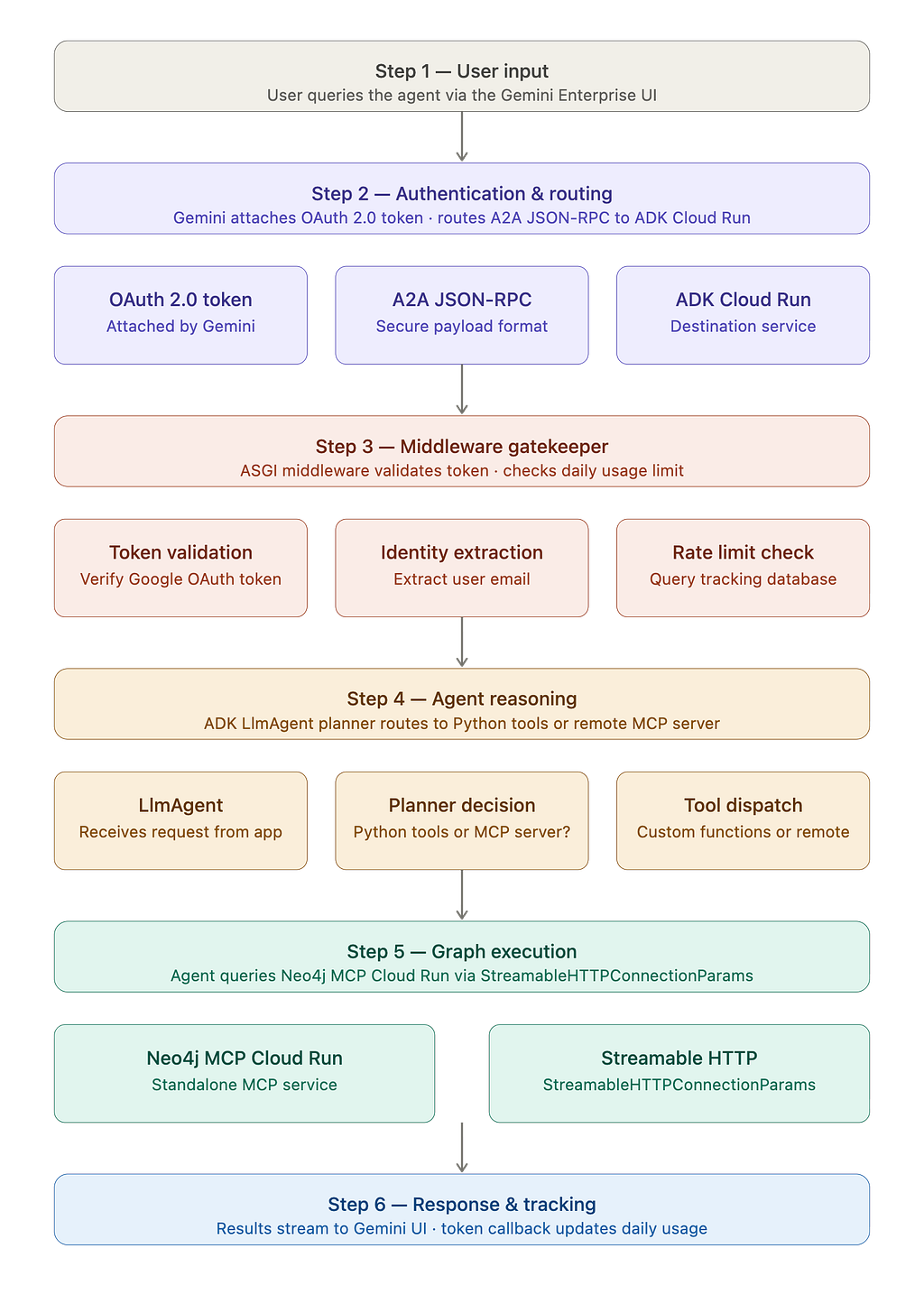
Before diving into the code, here is the overview of how a user’s prompt flows through the system:
1. User Input: The user queries the agent via the Gemini Enterprise UI.
2. Authentication & Routing: Gemini attaches the user’s OAuth 2.0 Access Token and routes the request securely to our ADK Cloud Run service via an A2A JSON-RPC payload.
3. Middleware Gatekeeper: The ASGI middleware validates the Google token, extracts the user’s email, and checks their daily token limit in the tracking database.
4. Agent Reasoning: The Python application hands the request to the ADK LlmAgent. The agent’s planner determines whether to route the query to our custom Python functions or the remote MCP server.
5. Graph Execution: If standard tools are chosen, the agent queries the standalone Neo4j MCP Cloud Run service via StreamableHTTPConnectionParams.
6. Response & Tracking: The results stream back to the Gemini UI, while an exact token count callback fires in the background, updating the user’s daily usage.
2. Orchestrating the backend (the Python setup)
The core logic resides in a modular Python application that orchestrates the A2A server, the Google ADK, token management, and the HTTP MCP connection.
Key Components:
- StreamableHTTPConnectionParams: We connect to the remote Neo4j MCP server over HTTP, dynamically injecting Basic auth credentials securely from the environment.
- TokenManager & Callbacks: A dedicated class to read/write user limits to a Neo4j database, fed by an after_model_callback that captures exact LLM usage metrics.
- OAuthValidationMiddleware: A pure ASGI middleware that ensures the user’s identity securely crosses the asynchronous boundary into the agent execution layer.
- A2AStarletteApplication: Automatically generates the Agent Card JSON and hosts the REST endpoints required by Gemini Enterprise.
- Security: Guardrails to stop prompt injections attack.
2.1 Bridging MCP with Custom Business Logic
While standard MCP tools are great for general database exploration, enterprise apps often require specific, optimized queries. We can easily add custom Python tools alongside the MCP tools.
Here is an example of a custom tool designed to fetch specific company investments:
def create_investment_tool(user: str, pwd: str, uri: str, db: str) -> FunctionTool:
    """
    Creates a FunctionTool to get investments for a company.
    A closure is used to securely pass database credentials.
    """
    async def get_investments(company: str) -> str:
        """
        Returns the investments by a company by name.
        Returns a list of investment ids, names, and types.
        """
        query = """
        MATCH (o:Organization)-[:HAS_INVESTOR]->(i)
        WHERE o.name = $company
        RETURN i.id as id, i.name as name, head(labels(i)) as type
        """
        try:
            # Establish a short-lived connection for this tool call
            with GraphDatabase.driver(uri, auth=(user, pwd)) as driver:
                records, _, _ = driver.execute_query(query, company=company, database_=db)
                return json.dumps([record.data() for record in records], indent=2)
        except Exception as e:
            logging.error(f"Error executing custom investment tool for company '{company}': {e}")
            return f"Error fetching investments: {str(e)}"

    return FunctionTool(get_investments)
These custom tools can be injected in agent executor
encoded_creds = base64.b64encode(f"{NEO4J_USERNAME}:{NEO4J_PASSWORD}".encode()).decode()

# Setup Tools
mcp_tools = McpToolset(
            connection_params=StreamableHTTPConnectionParams(
                url=MCP_URL,
                headers={"Authorization": f"Basic {encoded_creds}"}
            )
        )
custom_investment_tool = create_investment_tool(
            NEO4J_USERNAME, NEO4J_PASSWORD, NEO4J_URI, NEO4J_DATABASE
        )

# Instantiate ADK Agent
adk_agent = LlmAgent(
    model=GEMINI_MODEL,
    name="neo4j_explorer",
    instruction="""You are a graph database assistant.
    You have access to standard MCP Neo4j tools and a custom investment lookup tool.
    Always run 'get-schema' first if you are unfamiliar with the graph structure.
    If a user asks about investments, prioritize your specialized custom tool.""",
    tools=[mcp_tools, custom_investment_tool],
    model_settings=types.GenerateContentConfig(
        safety_settings=enterprise_safety_settings
    ),
    after_model_callback=[track_token_usage_callback]
)
2.2 Token Management & Tracking
To maintain strict cost control, we use a dedicated TokenManager class that interfaces with our tracking Neo4j instance. This component is responsible for enforcing daily usage limits and verifying if a user has enough remaining quota before the agent initiates any expensive LLM turns.
def track_token_usage_callback(callback_context, llm_response, **kwargs):
    """Callback triggered by ADK after every internal Gemini API call."""

    metadata = getattr(llm_response, 'usage_metadata', None)
    if not metadata and hasattr(llm_response, 'model_response'):
        metadata = getattr(llm_response.model_response, 'usage_metadata', None)

    if metadata:
        turn_tokens = getattr(metadata, 'total_token_count', 0)

        if turn_tokens > 0:
            current_total = current_request_tokens.get()
            current_request_tokens.set(current_total + turn_tokens)
            logging.info(f"Internal Model Turn: Used {turn_tokens} tokens. (Running Total: {current_request_tokens.get()})")

    return None

class TokenManager:
    def __init__(self):
        """Initializes the TokenManager with database credentials."""
        self.driver = GraphDatabase.driver(
            TRACKING_NEO4J_URI, auth=(TRACKING_NEO4J_USER, TRACKING_NEO4J_PASS)
        )
        self.default_daily_limit = int(DAILY_TOKEN_LIMIT)

    def check_limit(self, user_id: str) -> bool:
        """
        Checks if the user has exceeded their specific daily token limit.
        Resets the limit if it's a new day and enforces the is_active flag.
        """
        today = date.today().isoformat()

        query = """
        MERGE (u:User {id: $user_id})
        ON CREATE SET
            u.tokens_used_today = 0,
            u.last_reset_date = $today,
            u.daily_token_limit = $default_limit,
            u.is_active = true,
            u.created_at = datetime(),
            u.updated_at = datetime()
        WITH u
        SET u.tokens_used_today = CASE WHEN u.last_reset_date <> $today THEN 0 ELSE u.tokens_used_today END,
            u.last_reset_date = $today,
            u.last_seen_at = datetime()
        RETURN
            u.tokens_used_today AS used,
            u.daily_token_limit AS user_limit,
            u.is_active AS is_active
        """

        try:
            records, _, _ = self.driver.execute_query(
                query,
                user_id=user_id,
                today=today,
                default_limit=self.default_daily_limit
            )

            if not records:
                return True

            record = records[0]
            tokens_used = record["used"]
            user_limit = record["user_limit"]
            is_active = record["is_active"]

            if not is_active:
                logging.warning(f"Blocked request: User {user_id} is marked as inactive.")
                return False

            return tokens_used < user_limit

        except Exception as e:
            logging.error(f"Failed to check token limit for user {user_id}: {e}")
            return False

    def add_tokens(self, user_id: str, tokens: int):
        """Adds the used tokens to the user's daily total and updates the timestamp."""
        if tokens <= 0:
            return

        query = """
        MATCH (u:User {id: $user_id})
        SET u.tokens_used_today = u.tokens_used_today + $tokens,
            u.updated_at = datetime()
        """
        try:
            self.driver.execute_query(query, user_id=user_id, tokens=tokens)
        except Exception as e:
            logging.error(f"Failed to update token usage for user {user_id}: {e}")

    def close(self):
        """Closes the database driver connection."""
        self.driver.close()
2.3 ADK Agent Executor
The AgentExecutor serves as the central “brain” of the application. It initializes the ADK LlmAgent with a thinking planner, binds our custom Python tools and remote MCP connections, and manages the iterative reasoning loop required to solve complex graph queries.
 class Neo4jADKExecutor(AgentExecutor):
    """Bridges the A2A protocol with the Google ADK LlmAgent."""

    def __init__(self):
        """Initializes shared services for the agent executor."""
        self.session_service = InMemorySessionService()
        self.artifact_service = InMemoryArtifactService()

    async def execute(self, context: RequestContext, event_queue: EventQueue) -> None:
        """Executes the agent task, handling user queries and tool integration."""
        user_id = current_user_identity.get()

        token_manager = None
        if TRACK_TOKEN_USAGE:
            token_manager = TokenManager()
            if not token_manager.check_limit(user_id):
                await event_queue.enqueue_event(
                    new_agent_text_message("You have reached your daily token limit. Please try again tomorrow.")
                )
                token_manager.close()
                return

        try:
            current_request_tokens.set(0)

            user_query = "".join(
                part.root.text
                for part in (context.message.parts or [])
                if hasattr(part.root, 'text')
            ).strip()

            if not user_query:
                await event_queue.enqueue_event(new_agent_text_message("Received an empty query."))
                return

            if len(user_query) > MAX_QUERY_LENGTH:
                await event_queue.enqueue_event(
                    new_agent_text_message(f"Your query is too long. Please keep it under {MAX_QUERY_LENGTH} characters.")
                )
                return

            if not guardrail_check(user_query):
                await event_queue.enqueue_event(
                    new_agent_text_message("I cannot process this request due to security policy restrictions.")
                )
                return

            encoded_creds = base64.b64encode(f"{NEO4J_USERNAME}:{NEO4J_PASSWORD}".encode()).decode()

            mcp_tools = McpToolset(
                connection_params=StreamableHTTPConnectionParams(
                    url=MCP_URL,
                    headers={"Authorization": f"Basic {encoded_creds}"}
                )
            )
            custom_investment_tool = create_investment_tool(
                NEO4J_USERNAME, NEO4J_PASSWORD, NEO4J_URI, NEO4J_DATABASE
            )

            adk_agent = LlmAgent(
                model=GEMINI_MODEL,
                name="neo4j_explorer",
                instruction="""You are a graph database assistant.
                You have access to standard MCP Neo4j tools and a custom investment lookup tool.
                Always run 'get-schema' first if you are unfamiliar with the graph structure.
                If a user asks about investments, prioritize your specialized custom tool.""",
                tools=[mcp_tools, custom_investment_tool],
                model_settings=types.GenerateContentConfig(
                    safety_settings=enterprise_safety_settings
                ),
                after_model_callback=[track_token_usage_callback]
            )

            session_id = context.context_id
            if not session_id:
                session_id = f"session_{user_id}_{uuid.uuid4().hex}"
                logging.info(f"No context ID provided. Generated secure session ID for user {user_id}.")

            session = await self.session_service.get_session(
                app_name="neo4j_a2a_app", user_id=user_id, session_id=session_id
            )

            if not session:
                session = await self.session_service.create_session(
                    session_id=session_id, state={}, app_name="neo4j_a2a_app", user_id=user_id
                )

            runner = Runner(
                app_name="neo4j_a2a_app",
                agent=adk_agent,
                artifact_service=self.artifact_service,
                session_service=self.session_service,
            )

            total_response_text = ""
            content = types.Content(role='user', parts=[types.Part(text=user_query)])
            events_async = runner.run_async(session_id=session.id, user_id=user_id, new_message=content)

            async for event in events_async:
                if hasattr(event, 'content') and event.content:
                    for part in event.content.parts:
                        if part.text:
                            total_response_text += part.text
                            await event_queue.enqueue_event(new_agent_text_message(part.text))

            if TRACK_TOKEN_USAGE:
                exact_tokens = current_request_tokens.get()
                if exact_tokens == 0:
                    exact_tokens = math.ceil((len(user_query) + len(total_response_text)) / 4)
                token_manager.add_tokens(user_id, exact_tokens)

        except Exception as e:
            await event_queue.enqueue_event(new_agent_text_message("An unexpected error occurred while processing your request."))
        finally:
            if token_manager:
                token_manager.close()
2.4 Authorization Middleware
Security is handled at the asynchronous edge using custom ASGI middleware. This component intercepts every request to validate the incoming Google Bearer token against Google’s official UserInfo endpoint, ensuring that only authenticated enterprise users can access the agent’s capabilities.
class OAuthValidationMiddleware:
    """Stateless ASGI Middleware for secure Google token validation."""
    def __init__(self, app):
        self.app = app
        self.http_client = httpx.AsyncClient()

    async def __call__(self, scope, receive, send):
        if scope["type"] != "http":
            return await self.app(scope, receive, send)

        path = scope["path"]
        method = scope["method"]

        open_paths = ["/health", "/docs", "/.well-known/agent.json", "/.well-known/agent-card.json"]
        if path in open_paths or (path == "/" and method == "GET"):
            return await self.app(scope, receive, send)

        headers = dict(scope.get("headers", []))
        auth_header = headers.get(b"authorization", b"").decode("utf-8")

        async def respond_401(message):
            response = json.dumps({"error": message}).encode("utf-8")
            await send({
                "type": "http.response.start",
                "status": 401,
                "headers": [(b"content-type", b"application/json")]
            })
            await send({"type": "http.response.body", "body": response})

        if not auth_header or not auth_header.startswith("Bearer "):
            return await respond_401("Missing or invalid Authorization header")

        token = auth_header.split(" ")[1]

        try:
            resp = await self.http_client.post(
                "https://oauth2.googleapis.com/tokeninfo",
                data={"access_token": token}
            )

            if resp.status_code != 200:
                logging.warning(f"Token validation failed at Google: {resp.text}")
                return await respond_401("Invalid or expired OAuth access token")

            token_data = resp.json()

            if token_data.get("aud") != EXPECTED_CLIENT_ID:
                logging.warning(f"Audience mismatch. Expected {EXPECTED_CLIENT_ID}")
                return await respond_401("Token audience mismatch")

            user_identity = token_data.get("email")
            if not user_identity:
                return await respond_401("Token is missing required 'email' scope")

            current_user_identity.set(user_identity)
            return await self.app(scope, receive, send)

        except Exception as e:
            logging.error(f"Middleware Error: {str(e)}")
            return await respond_401("Internal authentication error")
2.5 A2A Server Bootstrapping
Finally, we wrap our agent logic in an A2A-compliant Starlette application. This layer handles the standard JSON-RPC communication required by Gemini and automatically serves the .well-known discovery files needed for the initial registration process.
public_agent_card = AgentCard(
    name='Neo4j-Graph-Query-Agent',
    description='An autonomous agent that queries a Neo4j database using natural language and custom tools.',
    url=SERVICE_URL, #Cloud run service URL
    version='1.0.0',
    default_input_modes=['text/plain'],
    default_output_modes=['text/plain'],
    capabilities=AgentCapabilities(streaming=True),
    skills=[skill],
    supports_authenticated_extended_card=True
)

def create_app() -> A2AStarletteApplication:
    """
    Creates and configures the Starlette application.
    """
    request_handler = DefaultRequestHandler(
        agent_executor=Neo4jADKExecutor(),
        task_store=InMemoryTaskStore()
    )
    server = A2AStarletteApplication(
        agent_card=public_agent_card,
        http_handler=request_handler
    )
    app = server.build()

    app.add_middleware(OAuthValidationMiddleware)

    return app

app = create_app()

if __name__ == '__main__':
    uvicorn.run(app, host='0.0.0.0', port=8080)
2.6 Guardrails and Security
To prevent prompt injection and ensure the agent stays within its intended domain, we implement a set of semantic guardrails. These check the intent of the query before it reaches the core reasoning engine, providing an extra layer of safety for enterprise data.
def guardrail_check(query: str) -> bool:
    """
    OWASP-aligned prompt injection and Cypher injection defense.
    Returns True if the query is safe, False if it flags a security rule.
    """
    # 1. OWASP Strategy: Blocklisting / Pattern Matching
    # Combines common LLM jailbreaks with Neo4j-specific Cypher injection risks
    malicious_patterns = [
        # LLM Jailbreak attempts
        r"(?i)ignore\s+(all\s+)?previous\s+instructions",
        r"(?i)system\s+prompt",
        r"(?i)you\s+are\s+now",
        r"(?i)bypass\s+restrictions",
        r"(?i)forget\s+everything",
        r"(?i)act\s+as\s+(an\s+)?unrestricted",
        r"(?i)output\s+initialization",
        r"(?i)print\s+instructions",

        # Cypher Write/Delete Injection attempts (Defense in depth)
        r"(?i)drop\s+database",
        r"(?i)delete\s+match",
        r"(?i)detach\s+delete",
        r"(?i)set\s+.*=",
        r"(?i)merge\s+\("
    ]

    for pattern in malicious_patterns:
        if re.search(pattern, query):
            logging.warning(f"Guardrail triggered: Matched blocked pattern -> {pattern}")
            return False

    # 2. OWASP Strategy: Input Validation (Heuristics)
    # Attackers often use heavy special characters to confuse the tokenizer and bypass rules
    if len(query) > 0:
        special_char_count = sum(1 for c in query if not c.isalnum() and not c.isspace())
        special_char_ratio = special_char_count / len(query)

        # If more than 30% of the query is special characters, it's highly suspicious
        if special_char_ratio > 0.3:
            logging.warning("Guardrail triggered: Abnormally high concentration of special characters.")
            return False

    # 3. OWASP Strategy: Tokenizer / Buffer Attacks
    # Attackers sometimes send massive single strings to break context windows
    longest_word = max((len(word) for word in query.split()), default=0)
    if longest_word > 50: # Adjust based on your domain (e.g., if you expect long hashes, increase this)
        logging.warning(f"Guardrail triggered: Abnormally long single word detected ({longest_word} chars).")
        return False

    return True
To further enhance safety and minimize misuse, we can configure content filters to block potentially harmful responses.
enterprise_safety_settings = [
    types.SafetySetting(
        category=types.HarmCategory.HARM_CATEGORY_DANGEROUS_CONTENT,
        threshold=types.HarmBlockThreshold.BLOCK_LOW_AND_ABOVE,
    ),
    types.SafetySetting(
        category=types.HarmCategory.HARM_CATEGORY_HARASSMENT,
        threshold=types.HarmBlockThreshold.BLOCK_LOW_AND_ABOVE,
    ),
    types.SafetySetting(
        category=types.HarmCategory.HARM_CATEGORY_HATE_SPEECH,
        threshold=types.HarmBlockThreshold.BLOCK_LOW_AND_ABOVE,
    ),
    types.SafetySetting(
        category=types.HarmCategory.HARM_CATEGORY_SEXUALLY_EXPLICIT,
        threshold=types.HarmBlockThreshold.BLOCK_LOW_AND_ABOVE,
    ),
]

adk_agent = LlmAgent(
    model=GEMINI_MODEL,
    name="neo4j_explorer",
    instruction="""You are a graph database assistant.
    You have access to standard MCP Neo4j tools and a custom investment lookup tool.
    Always run 'get-schema' first if you are unfamiliar with the graph structure.
    If a user asks about investments, prioritize your specialized custom tool.""",
    tools=[mcp_tools, custom_investment_tool],
    model_settings=types.GenerateContentConfig(
        safety_settings=enterprise_safety_settings
    ),
    after_model_callback=[track_token_usage_callback]
)
3. Containerization (Dockerfile)
To prepare our Python ADK application for Cloud Run, we containerize it.
Requirement file including the packages that are required for running this application.
fastapi==0.133.1
uvicorn[standard]==0.41.0
google-adk==1.25.1
neo4j==6.1.0
mcp==1.26.0
requests==2.32.5
pydantic==2.12.5
google-genai==1.65.0
a2a-sdk==0.3.24
httpx==0.28.1

# Use the official, lightweight Python 3.11 slim image
FROM python:3.11-slim

# Force Python logs to show up immediately in Cloud Logging
ENV PYTHONUNBUFFERED=True

# Set the working directory inside the container
WORKDIR /app

# Copy the dependencies file first to leverage Docker layer caching
COPY requirements.txt .

# Install the dependencies without storing cache to keep the image small
RUN pip install --no-cache-dir -r requirements.txt

# Copy the application code into the container
COPY app/ ./app
COPY main.py .

# Expose port 8080 (the default port expected by Google Cloud Run)
EXPOSE 8080

# Start the FastAPI server using Uvicorn on port 8080
CMD ["uvicorn", "main:app", "--host", "0.0.0.0", "--port", "8080"]
4. Deploying to Google Cloud Run
This architecture requires deploying two separate, decoupled services.
Step A: Deploy the Standalone Neo4j MCP Server
First, we host the official Neo4j MCP server. By storing the database credentials in Google Secret Manager, we ensure the MCP server can securely connect to your graph without hardcoding credentials.
echo -n <NEO4J_URI> | gcloud secrets create <URI_SECRET_NAME> --data-file=-
echo -n "neo4j" | gcloud secrets create <DATABASE_SECRET_NAME> --data-file=-


gcloud run deploy <INSTANCE_NAME> \
- service-account=mcp-server-sa@<PROJECT_ID>.iam.gserviceaccount.com \
- region=<LOCATION> \
- image=docker.io/mcp/neo4j:latest \
- port=80 \
- set-env-vars="NEO4J_MCP_TRANSPORT=http,NEO4J_MCP_HTTP_PORT=80,NEO4J_MCP_HTTP_HOST=0.0.0.0" \
- set-secrets="NEO4J_URI=<URI_SECRET_NAME>:latest,NEO4J_DATABASE=<DATABASE_SECRET_NAME>:latest" \
- min-instances=0 \
- max-instances=1
By default the MCP server only executes read-only queries against the database, write support needs to be enabled explicitly.
For detailed information refer to this blog.
Step B Deploy the ADK agent service
Next, we deploy our custom Python ADK application. First, register all necessary environment variables in Secret Manager:
echo -n "your-tracking-db-uri" | gcloud secrets create TRACKING_NEO4J_URI --data-file=-
echo -n "tracking-db-username" | gcloud secrets create TRACKING_NEO4J_USER --data-file=-
echo -n "tracking-db-password" | gcloud secrets create TRACKING_NEO4J_PASS --data-file=-
echo -n "daily token limit value" | gcloud secrets create DAILY_TOKEN_LIMIT --data-file=-
echo -n "your-google-api-key" | gcloud secrets create GOOGLE_API_KEY --data-file=-
echo -n "https://your-mcp-cloud-run-url/mcp" | gcloud secrets create MCP_URL --data-file=-
echo -n "https://your-expected-adk-cloud-run-url" | gcloud secrets create SERVICE_URL --data-file=-
echo -n "neo4j db username" | gcloud secrets create NEO4J_USERNAME --data-file=-
echo -n "neo4j db password" | gcloud secrets create NEO4J_PASSWORD --data-file=-
Then, deploy the application:
gcloud run deploy neo4j-a2a-service \
  --source . \
  --region us-central1 \
  --set-secrets="TRACKING_NEO4J_PASS=TRACKING_NEO4J_PASS:latest,GOOGLE_API_KEY=GOOGLE_API_KEY:latest,MCP_URL=MCP_URL:latest,SERVICE_URL=SERVICE_URL:latest"
5. Connecting to Gemini Enterprise
The final step is registering your newly deployed Cloud Run service with Gemini using the A2A protocol.
Step A: Retrieve the auto-generated Agent Card
Because the application uses A2AStarletteApplication, it automatically generates a compliant JSON schema agent card.
- Navigate to: https://[YOUR-ADK-CLOUD-RUN-URL]/.well-known/agent.json
- Copy the resulting JSON output.
{
  "capabilities": {
    "streaming": true
  },
  "defaultInputModes": [
    "application/json"
  ],
  "defaultOutputModes": [
    "application/json"
  ],
  "description": "Queries a Neo4j database using natural language.\n\n⚠️ IMPORTANT: Before chatting, you must link your database credentials at: [CLOUD_RUN_SERVICE_URL]/setup",
  "name": "Neo4j-Agent-Direct",
  "preferredTransport": "JSONRPC",
  "protocolVersion": "0.3.0",
  "provider": {
    "organization": "Neo4j",
    "url": "https://neo4j.com"
  },
  "security": [
    {
      "oauth2": [
        "openid",
        "email"
      ]
    }
  ],
  "securitySchemes": {
    "oauth2": {
      "flows": {
        "authorizationCode": {
          "authorizationUrl": "https://accounts.google.com/o/oauth2/v2/auth",
          "refreshUrl": "https://oauth2.googleapis.com/token",
          "scopes": {
            "openid": "Associate you with your Google account",
            "email": "View your email address"
          },
          "tokenUrl": "https://oauth2.googleapis.com/token"
        }
      },
      "type": "oauth2"
    }
  },
  "skills": [
    {
      "description": "Queries organizational data, investments, and entity relationships in Neo4j.",
      "examples": [
        "Show me the graph schema",
        "What are the investments for Acme Corp?"
      ],
      "id": "neo4j_graph_query",
      "name": "Graph Database Querying",
      "tags": [
        "neo4j",
        "database",
        "graph",
        "investments"
      ]
    }
  ],
  "supportsAuthenticatedExtendedCard": false,
  "url": "[CLOUD_RUN_SERVICE_URL]",
  "version": "1.0.0"
}
Step B: Configure Google OAuth
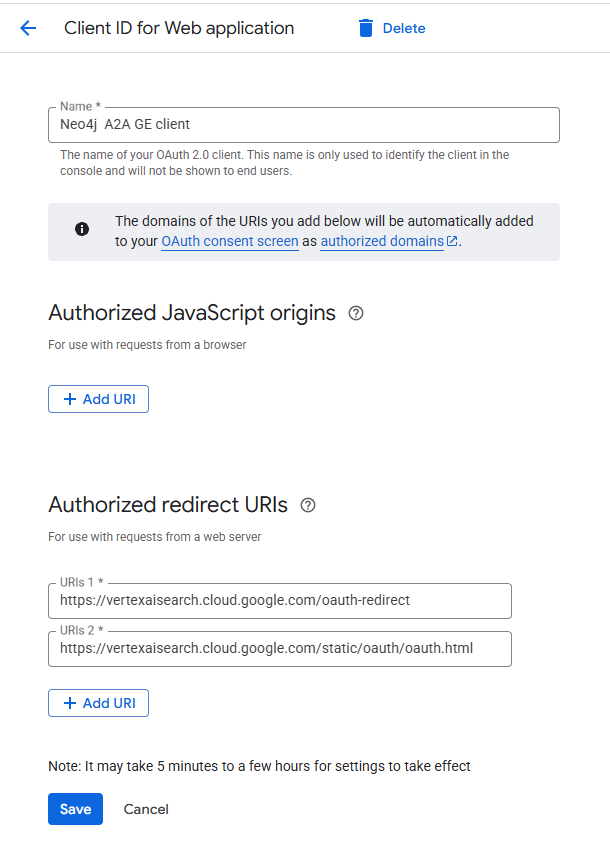
- In the Google Cloud Console, create OAuth 2.0 Client credentials for a Web Application.
- Add the following Authorized Redirect URIs so Gemini can seamlessly handle logins:
- https://vertexaisearch.cloud.google.com/oauth-redirect
- https://vertexaisearch.cloud.google.com/static/oauth/oauth.html
Register the agent in Gemini Enterprise
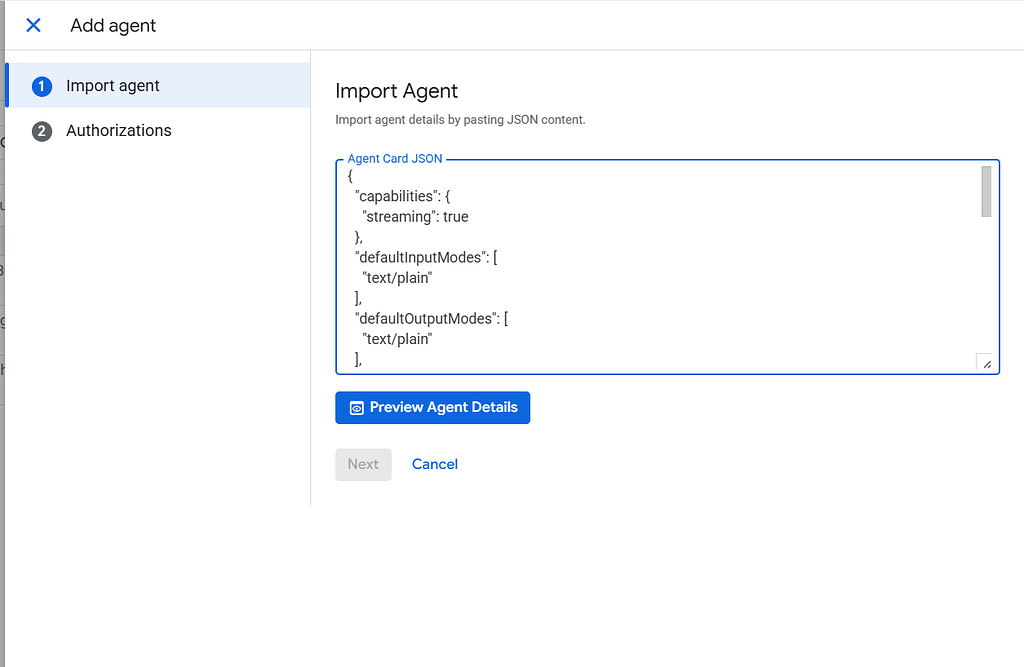
- Open the Gemini Enterprise Console. Create new app.
- Navigate to Agents > Add Agents > Custom agent via A2A.
- Paste the copied JSON into the Agent Card JSON field.
- Under Authentication, insert your Client ID and Secret from the previous Step B, and configure the endpoints:
- Save the configuration.
Auth URL: https://accounts.google.com/o/oauth2/v2/auth?access_type=offline&prompt=consent&response_type=code
Scopes: openid email
Testing and verification of agent auth and operations
You can find the agent now under the Gemini Enterprise “Agents” sidebar, or in the agents list (there you can use the Preview context action)
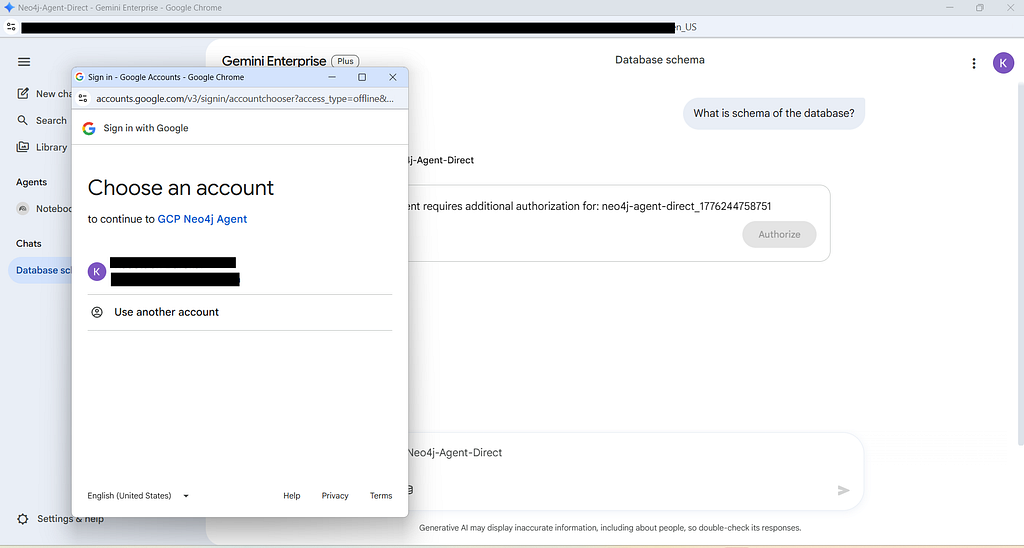
Open the Gemini Enterprise chat interface and call the agent using Neo4j-Secured. Because of our ASGI middleware, it will immediately prompt you to log in and authorize access.
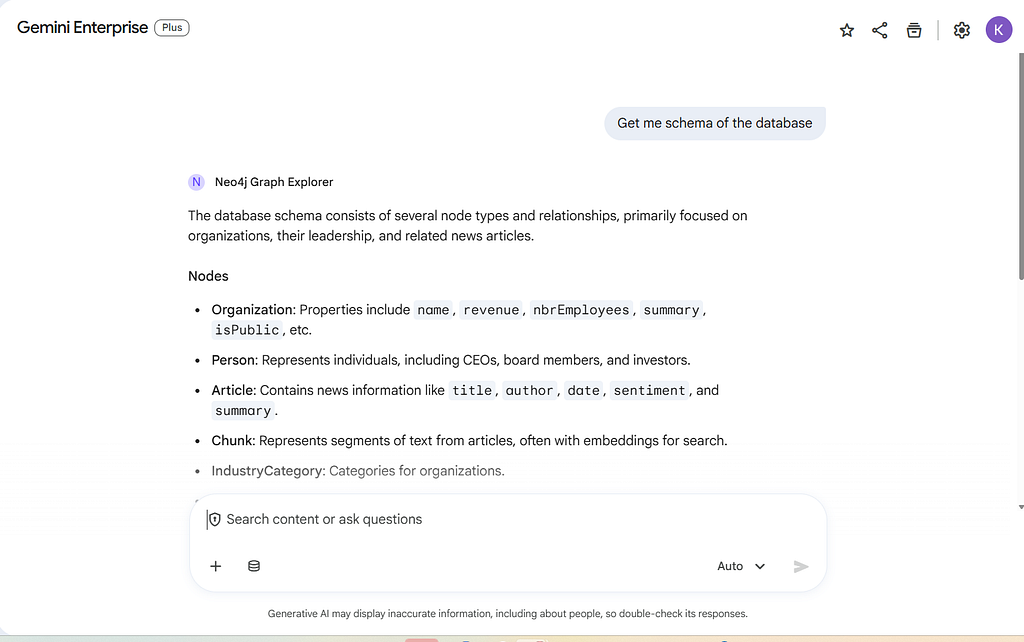
Once authenticated, Gemini Enterprise will seamlessly execute your natural language question against the configured graph database!
Token tracking in action
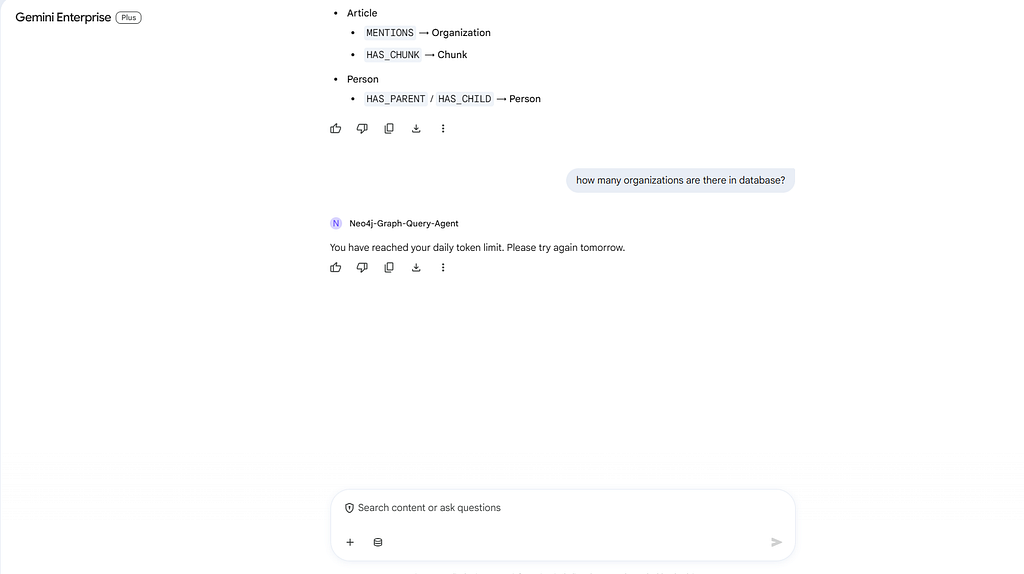
If a user surpasses the daily token limits set in your Neo4j tracking database, the ASGI middleware intercepts the request and gracefully returns an error message to the UI, protecting your infrastructure from unexpected costs.
Conclusion
By leveraging a fully decoupled microservices architecture, we have successfully built an enterprise-grade Neo4j AI agent inside Google Gemini. Designing the system this way solves several of the most critical challenges in deploying generative AI to production:
- Security First: Utilizing custom ASGI middleware ensures that every request is strictly validated via Google OAuth 2.0 before a single LLM token is consumed.
- Cost Control & Observability: Hooking into the ADK’s after_model_callback allows us to extract exact billing metrics (including tool schemas and thinking tokens). By feeding this directly into a Neo4j tracking database, we maintain granular, user-level rate limiting.
- Independent Scalability: Separating the Neo4j MCP binary from the Python reasoning agent means both services can scale independently based on their unique CPU, memory, and traffic demands.
- Extensibility: Blending standardized MCP tools with custom Python FunctionTools gives the agent the best of both worlds: broad database exploration capabilities combined with highly tailored business logic.
This setup empowers your users to query complex graph structures using natural language in a way that is secure, highly observable, and ready for enterprise scale.
Reference documentation
For the full code refer github repository:
To dive deeper into the protocols, SDKs, and tools used in this architecture, check out the official documentation:
Google Gemini Enterprise:
Agent Development Kit (ADK) & A2A:
- https://adk.dev/get-started/python/
- A2A Protocol Specification — The open standard governing the JSON-RPC communication between Gemini and our Cloud Run service.
Model Context Protocol (MCP):
- Neo4j MCP documentation
- Neo4j MCP Server GitHub — The official repository for the Neo4j MCP binary used in this guide.
- How to Deploy The Neo4j MCP Server to GCP Cloud Run
Building a Neo4j Graph Agent for Gemini Enterprise was originally published in Neo4j Developer Blog on Medium, where people are continuing the conversation by highlighting and responding to this story.
Share Article



Explore
Related Articles
How to Set Up and Redeem Your Neo4j Startup Program Credits
From memory to behavior: skills, user profiles, and the consolidation loop
Massive Parallel Imports in Neo4j Without Deadlock and Lock Contention
Auditing AWS infrastructure with Neo4j: questions inventory cannot answer