Google Gemini Enterprise — A2A MCP Wrapper
Overview
This repository showcases a production-ready integration between a Neo4j Graph Database and Google Gemini Enterprise using the Agent-to-Agent (A2A) protocol. This architecture utilizes a decoupled microservices approach:
-
MCP Tool Service: The official Neo4j Model Context Protocol (MCP) server deployed independently on Google Cloud Run.
-
ADK Agent Service: A custom Google Agent Development Kit (ADK) application wrapped in the A2A protocol, also hosted on Cloud Run. It features a custom Starlette/FastAPI ASGI middleware layer to securely validate end-user OAuth 2.0 Access Tokens directly against Google’s identity servers, alongside a dedicated Neo4j token-tracking database to monitor and limit daily LLM usage per user (Optional Feature).
Key Features
-
Decoupled Architecture: Separates the Neo4j MCP binary from the Python reasoning agent, allowing both Cloud Run services to scale independently.
-
Native Graph Querying: Uses the remote Neo4j MCP server over HTTP to autonomously explore graph schemas and execute Cypher queries.
-
Custom Python Tools: Extends MCP capabilities with specialized, hardcoded business logic (e.g., get_investments). refer custom_tools.py
-
Secure Token Validation: A pure ASGI middleware intercepts and validates Gemini Enterprise OAuth 2.0 access tokens in real-time, extracting the user’s email address.
-
Granular Token Management (Optional): Uses ADK callbacks to calculate exact billing tokens per request and tracks daily usage limits per user in a secondary Neo4j database.
Architecture Flow
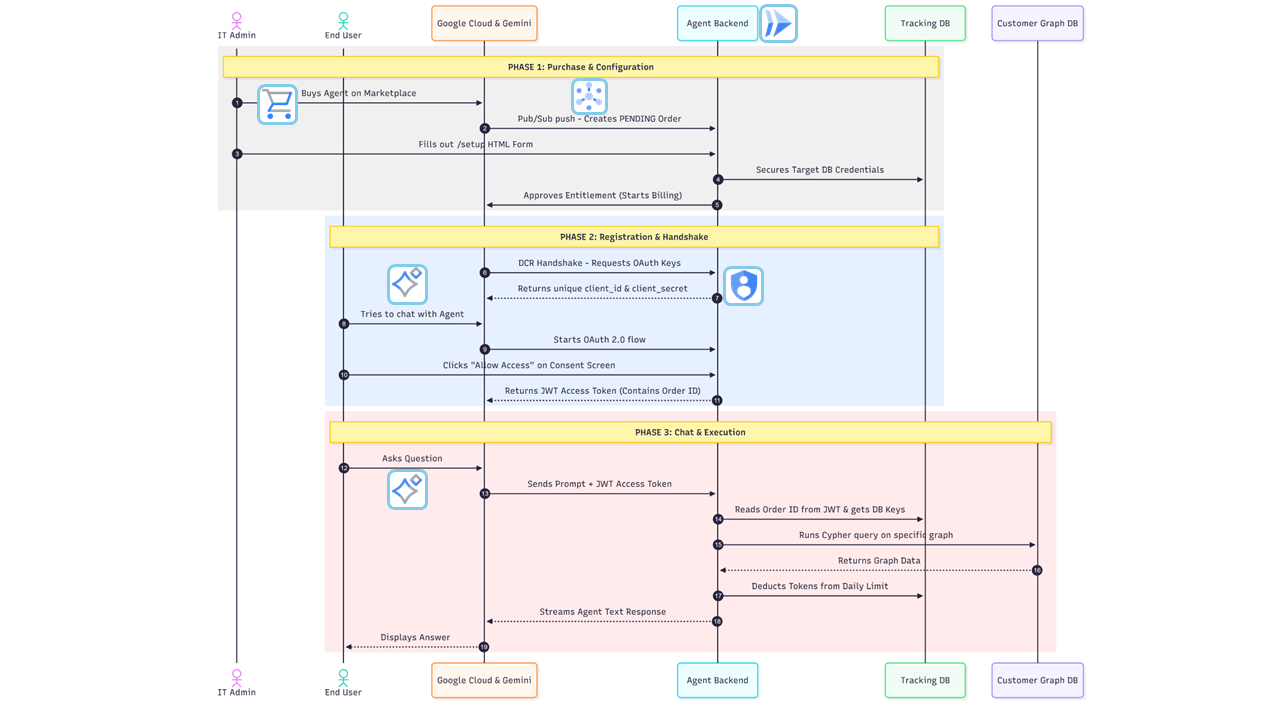
-
Discovery: Gemini Enterprise sends
/.well-known/agent.jsonrequest. The service returns the AgentCard (manifest) detailing the agent’s skills and confirming it requires authentication. -
Authentication: Gemini prompts the user to log in via Google OAuth 2.0.
-
Execution: Gemini sends a
POST /request containing the user’s prompt and theAuthorization: Bearer <TOKEN>header. -
Validation: The custom Python middleware intercepts the request, verifies the token via Google’s tokeninfo endpoint, extracts the user’s email, and checks their daily token limit in the Tracking Database. Code can be found in middleware.py
-
Reasoning: The Google ADK
LlmAgentdetermines whether to use the Neo4j MCP schema tools or the custom investment tools to formulate a response. Refer agent_executor.py -
Tracking: After the response is generated, an ADK callback captures the exact token usage and updates the user’s record in the tracking database. Refer token_manager.py == Prerequisites
Before deploying, ensure you have the following:
-
Google Cloud Project with billing enabled.
-
Google Cloud CLI (
gcloud) installed and authenticated. -
Neo4j Database (AuraDB or self-hosted) with credentials.
-
Google Cloud APIs Enabled:
-
Cloud Run API (
run.googleapis.com) -
Secret Manager API (
secretmanager.googleapis.com)
-
Step 1: Deploy the Standalone Neo4j MCP Server
Deploy the official Neo4j MCP image as a cloud run backend service. We inject the main database credentials here so it can securely connect to your graph. Detailed guide here
gcloud run deploy <INSTANCE_NAME> \
- service-account=mcp-server-sa@<PROJECT_ID>.iam.gserviceaccount.com \
- no-allow-unauthenticated \
- region=<LOCATION> \
- image=docker.io/mcp/neo4j:latest \
- port=80 \
- set-env-vars="NEO4J_MCP_TRANSPORT=http,NEO4J_MCP_HTTP_PORT=80,NEO4J_MCP_HTTP_HOST=0.0.0.0" \
- set-secrets="NEO4J_URI=<URI_SECRET_NAME>:latest,NEO4J_DATABASE=<DATABASE_SECRET_NAME>:latest" \
- min-instances=0 \
- max-instances=1
Step 2: Secure Configuration (Secret Manager)
We use Google Cloud Secret Manager for storing credentials. Tracking related credentials are optional. If you want to track token usage keep env TRACK_TOKEN_USAGE as True
    echo -n "your-tracking-db-uri" | gcloud secrets create TRACKING_NEO4J_URI --data-file=-
    echo -n "tracking-db-username" | gcloud secrets create TRACKING_NEO4J_USER --data-file=-
    echo -n "tracking-db-password" | gcloud secrets create TRACKING_NEO4J_PASS --data-file=-
    echo -n "daily token limit value" | gcloud secrets create DAILY_TOKEN_LIMIT --data-file=-
    echo -n "your-google-api-key" | gcloud secrets create GOOGLE_API_KEY --data-file=-
    echo -n "https://your-mcp-cloud-run-url/mcp" | gcloud secrets create MCP_URL --data-file=-
    echo -n "https://your-expected-adk-cloud-run-url" | gcloud secrets create SERVICE_URL --data-file=-
    echo -n "neo4j db username" | gcloud secrets create NEO4J_USERNAME --data-file=-
    echo -n "neo4j db password" | gcloud secrets create NEO4J_PASSWORD --data-file=-
Setup 3: Grant Cloud Run access to read the secrets:
# Grants the Secret Accessor role to the default Compute Engine service account
export PROJECT_ID=$(gcloud config get-value project)
export PROJECT_NUM=$(gcloud projects describe $PROJECT_ID --format='value(projectNumber)')

gcloud projects add-iam-policy-binding $PROJECT_ID
  --member="serviceAccount:${PROJECT_NUM}[email protected]"
  --role="roles/secretmanager.secretAccessor"
Step 4: Deploy the ADK AgentDeployment
Deploy the container to Cloud Run. We must use --allow-unauthenticated so the service can be reached publicly, relying entirely on our Python middleware for authorization.
gcloud run deploy neo4j-a2a-service
  --source .
  --region us-central1
  --allow-unauthenticated
  --set-secrets="NEO4J_URI=NEO4J_URI:latest,NEO4J_USERNAME=NEO4J_USERNAME:latest,NEO4J_PASSWORD=NEO4J_PASSWORD:latest,NEO4J_DATABASE=NEO4J_DATABASE:latest,GOOGLE_API_KEY=GOOGLE_API_KEY:latest,SERVICE_URL=SERVICE_URL:latest"
Step 3: Gemini Enterprise Configuration
Register the deployed agent in the Gemini Enterprise portal.
-
Navigate to the add agent configuration in Gemini Enterprise.
-
Provide the agent card , can be retrieved from (e.g.,
https://neo4j-a2a-service-xxxx-uc.a.run.app/.well-known/agent.). -
You can find this configuration in config.py
-
Set the Authentication type to OAuth 2.0.
-
Fill in the OAuth details using your GCP Credentials (APIs & Services → Credentials → OAuth 2.0 Client IDs):
-
Client ID:
your-client-id.apps.googleusercontent.com -
Client Secret:
your-client-secret -
Authorization URL:
https://accounts.google.com/o/oauth2/v2/auth -
Token URL:
https://oauth2.googleapis.com/token -
Scope:
openid email https://www.googleapis.com/auth/cloud-platform
-
-
Ensure the following Redirect URIs are added to your Google Cloud OAuth Client ID configuration:
Gemini Enterprise UI.
-
Ask a question in the Gemini Enterprise chatbot UI related to your database (e.g., "@Neo4j-Secured How many users are in the system?").
-
Gemini will prompt you to log in and authorize access to your email address via OAuth.
-
Once authenticated, the ADK agent will process the request, utilize the remote MCP/custom tools, and stream the answer back to the UI.
-
(Optional) If a user surpasses their daily token limit set in the Neo4j tracking database, the agent will gracefully return a limit-reached message.
Referral Documentation
Neo4j • Neo4j & MCP
ADK agent • Agent Development Kit
A2A Protocol • A2A Protocol
Gemini Enterprise & Agents • Gemini for Google Workspace / Enterprise