Google Gemini Enterprise — GE Marketplace
| Documentation for a Neo4j Labs project, which is governed by these terms. |
👋 ARE YOU A CUSTOMER? > If you are an IT Admin or user looking to install and configure this agent for your organization, follow our Customer Setup Guide.
This repository contains an enterprise-grade AI Agent that bridges organization-specific Neo4j Graph Databases with Google Gemini Enterprise. Built on the Agent-to-Agent (A2A) protocol and the Google Agent Development Kit (ADK), it enables secure, natural language querying of complex graph data at scale.
Designed natively as an Agent-as-a-Service (AaaS) for the Google Cloud Marketplace, the architecture provides robust multi-tenant isolation, automated billing lifecycle management, and verified federated identity.
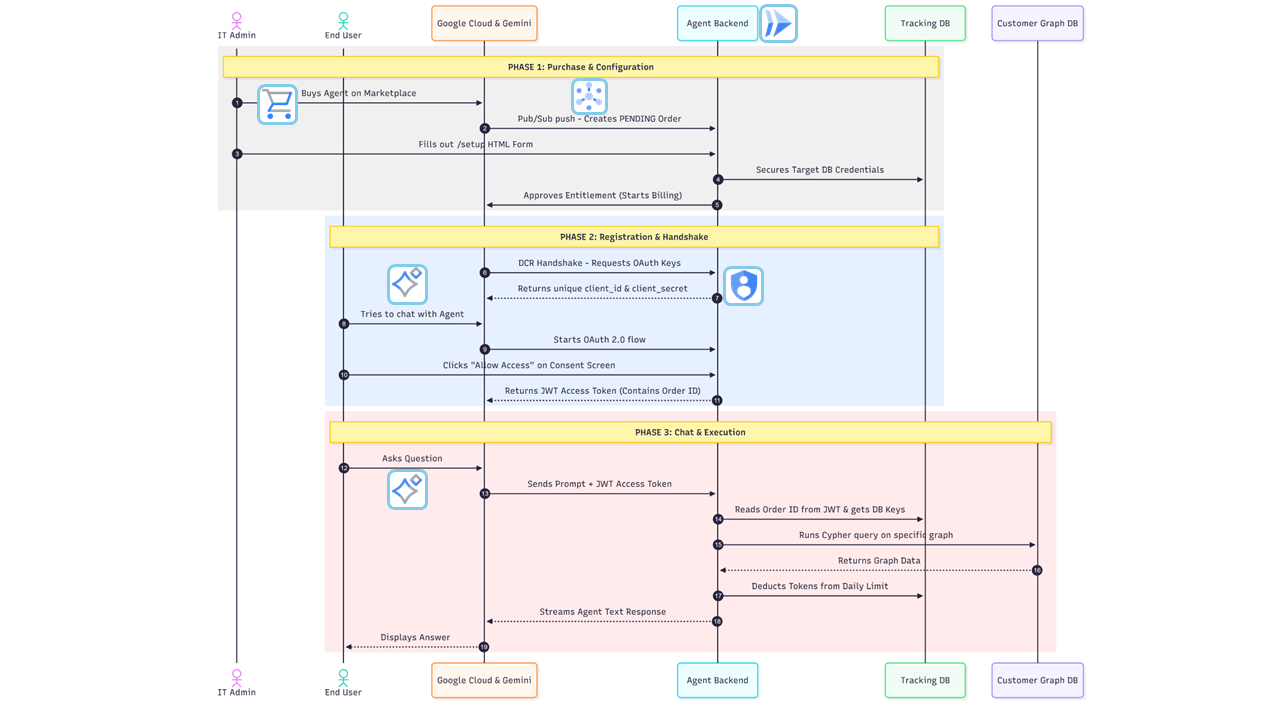
💡 How It Works
The service operates as a serverless gateway on Google Cloud Run. It manages a sophisticated "one-to-many" relationship model where a single Marketplace Order (representing a company) can support multiple Users (employees) and App Instances, each with isolated token quotas and conversation histories.
The system utilizes context.py to maintain strict cryptographic separation between the human user’s identity (email) and the corporate database credentials throughout the execution lifecycle.
✨ Core Features
-
Dual-Mode Authentication (OIDC & A2A M2M):
-
Interactive UI: Uses Google Workspace OIDC (
authorization_code) to verify human emails and enforce individual user token quotas in the Gemini Enterprise UI. -
Headless A2A Protocol: Supports OAuth 2.0
client_credentialsfor direct Agent-to-Agent delegations, automatically attributing background execution tokens to the parent Order. Federated Identity (OIDC): Integrates directly with Google Workspace Identity. The agent uses a secure Federated OAuth Flow to verify the user’s corporate email, ensuring token limits follow the individual across any Gemini app they use.
True Multi-Tenancy: Dynamically routes queries to isolated target Neo4j databases. The TokenManager resolves the correct encrypted credentials for each specific Marketplace Order ID.
Granular Token Economics: Implements a dual-bucket tracking system. It monitors both Daily Limits (enforcing quotas) and Lifetime Cumulative Usage (for long-term analytics) at the individual user level.
Dynamic Client Registration (DCR): Automatically provisions unique OAuth 2.0 credentials when Gemini connects to a new app instance, binding the connection strictly to an active Marketplace Entitlement.
Semantic Guardrails: Features an integrated security layer that inspects every natural language query for prompt injection or malicious Cypher patterns before they reach the graph engine.
🏛️ Internal Tracking Graph (State Management)
Because this is a multi-tenant application, it relies on its own internal Neo4j database to manage routing and state. The graph schema connects Marketplace procurement with identities:
`(:ProcurementAccount): The master Google Cloud Billing account node representing the purchasing organization. Linked to one or more Orders via `HAS_SUBSCRIPTION.
`(:Order): Represents a specific Marketplace Entitlement/Subscription. Holds the target Neo4j URI and Secret Manager password references.
(:User): The human employee (identified by email) or synthetic service account. Linked to an Order via `HAS_USER. Tracks tokens_used_today and total_tokens_used.
`(:OAuthClient): The specific Gemini App or A2A client installation. Linked to the Order via `HAS_CLIENT.
`(:RefreshToken)`: Bound to the User and OAuthClient for session persistence across token renewals.
🛰️ Marketplace & Pub/Sub Integration
To automate provisioning, the application processes real-time events via a Pub/Sub Handler. This ensures the internal state in Neo4j always matches the customer’s current billing status on the Google Cloud Marketplace.
| Event Type | System Action |
|---|---|
`ENTITLEMENT_CREATION_REQUESTED` |
Provisions a |
`ENTITLEMENT_ACTIVE` |
Activates the tenant routing after the admin completes the secure setup. |
`ENTITLEMENT_PLAN_CHANGED` |
Dynamically updates user-level token limits in the tracking database. |
`ENTITLEMENT_CANCELLED` |
Revokes all OAuth Client IDs and wipes target database credentials. |
🔄 Lifecycle Breakdown
Purchase & Ingestion: A customer subscribes on Google Cloud Marketplace. Pub/Sub pushes lifecycle events (ACCOUNT_ACTIVE, ENTITLEMENT_CREATION_REQUESTED) to marketplace.py, which records the pending tenant graph asynchronously and acknowledges immediately (200 OK) to avoid delivery loops.
Configuration & Procurement Approval: The IT Admin completes the /setup portal. Credentials are stored securely in Google Secret Manager, and the service executes deferred Google Procurement API approvals (approve_marketplace_account and approve_marketplace_entitlement) in background worker threads to activate billing.
Registration: Gemini calls the /dcr endpoint in auth_routes.py to generate unique credentials for a specific agent installation.
Authorization (Federated): When a user chats, the authorize_handler redirects them to a native Google Login. Once verified, the user’s email is cryptographically bound to an internal JWT.
Execution: The OAuthValidationMiddleware extracts the identity. The Neo4jADKExecutor then loads the specific tenant tools and executes the query against the graph.
⚙️ Prerequisites & Environment Setup
Ensure the following are configured in your Google Cloud Project:
1. Enable GCP APIs
Cloud Run API: To host the Starlette application.
Vertex AI API: To allow the ADK agent to call Gemini.
Secret Manager API: To securely store and retrieve sensitive configuration data.
Cloud Commerce Partner Procurement API: To approve Marketplace purchases and manage entitlements.
2. IAM Permissions (For the Cloud Run Service Account)
Vertex AI User
Commerce Partner Editor (or equivalent for Procurement API access)
Pub/Sub Subscriber
Secret Manager Secret Accessor
3. Environment Variables
The application is configured via app/core/config.py. Ensure the following variables are set in your environment:
`SERVICE_URL`: The literal public base URL of your Cloud Run app where traffic is routed.
`PROVIDER_URL`: The logical audience identifier configured in the GCP Agent Card (e.g., https://neo4j.com). Used strictly for JWT verification during DCR.
`MARKETPLACE_PROVIDER_ID`: Your Google Cloud Partner ID (used to approve billing).
`TRACKING_NEO4J_URI`: URI for the internal Neo4j instance used for billing, token tracking, and storing tenant routing credentials.
`TRACKING_NEO4J_USER`: Tracking DB username.
`GEMINI_MODEL`: The LLM model string (e.g., gemini-2.5-pro).
`TRACK_TOKEN_USAGE`: Boolean string (True/False) to toggle the token billing/limiting logic.
4. Secret Manager
Add the following secrets to Google Secret Manager:
`GOOGLE_CLIENT_ID` / `GOOGLE_CLIENT_SECRET`: Your Google OIDC credentials.
`INTERNAL_SECRET_KEY`: A cryptographically secure string used to sign the internal AaaS JWT tokens.
`TRACKING_NEO4J_PASS`: Password for the internal billing and routing database.
🚀 Deployment & Hosting
1. Configure Google Identity (OAuth Consent Screen)
To enable Federated Login, you must configure the OAuth consent screen in the GCP Console:
User Type: Select External (Required for Marketplace apps).
Scopes: Explicitly add the openid and …/auth/userinfo.email scopes.
Credentials: Create an OAuth 2.0 Web Client ID and add https://[YOUR_SERVICE_URL]/auth/google/callback to the Authorized Redirect URIs.
Referral Documentation
ADK agent • Agent Development Kit
A2A Protocol • A2A Protocol
Gemini Enterprise & Agents • Gemini for Google Workspace / Enterprise