How a Neo4j semantic layer makes your Text-to-SQL agent smarter and cheaper

Senior Solutions Engineer, Neo4j
12 min read
In this article, I’ll show how replacing static YAML schema files with a Neo4j knowledge graph cuts token usage by 20–30% on average (and up to 10× on simple queries), while improving accuracy on complex multi-table questions by ~10 percentage points. All benchmarked on a live demo you can run in 3 minutes.
Why it matters
Business context
For a data-driven enterprise, the key decisions must be taken based on data, therefore, universal access to the data (with respect to policies and governance) is an imperative initiative to lead.
However, the vast majority of data resides in databases, and organizations invest considerable time and resources in IT teams to continuously transfer this data into dashboards. While these dashboards are and will remain an important asset to guide decisions based on the company’s KPIs, business users now expect more. They don’t just want to see the numbers; they want to understand the ‘why’ by directly accessing the data across the organizational value chain.
The easiest for these business users would be to use natural language to communicate and provide their thoughts about a rich context with the nuances and technical jargon specific to their industry. That’s why AI agents are being developed to let users talk to and explore data across multiple databases.
The problem with today’s Text-to-SQL agents
Talking to your databases means your agent will translate your natural language question and query the data using SQL over PostgreSQL, Oracle, Snowflake, Databricks, BigQuery, Azure Fabric, etc…
Standard approach: provide the LLM with a comprehensive YAML (or Markdown) file with all table/column metadata, or the a vector-based equivalent for semantic similarity, SKILLs and any additional business description to guide the query.
While it works for basic questions and can provide an easy “wow” effect with a demo, it’s introducing several pain points:
- High token cost: a big part or even the entire schema is sent on every request.
- Contextual noise: irrelevant tables degrade accuracy and cause hallucinations.
- Static limitations: flat files are hard to maintain as usage patterns, dictionaries, or business semantics evolve. Without continuous upkeep, the agent will degrade over time.
The Neo4j semantic layer approach
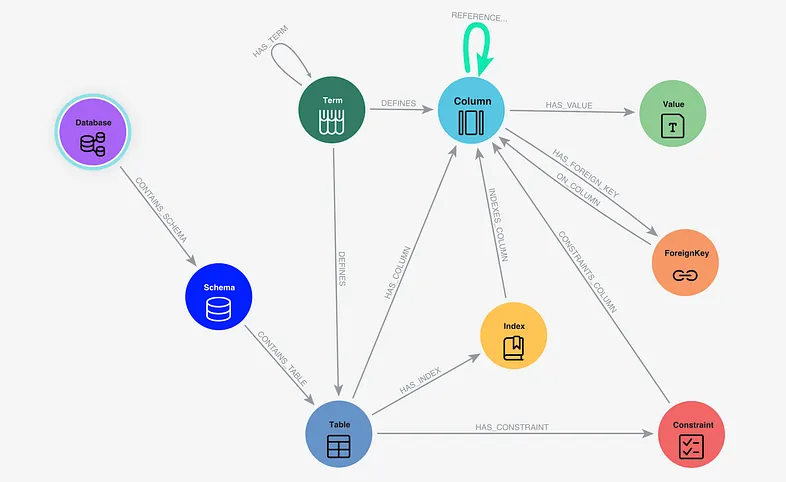
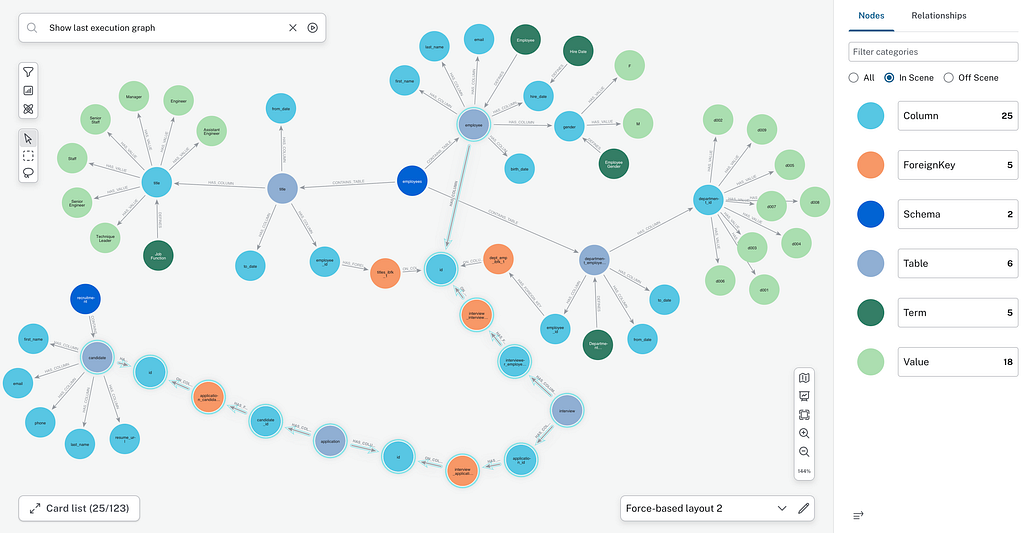
A Neo4j Semantic Layer introduces a GraphRAG approach using Neo4j as a dynamic semantic layer. By moving from linear text files to a Knowledge Graph, the agent stops “reading” all the metadata and starts intelligently “navigating” your data architecture.
What is stored in the Semantic Layer? To ground the LLM with surgical precision and produce valid SQL, the Neo4j semantic layer stores:
- Database Structure: Schemas, Tables, Columns, and Types.
- Database Constraints: Foreign Keys and Indexes.
- Dictionary: Specific values or a few examples from the columns.
- Business Glossary: Domain-specific terms and definitions and a basic taxonomy structure
- Behavior of the users: joins from the RDBMS transaction logs which are not specified as Foreign Keys in the database.
And when the agent needs to query a database, the agent fetches only the portion of the graph relevant to the question, using semantic search + graph traversal (shortest path).
Concrete example
The benchmark application

In this application, you can review and try out both approaches with two agents side-by-side in the same Streamlit application:
- YAML Agent: reads the full database_schema.yaml (44 KB, ~50 tables) on every call.
- Neo4j Semantic Layer Agent: queries the graph to retrieve only the relevant context.
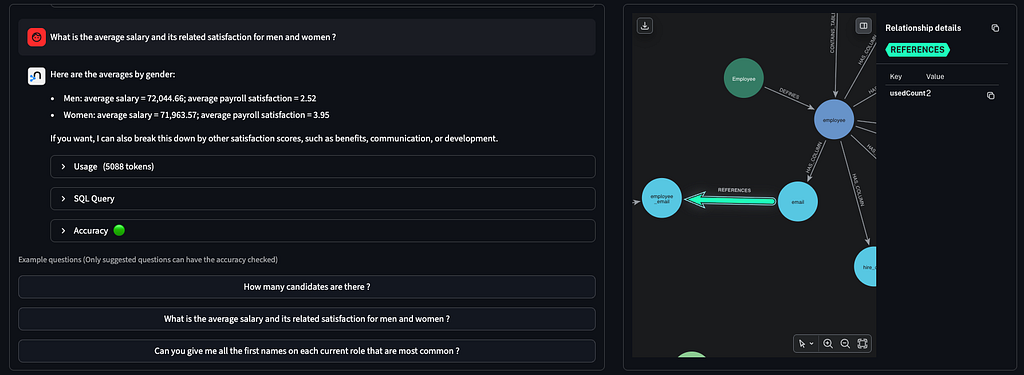
The 2 agents are using the exact same LangChain agent chain and toolset, with the only difference on the schema retrieval tool. To avoid unfair comparison, the yaml file contains all the key information stored in the semantic layer, like an important join based on user behavior (the “REFERENCES” green relationship between email you can see on the graph below). You can easily compare the result without clearing the session as no history of the conversation is sent to the agent.
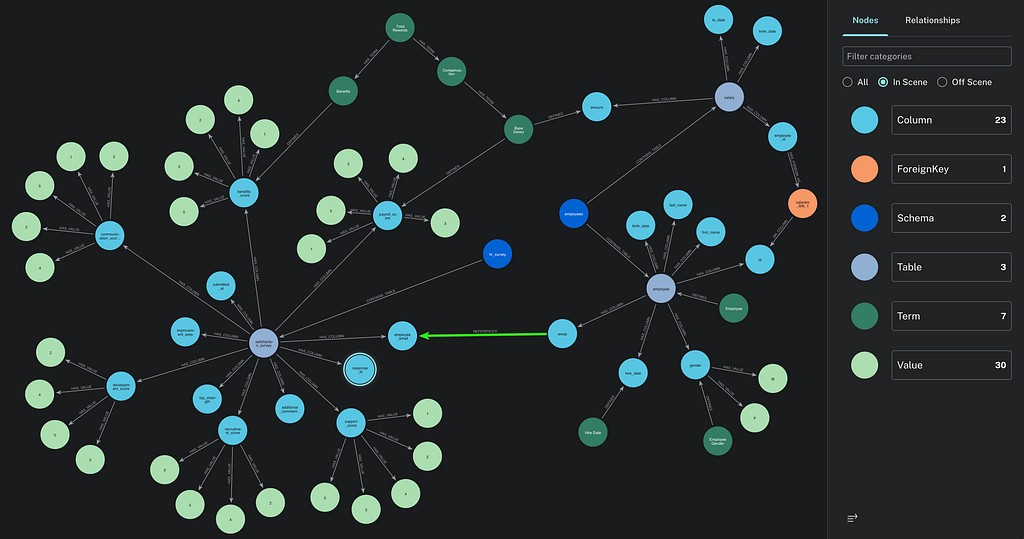
This application uses OpenAI GPT (gpt-5.4-mini + text-embedding-3-small) for semantic similarity search on the semantic layer stored in Neo4j and agent logic, to query Human Resources data (fake public dataset) stored in a PostgreSQL database.
Asking questions to the agent
In the application, 3 questions on the HR data have been pre-wired to be able to check the accuracy of the answer based on expected SQL query and covering increasing complexity:
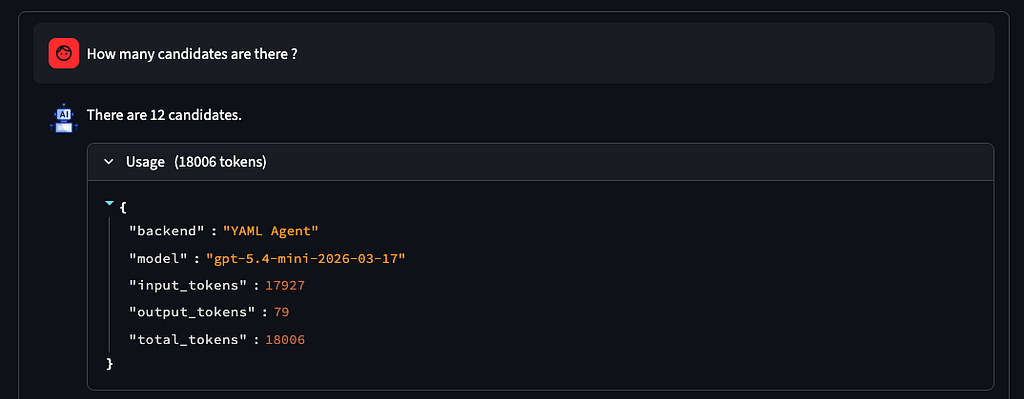
- Simple count, single table (“How many candidates are there?”)
- Multi-table join and aggregation (“What is the average salary and satisfaction for men and women?”)
- Common Table Expression (CTE) + window function (ROW_NUMBER()), grouping (“What first names are most common on each current role?”)
Accuracy and cost of YAML agent
In the demo application (see screenshot below), with the default configuration of the agent, using YAML description, typical results are:
- 100% Perfect accuracy for simple question
- ~90% accuracy for question with multi-join
- ~85% accuracy on question needing intermediate view (CTE)
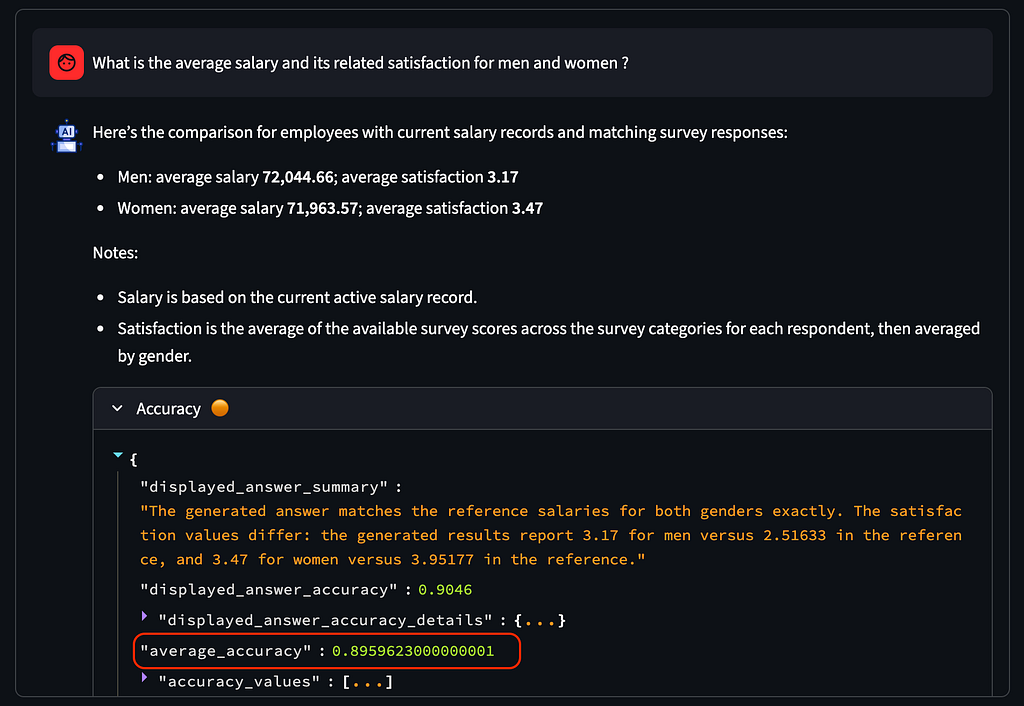
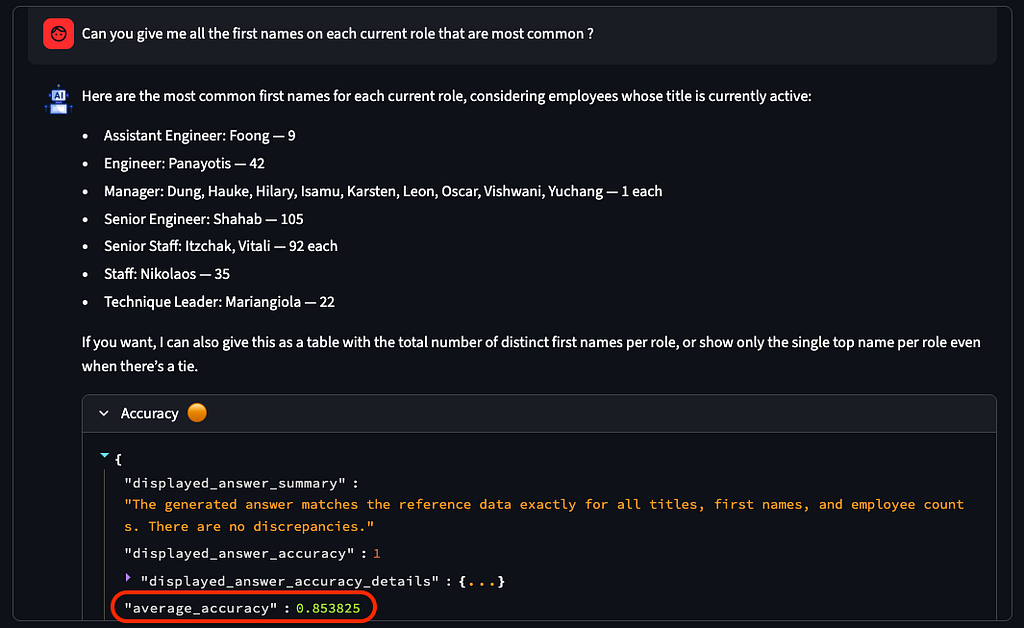
Average accuracy for YAML agent on complex question (Executed 10 times each)
Regarding cost, we see a stable tokens usage (18,000 tokens) reflecting the size of the YAML file provided as the context. The cost can increase dramatically when asking questions where the agent is hallucinating (adding too much context increase the risk of creating a bad SQL query, with the risk of having the agent looping for fixing the errors and increasing tokens consumption).
Accuracy and Cost of Neo4j semantic layer agent
Staying in the demo application, when you switch to the Neo4j semantic layer agent in the settings, you will typically see improved accuracy:
- 100% accuracy for simple question
- ~98% accuracy for question with multi-join
- ~94% accuracy on question needing intermediate view (CTE)
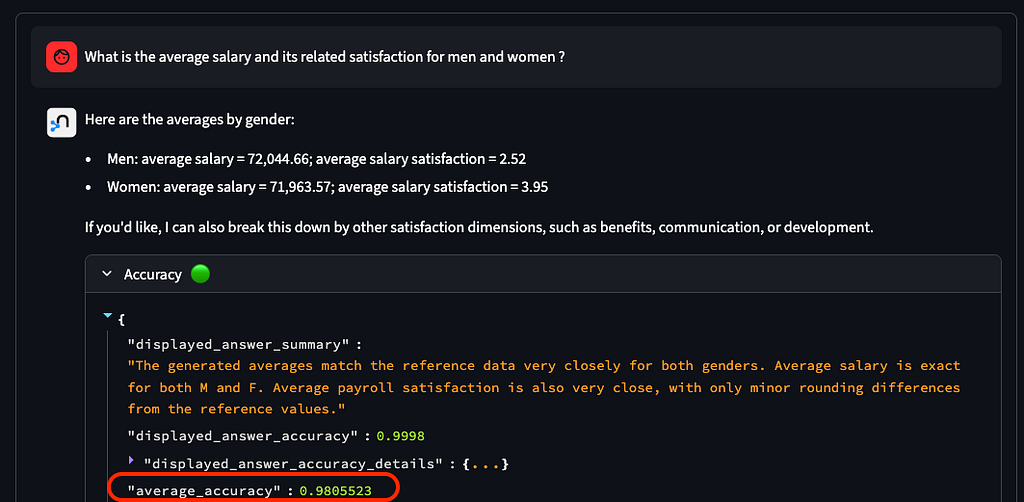
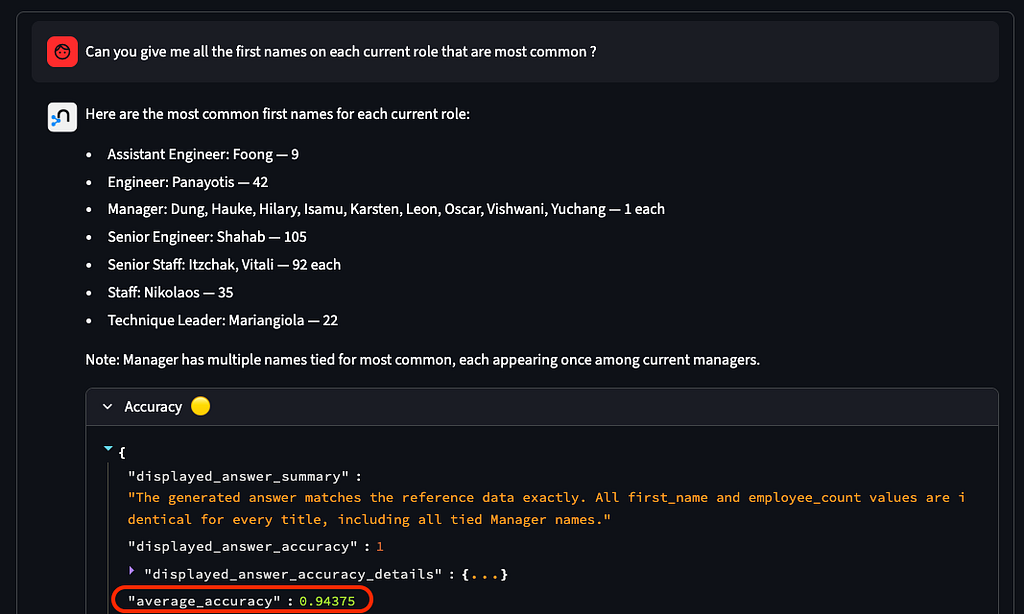
Regarding the cost, while the YAML agent was using a nearly constant number of tokens (on non hallucinated answers), the Neo4j semantic layer depends on the complexity of the question:
- ~1,800 tokens on the simple question
- ~5,000 tokens on the question with multi-join
- ~7,300 tokens on the question needing intermediate view (CTE)
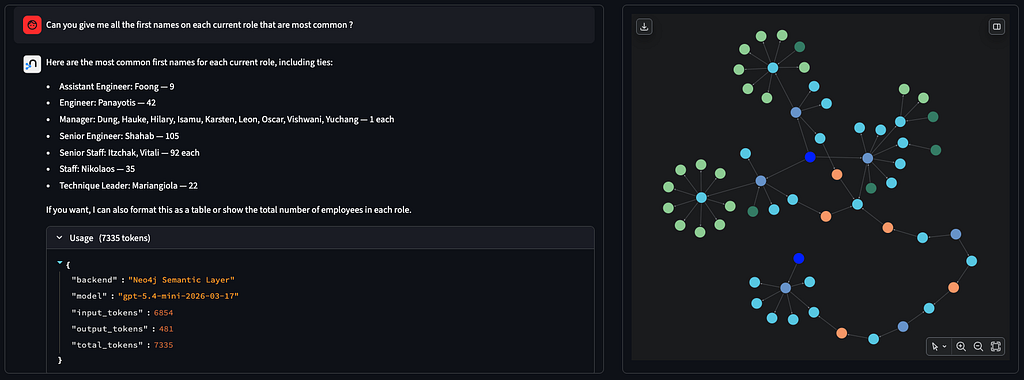
Result analysis and why the graph wins on complex questions
For simple questions, both agents perform comparably, but the tokens used are clearly reduced. As an average, and from what we collect on the field for the projects using this approach, we are seeing a minimum of 20–30% tokens reduction compared to a static approach using YAML file (or multiple YAML files spread with multi-agents).
For complex, multi-table queries, the Neo4j agent demonstrates significantly higher accuracy (+10 points of percentage in this demo) as it focuses only on the relevant portions of the context graph. This benefit increases with larger schemas (50–100+ tables) and when queries involve joins across multiple tables. Having a business glossary, a related taxonomy, and example values are improving the semantic layer reliability especially to define the specific terms and business complexity of your industry.
The information provided includes join paths. These joins paths are using the technical metadata from the database (Foreign Keys), but also usage-inferred joins not declared as Foreign Keys that can be continuously updated from the data engineers/analysts behavior. These behavioral information, extracted from relational database transaction logs, can then be used as a weight in path finding algorithm to only suggest the most used one.
Deep dive on the Neo4j semantic layer
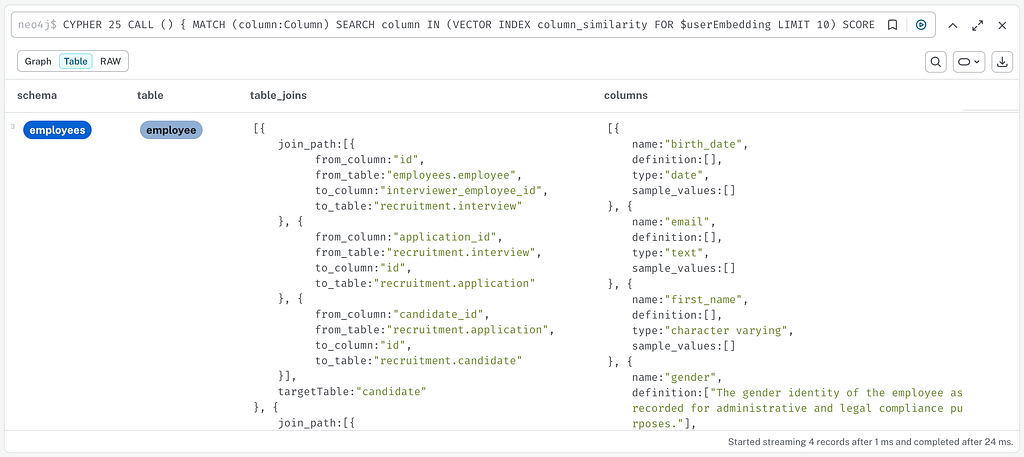
The reduction of tokens and improvement of the accuracy is based on finding the necessary metadata for the LLM to create the perfect SQL query. This is achieved in 3 steps:
- Find the most similar terms and column and related tables using semantic similarity
MATCH (column:Column)
    SEARCH column IN (VECTOR INDEX column_similarity
      FOR $userEmbedding LIMIT 10) SCORE as score
    WHERE score>$threshold
RETURN DISTINCT column
UNION
MATCH (entryTerm:Term)
    SEARCH entryTerm IN (VECTOR INDEX term_similarity FOR $userEmbedding LIMIT 10) SCORE as score
    WHERE score>$threshold-0.1
MATCH (entryTerm)-[:HAS_TERM*0..]->(:Term)-[:DEFINES|HAS_COLUMN*1..2]->(column:Column)
RETURN DISTINCT column
2. Find all possible joins between identified tables
WITH collect(DISTINCT column) as columns
UNWIND columns as sourceColumn
UNWIND columns as targetColumn
WITH sourceColumn, targetColumn
OPTIONAL MATCH links = SHORTEST 1
    (sourceTable:Table {name:sourceColumn.tableName})
    (()-[:HAS_COLUMN|HAS_FOREIGN_KEY|ON_COLUMN|REFERENCES]-(x)){0,16}
    (targetTable:Table {name:targetColumn.tableName})
3. Collect the additional context
WITH DISTINCT sourceColumn as columnSimilarity, links
MATCH (table:Table)-[:HAS_COLUMN]->(columnSimilarity:Column)
MATCH p=(:Schema)-[:CONTAINS_TABLE]->(table)-[:HAS_COLUMN]->(column:Column)
OPTIONAL MATCH termCol = (:Term)-[:HAS_TERM*0..]->(:Term)-[:DEFINES]->(column)
OPTIONAL MATCH termTable = (:Term)-[:HAS_TERM*0..]->(:Term)-[:DEFINES]->(table)
OPTIONAL MATCH values = (column)-[:HAS_VALUE]->(:Value)
The result can then be provided to the agent in just a few ms in a json format, containing the information of the tables and the possible joins between them.
Try it yourself !
Quick install
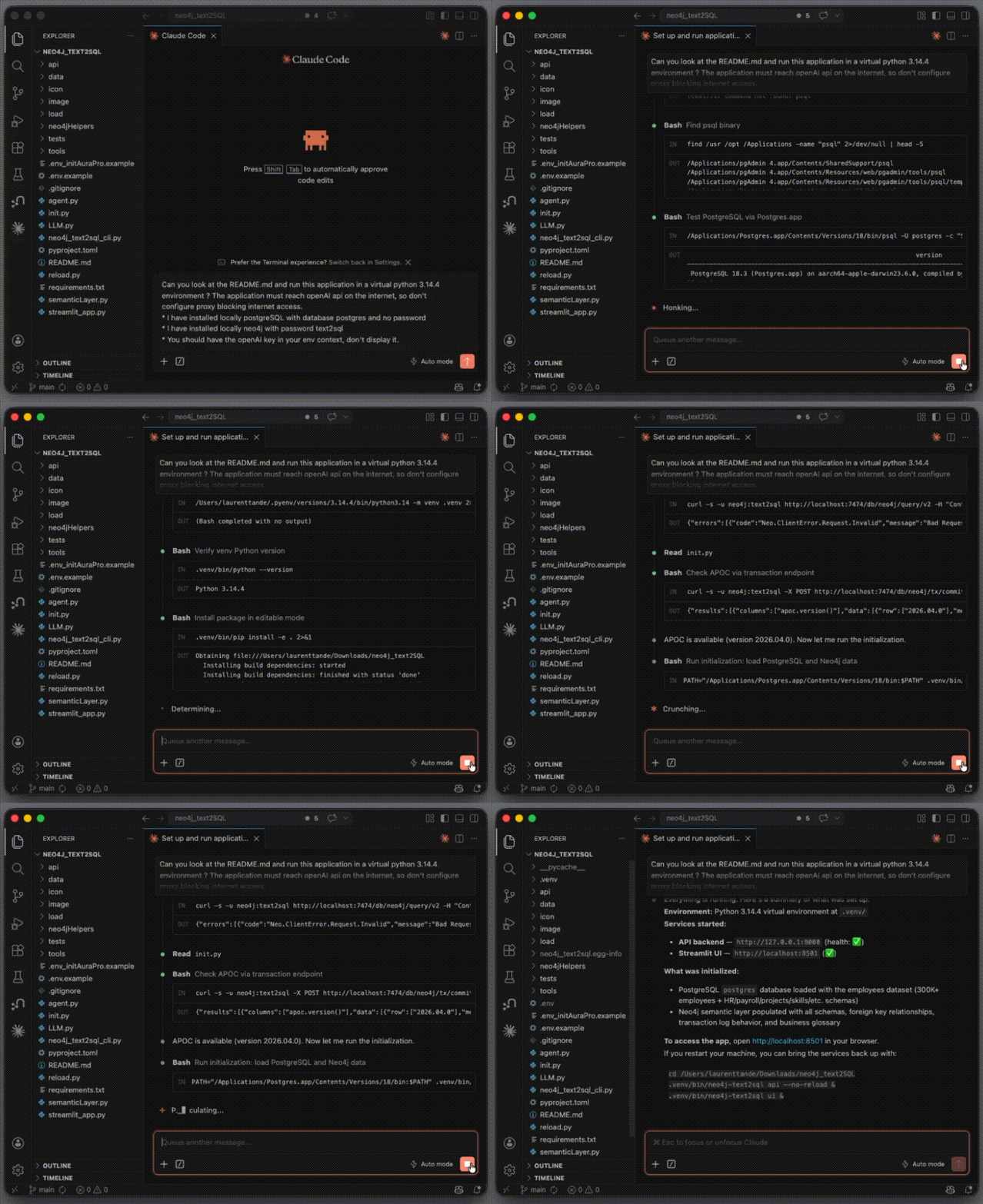
You can easily compare this claim by running this application on your laptop in 3 minutes, especially if you have Cursor or Claude Code.
- Have an OPENAI_API_KEY to use gpt-4o-mini and text-embedding-3-small models
- Install PostgreSQL (example on Mac : https://postgresapp.com/downloads.html, or Databricks Lakebase, Snowflake postgres)
- Install Neo4j (local : https://neo4j.com/download/ with APOC plugin installed (Neo4j’s standard extensions library), or use Neo4j Aura
- Download the demo code from https://github.com/ltndn4j/neo4j_text2SQL
- Open the folder of the demo code in your coding agent (Cursor, VS Code…) and ask to do it all for you (Init will download the HR dataset from the internet and load data in PostgreSQL and Neo4j)
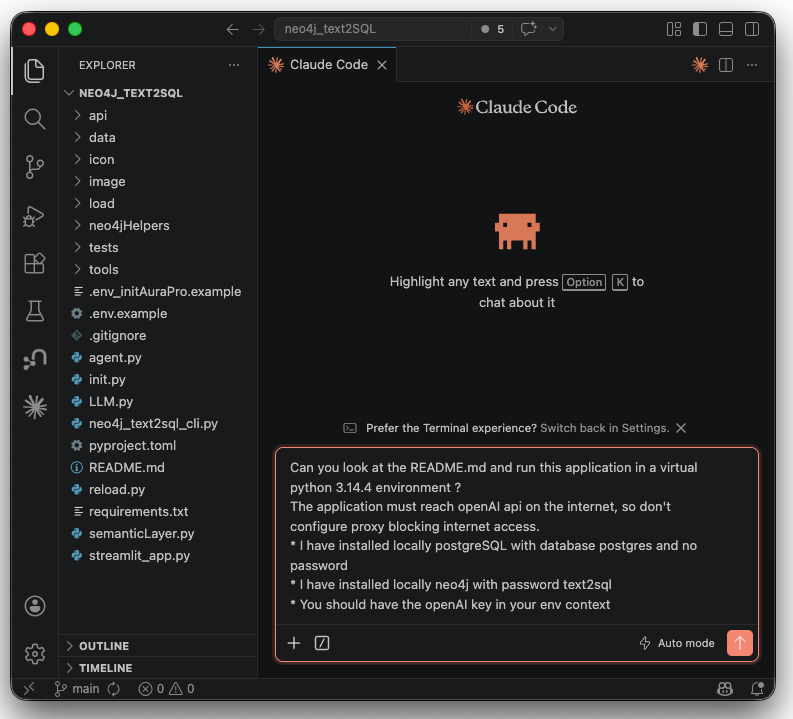
Can you look at the README.md and run this application in a virtual python 3.13.3 environment ?
The application must reach openAI api on the internet, so don't configure proxy blocking internet access.
* I have installed locally PostgreSQL with database postgres and no password
* I have installed locally Neo4j with password text2sql
* You should have the openAI key in your env context
Go beyond the built-in examples
The three pre-wired questions cover increasing SQL complexity, but you’re not limited to them. You can define your own test case using the button next to settings to open a dialog where you can enter:
- Your natural language question
- The reference SQL representing the expected correct answer
- A comparison instruction (which columns the validator uses to check the result)
Your question appears in the list and the accuracy check runs automatically. This lets you benchmark both agents against questions from your own scenarios !
Going further: Graph Data Science, plug-and-play MCP
One of the key strengths of the Neo4j semantic layer is that it delivers solid results even with a basic setup, while leaving significant room for improvement, particularly through Graph Data Science (GDS):
- Path finding with weights: use the number of times a join was executed (from transaction logs) as a weight on `REFERENCES` edges to prefer high-traffic joins with path finding algorithms
- Entity resolution: use Weakly Connected Components (WCC) and K-Nearest Neighbors (KNN) on entities extracted from unstructured business documents to auto-link synonyms to business glossary terms.
- Policies: include user group access controls to ensure the graph context reflects only the data each business user can access.
- Business process enrichment: model data flows as graph paths to answer process-level questions.
- Agent Memory: by capturing conversation history and user feedback in the semantic layer, the agent can generate higher-quality SQL queries over time. (agent continuous improvement)
As an accelerator, the semantic layer is available with the project Neocarta with plug & play MCP servers : https://github.com/neo4j-field/neocarta
Conclusion
Natural language querying over relational databases is now standard across major platforms. What separates a demo from a production system is the context you provide.
The traditional flat-file or vector-based approach treats schema documentation as a blob of text to be dumped into the context window. This leads to excessively large prompts, higher API costs, and an LLM burdened with irrelevant table definitions before meaningful reasoning can even begin.
A Neo4j semantic layer fundamentally changes the approach. Instead of giving the agent everything and expecting it to figure it out, it provides only what’s needed to answer the question — a precise, real-time subgraph of relevant tables, columns, join paths, and business terms. The results are clear: lower token usage across all queries and significantly higher accuracy, especially for complex, multi-table questions that require both structural and business context.
The graph also captures something a YAML file fundamentally cannot: how your data is actually used. Join patterns mined from transaction logs, business glossary terms that resolve ambiguous language, usage-weighted relationships that prefer proven paths over theoretical ones: these are dynamic, living properties of your data ecosystem, and a knowledge graph is the right tool to model them.
The LLM doesn’t need a bigger context window. It needs a better map: a graph-powered map.
How a Neo4j semantic layer makes your Text-to-SQL agent smarter and cheaper was originally published in Neo4j Developer Blog on Medium, where people are continuing the conversation by highlighting and responding to this story.
Share Article



Explore
Related Articles
What are decision traces in a context graph? How they reveal agentic reasoning
Your AI Agent Forgets Everything. So We Taught It to Remember — With a Graph.
Grounding Salesforce Agentforce with Neo4j — multi-agent setup over MCP

Cut Text2SQL token costs up to 81%, and stop paying for wrong answers: a Neo4j semantic layer across BigQuery and Databricks