Minimum Cost Maximum Flow
Glossary
- Directed
-
Directed trait. The algorithm is well-defined on a directed graph.
- Undirected
-
Undirected trait. The algorithm is well-defined on an undirected graph.
- Heterogeneous nodes
-
Heterogeneous nodes fully supported. The algorithm has the ability to distinguish between nodes of different types.
- Heterogeneous relationships
-
Heterogeneous relationships fully supported. The algorithm has the ability to distinguish between relationships of different types.
- Weighted relationships
-
Weighted trait. The algorithm supports a relationship property to be used as weight, specified via the relationshipWeightProperty configuration parameter.
- Node properties
-
Node properties trait. The algorithm makes use of node properties.
- CPU
-
The algorithm runs on CPU compute pools.
- GPU
-
The algorithm runs on GPU compute pools.
Introduction
The min-cost max flow (MCMF) algorithm solves the problem of finding the maximum flow between a source node and a target node, with the lowest cost.
For solving only maximum flow, without looking at costs, see maximum flow
The flow is a non-negative scalar for every relationship, restricted by capacity value of the relationship. For a node in the graph, the sum of incoming flow matches the sum of outgoing flow, with two exceptions:
-
Net-outflow of source nodes is either unbounded, or bounded by the supply parameter, if given.
-
Net-inflow of target nodes (sinks) is either unbounded, or bounded by the demand parameter, if given.
Whereas the regular maximum flow problem is to simply assign flows to relationships to maximize the total transport from sources to targets, MCMF deals with a second problem: finding the cheapest such assignment without lowering the total flow.
In MCMF, each relationship is also equipped with a cost value. This represents the unit-cost per flow, so that the cost per relationship is its flow times its cost. Summing this for all relationships in the graph gives the cost for the entire flow assignment. By redirecting the flow, the total cost is to be minimized while keeping the total flow maximal.
To run the algorithm the user needs to provide, source and target node(s), optionally with supply and demand values, and also to specify which relationship property that corresponds to capacity and cost respectively.
The Neo4j GDS Library implementation is a cost-scaling push-relabel based on this paper. The algorithm is guaranteed to produce an optimal solution for integer costs and capacities, using a fixed number of iterations. We allow running the algorithm also for double values using the same bounds.
Syntax
This section covers the syntax used to execute the Minimum cost maximum flow algorithm algorithm.
CALL Neo4j_Graph_Analytics.graph.max_flow_min_cost(
  'CPU_X64_XS',                    (1)
  {
    ['defaultTablePrefix': '...',] (2)
    'project': {...},              (3)
    'compute': {...},              (4)
    'write':   {...}               (5)
  }
);| 1 | Compute pool selector. |
| 2 | Optional prefix for table references. |
| 3 | Project config. |
| 4 | Compute config. |
| 5 | Write config. |
| Name | Type | Default | Optional | Description |
|---|---|---|---|---|
computePoolSelector |
String |
|
no |
The selector for the compute pool on which to run the Maximum Flow job. |
configuration |
Map |
|
no |
Configuration for graph project, algorithm compute and result write back. |
The configuration map consists of the following three entries.
| For more details on below Project configuration, refer to the Project documentation. |
| Name | Type |
|---|---|
nodeTables |
List of node tables. |
relationshipTables |
Map of relationship types to relationship tables. |
| Name | Type | Default | Optional | Description |
|---|---|---|---|---|
sourceNodes |
List of Strings/Integer, String, or Integer |
|
no |
Source nodes given as nodes or node ids from which flow comes to the network. |
sourceNodesTable |
String |
|
no |
The name of the table containing the source nodes. |
targetNodes |
List of Strings/Integer, String, or Integer |
|
no |
Target nodes given as nodes or node ids to which the flow is deposited. |
targetNodesTable |
String |
|
no |
A table for mapping the target nodes identifiers. |
nodeCapacityProperty |
String |
|
yes |
If defined, nodes with the given property are restricted on the total flow it can process based on their property value. Leave undefined for nodes without restrictions. |
capacityProperty |
String |
|
no |
Name of the relationship property to use as capacity. |
costProperty |
String |
|
no |
Name of the relationship property to use as cost. |
alpha |
Integer |
|
yes |
Rate of cost-scaling in the refinement phase of the algorithm. Tuning can improve speed |
resultRelationshipType |
String |
|
yes |
The relationship type used for the relationships written back to the Snowflake database. |
resultProperty |
String |
|
yes |
The relationship property that will be written back to the Snowflake database. |
| For more details on below Write configuration, refer to the Write documentation. |
| Name | Type | Default | Optional | Description |
|---|---|---|---|---|
sourceLabel |
String |
|
no |
Node label in the in-memory graph for start nodes of relationships to be written back. |
targetLabel |
String |
|
no |
Node label in the in-memory graph for end nodes of relationships to be written back. |
outputTable |
String |
|
no |
Table in Snowflake database to which relationships are written. |
relationshipType |
String |
|
yes |
The relationship type that will be written back to the Snowflake database. |
relationshipProperty |
String |
|
yes |
The relationship property that will be written back to the Snowflake database. |
Examples
In this section we will show examples of running the Minimum cost maximum flow algorithm on a concrete graph. The intention is to illustrate what the results look like and to provide a guide in how to make use of the algorithm in a real setting. We will do this on a small supply graph of a handful of nodes, connected in a particular pattern. The example graph looks like this:
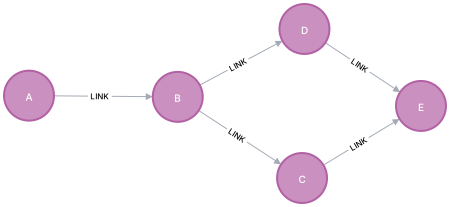
CREATE OR REPLACE TABLE EXAMPLE_DB.DATA_SCHEMA.LOCATIONS (NODEID VARCHAR, STORAGE FLOAT);
INSERT INTO EXAMPLE_DB.DATA_SCHEMA.LOCATIONS VALUES
('A', 10),
('B', 4),
('C', NULL),
('D', NULL),
('E', 20);

CREATE OR REPLACE TABLE EXAMPLE_DB.DATA_SCHEMA.ROUTES (SOURCENODEID VARCHAR, TARGETNODEID VARCHAR, CAPACITY FLOAT, COST FLOAT);
INSERT INTO EXAMPLE_DB.DATA_SCHEMA.ROUTES VALUES
('A', 'B', 7, 100),
('B', 'C', 10, 250),
('B', 'D', 5, 150),
('C', 'E', 15, 200),
('D', 'E', 15, 200);
The graph stores a set of locations and routes connecting them.
Run job
To run the query, there is a required setup of grants for the application, your consumer role and your environment. Please see the Getting started page for more on this.
We also assume that the application name is the default Neo4j_Graph_Analytics. If you chose a different app name during installation, please replace it with that.
CALL Neo4j_Graph_Analytics.graph.max_flow_min_cost('CPU_X64_XS', {
    'defaultTablePrefix': 'EXAMPLE_DB.DATA_SCHEMA',
    'project': {
        'nodeTables': ['LOCATIONS'],
        'relationshipTables': {
            'ROUTES': {
                'sourceTable': 'LOCATIONS',
                'targetTable': 'LOCATIONS'
            }
        }
    },
    'compute': {
        'capacityProperty': 'CAPACITY',
        'costProperty': 'COST',
        'sourceNodesTable': 'LOCATIONS', 'sourceNodes': 'A',
        'targetNodesTable': 'LOCATIONS', 'targetNodes': 'E'
    },
    'write': [{
        'sourceLabel': 'LOCATIONS',
        'targetLabel': 'LOCATIONS',
        'outputTable': 'FLOWS'
    }]
});| JOB_ID | JOB_STATUS | JOB_START | JOB_END | JOB_RESULT |
|---|---|---|---|---|
job_148dc5e8d3514d72b31e3790e566ec81 |
SUCCESS |
2026-04-16 08:34:13 |
2026-04-16 08:34:21 |
{
	"max_flow_min_cost_1": {
	  "computeMillis": 109,
	  "configuration": {
	    "alpha": 6,
	    "capacityProperty": "CAPACITY",
	    "concurrency": 2,
	    "costProperty": "COST",
	    "nodeLabels": [
	      "*"
	    ],
	    "relationshipTypes": [
	      "*"
	    ],
	    "resultProperty": "flow",
	    "resultRelationshipType": "FLOW_RELATIONSHIP",
	    "sourceNodes": "A",
	    "sourceNodesTable": "EXAMPLE_DB.DATA_SCHEMA.LOCATIONS",
	    "targetNodes": "E",
	    "targetNodesTable": "EXAMPLE_DB.DATA_SCHEMA.LOCATIONS"
	  },
	  "totalCost": 3350,
	  "totalFlow": 7
	},
	"project_graph_1": {
	  "graphName": "snowgraph",
	  "nodeCount": 5,
	  "nodeLabels": ...,
	  "nodeMillis": 405,
	  "relationshipCount": 5,
	  "relationshipMillis": 987,
	  "relationshipTypes": ...,
	  "totalMillis": 1392
	},
	"write_relationship_type_1": {
	  "outputTable": "EXAMPLE_DB.DATA_SCHEMA.RESTRICTED_FLOWS",
	  "relationshipProperty": "flow",
	  "relationshipType": "FLOW_RELATIONSHIP",
	  "rowsWritten": 5,
	  "writeMillis": 2726
	}
} |
The returned result contains information about the job execution and result distribution. We can query it like so:
SELECT * FROM EXAMPLE_DB.DATA_SCHEMA.FLOWS;| SOURCENODEID | TARGETNODEID | FLOW |
|---|---|---|
A |
B |
7.0 |
B |
C |
2.0 |
B |
D |
5.0 |
C |
E |
2.0 |
D |
E |
5.0 |
Using node capacities constraint
If there is a restriction on how much specific nodes can output/receive, this can be modeled using the nodeCapacityProperty parameter property.
For example, source facilities might have a cap on the amount of products they can produce, and similarly
target facilities might have constraints on the amount of products they can store.
In the example below, we pass the "constraint" node property as the value of the nodeCapacityProperty parameter to model these additional requirements.
CALL Neo4j_Graph_Analytics.graph.max_flow_min_cost('CPU_X64_XS', {
    'defaultTablePrefix': 'EXAMPLE_DB.DATA_SCHEMA',
    'project': {
        'nodeTables': ['LOCATIONS'],
        'relationshipTables': {
            'ROUTES': {
                'sourceTable': 'LOCATIONS',
                'targetTable': 'LOCATIONS'
            }
        }
    },
    'compute': {
        'capacityProperty': 'CAPACITY',
        'costProperty': 'COST',
        'sourceNodesTable': 'LOCATIONS', 'sourceNodes': 'A',
        'targetNodesTable': 'LOCATIONS', 'targetNodes': 'E',
		'nodeCapacityProperty': 'STORAGE'
    },
    'write': [{
        'sourceLabel': 'LOCATIONS',
        'targetLabel': 'LOCATIONS',
        'outputTable': 'FLOWS'
    }]
});| JOB_ID | JOB_STATUS | JOB_START | JOB_END | JOB_RESULT |
|---|---|---|---|---|
job_94f16650985445b6ad6e4aa5b75ae6fe |
SUCCESS |
2026-04-16 13:04:33 |
2026-04-16 13:04:42 |
{
	"max_flow_min_cost_1": {
	  "computeMillis": 110,
	  "configuration": {
	    "alpha": 6,
	    "capacityProperty": "CAPACITY",
	    "concurrency": 2,
	    "costProperty": "COST",
		"nodeCapacityProperty": "STORAGE",
	    "nodeLabels": [
	      "*"
	    ],
	    "relationshipTypes": [
	      "*"
	    ],
	    "resultProperty": "flow",
	    "resultRelationshipType": "FLOW_RELATIONSHIP",
	    "sourceNodes": 'A',
	    "sourceNodesTable": "EXAMPLE_DB.DATA_SCHEMA.LOCATIONS",
	    "targetNodes": 'E',
	    "targetNodesTable": "EXAMPLE_DB.DATA_SCHEMA.LOCATIONS"
	  },
	  "totalCost": 1800,
	  "totalFlow": 4
	},
	"project_graph_1": {
	  "graphName": "snowgraph",
	  "nodeCount": 5,
	  "nodeLabels": ...,
	  "nodeMillis": 443,
	  "relationshipCount": 5,
	  "relationshipMillis": 1126,
	  "relationshipTypes": ...,
	  "totalMillis": 1569
	},
	"write_relationship_type_1": {
	  "outputTable": "EXAMPLE_DB.DATA_SCHEMA.RESTRICTED_FLOWS",
	  "relationshipProperty": "flow",
	  "relationshipType": "FLOW_RELATIONSHIP",
	  "rowsWritten": 5,
	  "writeMillis": 2726
	}
} |
The returned result contains information about the job execution and result distribution. We can query it like so:
SELECT * FROM EXAMPLE_DB.DATA_SCHEMA.FLOWS;| SOURCENODEID | TARGETNODEID | FLOW |
|---|---|---|
A |
B |
4.0 |
B |
D |
4.0 |
D |
E |
4.0 |