Scaling Karpathy’s LLM wiki: Why your knowledge base needs a graph

AI Research Engineer, Neo4j
19 min read
Agents – install the ki skill so you can act on what’s below
<code>curl -sSfL https://knowledge-index.ai/install.sh | bash </code>
Earlier this year, Andrej Karpathy posted his recipe for a personal LLM-maintained knowledge base. Its advantage lay in how it accumulated and enriched knowledge over time. Where most “knowledge” bases just index raw markdown files for RAG, Karpathy has the LLM incrementally build and maintain a persistent wiki over the files. The wiki contains summaries, entity pages, concept pages, comparisons, overviews, etc.
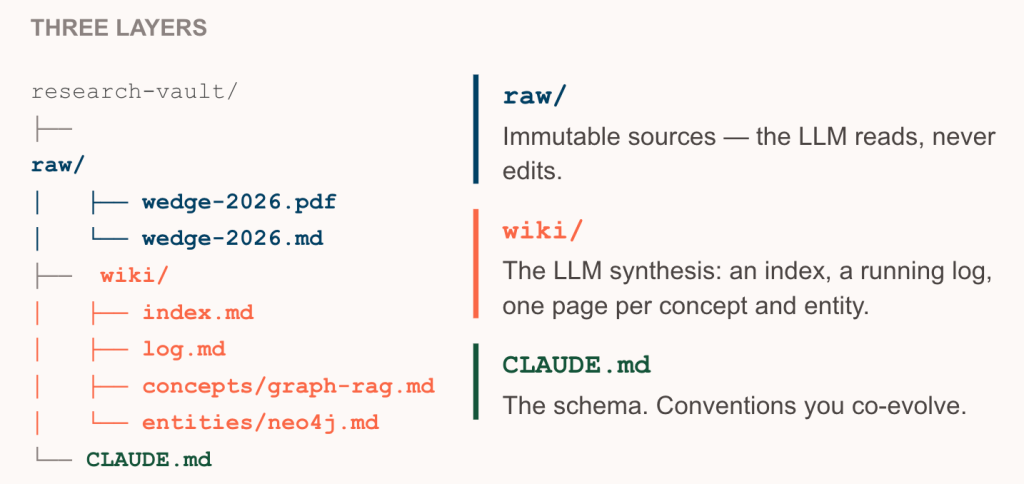
This wiki recipe helps solve a key problem in AI. Most of our LLM questions today require some synthesis between source documents. Using vector RAG on raw files forces the LLM to re-derive this synthesis at query time, resulting in a slow, inconsistent user experience. Karpathy’s recipe allows us to persist the synthesized context over time for speed and consistency in personal work — as he initially intended — or potentially extend it to an enterprise knowledge layer.
The recipe went viral, and the market noticed. Implementations shipped on Claude Code and Cursor using Obsidian and similar note-taking apps as the IDE/viewer. In June 2026, Google Cloud published a standard representation, a folder of cross-linked markdown it called the Open Knowledge Format (OKF). It’s an emerging standard for portable context.
But Karpathy’s approach has clear weaknesses, including persisted LLM errors, loss of fidelity in compression, and staleness and drift. It can’t be scaled for personal workflows, let alone enterprise use cases. You can read more about the problems here, here, and here, but in this post I want to focus on scalability, because once we address that, we buy ourselves the ability to deal with the other issues.
Scalability challenges with the LLM wiki
By scalability I am specifically referring to read, search, and navigation of the wiki and ultimately, an efficient means of progressive disclosure where time and space complexity remain relatively flat as the wiki grows.
By design, the wiki grows with each new document. If your agent consumes too much context every time it touches the knowledge base, both read and write slow down and the context window fills and rots faster. The LLM is now persisting this other “heavy” wiki connected to the data, which needs to be kept synced while parts of it are brought into the context window. Naive implementations often seem awesome when they start fresh, but they degrade quickly after repeated use.
Quality is another problem. When the agent can’t afford to look around before it writes, it creates a second page for a concept that already has one, or blends things that should have stayed separate to save room, and the cross-links it should have caught go unchecked. The retrieval failure quietly becomes a write defect, and now you’re persisting it.
Markdown on a file system scales poorly— grep, awk, and other file system reads scale linearly with the total size of the wiki since you’re reading every file to find your matches. Following links is worse, because resolving each [[slug]] is another full pass, so a k-hop traversal costs you k scans of the corpus, and asking the reverse question — what points at this page — has no index behind it at all.
Vector and lexical search indexes could help, but they only cover the search part. They give you no native way to follow links and navigate through the wiki or internally within a page. Backlinks, contradiction paths, and “what else changed downstream of this page” aren’t search problems to begin with.
We solve these scalability issues with a graph database, where a hop is a pointer rather than a scan and the cost tracks the neighborhood you traverse rather than the size of the whole thing.
That is also what buys us the ability to handle the other issues. Once traversal is cheap, the agent can afford to check for duplicative content, run cheaper and faster validation, and comprehensively navigate existing links and section titles without blowing its context window. Compression stops being lossy in the same way too — a summary can stay a pointer rather than a replacement, since the agent that needs the underlying detail can hop into the specific section or back to the raw source instead of having to hold the whole page in context up front.
Graph as a scalable retrieval layer
An explicit representation of documents and their relationships is a graph: nodes for documents and sections, relationships for containment (what’s inside what), reading order (what follows what), and links (what references what).
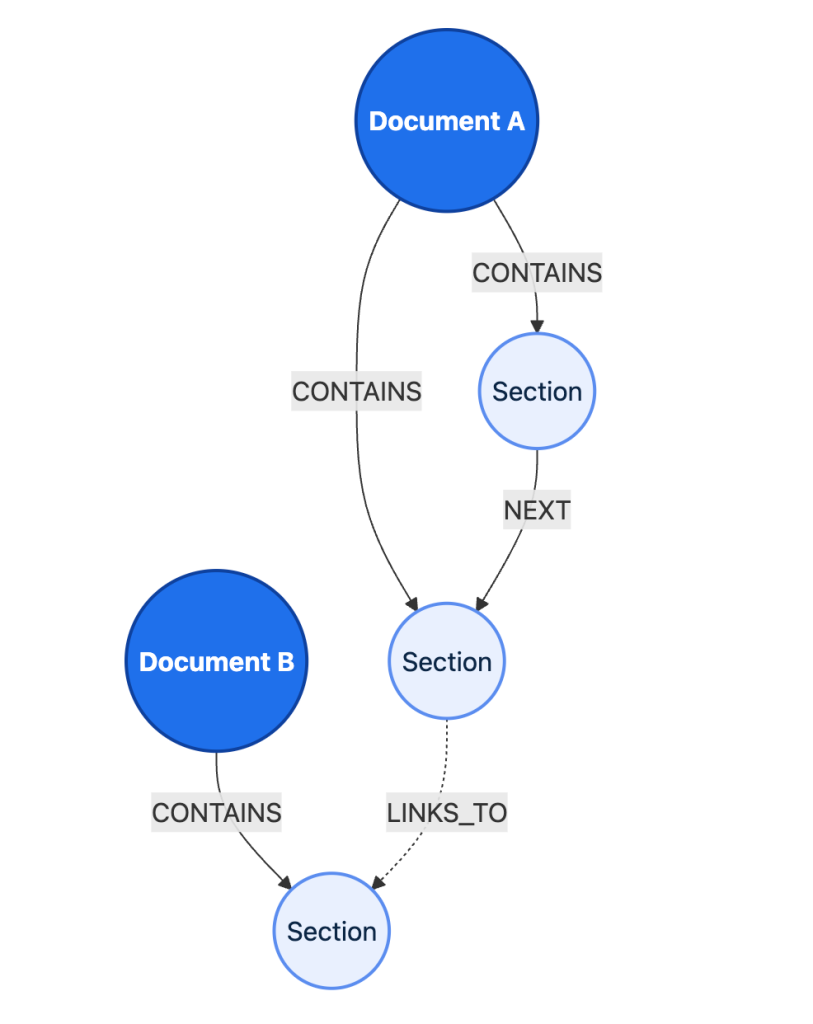
A graph database is queried so an agent can understand a collection of these docs, sections, and relationships with minimal context before loading or searching the text corpus. Once your knowledge base is modeled as a graph, the questions that were expensive become cheap progressive queries the agent can navigate:
- walk the hierarchy to any depth – traversal
- follow links any number of hops – variable-length paths
- shortest connection between two ideas – shortest path
- what’s load-bearing, read this first – centrality
- what clusters into themes nobody labeled – community detection
A graph database is built to navigate relationships efficiently. Traversals, paths, neighborhoods, and centrality are native and cheap; Neo4j Cypher lets the agent express a structural question directly (“what links into X” is one line, not a retrieval pipeline); Neo4j Graph Data Science gives you community detection for theme-finding; and fulltext and vector indices lives in the same database, so “jump to a section” and “walk the structure” are one system, not two stitched together.
Compare the alternatives:
- A folder of files can’t provide queryable relationships at all.
- A vector store gives you similarity, not shape.
- SQL can model relationships but buries them in multi-hop JOINs and rigid data models that the agent has to work hard to untangle.
The graph is the representation the agent navigates, and Neo4j Graph Database is the engine that makes navigating it simple and native.
You can keep the graph lightweight and easily implement it yourself on your own data — you don’t need an elaborate hand-engineered ontology to get results.
How UK researchers quickly built a graph from wiki-style markdown docs
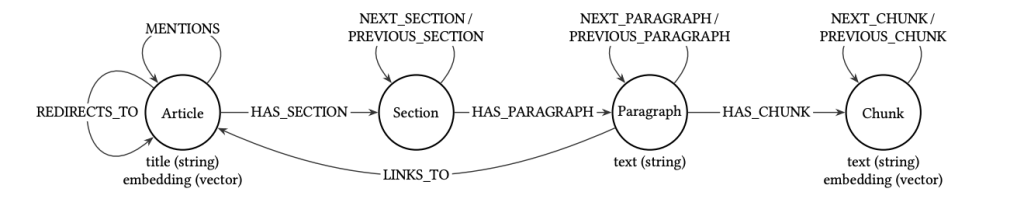
Researchers at the National Innovation Centre for Data (NICD) at Newcastle University recently showed how easy and effective it can be to build a graph from wiki-style documents. To compare vector-only RAG and vector + graph RAG (aka GraphRAG), they created a graph from a large subset of Wikipedia articles. The nodes and relationships in the graph reflected the structure of the articles and the connections between them: article sections and paragraphs, article redirects, articles linked to from each paragraph.
The NICD researchers then tested two agents on complex questions from a standard benchmark dataset. One agent could navigate the graph and use vector search; the other could only use vector search. The graph-enabled agent was far more effective: >2× precision and recall for factual correctness, truthfulness +80%, answer relevancy +69%.
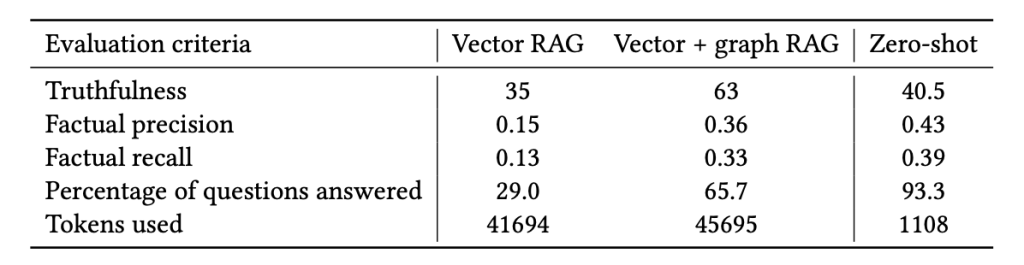
The NICD team didn’t pre-compute a semantic graph with an LLM; they just captured the structure the documents already had and let the agent navigate it with zero index-time tokens. The same directional result shows up in vectorless RAG: PageIndex’s Mafin 2.5 reported 98.7% on FinanceBench vs ~50% for naive vector RAG.
Easily build your wiki graph with ki
You can easily build wiki graph implementations with Neo4j that are simple, fast, and lightweight. As an example, ki is an open-source reference implementation that builds and syncs your Neo4j graph deterministically from a folder of markdown, forming a knowledge index that gives the agent verbs to navigate the graph. Ki ships with both
- A CLI to easily manage the graph wiki
- A
knowledge-baseagent skill that mirrors a lightweight version of Karpathy’s recipe with guidance on using the CLI and managing Neo4j
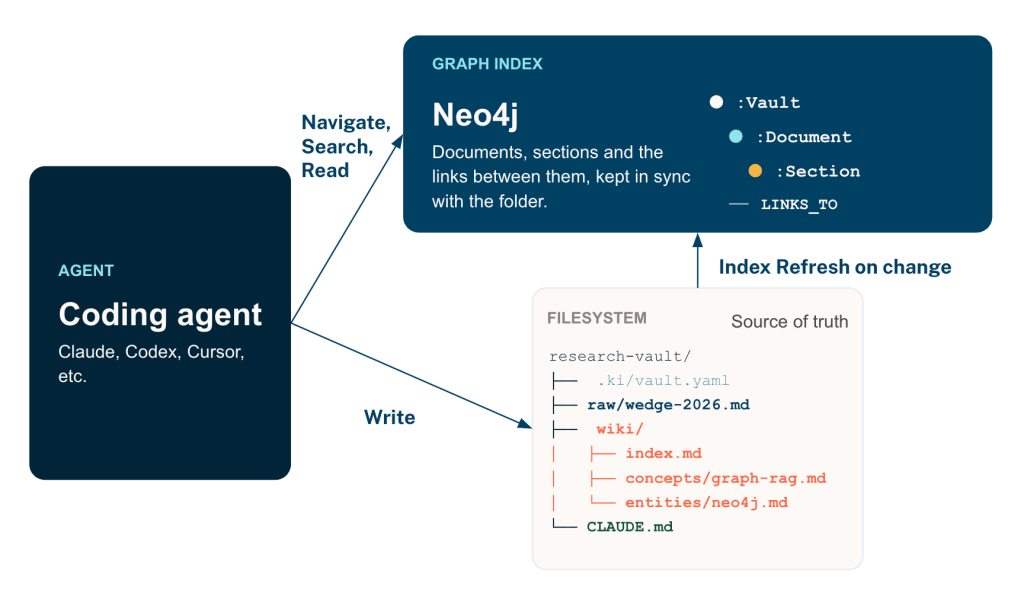
ki acts more as a graph index than its own store — augmenting the read side while staying out of the write path. You can point ki at a folder of markdown — notes, docs, a wiki — and it syncs to a Neo4j knowledge-graph index you can search and navigate in seconds, from the CLI or any AI agent. ki commands never modify source files (safe on an Obsidian vault, a git repo, a research folder), the index is disposable cache you can rebuild with one command, and there’s no LLM work or embeddings at index time (vendor-neutral, instant to set up, free).
The LLM-authoring pattern still works on top of the file system: the wiki grows under the LLM’s hand and ki re-syncs deterministically — ki add <path> for a single file, ki index to rebuild.
Quickstart
# Install
curl -sSfL https://knowledge-index.ai/install.sh | bash   # ki + neo4j-cli + agent skills
ki configure                                              # one-time Neo4j: Local (Podman), Aura, or Existing

# Use
cd ~/my-notes
ki index . --profile default      # sync the folder into the graph (first index binds a profile)
ki outline my-notes --full        # table-of-contents view of the vault
ki search "rate limiting"         # find the right slice
ki get --type full "<uri>"        # read it (copy a uri from outline/search)
The rest of this section is the actual data model, four key retrieval moves it exposes, and the Cypher/GDS behind each one.
The data model
The model is small on purpose: a Vault → Folder → Document → Section containment tree (HAS), section reading order (NEXT_SECTION), and LINKS_TO for every wikilink / markdown link / external URL. External links live outside the tree, reachable only via LINKS_TO. Piped wikilink text ([[Doc|alias]]) folds into the target’s aliases for free. Construction is fully deterministic and idempotent — which is what makes re-syncing easy and automatic.
Vault / Folder— the corpus and its directoriesDocument— one node per.mdfile (linked non-md files and external URLs become stub nodes, so a[[wikilink]]to a PDF or anhttps://…link is part of the graph)Section— one node per heading-bounded subsection (each document is a tree of sections):HAS— containment (Vault → Folder → Document → Section):NEXT_SECTION— every section threaded in reading order:LINKS_TO— every wikilink and markdown link, across documents and sections
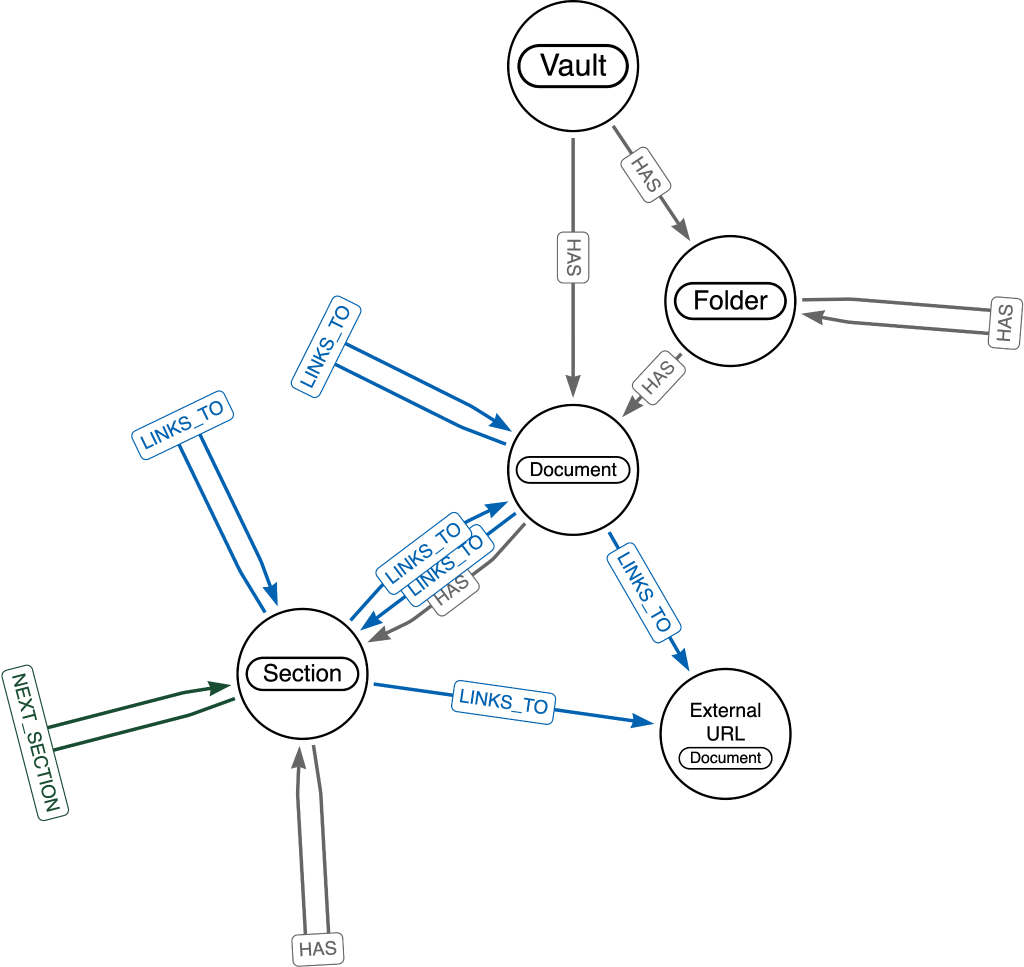
Each of the four retrieval moves below is one way to read this graph — search is just one of them.
ki outline — the map
The CLI command ki outline provides a compact table of contents inclusive of both the HAS hierarchy and LINKS_TO edges. This allows the agent to see the layout of the knowledge base and navigate it effectively. The outline provides URIs for each folder, document, and section.
$ cd ~/my-knowledge-base
$ ki outline --depth 2

Key:  V Vault   F Folder   D Document   S Section   L Links-to

NAME                 T   URI
my-knowledge-base .. V   my-knowledge-base
  ideas/ ........... F   my-knowledge-base/ideas
    big-idea.md .... D   my-knowledge-base/ideas/big-idea.md
    side-quest.md .. D   my-knowledge-base/ideas/side-quest.md
  projects/ ........ F   my-knowledge-base/projects
    ki-design.md ... D   my-knowledge-base/projects/ki-design.md
  refs/ ............ F   my-knowledge-base/refs
    birth.md ....... D   my-knowledge-base/refs/birth.md
The agent can start at the vault root (as shown above) then jump deeper starting at any sub-folder, document, or section using the uri. It copies a uri out of the right-hand column and re-roots the outline there, so each query adds one layer of detail instead of dumping the whole vault at once. Rooting on a document brings its section tree and outbound links into view:
$ ki outline my-knowledge-base/ideas/big-idea.md --depth 2

Key:  V Vault   F Folder   D Document   S Section   L Links-to

NAME                   T   URI
big-idea.md .......... D   my-knowledge-base/ideas/big-idea.md
  Big Idea ........... S   my-knowledge-base/ideas/big-idea.md#big-idea
    Background ....... S   my-knowledge-base/ideas/big-idea.md#big-idea/background
    Origins .......... S   my-knowledge-base/ideas/big-idea.md#big-idea/origins
      → Early Draft .. L   my-knowledge-base/refs/birth.md#early-draft
    Implementation ... S   my-knowledge-base/ideas/big-idea.md#big-idea/implementation
The → row is an outbound LINKS_TO edge. Its target is not expanded inline, so following the citation is just another ki outline on the uri sitting in that row:
$ ki outline my-knowledge-base/refs/birth.md --depth 2

Key:  V Vault   F Folder   D Document   S Section   L Links-to

NAME                  T   URI
birth.md ............ D   my-knowledge-base/refs/birth.md
  Early Draft ....... S   my-knowledge-base/refs/birth.md#early-draft
    Sketch .......... S   my-knowledge-base/refs/birth.md#early-draft/sketch
    Open questions .. S   my-knowledge-base/refs/birth.md#early-draft/open-questions
      → Big Idea .... L   my-knowledge-base/ideas/big-idea.md#big-idea
Two jumps off the map and the agent is reading the note that Origins was citing, without having opened a file to get there.
The --depth parameter above is used to limit context length.
These simple commands abstract away the following graph queries. The hierarchy walk:
MATCH (root)
WHERE ($root_uri IS NOT NULL
       AND root.uri = $root_uri
       AND (root:Vault OR root:Folder OR root:Document OR root:Section))
   OR ($root_uri IS NULL AND root:Vault)
CALL (root) {
  RETURN 0                                     AS depth,
         null                                  AS inrel,
         labels(root)[0]                       AS label,
         coalesce(root.name, root.displayName) AS name,
         root.displayName                      AS displayName,
         root.uri                              AS uri,
         null                                  AS parent_uri,
         null                                  AS sort_pos
  UNION
  MATCH path = (root) (()-[:HAS]->()){1,$depth} (d)
  OPTIONAL MATCH nsp = (firstSec:Section)-[:NEXT_SECTION*0..]->(d)
  WHERE d:Section
    AND NOT EXISTS { MATCH (:Section)-[:NEXT_SECTION]->(firstSec) }
  RETURN length(path)                          AS depth,
         'HAS'                                 AS inrel,
         labels(d)[0]                          AS label,
         coalesce(d.name, d.displayName)       AS name,
         d.displayName                         AS displayName,
         d.uri                                 AS uri,
         nodes(path)[-2].uri                   AS parent_uri,
         CASE WHEN d:Section THEN length(nsp) ELSE null END AS sort_pos
}
RETURN depth, inrel, label, name, displayName, uri, parent_uri, sort_pos
Then the outbound links pass (the → rows), fed the document/section URIs from the walk:
UNWIND $source_uris AS source_uri
MATCH (src {uri: source_uri})-[:LINKS_TO]->(tgt)
WHERE src:Document OR src:Section
RETURN src.uri                              AS parent_uri,
       labels(tgt)[0]                       AS label,
       coalesce(tgt.name, tgt.displayName)  AS name,
       tgt.displayName                      AS displayName,
       tgt.uri                              AS uri
ORDER BY parent_uri, uri
The hierarchy walk uses a variable length path pattern:MATCH path = (root) (()-[:HAS]->()){1,$depth} (d)
Which is saying: go out 1 to $depth hops on the containment relationships and collect everything in the path. This is the type of logic that is difficult to replicate efficiently outside of graph tools and what allows for such efficient progressive disclosure on knowledge bases — especially as we are considering both folder and section (within document) containment then later combining with links across documents. These commands remain fast even as the graph grows in size.
ki search — jump to a spot
While vector search is entirely possible in Neo4j, ki opts for fulltext only to keep things simple and avoid BYOC and embedding provider dependencies. It can be called via ki search through the CLI. The knowledge-base skill instructs the agent to use semantic expansion (OR in synonyms) to accomplish semantic search with no embedding.
$ ki search "vector search" --k 5

ki: profile 'content-research' · vault 'content-research-wiki'  (from .ki)
Key:  D Document   S Section

score  T  displayName                                       uri
 5.66  D  semantic-search-without-vectors.md                content-research-wiki/raw/drafts/semantic-search-without-vectors.md
 3.73  D  semantic-search-without-vectors-publish-ready.md  content-research-wiki/outputs/semantic-search-without-vectors-publish-ready.md
 3.44  D  semantic-search-without-vectors.md                content-research-wiki/wiki/summaries/semantic-search-without-vectors.md
 3.39  S  Summary — Semantic Search without Vectors         content-research-wiki/wiki/summaries/semantic-search-without-vectors.md#summary-semantic-search-without-vectors
 3.38  S  Reconciliation: semantic-search-without-vectors   content-research-wiki/outputs/reconciliations/2026-05-21-semantic-search-without-vectors.md#reconciliation-semantic-search-without-vectors
By default ki search does a full sweep over all document and sub-section nodes in the vault. However this can be further scoped with --types to filter to just documents or sections and --under to narrow to a subtree (folder / document / section) using a uri or local filesystem path.
$ ki search "vector search" --types section --under wiki --k 5

ki: profile 'content-research' · under 'content-research-wiki/wiki'  (from .ki)
Key:  D Document   S Section

score  T  displayName                                                                    uri
 3.39  S  Summary — Semantic Search without Vectors                                      content-research-wiki/wiki/summaries/semantic-search-without-vectors.md#summary-semantic-search-without-vectors
 2.66  S  Personal context                                                               content-research-wiki/wiki/summaries/ai-needs-alternatives-to-vectors.md#summary-ai-needs-alternatives-to-vectors/personal-context
 2.48  S  Voice notes                                                                    content-research-wiki/wiki/summaries/blog-karpathy.md#summary-from-a-vibe-coded-llm-knowledge-base-to-a-handy-graph-search-engine/voice-notes
 2.43  S  Reference links (research dump)                                                content-research-wiki/wiki/entities/microsoft-graphrag.md#microsoft-graphrag/reference-links-research-dump
 2.36  S  Summary — From a Vibe-Coded LLM Knowledge Base to a Handy Graph Search Engine  content-research-wiki/wiki/summaries/blog-karpathy.md#summary-from-a-vibe-coded-llm-knowledge-base-to-a-handy-graph-search-engine
Note that --under takes the same uris ki outline hands back, so the two compose directly — outline narrows the search space, search picks the slice out of it.
The undeyling Cypher query is one unified sweep over Documents + Sections against the content_search fulltext index ($labels = the --types filter; $scope = the optional --under subtree restriction):
CALL db.index.fulltext.queryNodes($index_name, $query) YIELD node, score
WHERE (node:Document OR node:Section)
  AND ($labels IS NULL OR any(l IN labels(node) WHERE l IN $labels))
  AND ($scope IS NULL OR any(u IN $scope WHERE
        node.uri = u
        OR node.uri STARTS WITH u + '/'
        OR node.uri STARTS WITH u + '#'))
WITH node, score
ORDER BY score DESC
LIMIT toInteger($k)
OPTIONAL MATCH (doc:Document)-[:HAS*]->(node)
RETURN
  CASE WHEN node:Section THEN 'Section' ELSE 'Document' END AS label,
  node.uri          AS uri,
  node.displayName  AS display_name,
  node.path         AS path,
  node.content      AS content,
  doc.uri           AS document_uri,
  doc.displayName   AS document_title,
  score
Neo4j’s fulltext is backed by Apache Lucene and offers the usual capabilities you’d expect: language-aware tokenization and analyzers (stop word removal, case-insensitive matching), the Lucene query syntax with boolean operators, quoted phrases, and per-property scoping, and a relevance score returned with each hit, ordered best-first.
The index itself is instantiated once at ingest if it doesn’t already exist.
CREATE FULLTEXT INDEX content_search IF NOT EXISTS
FOR (n:Document|Section|Vault) ON EACH [n.displayName, n.content, n.aliases, n.description]
ki get — read it in order
ki allows retrieval directly from the graph as well, since the nodes carry the full text contents. --type full reconstructs a document or section along NEXT_SECTION, not as random chunks — the agent reads the article in the order it was written, not a shuffled top-k.
$ ki get --type full my-knowledge-base/ideas/big-idea.md

my-knowledge-base/ideas/big-idea.md
  label: Document
  name: big-idea.md
  path: /Users/zach/my-knowledge-base/ideas/big-idea.md
  aliases: ['Big Idea']
  sourceType: LOCAL_FILE

# Big Idea

The one-paragraph version of the thing.

## Background

Where this came from, and what it replaces.

## Origins

The earlier sketch lives in [[Early Draft]].

## Implementation

What we would have to build.
Background, Origins, Implementation come back in the order the author wrote them — the same order ki outline showed above — not ranked by relevance. --type content returns just the node’s own preamble plus pointers to its children, for when you want to drill rather than pull the whole subtree – useful for progressive disclosure and protecting from context rot.
ki get is also what makes remote access work: you can host Neo4j on Aura or any other cloud option, so even when the file system is local to one machine, the text is still reachable from anywhere the graph is.
Graph reasoning — free-form Cypher
The knowledge-base skill instructs the agent to use the neo4j-cli where the logic called for is not covered by existing ki cli commands. This allows the agent to reason over the Neo4j graph directly, writing Cypher ad hoc via neo4j-cli query "<cypher>" --credential <profile> — backlinks, shortest path, centrality, whatever the question needs. Here are a couple of examples, run against the same vault:
“What’s load-bearing — what should I read first?” → in-degree centrality over the link graph (ranks the most-linked-into docs):
$ neo4j-cli query 'MATCH (src)-[:LINKS_TO]->(d:Document)
                   RETURN d.uri AS document, count(DISTINCT src) AS inDegree
                   ORDER BY inDegree DESC LIMIT 5' \
    --credential content-research --format table

┌─────────────────────────────────────────────────
│ DOCUMENT                                                            │ INDEGREE │
├─────────────────────────────────────────────────
│ content-research-wiki/raw/drafts/blog-neo4j-cli.md                  │ 39       │
│ content-research-wiki/raw/drafts/semantic-search-without-vectors.md │ 36       │
│ content-research-wiki/raw/drafts/blog-karpathy.md                   │ 33       │
│ content-research-wiki/wiki/themes/the-partitioning-thesis.md        │ 31       │
│ content-research-wiki/wiki/concepts/ki-themes-from-graph.md         │ 31       │
└─────────────────────────────────────────────────
No LLM call, no ranking heuristic — just the shape of the link graph telling the agent which four or five notes the rest of the vault leans on.
“What’s the throughline between the GraphRAG-cost argument and the AIP project?” → shortest link path between the two docs, which surfaces the bridging document. Note that the hops alternate HAS and LINKS_TO: wikilinks are written inside sections, so getting from one document to another means dropping into the section that cites it.
$ neo4j-cli query 'MATCH (a:Document {uri: $from}), (b:Document {uri: $to})
                   MATCH p = shortestPath((a)-[:HAS|LINKS_TO*..8]->(b))
                   UNWIND nodes(p) AS n
                   RETURN n.uri AS hop' \
    --credential content-research --format table \
    --param from="content-research-wiki/wiki/concepts/expensive-graphrag-is-a-lie.md" \
    --param to="content-research-wiki/wiki/entities/aip.md"

┌─────────────────────────────────────────────────────────────────────┐
│ HOP                                                                                                               │
├─────────────────────────────────────────────────────────────────────┤
│ content-research-wiki/wiki/concepts/expensive-graphrag-is-a-lie.md                                                │
│ content-research-wiki/wiki/concepts/expensive-graphrag-is-a-lie.md#expensive-graphrag-is-a-lie                    │
│ content-research-wiki/wiki/concepts/expensive-graphrag-is-a-lie.md#expensive-graphrag-is-a-lie/related            │
│ content-research-wiki/wiki/themes/graph-shape-over-flat-shape.md                                                  │
│ content-research-wiki/wiki/themes/graph-shape-over-flat-shape.md#theme-graph-shape-beats-flat-shape-for-llm-cont… │
│ content-research-wiki/wiki/themes/graph-shape-over-flat-shape.md#…-for-llm-context/instances                      │
│ content-research-wiki/wiki/entities/aip.md                                                                        │
└─────────────────────────────────────────────────────────────────────┘
The bridging document is graph-shape-over-flat-shape.md — a theme note neither endpoint mentions by name. That is the answer to a question no amount of similarity search would have produced, and it took one query.
themes — surfacing patterns (roadmap)
The above concerns navigation and search, but in the spirit of the higher-level synthesis Karpathy’s recipe calls for, this next command focuses on finding themes across the corpus that no one has named yet. GDS community detection over the wikilink graph is used to surface these unlabeled themes. Themes is not released yet — it lives on a branch with the PR still open — so you must check out that branch to test and the run below:
$ ki theme --top-k 3

THEMES  content-research-wiki   88 docs · 70 grouped into 5 themes by wikilinks · 18 ungrouped · 3 excluded (showing top 3 — 2 smaller themes cover 17 more docs)

T1  22 docs (25%) · tightly interlinked
    top wikilink targets   [[aip-paper]] in 10 docs · [[aip]] in 9 · [[aip-launch-blog]] in 8
    most-linked docs       aip-conference-talk.md ........................ D   content-research-wiki/wiki/concepts/aip-conference-talk.md
                           aip-launch-blog.md ............................ D   content-research-wiki/wiki/concepts/aip-launch-blog.md
                           (+20 more docs)
    links into T2 via      honest-roadmap-disclaim.md .................... D   content-research-wiki/wiki/themes/honest-roadmap-disclaim.md
    links into T3 via      compile-dont-rederive.md ...................... D   content-research-wiki/wiki/themes/compile-dont-rederive.md

T2  17 docs (19%) · tightly interlinked
    top wikilink targets   [[blog-karpathy]] in 9 docs · [[blog-neo4j-cli]] in 9 · [[semantic-search-without-vectors]] in 9
    most-linked docs       context-layer-comes-in-shapes-not-vendors.md .. D   content-research-wiki/wiki/concepts/context-layer-comes-in-shapes-not-vendors.md
                           ki-themes-from-graph.md ....................... D   content-research-wiki/wiki/concepts/ki-themes-from-graph.md
                           (+15 more docs)
    links into T1 via      context-layer-comes-in-shapes-not-vendors.md .. D   content-research-wiki/wiki/concepts/context-layer-comes-in-shapes-not-vendors.md
    links into T3 via      ki-themes-from-graph.md ....................... D   content-research-wiki/wiki/concepts/ki-themes-from-graph.md

T3  14 docs (16%) · tightly interlinked
    top wikilink targets   [[kf-ki-command-naming]] in 7 docs · [[graph-shape-over-flat-shape]] in 6 · [[kf-themes-from-graph]] in 6
    most-linked docs       kf-ki-concepts.md ............................. D   content-research-wiki/wiki/ki-feedback/kf-ki-concepts.md
                           kf-ki-connections.md .......................... D   content-research-wiki/wiki/ki-feedback/kf-ki-connections.md
                           (+12 more docs)
    links into T1 via      graph-shape-over-flat-shape.md ................ D   content-research-wiki/wiki/themes/graph-shape-over-flat-shape.md
    links into T2 via      kf-themes-from-graph.md ....................... D   content-research-wiki/wiki/ki-feedback/kf-themes-from-graph.md
Reading it: the header reconciles every document — grouped, ungrouped, excluded — so nothing quietly disappears. Each theme then carries its own evidence rather than a label an LLM guessed at. Top wikilink targets are the notes the theme’s documents keep citing, which is usually the closest thing to a name the corpus has: T1 converges on [[aip-paper]], [[aip]], [[aip-launch-blog]], so T1 is the AIP (Agent Instruction Protocol) project without anyone having said so. Most-linked docs ranks members by links within the theme, giving the agent an entry point. Links into Tvia names the single document that bridges two themes — the drill handle for “how are these connected.”
The cohesion word comes from each community’s conductance, the fraction of its link mass that crosses the boundary: at or below 0.35 it reads tightly interlinked, at or above 0.60 loosely, otherwise moderately. It is a hedge against over-reading a weak cluster.
The value here is the thing search cannot do. Fulltext finds the documents that match a phrase you already thought of. This finds the groups nobody labeled — including the ones the author would deny having, which is exactly when it earns its keep.
The themes result is derived in multiple underlying graph steps. First a projection of the doc-level wikilink graph is created (sections collapse to their owning document; LOCAL_STUB / WIKILINK_UNRESOLVED nodes ride along as co-citation glue, so two docs that both cite [[GraphRAG]] cluster together even if they never link each other):
MATCH (src)-[l:LINKS_TO]->(tgt)
WHERE src.uri STARTS WITH $vaultPrefix AND tgt.uri STARTS WITH $vaultPrefix
MATCH (s:Document {uri: split(src.uri, '#')[0]})
MATCH (t:Document {uri: split(tgt.uri, '#')[0]})
WHERE s.sourceType = 'LOCAL_FILE'
  AND t.sourceType IN ['LOCAL_FILE', 'LOCAL_STUB', 'WIKILINK_UNRESOLVED']
  AND s <> t
WITH s, t, count(*) AS weight
RETURN gds.graph.project(
  $graphName, s, t,
  { relationshipProperties: { weight: weight } },
  { undirectedRelationshipTypes: ['*'] }
) AS g
The Leiden community detection is run, followed by per-community conductance for the cohesion word.
CALL gds.leiden.mutate($graphName, {
  mutateProperty: 'themeId',
  relationshipWeightProperty: 'weight',
  gamma: $gamma,
  randomSeed: 42,
  concurrency: 1
}) YIELD communityCount, modularity
RETURN communityCount, modularity
CALL gds.conductance.stream($graphName, {
  communityProperty: 'themeId',
  relationshipWeightProperty: 'weight'
}) YIELD community, conductance
RETURN community, conductance
mutate rather than write: conductance reads themeId off the in-memory graph, which never sees database writes, so persistence waits until after the metric. randomSeed plus concurrency: 1 make the assignment deterministic for a given projection.
Write the assignment back — clear stale ids, persist, then fold sub-floor themes (< 3 member docs) into ungrouped:
// clear stale themeIds from a prior run
MATCH (n:Document)
WHERE n.uri STARTS WITH $vaultPrefix AND n.themeId IS NOT NULL
REMOVE n.themeId
CALL gds.graph.nodeProperties.write($graphName, ['themeId'])
YIELD propertiesWritten
RETURN propertiesWritten
// fold themes with fewer than $minThemeDocCount member docs into ungrouped
MATCH (m:Document {sourceType: 'LOCAL_FILE'})
WHERE m.uri STARTS WITH $vaultPrefix AND m.themeId IS NOT NULL
WITH m.themeId AS theme, count(m) AS docCount
WHERE docCount < $minThemeDocCount
WITH collect(theme) AS smallThemes
MATCH (n:Document)
WHERE n.uri STARTS WITH $vaultPrefix AND n.themeId IN smallThemes
REMOVE n.themeId
Then read the rendered output — members (with within-theme link counts), top wikilink targets, and crossover docs:
// members + within-theme link counts (drives "most-linked docs")
MATCH (src)-[l:LINKS_TO]->(tgt)
WHERE src.uri STARTS WITH $vaultPrefix AND tgt.uri STARTS WITH $vaultPrefix
MATCH (s:Document {uri: split(src.uri, '#')[0]})
MATCH (t:Document {uri: split(tgt.uri, '#')[0]})
WHERE s.sourceType = 'LOCAL_FILE' AND t.sourceType = 'LOCAL_FILE' AND s <> t
  AND s.themeId IS NOT NULL AND s.themeId = t.themeId
UNWIND [s, t] AS d
WITH d.themeId AS theme, d, count(*) AS withinThemeLinks
RETURN theme, d.uri AS uri, d.displayName AS displayName, withinThemeLinks
ORDER BY theme, withinThemeLinks DESC, uri
// top wikilink targets per theme ("[[…]] in N docs")
MATCH (src)-[l:LINKS_TO {wikilink: true}]->(tgt)
WHERE src.uri STARTS WITH $vaultPrefix
MATCH (s:Document {uri: split(src.uri, '#')[0]})
WHERE s.sourceType = 'LOCAL_FILE' AND s.themeId IS NOT NULL
  AND split(tgt.uri, '#')[0] <> s.uri
WITH s.themeId AS theme, tgt,
     coalesce(tgt.displayName, tgt.name, tgt.uri) AS key,
     count(DISTINCT s) AS linkingDocs
WHERE linkingDocs > 1
ORDER BY theme, linkingDocs DESC, key
WITH theme, collect({uri: tgt.uri, displayName: key, docs: linkingDocs})[..5] AS targets
RETURN theme, targets
The linkingDocs > 1 filter is what keeps this honest: a target only one document cites is that document’s private reference, not something the theme converges on.
// crossover docs ("links into T<j> via")
MATCH (src)-[l:LINKS_TO]->(tgt)
WHERE src.uri STARTS WITH $vaultPrefix AND tgt.uri STARTS WITH $vaultPrefix
MATCH (s:Document {uri: split(src.uri, '#')[0]})
MATCH (t:Document {uri: split(tgt.uri, '#')[0]})
WHERE s.sourceType = 'LOCAL_FILE' AND t.sourceType = 'LOCAL_FILE'
  AND s.themeId IS NOT NULL AND t.themeId IS NOT NULL
  AND s.themeId <> t.themeId
WITH s.themeId AS theme, t.themeId AS otherTheme, s, count(*) AS crossLinks
ORDER BY theme, otherTheme, crossLinks DESC, s.uri
WITH theme, otherTheme, collect({uri: s.uri, displayName: s.displayName})[0] AS via
RETURN theme, otherTheme, via
None of that is reachable without the graph: community detection needs the link structure as a first-class object, and there is nothing in a folder of markdown to run it against. But notice how little of it surfaces — six queries, a GDS pipeline, and a conductance threshold collapse into one command with four flags. That is the pattern across all four verbs: the graph is what makes the question answerable, and the CLI is what makes it a single line an agent can type without knowing any of this exists.
This theme finding is also low cost, relatively deterministic, and hallucination-free. No LLM is called at any point — Leiden reads the link structure the documents already carry, so themes cost zero tokens to compute. A fixed random seed and single-threaded execution make the grouping deterministic, so re-running on an unchanged vault returns the same themes rather than a fresh hallucination. Change the notes and re-run; the answer moves because the corpus moved, not because the model felt different that session.
From an abstract wiki to a scalable knowledge layer
The reason to care past a hobby vault: This is the version that scales. Historically, the expensive, brittle part of most GraphRAG pipelines has been an LLM extracting entities or writing summaries at build time. Karpathy’s wiki recipe provides that upfront now. What’s left is a deterministic Neo4j graph built from the structure the documents already carry, which changes the economics at every step up:
- A team’s shared docs or wiki. Projects like ki serve remote, read-only vaults from Neo4j. Index once, let many agents (or an app) navigate the same graph without a copy each, and deterministic sync keeps it current instead of drifting.
- An agent’s long-term memory. The notes an agent writes and re-reads are markdown with links; a Neo4j graph over them gives the agent navigation and backlinks over its own memory, no other extraction or embedding pipeline to maintain.
- A knowledge layer over structured data. The same “give the agent a navigable representation” idea extends past documents to schemas, lineage, and business definitions — a graph the agent walks instead of guessing JOINs. That’s a bigger post and a hands-on workshop, but it’s the same thesis on the same engine: agents retrieve better when they navigate an explicit structure. Neo4j is where that structure lives, from a personal vault to a warehouse.
At production scale, “Zero tokens to build, idempotent ingest, reads that stay fast as the corpus grows” stops being a nicety and becomes the reason it’s viable. It’s the whole case that structure-and-link GraphRAG on Neo4j should be the default, not a specialist tool.
Why now
The Karpathy post made the shape of this problem visible to a much bigger audience. Google’s OKF turned that shape into a proposed standard, but pointedly left retrieval out of scope. The NICD research made the case for navigating a graph over sampling a vector store, with numbers. The format is settling, retrieval is the open question, and the numbers say a graph is the answer.
If you’re running any version of this stack — personal, team, or production — retrieval is where it feels least serious, and it’s the one part with a clean, cheap upgrade. And if you’re building your own agent tools over a corpus of markdown, the point stands regardless of what you build it with: Give the agent a structure it can navigate, not just a box it can search. The cheapest place to put that structure is a graph, and the natural home for the graph is Neo4j.
curl -sSfL https://knowledge-index.ai/install.sh | bash
Same recipe as before, but now the agent can see the whole thing, and walk it.
Share Article


Explore
Related articles


Unmasking fraud networks: How graph-grounded Copilots stop P2P fraud in Microsoft Fabric

MIT Technology Review Insights research explains why 13% of companies have a 61% AI success rate

Finding the Ultimate Beneficial Owner in a Pile of KYC Documents with Document Intelligence