Vector RAG vs. GraphRAG: Which retrieval do you need?

Blog Editor, Neo4j
10 min read
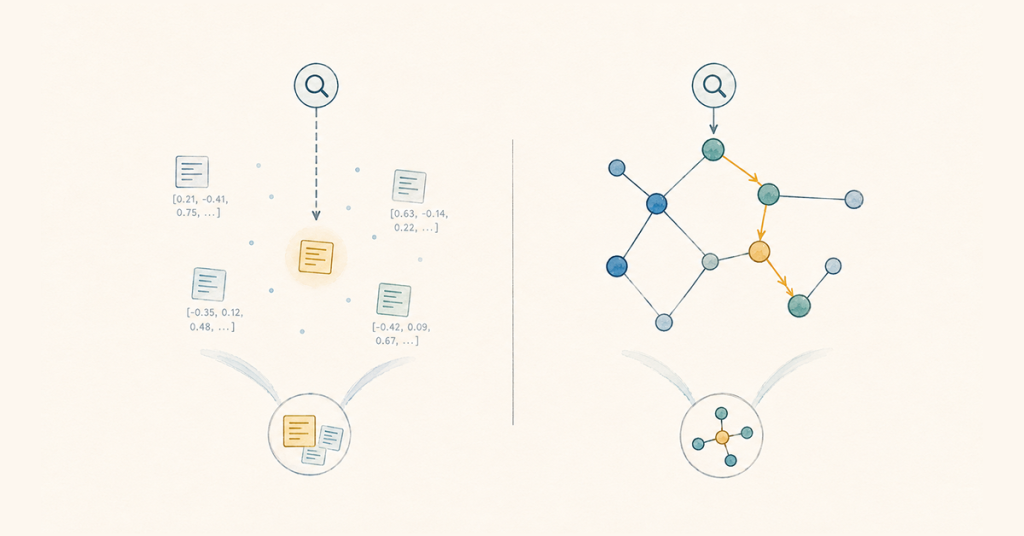
A vector-only pipeline can be a great fit for your agentic AI project — right up until an accurate, explainable response depends on how disparate facts connect.
Take a support example, where a manager asks which vendor’s outage caused three tickets last week. The tickets, the vendor record, and the outage report are all in the index, but none mention each other by name, so a similarity search has no way to string them together. The result: an incomplete or inaccurate answer, or none at all.
That’s the limit of similarity search, which is what vector RAG uses to provide an LLM with relevant information at query time. It ranks text by how closely it reads like the question, not by how the underlying facts relate. GraphRAG takes a different approach, which is why it has been shown to more than double factual accuracy, offer better token efficiency, and provide a traceable path back to each answer’s sources.
So what’s the difference between GraphRAG and vector RAG? And will adding GraphRAG to your pipeline be worth the investment? In this blog post, you’ll get the answers. We share how each approach retrieves context, look at where GraphRAG’s complexity earns its keep, and walk through sample code to show you how it works.
More in this guide:
Vector RAG vs. GraphRAG
Before getting into the mechanics of each one, here’s how the two approaches compare in how they retrieve context, handle connected questions, offer explainability, and fit different use cases.
| Vector RAG | GraphRAG | |
| Retrieval mechanism | Similarity search over embedded chunks | Traversal across relationships in a knowledge graph, often combined with vector or full-text search |
| Multi-step reasoning | Can’t follow chains of connected facts on its own | Follows relationships across multiple hops directly |
| Explainability | Inspectable results, but no explicit relationship path | Returns the relationship path behind the answer |
| Setup | Chunk, embed, and index text passages | Modeling entities and relationships in a knowledge graph |
| Best fit | Single-fact lookups, semantic matching | Multi-step reasoning and gathering relevant context |
Where vector RAG’s similarity search breaks down
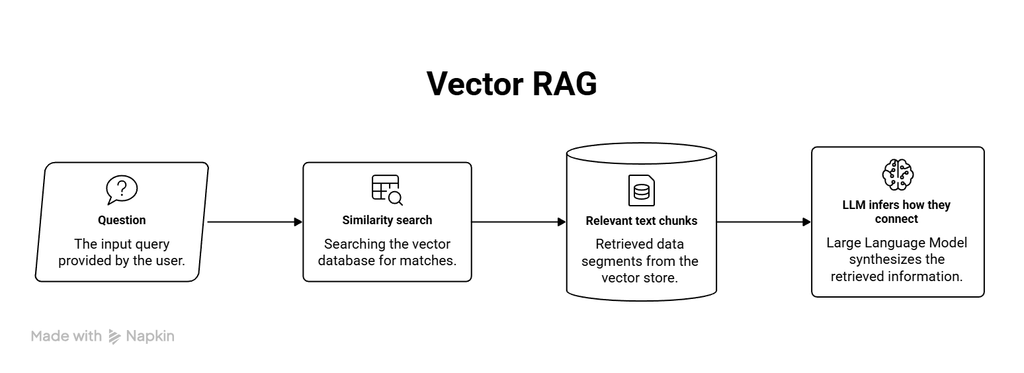
Vector RAG uses semantic similarity to find the text most relevant to a question. It chunks and embeds the source content and query, then ranks the best matches by vector similarity, a common retrieval pattern in standard RAG. Someone searching a support knowledge base for the phrase “can I send this back after a month” can get a return policy that never uses those exact words, because embeddings capture meaning rather than phrasing. That’s why this kind of matching works well in documentation search, product discovery, and anywhere people describe the same idea a dozen different ways.
However, this model doesn’t always work. For a question like “which vendor’s outage caused three tickets last week?”, a similarity search can return the ticket, the service record, and the outage record if the semantic phrasing lines up, but it has no notion of “connects to.” The meaning is lost.
Retrieval size isn’t the issue, either. In fact, it can create problems in both directions. Set top_k (the number of chunks returned) too low, and useful evidence gets left out of the prompt. Set it too high, and you pull in repetitive or tangential chunks. Regardless, it can’t understand relationships that the vectors never stored in the first place. The returned chunks, metadata, and similarity scores don’t tell you how those passages are contextually relevant.
Why GraphRAG works better for complex questions
Instead of ranking by similarity, GraphRAG follows relationships in a graph. The graph can be a knowledge graph that captures facts and relationships between them, or a context graph that also includes situational information such as current state, conversation history, prior decisions, and reasoning traces.
Model our example’s support data (tickets, services, vendors, outages) as a graph, and your agent can traverse those relationships to find relevant data. Tickets connect to the services they reference, services connect to the vendors that run them, and vendors connect to the outage records logged against them. The data itself captures the path between those records through their relationships.
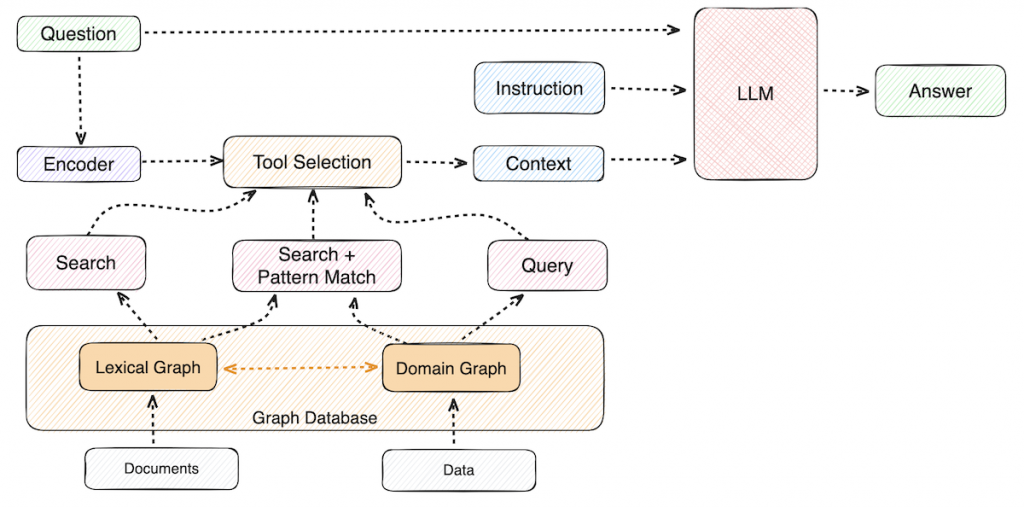
GraphRAG retrieval still often starts with a search. A vector lookup finds the ticket that matches the question most closely, or a full-text search locates an entity by name. From that initial point, a graph traversal follows the relationships, pulling in relevant records that a similarity ranking would never return.
Neo4j’s VectorCypherRetriever, for example, runs a vector search first and hands the matching node to a Cypher query that expands from it; HybridCypherRetriever does the same thing but starts from a combined vector and full-text search instead.
For the outage question, this means you can get the right response in a single retrieval pass. A vector pipeline would require three separate lookups to retrieve those same records, but it would have no way to confirm how they relate to one another.

Comprehensive guide to production-ready RAG
A new Manning guide explains how to combine structured and unstructured data, connect entities, and deploy multiple retrievers.
GraphRAG outperforms vector-only RAG
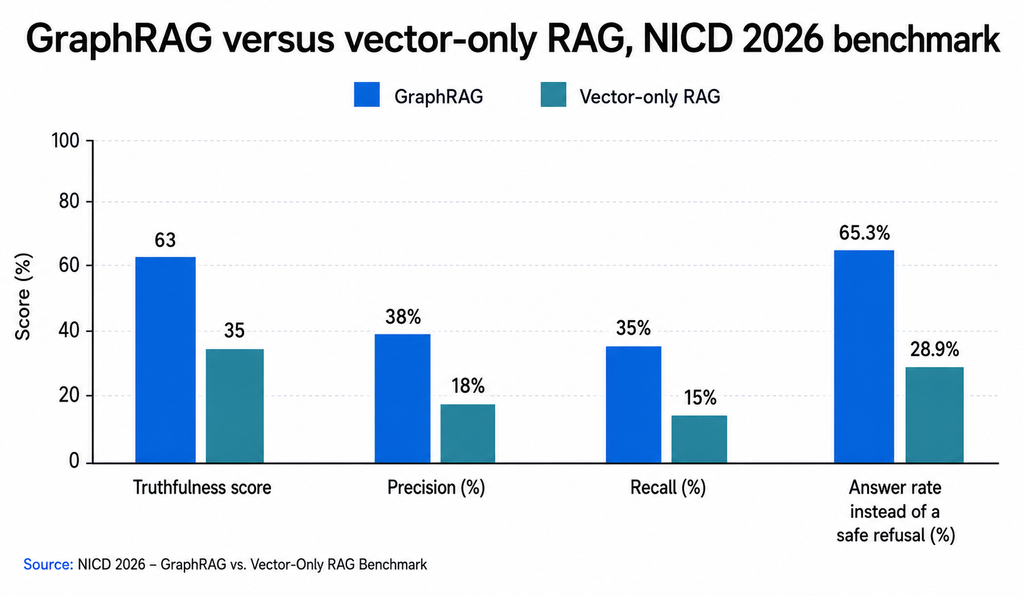
A 2026 study run independently by the U.K.’s National Innovation Centre for Data (NICD) tested three setups — no database, vector-only, and vector plus graph against 510 complex questions. GraphRAG scored roughly 80% higher on truthfulness than vector-only RAG, and successfully answered more than 65.3% of the complex questions, whereas vector-only RAG only answered 28.9%. The study also improved token efficiency because GraphRAG could target the relevant information they needed rather than reading entire articles.
A separate IDC study sponsored by Neo4j, published in May 2026, examined enterprises already running Neo4j in production and found GenAI hallucination rates dropped by an average of 44%. (Note: NICD tested a specific question-answering setup, while IDC examined organizations already running Neo4j in production, so the findings are not directly comparable.)
GraphRAG also leaves a trail, since the nodes and relationships used to assemble an answer stay visible after the fact. That matters whether you’re debugging a wrong result or explaining a correct decision. Because those relationships are explicit and traceable, teams can apply governance controls to the GraphRAG and trace the supporting context back to its source.
Does GraphRAG replace vector search?
GraphRAG doesn’t replace vector search. Vector search is still the right tool when a question can be answered from one relevant passage with semantic matching. GraphRAG is a better fit for questions that require multi-hop reasoning, where the relationships between facts matter.
The line between them is fluid in practice. In GraphRAG, a graph can store vector embeddings inside its entities and relationships, and vector search often serves as the starting point for graph traversal.
The query below shows the retrieval pattern, taking the support-ticket question and tracing the outage back to a vendor. It uses the neo4j-graphrag package (pip install neo4j-graphrag).
from neo4j_graphrag.retrievers import VectorCypherRetriever

graph_retriever = VectorCypherRetriever(
    driver,
    index_name="ticket_embeddings",
    embedder=embedder,
    retrieval_query="""
    WITH node AS ticket
    MATCH (ticket)-[:AFFECTS]->(service:Service)
          <-[:RUNS]-(vendor:Vendor)
          -[:HAD]->(outage:Outage)
    RETURN ticket.text AS ticket_text,
           service.name AS service,
           vendor.name AS vendor,
           outage.summary AS outage_summary
    """
)
First, the vector index finds the closest matching ticket. Then the graph query continues from that match, traversing the graph to return connected context, such as the affected services, the vendors that run them, and their outages.
If you want to put hybrid retrieval (vector and graph) into practice, follow this step-by-step guide to combining full-text and vector search with graph traversal using HybridCypherRetriever.
How to choose the right retrieval for your pipeline
Look at the retrieval failure before changing the architecture. Your results will tell you which retrieval architecture is right for your situation.
Poor semantic matches point to a tuning problem — chunking, embeddings, or filtering. Consistently retrieving the right facts without the relationships between them points to something a tuning pass won’t fix.
To tell which one you have, build a test set that mirrors your production traffic: clean and messy phrasing, single-hop lookups, multi-hop questions, and cases where the answer needs evidence from more than one source. Run it through your pipeline and compare context precision (the share of retrieved results that were relevant), context recall (the share of needed evidence you retrieved), answer faithfulness, latency, and token cost. If GraphRAG doesn’t move those numbers, the added complexity of modeling and maintaining a graph isn’t worth it. If it does, that’s your evidence to build it.
Get started with GraphRAG
Vectors retrieve, graphs reason. For complex questions that depend on connected facts, GraphRAG performs better than vector-only retrieval. Preserving the relationships among those facts can give an LLM the context needed to answer questions that similarity alone struggles to resolve, and also offers a traceable path back to the evidence behind the answers.
You don’t need to choose one architecture over the other:
Neo4j supports vector search and graph traversal in the same database, so you can add GraphRAG when needed, and build from there with the GraphRAG Python package.
Build your first GraphRAG application
Put GraphRAG into practice in a hands-on GraphAcademy workshop. Build a knowledge graph, work with vector and vector-plus-Cypher retrieval, and create a conversational agent.
FAQs: Vector RAG vs. GraphRAG
Vector RAG retrieves content by ranking embedded text chunks against a query’s similarity, while GraphRAG retrieves content by traversing the relationships between entities in a knowledge graph (often alongside vector or full-text search) so it can assemble evidence spread across several connected records.
For complex questions that depend on connected facts, the evidence favors GraphRAG. In the 2026 NICD benchmark, GraphRAG outperformed vector-only RAG on truthfulness and its ability to answer complex questions. Vector RAG is still well-suited to straightforward semantic retrieval, especially when the answer can be found in a single relevant passage.
GraphRAG can answer questions that require multiple steps of reasoning, like connecting a support ticket to the vendor behind an outage. A vector pipeline can still answer some of these types of questions if the full chain happens to appear in one retrieved passage, but similarity search itself has no way to traverse relationships between separate records.
Hybrid RAG combines vector similarity search with graph traversal in the same pipeline, so it works alongside vector search rather than replacing it. A vector match finds the starting point, then graph traversal expands outward from there within a single retrieval flow. Vector and graph retrieval can also run independently, with the results merged or reranked before generation, or an agent can route each query to whichever path fits.
On top of the chunking and indexing that a vector pipeline already needs, GraphRAG requires that you model entities and relationships, build and maintain the graph, and write retrieval queries that reflect your domain. GraphRAG pays off when multi-step reasoning or explainability starts to matter more than semantic match.
Vector retrieval lets you inspect the chunks, metadata, and similarity scores returned for a query. GraphRAG can also trace the nodes and relationships used to assemble the context, making it easier to see how the supporting facts connect.
Share Article


Explore
Related articles

MIT Technology Review Insights research explains why 13% of companies have a 61% AI success rate