Rescored binary vector search in Neo4j: search more with less memory

Principal Database Product Manager at Neo4j
8 min read
As an AI application grows, its embeddings can quickly become one of its largest demands on memory. More documents, finer-grained chunks and richer embedding models all increase the amount of vector data your database needs to search. Keeping retrieval fast as that collection grows can mean paying for substantially more RAM.
Rescored binary quantization changes that balance. It dramatically reduces the memory footprint while maintaining retrieval speed and accuracy over a far greater range.

In our benchmarks, Neo4j 2026.09 delivers approximately both five times better throughput and also query latency than Neo4j 2026.08. An upcoming benchmarking post will explain the methodology and results.
In Neo4j 2026.09 Aura, EE and CE, rescored binary is the default for newly created vector indexes.
How rescored binary works
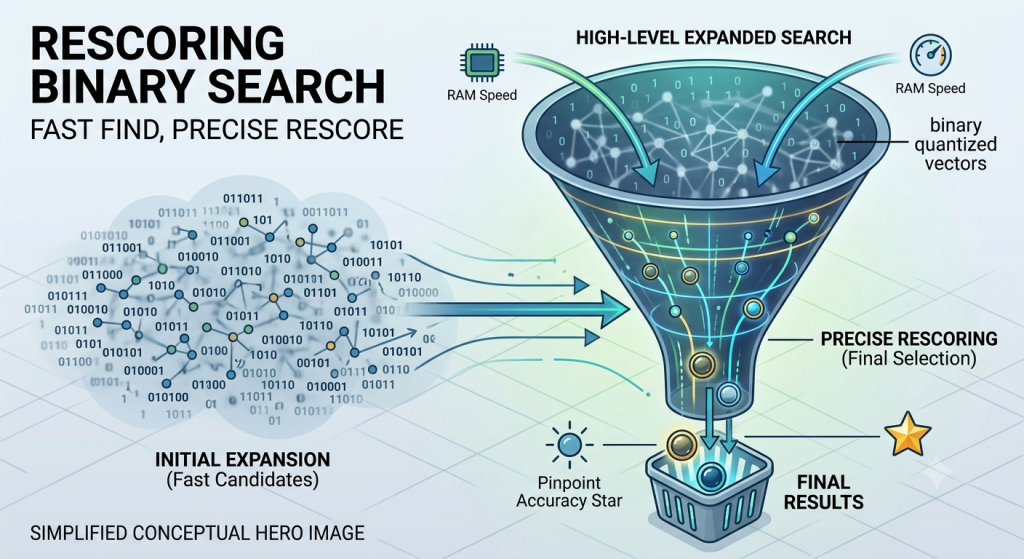
The high-level approach behind rescored binary is to
- perform an initial expanded search using highly compressed vectors (binary quantized vectors) to produce candidate results.
- the candidates are then rescored using their full-precision vectors.
This allows us to keep only the small HNSW (Hierarchical Navigable Small World) graph and compressed vectors in memory, while reading a small number of full-precision vectors from disk for rescoring.
There are a lot more techniques being applied under-the-hood, but this high-level description captures the most important aspects. If you’re interested in more details, Neo4j developed a technique it calls High Fidelity Quantized (HFQ) vector search that is inspired by work on RaBitQ at Nanyang Technological University and later by the BBQ implementation in Lucene.
For 768-dimensional Float32 embeddings (compared to our previous default scalar (8-bit) quantization) approximately four times as many vectors can fit within the same memory budget for the HNSW graph and quantized vector values.
The worked example below explains why the overall reduction is fourfold rather than eightfold relative to scalar quantization.

When to use rescored binary
Neo4j v2026.09 offers options that control quantization and rescoring, in practice this means you typically have a choice between three modes of operation:
- Rescored binary — quantization: binary (1-bit), search expansion factor: 3.0
- Scalar — quantization: scalar (8-bit), search expansion factor: 1.0
- Full-precision — quantization: none, search expansion factor: 1.0
We recommend rescored binary as the starting point for most workloads. In our tests, it achieves recall comparable to scalar quantization, with similar latency and throughput and a substantially smaller memory footprint for the search structures.
Scalar quantization can offer slightly lower latency (up to 30%) when its larger search structures fit in memory. If your priority is the lowest possible latency and memory is less constrained, compare scalar and full-precision search on your workload.
The chart below shows latency for scalar quantization and rescored binary as the dataset grows, measured by the size of its original Float32 embeddings. Both configurations run on the same hardware and achieve the same recall.

How to try rescored binary
To create a vector index in rescored binary mode, you simply need to create a new vector index without overriding the default vector.quantization.type and vector.default_search_expansion_factor options. To explicitly do this you can use the Cypher below.
CREATE VECTOR INDEX vector_index
  FOR (doc:Document)
  ON doc.embedding
  OPTIONS {indexConfig: {
    `vector.dimensions`: 1536,
    `vector.similarity_function`: 'cosine',
    `vector.quantization.type`: 'binary', //default, not required
    `vector.default_search_expansion_factor`: 3.0 //default, not required
  }};
The option default_search_expansion_factor plays an important role in rescoring. This tells the index how much to expand the initial search by.
If it is set to 3.0 and you search for the top 10 results, the initial search will yield the top 30 candidates based on their binary quantized embeddings and then rescore and filter them down to the top 10.
In our tests, an expansion factor of 3.0 achieves good recall, comparable to scalar quantization. The appropriate value depends on your embeddings and recall target.
To manually improve recall for a fixed number of final results, you can request more results from the vector index and then return only the highest-scoring matches. In the example below, $fetch_count controls the number requested from SEARCH, while $top_k controls the number returned to the application. Increasing $fetch_count also increases the number of candidates considered for rescoring.
MATCH (document:Document)
  SEARCH document IN (
    VECTOR INDEX vector_index
    FOR $query_vec
    LIMIT $fetch_count
  ) SCORE AS score
RETURN document, score
ORDER BY score DESC
LIMIT $top_k;
For example, with $fetch_count = 30, $top_k = 10 and a search expansion factor of 3.0, the expanded search targets 90 candidates for rescoring, SEARCH returns up to 30, and the application receives up to 10. Set $fetch_count at least as high as $top_k.
Rebuild your index
Rescored binary was introduced as a preview in Neo4j 2026.06 and became generally available in 2026.07. Its performance has improved substantially since then.
To ensure an existing index benefits from all the improvements in Neo4j 2026.09, rebuild it after upgrading.
Regular updates may allow an existing index to benefit over time, but rebuilding is the reliable way to ensure the entire index benefits.
Use the following query to retrieve and save the index’s CREATE statement. Check its configuration before reusing it: recreating an index with explicit older settings preserves those settings rather than adopting the new defaults. For rescored binary, select binary quantization and a search expansion factor of 3.0 either by relying on the defaults, or by explicitly declaring them.
SHOW VECTOR INDEXES
  YIELD name, createStatement
  WHERE name = 'vector_index'
RETURN createStatement;
Drop the existing index, then run the saved CREATE statement with any required configuration changes. The index will be unavailable for vector queries until rebuilding completes and its state is ONLINE.
Estimating memory requirements
To estimate the memory needed for efficient search, we look at two frequently accessed structures: the quantized vector values and the HNSW graph. Binary quantization makes the vector values much smaller, but does not provide the same reduction in the index’s HNSW graph structure itself. Consequently, the HNSW graph accounts for a larger share of the combined footprint.
The following example estimates the combined footprint for one million 768-dimensional Float32 embeddings, using HNSW M = 16. Figures use decimal MB and GB and exclude additional metadata and overhead.
The formulas are:
- 8-bit-scalar-quantized vector values ≈ 4 bytes per dimension x dimension count x vector count / 4
- 1-bit-binary-quantized vector values ≈ 4 bytes per dimension x dimension count x vector count / 32
scalar-quantized vector values ≈ 3.072 GB / 4 = 768 MB
binary-quantized vector values ≈ 3.072 GB / 32 = 96 MB
The HNSW graph size can be estimated as follows:
- HNSW graph size ≈ 8 bytes x vector count x HNSW_M
With M = 16, the estimated HNSW graph size is 128 MB.
Taken together we calculate the following memory footprints:
- binary-quantized index with rescoring: 96 MB + 128 MB = 224 MB
- scalar-quantized index: 768 MB + 128 MB = 896 MB
This shows why rescored binary (1-bit) indexes don’t reduce the memory footprint by a factor of eight vs scalar (8-bit) quantized indexes.
There is a full discussion of memory configuration and disk space requirement in the Neo4j operations manual. See Vector index memory configuration — Operations Manual.
Aura vector-optimized configurations
For vector search workloads on Aura, we recommend the vector-optimized configuration, which allocates more of your instance’s memory to vector indexes. We also recommend selecting the largest available disk size (1:16) to take full advantage of rescored binary: its smaller memory footprint allows an instance to search substantially more vectors effectively, but those vectors still need to fit on disk, including the full-precision values retained for rescoring. See the Aura vector optimization documentation for configuration and sizing guidance.
Performance improvements in v2026.09
The initial release of rescored binary/HFQ in v2026.06 performed much better than scalar quantization, but it didn’t perform as well as we had expected. So over the last several months we have gone deep on benchmarking vector indexes. As a result we greatly improved our understanding and the performance of the index.
The chart below shows how performance has improved since the initial release. It also compares Neo4j with the range of performance observed in the peer implementations we tested. With the HNSW graph and binary-quantized vectors resident in memory, our results indicate that Neo4j 2026.09 matches or exceeds those implementations on the workloads shown. A forthcoming benchmarking post will explain the methodology, configurations and results in detail.

Conclusion
Rescored binary makes it practical to search more vectors with the memory you have, while retaining high recall through full-precision rescoring. With the performance improvements in Neo4j 2026.09, it’s our recommended starting point for most vector search workloads.
Try it with your own data and let me know how it performs. I’d welcome feedback on your results, the trade-offs you encounter, and what would make vector search in Neo4j more useful to you.
Rescored binary vector search in Neo4j: search more with less memory was originally published in Neo4j Developer Blog on Medium, where people are continuing the conversation by highlighting and responding to this story.
Share Article



Explore
Related articles



Connected Intelligence: Accelerating Enterprise AI throughout the cloud ecosystem