Multiple databases now generally available in AuraDB


4 min read
Multiple databases are now generally available in AuraDB Business Critical and Virtual Dedicated Cloud. You can run multiple independent databases within a single AuraDB instance, sharing its resources while maintaining full data separation between them. That gives teams a simpler way to consolidate workloads while keeping databases separate and independently managed.
One instance, many graphs
Enterprise graph workloads rarely stop at one database. Every graph project outgrows its first instance. The first graph application grows to five, each needing dev, staging, and QA environments, and suddenly, a team is managing twenty instances for what is really a handful of workloads. For SaaS companies building on Aura, the problem compounds per customer. Every tenant needs isolated data, but provisioning a full instance per tenant means paying for compute that sits mostly idle, and operating a fleet where each new customer adds infrastructure to size, monitor, patch, and pay for. Teams moving past their first AI application hit the same wall. One instance per workload doesn’t scale, operationally or financially.
With multiple databases, an AuraDB instance hosts many databases side by side. Each database remains separate while sharing the instance’s compute and storage. Each one is separated from the others, easy to add or remove, and fully managed from the Aura API or Console. It’s all included in the standard AuraDB instance pricing, regardless of how many databases you run!
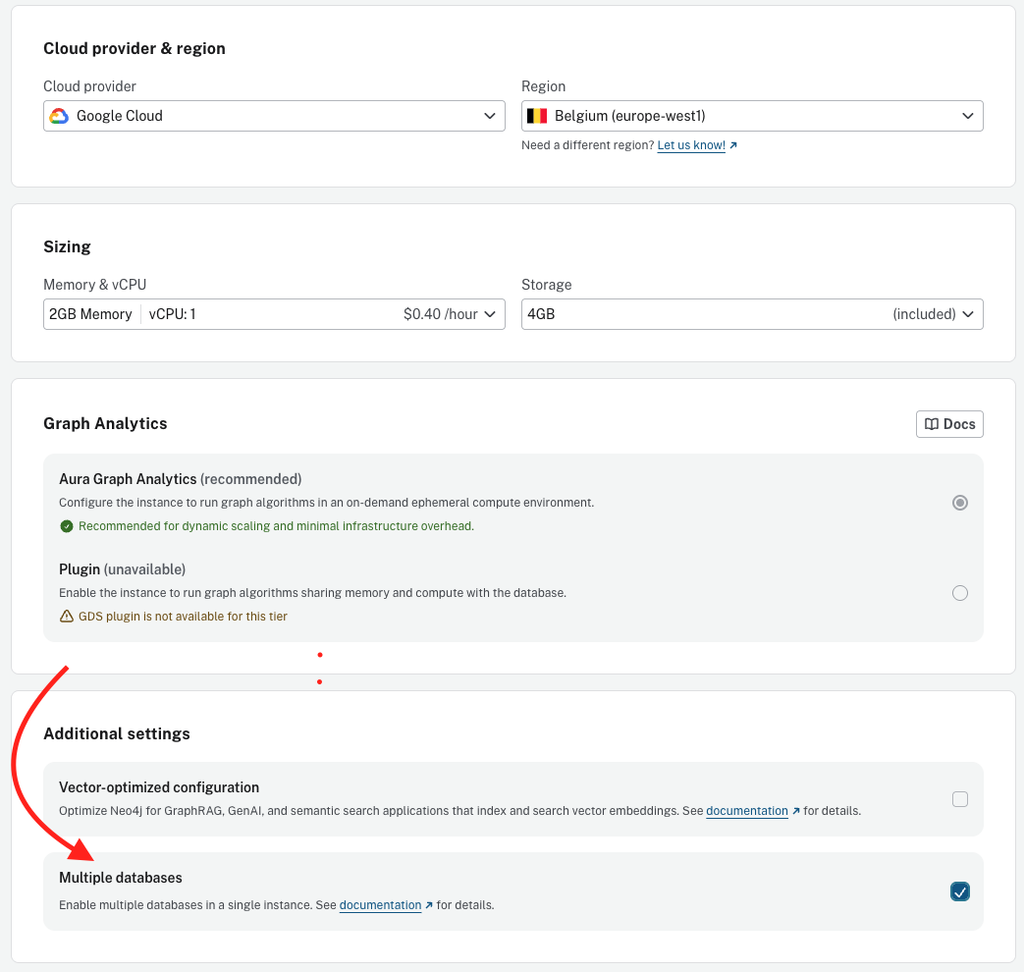
Enabling Multiple databases under Additional settings during instance creation.
Where multiple databases fit
Multi-tenant applications for OEMs and SaaS builders. Give each customer their own database in a shared instance. You get data separation per tenant and one instance to operate. Onboarding a customer becomes an API call, not an instance provisioning request, and restoring one tenant never touches another.
Agentic applications, at the right scale. Systems that need a graph per agent, knowledge domain, or application context can run each one as its own database within a single instance, up to the database limits for your tier, with access governed through RBAC.
Departmental and domain separation. A central platform team can offer graph as a service inside the organization: a single governed instance, a database per team or project, access controlled by RBAC, and capacity managed in one place.
Workload segmentation. Keep transactional and analytical graphs as separate databases so each can be backed up, restored, and evolved on its own terms, even when they share an instance.
Environment consolidation. Dev, test, staging, and training environments rarely require dedicated compute resources. Run them as databases in a shared non-production instance and manage capacity more efficiently in one place.
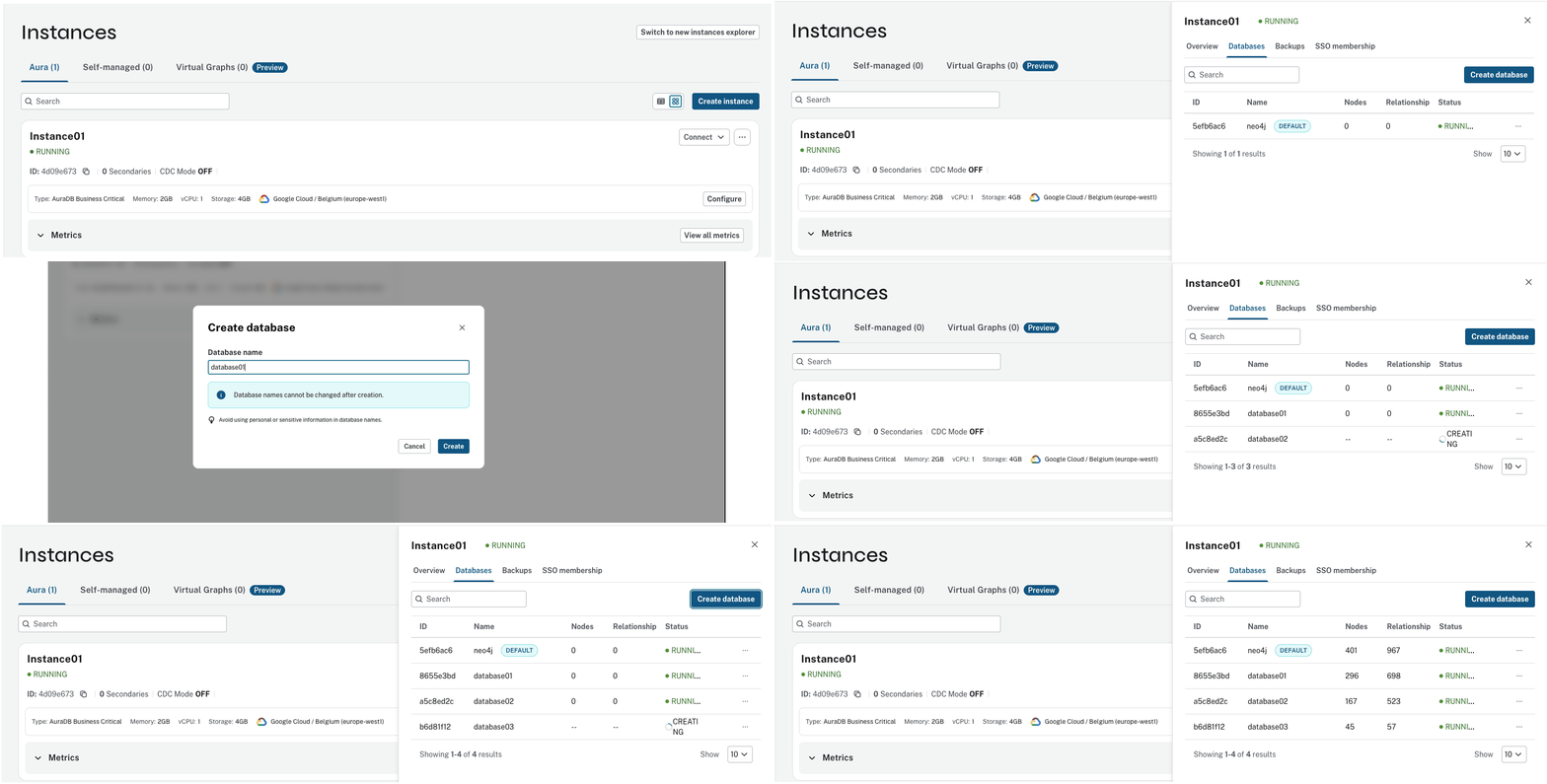
Database list within a multi-database instance, showing per-database status and life cycle actions.
Built for production
When your tenants, agents, and business domains share an instance, the number of databases isn’t the hard part. Trust is. So we made sure multiple databases meet the same bar as the rest of AuraDB:
- Fully managed. Databases are lightweight, so creating one takes seconds. Create, manage, connect to, and delete them from the Console or the Aura API, so the full lifecycle can be automated end-to-end.
- Observable. Metrics and logs work at the database level, so you can see what each workload is doing, not just what the instance is doing.
- Secure. It works with the security features of your tier, including single sign-on, IP filtering, and private endpoints, as well as standard Neo4j RBAC.
- Recoverable. Each database is a first-class object with its own backups (ad hoc, hourly, and daily), restores, and exports.
- Scalable. The scaling model is straightforward: by default, up to 5 databases per GB of RAM, with up to 250 databases on Virtual Dedicated Cloud and 100 on Business Critical initially, you can choose an instance size that fits both your database count and your workload.
- Familiar. Bloom, Query, Import, and Dashboards all operate at the database level, and your existing drivers connect by specifying the database name.
From preview to general availability
During preview, we worked with customers on real workloads: SaaS platforms isolating their tenants, platform teams consolidating environments, and enterprises giving each business domain its own graph. Thank you to the many customers who have been running multiple databases since preview. Their experience and feedback shaped what we shipped at general availability on September 30, 2026.
A milestone for customers moving from self-managed
For teams running self-managed Neo4j, hosting multiple databases within a single deployment has long been part of the toolkit. It has also been a hurdle when considering a move to Aura. Now, teams can bring an existing multi-database architecture to AuraDB without redesigning it around one instance per database.
What’s next
This is the beginning, not the finish line. We have enhancements planned for the coming months and will announce them as they land.
Get started
Create a new AuraDB Business Critical or Virtual Dedicated Cloud instance, enable Multiple databases under Additional settings (set at creation), and start bringing your graphs together. Tell us how it goes with the Feedback button in the Console, or reach out to your Account Manager or Customer Support.
Share Article



Explore
Related Articles