What got me building this was a pattern I kept noticing. People start out not knowing how to build a knowledge graph.
The Document Intelligence feature solves that: you point it at your files and get a graph inside Neo4j Aura. And then the next question arrives.
We have a graph. How do I build on it, and plug it into my own app and system?
graph-explorer-kit, built on Neo4j’s neo4j-graphrag library, retrieves the graph and runs an agent over it, behind an API your app can call. The Graph Explorer lets people watch an answer take shape and add to the graph themselves.
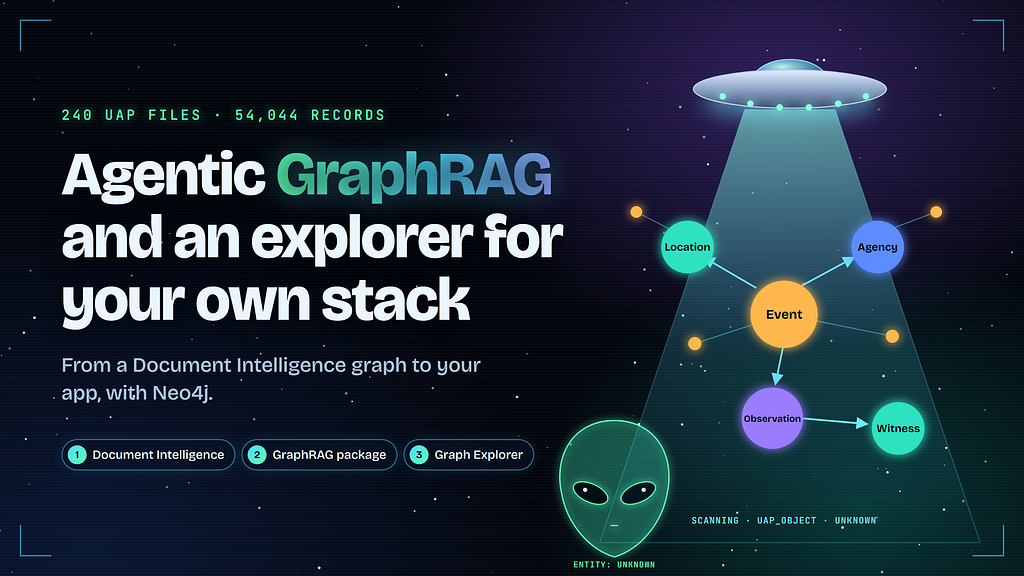
To test the whole path, I ran it on 240 released documents about UFO sightings. They’re scans of typed reports and memos, and a single sighting can show up in a witness statement, an intelligence summary and a redacted memo that don’t agree with each other.
1. Document Intelligence: from files to a knowledge graph
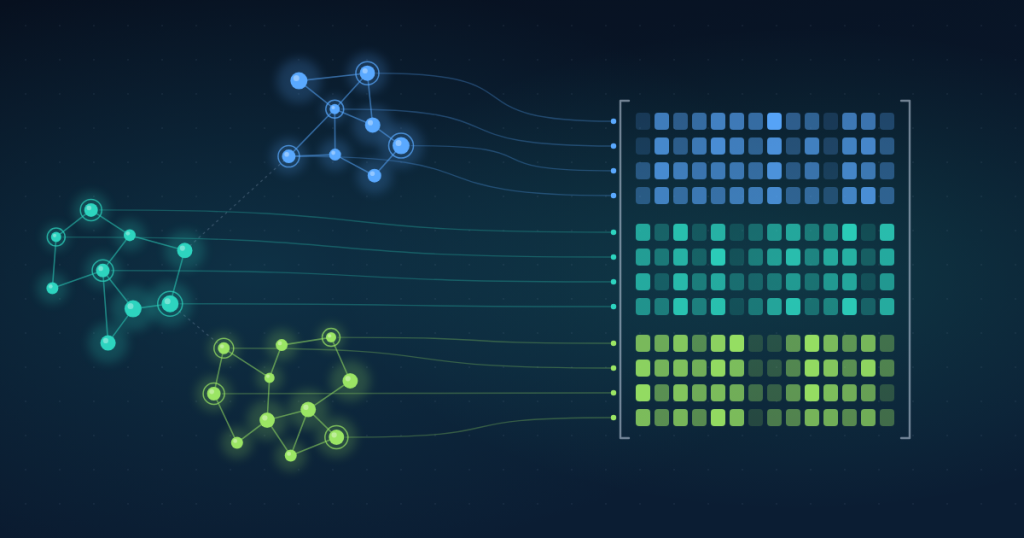
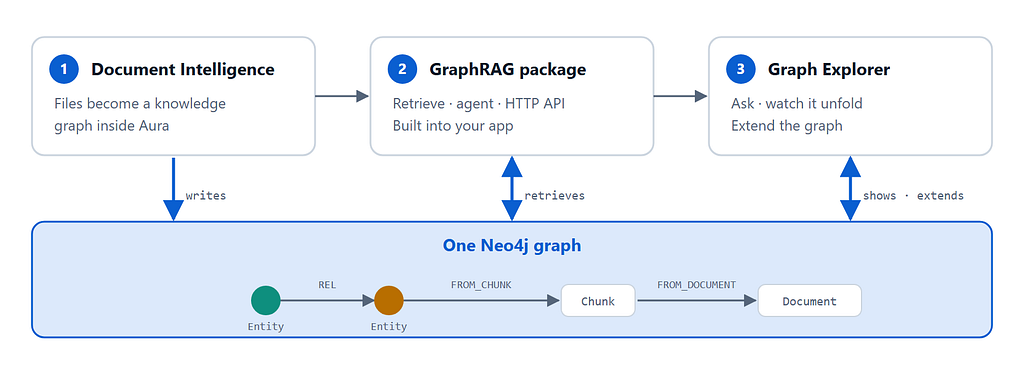
Document Intelligence turns your files into a knowledge graph inside Aura. I started with five of the released PDFs, and what came back was a graph with the information contained inside them:
- Source files, split into chunks with embeddings
- Entities and relationships extracted from those chunks: people, events, locations, agencies
- A link from every entity back to the chunk it came from
That link provides provenance: any claim can be walked back to the passage and the PDF it came from.
The other 235 files were mostly scans, so I used the package to prepare and ingest them under the same schema.
It’s POLE (Person, Object, Location, Event), plus agencies and the paper trail itself, with Claim, Evidence and Redaction as nodes.
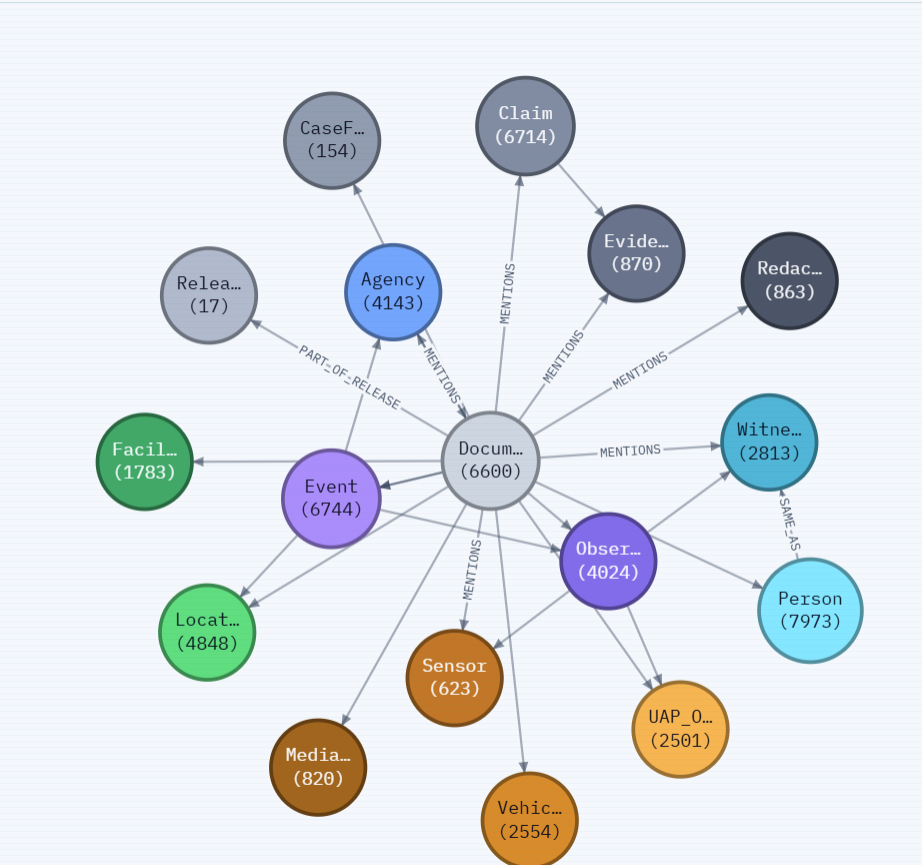
Of 10,214 prepared pages, 6,759 had a usable text layer, 1,499 needed OCR, and 1,956 were judged illegible. The end result is 54,044 records, 58,429 relationships and 24,971 passages.
2. The GraphRAG kit: build it into your app
The kit is a Python library built on neo4j-graphrag, and I tried to keep the integration surface small. Everything about your domain lives in one ProjectSpec, a Python dataclass in your project’s module: schema, extraction rules, example Cypher, seed questions.
From there you have three options.
- call a retriever from your own code,
- hand its tools to your own agent,
- call the HTTP API.
POST /api/ask returns the answer, the retrieved context and related graph context as JSON, and /api/ask/stream sends the same work as server-sent events.
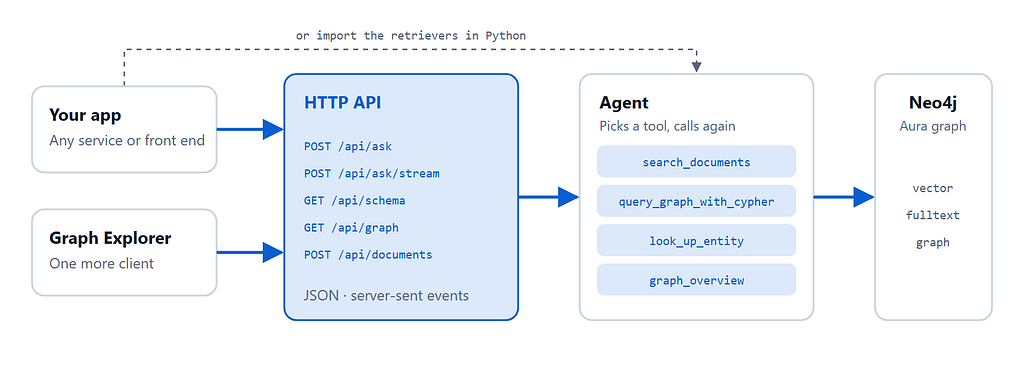
It reads the Document Intelligence graph as it is. The spec tells it what the labels are called, and graphrag-adopt then adds three things next to your data: a Chunk label alongside Document Intelligence’s __Chunk__ (a vector index covers only one label), embeddings from your own model, and a readable source name on each file (Document Intelligence stores a long upload link there). –dry-run shows what it would change first, and –undo removes exactly what it added.
One of the missing pieces was embeddings with your own model. The package embeds every question with the model you configure, and a question only matches chunks that were embedded by that same model.
Document Intelligence’s vectors come from a model (gemini-embedding-001), so I embedded the chunks again with the model I already used for ingestion, retrieval and the agent, and stored the vectors next to the originals.
Document Intelligence’s own index keeps working. If you can call the embedding model it used, you could skip this step. Otherwise, pick any embedding model for the kit and set EMBEDDING_DIMENSIONS to that model’s vector size (1536 for text-embedding-3-small, 3072 for text-embedding-3-large). The vector index is created at a fixed width, so the two have to agree.
Now for our New Mexico question: “What did witnesses report over New Mexico in 1949, and which agencies looked into it?” A witness statement tells you what was seen. An intelligence summary tells you which agency looked into it. No single passage holds both, so vector search hands back two half-answers. The graph holds the whole chain: an Event that OCCURRED_AT a location, was INVESTIGATED_BY an agency, and HAS_OBSERVATION of an observation REPORTED_BY a witness.
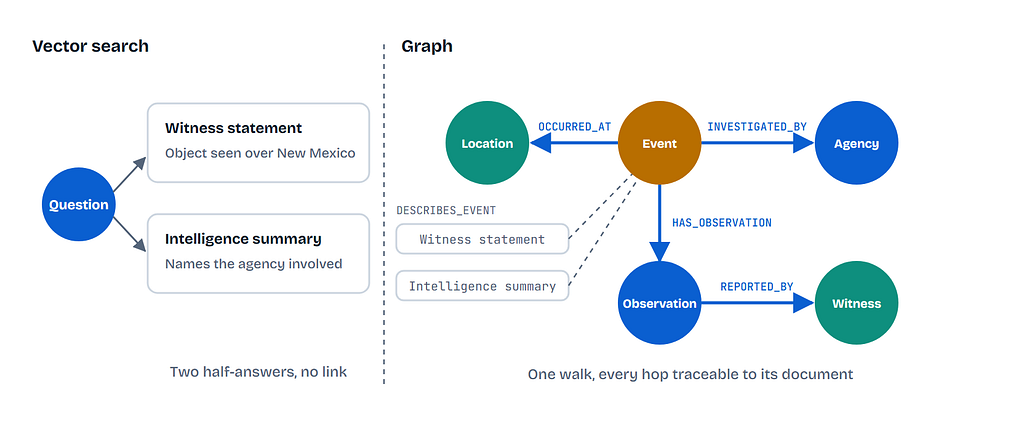
A fixed retriever still only answers half of some questions. Semantic search undercounts. text2cypher counts correctly but rarely reads the prose. So I give the agent the retrievers as tools. It picks one, sometimes calls several, and calls again once it has read the result:
- search_documents: hybrid vector, fulltext and graph, for anything the text answers.
- query_graph_with_cypher: counting and listing every match. Writes are rejected.
- look_up_entity: a name you already have, and its connections.
- graph_overview: what kinds of things exist.
Ask the agent “Which agencies investigated the most events?” and it generates the Cypher to execute itself. When it counts, it notices that the same event is recorded under several names and reports both numbers, which makes for a nice demo moment. If you’d rather choose the strategy yourself:
- vector: vector only. Chunks that sound like the question.
- hybrid: vector + fulltext. Recovers proper nouns that embeddings blur.
- vector-cypher: vector + graph. Graph expansion, no keyword matching.
- hybrid-cypher: vector + fulltext + graph. The default.
- text2cypher: graph only. Writes the Cypher. “What shapes were reported, and how often?”
A plain exact-name merge would have collapsed 48 redacted witnesses across 15 files into one person. So [REDACTED] never merges, and only labels that act as identities, like Agency and Location, merge across documents.
Choose your models: Microsoft Foundry or OpenAI
The kit needs one chat and one embedding model, from Microsoft Foundry (the default, signed in with Entra ID after az login, no key stored) or OpenAI (LLM_PROVIDER=openai and an OPENAI_API_KEY). Keep EMBEDDING_DIMENSIONS matched to your embedding deployment. The rest is in the engine manual.
3. Graph Explorer
The explorer is just a client of that same API, and graphrag-serve opens it in your browser. Ask the New Mexico question and the graph shows with the pipeline: the matched passages first, then the entities extracted from them, then one hop of neighbours, while the model is still writing.
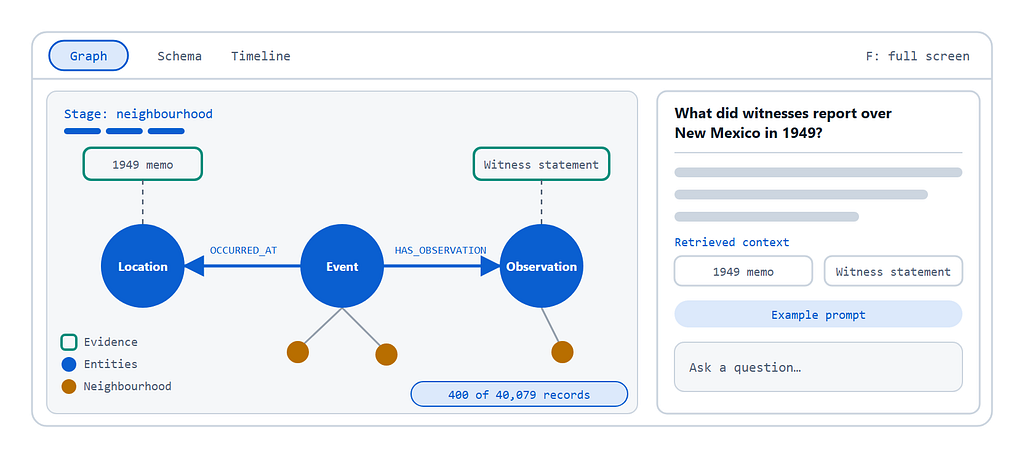
Start from the spine. The Graph view opens on the most connected records: the FBI, USCENTCOM, the Air Force, NASA and AARO. Double-click the FBI and sixty of its connections are shown.
- Roll it up. Types shows one node per label, such as Document MENTIONS ×37,937. Schema explains why Claim, Evidence and Redaction are nodes, and Timeline orders the dated events.
- Ask a follow-up. “Which agencies investigated events over New Mexico?” then “and which of those appear in the 2020s mission reports?” The thread lives in the same Aura instance.
- Extend the graph. Drop a newly released PDF on the rail. A scan is OCR’d on the way in, then what it added lights up.
There are some limits to this approach. The rings come from a separate lookup, so read them as related graph context, not a trace of each claim. And scans are noisy: some Agency records are date strings read off a stamp. Nothing here asserts an origin for anything. The graph holds what observers reported, what instruments captured, what agencies concluded, and where those disagree. I call each stage a ring: the matched passages land first, the entities extracted from them next, then one hop of neighbours, each ring growing out of what’s already on screen.
Get started
git clone https://github.com/ZaidZaim/graph-explorer-kit.git
cd graph-explorer-kit
git checkout ufo-documents
uv sync
cp .env.example .env     # GRAPHRAG_PROJECT=projects.ufo, NEO4J_*, models
uv run graphrag-adopt --relax-constraints
uv run graphrag-setup
uv run graphrag-serve    # http://localhost:8000
–relax-constraints is only needed if you want to add new documents. Document Intelligence creates uniqueness and existence constraints that reject the second mention of the same entity, so a new document would silently ingest to nothing. The flag drops those constraints, replaces them with plain indexes, and records the exact definitions in your graph. graphrag-adopt –undo restores them. Run graphrag-adopt –dry-run first to see what would change.
- Start building. Clone graph-explorer-kit and swap in your own schema and corpus.
- Watch the walkthrough. Turn public UFO documents from war.gov/ufo into a grounded Knowledge Graph Agent.
- Read the announcement. Introducing Document Intelligence.
- Get the records. The public releases are at war.gov/ufo.
- Try Aura. Spin up AuraDB and point .env at it.
- Building in .NET? Read Jose’s companion article here
Agentic GraphRAG and an explorer for your own stack was originally published in Neo4j Developer Blog on Medium, where people are continuing the conversation by highlighting and responding to this story.
Share Article


Explore
Related articles
The Neo4j Ontology Graph Specification: A pragmatic, open, AI-first approach