Introducing Document Intelligence: From documents to a knowledge graph, right inside Aura



11 min read
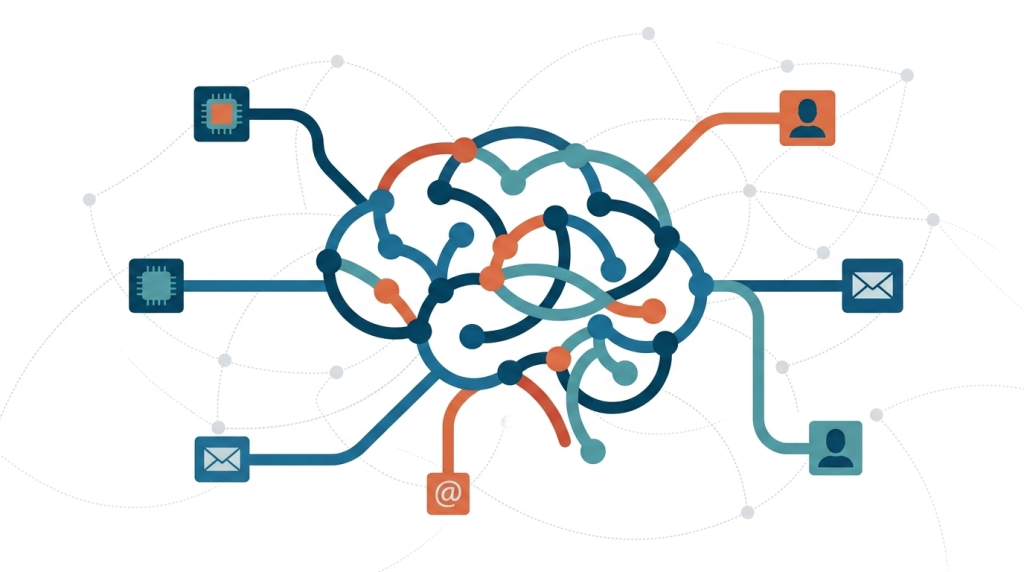
Over the past few quarters, we have seen agentic workflows move from experimentation to production across the enterprise. Increasingly, customers bring us the same requirement: 90% of the data their agents need to reason over lives in documents (10-Ks, contracts, research papers, policy manuals, internal wikis), and their AI systems can read every word of those individual documents without ever seeing the relationships that tie them together. Vector search finds similar fragments. It cannot traverse the entities behind them.
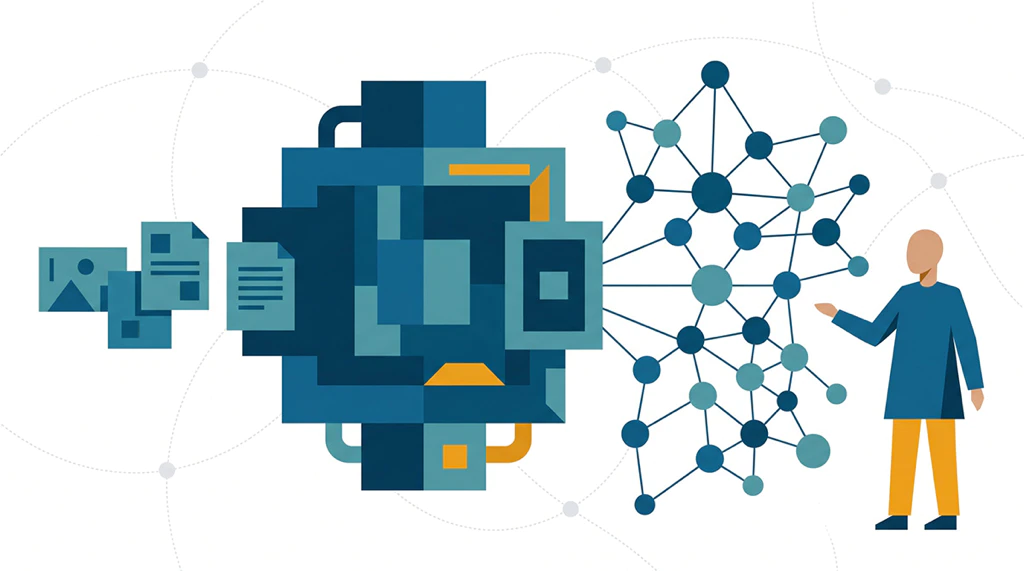
A knowledge graph closes that gap. The hard part has always been getting there: schema design, ontology decisions, extraction prompts, glue code, weeks of iteration. That is exactly what we set out to fix. Today, we are announcing Document Intelligence, available now in preview inside Neo4j Aura on all cloud providers and tiers. It turns documents into a queryable knowledge graph through a guided experience in the Aura console. No graph modeling background required, no extraction code to write. Drop in a PDF to the agent, describe what you want extracted in plain English, and watch the graph build itself. Once that is done, you can chat directly with your graph right there in the document intelligence agent and ask questions.
Why Document Intelligence?
Every team building with AI hits the same wall. Language models are powerful reasoners, but they need clean, structured, connected data to reason well. Without it, their context window fills with noise, and accuracy collapses. The documents they reach into were never structured for graph-shaped retrieval. When an agent needs to answer “show me every product line the company operates and the segments it sells into” or “which risk factors are shared across these filings,” vector search and a keyword index are not enough. The agent needs a graph: something it can use to retrieve the relevant context surgically, explain where answers came from, and stop burning tokens on noise.
The questions we have heard from data and AI teams over the past year:
- How do I turn a folder of PDFs into a knowledge graph without spinning up a parallel ML pipeline?
- How do I tell the extraction what I actually care about, like products, services, or risks, without writing extra prompts?
- How do I do all of this while keeping my data protection, security, and compliance posture intact?
- How do I see a preview of what was extracted from my documents before any of it lands in my database?
- How do I do all of this inside the environment where I already run my graph workloads?
- How do I let my agent query across both my structured enterprise data and my documents, traversing the relationships that connect them?
Document Intelligence is built to answer all questions above.
Meet Document Intelligence
Imagine pointing a tool at a folder or bucket of documents and getting a queryable knowledge graph in minutes, with no extraction code, no schema scaffolding, and no parallel pipeline to maintain. That is Document Intelligence. It runs natively in Neo4j Aura, alongside the Agents, Import, Query, and Explore tools you already use. Here is what that looks like in practice.
1. Generate a graph model from your documents
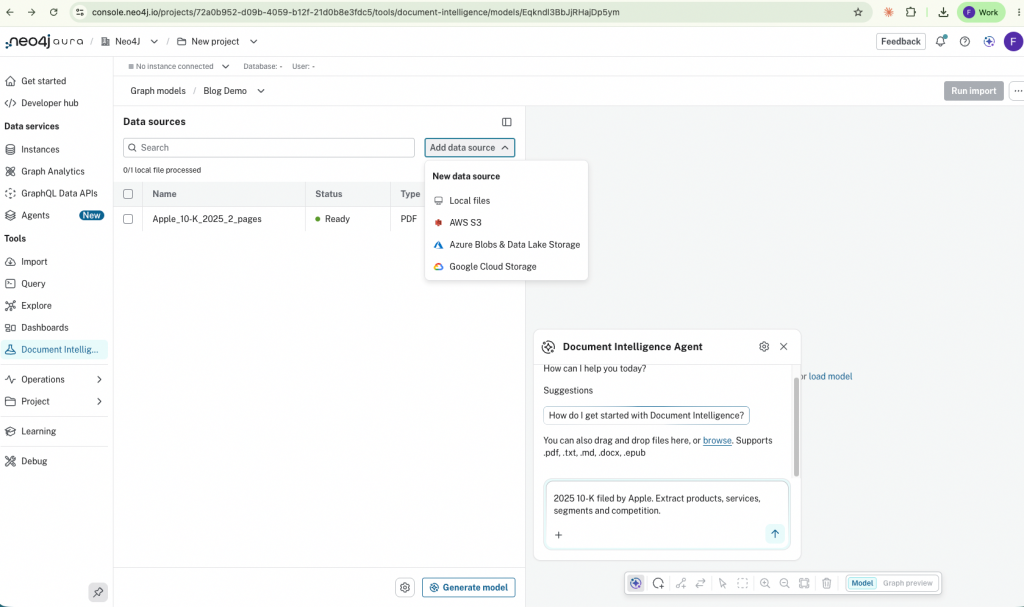
Open Document Intelligence in the Aura console, click Create graph model, and add a data source. Drop in local files, or connect a bucket through the Cloud data sources tab. PDF, DOCX, TXT, EPUB, HTML, and Markdown are supported at launch. Click Generate model, and Document Intelligence parses your documents, samples across them, and proposes a starting graph model grounded in what is actually in your content. You can also skip the auto-generation and describe the model you want directly to the built-in document intelligent agent. For many domains, that is the faster path. It also allows you to do everything you can do through the document intelligence product through the agent, and you can chat with your data.
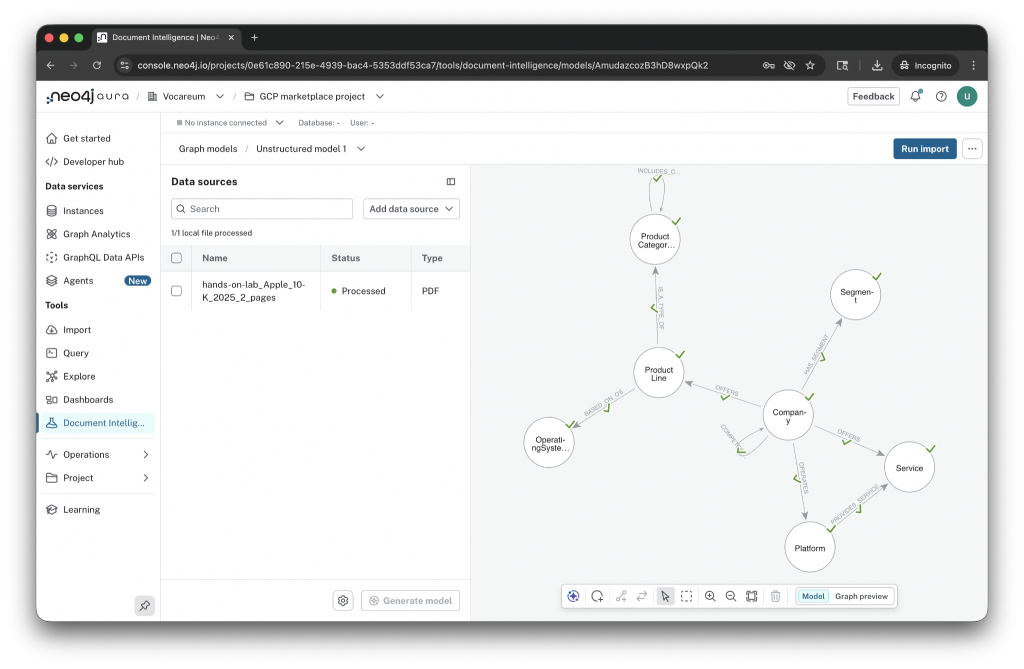
For an Apple 10-K, two pages of text come back as Company, Product Line, Product Category, Segment, Service, Operating System, and Platform, with relationships like OFFERS, HAS_SEGMENT, OPERATES, IS_A_TYPE_OF, BASED_ON_OS, COMPETES, and PROVIDES_SERVICE. The model lands on a graph canvas you can zoom, inspect, and edit directly or with the built-in schema agent.
2. Guide the extraction with a single prompt
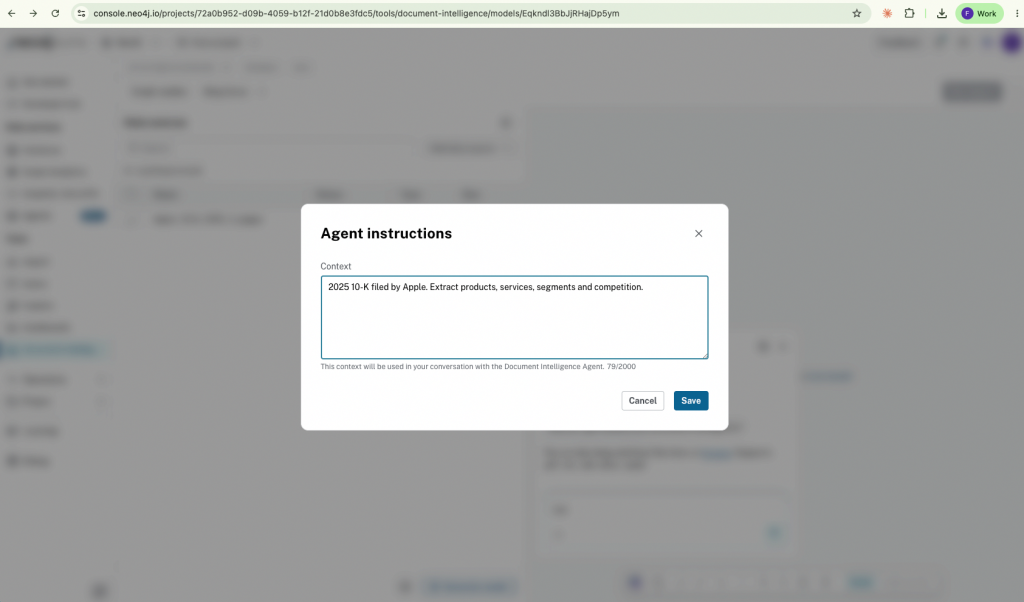
The most important field in the experience is one text box. The model already tells the agent what types to extract. The prompt is where you give it the context: focus areas, the business questions you want the graph to answer, and any specific entities you want the agent to recognize by name.
For the 10-K example:
Focus on products, services, segments, and competition. Pay particular attention to year-over-year changes in segment revenue.
Or, when you want the agent to anchor on entities it might otherwise miss:
Focus on financial risk factors. Recognize these portfolio companies by name: Stripe, Cohere, Anthropic, Hugging Face.
For an academic literature review, the prompt could read:
Focus on the methods used, the datasets evaluated, and the limitations the authors call out. Recognize Stanford, MIT, DeepMind, and Anthropic as institutions. Ignore acknowledgments and funding statements.
That short paragraph is the difference between a generic graph and one that answers the questions your business actually asks. Context engineering, condensed into a single field. No prompt tuning, no eval harness, no extraction pipeline to maintain.
3. Preview the extracted graph, then import into Aura
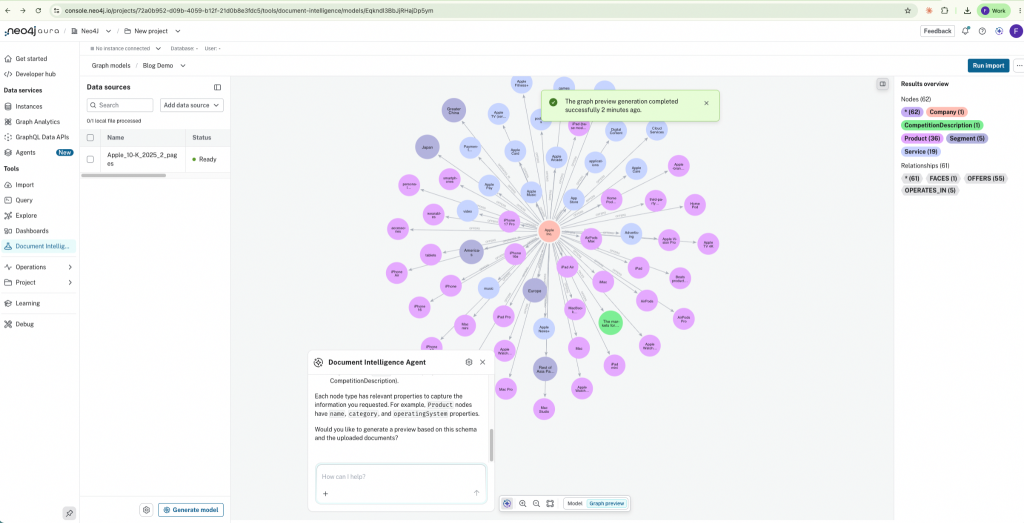
Toggle to Graph preview at the bottom of the canvas and you see the model populated with real entities extracted from a sample of your documents. For the 10-K, that is Apple Inc. at the center, surrounded by iPhone, iPad, Apple TV 4K, HomePod, AirPods, Apple Music, Apple Card, Apple Pay, Apple Fitness+, App Store, and Cloud Services; segments like Americas, Greater China, Japan, Europe, and Rest of Asia Pacific; competitors and platforms. All connected, all extracted from two pages of text.
The entities and relationships were always there, buried in flat text where no traversal could reach them. Document Intelligence surfaces them, and it connects your documents through the entities they share. Two pages of a 10-K become a graph you can query. A hundred contracts become a graph that lets you ask questions no single contract could answer alone.
When you are happy with what you see, click Run import. The model, the extracted entities, the relationships, and the underlying lexical layer (documents to chunks to entities, with embeddings on the chunks) are written into your Aura instance. From there, you are in Neo4j: use Query, Explore or Dashboards, hand it to an Aura Agent or run directly with the document intelligent agent or plug it into a GraphRAG application. In addition, you can continue chatting with the data directly from the agent without needing any other tool.
How it works
Document Intelligence sits between your documents and your knowledge graph, with three pieces working together.
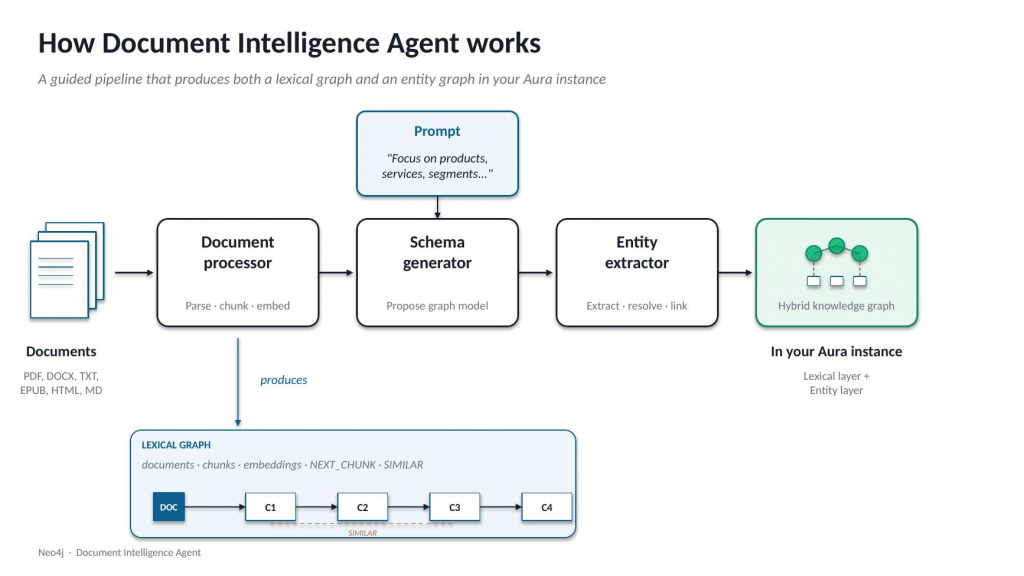
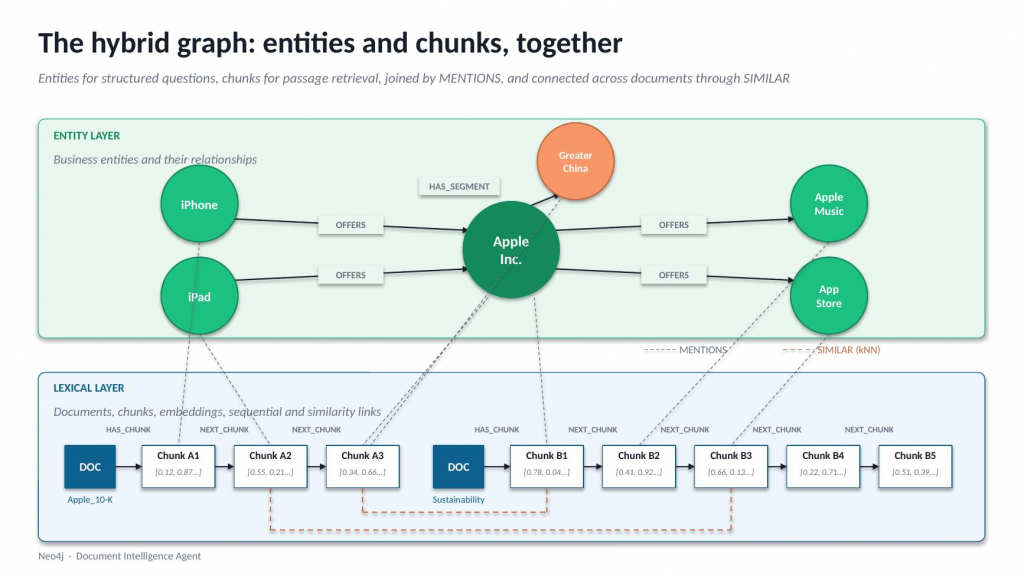
The document processor parses your files, chunks them in a layout-aware way, and stores both the chunks and their embeddings as a lexical graph: documents linked to chunks, chunks linked to each other, every chunk searchable by vector similarity.
The schema generator samples across your documents, takes your natural-language prompt as guidance, and proposes entity types, relationship types, and properties grounded in your content. The proposal lands on a graph canvas, where you can edit it directly or chat with the Document Intelligence agent to refine it before any extraction runs.
The entity extractor runs schema-guided LLM extraction with your instructions against every chunk, deduplicates entities through a merge step, so you do not end up with Apple Inc., Apple, Inc, and APPLE as separate nodes, and links each extracted entity back to the chunks it was mentioned in. Extraction runs as a background import job, so you can close the tab and come back to a finished graph. For small document sets, that is convenient. For larger ones, it is what makes the workflow usable at all.
The result is a hybrid graph in your Aura instance: a lexical layer for passage-level retrieval and provenance, and an entity layer for the structured questions your agents actually need to answer. Both live together, and both come out of the same workflow.
A heritage worth acknowledging
Neo4j has been working on knowledge graphs from documents since 2022. The earliest patterns were code-heavy: LangChain pipelines that gave teams complete control at the cost of significant engineering investment. Many of our most sophisticated customers still build that way, and that is the right choice when deep customization matters. Neo4j Labs then packaged the same approach into the LLM Graph Builder, a UI that made the pattern accessible to a wider audience.
Document Intelligence is the next step: the same proven patterns, brought into Aura as a first-class, supported capability, integrated with the rest of your graph workflows. It is the path we now recommend for most teams starting out, and a clear runway for the customers who have outgrown the labs experience and want production support.
What’s next: from focused preview to platform capability
Document Intelligence launches today as a focused preview. That is intentional. We want everyone to be able to take a folder of documents, hand it to Document Intelligence, and see a graph appear, without having to manage a complex pipeline first. But we are not stopping there.
Today, that means up to 20 documents per job, each 10 to 20 pages, in text-dominant formats (PDF, DOCX, TXT, EPUB, HTML, Markdown). Multi-column layouts, tables, and image-heavy documents are on the way. So is scale.
Here is what is on the roadmap:
- Scale. Hundreds, then thousands of documents per job, with parallel processing and queue management. The most common ask from our preview customers, and the one we are investing in next.
- Programmatic access. API, CLI, and MCP server endpoints so the same workflow you run interactively can also run from your pipeline, your IDE, or your agent.
- Complex documents. Multi-column layouts, tables, and embedded images with text. Layout-aware parsing for the documents that look less like text and more like reports.
- Semi-structured data. Starting with CSV files that carry a text column, the most common bridge between the structured and unstructured worlds.
- Composable architecture. Bring your own model, bring your own document processor, bring your own entity resolution. The defaults will keep getting better, and the seams will be open for teams that need to customize them.
- Context graph. Schema provenance, lineage, and the decisions that built your knowledge graph are captured as a separate graph alongside it, so the result is reproducible and the AI’s reasoning is auditable.
The knowledge layer for the agentic enterprise
Agents are only as good as the context they can reason over, and that context comes from three places: the operational graphs you already maintain, the structured data in your warehouse, and the documents that hold your domain knowledge. Neo4j Aura is the platform across all three.
- AuraDB is the home for your most valuable graph data, with the high-density relationships and millisecond latency your operational workloads need.
- Virtual Graph opens the structured data already in your warehouse to graph reasoning, without copies and without migration.
- Document Intelligence unlocks the 90% of your enterprise data that lives in documents, turning a folder of PDFs into a queryable knowledge graph in minutes.
Use these capabilities together on a single platform. That is how the most graph-mature enterprises will build.
We cannot wait to see what you build.
Ready to get started?
- Start building: Document Intelligence is live in every Neo4j Aura instance, across every cloud and tier. Sign in, open Document Intelligence in the left navigation, and you are one click from your first graph.
- Watch the demo: A short walkthrough, connecting a document, generating a model, and importing into Aura.
- Read the docs: Quick start, visual tour, and the full preview reference.
- Have a workload in mind? Drop us a quick note, and our team will be in touch.
Share Article



Explore
Related Articles
Introducing Neo4j Virtual Graph: Graph reasoning on the data you already have