One starter repo, three winners: Neo4j at Hack the Video Agent Context Graph

Sr. Developer Advocate
18 min read
AWS Builder Loft, San Francisco · July 30, 2026
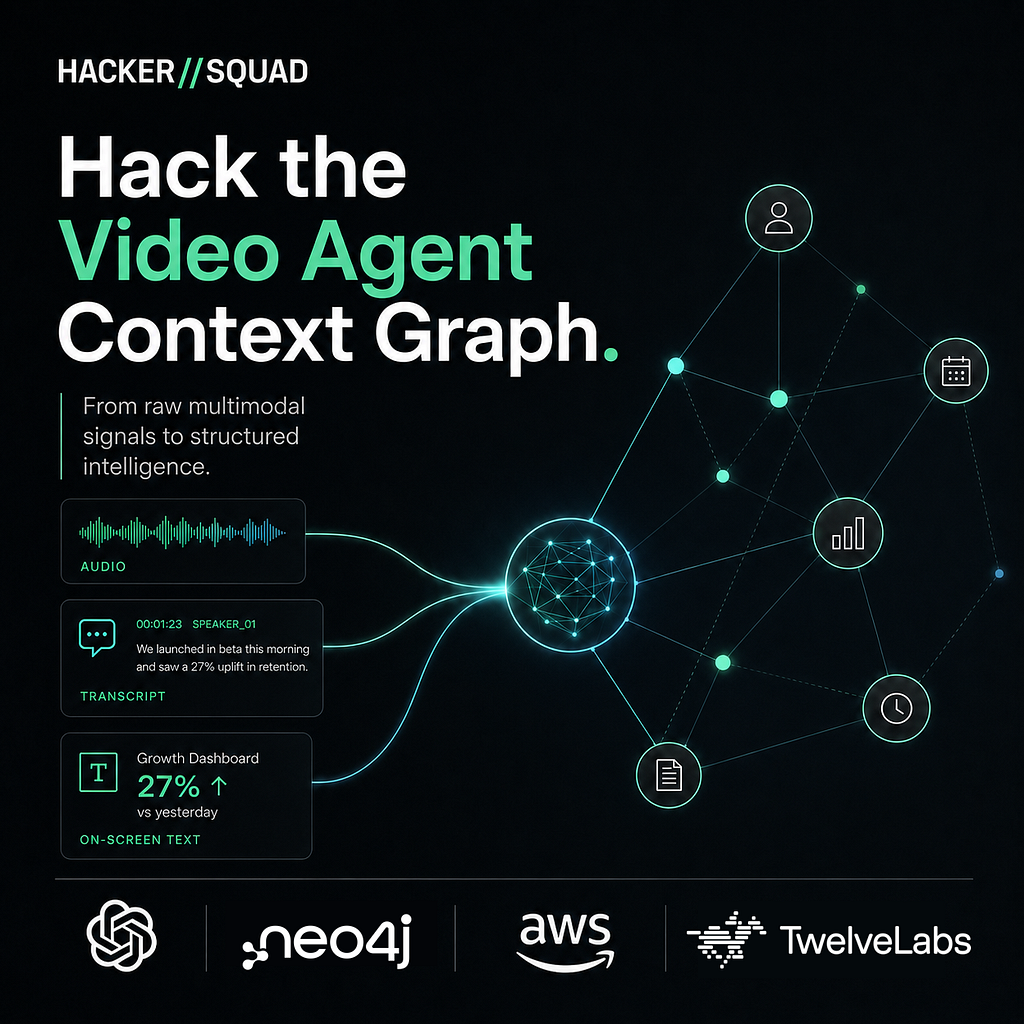
Last Thursday, 151 builders filled the AWS Builder Loft on Market Street for Hack the Video Agent Context Graph, hosted by HackerSquad with the AWS Builder Loft — one day, one theme, 37 projects, and four required tools: AWS Strands Agents for orchestration, OpenAI for reasoning, TwelveLabs for multimodal video understanding, and Neo4j for the context graph.
The whole stack was in the required toolset, so every project used all four. That makes the interesting question not whether the winners used a graph, but how well — and all three top teams did something genuinely smart with it. None treated Neo4j as a bucket to dump nodes into.
The theme was unusually specific too. Not “build an agent,” but: ingest raw video, extract what’s shown, said, and written, and model it as a graph an agent can reason over. That’s a lot of pipeline to stand up before you’ve built any product at all — Marengo indexing, Pegasus analysis, an extraction schema, a graph model, a viz layer, a chat surface. Spend your hack time on that and it’s tough to have more than scaffolding done by 4pm.
So to reduce undifferentiated work, demo some basic techniques, and let teams focus on innovation, I created a starter repo: jpadams/video-context-graph — a working end-to-end video→graph→agent app with all four required tools already wired together. I derived it from William Lyon’s create-context-graph (Neo4j Labs), repointed from generic domains to video. Open source all the way down. 🐢
Here’s what happened:
- Three of the top seven submissions built on the starter.
- Two of the top three, including the 🥇 winner.
- The one top-three project that didn’t fork it still lifted its live-graph pattern — and credits it in the README.
- And in the run-up, OpenAI sent a PR showing the current way they want the Responses API driven from Strands. More on that below, because it’s the single most copyable thing in this post.
What follows is what the top three built, how each one used the graph, and the three genuinely different ways they approached making this challenge their own.
🥇 First Place — MealPrep Video Context Graph
Roopa Gangadhar Devihosur · 🔗 GitHub
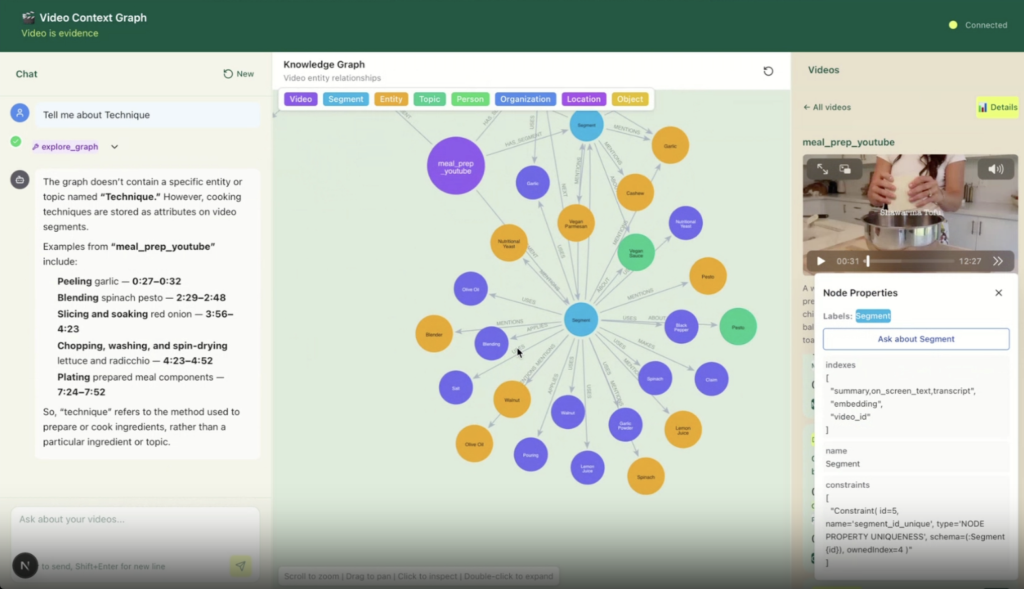
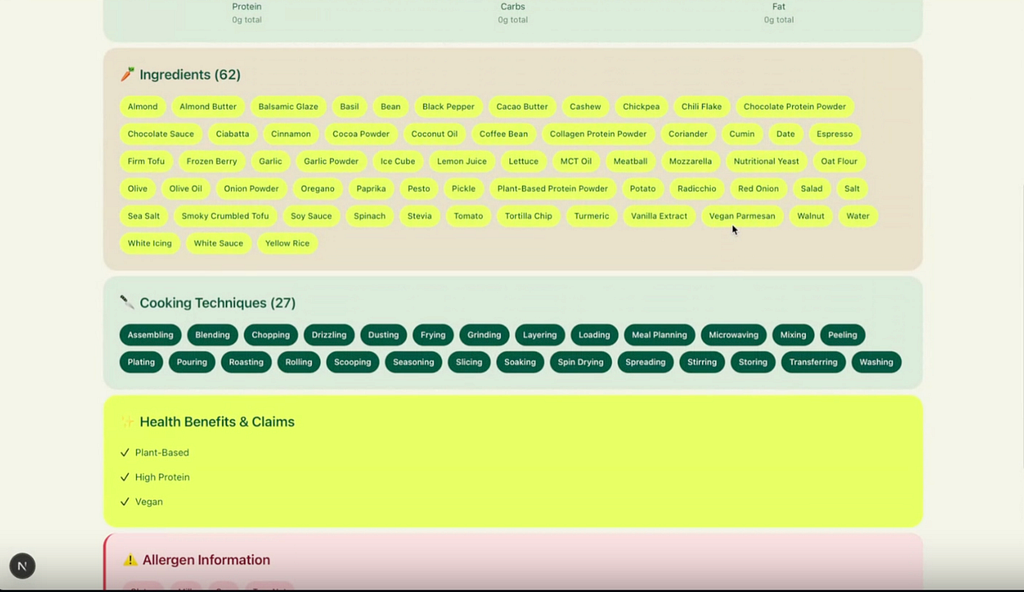
Meal prep videos, turned into a graph you can plan a week from. Point it at cooking videos and it doesn’t just summarize them — it extracts every ingredient with its quantity, every technique, every cooking temperature and time, the macros if the video actually states them, allergens, yield, and storage guidance. All of it at the segment level, so you can come at the collection from whatever direction you actually think in — an ingredient you need to use up, a dietary constraint, a tag — and land on the precise moment in the precise video that answers you. That lands in Neo4j as a real domain graph, surfaces as a nutrition dashboard, and then gets interesting: the agent can compare what different creators claim about the same food, and tell you which ingredients to batch-cook because they show up across several dishes.
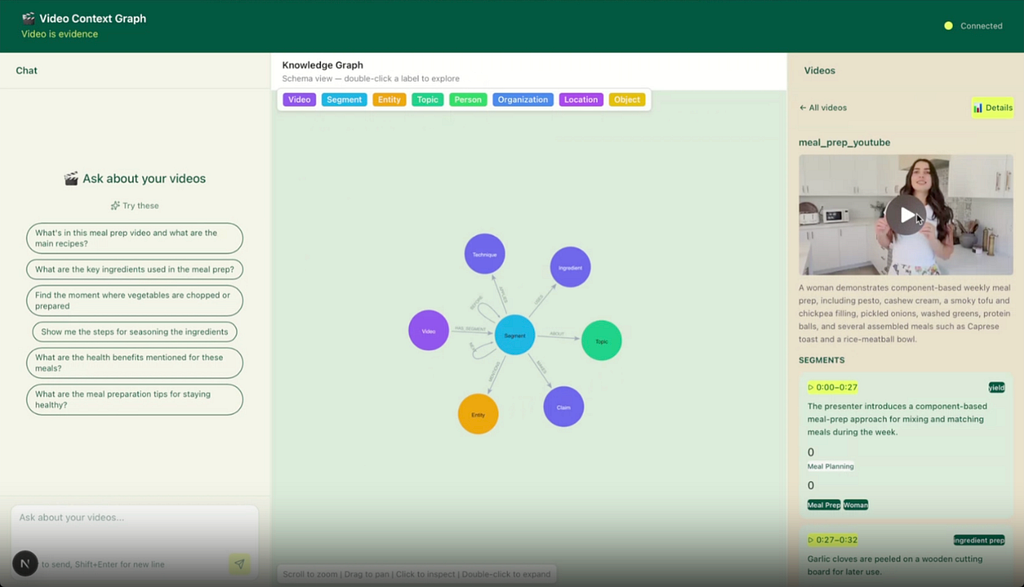
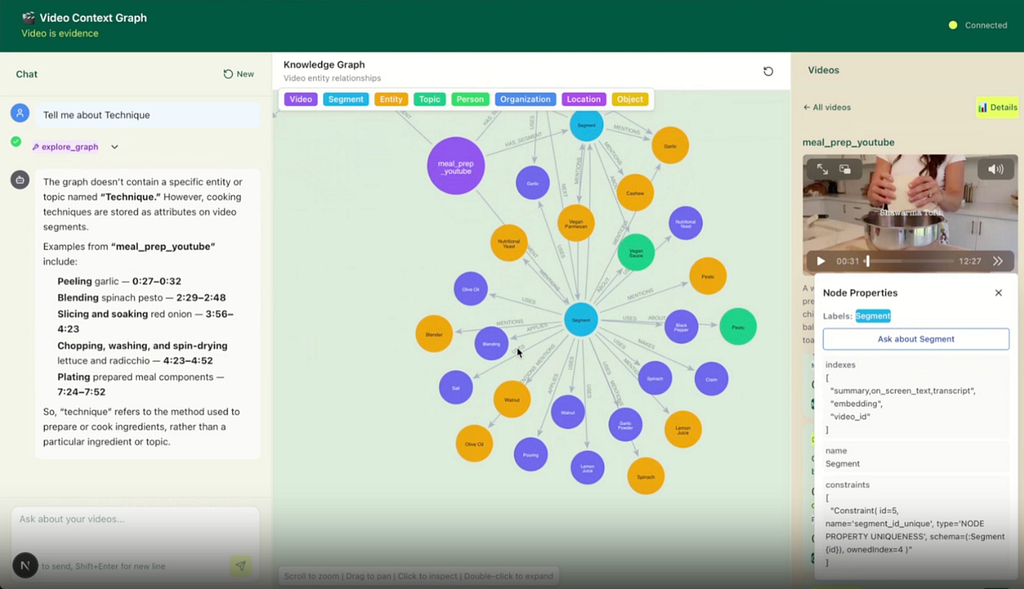
Ask it about a technique and it answers in timecodes, not prose — peeling garlic at 0:27–0:32, blending spinach pesto at 2:29–2:48, slicing and soaking red onion at 3:56–4:23, plating at 7:24–7:52 — because every one of those is a (:Segment)-[:APPLIES]->(:Technique) edge with start_sec on the segment.
The smart bit: the extraction refuses to guess. The prompt says report what’s shown or said, not what’s plausible — so a video with no on-screen nutrition panel writes 0 calories rather than an LLM’s estimate. Watch what that discipline looks like in the product:
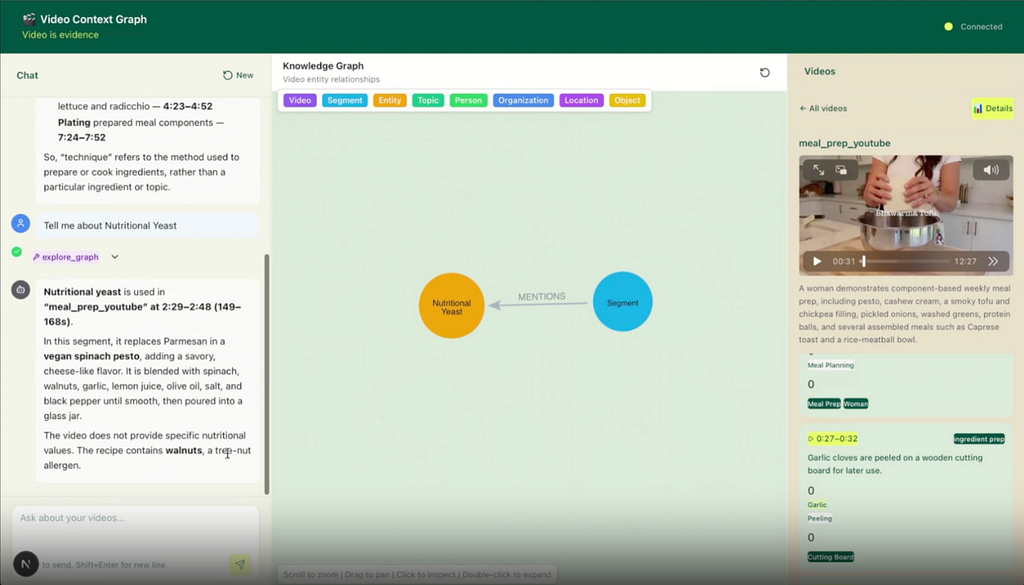
An LLM asked to be helpful would have produced a calorie count. This one declines and hands you the allergen instead. In a domain where a hallucinated macro is worse than a missing one, that’s the right trade, and the README documents it as expected behavior rather than a bug.
The second smart bit is that the two headline features are graph queries, exposed as Strands tools — not prompt tricks:
@tool
def find_contradictions() -> str:
    """Same ingredient, two creators, two different claims."""
    cypher = """
    MATCH (e:Entity)<-[:MENTIONS]-(s1:Segment)-[:MAKES]->(c1:Claim)
    MATCH (e)<-[:MENTIONS]-(s2:Segment)-[:MAKES]->(c2:Claim)
    MATCH (s1)<-[:HAS_SEGMENT]-(v1:Video)
    MATCH (s2)<-[:HAS_SEGMENT]-(v2:Video)
    WHERE v1 <> v2 AND c1.text <> c2.text
    RETURN DISTINCT e.name AS subject,
           v1.title AS video_1, c1.text AS claim_1,
           v2.title AS video_2, c2.text AS claim_2
    """
That query only works because the starter MERGEs Entity nodes on a normalized key — you can see it in the node inspector above: name: Nutritional Yeast, key: nutritional yeast, type: ingredient. Two unrelated creators filming in different kitchens converge on that one node, and the moment they do, the graph can put their claims side by side. Same mechanism powers shared_staple_scheduler — group ingredients by how many distinct videos use them, and the batch-cook list falls out of a count(DISTINCT v). Neither feature is possible in a vector store; both are three lines of Cypher.
How the stack fit together:
- TwelveLabs — Pegasus analyzes each video into a time-coded description; Marengo embeds every segment for the Neo4j vector index and answers live “find the moment where…” search.
- OpenAI — Structured Outputs turns Pegasus prose into a validated segment schema that grew from 7 fields to ~18 domain-specific ones (segment_type, ingredients[{name, quantity, unit}], nutritional_info, allergens, storage_method, step_dependencies…).
- Neo4j — the domain graph: Ingredient and Technique nodes MERGE’d by lowercased name, Claim nodes per segment, and (:Segment)-[:USES]->(:Ingredient), -[:APPLIES]->(:Technique), -[:MAKES]->(:Claim), plus BEFORE edges for step ordering.
- Strands — the agent, its tool list, and the two new graph tools above.
Why it won. The engineering above is what got it working; what got the room was where it points — and it was Mike Chambers of AWS, one of the judges, who named it. A technique graph built from video doesn’t only index strangers on the internet. Set a camera in front of your grandmother while she cooks the thing nobody ever wrote down, and this pipeline captures the how: the order of operations, the temperature she never measures, the moment she says “until it looks like this.” Family recipes are usually lost as technique long before they’re lost as ingredient lists. That reframing turned a meal-planning tool into a preservation tool, and it’s a genuinely good reason for a knowledge graph to exist.
🥈 Second Place — Rehearsal
Alton Alexander · 🔗 GitHub
“Video is evidence” → “video is coaching.” Record a practice talk on your webcam. Rehearsal transcribes it live, scores seven delivery dimensions, and hands back a timestamped debrief where every weakness links to the exact minute of a world-class talk that demonstrates the fix. A handful of reference talks — the kind of canonical material that gets passed around university lecture halls and conference stages — mined into a graph of speaking technique, then traversed on your behalf.
It also made for the best demo of the day, because it’s a product you can only really show by using it. Alton stood up, gave a talk about giving talks, and stopped. Seconds later the screen had the transcript, the scores, the specific weak spots — and the clips from those reference talks that address those exact weak spots. Nothing to take on faith; the thing did the thing, live, on the presenter.
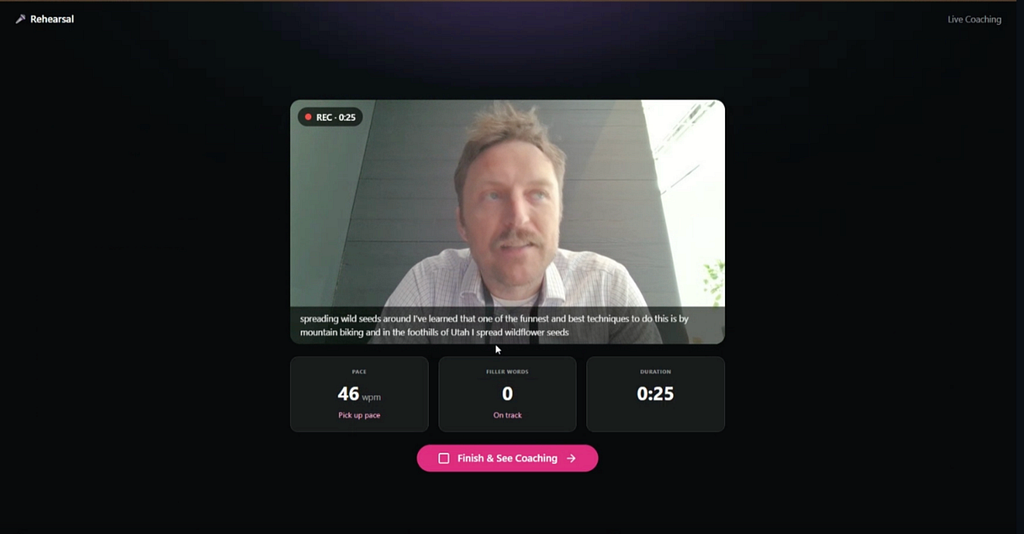
Hit Finish & See Coaching and the graph goes to work:
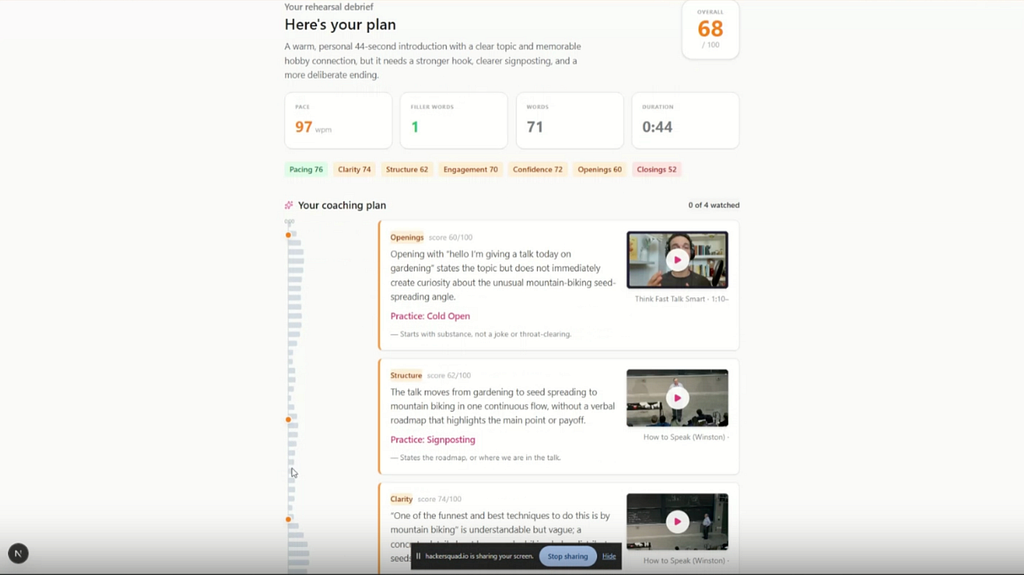
The smart bit: the graph is the coach’s vocabulary, and it’s closed. A hand-curated ontology of 14 techniques — Empowerment Promise, Cold Open, Cycling, Verbal Punctuation, Pausing, Vocal Variety, Strong Close… — each mapped to the coaching dimensions it improves:
(:Segment)-[:DEMONSTRATES]->(:Technique)-[:IMPROVES]->(:Dimension)
(:Video)-[:TEACHES]->(:Technique)
(:Technique)-[:TOP_EXEMPLAR]->(:Segment)   // the clip to go watch
When your rehearsal gets scored, the model is handed that vocabulary and required to return an exact technique_key for every recommendation. Anything that doesn’t resolve to a node is dropped on the floor in Python:
for r in out.recommendations:
    t = tmap.get(r.technique_key)
    if not t:
        continue          # no node, no advice
The result: the coach cannot invent a technique, and every single piece of advice arrives with a playable exemplar clip attached, because TOP_EXEMPLAR is on the node it named.
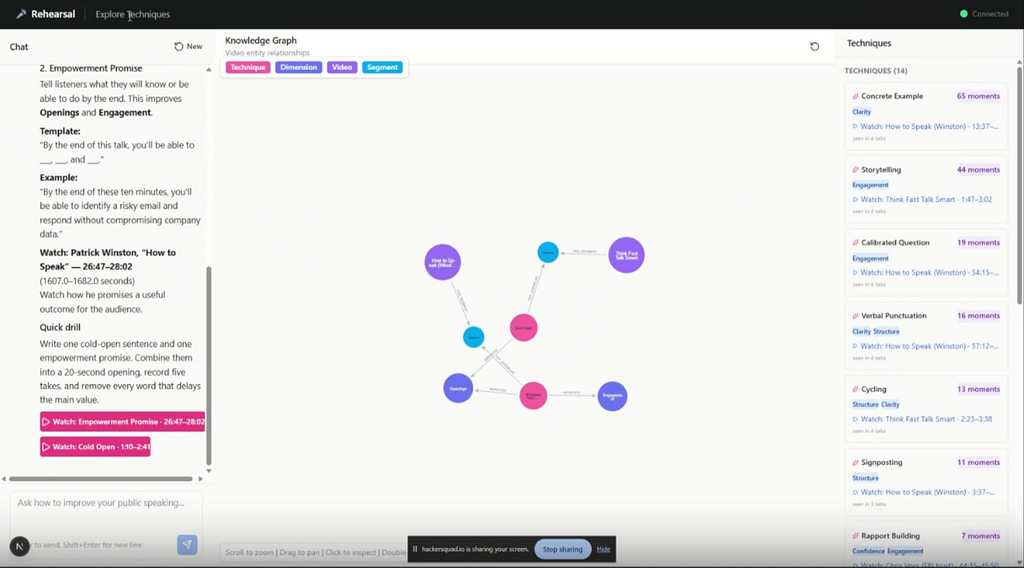
Two more details I loved, both of them the marks of someone building under a clock:
It skips Pegasus on purpose. Analyze quota is finite and the reference talks are long. So technique extraction runs off YouTube .vtt transcripts instead: parse captions, collapse YouTube’s rolling-caption duplicates, group into 45-second passages, and have OpenAI tag only the passages that clearly demonstrate a technique. Zero analyze calls, full graph.
But Marengo does the thing only Marengo can do. Exemplar clips are found with multimodal search, using probes phrased for craft rather than content — ”speaker pausing in silence for emphasis before continuing”, “speaker using dynamic vocal variety, changing pitch pace and volume with energy”. A transcript cannot see a well-timed pause. Then, rather than returning a 4-second hit, the script widens the top match into a coachable window: pull in nearby hits of the same technique from the same talk, back up 8 seconds for lead-in, and clamp to 60–120 seconds. Because a clip you learn from is a minute long, not a moment. That’s why the debrief cards read 1:10–2:41 and 26:47–28:02 rather than a bare timestamp.
How the stack fit together:
- TwelveLabs (Marengo) — semantic search over the reference talks to find the best exemplar clip per technique, including delivery cues no transcript carries.
- OpenAI — transcript passages → technique tags against the controlled vocabulary; rehearsal transcript → dimension scores, strengths, and recommendations, all via Structured Outputs.
- Neo4j — the reasoning layer: techniques MERGE’d by key so the same craft across many talks is one node, joined to dimensions and exemplar clips. Your weaknesses traverse it to the clips that fix them.
- Strands — orchestrates the agent and its graph tools; Next.js + FastAPI + Web Speech API + MediaRecorder do the rehearse → score → debrief loop.
🥉 Third Place — ZooVision
Rishabh Bansal · Aditya Das · Jerry Wen · 🔗 GitHub
Overnight animal-welfare monitoring for zoo and sanctuary keepers. Fixed-camera footage in; a Neo4j graph per enclosure and a timestamped activity timeline out, with a review-and-handoff workflow for the morning shift. The use case is sharp: the hours when something can go wrong in an enclosure are exactly the hours no keeper is standing in front of it. ZooVision watches the night and hands over a reviewable record at dawn.
This one didn’t fork the starter — it’s a from-scratch FastAPI + Vite/Next build that adds Bedrock, AgentCore, and local YOLO — and it’s the most conservative system of the three, deliberately. The README opens by stating what it is not: not a medical device, no diagnosis, no medication, no actuator tools.
It was also the most finished thing in the room. There was a QR code on the slide; you could pull it up on your phone and try it while the demo was still going. The domain was already registered.
The smart bit: every claim in the graph knows which layer produced it, and no model is allowed to decide how bad something is. The README ships a table of what each evidence source may and may not claim:
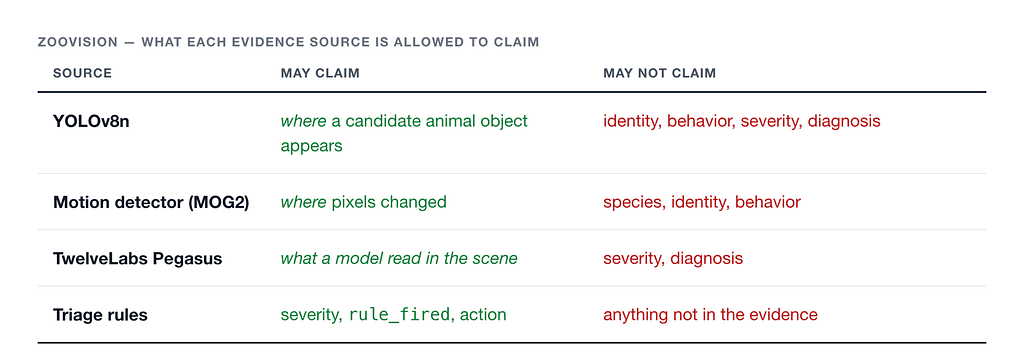
Severity comes from eight deterministic, first-match Python rules (R001_FIGHTING → CRITICAL, R004_PACING_20M_NO_WATER_6H → HIGH, …), each stamping the rule_fired that produced it. Models extract, normalize, and phrase. They never grade. And the UI is built to say so out loud:
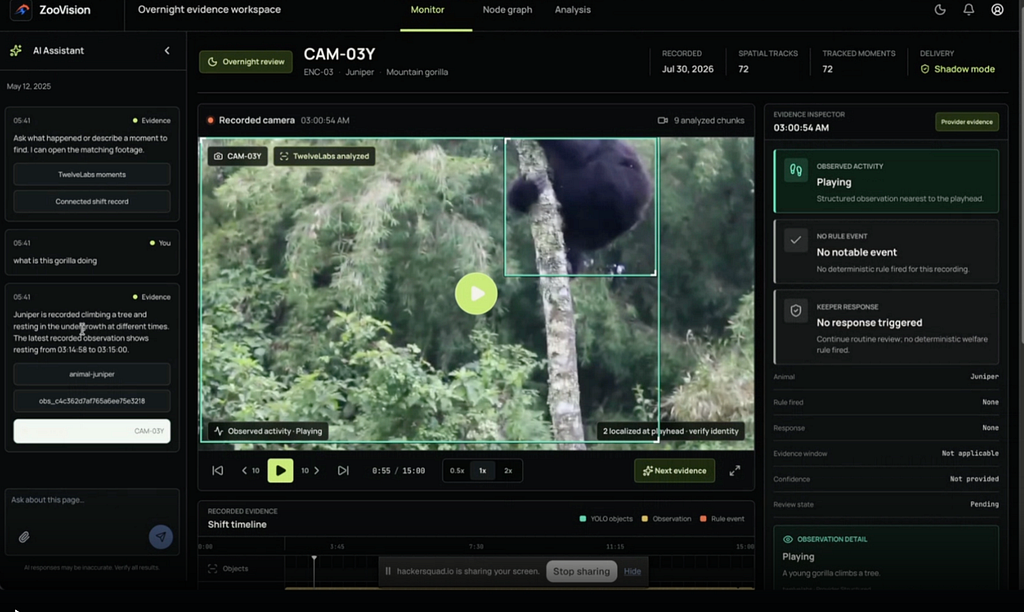
Look at the timeline underneath too: YOLO objects, Observation, and Rule event are three separately-colored tracks. The provenance separation from that table isn’t just a README promise — it’s the axis the interface is drawn on. And the box on the gorilla is labeled “2 localized at playhead · verify identity”, because YOLO is allowed to say where, never who.
The graph is where that discipline pays off, because a welfare graph is an audit trail:
(:Animal)-[:HOUSED_IN]->(:Enclosure)<-[:MONITORS]-(:Camera)-[:CAPTURED]->(:Clip)
(:Observation)-[:EVIDENCE_FROM]->(:Clip)
(:Observation)-[:SOURCE_FOR]->(:WelfareEvent)<-[:HAS_EVENT]-(:Animal)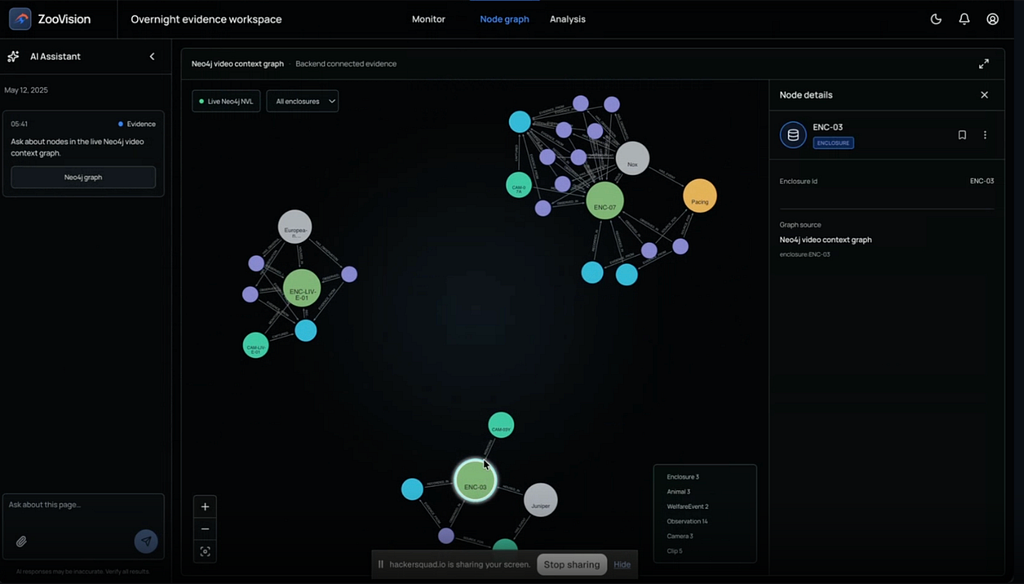
A keeper can walk from an alert to the observations that raised it, to the clip each observation came from, to the camera and enclosure that recorded it. Every application write is a static MERGE. There is no arbitrary-Cypher endpoint anywhere in the app. /api/graph is one fixed, read-only ontology query with separate read credentials, and if Neo4j is unavailable it returns 503 rather than quietly serving SQLite — no silent downgrade of the thing that’s supposed to be the record. When the assistant answers “what is this gorilla doing,” it cites the observation ID (obs_c4c362d7af765a…) and the camera alongside the answer.
Also worth calling out: ZooVision uses Strands not as a chat loop but as a bounded execution graph — strands.multiagent.GraphBuilder, with the deterministic stages (ingest, triage, index, report) implemented as MultiAgentBase nodes wrapping plain Python, LLM nodes pinned to Pydantic structured output, and a per-node audit entry for every hop. That’s Strands used as a control-flow guarantee rather than a convenience.
How the stack fit together:
- AWS — Bedrock hosts Marengo 3.0 embeddings and the structuring model; AgentCore Runtime hosts the Strands orchestrator; three separate private S3 buckets carry raw chunks, analysis JSON, and evidence clips on 7/30/90-day lifecycle policies.
- TwelveLabs (Pegasus 1.5) — behavior semantics per segment, behind a strict relative-timestamp schema and an opt-in gate, held in shadow mode until measured against labeled footage.
- OpenAI — gpt-5.6-luna phrases evidence, gpt-5.6-terra phrases reports, both through strict Pydantic Structured Outputs with store=false. Both paths explicitly non-authoritative.
- Neo4j — the evidence and provenance graph, written only through static idempotent MERGEs, rendered with @neo4j-nvl/react, following the live-graph pattern from the starter (and saying so in the README).
- Local YOLOv8n + MOG2 — fast object candidates and deterministic motion evidence, both explicitly non-authoritative and both barred from triage.
Three ways to make a graph your own
Here’s the detail I keep coming back to. Two of these teams started from the same four-label graph — Video, Segment, Entity, Topic — and the third started from nothing but the pattern. They ended up in three completely different places, by three different moves:
1. Extend in place. MealPrep kept the core intact and grew new labels and edges beside it: Ingredient, Technique, Claim, joined by USES, APPLIES, MAKES, BEFORE. It widened the extraction schema, added constraints and indexes for the new labels, and added two Cypher-backed Strands tools. The original cross-video Entity merge is doing load-bearing work in both new features — it never got replaced, it got used.
2. Swap the axis of extraction. Rehearsal kept the node shapes and changed what they’re about. A Segment no longer points at what the video is discussing; it points at what the speaker is doing — DEMONSTRATES a technique, not ABOUT a topic. Same graph mechanics, same MERGE-by-key payoff (one Concrete Example node for all 65 moments across four talks), completely different product. If you only change the ontology, you can change the entire domain in an afternoon.
3. Model from the ground up — and still borrow the pattern. ZooVision needed Animal/Enclosure/Camera/Clip/Observation/WelfareEvent and a provenance chain, so it wrote its own model with static writes and no open Cypher surface. But it took the starter’s live-NVL-graph approach for the keeper console, swapping the arbitrary-Cypher query for a fixed read-only one. A starter repo doesn’t have to be forked to be useful.
Same database, three shapes, chosen by domain rather than by convenience. And in every case the graph earned its place by answering a question the raw video couldn’t: what do two creators disagree about? which minute of Winston’s talk fixes my weak open? which clip raised this alert?
The pattern OpenAI sent us a PR for
This is the part to steal for your next hackathon regardless of what you’re building.
The day before the event, Charlie Guo from OpenAI opened a PR against the starter — “Update video agent for GPT-5.6 and structured outputs” — showing the current way they want the Responses API driven from Strands. Two changes, both small, both things you’d otherwise get subtly wrong:
Use the Responses model class, not the chat-completions one:
- from strands.models.openai import OpenAIModel
+ from strands.models.openai_responses import OpenAIResponsesModel

- model = OpenAIModel(
+ model = OpenAIResponsesModel(
      client_args={"api_key": ...},
      model_id=settings.openai_model,          # gpt-5.6
-     params={"temperature": 0.2, "max_tokens": 2000},
+     params={
+         "reasoning": {"effort": settings.openai_reasoning_effort},
+         "max_output_tokens": 2000,
+     },
  )Code language: Diff (diff)
On a reasoning model, temperature is the wrong dial and max_tokens is the wrong budget. reasoning.effort is the dial — and “low” is what keeps an agent snappy enough to demo live.
And for extraction, parse into a Pydantic model instead of hand-parsing JSON:
- resp = client.chat.completions.create(
-     model=settings.openai_model,
-     response_format={"type": "json_object"},
-     temperature=0.1,
-     messages=[...],
- )
- return json.loads(resp.choices[0].message.content)
+ response = client.responses.parse(
+     model=settings.openai_extraction_model,       # gpt-5.6-terra
+     reasoning={"effort": settings.openai_reasoning_effort},
+     input=[...],
+     text_format=VideoAnalysis,                    # a Pydantic model
+ )
+ if response.output_parsed is None:
+     raise RuntimeError("OpenAI did not return a structured video analysis.")
+ return response.output_parsed.model_dump()Code language: Diff (diff)
That second change is why the winner’s schema expansion was cheap. MealPrep needed eleven new fields — nested ingredient objects, a nutrition object, enum’d segment types — and adding them was adding Pydantic classes. No prompt archaeology, no defensive json.loads, no “sometimes it returns a string.” Both top-two teams extended that typed schema on the day, and neither one had to fight it.
Every winning project in this post runs on that pattern. It’s ~15 lines of the starter, and it came from the model provider itself. 🙏
Bring a starter to your next hackathon
Three products in one day — a meal-planning graph, a public-speaking coach, and a welfare-monitoring console — with the same four sponsor tools underneath, and, for two of them, the same demo app scaffold.
The scaffold isn’t the interesting part. What it bought was hours. Nobody spent the morning discovering that TwelveLabs needs a directly-fetchable MP4, that index creation accepts pegasus1.2 but analyze wants 1.5, that the Marengo embedding dimension has to be probed before you create the vector index, or that temperature doesn’t mean anything to a reasoning model. Every one of those is a time sink, and every one of them was already documented in the starter’s troubleshooting table.
So: if you’re organizing or sponsoring a hackathon, ship a starter. Not a tutorial, not a docs page — a repo that runs end to end with make install && make seed && make start, with your ontology in a YAML file where someone can see it and change it. The teams that win won’t use it the way you expected. That’s the point.
And if you’re building one, you don’t have to start from zero either. Mine came from create-context-graph, which scaffolds a full-stack context-graph agent app in one command.
Huge congratulations to Roopa, Alton, Rishabh, Aditya, and Jerry.
And thank you to the people who made the day happen: Elizabeth Fuentes Leone for hosting us at the AWS Builder Loft, Charlie Guo from OpenAI, and Kyle Nicolas Cabigon from TwelveLabs — four developer advocates from four companies, spending a Thursday helping people build agents together. Adam Chan and the HackerSquad community ran the whole thing, which is the unglamorous work everything else depends on. And thanks to Mike Chambers and Asako Hayase for judging, and mentoring.
Want to build your own graph-backed video agent? Spin up a free Neo4j Aura instance, clone video-context-graph, and point it at a video.
Screenshots captured from the teams’ running applications.
Share Article



Explore
Related Articles