Wherever you’re building agents, Neo4j is already there



11 min read
Want to deploy a fully functional AI agent quickly? Skip starting from scratch and tap into a repeatable infrastructure, one where context, memory, and reasoning map to your existing stack. Neo4j has built a broad library of documented, working integrations across the agent frameworks agent platforms you’re already building on: AWS, Google, Microsoft, Vercel, Salesforce, and more. With architecture guidance, security setup, and code you can run today, you can get your agents pulling work from the same knowledge layer.
An agent is only as good as what it can retrieve, remember, and what context it can get from tools, memory or other agents in a workflow. Get those parts wrong, and the rest of the agentic workflow doesn’t matter, no matter how well you built it. Every team building an agent independently solves the same problems: how do I get a knowledge graph talking to LangGraph, AWS Strands, or Salesforce Agentforce, and how do I get an agent’s memory to survive past a single session and be shared in a larger agentic system?
We did the work figuring out how the platforms, frameworks and APIs fit together, so you don’t have to. These are published as Neo4j Labs integrations, so you get documented patterns, working code, and the architecture guidance to connect your agents to the same graph they can query, act on, and remember from, wherever you’re already building.
The question we kept hearing
We kept hearing different versions of the same question, just with a different framework name attached.
How do I connect Neo4j to this?
So we answered it for each framework, platform, or tool that developers keep asking about. Everything from native model access and MCP servers, to GenAI frameworks.
The point is to give your agents correct, graph-powered infrastructure built using the frameworks and platforms you’ve already chosen, so you spend your time on the agent itself instead of the wiring underneath it. Neo4j AI integrations provide pre-built, production-ready graph solutions across leading AI frameworks, giving your agents the persistent memory, contextual retrieval, and cross-platform interoperability required to deliver real business impact out of the box.
What an agent actually needs from a graph
Strip away the framework-specific detail, and every agent benefits from the same two things from Neo4j: a way to retrieve and act on graph data, and a way to remember and learn.
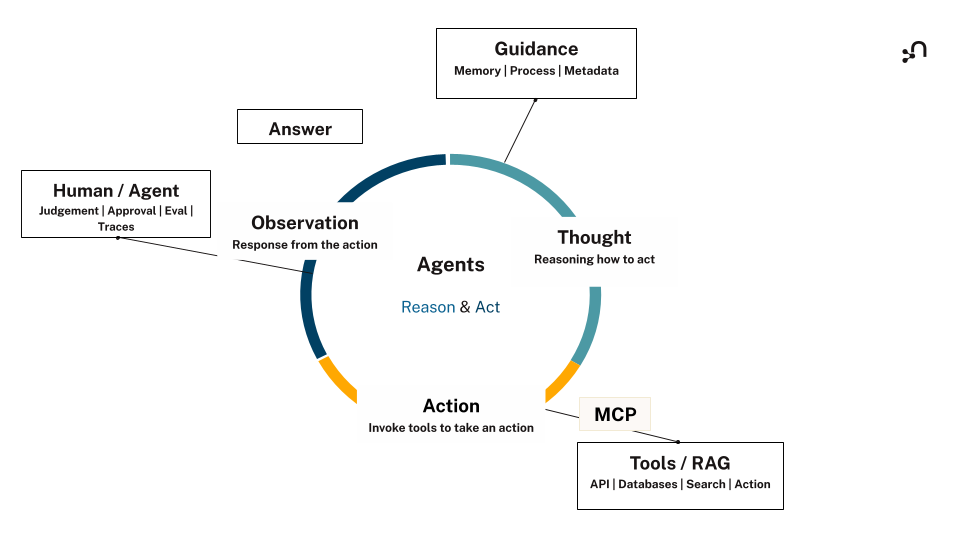
Retrieval and action is the essence of the action phase of the agent loop. An agent uses tools to query the graph, updates it, and reaches out to the APIs and databases it needs to get the job done. Memory improves planning and reasoning before taking action, and gets updated and consolidated in the observation phase. Teams tend to underestimate the memory part. Memory is more than a buzzword, it’s an architectural must for any agentic workflow that has multiple agents that need to work in sync with each other and you need those agents to perform accurately. Neo4j Agent Memory adds short-term, long-term, and reasoning memory, so an agent keeps context across a conversation and gets sharper the more it works, instead of forgetting everything between sessions. That memory lives as a connected graph of typed, resolved entities, not scattered mentions: three references to the same customer collapse into one node, with facts attached to it directly. Reasoning memory goes further, storing the agent’s decisions alongside the evidence behind them, so any agent with
You can wire this in through whichever route fits your stack:
- The official Neo4j MCP server, running locally or hosted
- Neo4j drivers, if you want a custom connection in custom tools
- Aura Agents MCP
- Neo4j Agent Memory and the Neo4j Agent Memory Service (NAMS) for the memory layer specifically.
A few of our favorite integrations to get started with
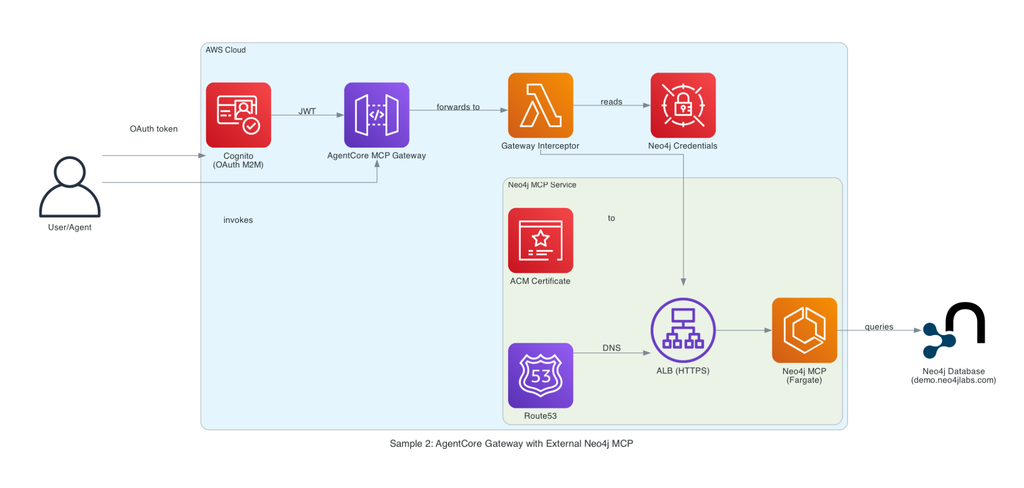
AWS.AWS Strands and AgentCore with a Neo4j MCP Server is making your AI agents significantly more efficient, reliable, and capable of distilling real-time learnings into long-term, transferable knowledge.By leveraging AgentCore Memory (or Neo4j Agent Memory for direct graph visualization), agents capture context, retain past outcomes, and convert experience into structured domain intelligence. While this enables seamless cross-agent handoffs, the broader advantage is continuous agent evolution: learning what works, reducing redundant computation, and sharing intelligence across your entire agent ecosystem.
The setup guide is ready, walking you through connecting the AWS AgentCore Gateway to external Neo4j MCP servers hosted on AWS Fargate.
Google. ADK and Gemini Enterprise integrations let an agent reason over your graph before it acts, and Genkit gives you a direct path from Google’s developer tooling into Neo4j. For example, a supply chain agent built this way can trace a part shortage through complex supplier relationships and dependent orders, then recommend a solution that optimizes the entire network rather than just fixing a single broken link.
Here’s an ADK agent wired up with both the MCP toolset for querying the graph and a memory tool for recalling past sessions:
from google.adk import Agent
from google.adk.tools.mcp_tool import McpToolset, StreamableHTTPConnectionParams
from google.adk.tools.preload_memory_tool import PreloadMemoryTool

mcp_tools = McpToolset(
    connection_params=StreamableHTTPConnectionParams(url="https://your-instance/mcp"),
    tool_filter=["get-schema", "read-cypher"],
)

agent = Agent(
    model="gemini-3-flash",
    instruction="You are a supply chain research assistant.",
    tools=[mcp_tools, PreloadMemoryTool()],
)Code language: JavaScript (javascript)
Vercel. The AI SDK integration turns Neo4j Agent Memory into a memory provider you can drop into an existing app, with NAMS Chat as a working example of what that looks like end to end. That’s a natural fit for a customer-facing assistant that needs to remember a person’s preferences and past requests across visits, not just within one chat session.
Here’s how the MCP client hands its tools straight to a single generateText call:
import { generateText, stepCountIs } from 'ai';
import { createMCPClient } from '@ai-sdk/mcp';

const mcpClient = await createMCPClient({
  transport: { type: 'http', url: 'https://your-instance/mcp' },
});

const { text } = await generateText({
  model,
  prompt: 'What did this customer ask about last time?',
  tools: await mcpClient.tools(),
  stopWhen: stepCountIs(10),
});Code language: JavaScript (javascript)
Salesforce Agentforce is worth a mention too. Three separate integrations ground Agentforce agents in Neo4j knowledge graphs. A native MCP client for grounding and multi-agent setups, with External Service Actions and Apex Actions available when you need a fully declarative path or full custom control, alongside a direct path to durable memory through Neo4j Agent Memory. This means that a sales support agent built this way can pull account history, relationship context, and open opportunities straight from the graph, then carry that context into the next conversation instead of starting the research over.
Every framework and platform we support lives on the agent frameworks and agent platforms pages, and the code behind all of it sits in one place: the neo4j-agent-integrations repo on GitHub.
Built to run
Each integration comes ready for production, complete with platform security, straightforward deployment steps, and pre-launch tests. If you’re evaluating what it takes to build this, the heavy lifting is already done. And Neo4j Agent Memory runs through nearly all of them, so no matter if you are using one integration or multiple, all agents are pulling from and contributing to the same memory.
What’s next
We’re not stopping here, and CrewAI and Haystack 3.0 are next on the integration roadmap, since Neo4j Agent Memory already gives CrewAI crews shared, persistent memory today and what’s coming next is the same architecture guidance and runnable code this launch gives every other framework. Haystack support already exists too, through the neo4j-haystack document store, but Haystack 3.0 shipped real breaking changes, including a leaner core, a merged pipeline class, and a new agent hooks system.
This post also kicks off a series that goes deeper into the integrations you just read about here. Each post takes one framework or platform from this list and walks through the full implementation, the specific decision points, MCP versus drivers, self-hosted memory versus NAMS, and the trade-offs that come with each choice, in more detail than a post like this one can cover.
Ready to get started?
- Pick your integration: Browse the neo4j-agent-integrations repo, find the framework or platform that matches your stack, and start from working code.
- Read Agent Platform documentation: Full architecture guidance, security setup, and integration details for whichever route you pick.
- Ask the community: Run into something unexpected? The Neo4j Community forum is a good place to start.
Share Article


Explore
Related Articles

Easily build a knowledge graph from your existing documents with Document Intelligence
How to Set Up and Redeem Your Neo4j Startup Program Credits
From memory to behavior: skills, user profiles, and the consolidation loop