Building a Neo4j Memory and Graph Agent for IBM watsonx Orchestrate

Senior Engineering Lead
10 min read
Bring your organizational knowledge graph and long term memory to agents on IBM watsonx Orchestrate
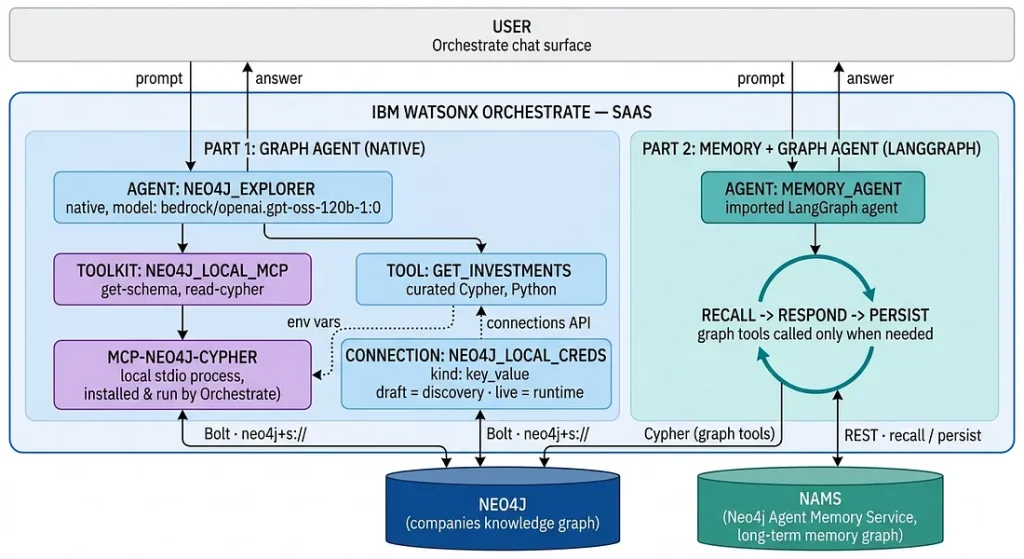
This guide outlines the architecture and implementation steps for building a Neo4j-backed agent on IBM watsonx Orchestrate. It covers two capabilities. First, a native Orchestrate agent that answers questions about companies, people, and investments by querying Neo4j through the Model Context Protocol (MCP), augmented with a custom Python tool. Second, a LangGraph agent imported into Orchestrate that adds long-term memory across sessions, using the Neo4j Agent Memory Service (NAMS), so Neo4j serves as both the knowledge layer and the memory layer.
You can find the full code in the Neo4j Agent Integrations repository.
Key features of this architecture

- Platform-native agents: The primary agent is a declarative Orchestrate agent. Its behavior is defined by a model, instructions, and a toolset, with no application code to host.
- Zero-infrastructure MCP: The official Neo4j MCP server runs as a local (stdio) toolkit that Orchestrate installs and executes inside its own runtime. There is no container to deploy and no public endpoint to maintain.
- Managed credentials: Neo4j credentials are stored in an Orchestrate connection and injected into the MCP server as environment variables, with separate draft and live scopes.
- Extensible logic: A custom Python tool is registered alongside the MCP tools, giving the agent a curated operation next to general-purpose Cypher execution.
- Cross-session memory: A LangGraph agent, imported into Orchestrate, recalls and persists facts through Neo4j Agent Memory Service (NAMS), so the agent remembers users across separate conversations.
1. Connecting Neo4j through MCP
The Model Context Protocol is an open standard for exposing tools to AI agents. Neo4j publishes an official MCP server, neo4j-mcp-server which exposes schema inspection and read-only Cypher execution as tools. Orchestrate can consume an MCP server either as a remote HTTP server that you host, or as a local server that it installs and runs itself. This integration uses the local option to avoid hosting entirely.
All configuration is performed through the Orchestrate ADK command-line tool. The environment is registered first:
pip install ibm-watsonx-orchestrate
orchestrate env add -n trial -u "https://api.<region>.watson-orchestrate.ibm.com/instances/<instance-id>" - activate
The API key must be generated inside the Orchestrate console under Settings → API details.
1.1 Storing credentials in a connection
Orchestrate stores tool credentials in connections and injects them at call time. For an MCP toolkit, the connection is of kind key_value, and each entry is passed to the MCP server process as an environment variable. Both the draft scope (used when Orchestrate discovers tools) and the live scope (used at runtime after deployment) are configured:
orchestrate connections add --app-id neo4j_local_creds

for env in draft live; do
  orchestrate connections configure --app-id neo4j_local_creds \
    --environment $env --kind key_value --type team
  orchestrate connections set-credentials --app-id neo4j_local_creds \
    --environment $env \
    -e "NEO4J_URI=neo4j+s://demo.neo4jlabs.com:7687" \
    -e "NEO4J_USERNAME=companies" \
    -e "NEO4J_PASSWORD=companies" \
    -e "NEO4J_DATABASE=companies" \
    -e "NEO4J_READ_ONLY=true"
done
Configuring only the draft scope is a common source of error: the toolkit imports and tests correctly, then stops working once the agent is deployed and begins using live credentials.
1.2 Importing the MCP server as a toolkit
A single command registers the server and returns its tools. The server is launched with python, which installs and runs it in one step:
orchestrate toolkits add \
  --kind mcp \
  --name neo4j_local_mcp \
  --description "Neo4j companies knowledge graph: schema inspection and read-only Cypher" \
  --command "python -m  neo4j_mcp_server" \
  --tools "*" \
  --app-id neo4j_local_creds
The subcommand is toolkits add. A separate toolkits import command exists for file-based definitions and will reject these flags. The imported tools can be confirmed with orchestrate tools list.

2. Adding a custom tool
This MCP server offers general purpose tools: the model composes its own Cypher. Enterprise use cases often call for a curated operation backed by a known-good query. Orchestrate supports plain Python tools, imported alongside the MCP toolkit. The following tool returns the investors backing a company. Users can define their own logic in such custom tools.
from ibm_watsonx_orchestrate.agent_builder.tools import tool
from neo4j import GraphDatabase

@tool(expected_credentials=[{"app_id": "neo4j_local_creds", "type": "key_value_creds"}])
def get_investments(company: str) -> str:
    """Look up the investors backing a company in the knowledge graph.
    Use this for any question about investors, funding, or who backed a company.

    Args:
        company (str): Name or partial name of the company.

    Returns:
        str: JSON list of investors.
    """
    query = """
    MATCH (o:Organization)-[:HAS_INVESTOR]->(i)
    WHERE toLower(o.name) CONTAINS toLower($company)
    RETURN o.name AS company,
           collect(DISTINCT i.name)[..20] AS investors
    LIMIT 5
    """
    # opens a Neo4j driver using the injected connection, runs the query,
    # and returns the rows as JSON
Two aspects of Python tools are worth noting. Dependencies are declared in a requirements.txt, installed server-side at import time, and validated against a tenant package allowlist; versions must be pinned exactly, for example neo4j==6.20.0. The first invocation after import may return a message indicating the tool is being configured in the background the dependency install after which it operates normally. The tool description and argument descriptions are extracted from the Google-style docstring and directly influence tool selection.
The tool is imported with:
orchestrate tools import -k python \
  -f tools/get_investments.py \
  -r tools/requirements.txt \
  -a neo4j_local_creds
3. Defining the agent
The agent is a declarative YAML definition. Its behavior is governed entirely by the model and instructions:
spec_version: v1
kind: native
name: neo4j_explorer
llm: bedrock/openai.gpt-oss-120b-1:0
style: default
instructions: >
  You are a graph database assistant connected to a Neo4j knowledge graph.
  1. If you do not know the graph structure, call get-schema first.
  2. For investor or funding questions, use get_investments.
  3. Otherwise, write a Cypher query and run it with read-cypher, limited to
     20 rows.
  The database is read-only.
tools:
  - get_investments
toolkits:
  - neo4j_local_mcp
In the IBM ADK version used for this integration (2.12.0), importing a native agent that references a toolkit from the command line fails with the message “Toolkits are only supported for experimental_customer_care style agents.” The identical agent created through the Agent Builder console succeeds, which indicates a command-line validation gap rather than a platform limitation. The recommended approach is therefore to perform every step by command line and create the agent in the console.

The agent can then be tested in the console. A schema question triggers the schema tool; a factual question produces a Cypher query executed through read-cypher.

You can debug the response to understand which tools used.

4. Adding long-term memory with a LangGraph agent
A native agent does not retain information between conversations. To give the reference agent memory that persists across sessions, watsonx Orchestrate’s ability to import a LangGraph agent is used. This deploys a code-based agent written in Python with explicit control flow into the Orchestrate runtime, and is the capability a declarative agent cannot provide.
Long-term memory is provided by the Neo4j Agent Memory Service (NAMS), a hosted service that stores what an agent learns as a knowledge graph and exposes REST endpoints to store and search it. Neo4j therefore serves as the memory layer in addition to the knowledge layer.
4.1 The agent’s control flow
The agent runs a single LangGraph node that performs three steps per turn:
1. Recall search NAMS for entities relevant to the current question and add them to the prompt as context.
2. Respond answer using that context, with the companies graph available as tools; the model queries the graph only when the question requires it.
3. Persist send the user’s message to NAMS, which extracts and stores entities in the background. These entities serve as context for agent answer.
The graph is queried only when the model chooses to call a graph tool. A question answerable from memory alone runs no neo4j graph query; a company question triggers one; a question needing both retrieves the preference from memory and adapts the neo4jgraph query accordingly.
def agent(state):
    # 1. Recall relevant facts from NAMS
    context = recall_from_memory(latest_user_message(state))

    # 2. Answer, with the companies graph exposed as tools
    system = SystemMessage(content=PROMPT.format(context=context))
    llm = ChatOpenAI(model="gpt-5.4-mini").bind_tools(graph_tools)

    working = [system] + state["messages"]
    while True:
        reply = llm.invoke(working)
        working.append(reply)
        if not reply.tool_calls:
            answer = reply.content
            break
        # execute each tool call and feed the results back to the model
        for call in reply.tool_calls:
            result = run_tool(call)
            working.append(ToolMessage(content=result, tool_call_id=call["id"]))

    # 3. Persist the user's message for background extraction
    persist_to_memory(latest_user_message(state))

    # Return exactly one plain assistant message
    return {"messages": [AIMessage(content=answer)]}
4.2 Deploying and connecting
The agent and its credentials are registered from the command line. Unlike the native agent, an imported LangGraph agent imports fully through the CLI:
orchestrate agents import --package-root memory-agent
orchestrate agents connect -n memory_agent -a nams_api -a nams_workspace -a llm_openai
Credentials for NAMS and the LLM are supplied through connections and injected into the agent at runtime, keyed as {app_id}_{credential_type}.
4.3 Demonstrating cross-session memory
Because memory is held in NAMS rather than in the agent’s own state, it persists across separate conversations. The demonstration therefore uses two sessions.
In the first session, a fact is stated: ”Remember that John is researching on opportunities in cyber security domain.”
The agent acknowledges it and persists the message. NAMS then extracts the entities in the background.

In a new session, the agent recalls the stored preference and applies it: asked What companies should I look at?, it retrieves the cyber security preference from memory and queries the companies graph filtered accordingly.
Entity extraction in NAMS is asynchronous. A stated fact is acknowledged immediately but may take from a few seconds to a few minutes to become searchable. Cross-session recall is unaffected, since time passes between sessions, but same-turn recall of a just-stated fact is not guaranteed.
Conclusion
This integration demonstrates two complementary patterns for using Neo4j with IBM watsonx Orchestrate:
– Graph as knowledge layer. A declarative Orchestrate agent queries a Neo4j graph through the official MCP server, run as a local toolkit with no infrastructure to host, and is extended with a curated Python tool. Credentials and tool governance are handled by the platform.
– Graph as memory layer. An imported LangGraph agent adds long-term, cross-session memory through the Neo4j Agent Memory Service, and decides per query whether to consult memory, the companies graph, or both.
Together they show that a capable, personalized graph agent can be assembled on watsonx Orchestrate largely through configuration, with code reserved for the two places it adds real value: a curated tool and a memory-aware reasoning loop.
Reference documentation
For the full code, refer to the GitHub repository:
IBM watsonx Orchestrate:
Model Context Protocol:
Neo4j Agent Memory Service:
Building a Neo4j Memory and Graph Agent for IBM watsonx Orchestrate was originally published in Neo4j Developer Blog on Medium, where people are continuing the conversation by highlighting and responding to this story.
Share Article



Explore
Related Articles



Connected Intelligence: Accelerating Enterprise AI throughout the cloud ecosystem