A Tour of the Neo4j Agent Memory Service (NAMS)

Senior Product Manager
15 min read
A walkthrough of the graph-native memory layer for AI agents.
Most agents you build today are amnesiacs. They run a chain of reasoning, return an answer, and forget the whole thing the moment the request ends. The usual patch of stuffing transcripts into the context window with glue code to decide what to retrieve works until the conversation gets long, the facts start to contradict each other, and you realize your “memory” is just a pile of text chunks ranked by cosine similarity.
The Neo4j Agent Memory Service (NAMS) is our take on a better foundation: persistent, structured memory for LLM agents, delivered as a managed cloud service.
You call a REST API or connect an MCP client and NAMS handles storage, entity extraction, deduplication, embedding, background compression, and context retrieval. This is all backed by a managed Neo4j Aura graph database with native vector indexes.
This isn’t a big-bang launch announcement. NAMS is a Neo4j Labs project (which means experimental and community supported) so we’re opening it up early because the fastest way to make it better is to put it in front of people who build agents. So rather than a feature list, let’s take a tour of NAMS to see how we can use it to make our agents more efficient. We’ll open the console and walk every tab.
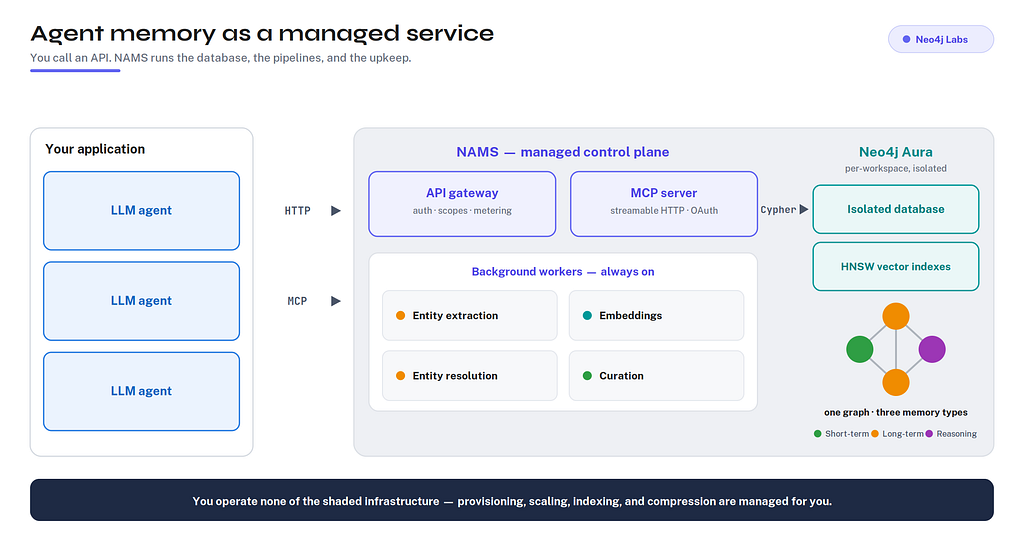
The shape of the system: your agent talks to NAMS over HTTP or MCP, and NAMS runs the database, the extraction and embedding pipelines, and the background compression. Everything you see in the console below is a view onto one per-workspace graph.
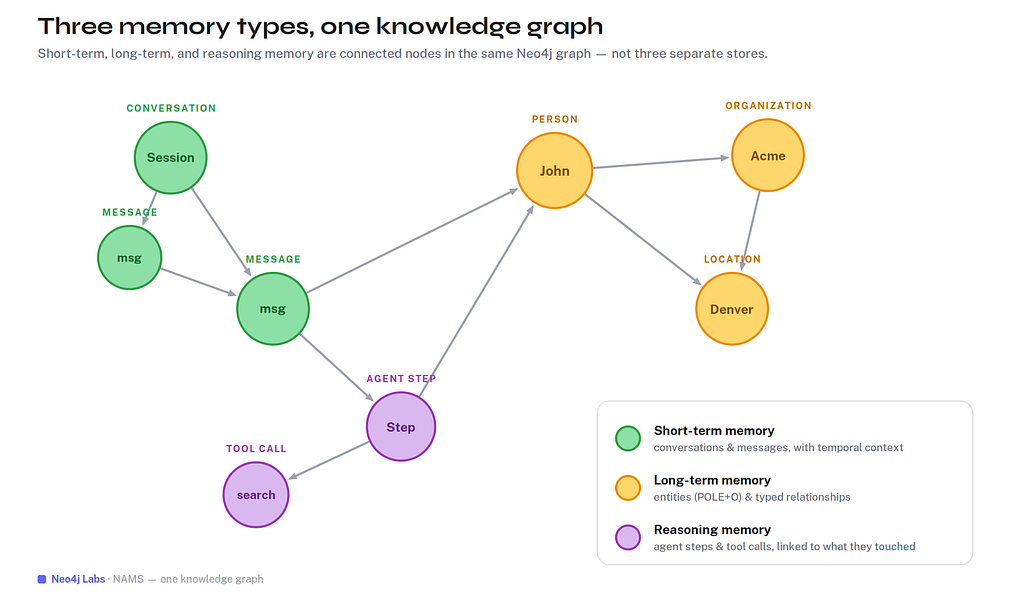
Before the tour its important to understand the goal of Neo4j Agent Memory. NAMS gives an agent three kinds of memory: short-term (the conversation), long-term (a knowledge graph of entities and relationships), and reasoning (a record of the agent’s own steps and tool calls). All three types of memory are connected and stored as connected nodes in a single graph. You can think of each tab in the console asa different lens on that graph.
Dashboard
After signing in the first thing you land on is an operations view of your workspace. It answers one question: is everything healthy and is my memory actually being processed?
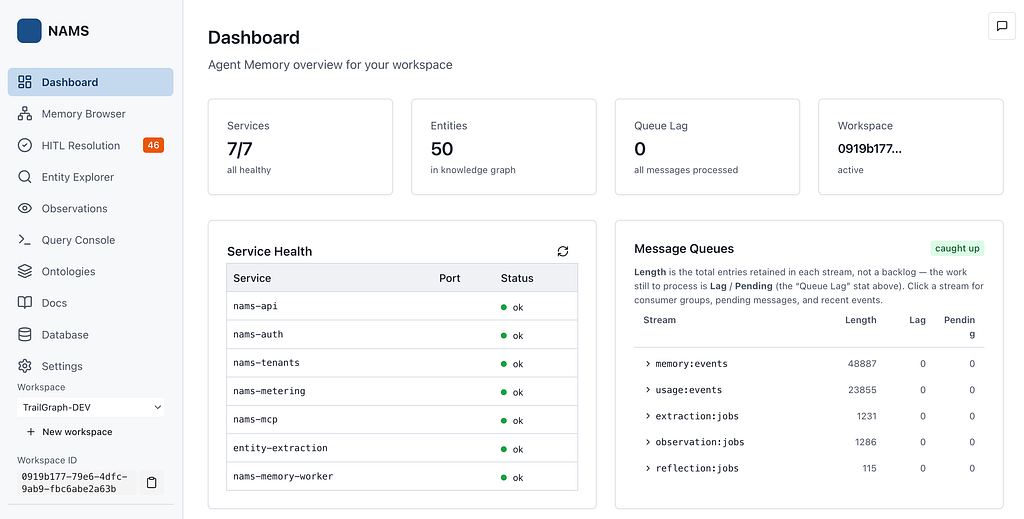
Across the top are the vitals: services healthy, entities in the graph, and queue lag (how far behind the async workers are). Below, Service Health lists the seven services that make up NAMS, and Message Queues shows the streams that carry work between them: memory:events, usage:events, extraction:jobs, observation:jobs, and reflection:jobs.
That queues panel is more interesting than it looks. When you store a message, the response comes back immediately, but the real work of pulling entities out of the text, embedding it, deduplicating against the existing graph, and later compressing the conversation happens asynchronously on those streams. A lag of zero means your graph is fully caught up with everything you’ve sent. Memory here is a living pipeline, not just a write to a table or another line in markdown file.
Memory Browser
This is the tab to open first if you want to feel what graph-native memory means. It’s an interactive, force-directed visualization of your knowledge graph: every entity is a node, colored by type, and clicking one opens its full properties panel.
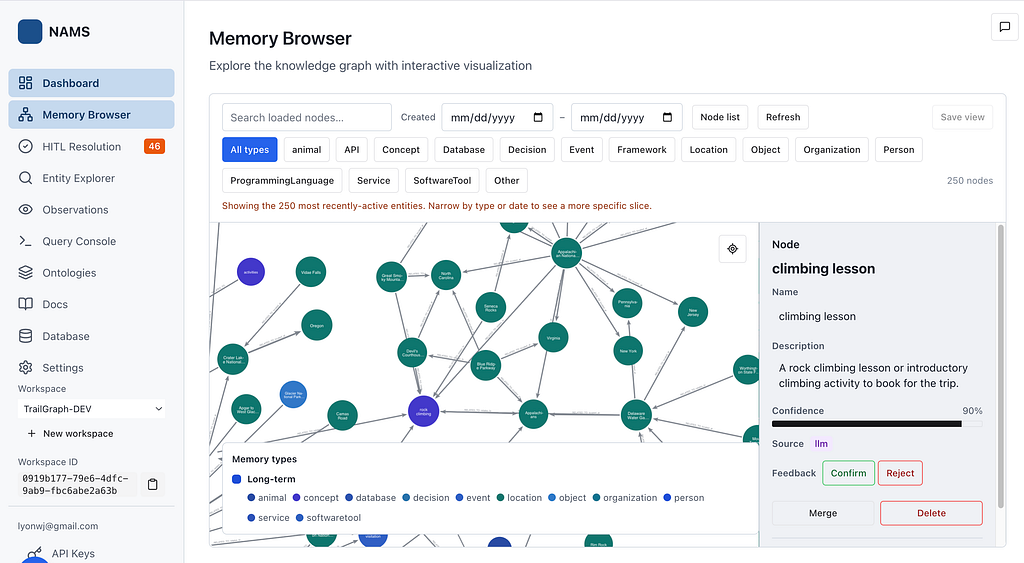
The colors map to the entity types the service extracts such as person, organization, location, concept, and so on. Select a node and you get its id, name, type, description, a confidence score, and the sourceStage that produced it (here, llm). None of this was entered by hand; it was extracted from messages and assembled into a graph automatically.
This is also the best place to see all three memory types coexisting in one structure:
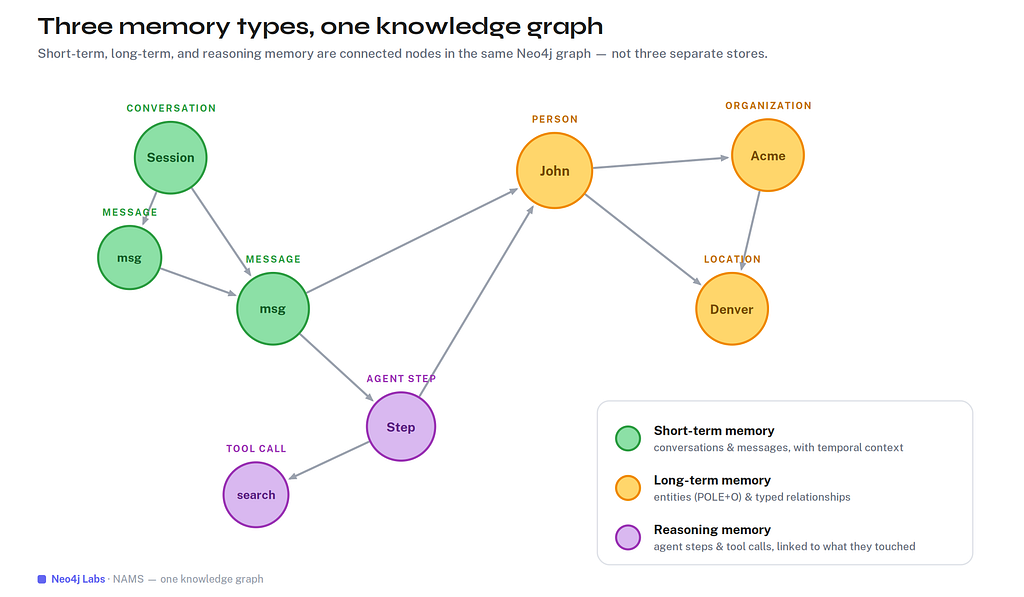
Short-term memory (the green conversation and message nodes), long-term memory (the orange entities, classified with the POLE+O model — Person, Organization, Location, Event, plus Object — and joined by typed relationships), and reasoning memory (the purple agent-step and tool-call nodes) aren’t three separate databases. They’re one connected graph, which means you can traverse from a tool call to the entity it touched to the message that first mentioned it. That traversal is the thing a vector store can’t give you: vector stores give you recall; the graph gives you understanding.
Human In The Loop (HITL) Resolution
Build a knowledge graph from messy, real-world text and you immediately hit a problem: the same thing gets mentioned a dozen ways. “J. Smith,” “John Smith,” and “Smith, John” should be one person, not three. NAMS handles the obvious cases automatically and asks a human for confirmation when the resolution confidence is below a configurable threshold. This tab is where that “ask a human” step lives.
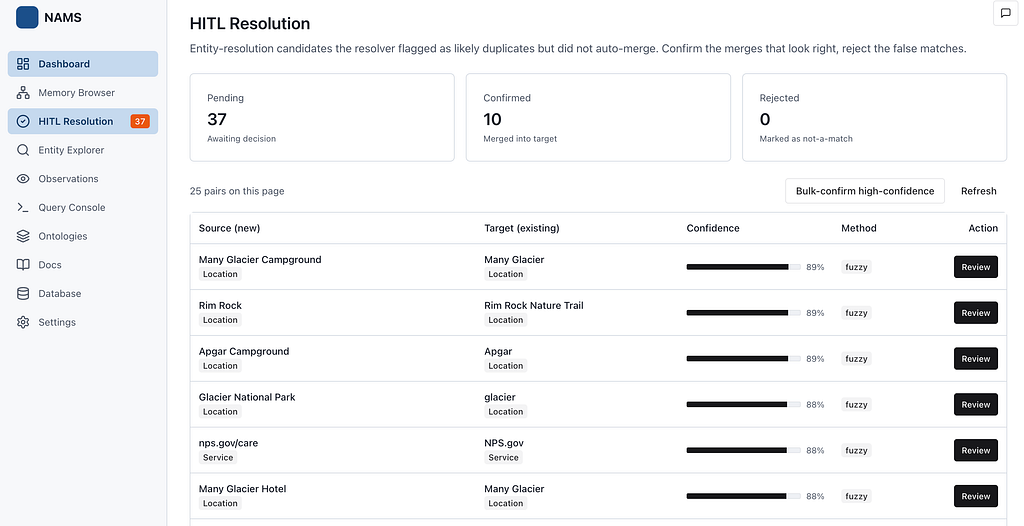
Behind the scenes, every newly extracted entity runs through a type-strict resolver cascade : first exact match on normalized names and aliases, then fuzzy matching (Levenshtein, Jaro-Winkler, token-sort), then semantic match on embeddings. High-confidence matches are auto-merged; clear non-matches become new nodes; the ambiguous middle band is written as a SAME_AS edge marked pending and surfaced here in the review queue. Each row shows the source and target, the confidence, and the method that flagged it (the example pair matched at 92% via fuzzy). You can confirm, reject, or bulk-confirm the high-confidence ones. It’s the same human-in-the-loop pattern that keeps the graph clean without forcing you to babysit every write.
Entity Explorer
Whie the Memory Browser above is useful for exploring your memory graph visually the Entity Explorer is for finding things. It’s a searchable, sortable table of every entity in the workspace.
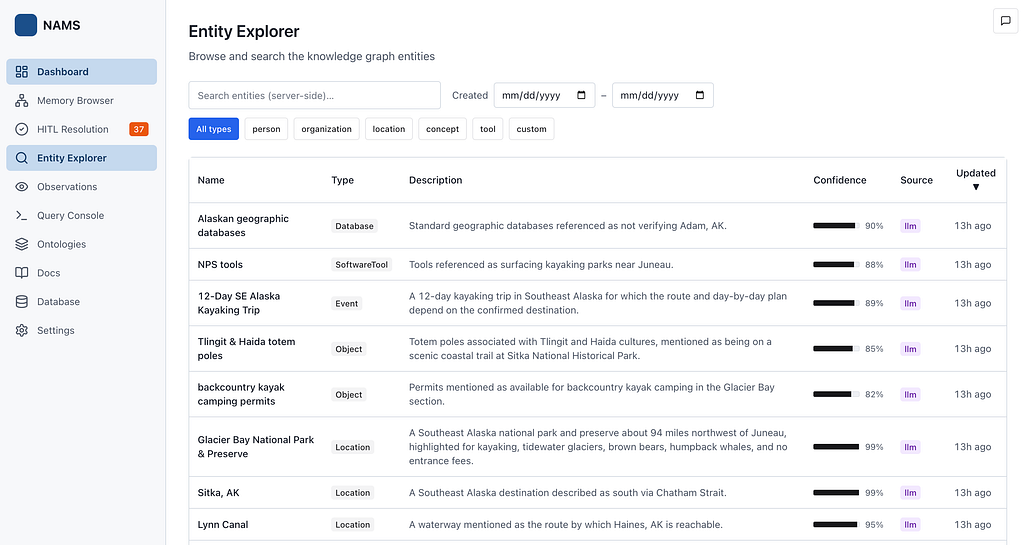
Each row carries
- the entity’s type,
- its extracted description,
- a confidence score,
- the source stage, and
- when it was last updated
Under the hood, search is hybrid: it runs vector similarity first (entities store embeddings as properties in the graph) and falls back to plain text matching when an embedding isn’t available, so a query for “kidney doctor” can surface a nephrologist even without an exact keyword hit. This is the tab you’ll reach for when you want to confirm what the agent actually knows about a given person, place, or thing.
Observations
Conversations can grow without bound so memory curation is an important feature to surface actionable knowledge. Periodically summarizing the history requires exactly the kind of always-on background job that’s annoying to build and operate yourself. NAMS just runs it for you, and the Observations tab is the timeline where you can inspect evolving curation of your agent’s memories.
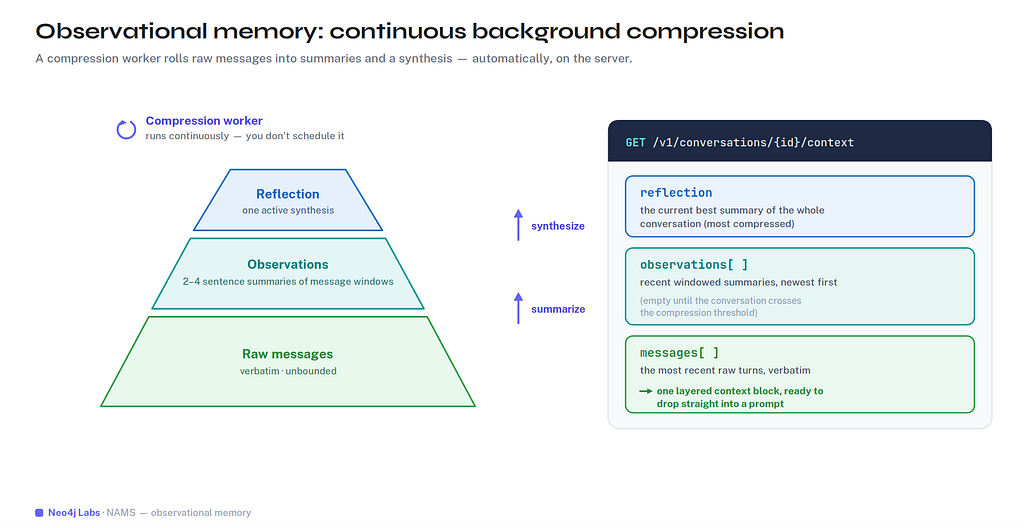
A compression worker continuously rolls raw messages into observations (short 2–4 sentence summaries of a window of messages, each traceable back to the exact messages it came from) and then synthesizes those into a single active reflection (the current best summary of the whole conversation). You don’t trigger any of it. When you need context for a prompt, one call returns all three tiers at once:
curl https://memory.neo4jlabs.com/v1/conversations/{id}/context \
  -H "Authorization: Bearer $NAMS_API_KEY"
You get the active reflection (most compressed), recent observations (mid-level), and recent raw messages (verbatim) — a ready-made, layered context block to drop straight into a prompt. Short conversations show empty arrays here until they cross the compression thresholds; the timeline fills in as the conversation earns it. This is the quiet luxury of a hosted memory service: the expensive, stateful, never-quite-finished work of keeping memory compact happens somewhere else, not in your agent.
Query Console
For everything the curated tabs don’t cover, there’s a direct line to the graph. The Query Console is a read-only Cypher editor that runs against your workspace graph. It can return results in tables or graph shape.
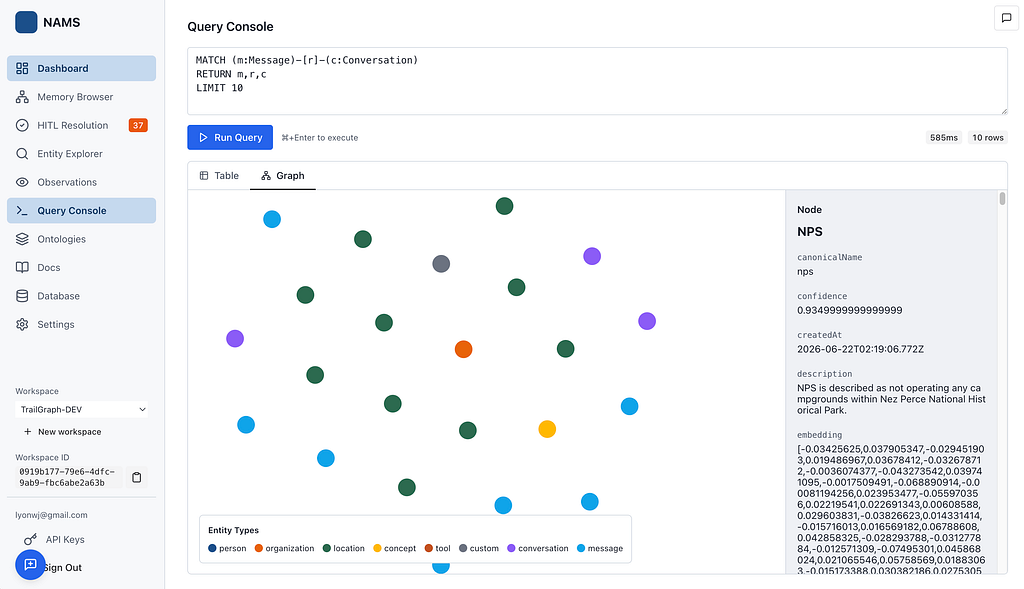
Because NAMS is Neo4j underneath, your memory is queryable with the full Cypher language. Ask for the entities a particular tool call influenced, the messages that mention an organization, the most-connected nodes in the graph; if you can express it in Cypher, you can run it here. It’s the power-user complement to the visual sections, and a reminder that your memory is portable as you can access the underlying database.
Ontologies
Out of the box, NAMS extracts a sensible general-purpose vocabulary. But a legal assistant, a financial-services agent, and an e-commerce bot don’t see the world the same way . The concept of “entity” means a Patient and a Diagnosis in one and a Customer and an Order in another. NAMS enables each workspace to bind to its own ontology: a declarative description of the entity and relationship types that shape both extraction and validation.
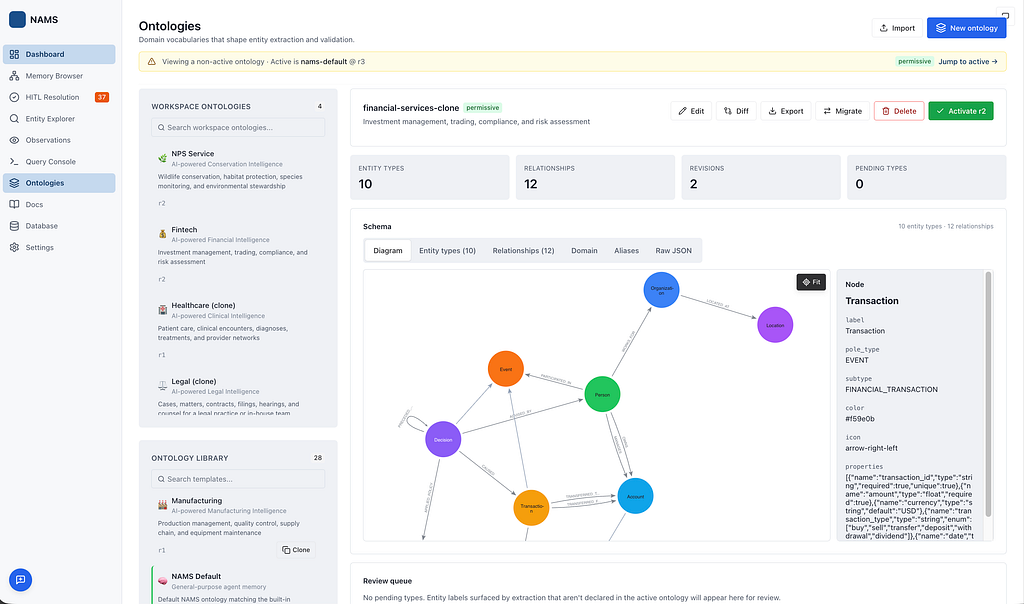
A workspace starts by using a default POLE model based ontology, and from there you can clone one of the domain templates – healthcare, legal, financial-services, cybersecurity, retail, software-engineering, etc. Or import an existing ontology from formats such as RDF/ttl. Cloning and activating a template can be done via the MCP or HTTP API:
curl -X POST https://memory.neo4jlabs.com/v1/ontologies/legal/clone \
  -H "Authorization: Bearer $NAMS_API_KEY"
# → {"id": "ov_...", "ontology_id": "ont_...", "revision": 1}


curl -X POST https://memory.neo4jlabs.com/v1/ontologies/active \
  -H "Authorization: Bearer $NAMS_API_KEY" \
  -H "Content-Type: application/json" \
  -d '{"version_id": "ov_..."}'
Once active, the ontology’s validation mode governs what happens when an extracted entity has a type that isn’t in your schema.
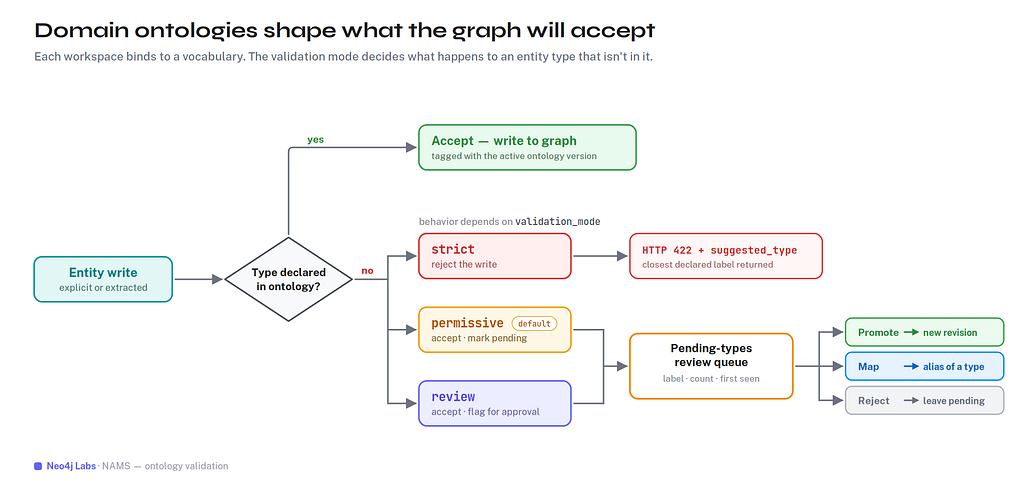
In strict mode the write is rejected and the closest declared type is used as a suggestion. This approach is good for clean, predictable graphs. In permissive mode (the default) the entity is accepted and the unknown type is recorded as pending.
In review mode it’s accepted but flagged for approval. Those pending types surface right on this page in a review queue, where you can promote one (creating a new ontology revision), map it as an alias, or reject it — the same human-in-the-loop idea as entity resolution, applied to the schema itself.
Edits produce immutable, queryable revisions, and every change is written to an append-only audit trail of the ontology.
Docs
The Docs section is a live, in-console reference that already knows your workspace — every snippet has your API key attached, and there’s a “Try it” button that runs the call against your own data. It covers the two ways into NAMS.
The REST API, for building your agent’s plumbing. Your nams_ API key works directly as a bearer token, no exchange step:
# 1. Create a conversation
curl -X POST https://memory.neo4jlabs.com/v1/conversations \
  -H "Authorization: Bearer $NAMS_API_KEY" \
  -H "Content-Type: application/json" \
  -d '{"userId": "user-1"}'

# 2. Add a message — extraction and embedding happen automatically
curl -X POST https://memory.neo4jlabs.com/v1/conversations/{id}/messages \
  -H "Authorization: Bearer $NAMS_API_KEY" \
  -H "Content-Type: application/json" \
  -d '{"role": "user", "content": "John works at Acme Corp in Denver"}'

# 3. See what was extracted
curl https://memory.neo4jlabs.com/v1/entities \
  -H "Authorization: Bearer $NAMS_API_KEY"
# → John (person), Acme Corp (organization), Denver (location)
The MCP server, for letting an agent (or your coding assistant) use memory as a set of tools. It speaks streamable HTTP, and the same key works as a bearer token:
claude mcp add --transport http --scope project nams \
  https://memory.neo4jlabs.com/mcp \
  --header "Authorization: Bearer ${NAMS_API_KEY}"
That connects your agent to 12 memory_* tools
- create conversations,
- store messages,
- search entities,
- fetch layered context,
- record reasoning steps,
- resolve duplicates,
- manage ontologies
The Docs tab has copy-paste config for Claude Desktop, Claude Code, Codex CLI, Gemini CLI, Cursor, and Windsurf. Clients that support OAuth discovery (DCR) can skip the static API key and log in through the browser instead.
SDKS are also available for Python and TypeScript with integrations for many commont agent frameworks.
Database
NAMS is graph-native all the way down, and this section makes that literal: it exposes the actual Neo4j database behind your workspace.
The free tier of NAMS uses a temporary Neo4j instance that NAMS provisions and operates for development and testing.
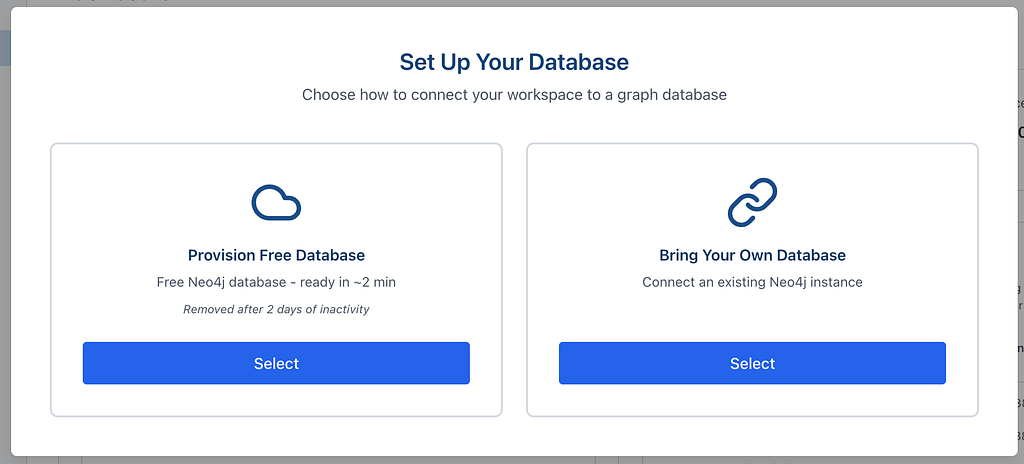
You can also flip to external and point the workspace at your own Neo4j instance. The approach of bring-your-own-database ensures you are responsible for your own data for teams with residency or data retention requirements.
You can export the entire graph as Cypher statements (and import back), and you get real Bolt credentials with a one-click Open in Neo4j Browser, so your agent’s memory is explorable with the same tools you’d use for any Neo4j database. No data is trapped inside NAMS, it lives in your own Neo4j database.
Settings
The last section is workspace administration:
- rename the workspace,
- manage who has access,
- in the Danger Zone — delete it (which also tears down the managed database, so it asks twice).
Members are listed with their roles, and you can invite teammates so a workspace’s memory is shared rather than siloed to one developer.
Alongside Settings, the API Keys area is where you create the nams_ keys used as bearer tokens throughout this tour. Keys are validated on every request and rotate on a 90-day expiry, and access is scoped (memory:read, entities:write, reasoning:write, ontology:write, and so on) so you can hand an agent exactly the permissions it needs.
API Keys are separated into “agent” key for memory management and “admin” key, which allows workspace management so your agent can create and manage new workspaces as well.
Where this goes from here
There’s a thesis gaining traction that the next layer of AI infrastructure is the context graph — a persistent, structured record of everything an agent knows and has done, sitting alongside the data it reasons over. NAMS is an approach to make that real and usable: three memory types in one knowledge graph, continuous background compression, per-workspace ontologies, and a console that lets you see all of it, served as a cloud API so you can start as soon as you sign up.
One of the main motivators for building a hosted agent memory service was to enable integrations with other platforms such as the Salesforce Agentforce platform. Read more about that one here:
Giving Salesforce Agentforce Durable Memory With Neo4j
And similarly for the GCP Gemini Enterprise, AWS AgentCore and Microsoft Foundry agent platforms — blog posts coming soon.
NAMS is a Neo4j Labs project, which means we’re constantly iterating and any feedback from users is super helpful to help guide this process and deliver useful features. If you build agents, the best thing you can do is connect one and tell us where NAMS falls short. We have integrated a feedback button in the UI, which you can also use to send feedback to the team.
Here are some resources to get started:
- NAMS Service & docs: https://memory.neo4jlabs.com
- Agent Memory Docs: https://neo4j.com/labs/agent-memory/
- More from Neo4j Labs: https://neo4j.com/labs/
Take the tour, store a few messages, and watch a graph build itself.
A Tour of the Neo4j Agent Memory Service (NAMS) was originally published in Neo4j Developer Blog on Medium, where people are continuing the conversation by highlighting and responding to this story.
Share Article



Explore
Related Articles


Connected Intelligence: Accelerating Enterprise AI throughout the cloud ecosystem