Build a Knowledge Layer: Map Your Data with an Ontology



6 min read
In this series
1. Give Your AI Agents the Shared Context to Succeed
2. Map Your Data with an Ontology
3. Turn Your Existing Data into Context
4. Connect Your Data Sources with a Composite Database
5. Ground Decisions in Precedent
Code: knowledge-layer-demo on GitHub
Why does an agent with multiple databases need a map?
Until now, the readers of enterprise data have been applications and people, and neither needed the data to explain itself. A loan system knows what a Delinquent flag means because that logic is written into its code. A banker knows from years on the job. An AI agent has neither the code nor the years, so the meaning has to come from somewhere else.
Let’s look at Rosa’s Bakery – a fictional business looking to apply for a bank loan.. In order to approve or reject the loan, the agent needs her transactions and KYC status from the banking system, her business plan, the term-loan rules from the lending policy, and earlier loan approval decisions from the decision-history log. That takes four data sources, and nothing tells the agent which one holds what or how they relate. We build each of these sources later in this series.
Putting that knowledge inside the agent means a bigger prompt and a custom tool per source. An ontology graph, which describes the other graphs, holds it instead. This post covers what an ontology holds and how an agent reads it.
How do you design the schema of an ontology?
An ontology has to show how data in different systems fits together, and its schema has to stay flexible as the sources change. That’s why the schema is generic. It models how systems relate to each other and how the elements inside each system relate, without hard-coding any one source’s specifics.
In our example, we kept ours deliberately small, with two node types connected in a few simple ways.
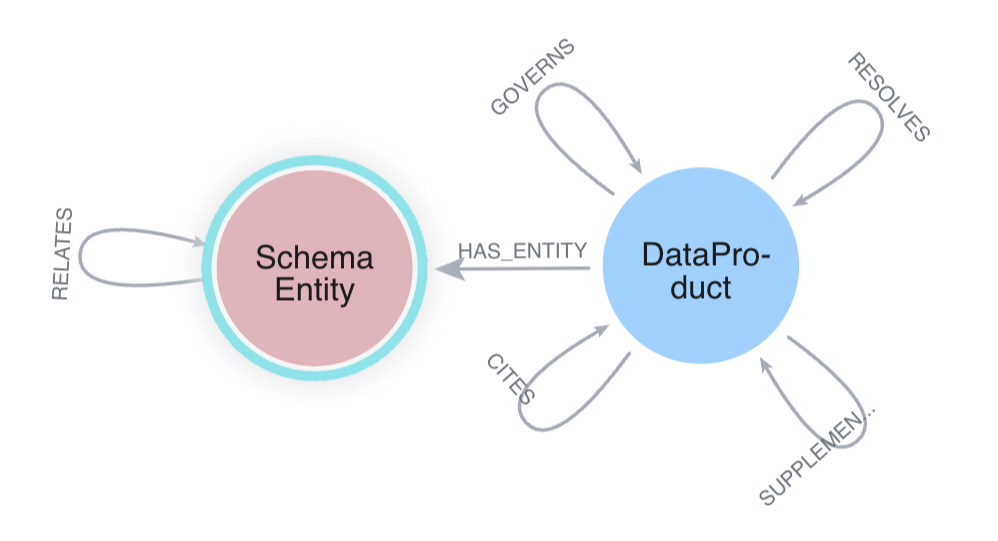
A DataProduct node represents a single data source as a whole – for example, the banking system or the raw data ingested by Document Intelligence. It holds a name, a plain description of what the source contains, a description of what technically backs it, and a color used to visually group it in the UI.
A SchemaEntity node represents a real, specific entity within a data source, such as a Customer or LoanFacility.
Ontologies show how things relate without explicitly recreating each source’s named relationships. One generic RELATES relationship connects any two entities and stores the real name as a property.
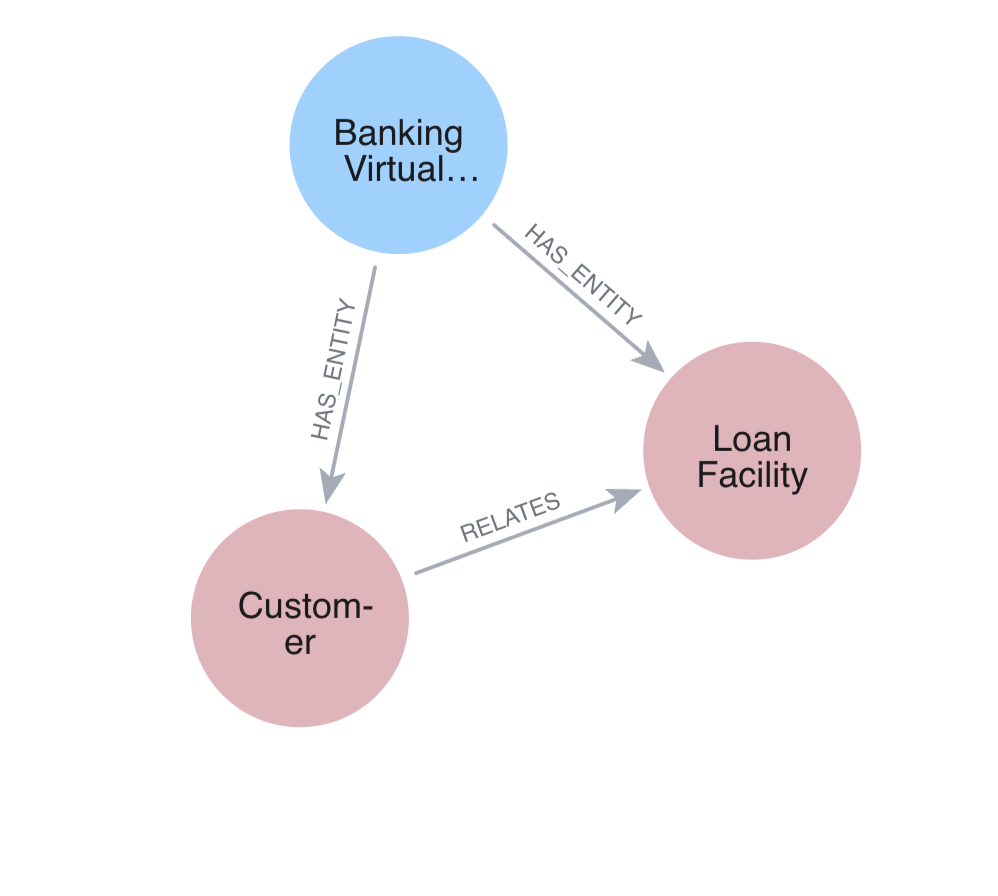
In the visual below, the Nordtell DataProduct links to its Customer and LoanFacility entities, and RELATES connects the two with the name HAS_FACILITY as a property on that RELATES relationship.
How do ontologies model how data sources relate to each other?
An ontology represents each data source as a node and connects those nodes with relationships that describe the role one source plays for another, such as holding the same real-world entity, adding context, setting the rules, or serving as the basis for a decision.
In our example, the DataProduct nodes connect directly to one another inside the ontology, describing how the five sources relate at a high level. The sources themselves are introduced in the next few posts.
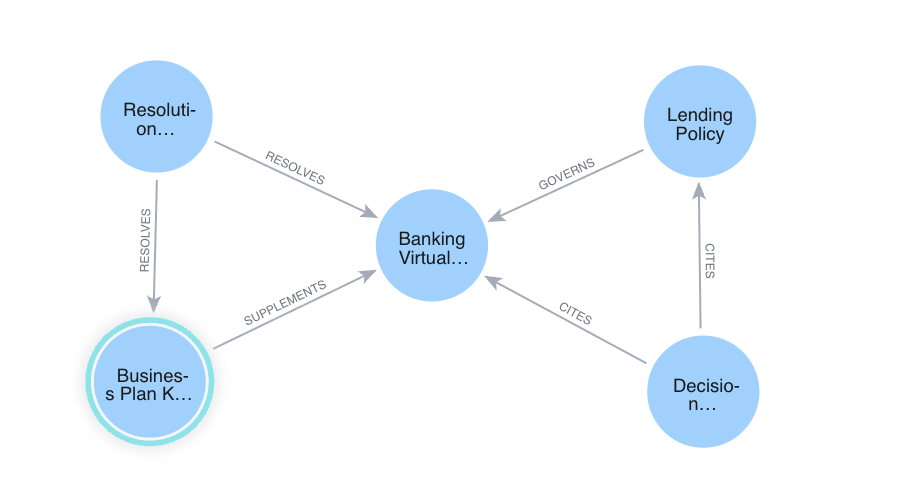
Modeling these relationships tells the agent how the sources fit together, like the lending policy governing the banking data, so it knows where to look without any integrations between the databases.
These connections come in four types: RESOLVES, meaning the sources on either end hold the same real-world entity; SUPPLEMENTS, meaning one source adds extra context to another; GOVERNS, meaning one source constrains what’s allowed in another; and CITES, meaning one source names another as the basis for a decision.
How does an agent use an ontology?
An agent uses an ontology to find out what exists and how it connects before it writes a query, so it doesn’t have to guess or carry that knowledge in its prompt.
The ontology is exposed to agents through two tools. get_schema_help reads the ontology to show the agent where data lives and what it looks like. ontology_guided_query then uses what the agent learned to run a guarded, read-only query against the right source.
Without an ontology, the system prompt would then need to carry a lot more information about each source’s labels and relationship types to guide the agent. Depending on the complexity of the underlying sources, that could look something like this (each of these sources is introduced in a later post):
Meridian (banking Virtual Graph):

  (Customer)-[:OWNS_ACCOUNT]->(Account)-[:HAS_TRANSACTION]->(Transaction)

  (Customer)-[:HAS_FACILITY]->(LoanFacility)

  (Customer)-[:HAS_KYC_STATUS]->(KYCStatus)

  (Customer)-[:HAS_CREDIT_SCORE]->(CreditScore)

  (Customer)-[:APPLIED_FOR]->(LoanApplication)

  (Customer)-[:MANAGED_BY]->(Employee)-[:WORKS_AT]->(Branch)

  (Customer)-[:HAS_PARENT]->(Customer)

Documents (business plan graph):

  (Person)-[:WORKED_AT]->(Organization), (Person)-[:CO_OWNS]->(Property)

  (Person)-[:OWNS]->(Organization), (Organization)-[:REQUESTS]->(LoanRequest)

Lending policy:

  (PolicyDocument)-[:HAS_SECTION]->(PolicySection)-[:HAS_RULE]->(PolicyRule)

  (PolicyRule)-[:REQUIRES_ESCALATION]->(EscalationPath)

...and the same again for the decision history and the shadow database.Code language: CSS (css)
Worse still, every line of that goes stale when a source changes, and it has to be repeated at the prompt of every agent. It also costs tokens on every call, whether or not the question needs it.
Thanks to ontologies, our prompt instead carries one instruction. The “constituents” it mentions are the individual graphs that a composite database connects, which a later post covers:
For anything the tools above don't cover (a question about an entity or relationship

that isn't exposed by a dedicated tool), use get_schema_help and ontology_guided_query

instead of declining or guessing. Call get_schema_help first -- with no arguments for

the five-constituent map, or with a constituent name (e.g. "meridian") for its real

labels and relationship types -- so you know what's actually there before writing a

query. Never cite or query a label/relationship name you haven't confirmed this way.

Then call ontology_guided_query with that constituent and a read-only MATCH...RETURN

Cypher query to actually answer the question.Code language: PHP (php)
How do you create an ontology at scale?
Ontologies are hard to build and maintain by hand. Sources change, definitions drift, and the ontology has to keep up with all of it.
Neo4j Context Engine, now in private preview, gives you a place to do that work. Its core is a six-layer business ontology that you define and store in Neo4j, with Context Studio to manage and govern it. The layers go beyond our demo’s data products and schemas, to domain terms and business processes.
With the ontology in place, your agent has a map to read before it queries.
Next steps
- The previous post, Give Your AI Agents the Shared Context to Succeed, explains why agents need a knowledge layer.
- Next, Turn Your Existing Data into Context shows how to build the knowledge graphs this ontology describes.
- To see where Neo4j is taking the ontology layer, read the Neo4j Context Engine announcement.
Share Article


Explore
Related articles
AuraDB High Memory instances with up to 2TB of RAM now generally available
The Neo4j Ontology Graph Specification: A pragmatic, open, AI-first approach
Seamless graph intelligence for your Snowflake data estate: The Neo4j and Snowflake partnership

Unmasking fraud networks: How graph-grounded Copilots stop P2P fraud in Microsoft Fabric