Finding the Ultimate Beneficial Owner in a Pile of KYC Documents with Document Intelligence

Sr. Manager, Technical Product Marketing, Neo4j
13 min read
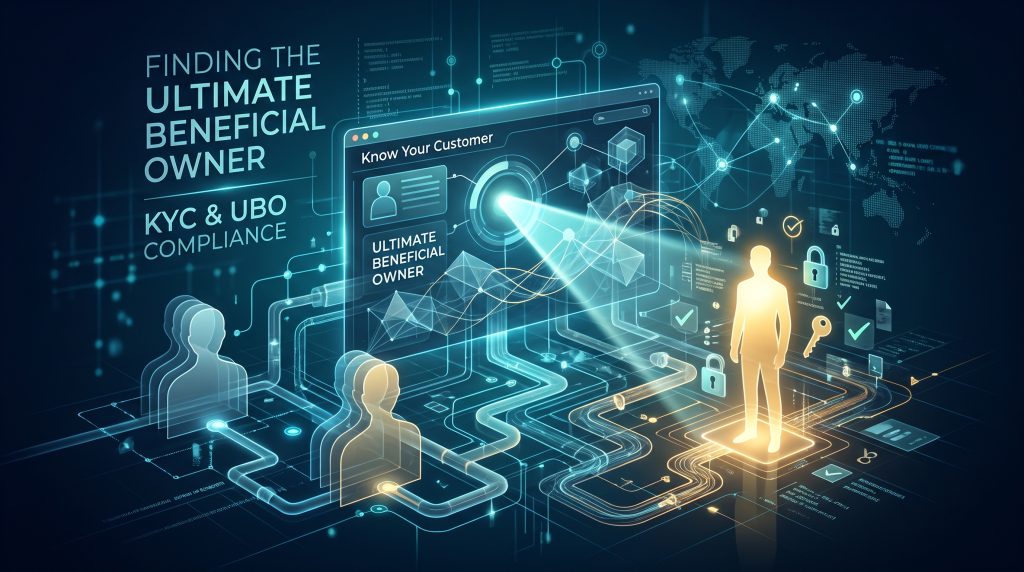
With Document Intelligence, you can build a knowledge graph from your existing documents, including plain text files, PDFs, and Microsoft Word files, without writing a single line of code. Documents that previously sat unused and unqueried can now be searched and acted upon. Once your documents are in a knowledge graph, you can programmatically uncover connections hidden across pages of text.
In this walkthrough, you’ll use Cypher and Louvain community detection algorithm to find the ultimate beneficial owner (UBO) behind a load applicant in a pile of know-your-customer (KYC) compliance documents.
Traditionally, a reviewer has to pour over each document carefully. A diligent reader then has to piece together connections on the fly, leading to easily missed context along the way, which is exactly how bad actors conceal fraud or illicit payments.
The scenario: screening for a loan
Today you are playing the role of compliance team member at a major financial institution. The team has received a stack of on-boarding paperwork for a new corporate client, Anchor Point Partners, which is applying for a loan. The paperwork includes registration filings, ownership disclosures, board minutes, a loan application, a sanctions screening note, and a couple of news clippings
The team pulled 20 documents in total to screen Anchor Point Partners, including previous loan applications for some related companies.
Read individually, every document looks routine. But one line in the loan application seemed a bit suspicious to the compliance team:
Guarantor Dorian Voss is disclosed as an individual guarantor providing personal support for the facility; his relationship to the applicant entity is not further specified on this application. Applicant’s own cap table does not list Mr. Voss as a direct owner.
The compliance team wants to know: what exactly is Dorian Voss’ role in Anchor Point Partners?
Document Intelligence makes building a knowledge graph easy
Before getting started: What you’ll need to build
- A Neo4j Aura account, where you’ll create an empty AuraDB instance
- Aura API credentials (client ID and client secret) for Aura Graph Analytics [add where to create these in the console]
- Python 3.x and Jupyter [add minimum versions]
- The demo repo, which has the 20 documents, the database backup, and both notebooks
You can easily create a knowledge graph from your documents with Document Intelligence in just a few steps:
1. Open Document Intelligence in Aura Console on the left sidebar
2. Drag your documents into Document Intelligence to begin staging them.. You can find the 20 documents used to build this knowledge graph here.
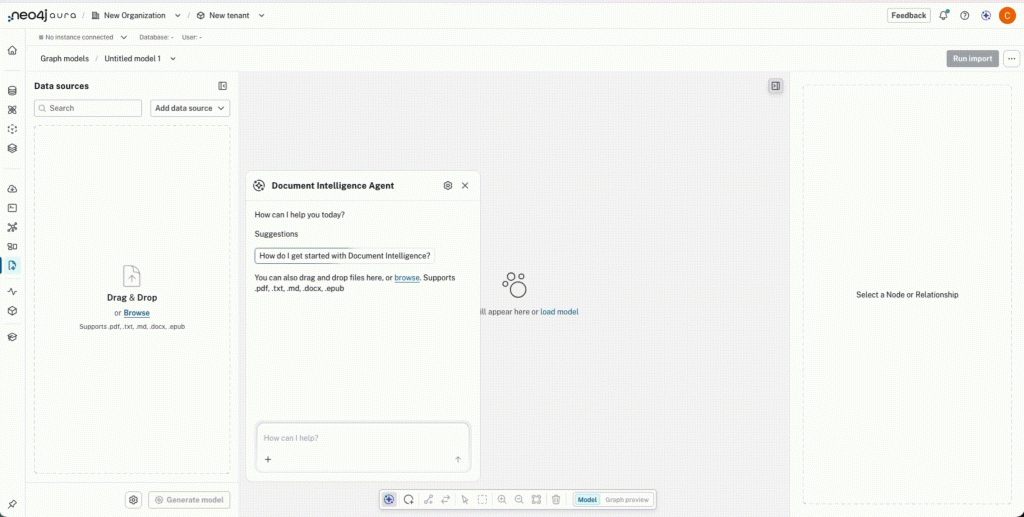
3. Using the conversational agent, you can describe the graph you want in plain language. This guides the LLM that extracts entities and relationships. Then, click Generate Model
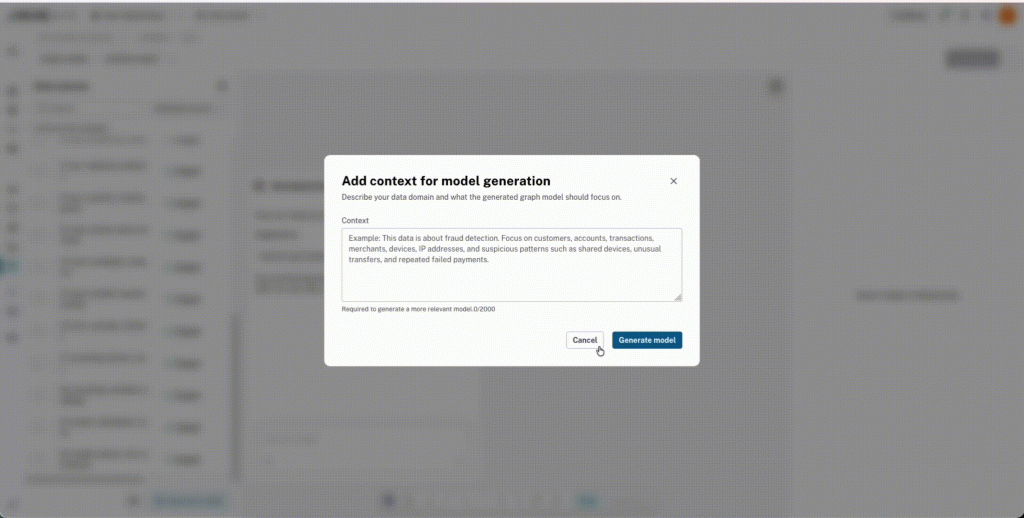
4. Refine the model by telling the agent what to change, for example “add an OWNS relationship between a person and business.”
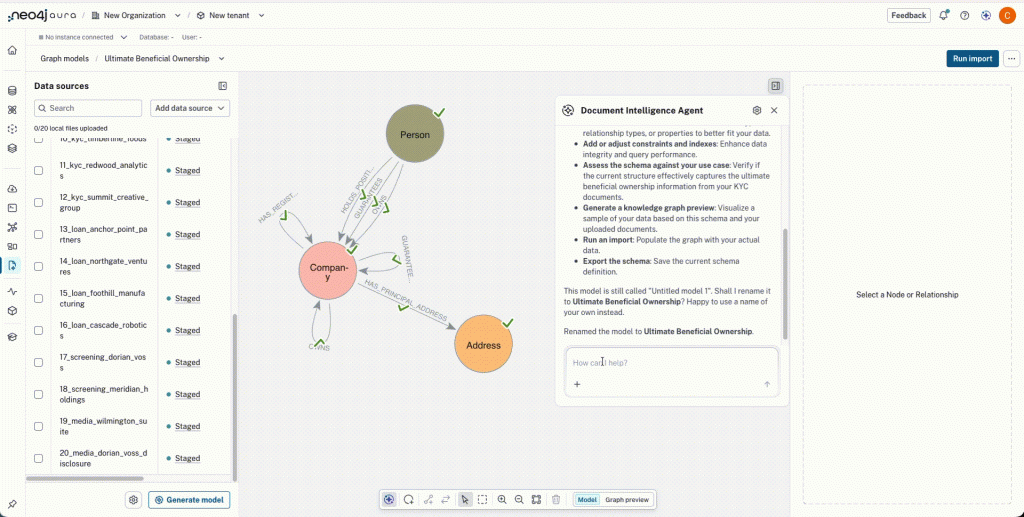
5. Review the graph model and preview of the populated graph.
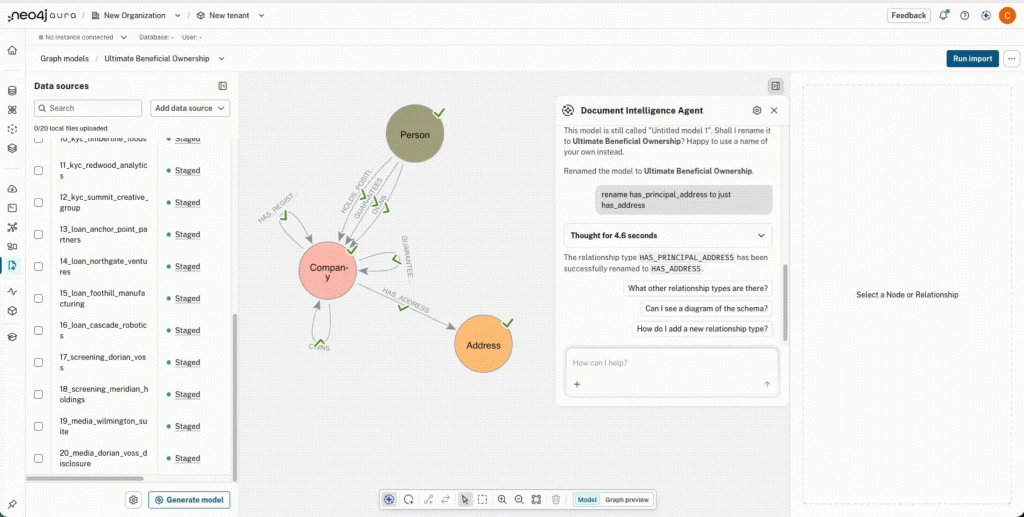
6. Once you are happy with your graph model, simply import it into an empty AuraDB.
Document Intelligence uses an LLM, so its output is not deterministic, and your graph won’t match this example exactly. To follow along with identical results, skip ahead to Step 2 and restore our backup instead.
The documents, the backup, and the notebooks
If you are following along, step-by-step with this tutorial, you’ll want to load our version of the repo before analyzing the graph.
- Close the repo and create an empty AuraDB instance. Be sure to save the connection URI, username, and password.
- Restore data/data.backup into the instance.
- Set the environment variables the notebooks read: CLIENT_ID and CLIENT_SECRET, then set the database connection values (URI, username, and password).
The remainder of this post walks through every code cell in the second notebook, UBO.ipynb, where we took that cleaned-up graph and went looking for the UBO.
Setting Up
You can find all the required packages in requirements.txt. You will need to run Python 3.10 or newer to use the pinned version of graphdatascience. Once you have all the packages installed, import them and load in the credentials for the AuraDB with the results from Document Intelligence.
import os
from datetime import timedelta
from dotenv import load_dotenv
from neo4j import GraphDatabase
from graphdatascience.session import AuraAPICredentials, GdsSessions, DbmsConnectionInfo, SessionMemory
import pandas as pd


load_dotenv()
URI = os.environ["NEO4J_URI"]
USERNAME = os.environ["NEO4J_USERNAME"]
PASSWORD = os.environ["NEO4J_PASSWORD"]
DATABASE = os.environ.get("NEO4J_DATABASE", "neo4j")Code language: JavaScript (javascript)
Next you create an Aura Graph Analytics session, which is a temporary, in-memory compute environment where graph algorithms run.
api_credentials = AuraAPICredentials(
    client_id=os.environ["CLIENT_ID"],
    client_secret=os.environ["CLIENT_SECRET"],
    project_id=os.environ.get("TENANT_ID") or None,
)
sessions = GdsSessions(api_credentials=api_credentials)


db_connection = DbmsConnectionInfo(uri=URI, username=USERNAME, password=PASSWORD)


gds = sessions.get_or_create(
    session_name=SESSION_NAME,
    memory=SessionMemory.m_2GB,
    db_connection=db_connection,
    ttl=timedelta(minutes=30),
    neo4j_driver_config={"notifications_min_severity": "OFF"},
)
gds.verify_connectivity()
print("GDS session ready:", SESSION_NAME)
Code language: PHP (php)
Tracing the ultimate beneficial owner
The loan applicant in our document set is Anchor Point Partners LLC. Its own KYC packet lists exactly two owners, both corporate entities: Cobalt Trading Co and Vantage Point Estates LLC. No individual person is named anywhere on its own paperwork.
To look past those immediate owners and deeper into the data, use a variable-length Cypher traversal. By using the OWNS relationship, the query is set to follow up to 6 OWNS relationships in row, so it can find a person however many layers deep that person sits:
ubo = gds.run_cypher(
    """
    MATCH p = (person:Person)-[:OWNS*1..6]->(applicant:Organization {legalName: "Anchor Point Partners LLC"})
    RETURN person.name AS beneficialOwner,
           [n IN nodes(p) | coalesce(n.legalName, n.name)] AS path,
           length(p) AS hops
    ORDER BY hops
    """,
    database=DATABASE,
)


ubo
Code language: PHP (php)
The query returns each person, the chain of entities between them and the applicant, and the number of hops.
The result: Dorian Voss reaches the loan applicant through two independent paths.
- A short one, two hops: Dorian Voss → Vantage Point Estates LLC (100% owned) → Anchor Point Partners LLC (20%)
- A longer one, four hops: Dorian Voss → Meridian Holdings LLC (60% owned) → Northgate Ventures LLC (40%) → Cobalt Trading Co (35%) → Anchor Point Partners LLC (51%)
Anchor Point had claimed that he was only a guaranteer, yet the graph shows him as an actual controlling owner. You can only reach this knowledge by walking the graph.
To see it rather than just read it, use neo4j_viz:
from neo4j_viz import Node, Relationship, VisualizationGraph


def graph_from_paths(match_clause, **params):
    """Build a VisualizationGraph from the paths `p` matched by `match_clause`."""
    nodes_df = gds.run_cypher(
        f"""
        {match_clause}
        UNWIND nodes(p) AS n
        RETURN DISTINCT elementId(n) AS id, labels(n) AS labels,
               coalesce(n.legalName, n.name) AS caption
        """,
        params, database=DATABASE,
    )
    rels_df = gds.run_cypher(
        f"""
        {match_clause}
        UNWIND relationships(p) AS r
        RETURN DISTINCT elementId(startNode(r)) AS source,
               elementId(endNode(r)) AS target, r.pct AS pct
        """,
        params, database=DATABASE,
    )
    nodes = [Node(id=r.id, caption=r.caption, properties={"labels": list(r.labels)})
             for r in nodes_df.itertuples()]
    rels = [Relationship(source=r.source, target=r.target,
                         caption=f"OWNS {'' if pd.isna(r.pct) else r.pct}")
            for r in rels_df.itertuples()]
    return VisualizationGraph(nodes=nodes, relationships=rels)


VG_ubo = graph_from_paths(
    'MATCH p = (person:Person)-[:OWNS*1..6]->(applicant:Organization {legalName: "Anchor Point Partners LLC"})'
)
for node in VG_ubo.nodes:
    node.color = "#4C72B0" if "Person" in node.properties["labels"] else "#DD8452"


VG_ubo.render_widget(initial_zoom=1.0)
Code language: PHP (php)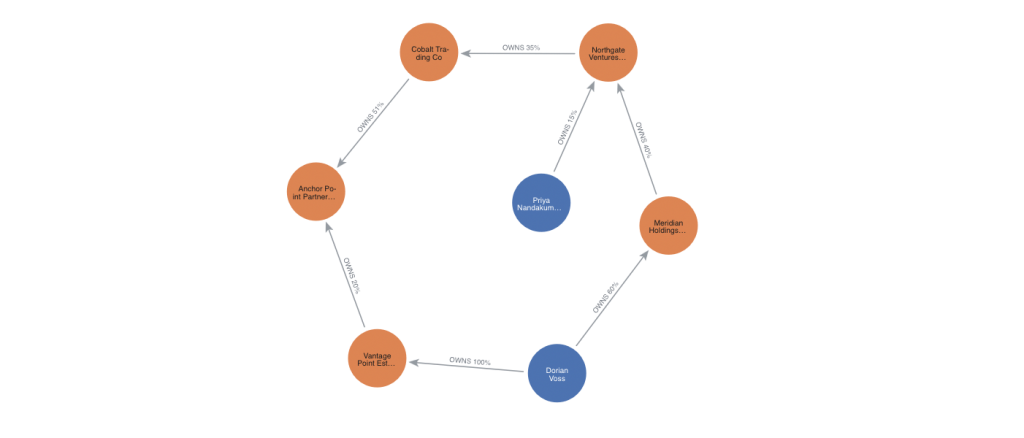
Finding the loop: detect circular ownership
Circular ownership is a classic way to obscure who’s really in charge of a group of companies. If Company A owns Company B, which owns Company C, which owns Company A again, there’s no single entity sitting on top, just a loop, and it’s easy to point to that loop and claim no one person or company is in control. Regulators treat it as a red flag for exactly that reason.
Meridian Holdings LLC, the company Dorian Voss owns 60% of and the first link in his path to Anchor Point Partners LLC, is a natural place to check for this. Does its ownership chain loop back on itself?
cycles = gds.run_cypher(
    """
    MATCH p = (o:Organization)-[:OWNS*2..6]->(o)
    RETURN DISTINCT [n IN nodes(p) | n.legalName] AS cycle, length(p) AS length
    """,
    database=DATABASE,
)


cycles
Code language: PHP (php)
It finds one. Dorian Voss’s own holding company, Meridian Holdings LLC, owns Northgate Ventures LLC, which owns Cobalt Trading Co, which owns Meridian Holdings LLC back again. That’s a closed three-company loop (40%, 35%, and 30% stakes respectively).
Same visualization approach as before:
VG_cycle = graph_from_paths(
    "MATCH p = (o:Organization)-[:OWNS*2..6]->(o)"
)


VG_cycle.render()
Code language: JavaScript (javascript)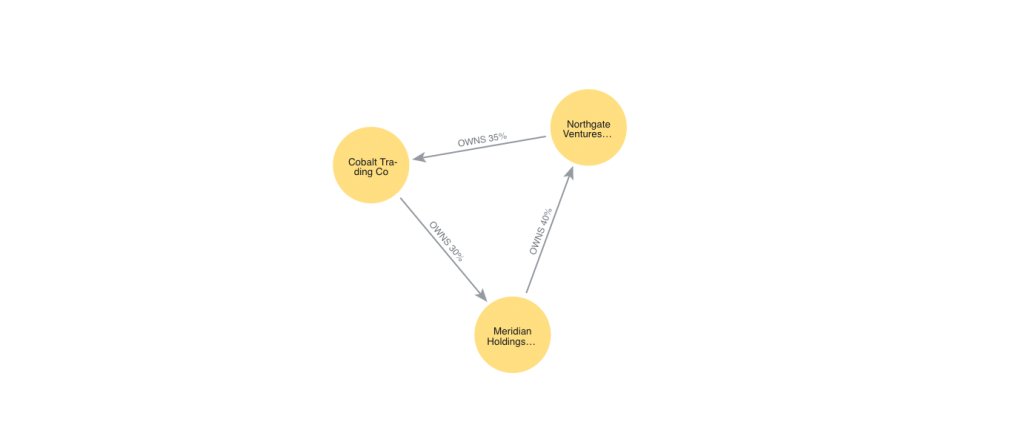
Louvain: the ring isn’t one blob, it’s two
Not all connections need to be explicit to be meaningful. That’s where a graph algorithm can help.
You can use Louvain to find regions of the graph that are more densely connected to each other than other regions of the graph.
Graph algorithms run inside an Aura Graph Analytics session, a temporary compute resource that is billed for use. This allows you to only pay for analytic resources when you actually need them.
However, this first requires projecting a graph into it. You can do this by writing a cypher query for just the subset of the graph that you want to examine.
The projection includes both OWNS and OFFICER_OF relationships, in both directions, because community detection only cares whether two things are connected, not what kind of connection it is or which way it points:
if gds.graph.exists("ownershipGraph"):
    gds.graph.drop("ownershipGraph")


G, project_result = gds.graph.project.cypher(
    "ownershipGraph",
    """
    CALL () {
        MATCH (a)-[:OWNS]->(b)
        RETURN a AS source, b AS target
        UNION
        MATCH (a)-[:OWNS]->(b)
        RETURN b AS source, a AS target
        UNION
        MATCH (a)-[:OFFICER_OF]->(b)
        RETURN a AS source, b AS target
        UNION
        MATCH (a)-[:OFFICER_OF]->(b)
        RETURN b AS source, a AS target
    }
    RETURN gds.graph.project.remote(source, target, {
      sourceNodeLabels: labels(source),
      targetNodeLabels: labels(target),
      relationshipType: 'CONNECTED'
    })
    """,
)
print(f"Projected {G.node_count()} nodes, {G.relationship_count()} edges (both directions)")
Code language: PHP (php)
Next you will run Louvain. mutate runs the algorithm and stores the result on the in-session graph, without writing back to AuraDB. stream pulls that property out as a table. The db_node_properties grabs the original legalName/name fields in the same call.
louvain_result = gds.louvain.mutate(G, mutate_property="louvainCommunity")
print(f"Louvain found {louvain_result.community_count} communities "
      f"(modularity {louvain_result.modularity:.3f})")


louvain_stream = gds.graph.node_properties.stream(
    G, ["louvainCommunity"], db_node_properties=["legalName", "name"]
)
louvain_stream["entity"] = louvain_stream["legalName"].fillna(louvain_stream["name"])
louvain_stream = louvain_stream[["entity", "louvainCommunity"]].sort_values(
    ["louvainCommunity", "entity"]
)
louvain_stream
Code language: PHP (php)
A quick groupby turns that table into the clusters directly:
for community_id, members in louvain_stream.groupby("louvainCommunity")["entity"]:
    print(f"Community {community_id}: {', '.join(members)}")
Code language: PHP (php)
Community 2: Ashford Capital Partners LLC, Cobalt Trading Co, Meridian Holdings LLC, Northgate Ventures LLC, Radu Costin
Community 8: Anchor Point Partners LLC, Dorian Voss, Ministry of Finance, Vantage Point Estates LLC
Community 11: Bluewater Logistics Inc, Cascade Robotics Inc, Elena Marsh, Foothill Manufacturing Inc, Priya Nandakumar
Community 13: Marcus Webb, Timberline Foods Inc
Community 15: Ines Alvarez, Redwood Analytics LLC, Summit Creative Group LLCGoing in, we expected the six companies connected to Dorian Voss, both his direct holdings and the ownership loop they sit inside, to fall out as one tidy “ring” community. Louvain found something more interesting: it split them into two tighter sub-communities instead of one.
- {Meridian Holdings LLC, Northgate Ventures LLC, Cobalt Trading Co, Ashford Capital Partners LLC, Radu Costin}: the reciprocal-ownership core (the loop, plus Cobalt’s CFO)
- {Anchor Point Partners LLC, Vantage Point Estates LLC, Dorian Voss, Ministry of Finance}: Dorian Voss’s personal holding chain
The algorithm found real structure: Voss’s direct personal holdings are genuinely more tightly connected to him than to the Meridian/Northgate/Cobalt loop, even though a corporate ownership stake (Cobalt’s 51% of Anchor Point) is what connects the two groups. Both sub-communities stay clearly separate from the legitimate operating companies and the unrelated clean pair in our document set.
Last step for this section, visualize the projected graph colored by the community property we just computed:
from neo4j_viz.gds import from_gds


VG = from_gds(gds, G, node_properties=["louvainCommunity"], db_node_properties=["legalName", "name"])
for node in VG.nodes:
    node.caption = node.properties.get("legalName") or node.properties.get("name")
VG.color_nodes(property="louvainCommunity")
VG.render_widget(initial_zoom=0.8)Code language: JavaScript (javascript)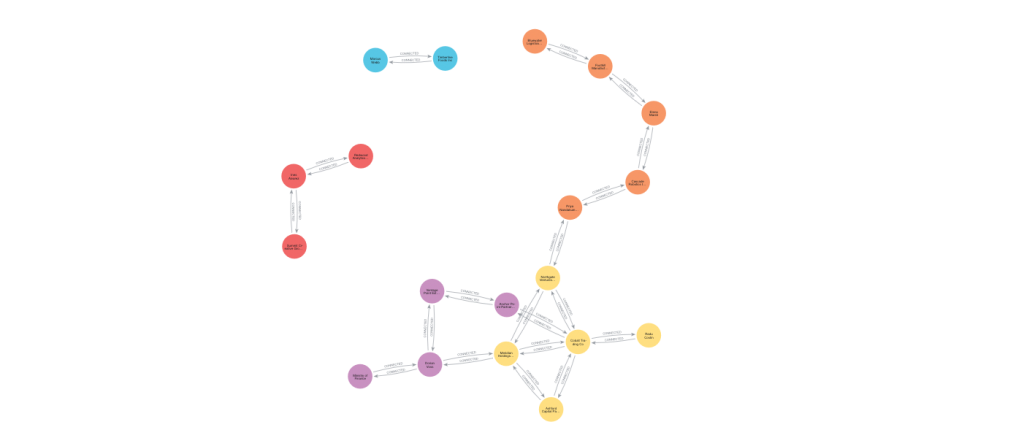
The notebook’s last cell closes out the session:
G.drop()
sessions.delete(session_name=SESSION_NAME)
print("Session deleted:", SESSION_NAME)
Code language: PHP (php)
An Aura Graph Analytics session is a billed resource for as long as it exists, so we drop the projected graph and delete the session explicitly rather than relying on the ttl timeout to clean it up for us.
What the knowledge graph reveals
Anchor Point Partners LLC’s loan application claimed:
“Guarantor Dorian Voss is disclosed as an individual guarantor providing personal support for the facility; his relationship to the applicant entity is not further specified on this application.”
However, examining the knowledge graph revealed that:
- Dorian Voss reaches Anchor Point Partners LLC through two independent ownership chains, despite never appearing on its own cap table.
- The first company in that chain, Meridian Holdings LLC, which Voss owns 60% of, sits in a closed three-company ownership loop with Northgate Ventures LLC and Cobalt Trading Co.
- Community detection groups the six companies tied to Voss into two tightly connected clusters, both clearly separate from the legitimate businesses in the rest of the document set.
Put together, the evidence points to Dorian Voss as the undisclosed ultimate beneficial owner of Anchor Point Partners LLC. A loop and a cluster of related entities obscured his role, which is the exact structure UBO diligence exists to catch.
None of this was stated anywhere in the source documents. Document Intelligence turned 20 files into a graph without writing an extraction rule, entity resolution with GDS merged fragmented mentions into one canonical graph, And Cypher traversal plus Louvain community detection surfaced facts that only exist as a property of the graph as a whole, not in any single document in the pile.
Next steps
Check out Document Intelligence on Aura today! Or if you’ve tried Document Intelligence, please share your feedback with us here!
Share Article


Explore
Related Articles
Introducing Document Intelligence: From documents to a knowledge graph, right inside Aura