Zero-Copy Graph Reasoning on Snowflake: Getting Started With Neo4j Virtual Graph

Senior AI Solutions Architect, Neo4j
17 min read
Run Cypher queries, graph algorithms, and AI agents directly on your Snowflake data. No ETL. No ingestion. Full Neo4j tooling.
Today is about uncovering the rich context hidden within your data topology — whether through deep, native graph traversals or zero-ETL, in-place queries. That is the essence of connected intelligence, and Neo4j Virtual Graph brings our industry-leading graph querying directly to Snowflake without moving a single byte of data.
Most graph conversations start with “move your data into a graph.” We want to expand on that option. Virtual Graph brings Neo4j graph reasoning directly to where your data already resides: you do not need to extract it, and you do not need to copy it. Which makes Virtual Graph the answer to a question we hear from data and AI teams everywhere:
How can my data and AI team leverage the expressive power of graph databases, while maintaining a single, unmoved source of truth within my existing data storage infrastructure?
Everything in this post is the answer to exactly that question:
- what Virtual Graph is,
- how it works under the hood with Snowflake,
- a walkthrough of a live Virtual Graph over a real public dataset,
- and where it sits in an enterprise architecture next to a native Neo4j graph database.
Graph projects rarely fail due to modeling. However, they can fail on data movement.
That is the pattern we often see in graph initiatives within large Snowflake shops, and it is not unique to graph: it is the standard cost of moving data from one system to another. Four walls come up again and again.
- Data migration is blocked. Security, GDPR, and governance reviews alone add months before a project even starts. The team that finally consolidated everything into Snowflake is not eager to approve an export.
- Political barriers. In large enterprises, the friction is organizational as much as technical. Who owns what data? Who operationalizes the pipeline? Who secures the new store? Data teams resist standing up and securing yet another database, and every new copy is a new liability.
- The scale problem. Petabyte-scale datasets might be too large to synchronize into any other store, graph, or otherwise. The synchronization pipeline becomes a project in its own right, and the copies drift the moment they land, leading to data inconsistency, stale insights, and an endless cycle of operational firefighting.
- Pilots stall. POCs succeed on sampled data, but then a significant investment is required to scale algorithms or visualizations to production.
The defining question isn’t which graph database to choose? It’s: how fast can we surface connected context and prove ROI without moving a single byte of data via ETL?
Eliminating complex ETL pipelines is the single greatest predictor of graph project success. It can turn a multi-month engineering effort into an agile, high-impact deployment that delivers deep relationship insights in hours or days, not quarters.
What Virtual Graph is
Neo4j Virtual Graph translates your Cypher queries into the native query language of the source and pushes the work down. This post shows how that works with Snowflake, though it supports other systems as well: today, any data warehouse or database that provides a standards-compliant JDBC connection with decent SQL support can be used, and the list of officially supported sources is expanding.
It carries the full Neo4j toolset on top: Bloom, GDS, agents, Browser, and the standard drivers over Bolt. If you use it today, it works — but without ETL and no frail ingestion. Warehouse remains your single, unmoved system of record.
Why it matters: you have large amounts of data you cannot move, and a traditional ETL project would face every wall described above before the first useful query. A Virtual Graph deploys against the data immediately, so you prove value in a matter of hours.
How it works under the hood
Three things come together.
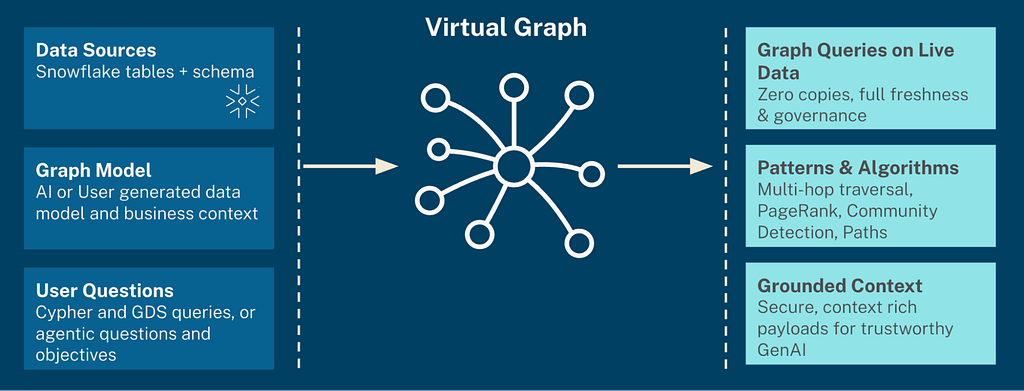
- Data sources. Your Snowflake tables and schema, connected read-only. Your existing Snowflake RBAC and governance apply unchanged, because every data query executes inside Snowflake, using the same Snowflake user credentials, which are under your control and governance boundaries.
- A graph model. AI-generated or self-designed, the model maps your tables onto a graph: tables become node labels, foreign keys and link tables become relationships, columns become properties. This is the conceptual shift the data warehouse world will recognize from semantic layers: nothing is loaded. The model is a mapping over data that stays exactly where it is. Relationships your tables have always implied through keys and joins become first-class, traversable citizens in the Virtual Graph through edges.
- User questions. From natural language user prompts to precise Cypher and Graph Data Science (GDS) queries — whether handcrafted by data scientists or dynamically generated by AI agents and Copilots — the ultimate goal is to convert human curiosity into instant, connected context. The bottleneck shifts from writing the code to efficiently executing it.
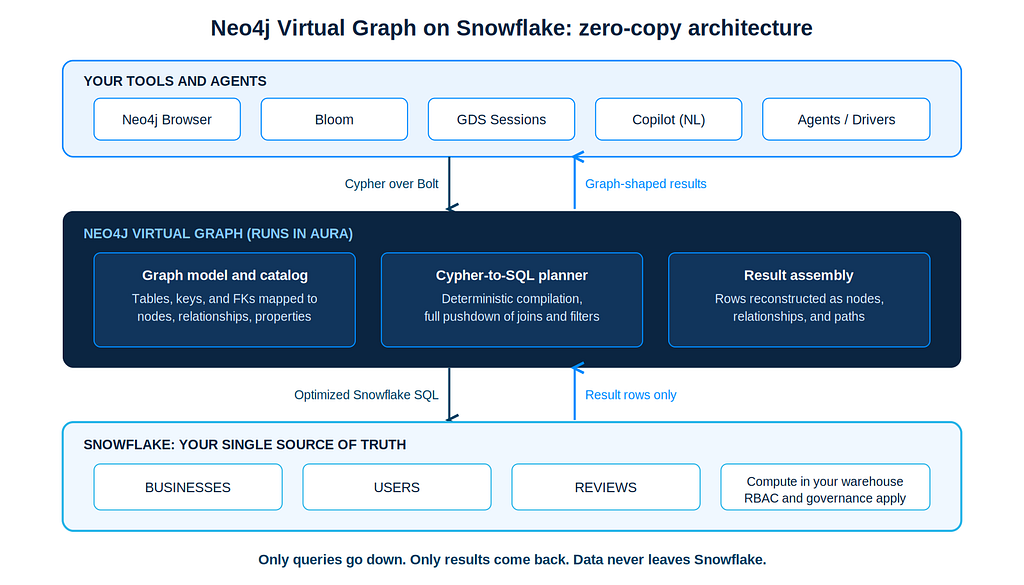
The Virtual Graph itself becomes the translation and routing layer. It compiles your graph query into optimized Snowflake SQL and pushes filtering, joins, and aggregations down to your warehouse. Only result rows come back, and Virtual Graph reassembles them into nodes, relationships, and paths as needed.
On the old architecture diagrams, there used to be a dashed line where the ETL pipeline sat between the warehouse and the graph. That dashed line is exactly the bit we have removed.
What you get out of it:
- Graph queries on live data. Zero copies, full freshness, no drift, your governance. If customer data is updated continuously, you do not build CDC pipelines to keep a graph in sync, because there is no second copy to sync.
- Patterns and algorithms. Multi-hop traversal, PageRank, community detection, and pathfinding, including 60+ algorithms via GDS serverless sessions.
- Grounded context. Secure, context-rich graph payloads for trustworthy GenAI and agentic workloads.
One more design point that matters for anyone who has been burned by “AI-powered” query layers: the Cypher-to-SQL translation is completely deterministic. It is a rule-based engine, so when you write Cypher yourself, you always get the same optimized SQL output, with predictable performance and predictable Snowflake compute cost. LLMs only enter the picture above the query language when an agent turns natural language into Cypher. The underlying Cypher-to-SQL layer remains strict and predictable.
Why not just write the SQL?
A fair question, and one we hear often. For one or two hops with a known shape, you can. But graph questions are rarely that polite. Variable-length paths (“find the chain of payments connecting these two accounts, however long it is”), cyclic patterns (“find circular payment loops”), and traversals where you do not know in advance which tables you will join, in what order, or how many times, turn into recursive CTEs and self-join pyramids that are brutal to write, harder to review, and nearly impossible for a business stakeholder to validate. The same pattern in Cypher reads like the question itself:
MATCH path = (a:Account)-[:SENT*3..6]->(a)
RETURN path
That readability is not cosmetic, it is fundamental to the true expressiveness and value of graph. When an AI agent answers a question by traversing your data, the traversal path is the audit trail. Anyone can follow it. That is much harder to claim about a 200-line recursive SQL statement.
A living example: the Yelp review dataset in Snowflake
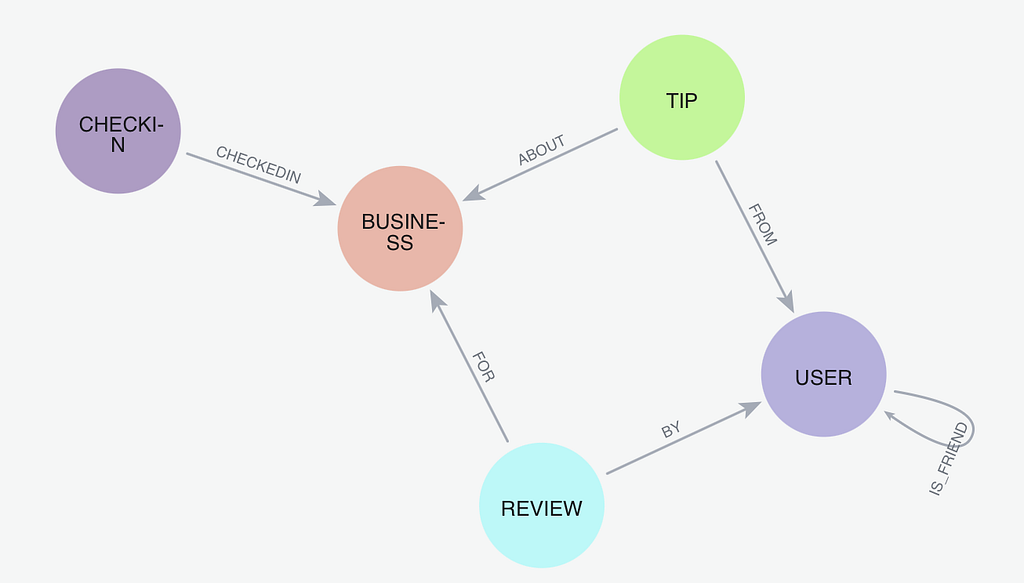
Let’s make it concrete with the walkthrough from our Connected Intelligence webinar, using a public dataset most teams will recognize: the Yelp review dataset, pre-loaded into Snowflake. It is relatively simple but very expressive: millions of reviews of US businesses, together with a social network of the users who wrote them. In Snowflake, there are six flat tables connected through foreign keys.
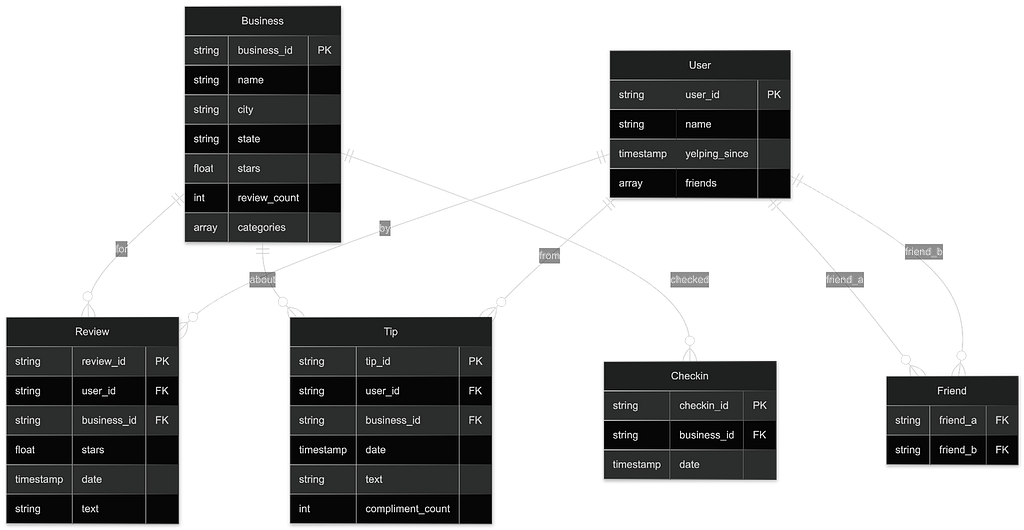
Represented in Neo4j, the same data becomes a simple but meaningful graph schema: businesses, users, reviews, tips, and check-ins as nodes, connected through relationships the engine builds from those keys.
From Snowflake tables to a running Virtual Graph
The flow, end-to-end, inside the Aura console:
1. Prepare Snowflake. Create a key pair and register a dedicated, read-only service account user with the public key (full commands in the Snowflake quickstart):
openssl genrsa 2048 | openssl pkcs8 -topk8 -inform PEM -out snowkey.p8 -nocrypt
openssl rsa -in snowkey.p8 -pubout -out snowkey.pub
Virtual Graph only ever requires read access, so restrict this user to read privileges and consider scoping it to specific tables. Whatever this user can see, the Virtual Graph can see.
2. Create the Virtual Graph instance. In the Aura console, select Instances, the Virtual Graphs tab, then Create Virtual Graph. Choose a name, cloud provider, and a memory volume sized to your workload (a small dataset only needs a few resources).
3. Connect the data source. Point the instance at your running Snowflake database: host, database, schema, warehouse, the service account user, and the private key. Do not skip the warehouse: if the Snowflake user has no default warehouse defined, Virtual Graph has no compute to run queries on, and the connection will fail, which is the most common setup issue we see. Aura verifies the connection.
4. Create the graph model. Here you have three options:
- Define the schema entirely manually when you know exactly what you want. Like the model shown above.
- Generate automatically from the tables and constraints defined in Snowflake. (Might miss the foreign key relationships).
- Use GenAI to parse the Snowflake schema and propose a graph representation using AI.
When should you use AI versus doing it yourself? AI generation works best when you are still exploring what there is: it is very good at extracting relationships and proposing a graph from zero, which gives you a fast experimentation loop. Once you understand the target schema you want, you either generate with AI and make manual tweaks, or generate directly from the database constraints if you are already confident in the model.
In the webinar, we generated the graph schema from the Snowflake table schema and constraints, then refined it by hand: renaming relationships to FOR, BY, FROM, and ABOUT, and adding one relationship that the constraints did not declare, the IS_FRIEND link that carries the social structure of the graph. A final review, then Create Virtual Graph. Within about a minute, Aura establishes the mappings, and the instance is running, ready for Query, Bloom, and GDS.
Querying it
First sanity check: visualize the schema and confirm it matches what you defined. Then start asking graph questions.
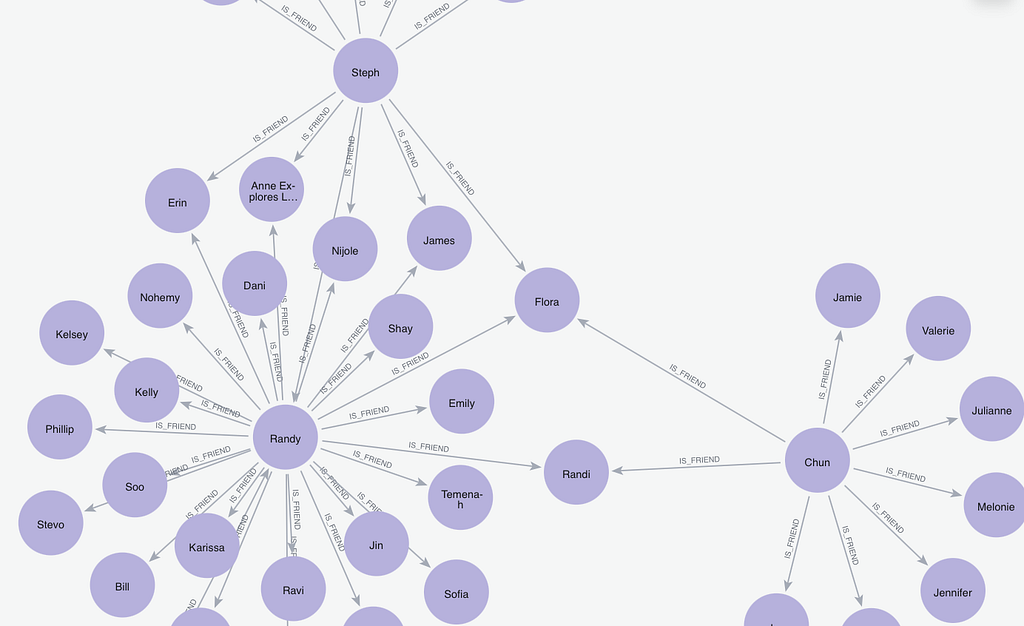
The social network. In tabular form, user friendships are nothing but flat connectivity entries in a table. As a graph, the same data becomes the social network in all its glory and scale. Run the Cypher, and you watch the Virtual Graph engine translate it into the native SQL needed to fetch the data from Snowflake, with the result rendered as a graph:
MATCH p=(u1:USER)-[:IS_FRIEND]-(u2:USER)
RETURN p
Five-star reviews other users found useful. A very expressive pattern in Cypher: businesses rated five stars, the reviews behind those ratings, and the users who wrote reviews that others marked useful, returned as a connected subgraph rather than a flat result set:
MATCH p=(b:BUSINESS)<-[:FOR]-(r:REVIEW)-[:BY]->(:USER)
WHERE r.STARS = 5 AND r.USEFUL >=5
RETURN p
Vengeful detractors. The fun one – users and their friends who review highly rated businesses but score them very low, despite the business’s strong average. A classic reputational-risk pattern that is awkward in SQL and natural in a graph:
MATCH p=(:USER)-[:IS_FRIEND]-(:USER)<-[:FROM]-(r:REVIEW)-[:FOR]->(b:BUSINESS)
WHERE r.STARS = 1 AND b.STARS >= 4.5
RETURN p
Every one of these hit the live Snowflake instance. Nothing was cached, nothing was copied, and the data was turned into an explorable graph with a wealth of visual context, without deeply copying or altering the underlying tables, and with sub-second query latency. The graph engine handles all conversions and query orchestration.
Asking it in plain English: an agent over the Virtual Graph
The last step of the demo is the one that lands best with AI teams: create a small autonomous agent in Aura, on top of the Virtual Graph, and ask natural language questions of data that never left Snowflake.
In the live event, we created an agent called Restaurant Advisor, gave it a role prompt, and asked it a real question: “Are there any good fish restaurants in Santa Barbara?” The agent examines the Virtual Graph schema in Neo4j, builds a Cypher query that answers the question, and the Virtual Graph pushes the SQL down to Snowflake. We are not pulling the full dataset; we are using the graph to answer one specific, localized question. The answer came back: Brophy Bros. or Arch Rock, both in Santa Barbara.
Then the follow-up: “What do reviews say about them?” The agent maintains conversation context, knows we mean those two restaurants, understands how reviews connect in the schema, translates intent into the right queries, and returns a natural-language summary of the positives and negatives of each (the clam chowder reviews settled it).
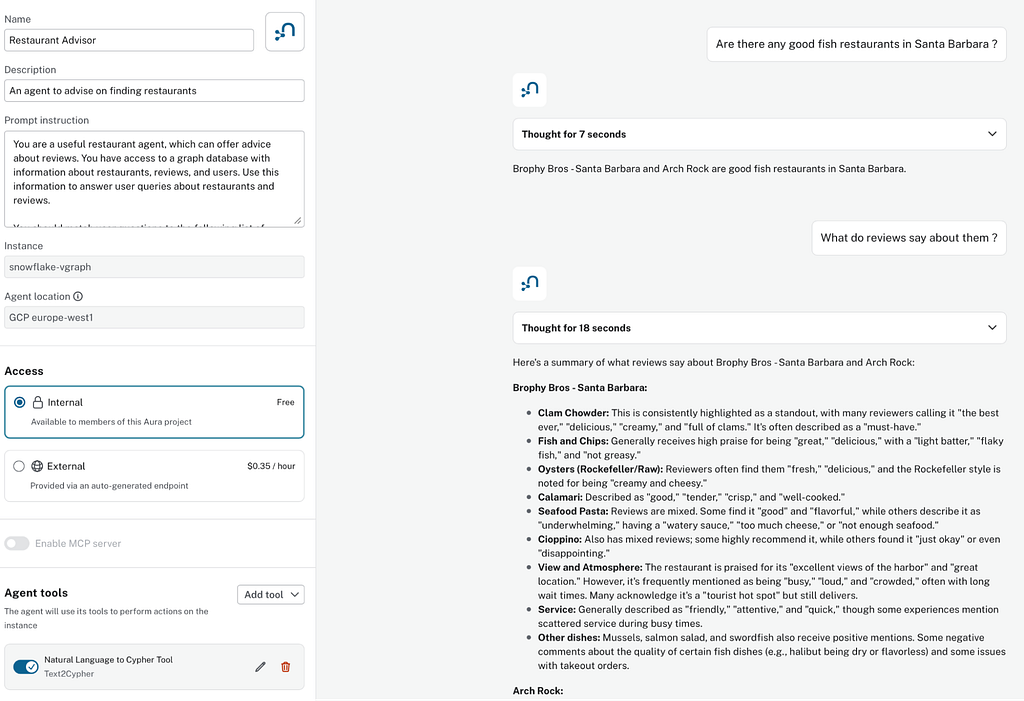
That is GraphRAG over warehouse data with zero ETL: grounded, traceable retrieval where every answer can be traced back through the graph traversal to the rows in Snowflake that produced it.
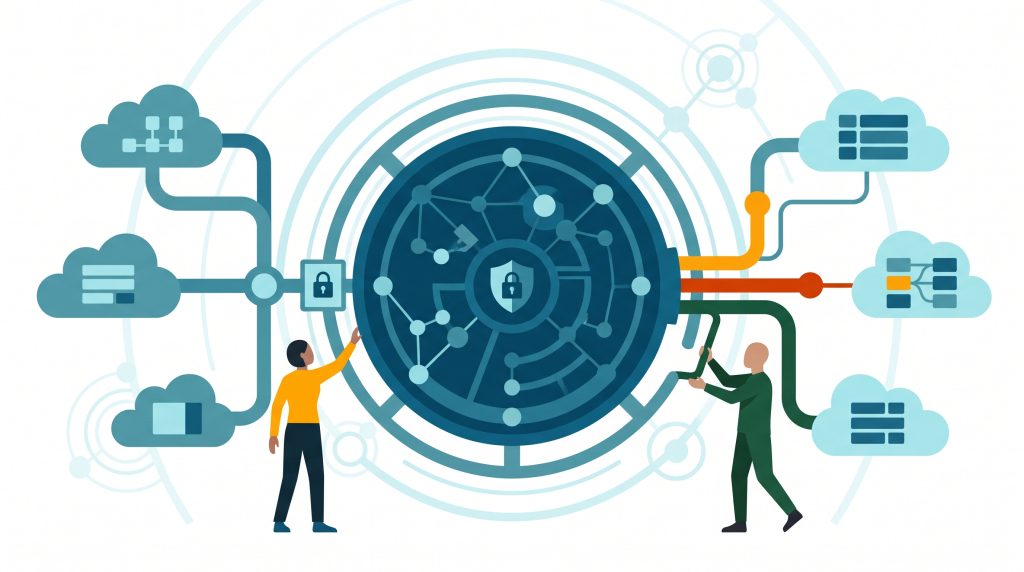
The enterprise architecture: a federated semantic hub
Step back from the demo and look at where Virtual Graph sits in a full enterprise architecture, because this structure is what makes the approach durable rather than a clever trick.
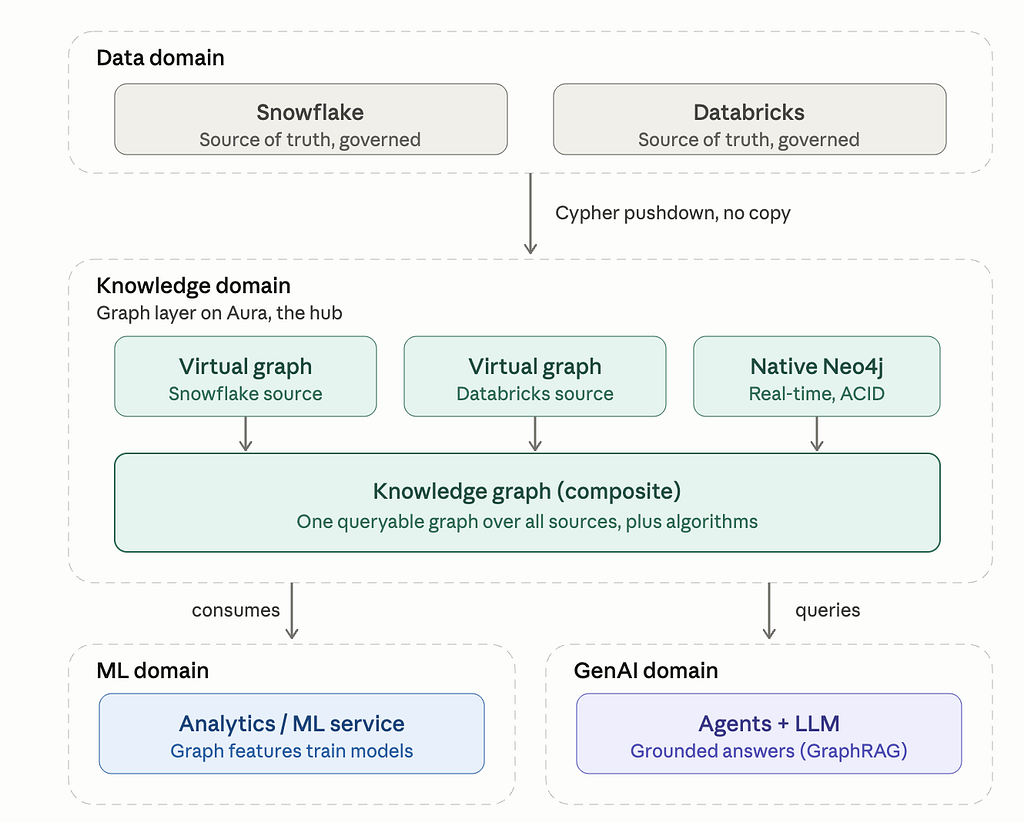
Read the architecture bottom-up, by domain:
- Data domain. Snowflake (and Databricks, and other JDBC sources) remain the governed sources of truth. Nothing about that changes: same owners, same controls, same compliance posture. The only thing that crosses the boundary upward is Cypher pushdown. No copy.
- Knowledge domain. The graph layer on Aura is the hub. It holds one Virtual Graph per source, alongside native Neo4j databases for the data that is naturally graph-shaped and latency-sensitive: knowledge graphs built from unstructured documents, customer 360, agent memory. A composite database sits over all of them, giving you one queryable knowledge graph spanning every source, plus the algorithm surface. This is the federated semantic hub: the place where the enterprise’s relationships are defined once and queried uniformly, regardless of where the underlying data lives.
- ML domain. Analytics and ML services consume the hub. Graph features (centrality scores, community labels, path metrics, etc.) are used to train the model without a feature-extraction pipeline per source.
- GenAI domain. Agents and LLMs query the hub for grounded answers. This is the GraphRAG pattern from the demo, generalized: the agent reasons over a single unified graph, whether the facts are unstructured documents handled natively in Neo4j or structured rows reached through a Virtual Graph.
For a governance-minded team, this is what truly matters about the whole design: you have not duplicated data, you have not lost track of where it lives, and nothing escapes the controls you already trust.
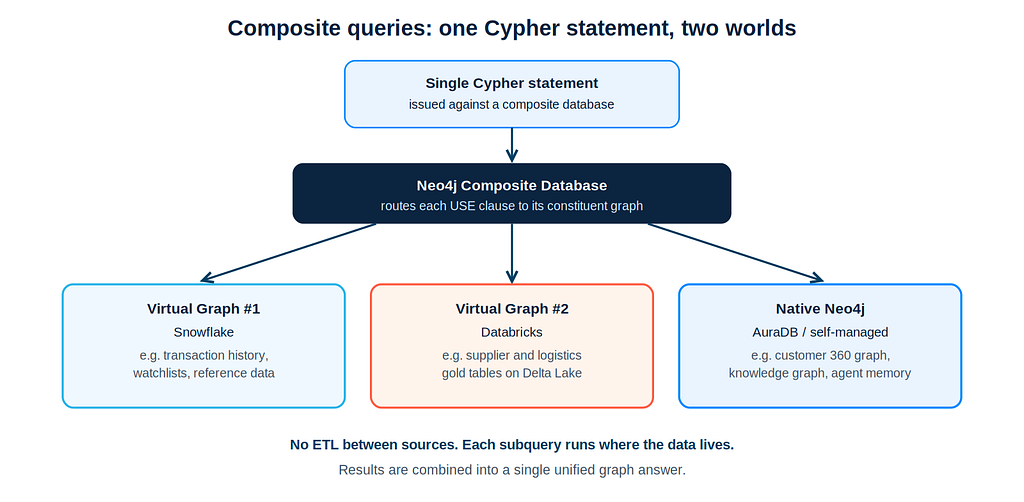
Composite queries in practice
The connective tissue of that architecture is the composite query: a single Cypher statement that addresses multiple constituent graphs in turn and blends the results.
USE vg_snowflake
MATCH (w:WatchlistEntity) WHERE w.risk = 'high'
WITH collect(w.entityId) AS flagged
USE neo4j_customers
MATCH (c:Customer)-[:TRANSACTED_WITH*1..3]->(x)
WHERE x.entityId IN flagged
RETURN c, x
Two patterns dominate so far.
First, knowledge graphs built in Neo4j e.g. from unstructured documents (a natural graph problem) blended with structured data residing in the lake.
Second, fraud detection with deep graph traversals across systems: watchlists and transaction history in the warehouse, the live customer interaction graph in Neo4j. One query, multiple sources, unified results, and no ETL in between.
Virtual Graph and native Neo4j: complementary, not competitive
Does Virtual Graph replace a native Neo4j database? It does not. They solve two different problems and have their own ideal use cases.
They aren’t fighting for the same crown — they are solving entirely different architectural challenges. Think of them as teammates rather than rivals — each optimized for a distinct pace and purpose.
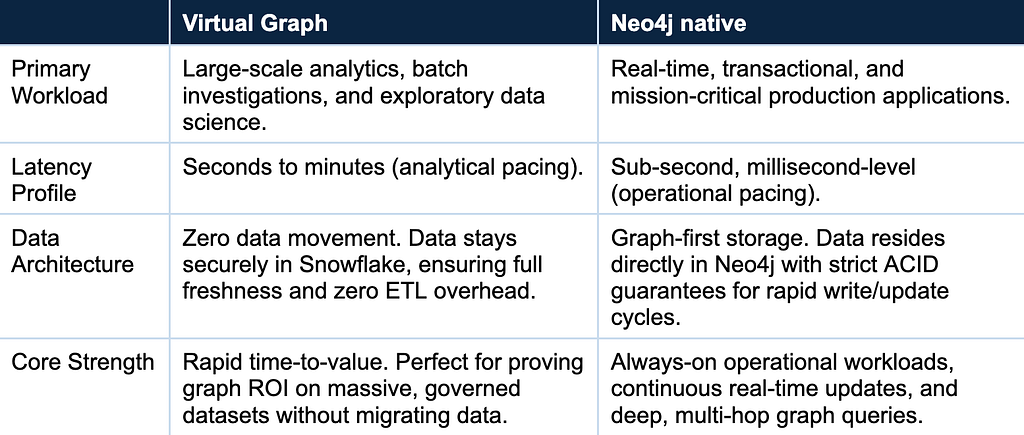
The Golden Rule of Virtual Graph Architecture
If your systems (or AI agents) need to think in seconds, Virtual Graph is your best fit. If they need to act in milliseconds, go native
You don’t always have to choose, either. By leveraging composite queries, you get the best of both worlds — allowing a single, unified question to span across both cached real-time data and massive, deep-lake analytics seamlessly.
Where teams are using it today
Virtual Graph is particularly interesting in any domain where moving data is difficult.
- Highly regulated industries such as pharma and life sciences benefit immediately, precisely because no data moves: genomic knowledge graphs over genes, proteins, compounds, trials, and adverse events; patient journey analysis over EHR, claims, and prescription histories that must stay in the warehouse.
- Machine learning use cases such as fraud detection and churn prediction, where there is a large volume of analytical data and the value lies in the graph topology: telecom operators running community detection over petabytes of call detail records without pulling them out, or root-cause analysis across network dependency graphs.
- IT and cybersecurity. IAM blast-radius analysis over nested permissions, and SIEM enrichment: security logs sit in massive cold storage, and incident responders use Cypher to reconstruct an attacker’s lateral movement without staging a copy.
The common thread: your data is large, governed, and already in Snowflake – the ETL pipeline is the part that is difficult. Whether for domain restrictions or pure volume, and the question is connected. Virtual Graph lets you prove that value and deliver working scenarios fast.
Next steps
- Join the preview: register for Virtual Graph early access
- Read the docs: Quickstart: Snowflake
- Read the launch blog: Introducing Neo4j Virtual Graph
- Watch our Virtual Graph on Snowflake event: Zero-Copy Advanced Graphs: Neo4j Data Reasoning Directly in Snowflake
- Deploy Neo4j via the Snowflake Marketplace, and read more about the partnership at neo4j.com/snowflake
- Questions, compliance boundaries, or unique technical hurdles: [email protected], and we will help map out your architecture
Zero-Copy Graph Reasoning on Snowflake: Getting Started With Neo4j Virtual Graph was originally published in Neo4j Developer Blog on Medium, where people are continuing the conversation by highlighting and responding to this story.
Share Article


Explore
Related Articles
Connected Intelligence: Accelerating Enterprise AI throughout the cloud ecosystem