Call procedures
The CALL clause is used to call a procedure deployed in the database.
Neo4j comes with a number of built-in procedures.
Users can also develop custom procedures and deploy to the database.
For more details, see Java Reference → User-defined procedures.
|
The |
Example graph
The examples on this page use the following graph:
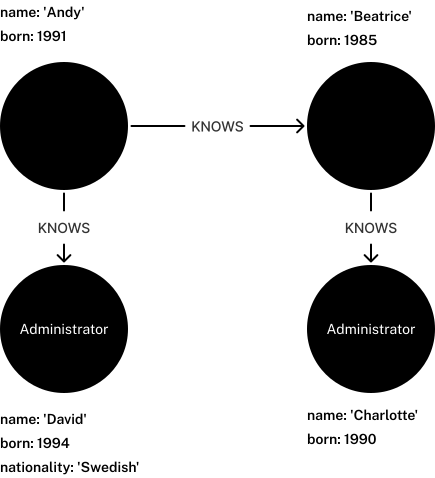
To recreate it, run the following statement against an empty Neo4j database:
CREATE (andy:Developer {name: 'Andy', born: 1991}),
       (beatrice:Developer {name: 'Beatrice', born: 1985}),
       (charlotte:Administrator {name: 'Charlotte', born: 1990}),
       (david:Administrator {name: 'David', born: 1994, nationality: 'Swedish'}),
       (andy)-[:KNOWS]->(beatrice),
       (beatrice)-[:KNOWS]->(charlotte),
       (andy)-[:KNOWS]->(david)
Standalone procedure calls
A Cypher statement made up of only a single CALL clause is known as a standalone procedure call.
Call a procedure without arguments
This example calls the built-in procedure db.labels(), which lists all labels used in the database.
CALL db.labels()| label |
|---|
|
|
Rows: 2 |
|
It is best practice to use parentheses when calling procedures, although Cypher allows for their omission when calling procedures of arity-0 (no arguments). Omission of parentheses is available only in a so-called standalone procedure call. |
Call a procedure using literal arguments
This example calls the procedure dbms.checkConfigValue(), which checks the validity of a configuration setting value, using literal arguments.
CALL dbms.checkConfigValue('server.bolt.enabled', 'true')| "valid" | "message" |
|---|---|
|
|
Rows: 1 |
|
Call a procedure using parameters
This example calls the procedure dbms.checkConfigValue() using parameters as arguments.
Each procedure argument is taken to be the value of a corresponding statement parameter with the same name (or null if no such parameter has been given).
|
The below example shows the given parameters in JSON format; the exact manner in which they are to be submitted depends on the driver being used. For more information, see the Cypher Manual → Parameters. |
{
  "setting": "server.bolt.enabled",
  "value": "true"
}CALL dbms.checkConfigValue($setting, $value)| "valid" | "message" |
|---|---|
|
|
Rows: 1 |
|
Call a procedure using both literal and parameter arguments
This example calls the procedure dbms.checkConfigValue() using both literal and parameter arguments.
{
  "setting": "server.bolt.enabled"
}CALL dbms.checkConfigValue($setting, 'true')| "valid" | "message" |
|---|---|
|
|
Rows: 1 |
|
Using YIELD to specify return columns and filter data
The YIELD keyword is used to specify which procedure columns to return, allowing for the selection and filtering of the displayed information.
YIELD is necessary if the procedure call is part of a larger Cypher statement (i.e. not a standalone procedure call).
YIELD * is only valid in standalone procedure calls and only adds the ability to show deprecated return columns (there are no non-default return columns for called procedures).
When YIELD is used outside of a standalone procedure call, variables must be explicitly named.
This restriction simplifies query logic and protects against output variables from the procedure accidentally clashing with other query variables.
For example, the following is not valid:
CALL db.labels() YIELD *
RETURN count(*) AS results
Yield specific return columns and filter on them
YIELD can be used to filter for specific results.
This requires knowing the names of the arguments within a procedure’s signature, which can either be found on the built-in procedures page or in the signature column returned by a SHOW PROCEDURES command.
db.propertyKeys()SHOW PROCEDURES YIELD name, signature
WHERE name = 'db.propertyKeys'
RETURN signature| signature |
|---|
|
Rows: 1 |
It is then possible to use these argument names for further query filtering.
Note that if the procedure call is part of a larger query, its output must be named explicitly.
In the following example, propertyKey is aliased as prop and then used later in the query to count the occurrence of each property in the graph.
CALL db.propertyKeys() YIELD propertyKey AS prop
MATCH (n)
WHERE n[prop] IS NOT NULL
RETURN prop, count(n) AS numNodes| prop | numNodes |
|---|---|
|
|
|
|
|
|
Rows: 3 |
|
Note on VOID procedures
Neo4j supports the notion of VOID procedures.
A VOID procedure is a procedure that does not declare any result fields and returns no result records.
VOID procedure only produces side-effects and does not allow for the use of YIELD.
Calling a VOID procedure in the middle of a larger query simply passes on each input record (i.e., it acts like WITH * in terms of the record stream).
CALL vs. OPTIONAL CALL
Regular procedure calls using CALL only return rows for which the procedure produces results.
OPTIONAL CALL allows for an optional procedure call.
Similar to OPTIONAL MATCH, any empty rows produced by OPTIONAL CALL return null.
Regular procedure call
This following query uses the apoc.neighbors.tohop() procedure (part of Neo4j’s APOC Core library), which returns all nodes connected by the given relationship type within the specified distance (1 hop, in this case) and direction.
MATCH (n)
CALL apoc.neighbors.tohop(n, "KNOWS>", 1)
YIELD node
RETURN n.name AS name, collect(node.name) AS connections
The result includes only the nodes with outgoing KNOWS relationships and their connections.
| name | connections |
|---|---|
|
|
|
|
Rows: 2 |
|
Optional procedure call
The same query is used in the following example, but CALL is replaced with OPTIONAL CALL.
MATCH (n)
OPTIONAL CALL apoc.neighbors.tohop(n, "KNOWS>", 1)
YIELD node
RETURN n.name AS name, collect(node.name) AS connections
The result includes the two nodes without any outgoing KNOWS relationships connected to them.
| name | connections |
|---|---|
|
|
|
|
|
|
|
|
Rows: 4 |
|
Procedure calls on the system database
When run on the system database, the queries are more restricted, as most Cypher clauses are not allowed there.
Standalone procedure calls are allowed, as well as procedure calls with YIELD and RETURN clauses.
Starting with Neo4j 2026.05 in Cypher 25, procedure calls can be combined with those of the composable commands that are allowed on the system database.
Additionally, starting with Neo4j 2026.07, they can include the WHERE clause.
Call a procedure on the system database
USE system
CALL db.index.fulltext.listAvailableAnalyzers()
YIELD analyzer
RETURN analyzer
ORDER BY analyzer
LIMIT 5;| analyzer |
|---|
|
|
|
|
|
Rows: 5 |
Call a procedure combined with SHOW DATABASES on the system databaseCypher 25Introduced in 2026.05
A subset of the composable commands is allowed on the system database and can be combined with procedure calls.
For more info on the composable show commands, see Cypher Manual → SHOW → Composable SHOW commands.
CYPHER 25
USE system
SHOW DATABASES
YIELD name AS database, serverID AS server, currentStatus
WHERE currentStatus='quarantined'
CALL dbms.unquarantineDatabase(server, database)
Nothing is returned from the query, as it ends with a procedure call of a void procedure.
Call a procedure combined with WHERE on the system databaseIntroduced in 2026.07
USE system
CALL db.index.fulltext.listAvailableAnalyzers()
YIELD analyzer, description
WHERE analyzer = 'swedish'
RETURN description;| description |
|---|
|
Rows: 1 |
Glossary
- allocator
-
A component in the cluster that allocates databases to servers according to the topology constraints specified and an allocation strategy.
- asynchronous replication
-
Asynchronous replication is used by secondary copies to poll for new transactions, which means they cannot be guaranteed to have received the most recent transactions. This enables efficient scale-out of read-performance.
- Aura instance
-
A fully-managed DBMS represented by a single instance ID, that is running in the Neo4j Aura cloud.
- auto-commit transaction
-
An automatically committed transaction that contains a single query.
- Bolt protocol
-
Bolt is a protocol used for interaction between Neo4j instances and drivers.
- bookmark
-
A marker the client can request from the cluster to ensure that it is able to read its own writes so that the application’s state is consistent and only databases that have a copy of the bookmark are permitted to respond.
- category (Bloom)
-
A category is based on a node label and is defined in a Perspective as a way of visually distinguishing nodes with the same label(s).
- causal consistency
-
All servers in a cluster agree on the order in which transactions take place. The position of a server on the causal chain can be guaranteed using a bookmark.
- cluster
-
A Neo4j DBMS that spans multiple servers working together to increase fault tolerance and/or read scalability. Databases on a cluster may be configured to replicate across servers in the cluster thus achieving read scalability or high availability.
- client application
-
Software that interacts with a Neo4j server.
- commit
-
A commit is the successful completion of a transaction, which ensures durability of any changes made. For more details, visit Operations Manual → Transaction management.
- composite database
-
Composite databases are the means to access partitioned graph data with a single Cypher query.
- constraint
-
Constraints are sets of data modeling rules that ensure the data is consistent and reliable.
- Cypher®
-
Neo4j’s graph query language.
- data model
-
A data model defines how information is organized in a database. A good data model will make querying and understanding your data easier. In Neo4j, the data models have a graph structure.
- database
-
A database is a container used by the DBMS to manage and store graph data. The physical structure of data is controlled by the database.
- database vs graph
-
Databases are the physical containers of graph data. Graphs are the logical structure of data in Neo4j.
- Database Management System
-
Database Management System, or DBMS, capable of managing multiple databases. A DBMS may run on a single server, or span several servers configured as a cluster.
- database schema
-
The prescribed property existence and datatypes for nodes and relationships.
- deallocate
-
An act of removing a database from a server or a server from a cluster without loss of data or reduced fault tolerance.
- degree (of a node)
-
The number of relationships of a specific node; loops are counted twice.
- disaster recovery
-
A manual intervention to restore availability of a cluster, or databases within a cluster.
- driver
-
A software library that provides access to Neo4j from a particular programming language.
- election
-
In the event that the Raft leader becomes unresponsive, followers automatically trigger an election and vote for a new leader.
- entity
-
A node or a relationship.
- expression (Cypher)
-
A component of a Cypher query which produces values. It may be used in projections, as a predicate, or when setting properties on graph elements.
- fabric
-
Fabric is the architectural design of a unified system that provides a single access point to local or distributed graph data.
- fault tolerance
-
A guarantee that a cluster can maintain a database’s persistence and availability in the event of one or more servers failing.
- follower
-
A primary copy of a database acting as a follower, receives and acknowledges synchronous writes from the leader.
- Generative AI (GenAI)
-
A type of artificial intelligence (AI) system that generates text, images, or other media in response to prompts.
- graph
-
A logical representation of a set of nodes where some pairs are connected by relationships.
- index
-
Data structure that improves read performance of a database.
- knowledge graph
-
A specific type of graph that has an organizing principle so that a user (or a computer system) can reason about the underlying data. The organizing principle provides an additional layer of structure that adds context to support knowledge discovery.
- label
-
Marks a node as a member of a named and indexed subset. A node may be assigned zero or more labels.
- leader
-
A single primary copy of a database is designated as the leader. It receives all write transactions from clients and replicates writes synchronously to followers and asynchronously to secondary copies of the database.
- main database
-
In terms of Neo4j Enterprise Studio, the database(s) containing the user’s data. Can exist in the same Neo4j deployment as the tool asset database.
- motif
-
A description of a specific pattern within a graph.
- node
-
A node represents an entity or discrete object in your graph data model. Nodes can be connected by relationships, hold data in properties, and are classified by labels.
- operator
-
A symbol representing a mathematical or logical operation.
- parameter
-
Named value provided when running a Cypher statement.
- path
-
A sequence of nodes and the relationships connecting them, that does not contain duplicate relationships. Several paths can match a pattern.
- pattern
-
A specific arrangement of nodes and relationships that can be matched in a graph. A pattern follows a motif.
- perspective (Bloom)
-
A Perspective defines a certain business view or domain that can be found in the target Neo4j graph. A single Neo4j graph can be viewed through different Perspectives, each tailored for a different business purpose.
- primary
-
A copy of the database that is able to process write transactions and is eligible to be elected as a leader. It participates in fault tolerant writes as it is part of the majority required to acknowledge and commit write transactions.
- primary vs secondary
-
In a cluster, databases can operate in either primary or secondary mode. Primary databases are able to process write and read transactions, ensuring fault tolerance. Secondary databases are replicated asynchronously from primaries, and their main purpose is to provide read scaling within the cluster.
- project (Aura)
-
An isolated environment in the unified Aura console that contains its own database instances, configurations, and resources. Preceded by tenant in the classic Aura console.
- property
-
Properties are key-value pairs that are used for storing data on nodes and relationships.
- query (Cypher)
-
A statement that retrieves or writes information to a database.
- Raft group
-
A group of servers that are participating in hosting a particular database in primary mode.
- Raft group member
-
A server that is participating in a Raft group. A server can be a member of one or more groups.
- Raft log
-
A shared log between all Raft group members that is guaranteed to be consistently updated and viewed by those members. The log contains both database data and operational state of the Raft group.
- Raft protocol
-
The networking mechanism that enables a database to replicate its data across multiple servers to give high availability for accessing the data and high durability to the data stored.
- read scaling
-
Distributing query load by creating additional database copies hosted in secondary mode (read-only).
- relationship
-
A relationship represents a connection between nodes in your graph data model. Relationships connect a source node to a target node, hold data in properties, and are classified by type.
- secondary
-
An asynchronously replicated copy of the database that provides read scaling within the cluster.
- seed
-
A seed is a database dump or a full backup used to create a database on a cluster. This is sometimes called seeding.
- server
-
A physical machine, a virtual machine, or a container running an instance of Neo4j. Servers can be standalone or part of a cluster.
- session
-
A causally linked sequence of transactions.
- session consistency
-
An alternative name for Neo4j’s causal consistency.
- standalone
-
A single server running Neo4j and not part of a cluster.
- synchronous replication
-
Synchronous replication requires the leader primary to replicate a transaction and block the commit until a quorum of the follower primaries acknowledges that the transaction is successfully replicated. Once the transaction is replicated, the commit is allowed to proceed. This ensures data durability and consistency within the cluster.
- system database
-
A database used by Neo4j to store system information.
- tenant (Aura)
-
An isolated environment in the classic Aura console that contains its own database instances, configurations, and resources. Replaced by project in the unified Aura console.
- tool asset database
-
In terms of Neo4j Enterprise Studio, the database where tools' assets are stored. This can be in the same Neo4j deployment as the main database(s) or in a separate deployment.
- topology
-
A configuration that describes how the copies of a database should be spread across the servers in a cluster, see primary mode and secondary mode.
- transaction
-
A transaction comprises a unit of work performed against a database. It is treated in a coherent and reliable way, independent of other transactions. Transactions comply with the ACID consistency model (atomic, consistent, isolated, and durable).