Interface types
|
This is the documentation of the GraphQL Library version 7. For the long-term support (LTS) version 5, refer to GraphQL Library version 5 LTS. |
This page describes how to use interfaces in the context of relationships, and exemplifies how to use them in queries and mutations.
Data model
Consider the following graph where a Person node has two relationships of the same name ACTED_IN, but connecting to both a Movie and a Series node.
The ACTED_IN relationship has different properties depending on the target node type.
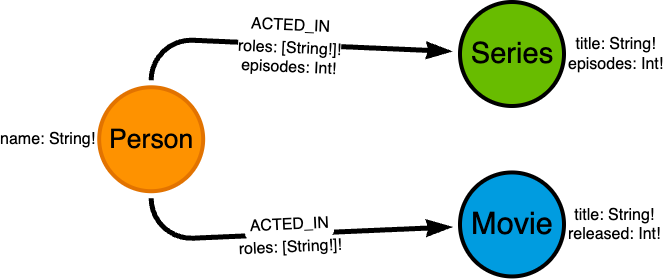
Person node connected to Movie and Series nodes via the ACTED_IN relationship, with different propertiesConsider the following data:
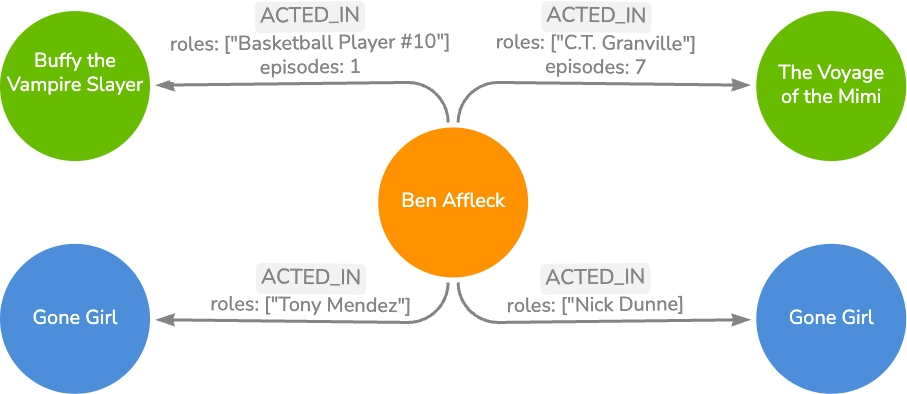
Relationships on an interface
The Movie and Series types are quite similar.
What they have in common can be captured by defining an interface Production, implemented by both Movie and Series, and declaring the relationship field actors on that interface.
This allows you to query the relationship from the interface, while supporting the flexibility of relationship details such as type and properties to be defined in the concrete types.
@declareRelationship
The @relationship directive can only be used on fields of object types.
If you want to model relationships on interfaces, which are then implemented by concrete object types, you can use the @declareRelationship directive.
interface Production {
  title: String!
  actors: [Person!]! @declareRelationship
}

type Person @node {
  name: String!
}
Implementing the declared relationship
The concrete types implementing the Production interface must then define their own relationship details such as type and properties.
This captures their nuances, while still being queryable as a field of the Production interface.
Notice how the ACTED_IN relationship differs between ActedInSeries and ActedIn.
Movie and Series which implement the Production Interfaceinterface Production {
title: String!
actors: [Person!]! @declareRelationship
}
type Movie implements Production @node {
title: String!
released: Int!
actors: [Person!]! @relationship(type: "ACTED_IN", properties: "ActedIn", direction: IN)
}
type Series implements Production @node {
title: String!
episodes: Int!
actors: [Person!]! @relationship(type: "ACTED_IN", properties: "ActedInSeries", direction: IN)
}
type ActedIn @relationshipProperties {
roles: [String!]!
}
type ActedInSeries @relationshipProperties {
roles: [String!]!
episodes: [Int!]!
}
type Person @node {
name: String!
}|
A declared relationship must be implemented in all types that implement the interface, just like any other field on an interface type.
For instance, the |
Querying an interface relationship
When querying a relationship field declared on an interface, while the relationship field is accessible from the interface level, the returned data is based on the concrete type that implements the interface.
Production, Movie and Series# Top-level interface query fields
productions(limit: Int, offset: Int, sort: [ProductionSort!], where: ProductionWhere): [Production!]!
productionsConnection(after: String, first: Int, sort: [ProductionSort!], where: ProductionWhere): ProductionsConnection!
# Top-level concrete type query fields
movies(limit: Int, offset: Int, sort: [MovieSort!], where: MovieWhere): [Movie!]!
moviesConnection(after: String, first: Int, sort: [MovieSort!], where: MovieWhere): MoviesConnection!
series(limit: Int, offset: Int, sort: [SeriesSort!], where: SeriesWhere): [Series!]!
seriesConnection(after: String, first: Int, sort: [SeriesSort!], where: SeriesWhere): SeriesConnection!Production nodes with related Actor nodesThis query returns a sorted list of up to 10 productions, that is a mix of Movie and Series nodes, with their related actors.
Notice the use of inline fragments to access the fields specific to the concrete types.
query {
  productions(limit: 10, sort: { title: ASC }) {
    title
    ... on Movie {
      released
    }
    actors {
      name
    }
  }
}
Response:
{
  "data": {
    "productions": [
      {
          "title": "Argo",
          "released": 2012,
          "actors": [{ "name": "Ben Affleck" }],
      },
      {
          "title": "Gone Girl",
          "released": 2014,
          "actors": [{ "name": "Ben Affleck" }],
      },
      {
          "title": "The Voyage of the Mimi",
          "actors": [{ "name": "Ben Affleck" }],
      },
      {
          "title": "Buffy the Vampire Slayer",
          "actors": [{ "name": "Ben Affleck" }],
      },
    ],
  }
}Production nodes with related Actor nodes and relationship propertiesBecause of the different relationship properties types, ActedIn and ActedInSeries, the query must use inline fragments to access the relationship properties:
query {
  productionsConnection(first: 10, sort: [{ title: ASC }]) {
    edges {
      node {
        title
        actorsConnection(first: 2, sort: { node: { name: ASC } }) {
          edges {
            node {
              name
            }
            properties {
              ... on ActedIn {
                roles
              }
              ... on ActedInSeries {
                roles
                episodes
              }
            }
          }
        }
      }
    }
  }
}
Response:
{
  "data": {
    "productionsConnection": {
      "edges": [
        {
          "node": {
            "title": "Argo",
            "actorsConnection": {
              "edges": [{
                  "node": {
                      "name": "Ben Affleck",
                  },
                  "properties": {
                      "roles": ["Tony Mendez"],
                  },
                }],
            },
          },
        },
        {
          "node": {
            "title": "Buffy the Vampire Slayer",
            "actorsConnection": {
              "edges": [{
                "node": {
                    "name": "Ben Affleck",
                },
                "properties": {
                    "roles": ["Basketball Player #10"],
                    "episodes": 1,
                },
              }],
            },
          },
        },
        {
          "node": {
            "title": "Gone Girl",
            "actorsConnection": {
              "edges": [{
                "node": {
                    "name": "Ben Affleck",
                },
                "properties": {
                    "roles": ["Nick Dunne"],
                },
              }],
            },
          },
        },
        {
          "node": {
            "title": "The Voyage of the Mimi",
            "actorsConnection": {
              "edges": [{
                "node": {
                    "name": "Ben Affleck",
                },
                "properties": {
                    "roles": ["C.T. Granville"],
                    "episodes": 7,
                },
              }],
            },
          },
        },
      ],
    },
  },
}
Relationships to an interface
Person type nodes are connected to Movie and Series nodes but this relationship has not been modeled in the GraphQL schema yet.
You can do so by adding relationship fields to the Person type that point to the Production interface, and then implementing the relationship details in the Movie and Series types.
Person type with new relationship fieldstype Person @node {
name: String!
born: Int!
# relationship to an interface
actedIn: [Production!]! @relationship(type: "ACTED_IN", properties: "ActedIn", direction: OUT)
}Querying the relationships of an interface
When querying a relationship field of an interface type, the interface fields can be queried directly as they are conceptually shared by all the implementations of the interface, for example title for Production.
To query fields specific to the types implementing the interface, use inline fragments, for example released for Movie and episodes for Series.
Person nodes with all Production nodes they ACTED_INNotice the use of inline fragments to access the fields specific to the concrete types Movie and Series.
query {
    people {
        name
        actedIn {
            title
            ... on Movie {
                released
            }
            ... on Series {
                episodes
            }
        }
    }
}
Filtering for specific implementations of an interface
When querying a relationship field of an interface type, you can request specific node types by using the typename filter.
Person nodes with Production nodes they ACTED_IN filtered by the Movie typequery {
people {
name
actedIn(where: { typename: [Movie] }) {
title
... on Movie {
released
}
}
}
}Notice the typename filter and the use of inline fragments to access the fields specific to the type Movie.
Creating a relationship to an interface
When creating a relationship to an interface type, you must specify the actual type of the node being connected in the mutation.
Person node with related Production nodesmutation CreateActorAndProductions {
createPeople(
input: [
{
name: "Ben Affleck"
actedIn: {
create: [
{
edge: { roles: ["Tony Mendez"] }
node: { Movie: { title: "Argo", released: 2012 } }
}
{
edge: { roles: ["Nick Dunne"] }
node: { Movie: { title: "Gone Girl", released: 2014 } }
}
{
edge: { roles: ["Basketball Player #10"] }
node: { Series: { title: "Buffy the Vampire Slayer", episodes: 144 } }
}
{
edge: { roles: ["C.T. Granville"] }
node: { Series: { title: "The Voyage of the Mimi", episodes: 7 } }
}
]
}
}
]
) {
people {
name
}
}
}Notice the specification of the type (Movie or Series) of the node that is being created.
Updating a relationship to an interface
Operations on interfaces apply for all implementing types unless you narrow them down.
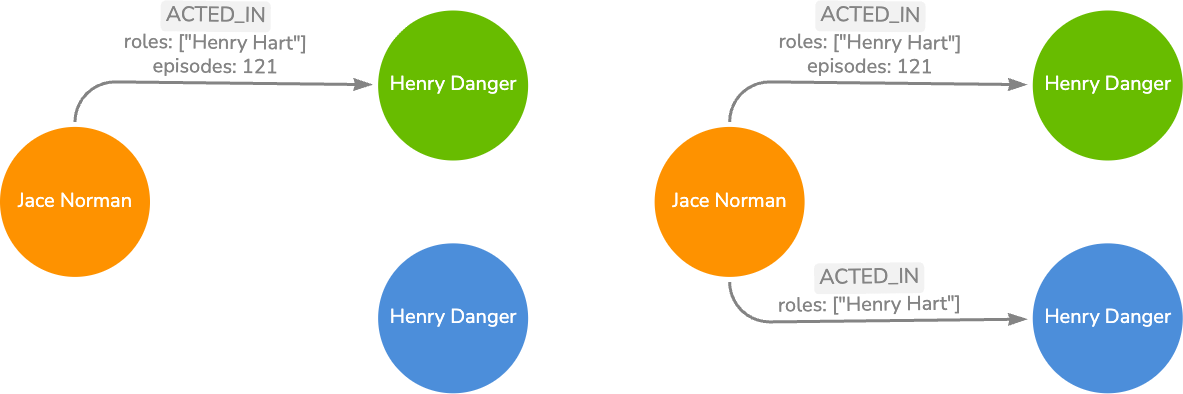
The mutation below adds the newly released Movie "Henry Danger" to the database, and connects it to the Person node Jace Norman through an ACTED_IN relationship with the role "Henry Hart".
A Series node with the same title already exists.
To add the desired connections, use the typename filter in the filters of an update mutation.
Person nodes and creating ACTED_IN relationships to Production nodes filtered by Movie typeNotice the use of the typename filter to only target Movie nodes.
mutation {
  updatePeople(
    where: { name: { eq: "Jace Norman" } }
    update: {
      actedIn: [
        {
          connect: [
            {
              edge: { roles: ["Henry Hart"] }
              where: {
                node: {
                  typename: [Movie],
                  title: { eq: "Henry Danger" }
                },
              },
            },
          ],
        },
      ],
    }
  ) {
    info {
      relationshipsCreated
    }
  }
}
If the relationship between Person and Movie already exists in the database, make sure the relationship properties are correct depending on the type of the connected node.
Person nodes and ACTED_IN relationships to Production nodes with relationship properties based on typemutation {
updatePeople(
where: {
name: {
eq: "Jace Norman"
}
}
update: {
actedIn: [
{
update: {
where: { node: { title: { eq: "Henry Danger" } } }
node: {
actors: [
{
update: {
edge: {
ActedIn: { roles: { set: ["Henry Hart"] } },
ActedInSeries: { roles: { set: ["Henry Hart"] }, episodes: { set: 121 } },
},
},
},
],
},
},
}]
}
) {
info {
relationshipsCreated
}
}
}Notice that the edge properties are updated with different values depending on the typename of the connected node.