Single relationships and cardinality considerations
|
This is the documentation of the GraphQL Library version 7. For the long-term support (LTS) version 5, refer to GraphQL Library version 5 LTS. |
Single relationships are relationships that are modeled as a non-list type field on either side of the relationship. If both sides are non-list types the relationship is a one-to-one relationship and a one-to-many relationship otherwise.
Neo4j databases do not currently support constraints on relationship cardinality. However, one-to-one and one-to-many relationships can be modeled with a GraphQL schema and they are supported by the Neo4j GraphQL Library.
Users of this feature should be aware that there is no guarantee that only one relationship is present in the database and this may result in non-deterministic behavior. The only guarantee is that only one result is returned when querying across a single relationship, but that result can be any of the related nodes.
Data model
Consider the following graph where a Person can direct multiple movies but a Movie only has one director.
Conceptually this is a one-to-many relationship and the single relationship is represented by the DIRECTED type relationship field on the Movie type.
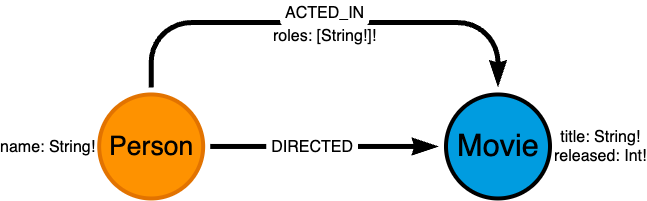
ACTED_IN and DIRECTED relationshipsPerson and Movie nodes with the one-to-many relationship DIRECTEDtype Person @node {
name: String!
directed: [Movie!]! @relationship(type: "DIRECTED", direction: OUT)
}
type Movie @node {
title: String!
released: Int!
director: Person @relationship(type: "DIRECTED", direction: IN)
}Querying single relationships
Querying single relationships returns the data of a single node if there is a relationship, and null otherwise. If the database contains multiple relationships of the same type, which is possible as a consequence of the Neo4j cardinality limitation, only one node is returned. See more details in Cardinality limitations.
Movie nodes by title with related Person nodes via the DIRECTED relationshipquery {
movies(where: { title: { eq: "No Country for Old Men" } }) {
title
director {
name
}
}
}Filter by single relationships
Single relationships (of a non-list type) can be used as filters in the where argument of a query.
Movie nodes filtered by the name of the director via the DIRECTED relationshipquery {
movies(where: { director: { name: { eq: "Joel Coen" } } }) {
title
}
}Mutating single relationships
Only a subset of the operations provided by the Neo4j GraphQL Library for relationship fields is available for single relationships (of a non-list type).
At the moment only create and delete operations are supported on single relationships.
Creating a single relationship
It is possible to create the node on the single side of a single relationship and connect it to the source node in the same operation, using the create nested mutation:
Movie node and connecting it to a Person node relationship in a single operationThe following query will create both the Movie node and the Person node, and connect them via the DIRECTED relationship.
mutation {
  createMovies(input: [{
    title: "No Country for Old Men",
    released: 2007,
    director: { create: { node: { name: "Joel Coen" } } }
}]){
    movies {
        title
        director {
            name
        }
    }
  }
}
However, the nested connect mutation is not available.
Therefore, if the node on the single side of a single relationship already exists, the relationship must be created from the "many" side of the relationship.
This can imply a second operation:
Movie node and connecting it to an existing Person nodeThe following query will create the Movie node.
mutation {
  createMovies(input: [{
    title: "No Country for Old Men",
    released: 2007
}]){
    movies {
        title
    }
  }
}
Then, a second query can connect the two nodes via the DIRECTED relationship.
mutation {
  updatePerson(
    where: { name: { eq: "Joel Coen" } }
    update: {
        directed: {
            connect: {
                where: { node: { title: { eq: "No Country for Old Men" } } }
            }
        }
    }
  ){
    info {
        relationshipsCreated
    }
  }
}
Deleting a single relationship
You can delete the node on the single side of a single relationship as a nested operation when deleting the source node.
Movie and Person nodes that are connected via the DIRECTED relationshipThe following query deletes the Movie node and the Person node if any is found by traversing the DIRECTED relationship.
mutation {
  deleteMovies(
    where: { title: { eq: "No Country for Old Men" } },
    delete: {
        director: {
            where: { node: { name: { eq: "Joel Coen" } } }
        }
    }
  ){
    nodesDeleted
    relationshipsDeleted
  }
}
However, the disconnect nested mutation is not available.
Therefore, if the intention is to delete the relationship, the disconnect must be performed from the "many" side of the relationship.
DIRECTED relationship between a Movie and a Person nodemutation {
updatePerson(
where: { name: { eq: "Joel Coen" } }
update: {
directed: [{
disconnect: {
where: { node: { title: { eq: "No Country for Old Men" } } },
}
}]
}
){
info {
relationshipsDeleted
}
}
}Cardinality limitations
Exactly-one relationships
According to the data model, it is impossible for a Movie to not have a director.
Ideally this would be reflected by making the director field non-nullable.
Because of the current lack of constraints on relationship cardinality in the Neo4j database, it is not possible to enforce an exactly-one relationship which is why all single relationship fields must be nullable.
At-most-one relationship
A nullable single relationship field models an at-most-one relationship between any two nodes of those types.
In the context of multiple surfaces accessing the same Neo4j database through different APIs or direct database access, it is possible that what a GraphQL API models as a single relationship between two types ends up matching multiple relationships in the database. This is due to the current lack of constraints on relationship cardinality.
Even within the same GraphQL API surface, it is possible for a one-to-many relationship to end up matching multiple relationships in the database.
Consider the following sample data:
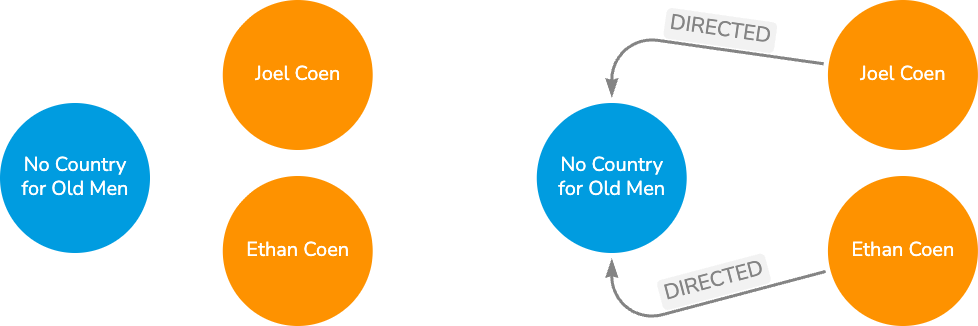
DIRECTED relationshipsPerson nodes to a Movie node via the DIRECTED relationshipmutation {
updatePerson(
where: { name: { contains: "Coen" } }
update: {
directed: {
connect: {
where: { node: { title: { eq: "No Country for Old Men" } } }
}
}
}
){
info {
relationshipsCreated
}
}
}Querying Movies and their director relationship fields returns only one object because of the type of the relationship in the GraphQL schema.
If there are multiple relationships of the same type between the same two nodes, only one node is returned.
The node that is returned is not deterministic: it can be any of the nodes that are connected through that relationship.
Movie by title and the now ambiguous directorquery {
movies(where: { title: { eq: "No Country for Old Men" } }) {
title
director {
name
}
}
}This results in either of the following:
const resultWithJoelCoen = {
    data: {
         movies: [
                {
                    title: "No Country for Old Men",
                    director: { name: "Joel Coen" },
                },
            ],
    },
};const resultWithEthanCoen = {
data: {
movies: [
{
title: "No Country for Old Men",
director: { name: "Ethan Coen" },
},
],
},
};