Union types
|
This is the documentation of the GraphQL Library version 7. For the long-term support (LTS) version 5, refer to GraphQL Library version 5 LTS. |
This page describes how to use unions in the context of relationships, and exemplifies how to use them in queries and mutations.
Data model
Consider the following graph where User nodes have HAS_CONTENT relationships to content nodes of two types: Blog and Post.
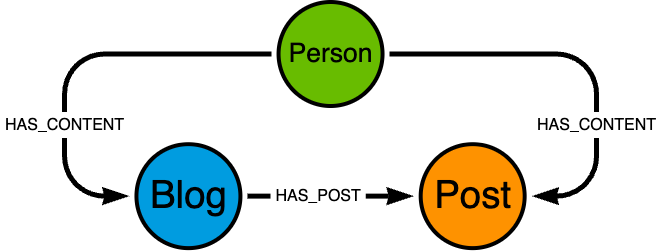
User nodes connected to both Blog and Post nodes via the HAS_CONTENT relationship.Consider the following sample data:
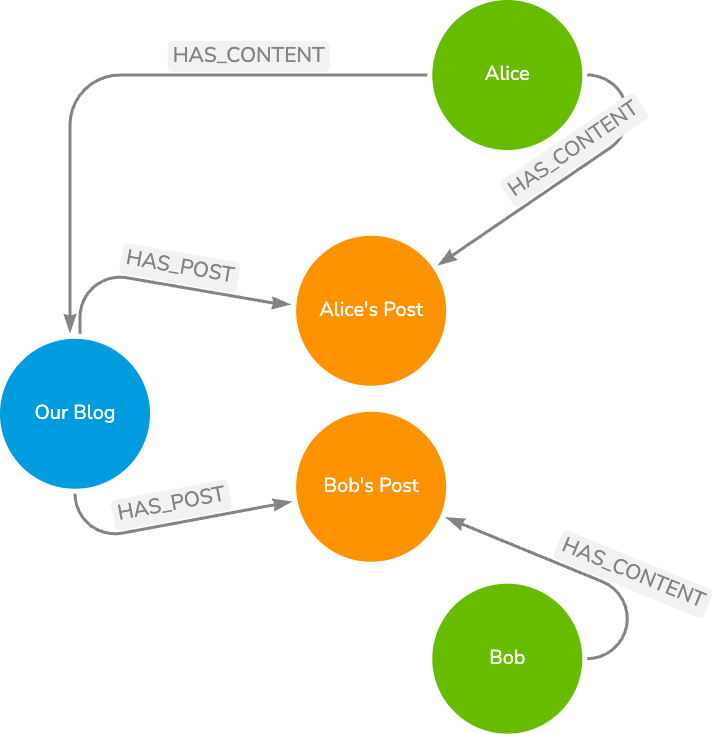
Blog node with HAS_POST relationships to Post nodes and User nodes with HAS_CONTENT relationships to Blog and Post nodesWriting type definitions
Conceptually, both Blog and Post are types of content attributed to a User.
However, they are fundamentally different types of content with different fields and therefore they can be grouped together by a union type.
union Content = Blog | Post

type Blog @node {
    title: String
    posts: [Post!]! @relationship(type: "HAS_POST", direction: OUT)
}

type Post @node {
    content: String
}

type User @node {
    name: String
    content: [Content!]! @relationship(type: "HAS_CONTENT", direction: OUT)
}
Union types are useful for modeling relationships that can point to multiple different node types which do not share common fields.
Querying a union
When querying a relationship field of a union type, you must use inline fragments to specify which fields to return for each type in the union.
User nodes with related Content nodes via inline fragments for union member typesquery {
users {
name
content {
... on Blog {
title
}
... on Post {
content
}
}
}
}If the inline fragment corresponding to a union member type is not included in the query, then no fields of that type are returned. Instead the response will be an empty object.
User nodes with related Content nodes omitting the Post typeThe following query only includes an inline fragment for the Blog type, and omits the inline fragment for the Post type:
query {
    users {
        name
        content {
            ... on Blog {
                title
            }
        }
    }
}
The response to this query includes empty objects for the Post type, as the query doesn’t specify fields for it:
{
    "data": {
        "users": [
            {
                "name": "Alice",
                "content": [{ "title": "Alice's Blog" }, {}]
            },
            {
                "name": "Bob",
                "content": [{}]
            }
        ]
    }
}
Filtering for a specific union member type
To filter for a specific union member type, you can use the where argument on the relationship field.
User nodes with related Content nodes filtered by the Blog typequery {
users {
name
content(where: { Blog: { NOT: { title: { eq: null } } }}) {
... on Blog {
title
}
}
}
}Notice how the inline fragment corresponding to the Post type does not need to be included in the query, as they are filtered out by the where argument.
Creating a union relationship
To create the sample database data shown in the graph above, one approach is to first create the User nodes.
User Alice is connected through the HAS_CONTENT relationship to a Blog node with two Post nodes connected to it through the HAS_POST relationship.
The relationship to the Content union can be created through a nested mutation at the same time.
User nodes with HAS_CONTENT relationships to Blog nodesmutation {
createUsers(
input: [
{
name: "Bob"
},
{
name: "Alice"
content: {
Blog: {
create: [
{
node: {
title: "Our Blog"
posts: {
create: [
{ node: { content: "Alice's Post" } },
{ node: { content: "Bob's Post" } }
]
}
}
}
]
}
}
}
]
) {
users {
name
}
}
}Notice the specification of the concrete type (Blog) of the Content union in the create input.
Executing this mutation on an empty database creates the following graph:
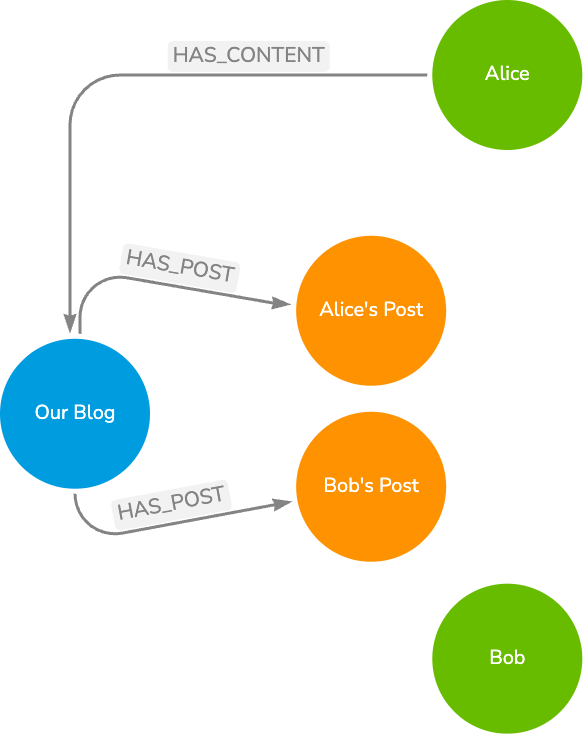
HAS_CONTENT relationship between User Bob and his Post is missingUpdating a union relationship
You can update the User nodes and create their HAS_POST relationships to the Post nodes part of the Content union.
User nodes with HAS_CONTENT relationships to Post nodesmutation {
mutation {
updateUsers(
where: { name: { eq: "Alice" } }
update: {
content: {
Post: [
{
connect: [
{
where: { node: { content: { eq: "Alice's Post" } } }
}
]
}
]
}
}
) {
users {
name
}
}
}
}Notice the specification of the type (Post) of the Content union in the update input.
You can execute a similar mutation for User Bob with adjusted filter criteria.